Amp Ram 3500 2019 Owner's Guide
[x] Cancel search | Manufacturer: RAM, Model Year: 2019, Model line: 3500, Model: Ram 3500 2019Pages: 696, PDF Size: 13.89 MB
Page 154 of 696

152 GETTING TO KNOW YOUR VEHICLE
7. From the Released Position, send the clamps to theStowed Position by pushing from the yellow bumper up.
Listen for a “clicking” sound to confirm the clamp has
been properly stowed.
Stowed Position 8. Clip both stowage straps to prevent the Tonneau Cover
panels from unfolding.
Stowage Strap
9. With two people, remove the Tonneau Cover.
NOTE:
Be sure the Tonneau Cover has been folded completely
before removing.
Page 155 of 696

GETTING TO KNOW YOUR VEHICLE 153
Tri-Fold Tonneau Cover Installation
To install the Tonneau Cover follow the following steps:
1. Position the folded Tonneau Cover on the truck bed andpush the cover forward against the front of the truck bed.
The Tonneau Cover centers itself when placed on the
vehicle.
2. Pull down on the first set of clamp handles to release the clamps from the stowed position.
Stowed Position 3. Push clamp wires up and under the flange of the box (or
flange of the Ram Box rail, if equipped) to the semi
clamped position.
Semi Clamped Position
2
Page 156 of 696

154 GETTING TO KNOW YOUR VEHICLE
4. Push clamp handles upward to the clamped position toproperly engage the clamps.
Clamped Position NOTE:
Once clamped, be sure the clamps are not improperly
attached to the truck bed flange.
Improper Clamp Position
5. Disengage the stowage straps.
Page 159 of 696

GETTING TO KNOW YOUR VEHICLE 157
7. Completely unfold the Tonneau Cover.Fully Unfolded Position 8. Pull the rear clamp handles down into the released posi
-
tion.
Stowed Position
2
Page 160 of 696

158 GETTING TO KNOW YOUR VEHICLE
9. Push clamp wires up and under the flange of box (orflange of Ram Box rail, if equipped) to the semi clamped
position.
Semi Clamped Position 10. Push clamp handles upward to the clamped position to
properly engage the clamps.
Clamped Position
Page 161 of 696
GETTING TO KNOW YOUR VEHICLE 159
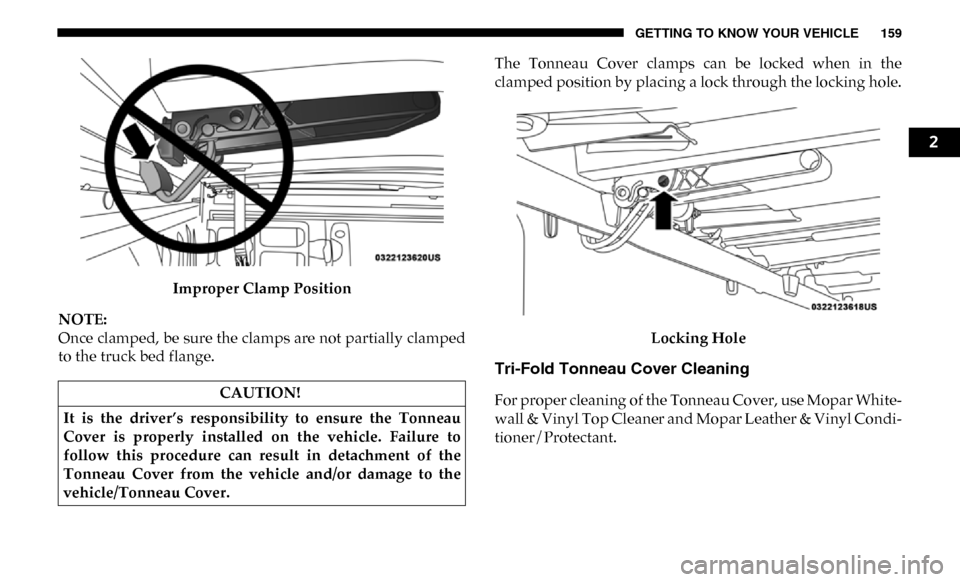
Improper Clamp Position
NOTE:
Once clamped, be sure the clamps are not partially clamped
to the truck bed flange. The Tonneau Cover clamps can be locked when in the
clamped position by placing a lock through the locking hole.
Locking Hole
Tri-Fold Tonneau Cover Cleaning
For proper cleaning of the Tonneau Cover, use Mopar White -
wall & Vinyl Top Cleaner and Mopar Leather & Vinyl Condi -
tioner/Protectant.
CAUTION!
It is the driver’s responsibility to ensure the Tonneau
Cover is properly installed on the vehicle. Failure to
follow this procedure can result in detachment of the
Tonneau Cover from the vehicle and/or damage to the
vehicle/Tonneau Cover.
2
Page 193 of 696

GETTING TO KNOW YOUR INSTRUMENT PANEL 191
— ECO Mode Indicator Light
This light will turn on when ECO Mode is active.
— Park/Headlight On Indicator Light
This indicator light will illuminate when the park lights or
headlights are turned on.
— Front Fog Indicator Light — If Equipped
This indicator light will illuminate when the front fog lights
are on.
— Turn Signal Indicator Lights
When the left or right turn signal is activated, the turn signal
indicator will flash independently and the corresponding
exterior turn signal lamps will flash. Turn signals can be acti -
vated when the multifunction lever is moved down (left) or
up (right). NOTE:
• A continuous chime will sound if the vehicle is driven
more than 1 mile (1.6 km) with either turn signal on.
• Check for an inoperative outside light bulb if either indi -
cator flashes at a rapid rate.
• If equipped with fog lamps, the fog lamp on the side of the activated turn signal will also illuminate to provide addi -
tional light when turning.
— Cruise Control Set Indicator Light — If Equipped
This indicator light will illuminate when the cruise control is
set to the desired speed. Refer to “Speed Control” in
“Starting And Operating” for further information.
White Indicator Lights
— Adaptive Cruise Control (ACC) Ready Light — If
Equipped
This light will illuminate when the vehicle equipped with
Adaptive Cruise Control (ACC) has been turned on but not
set.
Refer to “Adaptive Cruise Control (ACC) — If Equipped” in
“Starting And Operating” for further information.
3
Page 194 of 696
192 GETTING TO KNOW YOUR INSTRUMENT PANEL
— Cruise Control Ready Indicator
This indicator light will illuminate when the cruise control is
ready, but not set. Refer to “Speed Control” in “Starting And
Operating” for further information.
— Hill Descent Control (HDC) Indicator Light — If
Equipped
This indicator shows when the Hill Descent Control (HDC)
feature is turned on. The lamp will be on solid when HDC is
armed. HDC can only be armed when the transfer case is in
the “4WD LOW” position and the vehicle speed is less then
20 mph (32 km/h). If these conditions are not met while
attempting to use the HDC feature, the HDC indicator light
will flash on/off.
Blue Indicator Lights
— High Beam Indicator Light
This indicator light will illuminate to indicate that the high
beam headlights are on. With the low beams activated, push
the multifunction lever forward (toward the front of the
vehicle) to turn on the high beams. Pull the multifunction
lever rearward (toward the rear of the vehicle) to turn off the
high beams. If the high beams are off, pull the lever toward
you for a temporary high beam on, "flash to pass" scenario.
ONBOARD DIAGNOSTIC SYSTEM — OBD II
Your vehicle is equipped with a sophisticated Onboard
Diagnostic system called OBD II. This system monitors the
performance of the emissions, engine, and transmission
control systems. When these systems are operating properly,
your vehicle will provide excellent performance and fuel
economy, as well as engine emissions well within current
government regulations.
If any of these systems require service, the OBD II system
will turn on the Malfunction Indicator Light (MIL). It will
also store diagnostic codes and other information to assist
your service technician in making repairs. Although your
vehicle will usually be drivable and not need towing, see an
authorized dealer for service as soon as possible.
CAUTION!
• Prolonged driving with the MIL on could cause further damage to the emission control system. It could also
affect fuel economy and driveability. The vehicle must
be serviced before any emissions tests can be
performed.
• If the MIL is flashing while the vehicle is running, severe catalytic converter damage and power loss will
soon occur. Immediate service is required.
Page 210 of 696
208 SAFETY
Feedback To The Driver
The instrument cluster has an HDC icon and the HDC switch
has an LED icon, which offers feedback to the driver about
the state HDC is in.
• The cluster icon and switch lamp will illuminate andremain on solid when HDC is enabled or activated. This is
the normal operating condition for HDC.
• The cluster icon and switch lamp will flash for several seconds then extinguish when the driver pushes the HDC
switch but enable conditions are not met.
• The cluster icon and switch lamp will flash for several seconds then extinguish when HDC disables due to excess
speed.
• The cluster icon and switch lamp will flash when HDC deactivates due to overheated brakes. The flashing will
stop and HDC will activate again once the brakes have
cooled sufficiently.AUXILIARY DRIVING SYSTEMS
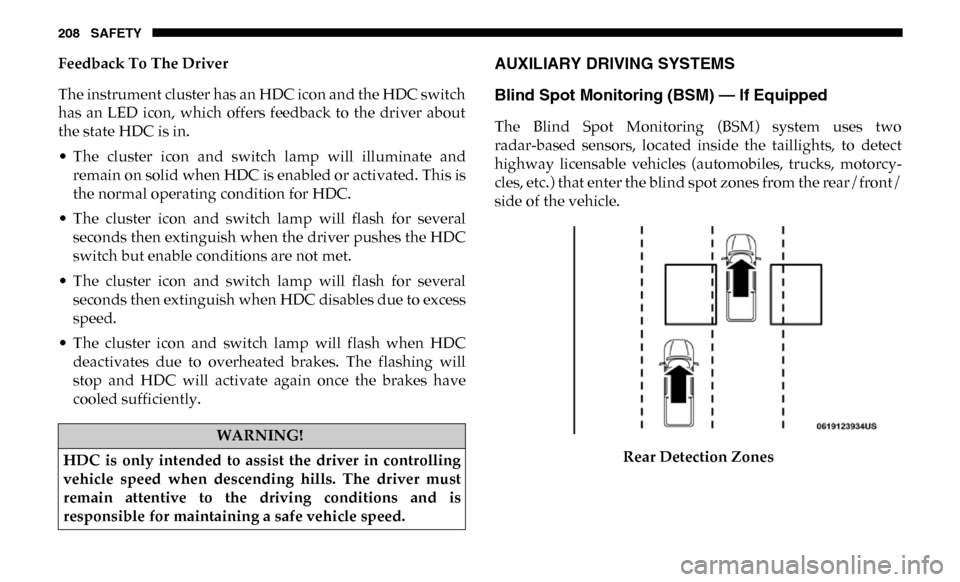
Blind Spot Monitoring (BSM) — If Equipped
The Blind Spot Monitoring (BSM) system uses two
radar-based sensors, located inside the taillights, to detect
highway licensable vehicles (automobiles, trucks, motorcy -
cles, etc.) that enter the blind spot zones from the rear/front/
side of the vehicle.
Rear Detection Zones
WARNING!
HDC is only intended to assist the driver in controlling
vehicle speed when descending hills. The driver must
remain attentive to the driving conditions and is
responsible for maintaining a safe vehicle speed.
Page 211 of 696

SAFETY 209
When the vehicle is started, the BSM warning light will
momentarily illuminate in both outside rearview mirrors to
let the driver know that the system is operational. The BSM
system sensors operate when the vehicle is in any forward
gear or REVERSE and enters stand-by mode when the
vehicle is in PARK.
The BSM detection zone covers approximately one lane
width on both sides of the vehicle 12 ft (3.8 m). The zone
length starts at the outside rear view mirror and extends
approximately 10 ft (3 m) beyond the rear bumper of the
vehicle. The BSM system monitors the detection zones on
both sides of the vehicle when the vehicle speed reaches
approximately 6 mph (10 km/h) or higher and will alert the
driver of vehicles in these areas.
NOTE:
• The BSM system DOES NOT alert the driver about rapidlyapproaching vehicles that are outside the detection zones.
• The Blind Spot Monitoring (BSM) system may experience drop outs (blinking on and off) of the side mirror Warning
Indicator lamps when a motorcycle or any small object
remains at the side of the vehicle for extended periods of
time (more than a couple of seconds). The vehicle’s taillights, where the radar sensors are located,
must remain free of snow, ice, and dirt/road contamination
so that the BSM system can function properly. Do not block
the taillights with foreign objects (bumper stickers, bicycle
racks, etc.).
Radar Sensor Locations
If the system detects degraded performance due to contami -
nation or foreign objects, a message will warn you of a
blocked sensor and the warning indicators in side view
mirrors will be on. The warning indicators will remain illu-
minated until blockage clearing conditions are met. First
4