instrument cluster Ram 3500 2019 Workshop Manual
[x] Cancel search | Manufacturer: RAM, Model Year: 2019, Model line: 3500, Model: Ram 3500 2019Pages: 696, PDF Size: 13.89 MB
Page 304 of 696
302 STARTING AND OPERATING
NOTE:
In the event of a mismatch between the gear selector position
and the actual transmission gear (for example, driver selects
PARK while driving), the position indicator will blink
continuously until the selector is returned to the proper posi-
tion, or the requested shift can be completed.
The electronically-controlled transmission adapts its shift
schedule based on driver inputs, along with environmental
and road conditions. The transmission electronics are
self-calibrating; therefore, the first few shifts on a new
vehicle may be somewhat abrupt. This is a normal condition,
and precision shifts will develop within a few hundred miles
(kilometers).
Only shift from DRIVE to PARK or REVERSE when the
accelerator pedal is released and the vehicle is stopped. Be
sure to keep your foot on the brake pedal when shifting
between these gears.
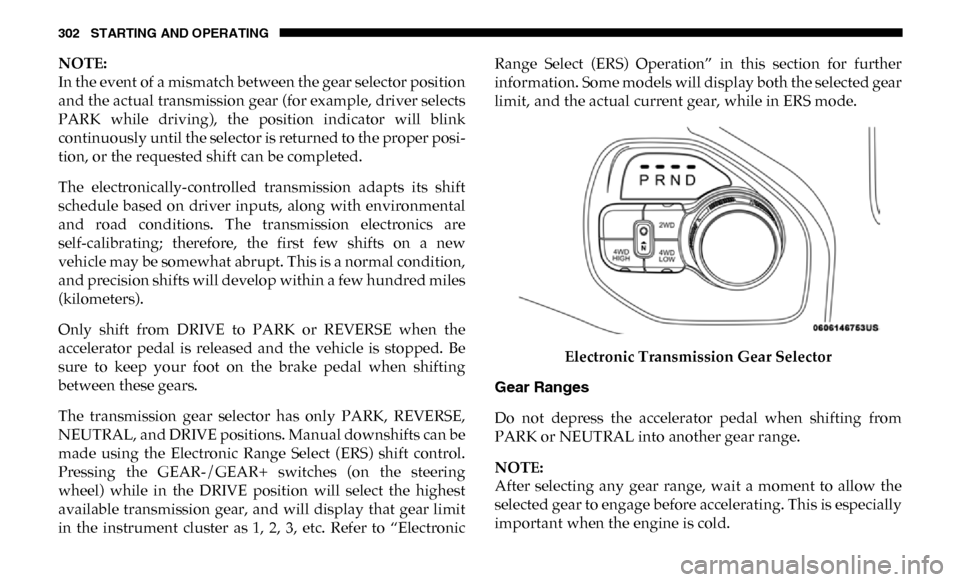
The transmission gear selector has only PARK, REVERSE,
NEUTRAL, and DRIVE positions. Manual downshifts can be
made using the Electronic Range Select (ERS) shift control.
Pressing the GEAR-/GEAR+ switches (on the steering
wheel) while in the DRIVE position will select the highest
available transmission gear, and will display that gear limit
in the instrument cluster as 1, 2, 3, etc. Refer to “Electronic Range Select (ERS) Operation” in this section for further
information. Some models will display both the selected gear
limit, and the actual current gear, while in ERS mode.
Electronic Transmission Gear Selector
Gear Ranges
Do not depress the accelerator pedal when shifting from
PARK or NEUTRAL into another gear range.
NOTE:
After selecting any gear range, wait a moment to allow the
selected gear to engage before accelerating. This is especially
important when the engine is cold.
Page 308 of 696

306 STARTING AND OPERATING
Transmission Limp Home Mode
Transmission function is monitored electronically for
abnormal conditions. If a condition is detected that could
result in transmission damage, Transmission Limp Home
Mode is activated. In this mode, the transmission may
operate only in certain gears, or may not shift at all. Vehicle
performance may be severely degraded and the engine may
stall. In some situations, the transmission may not re-engage
if the engine is turned off and restarted. The Malfunction
Indicator Light (MIL) may be illuminated. A message in the
instrument cluster will inform the driver of the more serious
conditions, and indicate what actions may be necessary.
In the event of a momentary problem, the transmission can
be reset to regain all forward gears by performing the
following steps:
NOTE:
In cases where the instrument cluster message indicates the
transmission may not re-engage after engine shutdown,
perform this procedure only in a desired location (prefer-
ably, at an authorized dealer). 1. Stop the vehicle.
2. Shift the transmission into PARK, if possible. If not, shift
the transmission to NEUTRAL.
3. Push and hold the ignition switch until the engine turns OFF.
4. Wait approximately 30 seconds.
5. Restart the engine.
6. Shift into the desired gear range. If the problem is no longer detected, the transmission will return to normal
operation.
NOTE:
Even if the transmission can be reset, we recommend that
you visit an authorized dealer at your earliest possible
convenience. An authorized dealer has diagnostic equip -
ment to assess the condition of your transmission.
If the transmission cannot be reset, authorized dealer service
is required.
Page 309 of 696

STARTING AND OPERATING 307
Electronic Range Select (ERS) Operation — Eight-Speed
Transmission
The Electronic Range Select (ERS) shift control allows the
driver to limit the highest available gear when the transmis-
sion is in DRIVE. For example, if you set the transmission
gear limit to 4 (fourth gear), the transmission will not shift
above fourth gear (except to prevent engine overspeed), but
will shift through the lower gears normally.
You can switch between DRIVE and ERS mode at any
vehicle speed. When the transmission gear selector is in
DRIVE, the transmission will operate automatically, shifting
between all available gears. Tapping the GEAR- switch (on
the steering wheel) will activate ERS mode, display the
current gear in the instrument cluster, and set that gear as the
top available gear. Once in ERS mode, tapping the GEAR- or
GEAR+ switch will change the top available gear. To exit ERS mode, simply push and hold the GEAR+ switch
until the gear limit display disappears from the instrument
cluster.
1 — GEAR + Switch
2 — GEAR – Switch
WARNING!
Do not downshift for additional engine braking on a
slippery surface. The drive wheels could lose their grip
and the vehicle could skid, causing a collision or
personal injury.
5
Page 310 of 696

308 STARTING AND OPERATING
When to Use TOW/HAUL Mode
When driving in hilly areas, towing a trailer, carrying a
heavy load, etc., and frequent transmission shifting occurs,
push the TOW/HAUL switch to activate TOW/HAUL
mode. This will improve performance and reduce the poten-
tial for transmission overheating or failure due to excessive
shifting.
TOW/HAUL Switch The “TOW/HAUL Indicator Light” will illuminate in the
instrument cluster to indicate that TOW/HAUL mode has
been activated. Pushing the switch a second time restores
normal operation. Normal operation is always the default at
engine start-up. If TOW/HAUL mode is desired, the switch
must be pushed each time the engine is started.
ACTIVE NOISE CANCELLATION
Your vehicle is equipped with an Active Noise Cancellation
System. This system is designed to address exhaust and
engine noise. The system relies on four microphones
embedded in the headliner, which monitor exhaust and
engine noise, and assists an onboard frequency generator,
which creates counteracting sound waves in the audio
system’s speakers. This helps keep the vehicle quiet at idle
and during drive.
WARNING!
Do not use the “TOW/HAUL” feature when driving in
icy or slippery conditions. The increased engine braking
can cause the rear wheels to slide, and the vehicle to
swing around with the possible loss of vehicle control,
which may cause an accident possibly resulting in
personal injury or death.
Page 313 of 696

STARTING AND OPERATING 311
The 4WD HIGH and 4WD LOW positions are designed for
loose, slippery road surfaces only. Driving in the 4WD HIGH
and 4WD LOW positions on dry hard surfaced roads may
cause increased tire wear and damage to the driveline
components.
NOTE:
The transfer case NEUTRAL button is located in the center of
the 4WD Control Switch and is pushed by using a ballpoint
pen or similar object. The transfer case NEUTRAL position is
to be used for recreational towing only. Refer to “Recre-
ational Towing” in “Starting And Operating” for further
information.
Transfer Case Position Indicator Lights
The Transfer Case Position Indicator Lights (4WD and
4LOW) are located in the instrument cluster and indicate the
current and desired transfer case selection. When you select
a different transfer case position, the indicator lights will do
the following:
If All Of The Following Shift Conditions Are Met:
1. The current position indicator light will turn OFF.
2. The selected position indicator light will flash until the transfer case completes the shift. 3. When the shift is complete, the indicator light for the
selected position will stop flashing and remain ON.
If One Or More Of The Following Shift Conditions Are
Not Met:
1. The indicator light for the current position will remain ON.
2. The newly selected position indicator light will continue to flash.
3. The transfer case will not shift.
NOTE:
Before retrying a selection, make certain that all the neces -
sary requirements for selecting a new transfer case position
have been met. To retry the selection, push the current posi -
tion, wait five seconds, and retry selection. To find the shift
requirements, refer to the "Shifting Procedure" for your
transfer case, located in this section.
The “SVC 4WD Warning Light” monitors the electronic shift
four-wheel drive system. If this light remains on after engine
start up or illuminates during driving, it means that the
four-wheel drive system is not functioning properly and that
service is required.
5
Page 320 of 696

318 STARTING AND OPERATING
Trailer Decoupling/Unloading - The air suspension system
will load level (lower/exhaust only) once after 12 minutes
after the vehicle is turned off. This allows for easy removal of
a trailer and/or load from the back of the truck by main -
taining the ride height. After 12 minutes you will need to
turn the ignition to the run position for the air suspension to
re-level due to addition/removal of load in the vehicle. If the
air suspension system is disabled using the settings menu
(Tire Jack Mode, Transport Mode, Alignment Mode, or Bed
Lowering Mode) the system will remain disabled when the
vehicle is turned off. Reactivating the air suspension can be
accomplished via the settings menu or driving the vehicle
above 5 mph (8 km/h) for Tire Jack Mode or Alignment
Mode and 16 mph (26 km/h) for Transport Mode and Bed
Lowering Mode.
NOTE:
• Most 3500 models will not lower to Alternate Trailer Height (ATH) when unloaded.
• Refer to “Trailer Towing” in “Starting And Operating” for further information. Ignition OFF Behavior
For a predetermined amount of time after the ignition is off the
air suspension may adjust to maintain a proper appearance.
Air Suspension Modes
The air suspension system has multiple modes to protect the
system in unique situations:
Tire/Jack Mode
To assist with changing a tire, the air suspension system has a
feature which allows the automatic leveling to be disabled. This
mode is intended to be enabled with engine running. Refer to
“Instrument Cluster Display” in “Getting To Know Your Instru
-
ment Panel” or “Uconnect Settings” in “Multimedia” if equipped
with a touch screen radio for further information.
NOTE:
This mode is intended to be enabled with engine running.
WARNING!
The air suspension system uses a high pressure volume
of air to operate the system. To avoid personal injury or
damage to the system, see your authorized dealer for
service.
Page 321 of 696

STARTING AND OPERATING 319
Transport Mode
For towing your vehicle with four wheels off the road, the air
suspension system has a feature which will put the vehicle
below Normal Ride Height (NRH) and disable the automatic
load leveling system. This mode is intended to be enabled
with engine running. Refer to “Instrument Cluster Display”
in “Getting To Know Your Instrument Panel” or “Uconnect
Settings” in “Understanding Your Instrument Panel” if
equipped with a touch screen radio for further information.
NOTE:
This mode is intended to be enabled with engine running.
Wheel Alignment Mode
Before performing a wheel alignment this mode must be
enabled. Refer to “Instrument Cluster Display” in “Getting
To Know Your Instrument Panel” or “Uconnect Settings” in
“Multimedia” if equipped with a touch screen radio for
further information.
NOTE:
This mode is intended to be enabled with engine running.Bed Lowering Mode
For towing your vehicle with four wheels off the road, the air
suspension system has a feature which will put the vehicle
below Normal Ride Height (NRH) and disable the automatic
load leveling system. This mode is intended to be enabled
with engine running. Refer to “Instrument Cluster Display”
in “Getting To Know Your Instrument Panel” or “Uconnect
Settings” in “Understanding Your Instrument Panel” if
equipped with a touch screen radio for further information.
Protection Strategy
In order to “protect” the air suspension system, the vehicle
will disable load leveling as required (suspension over
-
loaded, battery charge low, etc.). Load leveling will automat -
ically resume as soon as system operation requirements are
met. See your authorized dealer if system does not resume.
5
Page 322 of 696

320 STARTING AND OPERATING
Instrument Cluster Display Messages
When the appropriate conditions exist, a message will
appear in the instrument cluster display. Refer to “Instru-
ment Cluster Display” in “Getting To Know Your Instru-
ment Panel” for further information.
An audible chime will be heard whenever a system error has
been detected.
See your authorized dealer for system service if normal oper-
ation does not resume.
Operation
Pushing the Alternate Trailer Height (ATH) button once
while at Normal Ride Height (NRH), will lower the vehicle
to Alternate Trailer Height (ATH) and will illuminate the
LED.
NOTE:
The LED will continuously blink until vehicle Alternate
Trailer Height (ATH) has been achieved and the LED will
turn on.
Pushing the Alternate Trailer Height (ATH) again will raise
the vehicle to Normal Ride Height (NRH). NOTE:
The LED will continuously blink until Normal Ride Height
(NRH) has been achieved and the LED will turn off.
• Transport Mode – No indicator lamps will be illuminated.
Transport Mode is disabled by driving the vehicle, or dese -
lecting the mode via the interface.
• Tire/Jack Mode – No indicator lamps will be illuminated. Tire/Jack Mode is disabled by driving the vehicle, or by
deselecting the mode via the interface.
• Wheel Alignment Mode – No indicator lamps will be illu -
minated. Wheel Alignment Mode is disabled by driving
the vehicle, or by deselecting the mode via the interface.
• Bed Lowering Mode – No indicator lamps will be illumi -
nated. Bed Lowering Mode is disabled by driving the
vehicle, or deselecting the mode via the interface.
AXLE LOCKER SYSTEM — POWER WAGON
MODELS ONLY (IF EQUIPPED)
This vehicle is equipped with electronically locking front
and rear differentials. These differentials, when engaged,
mechanically lock together the axle shafts forcing the wheels
to spin at an equal rate. This allows the vehicle to maintain
its momentum and prevents it from becoming stuck. The
locking front and rear differentials should only be engaged
Page 325 of 696

STARTING AND OPERATING 323
This system is controlled by the electronic control sway bar
switch located below the instrument panel.Sway Bar Disconnect Button
Push the SWAY BAR switch to activate the system. Push the
switch again to deactivate the system. The “Sway Bar Indi -
cator Light” (located in the instrument cluster) will illumi -
nate when the bar is disconnected. The “Sway Bar Indicator
Light” will flash during activation transition, or when activa -
tion conditions are not met. The stabilizer/sway bar should
remain in on-road mode during normal driving conditions. To disconnect the stabilizer/sway bar, shift to either 4HI or
4LO and push the SWAY BAR button to obtain the Off-Road
position. Refer to “Four Wheel Drive Operation” in “Starting
And Operating” for further information. The “Sway Bar
Indicator Light” will flash until the stabilizer/sway bar has
been fully disconnected.
NOTE:
The stabilizer/sway bar may be torque locked due to left and
right suspension height differences. This condition is due to
driving surface differences or vehicle loading. In order for
the Stabilizer/Sway Bar to disconnect/reconnect, the rightWARNING!
Do not disconnect the stabilizer bar and drive on hard
surfaced roads or at speeds above 18 mph (29 km/h), you
may lose control of the vehicle, which could result in
serious injury or death. The front stabilizer bar enhances
vehicle stability and assists in maintaining control of the
vehicle. The system monitors vehicle speed and will
attempt to reconnect the stabilizer bar at speeds over
18 mph (29 km/h). This is indicated by a flashing off road
light and solid on road light. Once vehicle speed is
reduced below 14 mph (22 km/h), the system will
attempt to return to the Off-Road mode.
5
Page 357 of 696

STARTING AND OPERATING 355
To Activate
Push the On/Off button to activate the Speed Control. The
cruise indicator light in the instrument cluster display will
illuminate. To turn the system off, push the On/Off button a
second time. The cruise indicator light will turn off. The
system should be turned off when not in use.
To Set A Desired Speed
Turn the Speed Control on. When the vehicle has reached the
desired speed, push the SET (-) button and release. Release
the accelerator and the vehicle will operate at the selected
speed.
NOTE:
The vehicle should be traveling at a steady speed and on
level ground before pushing the SET (-) button.
To Vary The Speed Setting
To Increase Speed
When the Speed Control is set, you can increase speed by
pushing the RES (+) button.
The driver’s preferred units can be selected through the
instrument panel settings if equipped. Refer to “Getting To
Know Your Instrument Panel” for more information. The
speed decrement shown is dependant on the chosen speed
unit of U.S. (mph) or Metric (km/h):
U.S. Speed (mph)
• Pushing the RES (+) button once will result in a 1 mph increase in set speed. Each subsequent tap of the button
results in an increase of 1 mph.
• If the button is continually pushed, the set speed will continue to increase until the button is released, then the
new set speed will be established.
WARNING!
Leaving the Speed Control system on when not in use is
dangerous. You could accidentally set the system or
cause it to go faster than you want. You could lose
control and have an accident. Always leave the system
off when you are not using it.
5