fuel Ram 3500 Chassis Cab 2019 Owner's Guide
[x] Cancel search | Manufacturer: RAM, Model Year: 2019, Model line: 3500 Chassis Cab, Model: Ram 3500 Chassis Cab 2019Pages: 607, PDF Size: 10.72 MB
Page 181 of 607
SAFETY 179
NOTE:
• The TPMS is not intended to replace normal tire care andmaintenance or to provide warning of a tire failure or
condition.
• If your vehicle is not equipped with the Tire Fill Alert feature the TPMS should not be used as a tire pressure
gauge while adjusting your tire pressure.
• Driving on a significantly under-inflated tire causes the tire to overheat and can lead to tire failure. Under-inflation
also reduces fuel efficiency and tire tread life, and may
affect the vehicle’s handling and stopping ability.
• The TPMS is not a substitute for proper tire maintenance, and it is the driver’s responsibility to maintain correct tire
pressure using an accurate tire pressure gauge, even if
under-inflation has not reached the level to trigger illumi -
nation of the TPMS Warning Light.
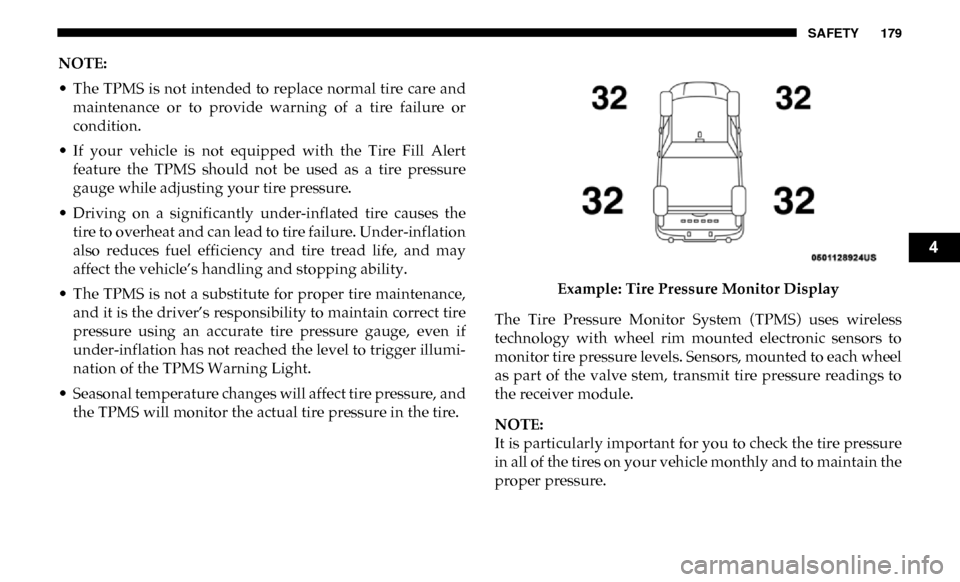
• Seasonal temperature changes will affect tire pressure, and the TPMS will monitor the actual tire pressure in the tire. Example: Tire Pressure Monitor Display
The Tire Pressure Monitor System (TPMS) uses wireless
technology with wheel rim mounted electronic sensors to
monitor tire pressure levels. Sensors, mounted to each wheel
as part of the valve stem, transmit tire pressure readings to
the receiver module.
NOTE:
It is particularly important for you to check the tire pressure
in all of the tires on your vehicle monthly and to maintain the
proper pressure.
4
Page 214 of 607

212 SAFETY
Enhanced Accident Response System
In the event of an impact, if the communication network
remains intact, and the power remains intact, depending on
the nature of the event, the ORC will determine whether to
have the Enhanced Accident Response System perform the
following functions:
• Cut off fuel to the engine (If Equipped)
• Cut off battery power to the electric motor (If Equipped)
• Flash hazard lights as long as the battery has power
• Turn on the interior lights, which remain on as long as thebattery has power or for 15 minutes from the intervention
of the Enhanced Accident Response System.
• Unlock the power door locks.
Your vehicle may also be designed to perform any of these
other functions in response to the Enhanced Accident
Response System:
• Turn off the Fuel Filter Heater, Turn off the HVAC Blower Motor, Close the HVAC Circulation Door • Cut off battery power to the:
• Engine
• Electric Motor (if equipped)
• Electric power steering
• Brake booster
• Electric park brake
• Automatic transmission gear selector
• Horn
• Front wiper
• Headlamp washer pump
NOTE:
After an accident, remember to cycle the ignition to the STOP
(OFF/LOCK) position and remove the key from the ignition
switch to avoid draining the battery. Carefully check the
vehicle for fuel leaks in the engine compartment and on the
ground near the engine compartment and fuel tank before
resetting the system and starting the engine. If there are no
fuel leaks or damage to the vehicle electrical devices (e.g.
headlights) after an accident, reset the system by following
the procedure described below. If you have any doubt,
contact an authorized dealer.
Page 215 of 607

SAFETY 213
(Continued)
Enhanced Accident Response System Reset Procedure
In order to reset the Enhanced Accident Response System
functions after an event, the ignition switch must be changed
from ignition START or ON/RUN to ignition OFF. Carefully
check the vehicle for fuel leaks in the engine compartment
and on the ground near the engine compartment and fuel
tank before resetting the system and starting the engine.
Maintaining Your Air Bag System Event Data Recorder (EDR)
This vehicle is equipped with an event data recorder (EDR).
The main purpose of an EDR is to record, in certain crash or
near crash-like situations, such as an air bag deployment or
hitting a road obstacle, data that will assist in understanding
how a vehicle’s systems performed. The EDR is designed to
record data related to vehicle dynamics and safety systems
WARNING!
• Modifications to any part of the air bag system could cause it to fail when you need it. You could be injured
if the air bag system is not there to protect you. Do not
modify the components or wiring, including adding
any kind of badges or stickers to the steering wheel hub
trim cover or the upper passenger side of the instru -
ment panel. Do not modify the front bumper, vehicle
body structure, or add aftermarket side steps or
running boards.
• It is dangerous to try to repair any part of the air bag system yourself. Be sure to tell anyone who works on
your vehicle that it has an air bag system.
• Do not attempt to modify any part of your air bagsystem. The air bag may inflate accidentally or may not
function properly if modifications are made. Take your
vehicle to an authorized dealer for any air bag system
service. If your seat, including your trim cover and
cushion, needs to be serviced in any way (including
removal or loosening/tightening of seat attachment
bolts), take the vehicle to an authorized dealer. Only
manufacturer approved seat accessories may be used. If
it is necessary to modify the air bag system for persons
with disabilities, contact an authorized dealer.
WARNING! (Continued)
4
Page 245 of 607

SAFETY 243
Periodic Safety Checks You Should Make Outside
The Vehicle
Tires
Examine tires for excessive tread wear and uneven wear
patterns. Check for stones, nails, glass, or other objects
lodged in the tread or sidewall. Inspect the tread for cuts and
cracks. Inspect sidewalls for cuts, cracks, and bulges. Check
the wheel bolts for tightness. Check the tires (including
spare) for proper cold inflation pressure.
Lights
Have someone observe the operation of brake lights and
exterior lights while you work the controls. Check turn
signal and high beam indicator lights on the instrument
panel.
Door Latches
Check for proper closing, latching, and locking.
Fluid Leaks
Check area under the vehicle after overnight parking for
fuel, coolant, oil, or other fluid leaks. Also, if gasoline fumes
are detected or if fuel, or brake fluid leaks are suspected. The
cause should be located and corrected immediately.
• ALWAYS make sure objects cannot fall or slide into the
driver’s side floor area when the vehicle is moving.
Objects can become trapped under accelerator, brake,
or clutch pedals and could cause a loss of vehicle
control.
• NEVER place any objects under the floor mat (e.g., towels, keys, etc.). These objects could change the posi -
tion of the floor mat and may cause interference with
the accelerator, brake, or clutch pedals.
• If the vehicle carpet has been removed and re-installed, always properly attach carpet to the floor and check the
floor mat fasteners are secure to the vehicle carpet.
Fully depress each pedal to check for interference with
the accelerator, brake, or clutch pedals then re-install
the floor mats.
• It is recommended to only use mild soap and water to clean your floor mats. After cleaning, always check
your floor mat has been properly installed and is
secured to your vehicle using the floor mat fasteners by
lightly pulling mat.
WARNING! (Continued)
4
Page 251 of 607

STARTING AND OPERATING 249
If the driver shifts into PARK while moving, the vehicle
may AutoPark.
AutoPark will engage ONLYwhen vehicle speed is 1.2 MPH
(1.9 km/h) or less.
The MESSAGE “ Vehicle Speed is Too High to Shift to
P ”will be displayed in the instrument cluster if vehicle speed
is above 1.2 MPH (1.9 km/h).
4WD LOW — If Equipped
AutoPark will be disabled when operating the vehicle in
4WD LOW.
The MESSAGE “ AutoPark Disabled ” will be displayed in
the instrument cluster. Additional customer warnings will be given when all of
these conditions are met:
• Vehicle is not in PARK
• Driver’s Door is ajar
• Vehicle is in 4WD LOW range
The MESSAGE “
AutoPark Not Engaged ” will be displayed
in the instrument cluster. A warning chime will continue
until you shift the vehicle into PARK or the Driver’s Door is
closed.
ALWAYS DO A VISUAL CHECK
that your vehicle is in
PARK by looking for the "P" in the Instrument Cluster
Display and near the shifter. As an added precaution, always
apply the parking brake when exiting the vehicle.
If Engine Fails To Start
If the engine fails to start after you have followed the
“Normal Starting” procedure, it may be flooded. Push the
accelerator pedal all the way to the floor and hold it there
while the engine is cranking. This should clear any excess
fuel in case the engine is flooded.
The starter motor will engage automatically, run for 10
seconds, and then disengage. Once this occurs, release the
WARNING!
If vehicle speed is above 1.2 MPH (1.9 km/h), the
transmission will default to NEUTRAL until the vehicle
speed drops below 1.2 MPH (1.9 km). A vehicle left in
the NEUTRAL position can roll. As an added precaution,
always apply the parking brake when exiting the
vehicle.
5
Page 252 of 607

250 STARTING AND OPERATING
accelerator pedal and the brake pedal, wait 10 to 15 seconds,
then repeat the “Normal Starting” procedure.If the engine has been flooded, it may start to run, but not
have enough power to continue running when the ignition
button/key is released. If this occurs, continue cranking with
the accelerator pedal pushed all the way to the floor. Release
the accelerator pedal and the ignition button/key once the
engine is running smoothly.
If the engine shows no sign of starting after a 10 second
period of engine cranking with the accelerator pedal held to
the floor, wait 10 to 15 seconds, then repeat the “Normal
Starting” procedure.
Cold Weather Operation (Below –22°F Or −30°C)
To ensure reliable starting at these temperatures, use of an
externally powered electric engine block heater (available
from your authorized dealer) is recommended.
After Starting
The idle speed is controlled automatically, and it will
decrease as the engine warms up.
WARNING!
• Never pour fuel or other flammable liquid into the throttle body air inlet opening in an attempt to start the
vehicle. This could result in flash fire causing serious
personal injury.
• Do not attempt to push or tow your vehicle to get it started. Vehicles equipped with an automatic transmis -
sion cannot be started this way. Unburned fuel could
enter the catalytic converter and once the engine has
started, ignite and damage the converter and vehicle.
• If the vehicle has a discharged battery, booster cables may be used to obtain a start from a booster battery or
the battery in another vehicle. This type of start can be
dangerous if done improperly. Refer to “Jump Starting
Procedure” in “In Case Of Emergency” for further
information.
CAUTION!
To prevent damage to the starter, do not crank the engine
for more than 10 seconds at a time. Wait 10 to 15 seconds
before trying again.
Page 262 of 607

260 STARTING AND OPERATING
NEUTRAL (N)
Use this range when the vehicle is standing for prolonged
periods with the engine running. The engine may be started
in this range. Apply the parking brake and shift the transmis-
sion into PARK if you must exit the vehicle.
DRIVE (D)
This range should be used for most city and highway
driving. It provides the smoothest upshifts and downshifts, and the best fuel economy. The transmission automatically
upshifts through underdrive first, second, and third gears,
direct fourth gear and overdrive fifth and sixth gears. The
DRIVE position provides optimum driving characteristics
under all normal operating conditions.
When frequent transmission shifting occurs (such as when
operating the vehicle under heavy loading conditions, in
hilly terrain, traveling into strong head winds, or while
towing a heavy trailer), use the Electronic Range Select (ERS)
shift control (refer to “Electronic Range Select (ERS) Opera
-
tion” in this section for further information) to select a lower
gear range. Under these conditions, using a lower gear range
will improve performance and extend transmission life by
reducing excessive shifting and heat buildup.
If the transmission temperature exceeds normal operating
limits, the powertrain controller will modify the transmis -
sion shift schedule and expand the range of torque converter
clutch engagement. This is done to prevent transmission
damage due to overheating.
If the transmission becomes extremely hot or is in danger of
overheating, the “Transmission Temperature Warning
Light” may illuminate and the transmission may operate
differently until the transmission cools down.
WARNING!
Do not coast in NEUTRAL and never turn off the
ignition to coast down a hill. These are unsafe practices
that limit your response to changing traffic or road
conditions. You might lose control of the vehicle and
have a collision.
CAUTION!
Towing the vehicle, coasting, or driving for any other
reason with the transmission in NEUTRAL can cause
severe transmission damage. Refer to “Recreational
Towing” in “Starting And Operating” and “Towing A
Disabled Vehicle” in “In Case Of Emergency” for further
information.
Page 265 of 607

STARTING AND OPERATING 263
NOTE:
To select the proper gear position for maximum deceleration
(engine braking), simply push and hold the ERS (-) switch.
The transmission will shift to the range from which the
vehicle can best be slowed down.
Overdrive Operation
The automatic transmission includes an electronically
controlled Overdrive (fifth and sixth gears). The transmis-
sion will automatically shift into Overdrive if the following
conditions are present:
• The gear selector is in the DRIVE position.
• The transmission fluid has reached an adequate temperature.
• The engine coolant has reached an adequate temperature.
• Vehicle speed is sufficiently high.
• The TOW/HAUL switch has not been activated.
• The driver is not heavily pressing the accelerator.
Torque Converter Clutch
A feature designed to improve fuel economy has been
included in the automatic transmission on your vehicle. A
clutch within the torque converter engages automatically at
calibrated speeds. This may result in a slightly different
feeling or response during normal operation in the upper
gears. When the vehicle speed drops or during some acceler
-
ations, the clutch automatically disengages.
NOTE:
• The torque converter clutch will not engage, until the transmission fluid and engine coolant are warm [usually
after 1 to 3 miles (2 to 5 km) of driving]. Because engine
speed is higher when the torque converter clutch is not
engaged, it may seem as if the transmission is not shifting
properly when cold. This is normal. Using the Electronic
Range Select (ERS) shift control, when the transmission is
sufficiently warm, will demonstrate that the transmission
is able to shift into and out of Overdrive.
WARNING!
Do not downshift for additional engine braking on a
slippery surface. The drive wheels could lose their grip
and the vehicle could skid, causing a collision or
personal injury.
CAUTION!
When using ERS for engine braking while descending
steep grades, be careful not to overspeed the engine.
Apply the brakes as needed to prevent engine overspeed.
5
Page 271 of 607

STARTING AND OPERATING 269
DRIVE (D)
This range should be used for most city and highway
driving. It provides the smoothest upshifts and downshifts,
and the best fuel economy. The transmission automatically
upshifts through all forward gears. The DRIVE position
provides optimum driving characteristics under all normal
operating conditions.
When frequent transmission shifting occurs (such as when
operating the vehicle under heavy loading conditions, in
hilly terrain, traveling into strong head winds, or while
towing a heavy trailer), select TOW/HAUL mode or use the
Electronic Range Select (ERS) shift control (refer to "Elec-
tronic Range Select (ERS) Operation" in this section for
further information) to select a lower gear range. Under
these conditions, using a lower gear range will improve
performance and extend transmission life by reducing exces -
sive shifting and heat buildup.
During extremely cold temperatures (-22°F [-30°C] or
below), transmission operation may be modified depending
on engine and transmission temperature as well as vehicle
speed. Normal operation will resume once the transmission
temperature has risen to a suitable level. Transmission Limp Home Mode
Transmission function is monitored electronically for
abnormal conditions. If a condition is detected that could
result in transmission damage, Transmission Limp Home
Mode is activated. In this mode, the transmission may
operate only in certain gears, or may not shift at all. Vehicle
performance may be severely degraded and the engine may
stall. In some situations, the transmission may not re-engage
if the engine is turned off and restarted. The Malfunction
Indicator Light (MIL) may be illuminated. A message in the
instrument cluster will inform the driver of the more serious
conditions, and indicate what actions may be necessary.
In the event of a momentary problem, the transmission can
be reset to regain all forward gears by performing the
following steps:
NOTE:
In cases where the instrument cluster message indicates the
transmission may not re-engage after engine shutdown,
perform this procedure only in a desired location (prefer
-
ably, at an authorized dealer).
1. Stop the vehicle.
2. Shift the transmission into PARK, if possible. If not, shift the transmission to NEUTRAL.
5
Page 276 of 607

274 STARTING AND OPERATING
This electronically shifted transfer case is designed to be
driven in the two–wheel drive position (2WD) for normal
street and highway conditions on dry hard surfaced roads).
Driving the vehicle in 2WD will have greater fuel economy
benefits as the front axle is not engaged in 2WD.
When additional traction is required, the transfer case 4WD
HIGH and 4WD LOW positions can be used to maximize
torque to the front driveshaft, forcing the front and rear
wheels to rotate at the same speed. This is accomplished by
pushing the desired position on the 4WD control switch.
Refer to “Shifting Procedure” in this section for specific
shifting instructions.
The 4WD HIGH and 4WD LOW positions are designed for
loose, slippery road surfaces only. Driving in the 4WD HIGHand 4WD LOW positions on dry hard surfaced roads may
cause increased tire wear and damage to the driveline
components.
NOTE:
The transfer case NEUTRAL button is located in the center of
the 4WD Control Switch and is pushed by using a ballpoint
pen or similar object. The transfer case NEUTRAL position is
to be used for recreational towing only. Refer to “Recre
-
ational Towing” in “Starting And Operating” for further
information.
Transfer Case Position Indicator Lights
The Transfer Case Position Indicator Lights (4WD and
4LOW) are located in the instrument cluster and indicate the
current and desired transfer case selection. When you select
a different transfer case position, the indicator lights will do
the following:
If All Of The Following Shift Conditions Are Met:
1. The current position indicator light will turn OFF.
2. The selected position indicator light will flash until the transfer case completes the shift.
• The transmission may not engage PARK if the vehicle
is moving. Always bring the vehicle to a complete stop
before shifting to PARK, and verify that the transmis -
sion gear position indicator solidly indicates PARK (P)
without blinking. Ensure that the vehicle is completely
stopped, and the PARK position is properly indicated,
before exiting the vehicle.
WARNING! (Continued)