adjust Ram 4500 Chassis Cab 2019 Repair Manual
[x] Cancel search | Manufacturer: RAM, Model Year: 2019, Model line: 4500 Chassis Cab, Model: Ram 4500 Chassis Cab 2019Pages: 607, PDF Size: 10.72 MB
Page 352 of 607

350 STARTING AND OPERATING
GAIN Adjustment Buttons (+/-)
Pushing these buttons will adjust the brake control power
output to the trailer brakes in 0.5 increments. The GAIN
setting can be increased to a maximum of 10 or decreased to
a minimum of 0 (no trailer braking).
GAIN
The GAIN setting is used to set the trailer brake control for
the specific towing condition and should be changed as
towing conditions change. Changes to towing conditions
include trailer load, vehicle load, road conditions and
weather.
Adjusting GAIN
NOTE:
This should only be performed in a traffic free environment
at speeds of approximately 20–25 mph (30–40 km/h).
1. Make sure the trailer brakes are in good working condi-
tion, functioning normally and properly adjusted. See
your trailer dealer if necessary.
2. Hook up the trailer and make the electrical connections according to the trailer manufacturer's instructions. 3. When a trailer with electric/EOH brakes is plugged in,
the trailer connected message should appear in the
instrument cluster display (if the connection is not recog -
nized by the ITBM, braking functions will not be avail -
able), the GAIN setting will illuminate and the correct
type of trailer must be selected from the instrument
cluster display options.
4. Push the UP or DOWN button on the steering wheel until “TRAILER TOW” appears on the screen.
5. Push the RIGHT arrow on the steering wheel to enter “TRAILER TOW”.
6. Push the UP or DOWN buttons until the Trailer Brake Type appears on the screen.
7. Push the RIGHT arrow and then push the UP or DOWN buttons until the proper Trailer Brake Type appears on
the screen.
8. In a traffic-free environment, tow the trailer on a dry, level surface at a speed of 20–25 mph (30–40 km/h) and
squeeze the manual brake control lever completely.
9. If the trailer wheels lockup (indicated by squealing tires), reduce the GAIN setting; if the trailer wheels turn freely,
increase the GAIN setting.
Page 387 of 607

IN CASE OF EMERGENCY 385
F50–20 Amp Yellow Air Suspension Control Module – If Equipped
F51 –10 Amp Red Ignition Node Module / Keyless Ignition Node Module,
Radio Frequency Hub Module / Electric Steering
Column Lock - If Equipped
F52 –5 Amp Tan Battery Sensor
F53 –20 Amp Yellow Trailer Tow – Left Turn/Stop Lights - If Equipped
F54 –20 Amp Yellow Non Memory Adjustable Pedals - If Equipped
F56 –15 Amp Blue Additional Diesel Content - If Equipped (DS 1500 Only)
F57 –20 Amp Yellow TCM/PCM / Solenoid Trans Pressure SW (RFE Trans
Only) – If Equipped (HD Only)
Transmission (DS 1500 Only)
F58 –10 Amp Red Bed Lighting (LED) – If Equipped (HD Only)
F60 –15 Amp Blue Underhood Lamp / TCM – If Equipped (DS 1500 Only)
F61 –10 Amp Red UREA Sensor / PM Sensor – If Equipped (DS 1500 LD
Diesel & Cummins Diesel)
F62 –10 Amp Red Air Conditioning Clutch
F63 –20 Amp Yellow Ignition Coils (Gas), Ignition Coils Capacitors (Gas) /
Short Runner Valve Actuator / Urea Heater Control
Unit (DS 1500 LD Diesel) / RLY Coil Feed-SCR (DS 1500
LD Diesel)
Cavity Cartridge Fuse
Micro FuseDescription
6
Page 396 of 607
394 IN CASE OF EMERGENCY
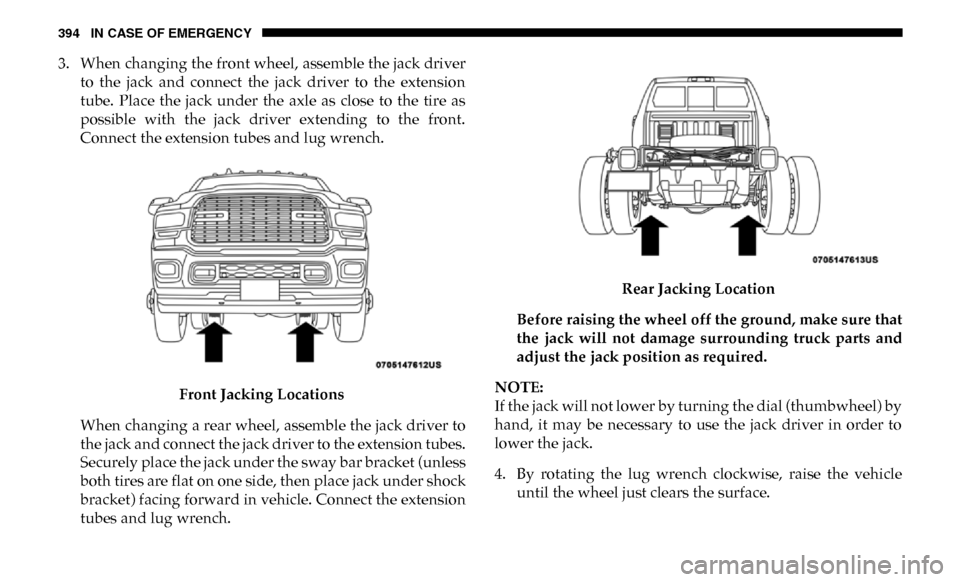
3. When changing the front wheel, assemble the jack driverto the jack and connect the jack driver to the extension
tube. Place the jack under the axle as close to the tire as
possible with the jack driver extending to the front.
Connect the extension tubes and lug wrench.
Front Jacking Locations
When changing a rear wheel, assemble the jack driver to
the jack and connect the jack driver to the extension tubes.
Securely place the jack under the sway bar bracket (unless
both tires are flat on one side, then place jack under shock
bracket) facing forward in vehicle. Connect the extension
tubes and lug wrench. Rear Jacking Location
Before raising the wheel off the ground, make sure that
the jack will not damage surrounding truck parts and
adjust the jack position as required.
NOTE:
If the jack will not lower by turning the dial (thumbwheel) by
hand, it may be necessary to use the jack driver in order to
lower the jack.
4. By rotating the lug wrench clockwise, raise the vehicle until the wheel just clears the surface.
Page 397 of 607

IN CASE OF EMERGENCY 395
5. Remove the lug nuts and pull the wheel off. Install thespare wheel and lug nuts with the cone shaped end of the
nuts toward the wheel on single rear wheel (SRW)
models. On dual rear wheel models (DRW) the lug nuts
are a two-piece assembly with a flat face. Lightly tighten
the nuts. To avoid risk of forcing the vehicle off the jack,
do not fully tighten the nuts until the vehicle has been
lowered.
6. Using the lug wrench, finish tightening the nuts using a crisscross pattern. For the proper lug nut torque specifica -
tions refer to “Wheel And Tire Torque Specifications” in
“Technical Specifications.” If in doubt about the correct
tightness, have them checked with a torque wrench by an
authorized dealer or at a service station. 7. Install wheel center cap (if equipped) and remove wheel
blocks. Do not install chrome or aluminum wheel center
caps on the spare wheel. This may result in cap damage.
8. Lower the jack to its fully closed position. If the jack will not lower by turning the dial (thumbwheel) by hand, it
may be necessary to use the jack driver in order to lower
the jack. Stow the replaced tire, jack, and tools as previ -
ously described.
9. Adjust the tire pressure when possible.
WARNING!
Raising the vehicle higher than necessary can make the
vehicle less stable. It could slip off the jack and hurt
someone near it. Raise the vehicle only enough to
remove the tire.WARNING!
A loose tire or jack thrown forward in a collision or hard
stop, could endanger the occupants of the vehicle.
Always stow the jack parts and the spare tire in the
places provided.
6
Page 442 of 607

440 SERVICING AND MAINTENANCE
Fluid Level Check — Eight-Speed Transmission
The fluid level is preset at the factory and does not require
adjustment under normal operating conditions. Routine
fluid level checks are not required, therefore the transmis-
sion has no dipstick. An authorized dealer can check your
transmission fluid level using special service tools.
If you notice fluid leakage or transmission malfunction, visit
an authorized dealer immediately to have the transmission
fluid level checked. Operating the vehicle with an improper
fluid level can cause severe transmission damage. Fluid Level Check — Six-Speed Transmission
It is best to check the fluid level when the transmission is at
normal operating temperature (158-176°F / 70-80°C). This
normally occurs after at least 15 miles (25 km) of driving. At
normal operating temperature the fluid cannot be held
comfortably between the fingertips. You can read the trans
-
mission sump temperature in the instrument cluster screen
(refer to “Instrument Cluster Display” for further informa -
tion).
Use the following procedure to check the transmission fluid
level properly:
1. Monitor the transmission temperature using the instru -
ment cluster display, and operate the vehicle as required
to reach the normal operating temperature. If the trans-
mission is not functioning properly, or the vehicle cannot
be driven, see the NOTE and CAUTION below about
checking the fluid level at colder temperatures.
2. Park the vehicle on level ground.
3. Run the engine at normal idle speed for at least 60 seconds, and leave the engine running for the rest of this
procedure.
4. Fully apply the parking brake, and press the brake pedal.
CAUTION!
Do not use chemical flushes in your transmission as the
chemicals can damage your transmission components.
Such damage is not covered by the New Vehicle Limited
Warranty.
CAUTION!
If a transmission fluid leak occurs, visit an authorized
dealer immediately. Severe transmission damage may
occur. An authorized dealer has the proper tools to adjust
the fluid level accurately.
Page 443 of 607

SERVICING AND MAINTENANCE 441
5. Place the gear selector momentarily into each gear posi-
tion (allowing time for the transmission to fully engage in
each position), ending with the transmission in PARK.
6. Remove the dipstick, wipe it clean and reinsert it until seated.
7. Remove the dipstick again and note the fluid level on both sides. The fluid level reading is only valid if there is
a solid coating of oil on both sides of the dipstick. Note
that the holes in the dipstick will be full of fluid if the
actual level is at or above the hole. The fluid level should
be between the “HOT” (upper) reference holes on the
dipstick at normal operating temperature. If the fluid
level is low, add fluid through the dipstick tube to bring
it to the proper level. Do not overfill. Use ONLY the spec -
ified fluid (see "Fluids And Lubricants" for fluid specifica -
tions). After adding any quantity of oil through the
dipstick tube, wait a minimum of two minutes for the oil
to fully drain into the transmission before rechecking the
fluid level.
NOTE:
If it is necessary to check the transmission below the oper -
ating temperature, the fluid level should be between the two
“COLD” (lower) holes on the dipstick with the fluid at
60-70°F / 16-21°C. Only use the COLD region of the dipstick as a rough reference when setting the fluid level after a trans
-
mission service or fluid change. Re-check the fluid level, and
adjust as required, once the transmission reaches normal
operating temperature.
8. Reinsert the dipstick. Check for leaks. Release the parking brake.
NOTE:
If it is necessary to check the transmission below the oper -
ating temperature, the fluid level should be between the two
COLD (lower) holes on the dipstick with the fluid at 68-86°F
/ 20-30°C. Only use the COLD region of the dipstick as a
rough reference when setting the fluid level after a transmis -
sion service or fluid change. Re-check the fluid level, and
adjust as required, once the transmission reaches normal
operating temperature. CAUTION!
If the fluid temperature is below 50 °F (10 °C) it may not
register on the dipstick. Do not add fluid until the
temperature is elevated enough to produce an accurate
reading. Run the engine at idle, in PARK, to warm the
fluid.
7
Page 457 of 607

SERVICING AND MAINTENANCE 455
Fuel Economy
Underinflated tires will increase tire rolling resistance
resulting in higher fuel consumption.
Tread Wear
Improper cold tire inflation pressures can cause abnormal
wear patterns and reduced tread life, resulting in the need
for earlier tire replacement.
Ride Comfort And Vehicle Stability
Proper tire inflation contributes to a comfortable ride.
Over-inflation produces a jarring and uncomfortable ride.
Tire Inflation Pressures
The proper cold tire inflation pressure is listed on the driver's
side B-Pillar or rear edge of the driver's side door.
At least once a month:
• Check and adjust tire pressure with a good qualitypocket-type pressure gauge. Do not make a visual judge -
ment when determining proper inflation. Tires may look
properly inflated even when they are under-inflated.
• Inspect tires for signs of tire wear or visible damage. Inflation pressures specified on the placard are always “cold
tire inflation pressure”. Cold tire inflation pressure is
defined as the tire pressure after the vehicle has not been
driven for at least three hours, or driven less than 1 mile
(1.6 km) after sitting for a minimum of three hours. The cold
tire inflation pressure must not exceed the maximum infla
-
tion pressure molded into the tire sidewall.
Check tire pressures more often if subject to a wide range of
outdoor temperatures, as tire pressures vary with tempera -
ture changes.
Tire pressures change by approximately 1 psi (7 kPa) per 12°F
(7°C) of air temperature change. Keep this in mind when
checking tire pressure inside a garage, especially in the Winter.
Example: If garage temperature = 68°F (20°C) and the
outside temperature = 32°F (0°C) then the cold tire inflation
pressure should be increased by 3 psi (21 kPa), which equals
1 psi (7 kPa) for every 12°F (7°C) for this outside temperature
condition. CAUTION!
After inspecting or adjusting the tire pressure, always
reinstall the valve stem cap. This will prevent moisture
and dirt from entering the valve stem, which could
damage the valve stem.
7
Page 484 of 607

482 TECHNICAL SPECIFICATIONS
NOTE:
Intentional tampering with the emissions control system can
result in civil penalties being assessed against you.
Carbon Monoxide Warnings
• An out-of-tune engine or certain fuel or ignitionmalfunctions can cause the catalytic converter to over -
heat. If you notice a pungent burning odor or some
light smoke, your engine may be out of tune or
malfunctioning and may require immediate service.
Contact an authorized dealer for service assistance.
• The use of fuel additives, which are now being sold as octane enhancers, is not recommended. Most of these
products contain high concentrations of methanol. Fuel
system damage or vehicle performance problems
resulting from the use of such fuels or additives is not
the responsibility of the manufacturer and may void or
not be covered under the New Vehicle Limited
Warranty. CAUTION!
(Continued)WARNING!
Carbon monoxide (CO) in exhaust gases is deadly.
Follow the precautions below to prevent carbon
monoxide poisoning:
• Do not inhale exhaust gases. They contain carbon monoxide, a colorless and odorless gas, which can kill.
Never run the engine in a closed area, such as a garage,
and never sit in a parked vehicle with the engine
running for an extended period. If the vehicle is
stopped in an open area with the engine running for
more than a short period, adjust the ventilation system
to force fresh, outside air into the vehicle.
• Guard against carbon monoxide with proper mainte -
nance. Have the exhaust system inspected every time
the vehicle is raised. Have any abnormal conditions
repaired promptly. Until repaired, drive with all side
windows fully open.
Page 494 of 607

492 MULTIMEDIA
Voice
After pressing the “Voice” button on the touchscreen, the following settings will be available:
Clock
After pressing the “Clock” button on the touchscreen, the following settings will be available:Power — If Equipped
HP (US)HP (UK) Kw
Temperature °C °F
Torque — If Equipped lb-ft Nm
Setting Name
Selectable Options
Setting NameSelectable Options
Voice Response Length Brief Detailed
Show Command List AlwaysWith Help Never
Setting Name Selectable Options
Set Time 12 hour24 hour
NOTE:
Within the “Set Time” feature, press the corresponding arrow above and below the current time to adjust, then select “AM”
or “PM.”
Page 498 of 607

496 MULTIMEDIA
Lights
After pressing the “Lights” button on the touchscreen, the following settings will be available:Hill Start Assist — If
Equipped
On
Off
NOTE:
When the “Hill Start Assist” feature is selected, the Hill Start Assist (HSA) system becomes active.
Tire Fill Assist OnOff
Setting Name
Selectable Options
Setting NameSelectable Options
Headlight Off Delay 0 sec
30 sec
60 sec 90 sec
Headlight Illumination On Approach 0 sec
30 sec
60 sec 90 sec
NOTE:
When the “Headlight Illumination On Approach” feature is selected, it allows the adjustment of the amount of time the head -
lights remain on when the doors are unlocked with the key fob.
Headlights With Wipers — If
Equipped On
Off
Auto Dim High Beams — If Equipped OnOff
Flash Lights With Lock OnOff