adjust Ram 4500 Chassis Cab 2019 Owner's Guide
[x] Cancel search | Manufacturer: RAM, Model Year: 2019, Model line: 4500 Chassis Cab, Model: Ram 4500 Chassis Cab 2019Pages: 607, PDF Size: 10.72 MB
Page 63 of 607
GETTING TO KNOW YOUR VEHICLE 61
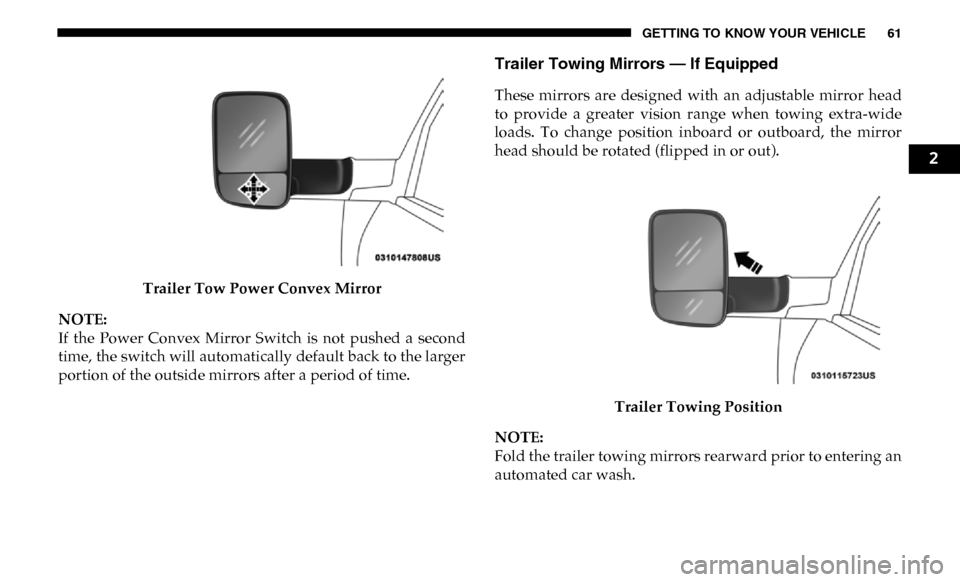
Trailer Tow Power Convex Mirror
NOTE:
If the Power Convex Mirror Switch is not pushed a second
time, the switch will automatically default back to the larger
portion of the outside mirrors after a period of time.
Trailer Towing Mirrors — If Equipped
These mirrors are designed with an adjustable mirror head
to provide a greater vision range when towing extra-wide
loads. To change position inboard or outboard, the mirror
head should be rotated (flipped in or out).
Trailer Towing Position
NOTE:
Fold the trailer towing mirrors rearward prior to entering an
automated car wash.
2
Page 64 of 607
62 GETTING TO KNOW YOUR VEHICLE
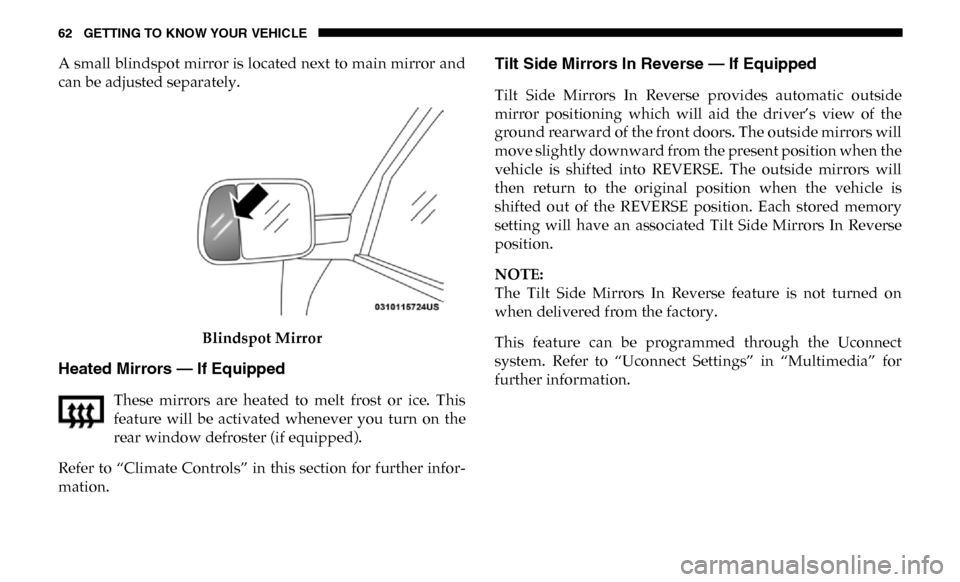
A small blindspot mirror is located next to main mirror and
can be adjusted separately.Blindspot Mirror
Heated Mirrors — If Equipped
These mirrors are heated to melt frost or ice. This
feature will be activated whenever you turn on the
rear window defroster (if equipped).
Refer to “Climate Controls” in this section for further infor -
mation.
Tilt Side Mirrors In Reverse — If Equipped
Tilt Side Mirrors In Reverse provides automatic outside
mirror positioning which will aid the driver’s view of the
ground rearward of the front doors. The outside mirrors will
move slightly downward from the present position when the
vehicle is shifted into REVERSE. The outside mirrors will
then return to the original position when the vehicle is
shifted out of the REVERSE position. Each stored memory
setting will have an associated Tilt Side Mirrors In Reverse
position.
NOTE:
The Tilt Side Mirrors In Reverse feature is not turned on
when delivered from the factory.
This feature can be programmed through the Uconnect
system. Refer to “Uconnect Settings” in “Multimedia” for
further information.
Page 75 of 607
GETTING TO KNOW YOUR VEHICLE 73
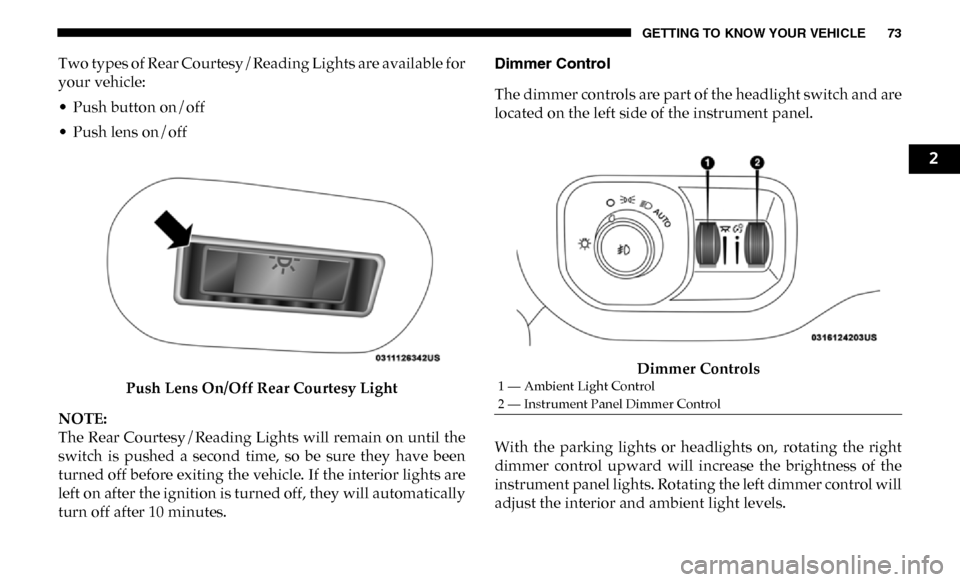
Two types of Rear Courtesy/Reading Lights are available for
your vehicle:
• Push button on/off
• Push lens on/offPush Lens On/Off Rear Courtesy Light
NOTE:
The Rear Courtesy/Reading Lights will remain on until the
switch is pushed a second time, so be sure they have been
turned off before exiting the vehicle. If the interior lights are
left on after the ignition is turned off, they will automatically
turn off after 10 minutes. Dimmer Control
The dimmer controls are part of the headlight switch and are
located on the left side of the instrument panel.
Dimmer Controls
With the parking lights or headlights on, rotating the right
dimmer control upward will increase the brightness of the
instrument panel lights. Rotating the left dimmer control will
adjust the interior and ambient light levels.
1 — Ambient Light Control
2 — Instrument Panel Dimmer Control
2
Page 78 of 607

76 GETTING TO KNOW YOUR VEHICLE
Mist Feature
When a single wipe to clear off road mist or spray from a
passing vehicle is needed, push the washer knob, located on
the end of the multifunction lever, inward to the first detent
and release. The wipers will cycle one time and automati-
cally shut off.
NOTE:
The mist feature does not activate the washer pump; there -
fore, no washer fluid will be sprayed on the windshield. The
wash function must be used in order to spray the windshield
with washer fluid.
Rain Sensing Wipers — If Equipped
This feature senses moisture on the windshield and automat -
ically activates the wipers for the driver. The feature is espe -
cially useful for road splash or overspray from the
windshield washers of the vehicle ahead. Rotate the end of
the multifunction lever to one of five settings to activate this
feature.
NOTE:
This feature can be programmed through the Uconnect
system. Refer to “Uconnect Settings” in “Multimedia” for
further information. The sensitivity of the system can be adjusted with the multi
-
function lever. Wiper delay position 1 is the least sensitive,
and wiper delay position 5 is the most sensitive. Position 3
should be used for normal rain conditions. Positions 1 and 2
can be used if the driver desires less wiper sensitivity. Posi -
tions 4 and 5 can be used if the driver desires more sensi -
tivity. Place the wiper switch in the O (off) position when not
using the system.
NOTE:
• The Rain Sensing feature will not operate when the wiper switch is in the low or high-speed position.
• The Rain Sensing feature may not function properly when ice, or dried salt water is present on the windshield.
• Use of Rain-X or products containing wax or silicone may reduce Rain Sensing performance.
The Rain Sensing system has protection features for the
wiper blades and arms, and will not operate under the
following conditions:
• Low Ambient Temperature — When the ignition is first
turned ON, the Rain Sensing system will not operate until
the wiper switch is moved, vehicle speed is greater than
0 mph (0 km/h), or the outside temperature is greater than
32°F (0°C).
Page 81 of 607
GETTING TO KNOW YOUR VEHICLE 79
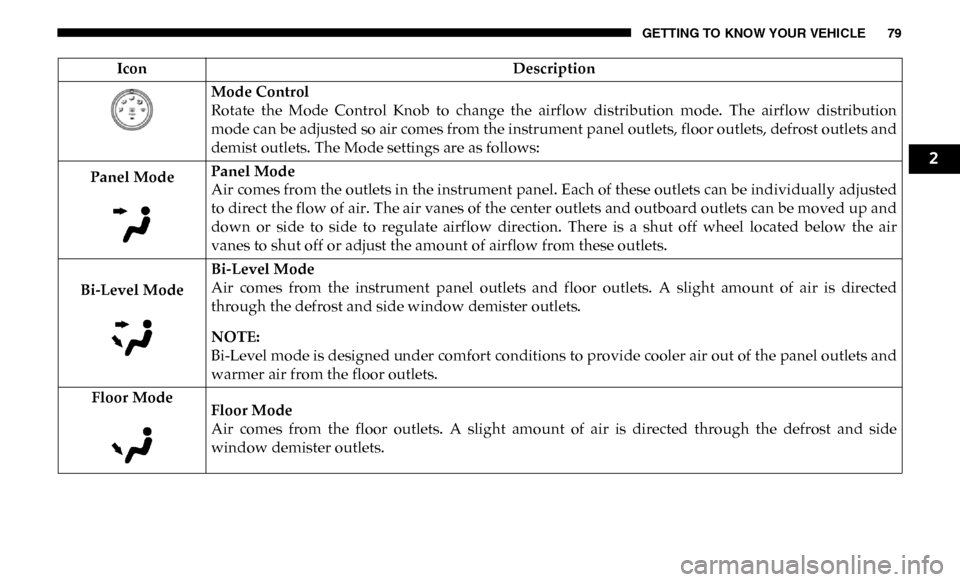
Mode Control
Rotate the Mode Control Knob to change the airflow distribution mode. The airflow distribution
mode can be adjusted so air comes from the instrument panel outlets, floor outlets, defrost outlets and
demist outlets. The Mode settings are as follows:
Panel Mode Panel Mode
Air comes from the outlets in the instrument panel. Each of these outlets can be individually adjusted
to direct the flow of air. The air vanes of the center outlets and outboard outlets can be moved up and
down or side to side to regulate airflow direction. There is a shut off wheel located below the air
vanes to shut off or adjust the amount of airflow from these outlets.
Bi-Level Mode Bi-Level Mode
Air comes from the instrument panel outlets and floor outlets. A slight amount of air is directed
through the defrost and side window demister outlets.
NOTE:
Bi-Level mode is designed under comfort conditions to provide cooler air out of the panel outlets and
warmer air from the floor outlets.
Floor Mode Floor Mode
Air comes from the floor outlets. A slight amount of air is directed through the defrost and side
window demister outlets.
Icon
Description
2
Page 86 of 607
84 GETTING TO KNOW YOUR VEHICLE
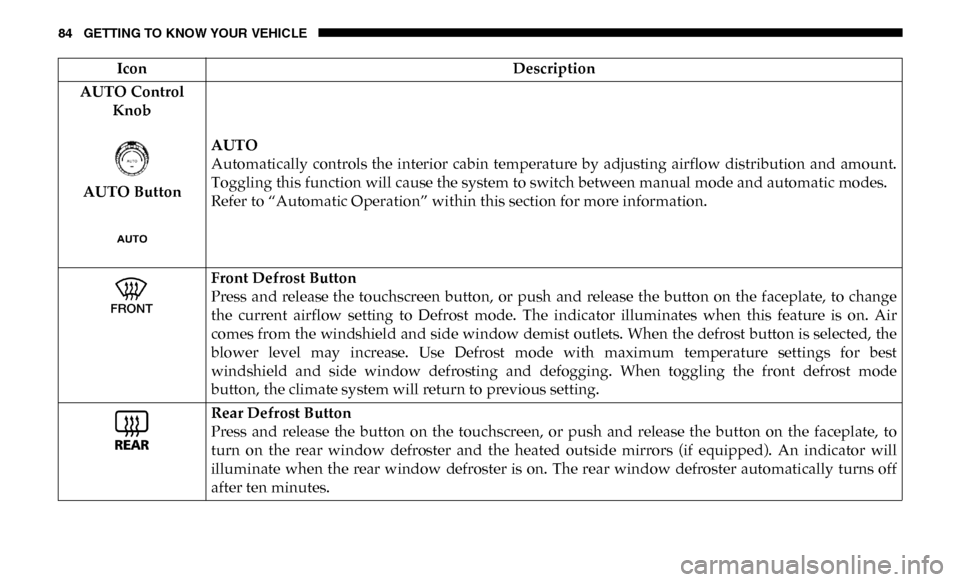
AUTO Control Knob
AUTO Button AUTO
Automatically controls the interior cabin temperature by adjusting airflow distribution and amount.
Toggling this function will cause the system to switch between manual mode and automatic modes.
Refer to “Automatic Operation” within this section for more information.
Front Defrost Button
Press and release the touchscreen button, or push and release the button on the faceplate, to change
the current airflow setting to Defrost mode. The indicator illuminates when this feature is on. Air
comes from the windshield and side window demist outlets. When the defrost button is selected, the
blower level may increase. Use Defrost mode with maximum temperature settings for best
windshield and side window defrosting and defogging. When toggling the front defrost mode
button, the climate system will return to previous setting.
Rear Defrost Button
Press and release the button on the touchscreen, or push and release the button on the faceplate, to
turn on the rear window defroster and the heated outside mirrors (if equipped). An indicator will
illuminate when the rear window defroster is on. The rear window defroster automatically turns off
after ten minutes.
Icon
Description
Page 88 of 607
86 GETTING TO KNOW YOUR VEHICLE
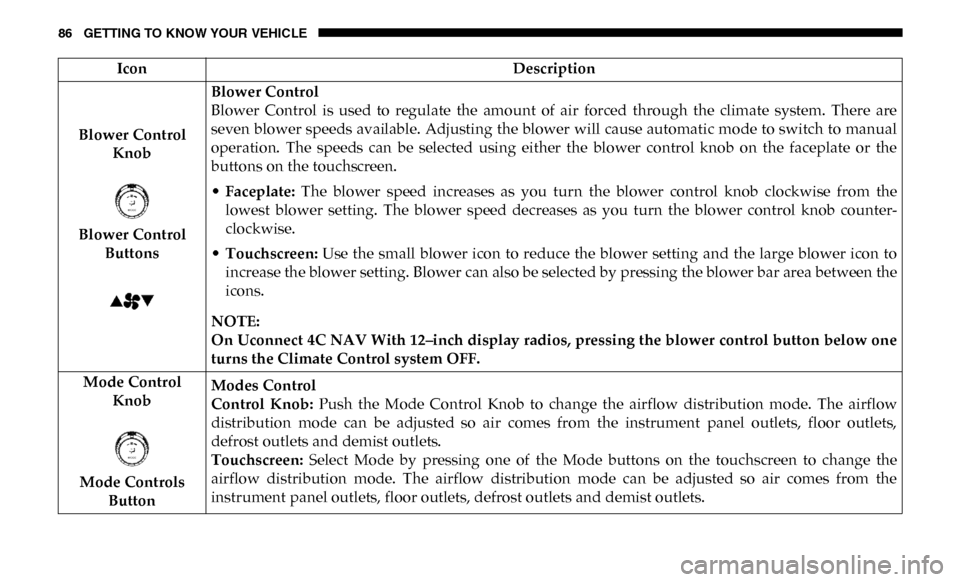
Blower Control Knob
Blower Control Buttons Blower Control
Blower Control is used to regulate the amount of air forced through the climate system. There are
seven blower speeds available. Adjusting the blower will cause automatic mode to switch to manual
operation. The speeds can be selected using either the blower control knob on the faceplate or the
buttons on the touchscreen.
•
Faceplate: The blower speed increases as you turn the blower control knob clockwise from the
lowest blower setting. The blower speed decreases as you turn the blower control knob counter -
clockwise.
• Touchscreen: Use the small blower icon to reduce the blower setting and the large blower icon to
increase the blower setting. Blower can also be selected by pressing the blower bar area between the
icons.
NOTE:
On Uconnect 4C NAV With 12–inch display radios, pressing the blower control button below one
turns the Climate Control system OFF.
Mode Control Knob
Mode Controls Button Modes Control
Control Knob:
Push the Mode Control Knob to change the airflow distribution mode. The airflow
distribution mode can be adjusted so air comes from the instrument panel outlets, floor outlets,
defrost outlets and demist outlets.
Touchscreen: Select Mode by pressing one of the Mode buttons on the touchscreen to change the
airflow distribution mode. The airflow distribution mode can be adjusted so air comes from the
instrument panel outlets, floor outlets, defrost outlets and demist outlets.
Icon
Description
Page 89 of 607
GETTING TO KNOW YOUR VEHICLE 87
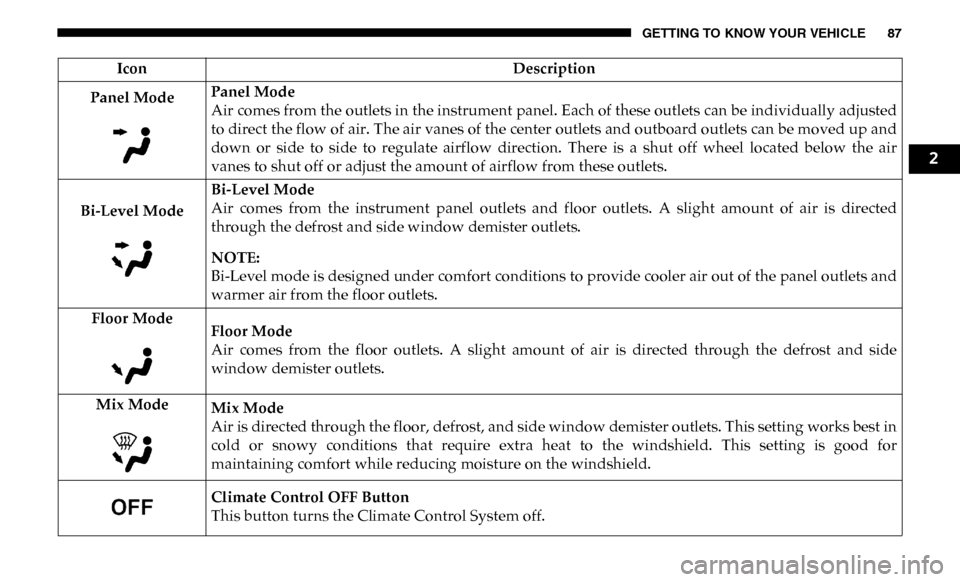
Panel ModePanel Mode
Air comes from the outlets in the instrument panel. Each of these outlets can be individually adjusted
to direct the flow of air. The air vanes of the center outlets and outboard outlets can be moved up and
down or side to side to regulate airflow direction. There is a shut off wheel located below the air
vanes to shut off or adjust the amount of airflow from these outlets.
Bi-Level Mode Bi-Level Mode
Air comes from the instrument panel outlets and floor outlets. A slight amount of air is directed
through the defrost and side window demister outlets.
NOTE:
Bi-Level mode is designed under comfort conditions to provide cooler air out of the panel outlets and
warmer air from the floor outlets.
Floor Mode Floor Mode
Air comes from the floor outlets. A slight amount of air is directed through the defrost and side
window demister outlets.
Mix Mode Mix Mode
Air is directed through the floor, defrost, and side window demister outlets. This setting works best in
cold or snowy conditions that require extra heat to the windshield. This setting is good for
maintaining comfort while reducing moisture on the windshield.
Climate Control OFF Button
This button turns the Climate Control System off.
Icon
Description
2
Page 90 of 607

88 GETTING TO KNOW YOUR VEHICLE
Climate Control Functions
A/C (Air Conditioning)
The Air Conditioning (A/C) button allows the operator to
manually activate or deactivate the air conditioning system.
When the air conditioning system is turned on, cool dehu-
midified air will flow through the outlets into the cabin. For
improved fuel economy, press the A/C button to turn off the
air conditioning and manually adjust the blower and airflow
mode settings. Also, make sure to select only Panel, Bi-Level,
or Floor modes.
NOTE:
• For Manual Climate Controls, if the system is in Mix, Flooror Defrost Mode, the A/C can be turned off, but the A/C
system shall remain active to prevent fogging of the
windows.
• If fog or mist appears on the windshield or side glass, select Defrost mode, and increase blower speed if needed.
• If your air conditioning performance seems lower than expected, check the front of the A/C condenser (located in
front of the radiator), for an accumulation of dirt or insects.
Clean with a gentle water spray from the front of the radi -
ator and through the condenser. MAX A/C
MAX A/C sets the control for maximum cooling perfor
-
mance.
Press and release to toggle between MAX A/C and the prior
settings. The button illuminates when MAX A/C is on.
In MAX A/C, the blower level and mode position can be
adjusted to desired user settings. Pressing other settings will
cause the MAX A/C operation to switch to the selected
setting and MAX A/C to exit.
Recirculation
In cold weather, use of Recirculation mode may lead to
excessive window fogging. The Recirculation feature may be
unavailable (button on the touchscreen greyed out) if condi -
tions exist that could create fogging on the inside of the
windshield.
On systems with Manual Climate Controls, if equipped, the
Recirculation mode is not allowed in Defrost mode to
improve window clearing operation. Recirculation is
disabled automatically if this mode is selected. Attempting
to use Recirculation while in this mode causes the LED in the
control button to blink and then turns off.
Page 91 of 607

GETTING TO KNOW YOUR VEHICLE 89
Automatic Temperature Control (ATC)
Automatic Operation
1. Push the AUTO button on the faceplate, or the AUTObutton on the touchscreen on the Automatic Temperature
Control (ATC) Panel.
2. Next, adjust the temperature you would like the system to maintain by adjusting the driver and passenger
temperature control buttons. Once the desired tempera -
ture is displayed, the system will achieve and automati -
cally maintain that comfort level.
3. When the system is set up for your comfort level, it is not necessary to change the settings. You will experience the
greatest efficiency by simply allowing the system to func -
tion automatically.
NOTE:
• It is not necessary to move the temperature settings for cold or hot vehicles. The system automatically adjusts the
temperature, mode, and blower speed to provide comfort
as quickly as possible. • The temperature can be displayed in U.S. or Metric units
by selecting the US/Metric customer-programmable
feature. Refer to the “Uconnect Settings” in “Multimedia”
for further information.
To provide you with maximum comfort in the Automatic
mode during cold start-ups, the blower fan will remain on
low until the engine warms up. The blower will increase in
speed and transition into Auto mode.
Manual Operation Override
This system offers a full complement of manual override
features. The AUTO symbol in the front ATC display will be
turned off when the system is being used in the manual
mode.
Operating Tips
NOTE:
Refer to the chart at the end of this section for suggested
control settings for various weather conditions.
2