adjust Ram 4500 Chassis Cab 2019 Workshop Manual
[x] Cancel search | Manufacturer: RAM, Model Year: 2019, Model line: 4500 Chassis Cab, Model: Ram 4500 Chassis Cab 2019Pages: 607, PDF Size: 10.72 MB
Page 246 of 607

244
(Continued)
STARTING AND OPERATING
STARTING THE ENGINE
Before starting your vehicle, adjust your seat, adjust both
inside and outside mirrors, and fasten your seat belt.
The starter should not be operated for more than 10-second
intervals. Waiting a few seconds between such intervals will
protect the starter from overheating.
WARNING!
• When leaving the vehicle, always make sure the keyless ignition node is in the "OFF" mode, remove the
key fob from the vehicle and lock the vehicle.
• Never leave children alone in a vehicle, or with access to an unlocked vehicle. Allowing children to be in a
vehicle unattended is dangerous for a number of
reasons. A child or others could be seriously or fatally
injured. Children should be warned not to touch the
parking brake, brake pedal or the gear selector.
• Do not leave the key fob in or near the vehicle, or in alocation accessible to children, and do not leave the
ignition of a vehicle equipped with Keyless
Enter-N-Go in the ACC or ON/RUN mode. A child
could operate power windows, other controls, or move
the vehicle.
• Do not leave children or animals inside parked vehicles in hot weather. Interior heat build-up may cause
serious injury or death.
WARNING! (Continued)
Page 299 of 607

STARTING AND OPERATING 297
Distance Setting 1 Bar (Short)
The system automatically defaults to the longest distance
setting. To decrease the distance setting, push the Distance
Button and release. Each time the button is pushed, the
distance setting decreases by one bar. Once the shortest
setting is reached, if the button is pushed again it will reset
to the default setting (longest).
If there is no vehicle ahead, the vehicle will maintain the set
speed. If a slower moving vehicle is detected in the same
lane, the instrument cluster displays the “Sensed Vehicle
Indicator” icon, and the system adjusts vehicle speed auto -
matically to maintain the distance setting, regardless of the
set speed. The vehicle will then maintain the set distance until:
• The vehicle ahead accelerates to a speed above the set
speed.
• The vehicle ahead moves out of your lane or view of the sensor.
• The distance setting is changed.
• The system disengages. (Refer to the information on ACC Activation).
The maximum braking applied by ACC is limited; however,
the driver can always apply the brakes manually, if neces -
sary.
NOTE:
The brake lights will illuminate whenever the ACC system
applies the brakes.
A Proximity Warning will alert the driver if ACC predicts
that its maximum braking level is not sufficient to maintain
the set distance. If this occurs, a visual alert “BRAKE” will
flash in the instrument cluster display and a chime will
sound while ACC continues to apply its maximum braking
capacity.5
Page 316 of 607

314 STARTING AND OPERATING
The vehicle is close to the obstacle when the warning display shows one flashing arc and sounds a continuous tone. The
following chart shows the warning alert operation when the system is detecting an obstacle:
NOTE:
ParkSense will reduce the volume of the radio, if on, when
the system is sounding an audio tone.Adjustable Chime Volume Settings
The rear chime volume settings are programmable through
the Uconnect system. Refer to “Uconnect Settings” in “Multi
-
media” for further information.
The chime volume settings include low, medium, and high.
The factory default volume is medium.
WARNING ALERTS
Rear Distance (inches/cm) Greater than
79 inches (200 cm) 79-59 inches
(200-150 cm) 59-47 inches
(150-120 cm) 47-39 inches
(120-100 cm) 39-25 inches
(100-65 cm) 25-12 inches
(65-30 cm) Less than
12 inches (30 cm)
Audible Alert Chime NoneSingle 1/2
Second Tone Slow Slow Fast
Fast Continuous
Arcs-Left None None None None None 2nd Flashing 1st Flashing
Arcs-Center None 6th Solid 5th Solid 4th Solid 3rd Flashing 2nd Flashing 1st Flashing Arcs-Right None None None None None 2nd Flashing 1st Flashing Radio
Volume
Reduced No
Yes YesYesYesYesYes
Page 325 of 607
STARTING AND OPERATING 323
NOTE:
ParkSense will reduce the volume of the radio, if on, when
the system is sounding an audio tone.
Front Park Assist Audible Alerts
ParkSense will turn off the Front Park Assist audible alert
(chime) after approximately three seconds when an obstacle
has been detected, the vehicle is stationary, and brake pedal
is applied.
Adjustable Chime Volume Settings
The Front and Rear chime volume settings are program-
mable through the Uconnect system. Refer to “Uconnect
Settings” in “Multimedia” for further information.
The chime volume settings include low, medium, and high.
The factory default volume is medium.Enabling And Disabling Front And/Or Rear ParkSense
Front ParkSense can be enabled and disabled with the Front
ParkSense switch.
Rear ParkSense can be enabled and disabled with the Rear
ParkSense switch.
When the gear selector is moved to REVERSE and
the Front or Rear system is disabled, the instrument
cluster display will show the “Off” message. This
vehicle graphic will be displayed for as long as the vehicle is
in REVERSE.
The Front or Rear ParkSense switch LED will be on when
Front or Rear ParkSense is disabled or requires service. The
Front or Rear ParkSense switch LED will be off when the
Front or Rear system is enabled. If the Front or Rear Park -
Sense switch is pushed, and the system requires service, the
Front or Rear ParkSense switch LED will blink momentarily,
and then the LED will be on.
Arcs-Center
None4th Solid 3rd Flashing 2nd Flashing 1st Flashing
Arcs-Right NoneNoneNone2nd Flashing 1st Flashing
Radio Volume Reduced No
NoNoYes Yes
5
Page 337 of 607

STARTING AND OPERATING 335
Forward Facing Camera With Tire Lines — If Equipped
The Forward Facing Camera displays a front view image of
the road ahead, along with tire lines to guide the driver when
driving on narrow roads.
Activation
The Forward Facing Camera can be activated by pressing the
Forward Camera soft button on the touchscreen.
Once activated, the camera image will remain on as long as
the vehicle speed is below 8 mph (13 km/h).
Deactivation
The Forward Facing Camera is deactivated in the following
conditions:
• The vehicle speed exceeds 8 mph (13 km/h) for 10seconds.
• The “X” button on the display is pressed.
• Vehicle is shifted into PARK.
• Ignition is cycled to OFF.
NOTE:
The Forward Facing Camera cannot be deactivated when the
vehicle is in 4LO. Trailer Reverse Guidance — If Equipped
The Trailer Reverse Guidance feature assists the driver in
backing up a trailer by providing adjustable camera views of
the trailer and surrounding area. The cameras are mounted
on the side mirrors and the images will be displayed
side-by-side on the touchscreen. Left and right camera
images are swapped and mirrored on the touchscreen to
show the equivalent area behind the vehicle as though the
driver is using the side mirrors.
Activation
The Trailer Reverse Guidance feature can be activated by
pressing the Trailer Reverse Guidance button on the touch
-
screen.
5
Page 342 of 607

340 STARTING AND OPERATING
Gross Combination Weight Rating (GCWR)
The GCWR is the total allowable weight of your vehicle and
trailer when weighed in combination.
Gross Axle Weight Rating (GAWR)
The GAWR is the maximum capacity of the front and rear
axles. Distribute the load over the front and rear axles evenly.
Make sure that you do not exceed either front or rear GAWR.
Refer to “Vehicle Loading/Vehicle Certification Label” in
“Starting And Operating” for further information.Tongue Weight (TW)
The tongue weight is the downward force exerted on the
hitch ball by the trailer. You must consider this as part of the
load on your vehicle.
Trailer Frontal Area
The frontal area is the maximum height multiplied by the
maximum width of the front of a trailer.
Trailer Sway Control
The trailer sway control can be a mechanical telescoping link
that can be installed between the hitch receiver and the
trailer tongue that typically provides adjustable friction asso
-
ciated with the telescoping motion to dampen any unwanted
trailer swaying motions while traveling.
If equipped, the electronic Trailer Sway Control (TSC) recog -
nizes a swaying trailer and automatically applies individual
wheel brakes and/or reduces engine power to attempt to
eliminate the trailer sway.
WARNING!
If the gross trailer weight is 5,000 lbs (2,267 kg) or more,
it is recommended to use a weight-distributing hitch to
ensure stable handling of your vehicle. If you use a
standard weight-carrying hitch, you could lose control of
your vehicle and cause a collision.
WARNING!
It is important that you do not exceed the maximum front
or rear GAWR. A dangerous driving condition can result
if either rating is exceeded. You could lose control of the
vehicle and have a collision.
Page 343 of 607
STARTING AND OPERATING 341
Weight-Carrying Hitch
A weight-carrying hitch supports the trailer tongue weight,
just as if it were luggage located at a hitch ball or some other
connecting point of the vehicle. These kinds of hitches are the
most popular on the market today and they are commonly
used to tow small and medium sized trailers.
Weight-Distributing Hitch
A weight-distributing system works by applying leverage
through spring (load) bars. They are typically used for
heavier loads to distribute trailer tongue weight to the tow
vehicle's front axle and the trailer axle(s). When used in
accordance with the manufacturer's directions, it provides
for a more level ride, offering more consistent steering and
brake control, thereby enhancing towing safety. The addi-
tion of a friction/hydraulic sway control also dampens sway
caused by traffic and crosswinds and contributes positively
to tow vehicle and trailer stability. Trailer sway control and
a weight distributing (load equalizing) hitch are recom -
mended for heavier Tongue Weights (TW) and may be
required depending on vehicle and trailer configuration/
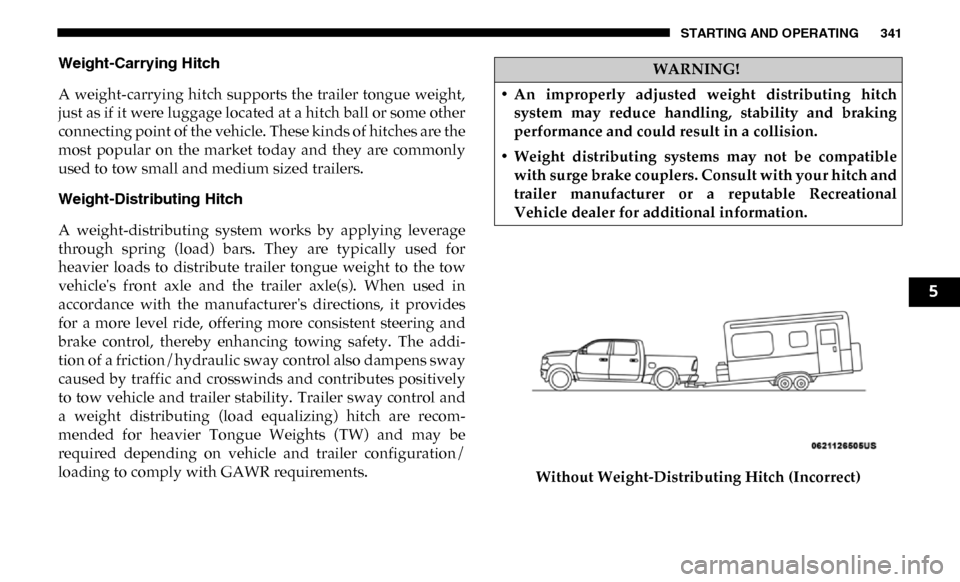
loading to comply with GAWR requirements. Without Weight-Distributing Hitch (Incorrect)WARNING!
• An improperly adjusted weight distributing hitch system may reduce handling, stability and braking
performance and could result in a collision.
• Weight distributing systems may not be compatible with surge brake couplers. Consult with your hitch and
trailer manufacturer or a reputable Recreational
Vehicle dealer for additional information.
5
Page 344 of 607
342 STARTING AND OPERATING
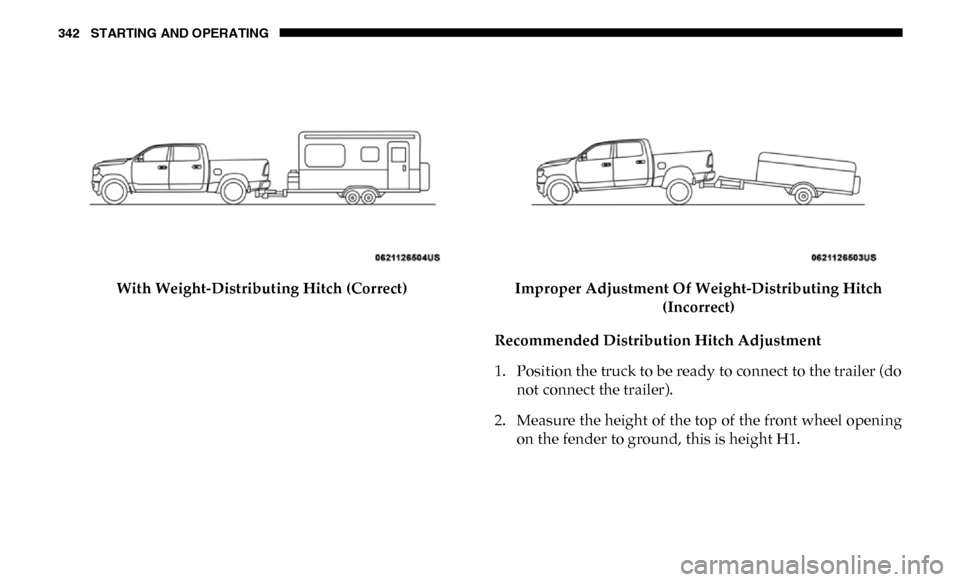
With Weight-Distributing Hitch (Correct)Improper Adjustment Of Weight-Distributing Hitch
(Incorrect)
Recommended Distribution Hitch Adjustment
1. Position the truck to be ready to connect to the trailer (do not connect the trailer).
2. Measure the height of the top of the front wheel opening on the fender to ground, this is height H1.
Page 345 of 607
STARTING AND OPERATING 343
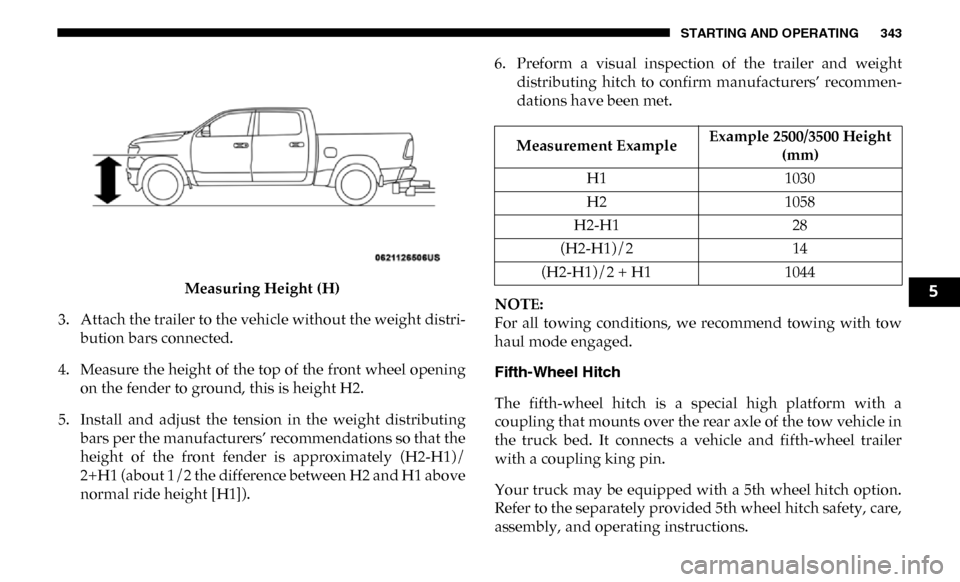
Measuring Height (H)
3. Attach the trailer to the vehicle without the weight distri -
bution bars connected.
4. Measure the height of the top of the front wheel opening on the fender to ground, this is height H2.
5. Install and adjust the tension in the weight distributing bars per the manufacturers’ recommendations so that the
height of the front fender is approximately (H2-H1)/
2+H1 (about 1/2 the difference between H2 and H1 above
normal ride height [H1]). 6. Preform a visual inspection of the trailer and weight
distributing hitch to confirm manufacturers’ recommen -
dations have been met.
NOTE:
For all towing conditions, we recommend towing with tow
haul mode engaged.
Fifth-Wheel Hitch
The fifth-wheel hitch is a special high platform with a
coupling that mounts over the rear axle of the tow vehicle in
the truck bed. It connects a vehicle and fifth-wheel trailer
with a coupling king pin.
Your truck may be equipped with a 5th wheel hitch option.
Refer to the separately provided 5th wheel hitch safety, care,
assembly, and operating instructions.
Measurement Example Example 2500/3500 Height
(mm)
H1 1030
H2 1058
H2-H1 28
(H2-H1)/2 14
(H2-H1)/2 + H1 1044
5
Page 351 of 607
STARTING AND OPERATING 349
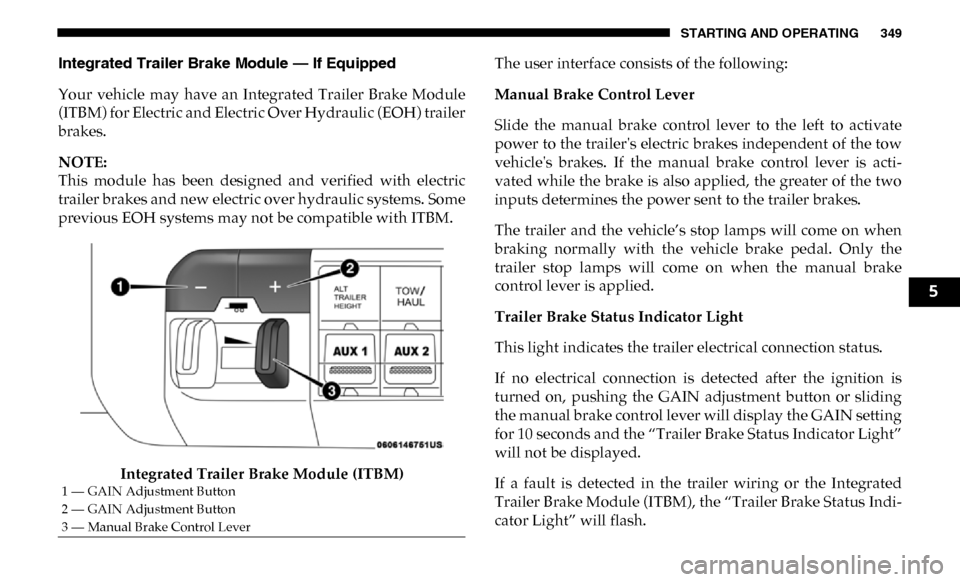
Integrated Trailer Brake Module — If Equipped
Your vehicle may have an Integrated Trailer Brake Module
(ITBM) for Electric and Electric Over Hydraulic (EOH) trailer
brakes.
NOTE:
This module has been designed and verified with electric
trailer brakes and new electric over hydraulic systems. Some
previous EOH systems may not be compatible with ITBM.Integrated Trailer Brake Module (ITBM) The user interface consists of the following:
Manual Brake Control Lever
Slide the manual brake control lever to the left to activate
power to the trailer's electric brakes independent of the tow
vehicle's brakes. If the manual brake control lever is acti
-
vated while the brake is also applied, the greater of the two
inputs determines the power sent to the trailer brakes.
The trailer and the vehicle’s stop lamps will come on when
braking normally with the vehicle brake pedal. Only the
trailer stop lamps will come on when the manual brake
control lever is applied.
Trailer Brake Status Indicator Light
This light indicates the trailer electrical connection status.
If no electrical connection is detected after the ignition is
turned on, pushing the GAIN adjustment button or sliding
the manual brake control lever will display the GAIN setting
for 10 seconds and the “Trailer Brake Status Indicator Light”
will not be displayed.
If a fault is detected in the trailer wiring or the Integrated
Trailer Brake Module (ITBM), the “Trailer Brake Status Indi -
cator Light” will flash.
1 — GAIN Adjustment Button
2 — GAIN Adjustment Button
3 — Manual Brake Control Lever
5