instrument panel RAM CHASSIS CAB 2009 User Guide
[x] Cancel search | Manufacturer: RAM, Model Year: 2009, Model line: CHASSIS CAB, Model: RAM CHASSIS CAB 2009Pages: 429, PDF Size: 3.51 MB
Page 77 of 429
Airbag Warning Light
The airbag warning light should come on, and remain on,
for six to eight seconds as a bulb check when the ignition
switch is first turned ON. If the light is not lit during
starting, see your authorized dealer. If the light stays on,
flickers or comes on while driving, have the system
checked by an authorized dealer. If there is a problem
with the airbag warning light, the seat belt light will
flash.
Safety Checks You Should Make Outside The
Vehicle
Tires
Examine tires for tread wear or uneven wear patterns.
Check for stones, nails, glass or other objects lodged in
the tread.
Inspect for tread cuts or sidewall cracks. Check wheel
nuts for tightness and tires for proper pressure.
Lights
Check the operation of all exterior lights. Check turn
signal and high beam indicator lights on the instrument
panel.
Door Latches
Check for positive closing, latching and locking.
Fluid Leaks
Check area under vehicle after overnight parking for fuel,
water, oil, or other fluid leaks. Also, if fuel fumes are
detected the cause should be located and corrected.
THINGS TO KNOW BEFORE STARTING YOUR VEHICLE 75
2
Page 82 of 429

\2Cupholders .......................... 146
\4 Front Instrument Panel Cupholders
(40–20–40 Seats) ..................... 146
\4 Front Instrument Panel Cupholders
(Bucket Seats) ....................... 147
\4 Rear Cupholder (Quad Cab\3)—
If Equipped ........................ 147
\2 Storage ............................. 148
\4 Center Storage Compartment
(40–20–40 Seat) — If Equipped ........... 148
\4 Center Storage Compartment
(Bucket Seats) — If Equipped ............ 150\4
Storage And Seats (Quad Cab\3 Models).... 152
\4 Plastic Grocery Bag Retainers ............ 153
\2 Rear Window Features .................. 153
\4 Rear Window Defroster And Heated
Sideview Mirrors — If Equipped ......... 153
\4 Power Sliding Rear Window —
If Equipped ........................ 154
\4 Sliding Rear Window — If Equipped ...... 154
\2 Fold Flat Load Floor — If Equipped ........ 154
80 UNDERSTANDING THE FEATURES OF YOUR VEHICLE
Page 86 of 429

Set the top switch to the left or right for the left or right
mirror, and set it to the center off position to prevent
accidentally moving a mirror when you are finished
adjusting the mirror. To adjust a mirror, select left or right
with the top switch, and press one of the four arrows for
the direction you want the mirror to move.Heated Power Mirrors — If Equipped
Heated mirrors are automatically activated when you
depress the rear window defroster switch located on the
instrument panel. Refer to “Rear Window Features” in
this Section, for further information.
Trailer Towing Mirrors — If Equipped
These mirrors are designed with an adjustable mirror
head to provide a greater vision range when towing
extra-wide loads. To change position inboard or out-
board, the mirror head should be rotated (flipped in or
out).
Power Mirror Movement
84 UNDERSTANDING THE FEATURES OF YOUR VEHICLE
Page 105 of 429

•After the\6Ready\6prompt and the following beep, say
\6Setup Confirmations.\6 The UConnect\3system will
play the current confirmation prompt status and you
will be given the choice to change it.
Phone and Network Status Indicators
If available on the radio and/or on a premium display
such as the instrument panel cluster, and supported by
your cellular phone, the UConnect\3 system will provide
notification to inform you of your phone and network
status when you are attempting to make a phone call
using UConnect\3. The status is given for roaming, net-
work signal strength, phone battery strength, etc.
Dialing Using the Cellular Phone Keypad
You can dial a phone number with your cellular phone
keypad and still use the UConnect\3 system (while dial-
ing via the cellular phone keypad, the user must exercise
caution and take precautionary safety measures). By
dialing a number with your paired Bluetooth \3cellular phone, the audio will be played through your vehicle’s
audio system. The UConnect\3
system will work the same
as if you dial the number using voice recognition.
NOTE: Certain brands of cellular phones do not send
the dial ring to the UConnect\3 system to play it on the
vehicle audio system, so you will not hear it. Under this
situation, after successfully dialing a number the user
may feel that the call did not go through even though the
call is in progress. Once your call is answered, you will
hear the audio.
Mute/Un-Mute (Mute OFF)
When you mute the UConnect\3 system, you will still be
able to hear the conversation coming from the other
party, but the other party will not be able to hear you. In
order to mute the UConnect\3 system:
•Press the VOICE RECOGNITION button.
•Following the beep, say\6Mute.\6
UNDERSTANDING THE FEATURES OF YOUR VEHICLE 103
3
Page 122 of 429
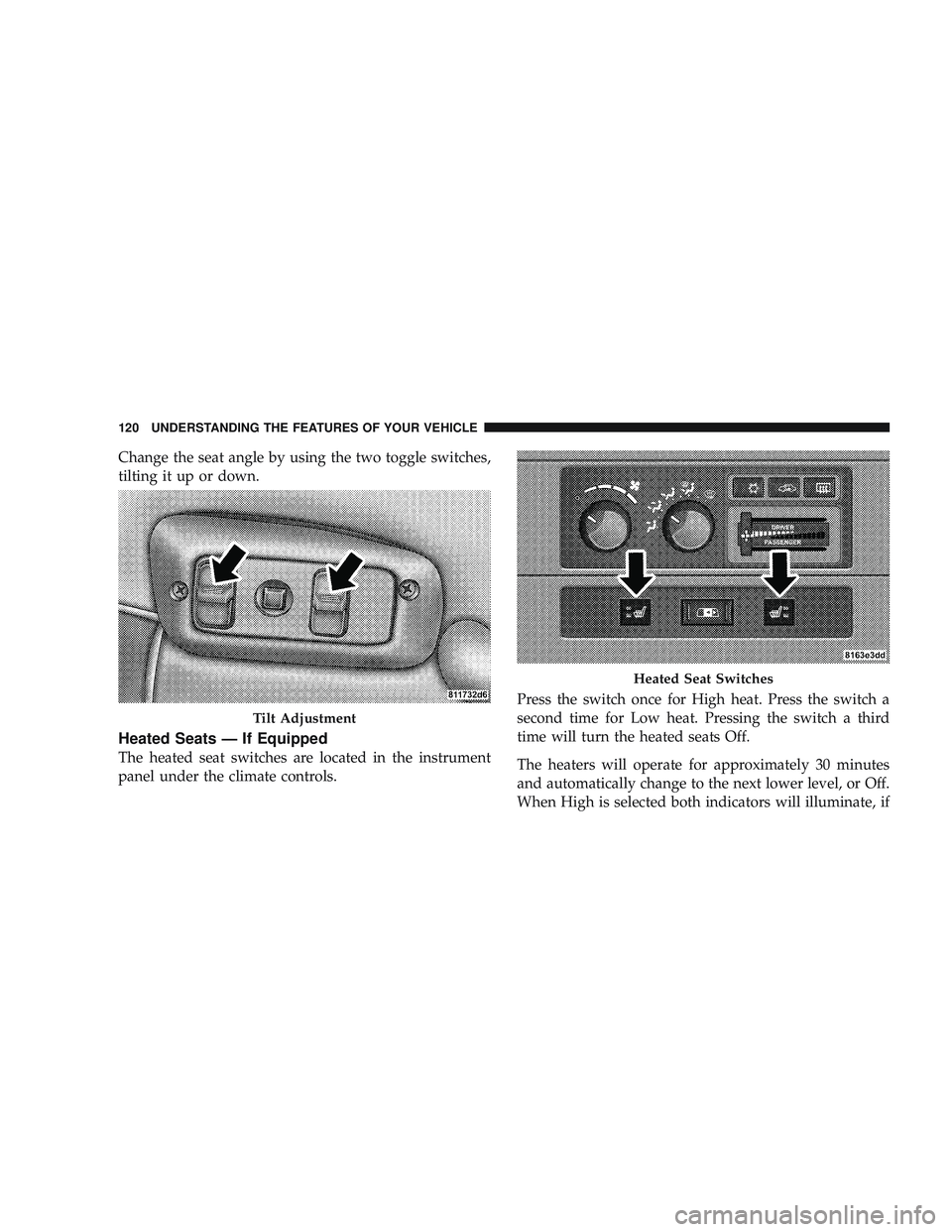
Change the seat angle by using the two toggle switches,
tilting it up or down.
Heated Seats — If Equipped
The heated seat switches are located in the instrument
panel under the climate controls.Press the switch once for High heat. Press the switch a
second time for Low heat. Pressing the switch a third
time will turn the heated seats Off.
The heaters will operate for approximately 30 minutes
and automatically change to the next lower level, or Off.
When High is selected both indicators will illuminate, if
Tilt Adjustment
Heated Seat Switches
120 UNDERSTANDING THE FEATURES OF YOUR VEHICLE
Page 123 of 429
Low is selected just the lower light will illuminate.
Flashing indicator lights on the switch indicate that the
heated seat system needs servicing. See your authorized
dealer.
WARNING!
•Persons who are unable to feel pain to the skin
because of advanced age, chronic illness, diabetes,
spinal cord injury, medication, alcohol use, ex-
haustion or other physical condition must exercise
care when using the seat heater. It may cause burns
even at low temperatures, especially if used for
long periods of time.
•Do not place anything on the seat that insulates
against heat, such as a blanket or cushion. This
may cause the seat heater to overheat.
TO OPEN AND CLOSE THE HOOD
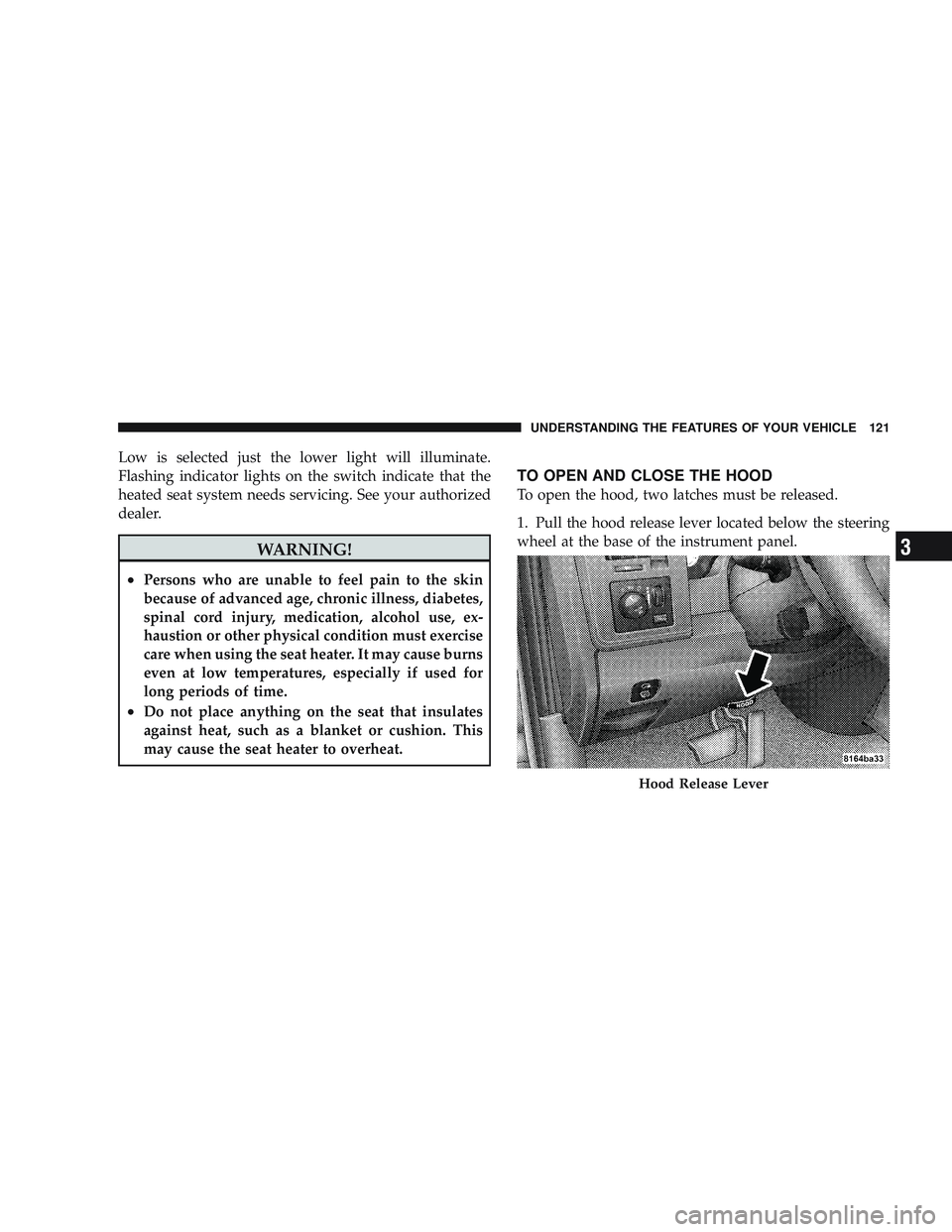
To open the hood, two latches must be released.
1. Pull the hood release lever located below the steering
wheel at the base of the instrument panel.
Hood Release Lever
UNDERSTANDING THE FEATURES OF YOUR VEHICLE 121
3
Page 125 of 429

LIGHTS
The headlight switch is located on the left side of the
instrument panel next to the steering wheel.
Interior Lights
Courtesy and dome lights are turned on when the front
doors are opened, when the dimmer control (rotatingwheel on the right side of the switch) is rotated to the
upward detent position, or if equipped, when the UN-
LOCK button is pressed on the Remote Keyless Entry
(RKE) transmitter. When a door is open and the interior
lights are on, rotating the dimmer control all the way
down to the OFF detent will cause all the interior lights to
go out. This is also known as the
\6Party\6mode because it
allows the doors to stay open for extended periods of
time without discharging the vehicle’s battery.
The brightness of the instrument panel lighting can be
regulated by rotating the dimmer control up (brighter) or
down (dimmer). When the headlights are on you can
supplement the brightness of the odometer, trip odom-
eter, radio and overhead console by rotating the control
up until you hear a click. This feature is termed the
“Parade” mode and is useful when headlights are re-
quired during the day.
Headlight Switch Location
UNDERSTANDING THE FEATURES OF YOUR VEHICLE 123
3
Page 127 of 429

The headlight delay time is programmable on vehicles
equipped with the Electronic Vehicle Information Center
(EVIC). For details, refer to “Personal Settings
(Customer-Programmable Features)” under “Overhead
Console with Electronic Vehicle Information Center
(EVIC) – If Equipped” in Section 3.
Headlights, Parking Lights and Panel Lights
When the headlight switch is rotated to the first
position, the parking lights, tail lights, side
marker lights, license plate light and instrument
panel lights are all turned on. The headlights will turn on
when the switch is rotated to the second position.
Your vehicle is equipped with plastic headlight lenses
that are lighter and less susceptible to stone breakage
than glass headlights.
Plastic is not as scratch resistant as glass and therefore
different lens cleaning procedures must be followed.
Light Switch Rotation
UNDERSTANDING THE FEATURES OF YOUR VEHICLE 125
3
Page 147 of 429
CAUTION!
•Many accessories that can be plugged in draw
power from the vehicle’s battery, even when not in
use (i.e., cellular phones, etc.). Eventually, if
plugged in long enough, the vehicle’s battery will
discharge sufficiently to degrade battery life
and/or prevent engine starting.
•Accessories that draw higher power (i.e., coolers,
vacuum cleaners, lights, etc.), will discharge the
battery even more quickly. Only use these inter-
mittently and with greater caution.
•After the use of high power draw accessories, or
long periods of the vehicle not being started (with
accessories still plugged in), the vehicle must be
driven a sufficient length of time to allow the
generator to recharge the vehicle’s battery.
CIGAR LIGHTER AND ASH RECEIVER
The removable ash receiver is located in the instrument
panel cupholder tray.
The cigar lighter is located on the instrument panel,
above and to the left of the ash receiver.
As a child safety precaution, the lighter only operates
with the ignition switch ON. It heats when pushed in and
pops out automatically when ready for use.To preserve
the heating element, do not hold the lighter in the
heating position.
UNDERSTANDING THE FEATURES OF YOUR VEHICLE 145
3
Page 148 of 429

CUPHOLDERS
Front Instrument Panel Cupholders (40–20–40
Seats)
Your new vehicle is equipped with two adjustable cup-
holders. The cupholder is opened by pulling on thecupholder door handle, on the front surface. Each open-
ing in the cupholder is adjustable and will hold cups and
mugs of various sizes.
To secure the cup, place the cup to be held into one of the
cup wells and then push the cupholder arm toward the
cup until it is held stable.
Ash Receiver
Cupholder Door Handle
146 UNDERSTANDING THE FEATURES OF YOUR VEHICLE