tow RAM CHASSIS CAB 2011 User Guide
[x] Cancel search | Manufacturer: RAM, Model Year: 2011, Model line: CHASSIS CAB, Model: RAM CHASSIS CAB 2011Pages: 472, PDF Size: 7.38 MB
Page 149 of 472
To prevent freeze-up of your windshield washer system
in cold weather, select a solution or mixture that meets or
exceeds the temperature range of your climate. This
rating information can be found on most washer fluid
containers.
WARNING!Sudden loss of visibility through the windshield
could lead to an accident. You might not see other
vehicles or other obstacles. To avoid sudden icing of
the windshield during freezing weather, warm the
windshield with the defroster before and during
windshield washer use. Mist Feature
Push the washer knob, located on the end of the multi-
function lever, inward to the first detent. The wipers will
cycle one time and automatically shut off to clear road
mist or spray from a passing vehicle.
TILT STEERING COLUMN
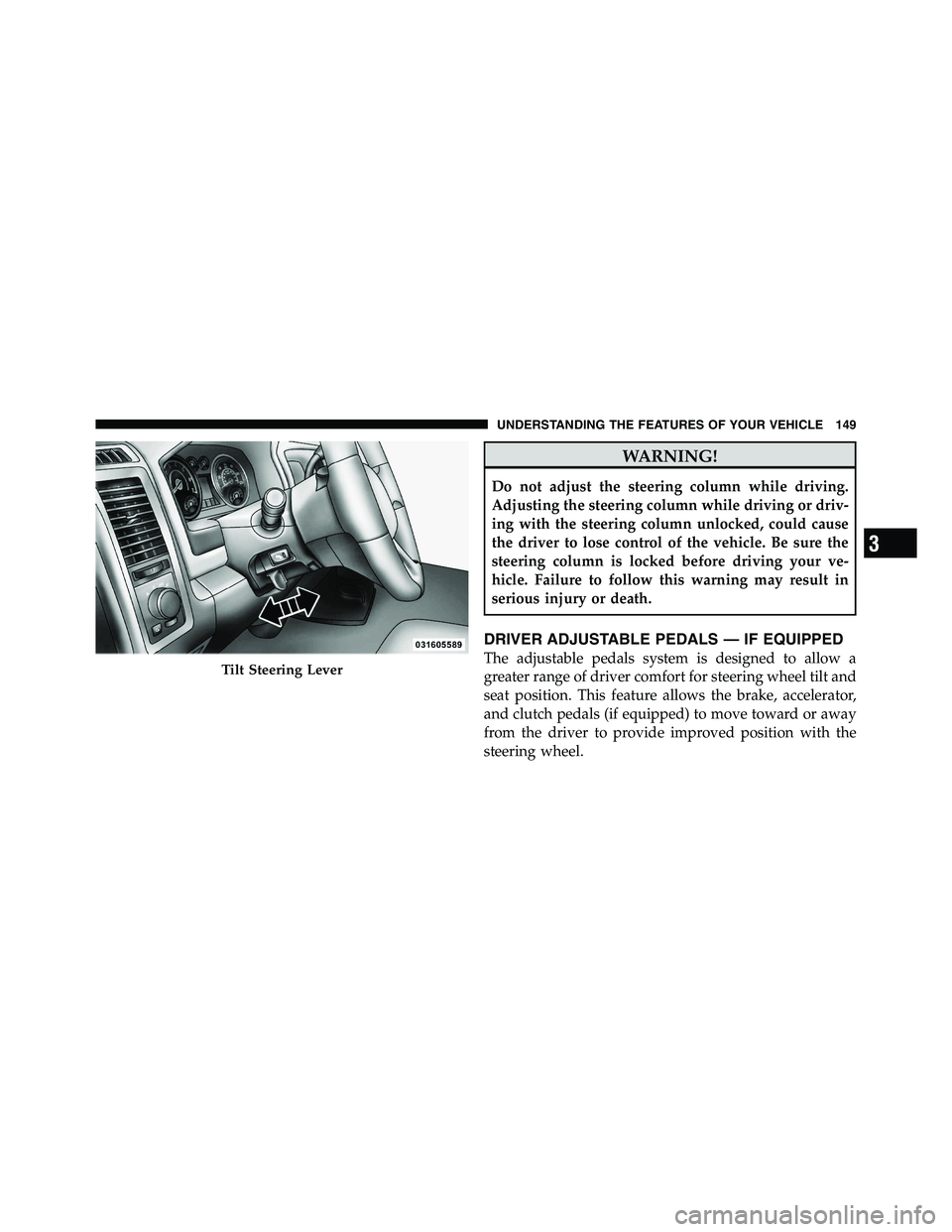
This feature allows you to tilt the steering column
upward or downward. The tilt lever is located on the
steering column, below the multifunction lever.
Pull the lever toward the steering wheel to unlock the
steering column. With one hand firmly on the steering
wheel, move the steering column up or down, as desired.
Release the lever to lock the steering column firmly in
place.148 UNDERSTANDING THE FEATURES OF YOUR VEHICLE
Page 150 of 472
WARNING!Do not adjust the steering column while driving.
Adjusting the steering column while driving or driv-
ing with the steering column unlocked, could cause
the driver to lose control of the vehicle. Be sure the
steering column is locked before driving your ve-
hicle. Failure to follow this warning may result in
serious injury or death.
DRIVER ADJUSTABLE PEDALS — IF EQUIPPED
The adjustable pedals system is designed to allow a
greater range of driver comfort for steering wheel tilt and
seat position. This feature allows the brake, accelerator,
and clutch pedals (if equipped) to move toward or away
from the driver to provide improved position with the
steering wheel.Tilt Steering Lever
3 UNDERSTANDING THE FEATURES OF YOUR VEHICLE 149
Page 154 of 472
To Activate
Push the ON/OFF button (located in the end of the lever)
once and the cruise indicator light (located in the mes-
sage window of the cluster) will illuminate showing that
the Electronic Speed Control system is on. To turn the
Electronic Speed Control system off, push the ON/OFF
button a second time and both the Electronic Speed
Control system and indicator will turn off.
WARNING!Leaving the Electronic Speed Control system on
when not in use is dangerous. You could accidently
set the system or cause it to go faster than you want.
You could lose control and have an accident. Always
leave the Electronic Speed Control system off when
you are not using it. To Set a Desired Speed
Turn the Electronic Speed Control ON. When the vehicle
has reached the desired speed, press the SET lever
downward and then release. Lift your foot off the accel-
erator and the vehicle will operate at the selected speed.
Deactivating Electronic Speed Control
A soft tap on the brake pedal or pulling the Electronic
Speed Control lever (CANCEL) toward you will deacti-
vate the Electronic Speed Control without erasing the set
speed memory. Pushing the ON/OFF button to the OFF
position or turning OFF the ignition erases the set speed
memory.
To Resume Speed
To resume a previously set speed, raise the Electronic
Speed Control lever (RESUME ACCEL) upwards and
release. Resume can be used at any speed above 30 mph
(50 km/h). 3 UNDERSTANDING THE FEATURES OF YOUR VEHICLE 153
Page 180 of 472
INSTRUMENT CLUSTER DESCRIPTIONS
1. Tachometer
The Tachometer indicates engine speed in revolutions per
minute.
CAUTION!Do not operate the engine with the tachometer
pointer at high RPM for extended periods. Engine
damage may occur.
2. Turn Signal Indicators
The arrow will flash with the exterior turn signal
when the turn signal lever is operated.
NOTE:
• A continuous chime will sound if the vehicle is driven
more than 1 mile (1.6 km) with either turn signal on. • Check for an inoperative outside light bulb if either
indicator flashes at a rapid rate.
3. Fuel Gauge
Shows level of fuel in tank when ignition switch is in the
ON/RUN position.
4. Temperature Gauge
The temperature gauge shows engine coolant tempera-
ture. Any reading within the normal range indicates that
the engine cooling system is operating satisfactorily.
The gauge pointer will likely indicate a higher tempera-
ture when driving in hot weather, up mountain grades,
or when towing a trailer. It should not be allowed to
exceed the upper limits of the normal operating range.
4 UNDERSTANDING YOUR INSTRUMENT PANEL 179
Page 182 of 472

If a problem is detected, the light will come on while the
engine is running. Cycle the ignition key when the
vehicle has completely stopped and the shift lever is
placed in the PARK position, the light should turn off.
If the light remains lit with the engine running, your
vehicle will usually be drivable; however, see an autho-
rized dealer for service as soon as possible. If the light is
flashing when the engine is running, immediate service is
required and you may experience reduced performance,
an elevated/rough idle or engine stall and your vehicle
may require towing.
For vehicles equipped with a premium cluster this indi-
cator will display in the Electronic Vehicle Information
Center (EVIC). Refer to ”Electronic Vehicle Information
Center (EVIC) — If Equipped” for further information. 8. 4WD Indicator
This light indicates the vehicle is in four-wheel
drive and 4LOCK. 4WD allows all four wheels
to receive torque from the engine simulta-
neously.
9. SERV (Service) 4WD
The SERV 4WD light monitors the electric shift
four-wheel drive system. If the SERV 4WD
light stays on or comes on during driving, it
means that the four-wheel drive system is not
functioning properly and that service is required.
For vehicles equipped with a premium cluster this indi-
cator will display in the Electronic Vehicle Information
Center (EVIC). Refer to ”Electronic Vehicle Information
Center (EVIC) — If Equipped” for further information.
4 UNDERSTANDING YOUR INSTRUMENT PANEL 181
Page 183 of 472
10. TOW/HAUL
The TOW HAUL button is located on the
center stack switch bank. This light will illumi-
nate when TOW HAUL mode is selected
11. Vehicle Security Light — If Equipped
This light will flash at a fast rate for approxi-
mately 15 seconds, when the vehicle security
alarm is arming, and then will flash slowly
until the vehicle is disarmed.
12. Oil Pressure Gauge — If Equipped
The pointer should always indicate some oil pressure
when the engine is running. A continuous high or low
reading under normal driving conditions may indicate a
lubrication system malfunction. Immediate service
should be obtained from an authorized dealer. 13. Odometer/Trip Odometer Button
Press this button to toggle between the odometer and the
trip odometer display. Holding the button in resets the
trip odometer reading when in trip mode.
14. Odometer / Electronic Vehicle Information Center
(EVIC) Display Area
Odometer Display
The odometer shows the total distance the vehicle has
been driven. Regulations require that upon transfer of
vehicle ownership, the seller certify to the purchaser the
correct mileage that the vehicle has been driven. If your
odometer needs to be repaired or serviced, the repair
technician should leave the odometer reading the same
as it was before the repair or service. If s/he cannot do so,
then the odometer must be set at zero, and a sticker must
be placed in the door jamb stating what the mileage was
before the repair or service. It is a good idea for you to
make a record of the odometer reading before the repair/182 UNDERSTANDING YOUR INSTRUMENT PANEL
Page 187 of 472
17. Low Fuel Light
When the fuel level reaches approximately 3.0 gal
(11.0 L) this light will turn on, and remain on until
fuel is added.
For vehicles equipped with a premium cluster this indi-
cator will display in the Electronic Vehicle Information
Center (EVIC). Refer to ”Electronic Vehicle Information
Center (EVIC) — If Equipped” for further information.
18. High Beam Indicator
This indicator shows that headlights are on high
beam. Push the multifunction lever forward to
switch the headlights to high beam, and pull toward
yourself (normal position) to return to low beam.
19. Voltmeter — If Equipped
When the engine is running, the gauge indicates the
electrical system voltage. The pointer should stay within
the normal range if the battery is charged. If the pointer moves to either extreme left or right and remains there
during normal driving, the electrical system should be
serviced.
NOTE: The voltmeter may show a gauge fluctuation at
various engine temperatures. This cycling operation is
caused by the post-heat cycle of the intake manifold
heater system. The number of cycles and the length of the
cycling operation is controlled by the engine control
module. Post-heat operation can run for several minutes,
and then the electrical system and voltmeter needle will
stabilize.
20. Cargo Light
The cargo light will illuminate when the cargo
light is activated by pressing the cargo light
button on the headlight switch.186 UNDERSTANDING YOUR INSTRUMENT PANEL
Page 190 of 472
Center (EVIC). Refer to ”Electronic Vehicle Information
Center (EVIC) — If Equipped” for further information.
23. Malfunction Indicator Light (MIL)
The Malfunction Indicator Light (MIL) is part of
an onboard diagnostic (OBDII) system which
monitors the emissions and engine control sys-
tem. If the vehicle is ready for emissions testing, the light
will come on when the ignition is first turned on and
remain on, as a bulb check, until the engine is started. If
the vehicle is not ready for emissions testing the light will
come on when the ignition is first turned on and remain
on for 15 seconds, then blink for 5 seconds, and remain
on until the vehicle is started. If the bulb does not come
on during starting, have the condition investigated
promptly.
If this light comes on and remains on while driving, it
suggests a potential engine control problem and the need
for system service. Although your vehicle will usually be drivable and not
need towing, see your authorized dealer for service as
soon as possible.
CAUTION!Prolonged driving with the MIL on could cause
damage to the engine control system. It also could
affect fuel economy and drivability. If the MIL is
flashing, severe catalytic converter damage and
power loss will soon occur. Immediate service is
required.
4 UNDERSTANDING YOUR INSTRUMENT PANEL 189
Page 192 of 472
27. Transmission Temperature Warning Light
This light indicates that there is excessive trans-
mission fluid temperature that might occur
with severe usage such as trailer towing. It may
also occur when operating the vehicle in a high
torque converter slip condition, such as 4-wheel-drive
operation (e.g., snow plowing, off- road operation). If this
light comes on, stop the vehicle and run the engine at idle
or faster, with the transmission in NEUTRAL until the
light goes off.
CAUTION!Continuous driving with the Transmission Tempera-
ture Warning Light illuminated will eventually cause
severe transmission damage or transmission failure. WARNING!Continued operation with the Transmission Tem-
perature Warning Light illuminated could cause the
fluid to boil over, come in contact with hot engine or
exhaust components causing a fire that may result in
personal injury.
For vehicles equipped with a premium cluster this warn-
ing light will display in the Electronic Vehicle Informa-
tion Center (EVIC). Refer to ”Electronic Vehicle Informa-
tion Center (EVIC) — If Equipped” for further
information.
28. Seat Belt Reminder Light
When the ignition switch is first turned to ON/
RUN, this light will turn on for five to eight
seconds as a bulb check. During the bulb check, if
the driver’s seat belt is unbuckled, a chime will sound.
After the bulb check or when driving, if the driver’s seat 4 UNDERSTANDING YOUR INSTRUMENT PANEL 191
Page 198 of 472
• Memory System Unavailable — Seatbelt Buckled
• Memory 1 Profile Recall
• Memory 2 Profile Recall
• Adjustable Pedals Unavailable — Vehicle in Reverse
• Adjustable Pedals Unavailable — Cruise Engaged
• To Tow Vehicle Safely, Read Neutral Shift Procedure in
Owners Manual
EVIC Warning Lights
• Door Ajar
This light will turn on to indicate that one or
more door may be ajar.
• Oil Pressure Warning Light
This light indicates low engine oil pressure. The
light should turn on momentarily when the engine is started. If the light turns on while driving, stop the
vehicle and shut off the engine as soon as possible. A
chime will sound for four minutes when this light turns
on.
Do not operate the vehicle until the cause is corrected.
This light does not show how much oil is in the engine.
The engine oil level must be checked under the hood.
• Charging System Light
This light shows the status of the electrical charg-
ing system. The light should come on when the
ignition switch is first turned ON and remain on briefly
as a bulb check. If the light stays on or comes on while
driving, turn off some of the vehicle’s non-essential
electrical devices or increase engine speed (if at idle). If
the charging system light remains on, it means that the
vehicle is experiencing a problem with the charging
system. Obtain SERVICE IMMEDIATELY. See an autho-
rized dealer. 4 UNDERSTANDING YOUR INSTRUMENT PANEL 197