steering RAM CHASSIS CAB 2019 User Guide
[x] Cancel search | Manufacturer: RAM, Model Year: 2019, Model line: CHASSIS CAB, Model: RAM CHASSIS CAB 2019Pages: 607, PDF Size: 12.68 MB
Page 97 of 607
GETTING TO KNOW YOUR VEHICLE 95
Manual Sliding Rear Window — If Equipped
A locking device in the center of the window helps to
prevent entry from the rear of the vehicle. Squeeze the lock
to release the window.
Wind Buffeting
Wind buffeting can be described as the perception of pres -
sure on the ears or a helicopter-type sound in the ears. Your
vehicle may exhibit wind buffeting with the windows down,
or the sunroof (if equipped) in certain open or partially open
positions. This is a normal occurrence and can be minimized.
If the buffeting occurs with the rear windows open, open the
front and rear windows together to minimize the buffeting.
If the buffeting occurs with the sunroof open, adjust the
sunroof opening to minimize the buffeting or open any
window. HOOD
To Open The Hood
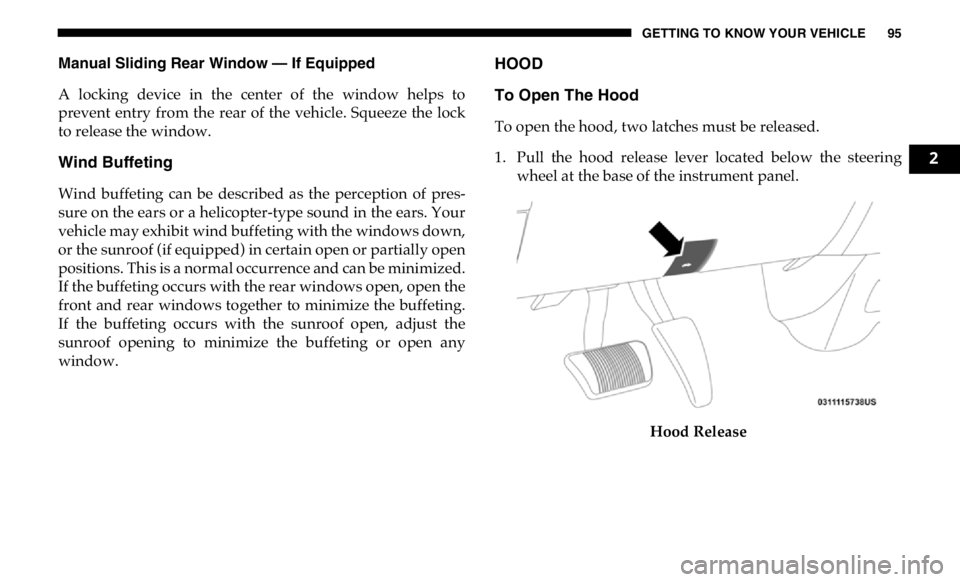
To open the hood, two latches must be released.
1. Pull the hood release lever located below the steering
wheel at the base of the instrument panel.
Hood Release 2
Page 130 of 607

128 GETTING TO KNOW YOUR INSTRUMENT PANEL
INSTRUMENT CLUSTER DISPLAY
Your vehicle will be equipped with an instrument cluster
display, which offers useful information to the driver. With
the ignition in the STOP/OFF mode, opening/closing of a
door will activate the display for viewing, and display the
total miles, or kilometers, in the odometer. Your instrument
cluster display is designed to display important information
about your vehicle’s systems and features. Using a driver
interactive display located on the instrument panel, your
instrument cluster display can show you how systems are
working and give you warnings when they are not. The
steering wheel mounted controls allow you to scroll through
the main menus and submenus. You can access the specific
information you want and make selections and adjustments. Instrument Cluster Display Controls
The instrument cluster display features a driver-interactive
display that is located in the instrument cluster.
Base Instrument Cluster DisplayCAUTION!
Driving with a hot engine cooling system could damage
your vehicle. If the temperature gauge reads “H,” pull
over and stop the vehicle. Idle the vehicle with the air
conditioner turned off until the pointer drops back into
the normal range. If the pointer remains on the “H,” turn
the engine off immediately and call an authorized dealer
for service.
1 – Instrument Cluster Display Controls
2 – Instrument Cluster Display Screen
Page 131 of 607
GETTING TO KNOW YOUR INSTRUMENT PANEL 129
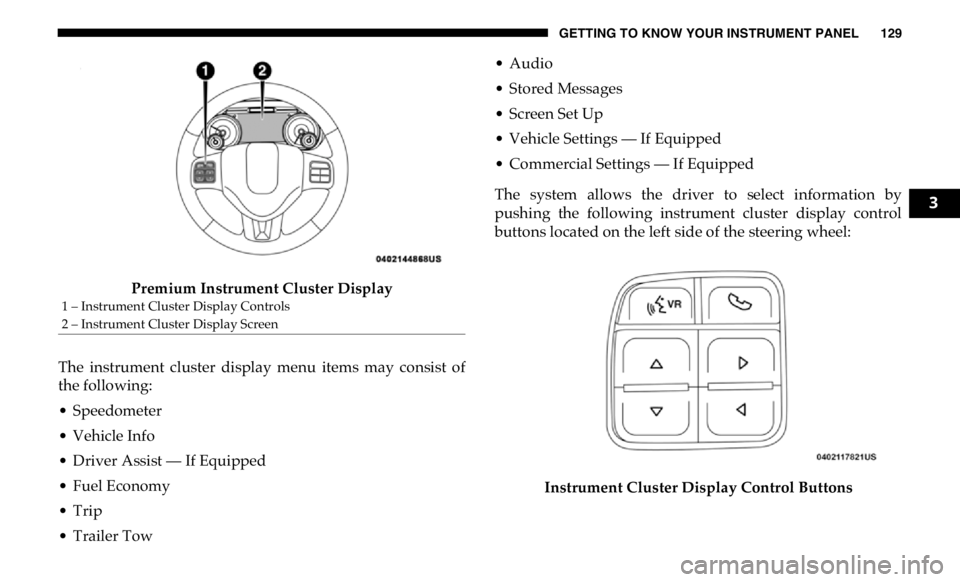
Premium Instrument Cluster Display
The instrument cluster display menu items may consist of
the following:
• Speedometer
• Vehicle Info
• Driver Assist — If Equipped
• Fuel Economy
• Trip
• Trailer Tow • Audio
• Stored Messages
• Screen Set Up
• Vehicle Settings — If Equipped
• Commercial Settings — If Equipped
The system allows the driver to select information by
pushing the following instrument cluster display control
buttons located on the left side of the steering wheel:
Instrument Cluster Display Control Buttons1 – Instrument Cluster Display Controls
2 – Instrument Cluster Display Screen 3
Page 132 of 607

130 GETTING TO KNOW YOUR INSTRUMENT PANEL
• Up Arrow Button
Push and release the up arrow button to scroll
upward through the main menu items, submenu
screen, and vehicle settings.
• Down Arrow Button
Push and release the down arrow button to scroll
downward through the main menu items,
submenu screen, and vehicle settings.
• Right Arrow Button
Push and release the right arrow button to access/
select the information screens or submenu screens
of a main menu item. Push and hold the RIGHT arrow
button for two seconds to reset displayed/selected
features that can be reset.
• Left Arrow Button
Push and release the left arrow button to access/
select the information screens, submenu screens of
a main menu item, or to return to the main menu. Oil Life Reset
Your vehicle is equipped with an engine oil change indicator
system. The “Oil Change Required” message will display in
the instrument cluster display after a single chime has
sounded, to indicate the next scheduled oil change interval.
The engine oil change indicator system is duty cycle based,
which means the engine oil change interval may fluctuate,
dependent upon your personal driving style.
NOTE:
Use the steering wheel instrument cluster display controls
for the following procedure.
Page 134 of 607

132 GETTING TO KNOW YOUR INSTRUMENT PANEL
Vehicle Info
Push and release the up or down arrow button until the
Vehicle Info menu item is highlighted in the instrument
cluster display. Push and release the right arrow button to
enter the submenus items of Vehicle Info. Follow the direc -
tional prompts to access or reset any of the following Vehicle
Info submenu items:
• Tire Pressure
• Coolant Temperature — If Equipped
• Transmission Temperature — If Equipped
• Oil Temperature — If Equipped
• Oil Pressure
• Exhaust Brake — If Equipped
• Turbo Boost — If Equipped
• Diesel Particulate Filter — If Equipped
• Oil Life
• Fuel Filter Life — If Equipped
• Battery Voltage
• Gauge Summary — If Equipped
• Engine Hours Driver Assist — If Equipped
The Driver Assist menu displays the status of the ACC
system.
Push and release the up or down arrow button until the
Driver Assist menu is displayed in the instrument cluster
display.
Adaptive Cruise Control (ACC) Feature
The instrument cluster display displays the current ACC
system settings. The information displayed depends on ACC
system status.
Push the Adaptive Cruise Control (ACC) on/off button
(located on the steering wheel) until one of the following
displays in the instrument cluster display:
Adaptive Cruise Control Off
When ACC is deactivated, the display will read “Adaptive
Cruise Control Off.”
Adaptive Cruise Control Ready
When ACC is activated but the vehicle speed setting has not
been selected, the display will read “Adaptive Cruise
Control Ready.”
Page 135 of 607

GETTING TO KNOW YOUR INSTRUMENT PANEL 133
Push the SET + or the SET- button (located on the steering
wheel) and the following will display in the instrument
cluster display:
ACC SET
When ACC is set, the set speed will display in the instrument
cluster.
The ACC screen may display once again if any ACC activity
occurs, which may include any of the following:
• Distance Setting Change
• System Cancel
• Driver Override
• System Off
• ACC Proximity Warning
• ACC Unavailable Warning
For further information, refer to “Adaptive Cruise Control
(ACC) — If Equipped” in “Starting And Operating.” Fuel Economy
Push and release the up or down arrow button until the Fuel
Economy menu item is highlighted in the instrument cluster
display. Push and Hold the right arrow button to reset
Average Fuel Economy.
• Current Fuel Economy Gauge
• Average Fuel Economy Value
• Range To Empty
• Fuel Tank Levels — If Equipped
Trip A/Trip B
Push and release the up or down arrow button until the Trip
menu item is highlighted in the instrument cluster display.
Push and release the right arrow button to enter the
submenus of Trip A and Trip B. The Trip A or Trip B infor -
mation will display the following:
• Distance
• Average Fuel Economy
• Elapsed Time
Push and hold right arrow button to reset all information. 3
Page 154 of 607
152 GETTING TO KNOW YOUR INSTRUMENT PANEL
— Low Washer Fluid Warning Light — If Equipped
This warning light will illuminate when the windshield
washer fluid is low.
— Low Fuel Warning Light
When the fuel level reaches approximately 3.2 gal (12 L) this
light will turn on, and remain on until fuel is added.
A single warning chime will sound with Low Fuel Warning.
— Low Coolant Level Warning Light
This telltale will turn on to indicate the vehicle coolant level
is low.
— Loose Fuel Filler Cap Warning Light — If Equipped
This warning light will illuminate when the fuel filler cap is
loose. Properly close the filler cap to disengage the light. If
the light does not turn off, please see an authorized dealer. — Tire Pressure Monitoring System (TPMS) Warning
Light
The warning light switches on and a message is displayed to
indicate that the tire pressure is lower than the recom -
mended value and/or that slow pressure loss is occurring. In
these cases, optimal tire duration and fuel consumption may
not be guaranteed.
Should one or more tires be in the condition mentioned
above, the display will show the indications corresponding
to each tire.
Each tire, including the spare (if provided), should be checked
monthly when cold and inflated to the inflation pressure
recommended by the vehicle manufacturer on the vehicle
placard or tire inflation pressure label. (If your vehicle has tires
of a different size than the size indicated on the vehicle placard
or tire inflation pressure label, you should determine the
proper tire inflation pressure for those tires.) CAUTION!
Do not continue driving with one or more flat tires as
handling may be compromised. Stop the vehicle, avoiding
sharp braking and steering. If a tire puncture occurs, repair
immediately using the dedicated tire repair kit and contact
an authorized dealer as soon as possible.
Page 164 of 607

162 SAFETY
ABS is designed to function with the OEM tires. Modification
may result in degraded ABS performance.
Anti-Lock Brake Warning Light
The yellow “Anti-Lock Brake Warning Light” will turn on
when the ignition is turned to the ON/RUN mode and may
stay on for as long as four seconds.
If the “Anti-Lock Brake Warning Light” remains on or comes
on while driving, it indicates that the anti-lock portion of the
brake system is not functioning and that service is required. However, the conventional brake system will continue to
operate normally if the “Anti-Lock Brake Warning Light” is
on.
If the “Anti-Lock Brake Warning Light” is on, the brake
system should be serviced as soon as possible to restore the
benefits of anti-lock brakes. If the “Anti-Lock Brake Warning
Light” does not come on when the ignition is turned to the
ON/RUN mode, have the light repaired as soon as possible.
Electronic Brake Control System
Your vehicle is equipped with an advanced Electronic Brake
Control system (EBC). This system includes Electronic Brake
Force Distribution (EBD), Anti-Lock Brake System (ABS),
Brake Assist System (BAS), Hill Start Assist (HSA), Traction
Control System (TCS), Electronic Stability Control (ESC),
and Electronic Roll Mitigation (ERM). These systems work
together to enhance both vehicle stability and control in
various driving conditions.
Your vehicle may also be equipped with Trailer Sway
Control (TSC) and Hill Descent Control (HDC).• The ABS cannot prevent the natural laws of physics
from acting on the vehicle, nor can it increase braking
or steering efficiency beyond that afforded by the
condition of the vehicle brakes and tires or the traction
afforded.
• The ABS cannot prevent collisions, including those
resulting from excessive speed in turns, following
another vehicle too closely, or hydroplaning.
• The capabilities of an ABS equipped vehicle must
never be exploited in a reckless or dangerous manner
that could jeopardize the user’s safety or the safety of
others. WARNING! (Continued)
Page 167 of 607

SAFETY 165
Towing With HSA
HSA will also provide assistance to mitigate roll back while
towing a trailer. Disabling And Enabling HSA
This feature can be turned on or turned off. To change the
current setting, proceed as follows:
• If disabling HSA using your instrument cluster display,
refer to “Instrument Cluster Display” in “Getting To Know
Your Instrument Panel” for further information.
• If disabling HSA using Uconnect Settings, refer to “Ucon -
nect Settings” in “Multimedia” for further information.
For vehicles not equipped with an instrument cluster
display, perform the following steps:
1. Center the steering wheel (front wheels pointing straight
forward).
2. Shift the transmission into PARK.
3. Apply the parking brake.
4. Start the engine.
5. Rotate the steering wheel slightly more than one-half turn
to the left.WARNING!
• If you use a trailer brake controller with your trailer, the
trailer brakes may be activated and deactivated with
the brake switch. If so, there may not be enough brake
pressure to hold both the vehicle and the trailer on a
hill when the brake pedal is released. In order to avoid
rolling down an incline while resuming acceleration,
manually activate the trailer brake or apply more
vehicle brake pressure prior to releasing the brake
pedal.
• HSA is not a parking brake. Always apply the parking
brake fully when exiting your vehicle. Also, be certain
to place the transmission in PARK.
• Failure to follow these warnings can result in a colli -
sion or serious personal injury. 4
Page 168 of 607

166 SAFETY
6. Push the “ESC Off” button located in the lower switch
bank below the climate control four times within 20
seconds. The “ESC Off Indicator Light” should turn on
and turn off two times.
7. Rotate the steering wheel back to center and then an addi -
tional slightly more than one-half turn to the right.
8. Turn the ignition to the OFF mode and then back to ON. If the
sequence was completed properly, the “ESC Off Indicator
Light” will blink several times to confirm HSA is disabled.
9. Repeat these steps if you want to return this feature to its
previous setting.
Traction Control System (TCS)
This system monitors the amount of wheel spin of each of the
driven wheels. If wheel spin is detected, the TCS may apply
brake pressure to the spinning wheel(s) and/or reduce engine
power to provide enhanced acceleration and stability. A
feature of the TCS, Brake Limited Differential (BLD), functions
similar to a limited slip differential and controls the wheel spin
across a driven axle. If one wheel on a driven axle is spinning
faster than the other, the system will apply the brake of the
spinning wheel. This will allow more engine power to be
applied to the wheel that is not spinning. BLD may remain
enabled even if TCS and ESC are in a reduced mode. Electronic Stability Control (ESC)
This system enhances directional control and stability of the
vehicle under various driving conditions. ESC corrects for
oversteering or understeering of the vehicle by applying the
brake of the appropriate wheel(s) to assist in counteracting
the oversteer or understeer condition. Engine power may
also be reduced to help the vehicle maintain the desired path.
ESC uses sensors in the vehicle to determine the vehicle path
intended by the driver and compares it to the actual path of
the vehicle. When the actual path does not match the
intended path, ESC applies the brake of the appropriate
wheel to assist in counteracting the oversteer or understeer
condition.
• Oversteer — when the vehicle is turning more than appro -
priate for the steering wheel position.
• Understeer — when the vehicle is turning less than appro -
priate for the steering wheel position.