trailer RAM CHASSIS CAB 2019 Workshop Manual
[x] Cancel search | Manufacturer: RAM, Model Year: 2019, Model line: CHASSIS CAB, Model: RAM CHASSIS CAB 2019Pages: 607, PDF Size: 12.68 MB
Page 351 of 607

STARTING AND OPERATING 349
Integrated Trailer Brake Module — If Equipped
Your vehicle may have an Integrated Trailer Brake Module
(ITBM) for Electric and Electric Over Hydraulic (EOH) trailer
brakes.
NOTE:
This module has been designed and verified with electric
trailer brakes and new electric over hydraulic systems. Some
previous EOH systems may not be compatible with ITBM.
Integrated Trailer Brake Module (ITBM) The user interface consists of the following:
Manual Brake Control Lever
Slide the manual brake control lever to the left to activate
power to the trailer's electric brakes independent of the tow
vehicle's brakes. If the manual brake control lever is acti -
vated while the brake is also applied, the greater of the two
inputs determines the power sent to the trailer brakes.
The trailer and the vehicle’s stop lamps will come on when
braking normally with the vehicle brake pedal. Only the
trailer stop lamps will come on when the manual brake
control lever is applied.
Trailer Brake Status Indicator Light
This light indicates the trailer electrical connection status.
If no electrical connection is detected after the ignition is
turned on, pushing the GAIN adjustment button or sliding
the manual brake control lever will display the GAIN setting
for 10 seconds and the “Trailer Brake Status Indicator Light”
will not be displayed.
If a fault is detected in the trailer wiring or the Integrated
Trailer Brake Module (ITBM), the “Trailer Brake Status Indi -
cator Light” will flash.1 — GAIN Adjustment Button
2 — GAIN Adjustment Button
3 — Manual Brake Control Lever 5
Page 352 of 607

350 STARTING AND OPERATING
GAIN Adjustment Buttons (+/-)
Pushing these buttons will adjust the brake control power
output to the trailer brakes in 0.5 increments. The GAIN
setting can be increased to a maximum of 10 or decreased to
a minimum of 0 (no trailer braking).
GAIN
The GAIN setting is used to set the trailer brake control for
the specific towing condition and should be changed as
towing conditions change. Changes to towing conditions
include trailer load, vehicle load, road conditions and
weather.
Adjusting GAIN
NOTE:
This should only be performed in a traffic free environment
at speeds of approximately 20–25 mph (30–40 km/h).
1. Make sure the trailer brakes are in good working condi -
tion, functioning normally and properly adjusted. See
your trailer dealer if necessary.
2. Hook up the trailer and make the electrical connections
according to the trailer manufacturer's instructions. 3. When a trailer with electric/EOH brakes is plugged in,
the trailer connected message should appear in the
instrument cluster display (if the connection is not recog -
nized by the ITBM, braking functions will not be avail -
able), the GAIN setting will illuminate and the correct
type of trailer must be selected from the instrument
cluster display options.
4. Push the UP or DOWN button on the steering wheel until
“TRAILER TOW” appears on the screen.
5. Push the RIGHT arrow on the steering wheel to enter
“TRAILER TOW”.
6. Push the UP or DOWN buttons until the Trailer Brake
Type appears on the screen.
7. Push the RIGHT arrow and then push the UP or DOWN
buttons until the proper Trailer Brake Type appears on
the screen.
8. In a traffic-free environment, tow the trailer on a dry,
level surface at a speed of 20–25 mph (30–40 km/h) and
squeeze the manual brake control lever completely.
9. If the trailer wheels lockup (indicated by squealing tires),
reduce the GAIN setting; if the trailer wheels turn freely,
increase the GAIN setting.
Page 353 of 607

STARTING AND OPERATING 351
Repeat steps 8 and 9 until the GAIN setting is at a point just below trailer wheel lockup. If towing a heavier trailer, trailer wheel
lockup may not be attainable even with the maximum GAIN setting of 10.
* The suggested selection depends and may change
depending on the customer preferences for braking perfor -
mance. Condition of the trailer brakes, driving and road state
may also affect the selection.
Display Messages
The trailer brake control interacts with the instrument cluster
display. Display messages, along with a single chime, will be
displayed when a malfunction is determined in the trailer
connection, trailer brake control, or on the trailer. Refer to
“Instrument Cluster Display” in “Getting To Know Your
Instrument Panel” for further information. Light Electric Heavy Electric Light EOH Heavy EOH
Type of Trailer Brakes Electric Trailer Brakes Electric Trailer Brakes Electric over Hydraulic
Trailer Brakes Electric over Hydraulic
Trailer Brakes
Load *Under 10,000 lbs *Above 10,000 lbs *Under 10,000 lbs *Above 10,000 lbs
WARNING!
Connecting a trailer that is not compatible with the
ITBM system may result in reduced or complete loss of
trailer braking. There may be a increase in stopping
distance or trailer instability which could result in
personal injury.
CAUTION!
Connecting a trailer that is not compatible with the
ITBM system may result in reduced or complete loss of
trailer braking. There may be a increase in stopping
distance or trailer instability which could result in
damage to your vehicle, trailer, or other property. 5
Page 354 of 607
352 STARTING AND OPERATING
NOTE:
• An aftermarket controller may be available for use with
trailers with air or electric-over-hydraulic trailer brake
systems. To determine the type of brakes on your trailer
and the availability of controllers, check with your trailer
manufacturer or dealer.
• Removal of the ITBM will cause errors and it may cause
damage to the electrical system and electronic modules of
the vehicle. See your authorized dealer if an aftermarket
module is to be installed.
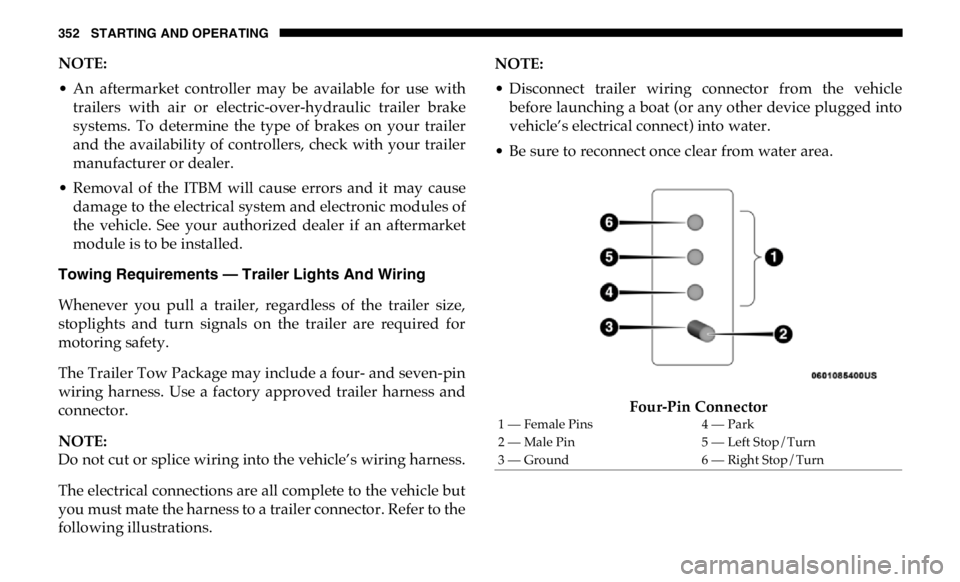
Towing Requirements — Trailer Lights And Wiring
Whenever you pull a trailer, regardless of the trailer size,
stoplights and turn signals on the trailer are required for
motoring safety.
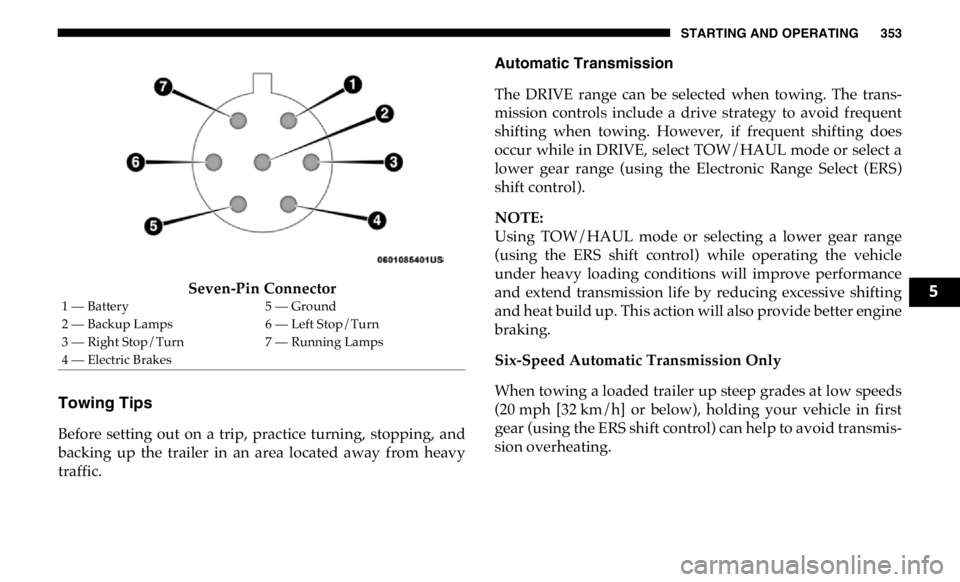
The Trailer Tow Package may include a four- and seven-pin
wiring harness. Use a factory approved trailer harness and
connector.
NOTE:
Do not cut or splice wiring into the vehicle’s wiring harness.
The electrical connections are all complete to the vehicle but
you must mate the harness to a trailer connector. Refer to the
following illustrations. NOTE:
• Disconnect trailer wiring connector from the vehicle
before launching a boat (or any other device plugged into
vehicle’s electrical connect) into water.
• Be sure to reconnect once clear from water area.
Four-Pin Connector1 — Female Pins 4 — Park
2 — Male Pin 5 — Left Stop/Turn
3 — Ground 6 — Right Stop/Turn
Page 355 of 607
STARTING AND OPERATING 353
Seven-Pin Connector
Towing Tips
Before setting out on a trip, practice turning, stopping, and
backing up the trailer in an area located away from heavy
traffic. Automatic Transmission
The DRIVE range can be selected when towing. The trans -
mission controls include a drive strategy to avoid frequent
shifting when towing. However, if frequent shifting does
occur while in DRIVE, select TOW/HAUL mode or select a
lower gear range (using the Electronic Range Select (ERS)
shift control).
NOTE:
Using TOW/HAUL mode or selecting a lower gear range
(using the ERS shift control) while operating the vehicle
under heavy loading conditions will improve performance
and extend transmission life by reducing excessive shifting
and heat build up. This action will also provide better engine
braking.
Six-Speed Automatic Transmission Only
When towing a loaded trailer up steep grades at low speeds
(20 mph [32 km/h] or below), holding your vehicle in first
gear (using the ERS shift control) can help to avoid transmis -
sion overheating.1 — Battery 5 — Ground
2 — Backup Lamps 6 — Left Stop/Turn
3 — Right Stop/Turn 7 — Running Lamps
4 — Electric Brakes 5
Page 356 of 607

354 STARTING AND OPERATING
If you regularly tow a trailer for more than 45 minutes of
continuous operation, then change the automatic transmis -
sion fluid and filter(s) as specified for "police, taxi, fleet, or
frequent trailer towing." Refer to the “Maintenance Plan” for
the proper maintenance intervals.
NOTE:
Check the automatic transmission fluid level before towing
(Six-speed automatic only).
Tow/Haul Mode
To reduce potential for automatic transmission overheating,
activate TOW/HAUL mode when driving in hilly areas, or
select a lower gear range (using the Electronic Range Select
(ERS) shift control) on more severe grades.
Speed Control — If Equipped
• Do not use on hilly terrain or with heavy loads.
• When using the speed control, if you experience speed
drops greater than 10 mph (16 km/h), disengage until you
can get back to cruising speed.
• Use speed control in flat terrain and with light loads to
maximize fuel efficiency. Cooling System
To reduce potential for engine and transmission over -
heating, take the following actions:
City Driving
• In city traffic — while stopped, place the transmission in
NEUTRAL, but do not increase engine idle speed.
Highway Driving
• Reduce speed.
• Temporarily turn off air conditioning.
Air Suspension System
To aid in attaching/detaching the trailer from the vehicle,
the air suspension system can be used. Refer to “Air Suspen -
sion System” in “Starting And Operating” for further infor -
mation.
NOTE:
The vehicle must remain in the engine running position
while attaching a trailer for proper leveling of the air suspen -
sion system.
Page 360 of 607

358 STARTING AND OPERATING
RECREATIONAL TOWING (BEHIND MOTORHOME, ETC.)
Towing This Vehicle Behind Another Vehicle
NOTE:
• When towing your vehicle, always follow applicable state
and provincial laws. Contact state and provincial
Highway Safety offices for additional details. Towing Condition Wheels OFF The
Ground Two-Wheel
Drive Models Four-Wheel Drive Models
Flat Tow NONE NOT ALLOWED See Instructions
• Automatic transmission in PARK
• Transfer case in NEUTRAL (N)
• Tow in forward direction
Dolly Tow Front NOT ALLOWED NOT ALLOWED
Rear OK NOT ALLOWED
On Trailer ALL OK OK
Page 361 of 607

STARTING AND OPERATING 359
(Continued)Recreational Towing — Two-Wheel Drive Models
DO NOT flat tow this vehicle. Damage to the drivetrain
will result.
Recreational towing (for two-wheel drive models) is allowed
ONLY if the rear wheels are OFF the ground. This may be
accomplished using a tow dolly or vehicle trailer. If using a
tow dolly, follow this procedure:
1. Properly secure the dolly to the tow vehicle, following the
dolly manufacturer's instructions.
2. Drive the rear wheels onto the tow dolly.
3. Firmly apply the parking brake. Place automatic trans -
mission in PARK.
4. Properly secure the rear wheels to the dolly, following the
dolly manufacturer's instructions.
5. Turn the ignition OFF and remove the key fob.
6. Install a suitable clamping device, designed for towing, to
secure the front wheels in the straight position. Recreational Towing — Four-Wheel Drive Models
NOTE:
Both the manual shift and electronic shift transfer cases must
be shifted into NEUTRAL (N) for recreational towing. Auto -
matic transmissions must be shifted into PARK for recre -
ational towing. Refer to the following for the proper transfer
case NEUTRAL (N) shifting procedure for your vehicle. CAUTION!
• Towing with the rear wheels on the ground will cause
severe transmission damage. Damage from improper
towing is not covered under the New Vehicle Limited
Warranty.
• Do not disconnect the driveshaft because fluid may
leak from the transmission, causing damage to internal
parts.
CAUTION!
• DO NOT dolly tow any 4WD vehicle. Towing with
only one set of wheels on the ground (front or rear) will
cause severe transmission and/or transfer case damage.
Tow with all four wheels either ON the ground, or OFF
the ground (using a vehicle trailer). 5
Page 384 of 607

382 IN CASE OF EMERGENCY
F08 20 Amp Blue (DS 1500
LD/Cummins Diesel)
40 Amp Green –
– NOX Sensor – If Equipped
Aux Relay Output- SSV Only
F09 40 Amp Green (SSV &
Cummins Diesel) – Aux Relay Output / Diesel Fuel Heater – If Equipped
F09 30 Amp Pink – Brake Vacuum Pump – If Equipped (HD Only)
F10 40 Amp Green – Body Controller / Exterior Lighting #2
F11 30 Amp Pink – PWR - Trailer Tow Electric Brake Batt Feed – If
Equipped (DS 1500 Only)
F11 40 Amp Green – Brake System Module (ECU and Valves) (HD Only)
F12 40 Amp Green – Body Controller #3
F13 40 Amp Green – Blower Motor
F14 40 Amp Green – Body Controller #4 / Exterior Lighting
F15 30 Amp Pink
40 Amp Green –
– Power Side Steps – If Equipped (HD Only)
Extra Fuse - SSV Only
F16 30 Amp Pink – Smart-Bar Module – If Equipped (HD Only)
F17 30 Amp Pink – Winch Control Module – If Equipped (HD Only)
F19 20 Amp Blue (DS 1500
LD Diesel)
30 Amp Pink
(Cummins Diesel) – SCR – If EquippedCavity Cartridge Fuse Micro Fuse Description
Page 385 of 607

IN CASE OF EMERGENCY 383
F20 30 Amp Pink – Passenger Door Module
F21 30 Amp Pink – Drive Train Control Module
F22 20 Amp Blue – Engine Control Module GPEC / Heavy Duty / Other –
If Equipped
F22 25 Amp White
(Cummins Diesel) – PCM – If Equipped
F23 30 Amp Pink – CBC Feed # 1
F24 30 Amp Pink – Driver Door Module
F25 30 Amp Pink – Front Wiper
F26 30 Amp Pink – Antilock Brakes / Stability Control Module / Valves – If
Equipped (DS 1500 Only)
F28 20 Amp Blue – Trailer Tow Backup Lights – If Equipped
F29 20 Amp Blue – Trailer Tow Parking Lights – If Equipped
F30 30 Amp Pink – Trailer Tow Receptacle / Trailer Tow (Separate
E-Brake)/Trailer Tow (BUX)
F31 30 Amp Pink – Diesel Heater Control – If Equipped (DS 1500 LD Diesel)
F31 20 Amp Blue – Aux App SSV Only - If Equipped
F32 – – Aux Feed, Special Services Vehicle-If Equipped (DS 1500
Only)
F33 20 Amp Blue – Trans Control Module – If Equipped (HD Only)
Aux Feed, SSV Only (DS 1500 Only)Cavity Cartridge Fuse Micro Fuse Description
6