trailer RAM CHASSIS CAB 2019 Manual PDF
[x] Cancel search | Manufacturer: RAM, Model Year: 2019, Model line: CHASSIS CAB, Model: RAM CHASSIS CAB 2019Pages: 607, PDF Size: 12.68 MB
Page 492 of 607

490 MULTIMEDIA
UCONNECT SETTINGS
The Uconnect system uses a combination of buttons on the
touchscreen and buttons on the faceplate located on the
center of the instrument panel that allows you to access and
change the customer programmable features. Many features
can vary by vehicle.
Uconnect 3 Settings
Uconnect 3 With 5–inch Display Buttons On The Touch -
screen And Buttons On The Faceplate Push the MORE or SETTINGS button on the faceplate, then
press the “Settings” button on the touchscreen (if equipped)
to display the settings menu screen. In this mode the Ucon -
nect system allows you to access programmable features that
may be equipped such as Display, Units, Voice, Clock, Safety
& Driving Assistance, Lights, Doors & Locks, Power Side
Steps, Auto-On Comfort (if equipped), Engine Off Options,
Suspension, Trailer Brake, Audio, Compass Settings, Phone/
Bluetooth, SiriusXM Setup (if equipped), Restore Settings,
Clear Personal Data and System Information.
NOTE:
Only one category may be selected at a time.
When making a selection, press the button on the touch -
screen to enter the desired mode. Once in the desired mode,
press and release the preferred setting until the button is
highlighted. Once the setting is complete, either press the
back arrow or the “Done” button on the touchscreen or push
the Back button on the faceplate to return to the previous
menu. Pressing the Up or Down Arrow buttons on the touch -
screen on the right side of the screen will allow you to toggle
up or down through the list of available settings.
NOTE:
All settings should be changed with the ignition in the RUN
position.1 — Uconnect Buttons On The Touchscreen
2 — Uconnect Buttons On The Faceplate
Page 497 of 607

MULTIMEDIA 495
NOTE:
When the vehicle is shifted out of REVERSE (with camera delay turned OFF), the rear camera mode is exited and the navi -
gation or audio screen appears again. When the vehicle is shifted out of REVERSE (with camera delay turned ON), the rear
view image with dynamic grid lines will be displayed for up to ten seconds after shifting out of REVERSE unless the forward
vehicle speed exceeds 8 mph (12 km/h), the transmission is shifted into PARK or the ignition is switched to the OFF position.
Forward Facing Camera
Guidelines — If Equipped On Off
NOTE:
The “Forward Facing Camera Guidelines” feature is an off-road type of feature that shows the path of the tires based on the
steering wheel input.
CHMSL (Center High
Mounted Stop Lamp) Camera
Dynamic Centerline — If
Equipped On Off
NOTE:
When the “CHMSL Camera Dynamic Centerline” feature is selected, it will assist in backing up for trailer alignment and
hook up.
Rain Sensing Auto Wipers
— If Equipped On Off
NOTE:
When the “Rain Sensing Auto Wipers” feature is selected, the system automatically activates the windshield wipers if it
senses moisture on the windshield. Setting Name Selectable Options
9
Page 504 of 607

502 MULTIMEDIA
Trailer Brake
After pressing the “Trailer Brake” button on the touchscreen, the following settings will be available:
Audio
After pressing the “Audio” button on the touchscreen, the following settings will be available: Setting Name Selectable Options
Trailer Select Trailer 1 Trailer 2 Trailer 3 Trailer 4
Trailer Brake Type Light Electric Heavy Electric Light EOH Heavy EOH
Trailer Name List of Trailer Names Available
NOTE:
You can select and personalize your trailer name depending on the type of trailer you are hauling. Select the trailer name
from the following list: trailer, boat, car, cargo, dump, equipment, flatbed, gooseneck, horse, livestock, motorcycle, snow
mobile, travel, utility, and 5th wheel.
Setting Name Selectable Options
Balance/Fade Front Back Left Right
NOTE:
The “Balance/Fade” feature allows you to adjust the Balance and Fade settings. Press and drag the speaker icon or use the
arrows to adjust, tap the “C” icon to readjust to the center.
Equalizer + –
NOTE:
When in the “Equalizer” display you may adjust the Bass, Mid and Treble settings.
Speed Adjusted Volume Off 1 2 3
Page 511 of 607

MULTIMEDIA 509
Uconnect 4/4C/4C NAV Settings
Uconnect 4/4C/4C NAV With 8.4–inch Display Buttons On
The Touchscreen And Buttons On The Faceplate
Press the “Apps” button on the touchscreen then press the
“Settings” button on the touchscreen to display the settings
menu screen. In this mode the Uconnect system allows you
to access programmable features that may be equipped such
as Language, Display, Units, Voice, Clock, Safety & Driving
Assistance, Mirrors & Wipers, Lights, Doors & Locks, Power
Side Steps (if equipped), Auto-On Comfort (if equipped), Engine Off Options, Suspension, Trailer, Audio, Phone/
Bluetooth, SiriusXM Setup (if equipped), Restore Settings
and System Information.
NOTE:
Only one category may be selected at a time.
When making a selection, press the button on the touch -
screen to enter the desired mode. Once in the desired mode,
press and release the preferred setting until a check-mark
appears next to the setting, showing that setting has been
selected. Once the setting is complete, press the back arrow
button on the touchscreen to return to the previous menu or
press the “X” button on the touchscreen to close out of the
settings screen. Pressing the Up or Down Arrow buttons on
the touchscreen on the right side of the screen will allow you
to toggle up or down through the list of available settings.
NOTE:
All settings should be changed with the ignition in the RUN
position.1 — Uconnect Buttons On The Touchscreen
2 — Uconnect Buttons On The Faceplate
9
Page 518 of 607

516 MULTIMEDIA
NOTE:
When the “CHMSL Camera Dynamic Centerline” feature is selected, it will assist in backing up for trailer alignment and
hook up.
Forward Collision Warning
— If Equipped Off Warning Only Warning & Braking
NOTE:
Apples brakes to slow the vehicle in case of potential forward collision, or applies brakes and a warning.
Forward Collision Warning
Sensitivity — If Equipped Near Med Far
NOTE:
Sets the distance in which a Forward Collision Warning occurs.
Front ParkSense Volume Low Med High
Rear ParkSense Volume Low Med High
Power Side Steps — If
Equipped Auto Store
Blind Spot Alert Off Lights Lights & ChimeSetting Name Selectable Options
Page 526 of 607

524 MULTIMEDIA
Trailer Brake
After pressing the “Trailer” button on the touchscreen, the following settings will be available: NOTE:
Before performing a wheel alignment, the “Wheel Alignment Mode” must be enabled. Refer to an authorized dealer for
further information.
Four Corner Air Suspension
Modes — If Equipped Tire Jack Mode Transport Mode Wheel Alignment Mode
NOTE:
There are four air suspension modes designed to protect the system in unique situations. Tire Jack Mode is selected to assist
in changing a spare tire. Transport Mode is selected to assist when the vehicle is being flat bed towed. Wheel Alignment
Mode is selected before performing a wheel alignment, refer to an authorized dealer for information. Setting Name Selectable Options
Setting Name Selectable Options
Trailer Select Trailer 1 Trailer 2 Trailer 3 Trailer 4
Trailer Brake Type Light Electric Heavy Electric Light EOH Heavy EOH
Trailer Name List of Trailer Names Available
NOTE:
You can select and personalize your trailer name depending on the type of trailer you are hauling. Select the trailer name
from the following list: trailer, boat, car, cargo, dump, equipment, flatbed, gooseneck, horse, livestock, motorcycle, snow
mobile, travel, utility, and 5th wheel.
Page 531 of 607
MULTIMEDIA 529
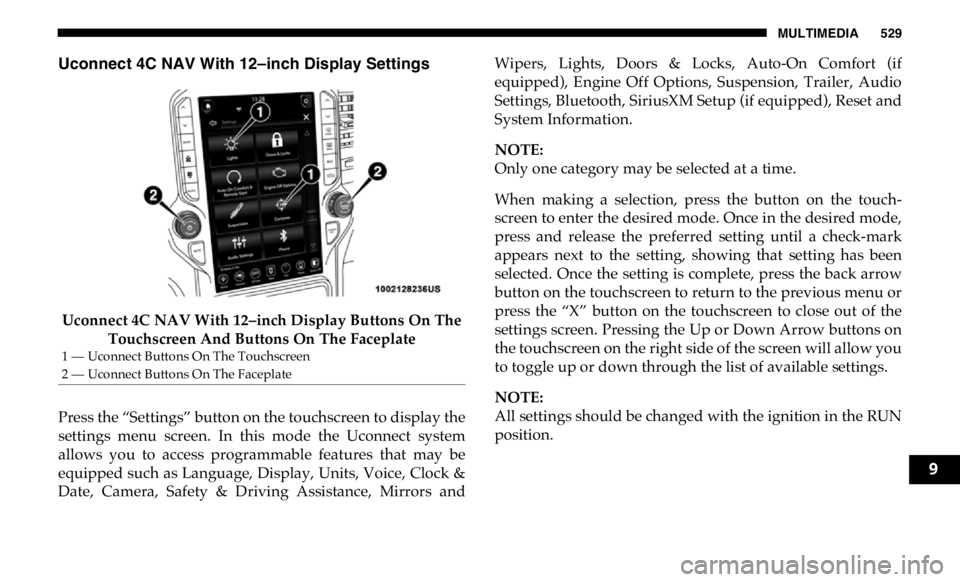
Uconnect 4C NAV With 12–inch Display Settings
Uconnect 4C NAV With 12–inch Display Buttons On The
Touchscreen And Buttons On The Faceplate
Press the “Settings” button on the touchscreen to display the
settings menu screen. In this mode the Uconnect system
allows you to access programmable features that may be
equipped such as Language, Display, Units, Voice, Clock &
Date, Camera, Safety & Driving Assistance, Mirrors and Wipers, Lights, Doors & Locks, Auto-On Comfort (if
equipped), Engine Off Options, Suspension, Trailer, Audio
Settings, Bluetooth, SiriusXM Setup (if equipped), Reset and
System Information.
NOTE:
Only one category may be selected at a time.
When making a selection, press the button on the touch -
screen to enter the desired mode. Once in the desired mode,
press and release the preferred setting until a check-mark
appears next to the setting, showing that setting has been
selected. Once the setting is complete, press the back arrow
button on the touchscreen to return to the previous menu or
press the “X” button on the touchscreen to close out of the
settings screen. Pressing the Up or Down Arrow buttons on
the touchscreen on the right side of the screen will allow you
to toggle up or down through the list of available settings.
NOTE:
All settings should be changed with the ignition in the RUN
position.1 — Uconnect Buttons On The Touchscreen
2 — Uconnect Buttons On The Faceplate
9
Page 537 of 607

MULTIMEDIA 535
NOTE:
The “Active Backup Camera Guidelines” feature overlays the Rear Backup Camera image with active, or dynamic, grid lines
to help illustrate the width of the vehicle and its project back up path, based on the steering wheel position when the option
is checked. A dashed center line overlay indicates the center of the vehicle to assist with parking or aligning to a hitch/
receiver.
Fixed Backup Camera Guidelines On Off
Forward Facing Camera Guidelines —
If Equipped On Off
NOTE:
The “Forward Facing Camera Guidelines” feature is an off-road type of feature that shows the path of the tires based on the
steering wheel input.
CHMSL (Center High Mounted Stop
Lamp) Camera Dynamic Centerline —
If Equipped On Off
NOTE:
When the “CHMSL Camera Dynamic Centerline” feature is selected, it will assist in backing up for trailer alignment and
hook up. Setting Name Selectable Options
9
Page 546 of 607

544 MULTIMEDIA
Trailer Brake
After pressing the “Trailer Brake” button on the touchscreen, the following settings will be available:
Setting Name Selectable Options
Trailer Select Trailer 1 Trailer 2 Trailer 3 Trailer 4
NOTE:
Once a Trailer is selected, press the “Use This Trailer” on the touchscreen to set this trailer as the one in current use. In each
Trailer setting, the following settings appear:
Braking Light Electric Heavy Electric Light Electric over
Hydraulic Heavy Electric over
Hydraulic
Trailer Name List of Trailer Names Available
NOTE:
You can select and personalize your trailer name depending on the type of trailer you are hauling. Select the trailer name
from the following list: trailer, boat, car, cargo, dump, equipment, flatbed, gooseneck, horse, livestock, motorcycle, snowmo -
bile, travel, utility, and fifth wheel.
Page 597 of 607

595
Gasoline, Reformulated ......................................................... 479
Gear Ranges ............................................................................. 257
Gear Selector Override ........................................................... 402
General Information ............................................................... 187
Glass Cleaning ......................................................................... 474
Gross Axle Weight Rating ..................................................... 340
Gross Vehicle Weight Rating ................................................ 339
Guide
Body Builders ........................................................................ 14
GVWR ....................................................................................... 337
H
Hazard
Driving Through Flowing, Rising, Or Shallow Standing
Water ..................................................................................... 364
Hazard Warning Flashers ...................................................... 366
Head Restraints ......................................................................... 50
Head Rests ................................................................................. 50
Headlights ................................................................................ 373
Automatic High Beam .......................................................... 67
Cleaning................................................................................ 471
High Beam.............................................................................. 67
Lights On Reminder ............................................................. 69
Passing .................................................................................... 68
Switch...................................................................................... 66
Heated Mirrors .......................................................................... 62
Hill Descent Control ............................................................... 171 Hill Descent Control Indicator ..............................................171
Hill Start Assist ........................................................................164
Hitches
Trailer Towing .....................................................................344
Hoisting ....................................................................................444
HomeLink (Garage Door Opener) ..........................................97
Hood Prop ..................................................................................95
Hood Release .............................................................................95
Hub Caps..................................................................................397
I
Ignition........................................................................................23
Switch ......................................................................................23
Illuminated Entry ......................................................................74
In Vehicle Help
Vehicle User Guide ...............................................................15
Inside Rearview Mirror ........................................56, 57, 58, 366
Instrument Cluster
Descriptions .........................................................................157
Display ..................................................................................128
Engine Oil Reset ..................................................................130
Instrument Panel Lens Cleaning...........................................473
Integrated Trailer Brake Control...........................................349
Interior Appearance Care ......................................................472
Interior Lights ............................................................................72
Intermittent Wipers (Delay Wipers) .......................................75
Introduction ...............................................................................12 11