brake light RAM CHASSIS CAB 2021 Owners Manual
[x] Cancel search | Manufacturer: RAM, Model Year: 2021, Model line: CHASSIS CAB, Model: RAM CHASSIS CAB 2021Pages: 463, PDF Size: 21.5 MB
Page 13 of 463
11
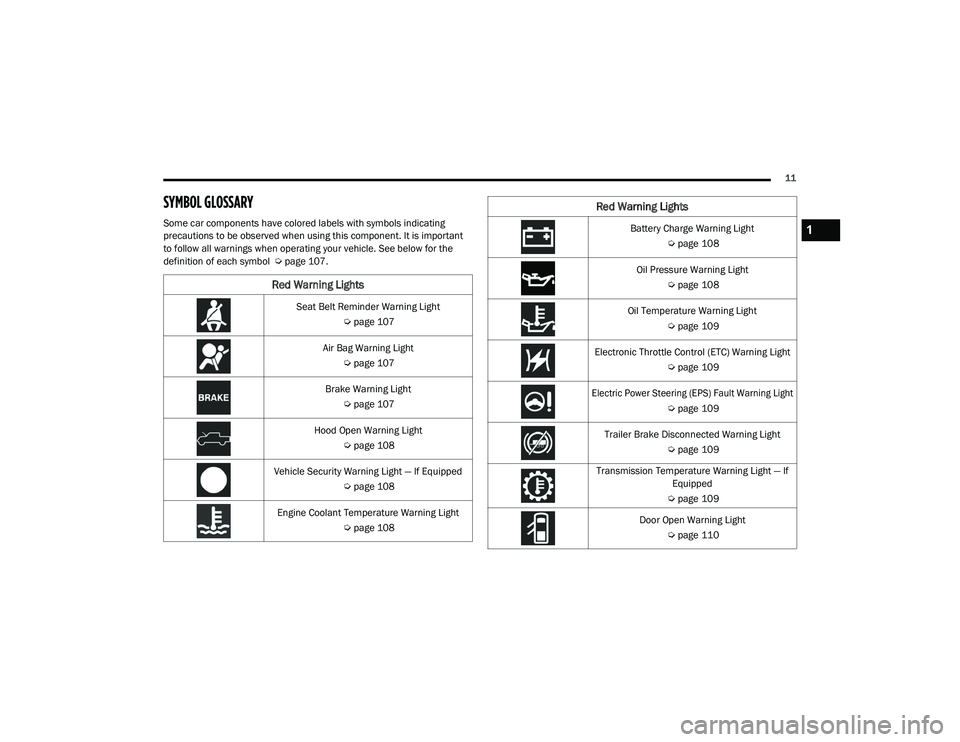
SYMBOL GLOSSARY
Some car components have colored labels with symbols indicating
precautions to be observed when using this component. It is important
to follow all warnings when operating your vehicle. See below for the
definition of each symbol Úpage 107.
Red Warning Lights
Seat Belt Reminder Warning Light
Úpage 107
Air Bag Warning Light Úpage 107
Brake Warning Light Úpage 107
Hood Open Warning Light Úpage 108
Vehicle Security Warning Light — If Equipped Úpage 108
Engine Coolant Temperature Warning Light Úpage 108
Battery Charge Warning Light
Úpage 108
Oil Pressure Warning Light Úpage 108
Oil Temperature Warning Light Úpage 109
Electronic Throttle Control (ETC) Warning Light Úpage 109
Electric Power Steering (EPS) Fault Warning Light
Úpage 109
Trailer Brake Disconnected Warning Light Úpage 109
Transmission Temperature Warning Light — If Equipped
Ú page 109
Door Open Warning Light Úpage 110
Red Warning Lights
1
21_DPF_OM_EN_USC_t.book Page 11
Page 14 of 463
12
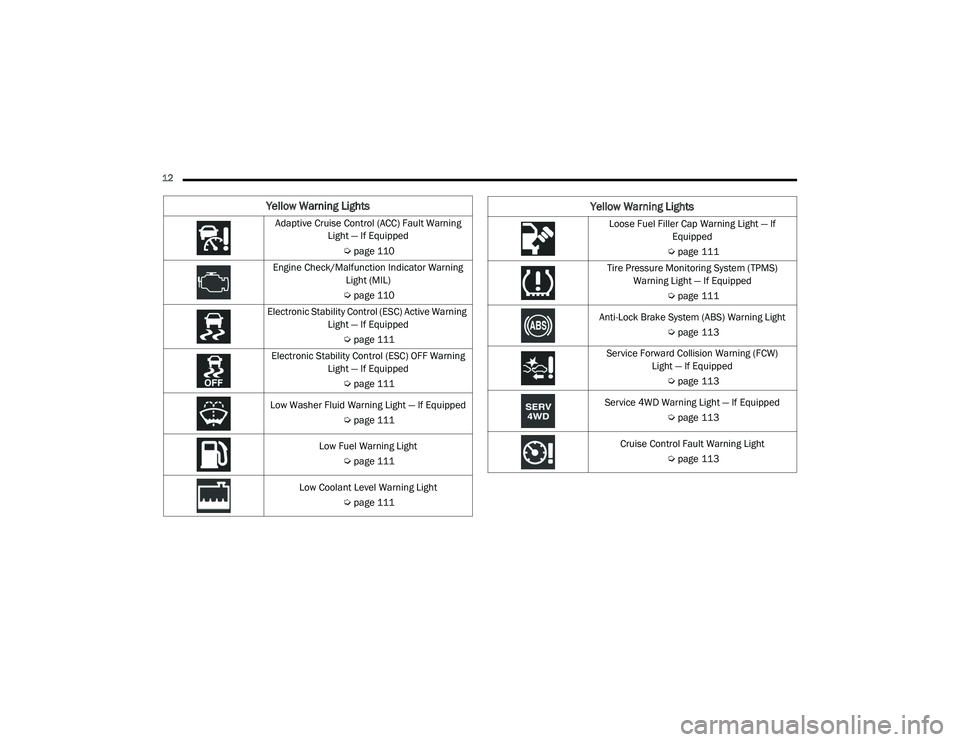
Yellow Warning Lights
Adaptive Cruise Control (ACC) Fault Warning Light — If Equipped
Úpage 110
Engine Check/Malfunction Indicator Warning Light (MIL)
Ú page 110
Electronic Stability Control (ESC) Active Warning Light — If Equipped
Úpage 111
Electronic Stability Control (ESC) OFF Warning Light — If Equipped
Úpage 111
Low Washer Fluid Warning Light — If Equipped Úpage 111
Low Fuel Warning Light Úpage 111
Low Coolant Level Warning Light Úpage 111Loose Fuel Filler Cap Warning Light — If
Equipped
Ú page 111
Tire Pressure Monitoring System (TPMS) Warning Light — If Equipped
Úpage 111
Anti-Lock Brake System (ABS) Warning Light Úpage 113
Service Forward Collision Warning (FCW) Light — If Equipped
Úpage 113
Service 4WD Warning Light — If Equipped Úpage 113
Cruise Control Fault Warning Light Úpage 113
Yellow Warning Lights
21_DPF_OM_EN_USC_t.book Page 12
Page 15 of 463
13
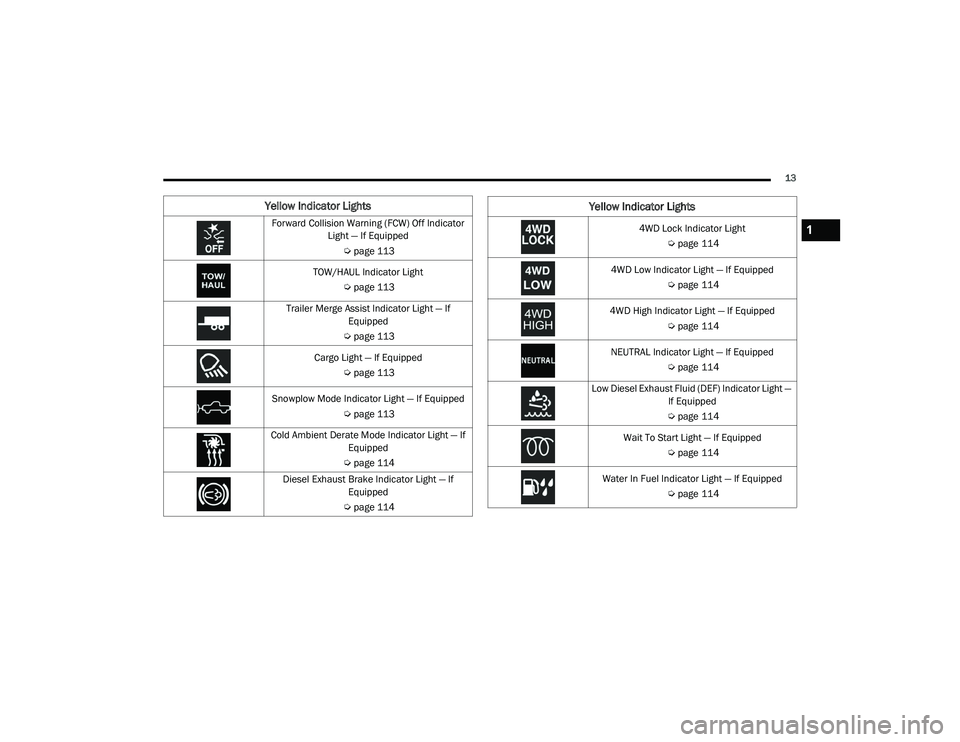
Yellow Indicator Lights
Forward Collision Warning (FCW) Off Indicator Light — If Equipped
Úpage 113
TOW/HAUL Indicator Light Úpage 113
Trailer Merge Assist Indicator Light — If Equipped
Ú page 113
Cargo Light — If Equipped Úpage 113
Snowplow Mode Indicator Light — If Equipped Úpage 113
Cold Ambient Derate Mode Indicator Light — If Equipped
Ú page 114
Diesel Exhaust Brake Indicator Light — If Equipped
Ú page 1144WD Lock Indicator Light
Úpage 114
4WD Low Indicator Light — If Equipped Úpage 114
4WD High Indicator Light — If Equipped Úpage 114
NEUTRAL Indicator Light — If Equipped Úpage 114
Low Diesel Exhaust Fluid (DEF) Indicator Light — If Equipped
Ú page 114
Wait To Start Light — If Equipped Úpage 114
Water In Fuel Indicator Light — If Equipped Úpage 114
Yellow Indicator Lights
1
21_DPF_OM_EN_USC_t.book Page 13
Page 16 of 463
14
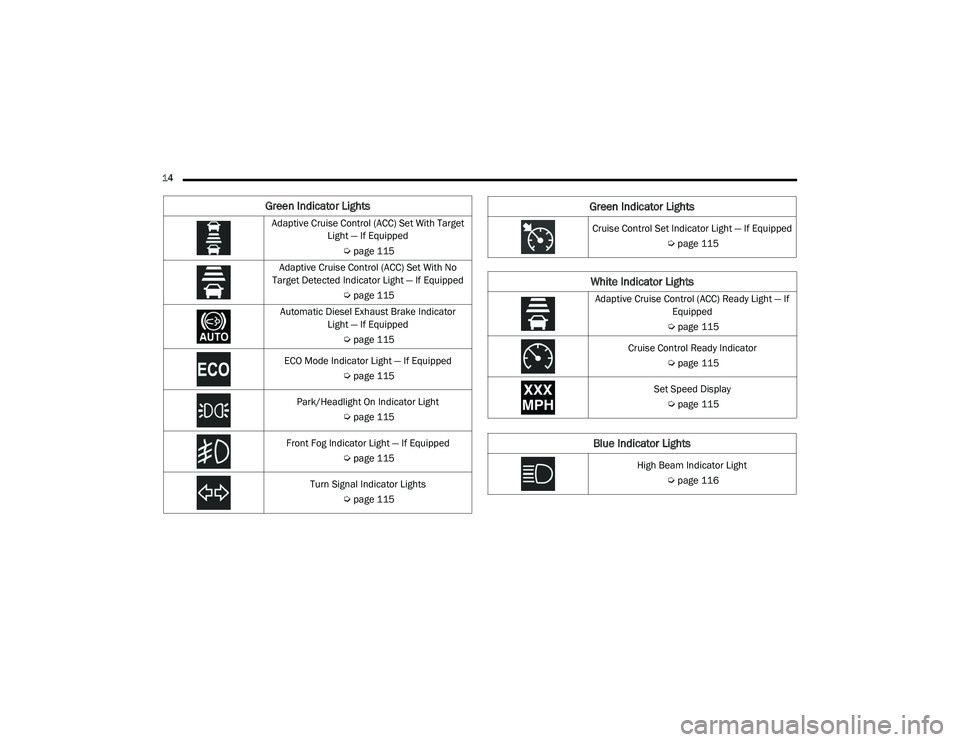
Green Indicator Lights
Adaptive Cruise Control (ACC) Set With Target Light — If Equipped
Úpage 115
Adaptive Cruise Control (ACC) Set With No
Target Detected Indicator Light — If Equipped
Úpage 115
Automatic Diesel Exhaust Brake Indicator Light — If Equipped
Úpage 115
ECO Mode Indicator Light — If Equipped Úpage 115
Park/Headlight On Indicator Light Úpage 115
Front Fog Indicator Light — If Equipped Úpage 115
Turn Signal Indicator Lights Úpage 115Cruise Control Set Indicator Light — If Equipped
Úpage 115
White Indicator Lights
Adaptive Cruise Control (ACC) Ready Light — If
Equipped
Ú page 115
Cruise Control Ready Indicator Úpage 115
Set Speed Display Ú page 115
Blue Indicator Lights
High Beam Indicator Light
Úpage 116
Green Indicator Lights
21_DPF_OM_EN_USC_t.book Page 14
Page 20 of 463
18GETTING TO KNOW YOUR VEHICLE
bulb check, it indicates that someone
attempted to start the engine with an invalid key
fob. In the event that a valid key fob is used to
start the engine but there is an issue with the
vehicle electronics, the engine will start and
shut off after two seconds.
If the vehicle security light turns on during
normal vehicle operation (vehicle running for
longer than 10 seconds), it indicates that there
is a fault in the electronics. Should this occur,
have the vehicle serviced as soon as possible by
an authorized dealer.
All of the key fobs provided with your new
vehicle have been programmed to the vehicle
electronics Úpage 449.IGNITION SWITCH
KEYLESS PUSH BUTTON IGNITION
This feature allows the driver to operate the
ignition switch with the push of a button as long
as the Remote Keyless Entry key fob is in the
passenger compartment.
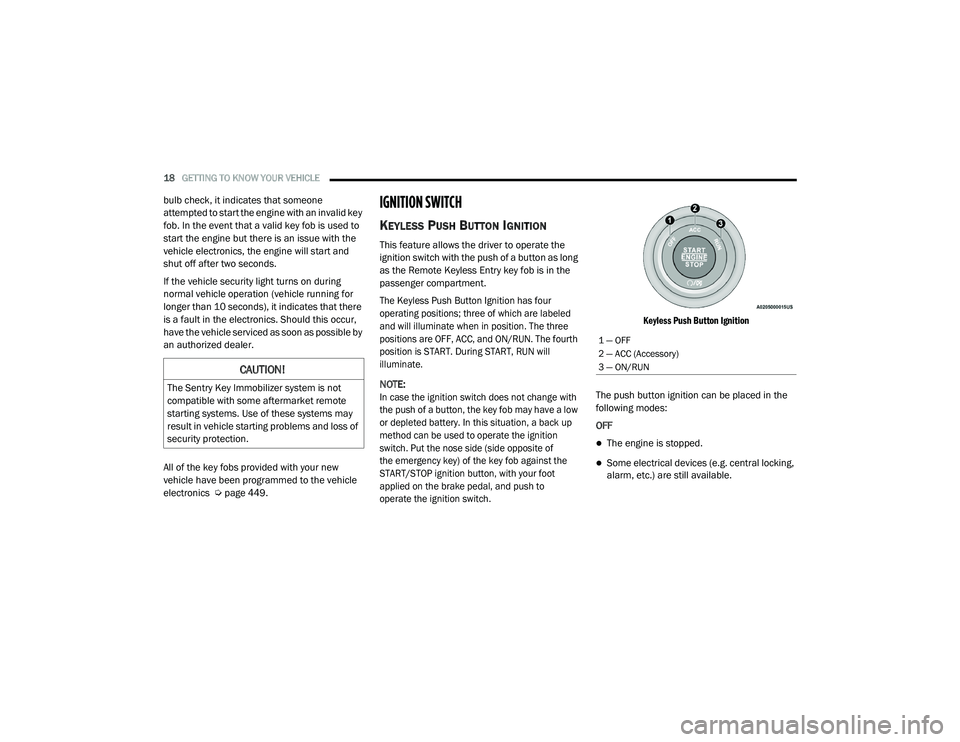
The Keyless Push Button Ignition has four
operating positions; three of which are labeled
and will illuminate when in position. The three
positions are OFF, ACC, and ON/RUN. The fourth
position is START. During START, RUN will
illuminate.
NOTE:
In case the ignition switch does not change with
the push of a button, the key fob may have a low
or depleted battery. In this situation, a back up
method can be used to operate the ignition
switch. Put the nose side (side opposite of
the emergency key) of the key fob against the
START/STOP ignition button, with your foot
applied on the brake pedal, and push to
operate the ignition switch. Keyless Push Button Ignition
The push button ignition can be placed in the
following modes:
OFF
The engine is stopped.
Some electrical devices (e.g. central locking,
alarm, etc.) are still available.
CAUTION!
The Sentry Key Immobilizer system is not
compatible with some aftermarket remote
starting systems. Use of these systems may
result in vehicle starting problems and loss of
security protection.
1 — OFF
2 — ACC (Accessory)
3 — ON/RUN
21_DPF_OM_EN_USC_t.book Page 18
Page 23 of 463
GETTING TO KNOW YOUR VEHICLE21
All of the following conditions must be met
before the engine will remote start:
Gear selector in PARK
Doors closed
Hood closed
Hazard switch off
Brake switch inactive (brake pedal not pushed)
Battery at an acceptable charge level
PANIC button not pushed
Fuel meets minimum requirement
System not disabled from previous remote
start event
Vehicle Security system not active
Malfunction Indicator Light is not illuminated
TO EXIT REMOTE START MODE
To drive the vehicle after starting the Remote
Start system, push and release the START/STOP
ignition button while pressing the brake pedal
prior to the end of the 15 minute cycle.
The Remote Start system will turn the engine off
with another push and release of the Remote
Start button on the key fob, or if the engine is
allowed to run for the entire 15 minute cycle.
Once the ignition is placed in the ON/RUN
position, the climate controls will resume the
previously set operations (temperature, blower
control, etc.).
NOTE:
For vehicles equipped with the Keyless
Enter-N-Go — Passive Entry feature, the
message “Remote Start Active — Push Start
Button” will display in the instrument cluster
display until you push the START/STOP igni -
tion button.
To avoid unintentional shutdowns, the
system will disable for two seconds after
receiving a valid Remote Start request.
REMOTE START FRONT DEFROST
A
CTIVATION — IF EQUIPPED
When remote start is active, and the outside
ambient temperature is 40°F (4.5°C) or below, the
system will automatically activate front defrost for
15 minutes or less. The time is dependent on the
ambient temperature. Once the timer expires, the
system will automatically adjust the settings
depending on ambient conditions. See “Remote
Start Comfort Systems — If Equipped” in the next
section for detailed operation.
REMOTE START COMFORT SYSTEMS —
I
F EQUIPPED
When remote start is activated, the front and
rear defrost will automatically turn on in cold
weather. The heated steering wheel and driver
heated seat feature will turn on if programmed
in the comfort menu screen within Uconnect
Settings Ú page 228. In warm weather, the
driver vented seat feature will automatically
turn on when the remote start is activated and
is programmed in the comfort menu screen.
The vehicle will adjust the climate control
settings depending on the outside ambient
temperature.
2
21_DPF_OM_EN_USC_t.book Page 21
Page 25 of 463
GETTING TO KNOW YOUR VEHICLE23
HOW TO USE REMOTE START
Push and release the Remote Start button on the
key fob twice within five seconds. The vehicle
doors will lock, the parking lights will flash, and
the horn will chirp twice (if programmed). Then,
the engine will start, and the vehicle will remain
in the Remote Start mode for a 15 minute cycle.
Pushing the remote start button a third time
shuts the engine off.
To drive the vehicle, push the unlock button,
insert the key into the ignition, and turn to the
ON/RUN position.
All of the following conditions must be met
before the engine will remote start:
Gear selector in PARK
Doors closed
Hood closed
Hazard switch off
Brake switch inactive (brake pedal not
pressed)
Battery at an acceptable charge level
PANIC button not pushed
Fuel meets minimum requirement
Water In Fuel Indicator Light is not illuminated
Wait To Start Light is not illuminated
Malfunction Indicator Light (MIL) is not illumi -
nated
For additional functions of the Remote Start
system, see Ú page 21
VEHICLE SECURITY SYSTEM — IF EQUIPPED
The Vehicle Security system monitors the
vehicle doors and ignition for unauthorized
operation. When the Vehicle Security system is
activated, interior switches for door locks are
disabled. If something triggers the alarm, the
Vehicle Security system will provide the
following audible and visible signals:
The horn will pulse
The turn signals will flash
The vehicle security light in the instrument
cluster will flash
TO ARM THE SYSTEM
Follow these steps to arm the Vehicle Security
system:
1. Make sure the vehicle’s ignition is placed
in the OFF position.
For vehicles equipped with Keyless Entry,
make sure the vehicle’s keyless ignition
system is OFF.
WARNING!
Do not start or run an engine in a closed
garage or confined area. Exhaust gas
contains Carbon Monoxide (CO) which is
odorless and colorless. Carbon Monoxide is
poisonous and can cause serious injury or
death when inhaled.
Keep key fobs away from children. Opera -
tion of the Remote Start System, windows,
door locks or other controls could cause
serious injury or death.
2
21_DPF_OM_EN_USC_t.book Page 23
Page 53 of 463
GETTING TO KNOW YOUR VEHICLE51
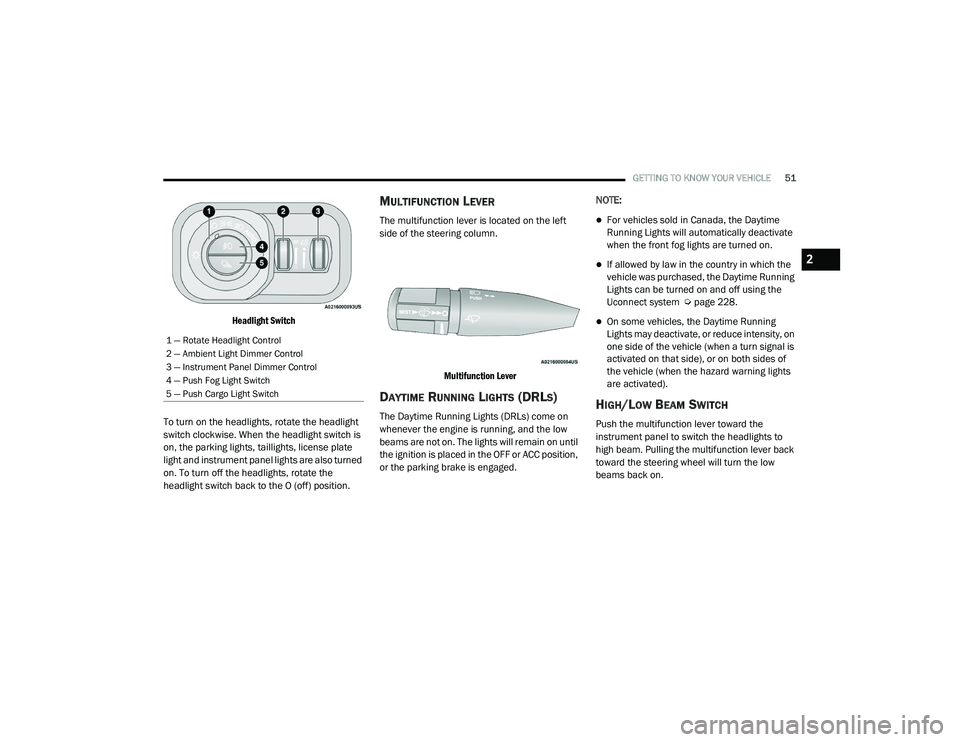
Headlight Switch
To turn on the headlights, rotate the headlight
switch clockwise. When the headlight switch is
on, the parking lights, taillights, license plate
light and instrument panel lights are also turned
on. To turn off the headlights, rotate the
headlight switch back to the O (off) position.
MULTIFUNCTION LEVER
The multifunction lever is located on the left
side of the steering column.
Multifunction Lever
DAYTIME RUNNING LIGHTS (DRLS)
The Daytime Running Lights (DRLs) come on
whenever the engine is running, and the low
beams are not on. The lights will remain on until
the ignition is placed in the OFF or ACC position,
or the parking brake is engaged. NOTE:
For vehicles sold in Canada, the Daytime
Running Lights will automatically deactivate
when the front fog lights are turned on.
If allowed by law in the country in which the
vehicle was purchased, the Daytime Running
Lights can be turned on and off using the
Uconnect system Ú
page 228.
On some vehicles, the Daytime Running
Lights may deactivate, or reduce intensity, on
one side of the vehicle (when a turn signal is
activated on that side), or on both sides of
the vehicle (when the hazard warning lights
are activated).
HIGH/LOW BEAM SWITCH
Push the multifunction lever toward the
instrument panel to switch the headlights to
high beam. Pulling the multifunction lever back
toward the steering wheel will turn the low
beams back on.
1 — Rotate Headlight Control
2 — Ambient Light Dimmer Control
3 — Instrument Panel Dimmer Control
4 — Push Fog Light Switch
5 — Push Cargo Light Switch
2
21_DPF_OM_EN_USC_t.book Page 51
Page 94 of 463

92GETTING TO KNOW YOUR INSTRUMENT PANEL
4. Push and hold the right arrow button to
select “Reset”.
5. Push and release the down arrow button
to select “Yes,” then push and release the
right arrow button to reset the Oil Life to
100%.
6. Push and release the up arrow button to
exit the instrument cluster display screen.
Secondary Method Of Resetting Engine Oil Life
1. Without pressing the brake pedal, push the ENGINE START/STOP button and place the
ignition to the ON/RUN position (do not
start the engine).
2. Fully press the accelerator pedal, slowly, three times within ten seconds.
3. Without pushing the brake pedal, push the ENGINE START/STOP button once to return
the ignition to the OFF/LOCK position.
NOTE:
If the indicator message illuminates when
you start the vehicle, the oil change indicator
system did not reset. If necessary, repeat this
procedure.DISPLAY MENU ITEMS
Push and release the up or down arrow
button until the desired selectable menu icon is
highlighted in the instrument cluster display.
Speedometer
Push and release the up or down arrow
button until the speedometer menu item is
highlighted in the instrument cluster display.
Push and release the right arrow button to
cycle the display between mph and km/h.
Vehicle Info
Push and release the up or down arrow
button until the Vehicle Info menu item is
highlighted in the instrument cluster display.
Push and release the right arrow button to
enter the submenus items of Vehicle Info.
Follow the directional prompts to access or
reset any of the following Vehicle Info submenu
items:
Tire Pressure
Coolant Temperature
Transmission Temperature — If Equipped
Oil Temperature
Oil Pressure
Exhaust Brake — If Equipped
Boost Pressure — If Equipped
Diesel Particulate Filter (DPF) — If Equipped
Oil Life
Fuel Filter Life — If Equipped
Battery Voltage
Gauge Summary
Engine Hours
Off-Road
Push and release the up or down arrow
button until the Off-Road menu icon is displayed
in the instrument cluster display. Push and
release the left or right arrow button to
scroll through the information submenus.
Drivetrain
Front Wheel Angle: displays the graphical
and numerical value of calculated
average front wheel angle from the
steering wheel orientation.
21_DPF_OM_EN_USC_t.book Page 92
Page 96 of 463

94GETTING TO KNOW YOUR INSTRUMENT PANEL
Fuel Economy
Push and release the up or down arrow
button until the Fuel Economy menu item is
highlighted in the instrument cluster display.
Push and Hold the right arrow button to reset
Average Fuel Economy.
Current Fuel Economy Gauge
Average Fuel Economy Value
Range To Empty
Fuel Tank Levels — If Equipped
Trip A/Trip B
Push and release the up or down arrow
button until the Trip menu item is highlighted
in the instrument cluster display. Push and
release the right arrow button to enter the
submenus of Trip A and Trip B. The Trip A or Trip
B information will display the following:
Distance
Average Fuel Economy
Elapsed Time
Push and hold right arrow button to reset all
information.
Trailer Tow
Push and release the up or down arrow
button until the Trailer Tow menu item is
highlighted in the instrument cluster display.
Push and release the right or left arrow
button to cycle through the following trailer tow
information:
Trip (trailer specific) Distance: Push and hold
the OK button to reset the distance.
Integrated Trailer Brake Module (ITBM):
Braking Output
Trailer Type
ITBM Gain
Trailer Light Check: Push and hold the
OK button to begin the Trailer Light Test
sequence Ú page 209.
Trailer Tire Pressure Monitoring: The Instru-
ment Cluster Display will display the Trailer
Tire Pressure for a connected trailer with
sensors that match the active trailer profile.
When a low tire is present, the low tire value
will be displayed in red, and the affected low tire will have a red glow. “Trailer Tire Low“ will
be displayed on the center bottom of the
Instrument Cluster Display screen.
Audio
Push and release the
up or down arrow
button until the Audio Menu icon/title is
highlighted in the instrument cluster display.
This menu will display the audio source
information, including the Song name, Artist
name, and audio source with an accompanying
graphic.
Phone Call Status
When a call is incoming, a Phone Call Status
pop-up will display on the screen. The pop-up
will remain until the phone is answered or
ignored.
NOTE:
The call status will temporarily replace the
previous media source information displayed
on the screen. When the pop-up is no longer
displayed, the display will return to the last used
screen.
21_DPF_OM_EN_USC_t.book Page 94