AUX RAM CHASSIS CAB 2021 Owners Manual
[x] Cancel search | Manufacturer: RAM, Model Year: 2021, Model line: CHASSIS CAB, Model: RAM CHASSIS CAB 2021Pages: 463, PDF Size: 21.5 MB
Page 5 of 463
3
EXTERIOR LIGHTS.................................................50 Headlight Switch .......................................... 50
Multifunction Lever ...................................... 51
Daytime Running Lights (DRLs) ................. 51
High/Low Beam Switch ............................... 51
Automatic High Beam Headlamp
Control — If Equipped .................................. 52 Flash-To-Pass ............................................... 52
Automatic Headlights — If Equipped ......... 52
Directional LED Headlamp
System — If Equipped .................................. 52 Parking Lights And Panel Lights ................. 53
Automatic Headlights With Wipers ............. 53
Headlight Delay ............................................ 53
Lights-On Reminder ..................................... 53
Front Fog Lights — If Equipped .................. 53
Turn Signals ................................................. 54
Lane Change Assist — If Equipped ............. 54
Cargo Lights/Trailer Spotter Lights — If
Equipped ...................................................... 54 Battery Saver................................................ 54
INTERIOR LIGHTS ................................................55
Courtesy Lights ............................................ 55
Illuminated Entry ......................................... 56
WINDSHIELD WIPERS AND WASHERS .............56
Windshield Wiper Operation ...................... 57
Rain Sensing Wipers — If Equipped ........... 58 CLIMATE CONTROLS ........................................... 58
Automatic Climate Control Descriptions
And Functions .............................................. 59 Manual Climate Control Descriptions And
Functions...................................................... 62 Automatic Temperature
Control (ATC) ................................................ 64 Climate Voice Recognition .......................... 65
Operating Tips ............................................. 65
INTERIOR STORAGE AND EQUIPMENT ............. 66
Storage ......................................................... 66
USB/AUX Control ........................................ 72
Electrical Power Outlets .............................. 73
Power Inverter — If Equipped ..................... 74
Wireless Charging Pad — If Equipped ........ 76
WINDOWS ............................................................ 76
Power Windows — If Equipped .................... 76
Automatic Window Features —
If Equipped ................................................... 77 Reset Auto-Up ............................................. 77
Window Lockout Switch — If Equipped....... 78
Power Sliding Rear Window —
If Equipped .................................................. 78 Manual Sliding Rear Window —
If Equipped ................................................... 78 Wind Buffeting ............................................ 78
HOOD ..................................................................... 79
To Open The Hood ...................................... 79
To Close The Hood ....................................... 79
GETTING TO KNOW YOUR
INSTRUMENT PANEL
BASE / MIDLINE INSTRUMENT CLUSTER —
GASOLINE ..............................................................80
Base / Midline Instrument Cluster
Descriptions ................................................. 81
PREMIUM INSTRUMENT CLUSTER —
GASOLINE ..............................................................83
Premium Instrument Cluster
Descriptions ................................................. 84
BASE / MIDLINE INSTRUMENT CLUSTER —
DIESEL....................................................................85
Diesel Instrument Cluster .......................... 86
PREMIUM INSTRUMENT CLUSTER — DIESEL ..... 88
Diesel Instrument Cluster .......................... 89
INSTRUMENT CLUSTER DISPLAY .......................90
Instrument Cluster Display Controls .......... 90
Oil Life Reset ............................................... 91
Display Menu Items ..................................... 92
Diesel Messages And Warnings ............... 101 Battery Saver On/Battery Saver Mode
Message — Electrical Load Reduction
Actions — If Equipped ............................... 105
WARNING LIGHTS AND MESSAGES ............... 107
Red Warning Lights ................................... 107
Yellow Warning Lights ............................... 110Yellow Indicator Lights .............................. 113
Green Indicator Lights ............................... 115White Indicator Lights ............................... 115Blue Indicator Lights ................................. 116
21_DPF_OM_EN_USC_t.book Page 3
Page 6 of 463
4
ONBOARD DIAGNOSTIC SYSTEM — OBD II ... 116 Onboard Diagnostic System
(OBD II) Cybersecurity ................................116
EMISSIONS INSPECTION AND MAINTENANCE
PROGRAMS ........................................................ 117
STARTING AND OPERATING
STARTING THE ENGINE — GASOLINE
ENGINE ............................................................... 118
Automatic Transmission ............................118
Tip Start Feature .......................................118
Keyless Enter-N-Go — Ignition ...................118Normal Starting Using ENGINE
START/STOP Button .................................119 AutoPark — Rotary Shifter and Eight
Speed Transmission Only ..........................120 Cold Weather Operation
(Below –22°F Or −30°C) .........................122 After Starting ..............................................122
STARTING THE ENGINE — DIESEL ENGINE..... 122
Automatic Transmission ............................123
Keyless Enter-N-Go — Ignition ...................123Extreme Cold Weather...............................125
Normal Starting Procedure — Engine Manifold
Air Temperature Above 66°F (19°C) .......125 Starting Procedure — Engine Manifold
Air Temperature 0°F To 66°F
(–18°C to 19°C)........................................126 Starting Procedure — Engine Manifold Air
Temperature Below 0°F (-18°C) .............. 127 Starting Fluids ............................................ 128
NORMAL OPERATION — DIESEL ENGINE ........128
Cold Weather Precautions ........................ 129
Engine Idling ............................................. 131
Noise........................................................... 132
Stopping The Engine ................................. 133
Idle Shutdown ............................................ 133Programmable Maximum Vehicle
Speed ......................................................... 134 Operating Precautions............................... 134Cooling System Tips .................................. 134Diesel Particulate Filter (DPF) Manual
Regeneration - If Equipped ....................... 135
ENGINE BLOCK HEATER — IF EQUIPPED ........135
ENGINE BREAK-IN RECOMMENDATIONS —
GASOLINE ENGINE ............................................136
ENGINE BREAK-IN RECOMMENDATIONS —
DIESEL ENGINE...................................................137
PARKING BRAKE ............................................... 137
DIESEL EXHAUST BRAKE
(ENGINE BRAKING) ...........................................138
AUTOMATIC TRANSMISSION ............................ 140 Ignition Park Interlock ............................... 141Brake/Transmission Shift Interlock (BTSI)
System ....................................................... 141 Eight-Speed Automatic Transmission — If
Equipped .................................................... 141 Six-Speed Automatic
Transmission — If Equipped ..................... 146 AUXILIARY SWITCHES — IF EQUIPPED ........... 152
FOUR-WHEEL DRIVE OPERATION —
IF EQUIPPED ...................................................... 153
Electronically Shifted Transfer Case (Eight
Speed Transmission) — If Equipped ........ 153 Electronically Shifted Transfer Case
(Six Speed Transmission) — If Equipped .. 156 Manually Shifted Transfer Case —
If Equipped ................................................. 160
LIMITED-SLIP DIFFERENTIAL .......................... 162
POWER TAKE OFF (PTO) OPERATION — IF
EQUIPPED .......................................................... 163
POWER STEERING............................................. 163
Hydraulic Power Steering .......................... 163
CRUISE CONTROL SYSTEMS —
IF EQUIPPED ...................................................... 164
Cruise Control — If Equipped ................... 164
Adaptive Cruise Control (ACC) —
If Equipped ................................................ 166
PARKSENSE FRONT/REAR PARK
ASSIST — IF EQUIPPED ..................................... 177
ParkSense Sensors ................................... 178
ParkSense Warning Display...................... 178
ParkSense Display..................................... 178
Enabling And Disabling ParkSense .......... 181Service The ParkSense Park Assist
System........................................................ 182 Cleaning The ParkSense System.............. 182
ParkSense System Usage Precautions .... 182
21_DPF_OM_EN_USC_t.book Page 4
Page 7 of 463
5
LANESENSE — IF EQUIPPED ........................... 183 LaneSense Operation ................................183Turning LaneSense On Or Off ...................184LaneSense Warning Message ..................184
Changing LaneSense Status .....................186
PARKVIEW REAR BACK UP CAMERA ............ 186
AUX Camera — If Equipped .......................188
SURROUND VIEW CAMERA SYSTEM — IF
EQUIPPED ........................................................... 189
AUX Camera — If Equipped .......................194
ENGINE RUNAWAY ............................................ 195
REFUELING THE VEHICLE — GASOLINE
ENGINE ................................................................ 195
Loose Fuel Filler Cap Message ................196
REFUELING THE VEHICLE — DIESEL
ENGINE ............................................................... 196
Diesel Exhaust Fluid ..................................196
VEHICLE LOADING ............................................ 199
Gross Vehicle Weight Rating (GVWR) ......199Payload .......................................................199Gross Axle Weight Rating (GAWR) ............200
Tire Size ......................................................200
Rim Size......................................................200
Inflation Pressure ......................................200
Curb Weight................................................200
Loading .......................................................200 TRAILER TOWING ............................................... 200
Common Towing Definitions ..................... 201Trailer Hitch Type and Maximum Trailer
Weight ........................................................ 204 Trailer Towing Weights (Maximum Trailer
Weight Ratings) ......................................... 205 Trailer And Tongue Weight ....................... 205
Towing Requirements ............................... 205Towing Tips ................................................ 211
SNOWPLOW — IF EQUIPPED ............................ 212
Before Plowing ........................................... 212
Snowplow Prep Package Model
Availability .................................................. 212 Over The Road Operation With Snowplow
Attached ..................................................... 213 Operating Tips ............................................ 213General Maintenance................................ 213
RECREATIONAL TOWING (BEHIND
MOTORHOME) ...................................................214
Towing This Vehicle Behind Another
Vehicle ........................................................ 214 Recreational Towing — Two-Wheel Drive
Models ........................................................ 215 Recreational Towing — Four-Wheel Drive
Models ........................................................ 215
DRIVING TIPS ...................................................... 218
Driving On Slippery Surfaces ................... 218
Driving Through Water .............................. 218
MULTIMEDIA
UCONNECT SYSTEMS ....................................... 220
CYBERSECURITY ............................................... 220
UCONNECT 3.0 ................................................... 221 Introduction................................................ 221
Radio Mode ................................................ 222
Media Mode ............................................... 224
Phone Mode............................................... 225
UCONNECT SETTINGS ....................................... 228
Customer Programmable Features .......... 228
UCONNECT INTRODUCTION.............................. 244
System Overview ...................................... 244
Safety And General Information ............... 246
UCONNECT MODES ........................................... 247
Steering Wheel Audio Controls ................. 247
Radio Mode ............................................... 247
Media Mode .............................................. 255Phone Mode .............................................. 258
RADIO OPERATION AND MOBILE PHONES.... 269
Regulatory And Safety Information .......... 269
OFF-ROAD PAGES — IF EQUIPPED .................. 270
Off-Road Pages Status Bar ....................... 270Vehicle Dynamics ...................................... 271
Accessory Gauge ....................................... 271
Pitch & Roll................................................. 272Forward Facing Camera ............................ 272
21_DPF_OM_EN_USC_t.book Page 5
Page 8 of 463
6
SAFETY
SAFETY FEATURES ............................................ 273
Anti-Lock Brake System (ABS) ................. 273
Electronic Brake Control (EBC) System ...274
AUXILIARY DRIVING SYSTEMS ........................ 281
Forward Collision Warning (FCW) With
Mitigation — If Equipped............................281 Tire Pressure Monitoring
System (TPMS) ..........................................284
OCCUPANT RESTRAINT SYSTEMS .................. 292
Occupant Restraint Systems Features ....292
Important Safety Precautions ...................293Seat Belt Systems ..................................... 293Supplemental Restraint Systems (SRS) ...302Child Restraints..........................................312
SAFETY TIPS ...................................................... 330
Transporting Passengers ..........................330
Transporting Pets ......................................330
Safety Checks You Should Make Inside
The Vehicle ................................................330 Periodic Safety Checks You Should Make
Outside The Vehicle ...................................332 Exhaust Gas ...............................................333Carbon Monoxide Warnings ......................333
IN CASE OF EMERGENCY
HAZARD WARNING FLASHERS .......................334
ASSIST AND SOS SYSTEM — IF EQUIPPED..... 335
JACKING AND TIRE CHANGING ........................339
4500/5500 Models .................................. 339Preparations For Jacking........................... 339
Jacking Instructions 4500 And
5500 Series ............................................... 340 To Stow The Flat Or Spare —
If Equipped ................................................ 343 Hub Caps/Wheel Covers — If Equipped ... 343
JUMP STARTING ................................................ 344
Preparations For Jump Start ..................... 344Jump Starting Procedure .......................... 345
IF YOUR ENGINE OVERHEATS .........................346
GEAR SELECTOR OVERRIDE — 6–SPEED
TRANSMISSION ................................................. 347
MANUAL PARK RELEASE — 8 – SPEED
TRANSMISSION ................................................. 348
FREEING A STUCK VEHICLE .............................349
TOWING A DISABLED VEHICLE ........................350 Two-Wheel Drive Models ........................... 351
Four-Wheel Drive Models .......................... 351Emergency Tow Hooks — If Equipped ...... 352
ENHANCED ACCIDENT RESPONSE
SYSTEM (EARS) ................................................. 352
EVENT DATA RECORDER (EDR) .......................352
SERVICING AND MAINTENANCE
SCHEDULED SERVICING — GASOLINE
ENGINE ................................................................ 353
Maintenance Plan ..................................... 354
SCHEDULED SERVICING — DIESEL ENGINE .. 357
Oil Change Indicator System — Cummins
Diesel.......................................................... 357 Perform Service Indicator — Cummins
Diesel ......................................................... 358 Maintenance Plan — Cummins Diesel
Engine ....................................................... 359
ENGINE COMPARTMENT .................................. 364
6.4L Engine ............................................... 364
6.7L Engine ................................................ 365
Checking Oil Level ..................................... 366
Adding Washer Fluid ................................. 366Maintenance-Free Battery ....................... 366Pressure Washing...................................... 367
VEHICLE MAINTENANCE .................................. 367
Engine Oil .................................................. 368
Engine Oil Filter.......................................... 369
Engine Air Cleaner Filter ........................... 369
Air Conditioner Maintenance ................... 371
Accessory Drive Belt Inspection ............... 374Draining Fuel/Water Separator Filter....... 375Engine Mounted Fuel Filter
Replacement.............................................. 376
21_DPF_OM_EN_USC_t.book Page 6
Page 74 of 463
72GETTING TO KNOW YOUR VEHICLE
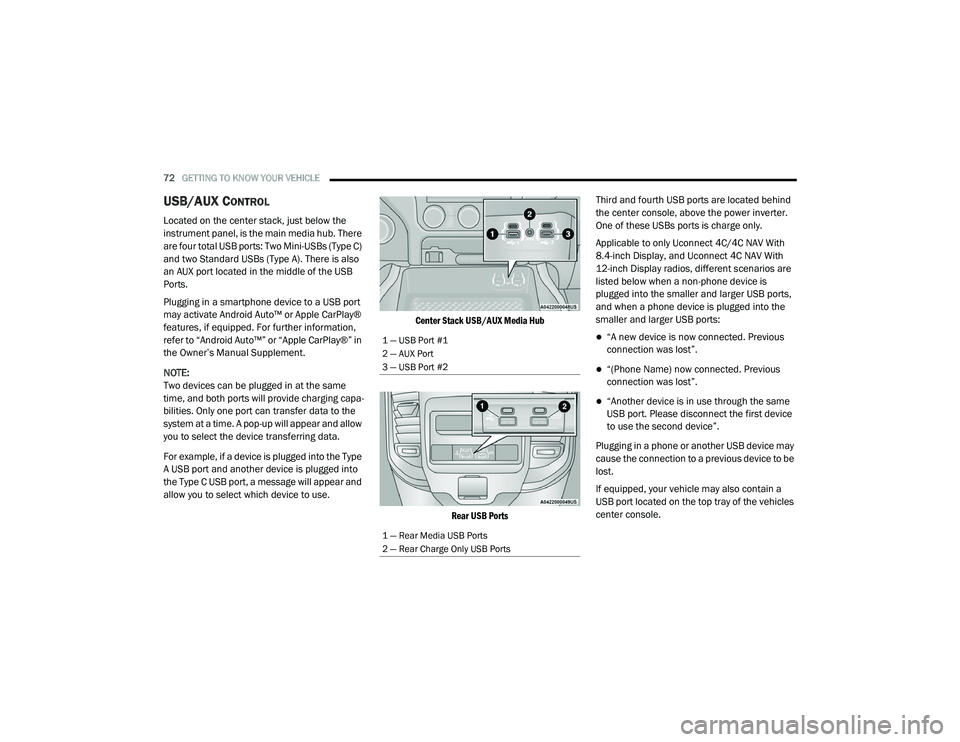
USB/AUX CONTROL
Located on the center stack, just below the
instrument panel, is the main media hub. There
are four total USB ports: Two Mini-USBs (Type C)
and two Standard USBs (Type A). There is also
an AUX port located in the middle of the USB
Ports.
Plugging in a smartphone device to a USB port
may activate Android Auto™ or Apple CarPlay®
features, if equipped. For further information,
refer to “Android Auto™” or “Apple CarPlay®” in
the Owner’s Manual Supplement.
NOTE:
Two devices can be plugged in at the same
time, and both ports will provide charging capa-
bilities. Only one port can transfer data to the
system at a time. A pop-up will appear and allow
you to select the device transferring data.
For example, if a device is plugged into the Type
A USB port and another device is plugged into
the Type C USB port, a message will appear and
allow you to select which device to use.
Center Stack USB/AUX Media Hub
Rear USB Ports
Third and fourth USB ports are located behind
the center console, above the power inverter.
One of these USBs ports is charge only.
Applicable to only Uconnect 4C/4C NAV With
8.4-inch Display, and Uconnect 4C NAV With
12-inch Display radios, different scenarios are
listed below when a non-phone device is
plugged into the smaller and larger USB ports,
and when a phone device is plugged into the
smaller and larger USB ports:
“A new device is now connected. Previous
connection was lost”.
“(Phone Name) now connected. Previous
connection was lost”.
“Another device is in use through the same
USB port. Please disconnect the first device
to use the second device”.
Plugging in a phone or another USB device may
cause the connection to a previous device to be
lost.
If equipped, your vehicle may also contain a
USB port located on the top tray of the vehicles
center console.
1 — USB Port #1
2 — AUX Port
3 — USB Port #2
1 — Rear Media USB Ports
2 — Rear Charge Only USB Ports
21_DPF_OM_EN_USC_t.book Page 72
Page 75 of 463
GETTING TO KNOW YOUR VEHICLE73
(Continued)
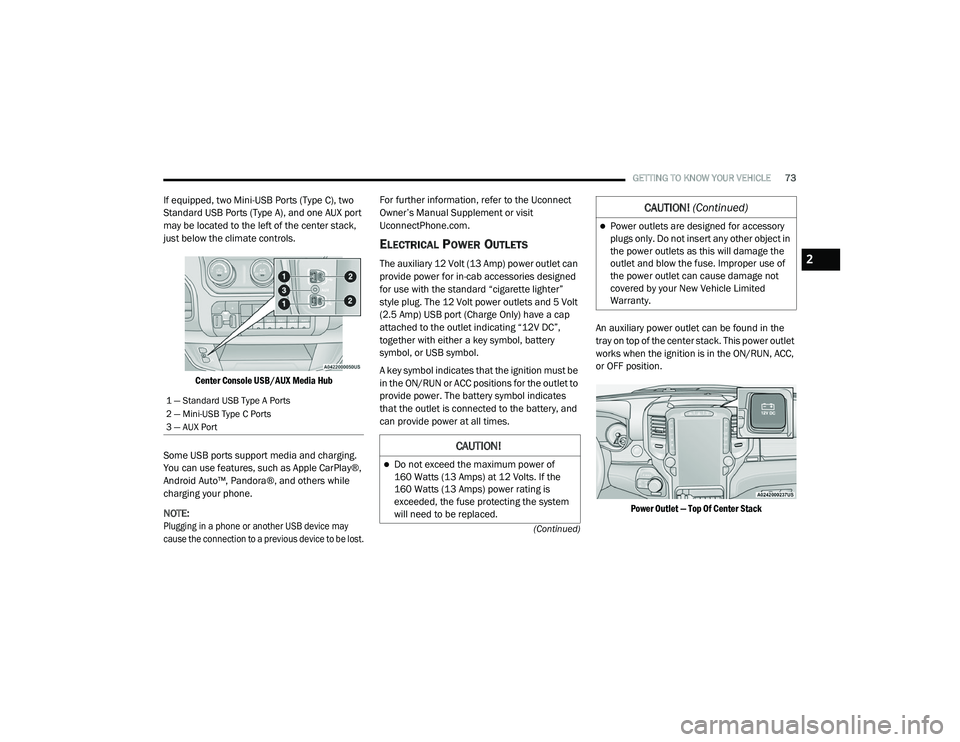
If equipped, two Mini-USB Ports (Type C), two
Standard USB Ports (Type A), and one AUX port
may be located to the left of the center stack,
just below the climate controls.
Center Console USB/AUX Media Hub
Some USB ports support media and charging.
You can use features, such as Apple CarPlay®,
Android Auto™, Pandora®, and others while
charging your phone.
NOTE:
Plugging in a phone or another USB device may
cause the connection to a previous device to be lost.
For further information, refer to the Uconnect
Owner’s Manual Supplement or visit
UconnectPhone.com.
ELECTRICAL POWER OUTLETS
The auxiliary 12 Volt (13 Amp) power outlet can
provide power for in-cab accessories designed
for use with the standard “cigarette lighter”
style plug. The 12 Volt power outlets and 5 Volt
(2.5 Amp) USB port (Charge Only) have a cap
attached to the outlet indicating “12V DC”,
together with either a key symbol, battery
symbol, or USB symbol.
A key symbol indicates that the ignition must be
in the ON/RUN or ACC positions for the outlet to
provide power. The battery symbol indicates
that the outlet is connected to the battery, and
can provide power at all times.
An auxiliary power outlet can be found in the
tray on top of the center stack. This power outlet
works when the ignition is in the ON/RUN, ACC,
or OFF position.
Power Outlet — Top Of Center Stack
1 — Standard USB Type A Ports
2 — Mini-USB Type C Ports
3 — AUX Port
CAUTION!
Do not exceed the maximum power of
160 Watts (13 Amps) at 12 Volts. If the
160 Watts (13 Amps) power rating is
exceeded, the fuse protecting the system
will need to be replaced.
Power outlets are designed for accessory
plugs only. Do not insert any other object in
the power outlets as this will damage the
outlet and blow the fuse. Improper use of
the power outlet can cause damage not
covered by your New Vehicle Limited
Warranty.
CAUTION! (Continued)
2
21_DPF_OM_EN_USC_t.book Page 73
Page 101 of 463

GETTING TO KNOW YOUR INSTRUMENT PANEL99
Daytime Running Lights Daytime Lights On; Off
Flash Lights with Lock Lights w/ Lock On; Off
Auto Lock Doors Auto Lock Doors On; Off
Auto Unlock Doors Auto Unlock Doors On; Off
Sound Horn with Remote Start Horn w/ Rmt Start On; Off
Sound Horn with Remote Lock Horn w/ Rmt Lock Off; 1st Press; 2nd Press
Remote Unlock Sequence Remote Unlock Driver Door; All Doors
Key Fob Linked to Memory Key in Memory On; Off
Passive Entry Passive Entry On; Off
Remote Start Comfort System Rmt Start Comfort Off; Remote Start; All starts
Easy Exit Seat Easy Exit Seat On; Off
Key-off Power Delay Power Off Delay Off; 45 seconds; 5 minutes; 10 minutes
Commercial Settings Commercial
Aux Switches
Power Take-Off
PIN Setup
NOTE:
If the vehicle’s PIN is forgotten or not known, see an authorized dealer to have
the PIN reset.
Trailer Select Trailer Select Trailer 1; Trailer 2; Trailer 3; Trailer 4
Setting NamesSetting Names Abbreviated
(Left Submenu Layer) Submenus (Right Submenu Layer)
3
21_DPF_OM_EN_USC_t.book Page 99
Page 103 of 463

GETTING TO KNOW YOUR INSTRUMENT PANEL101
Commercial Settings — If Equipped
Commercial Settings allows the driver to set
and recall additional features when the
transmission is in PARK.
Push and release the up or down arrow
button until Commercial Settings displays in the
instrument cluster display.
Follow the prompts to enter the required PIN
and enter the Commercial Settings submenu.
NOTE:
If your vehicle is equipped with a touchscreen
radio, “Commercial Settings” will replace
“Vehicle Settings” in the instrument cluster
display. The Commercial Settings menu will only
include the settings below Ú page 228.Commercial Settings allows you to access the
following features (if equipped):
Power Take Off (PTO)
Remote Ignition
Idle Control
Backup Alarm
ParkSense
Aux Switches
PIN Setup
NOTE:
If the vehicle’s PIN is forgotten or not known,
see an authorized dealer to have the PIN reset.
DIESEL MESSAGES AND WARNINGS
Diesel Particulate Filter (DPF) Messages
The Cummins diesel engine meets all diesel
emissions standards, resulting in one of the
lowest emitting diesel engines ever produced.
To achieve these emissions standards, your
vehicle is equipped with a state-of-the-art
engine and exhaust system. These systems are
seamlessly integrated into your vehicle and
managed by the Powertrain Control Module
(PCM). The PCM manages engine combustion
to allow the exhaust system’s catalyst to trap
and burn Particulate Matter (PM) pollutants,
with no input or interaction on your part.
Calibrate Compass
Compass Cal Cancel; Calibrate
Fuel Saver Display Fuel Saver On; Off
Setting NamesSetting Names Abbreviated
(Left Submenu Layer) Submenus (Right Submenu Layer)
3
21_DPF_OM_EN_USC_t.book Page 101
Page 154 of 463
152STARTING AND OPERATING
If the vehicle has not been driven for several
days, the first few seconds of operation after
shifting the transmission into gear may seem
sluggish. This is due to the fluid partially
draining from the torque converter into the
transmission. This condition is normal and
will not cause damage to the transmission.
The torque converter will refill within
five seconds after starting the engine.
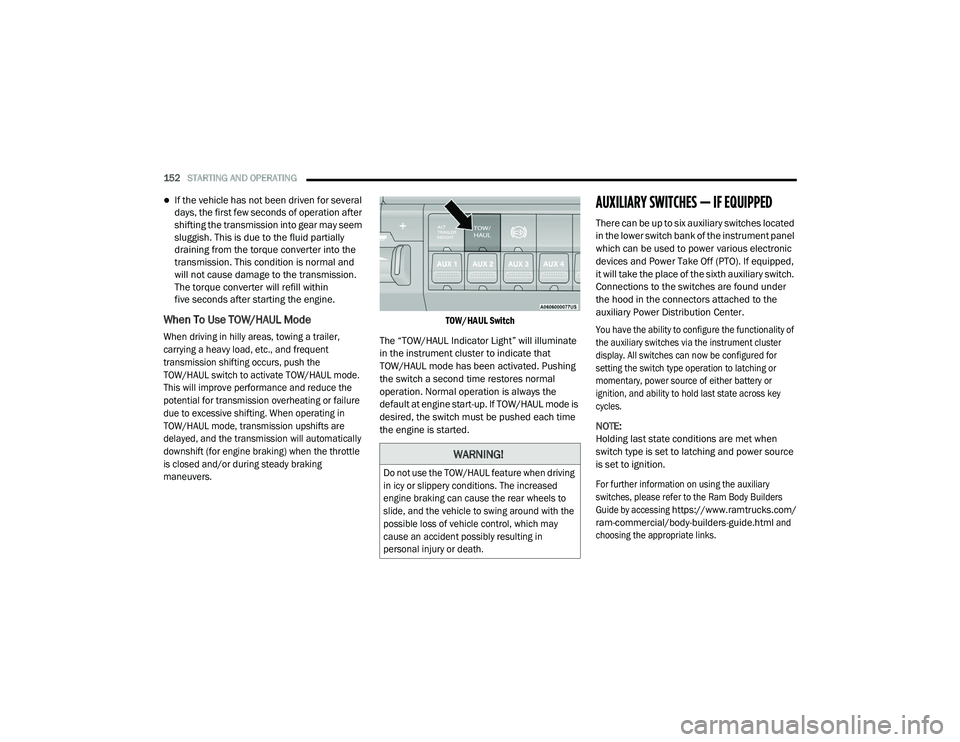
When To Use TOW/HAUL Mode
When driving in hilly areas, towing a trailer,
carrying a heavy load, etc., and frequent
transmission shifting occurs, push the
TOW/HAUL switch to activate TOW/HAUL mode.
This will improve performance and reduce the
potential for transmission overheating or failure
due to excessive shifting. When operating in
TOW/HAUL mode, transmission upshifts are
delayed, and the transmission will automatically
downshift (for engine braking) when the throttle
is closed and/or during steady braking
maneuvers. TOW/HAUL Switch
The “TOW/HAUL Indicator Light” will illuminate
in the instrument cluster to indicate that
TOW/HAUL mode has been activated. Pushing
the switch a second time restores normal
operation. Normal operation is always the
default at engine start-up. If TOW/HAUL mode is
desired, the switch must be pushed each time
the engine is started.
AUXILIARY SWITCHES — IF EQUIPPED
There can be up to six auxiliary switches located
in the lower switch bank of the instrument panel
which can be used to power various electronic
devices and Power Take Off (PTO). If equipped,
it will take the place of the sixth auxiliary switch.
Connections to the switches are found under
the hood in the connectors attached to the
auxiliary Power Distribution Center.
You have the ability to configure the functionality of
the auxiliary switches via the instrument cluster
display. All switches can now be configured for
setting the switch type operation to latching or
momentary, power source of either battery or
ignition, and ability to hold last state across key
cycles.
NOTE:
Holding last state conditions are met when
switch type is set to latching and power source
is set to ignition.
For further information on using the auxiliary
switches, please refer to the Ram Body Builders
Guide by accessing
https://www.ramtrucks.com/
ram-commercial/body-builders-guide.html
and
choosing the appropriate links.
WARNING!
Do not use the TOW/HAUL feature when driving
in icy or slippery conditions. The increased
engine braking can cause the rear wheels to
slide, and the vehicle to swing around with the
possible loss of vehicle control, which may
cause an accident possibly resulting in
personal injury or death.
21_DPF_OM_EN_USC_t.book Page 152
Page 189 of 463
STARTING AND OPERATING187
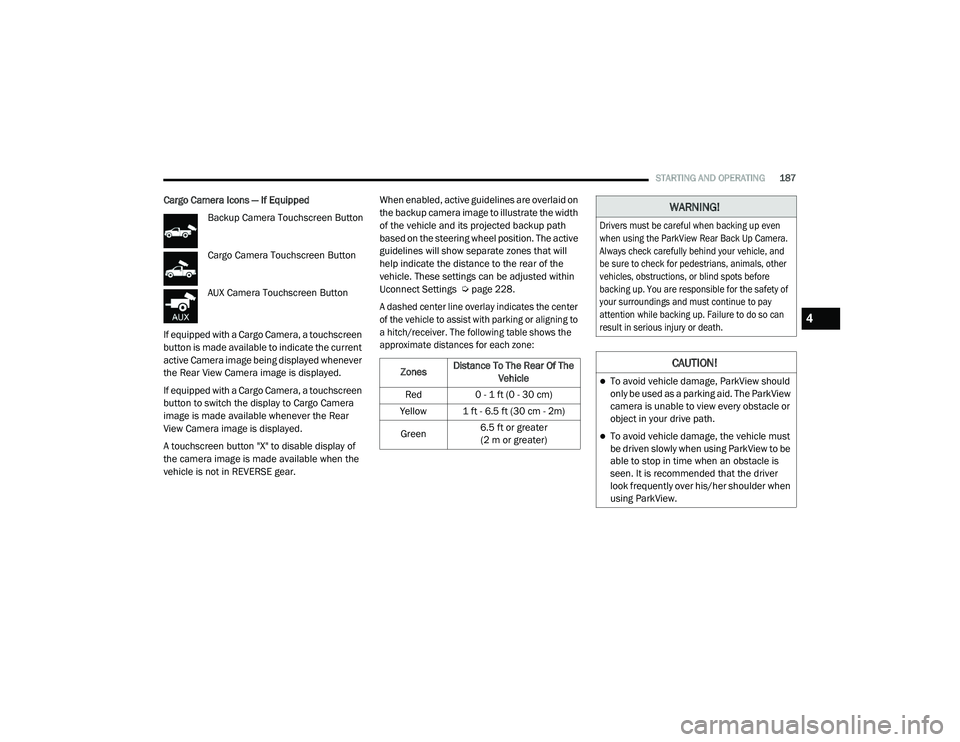
Cargo Camera Icons — If Equipped
Backup Camera Touchscreen Button
Cargo Camera Touchscreen Button
AUX Camera Touchscreen Button
If equipped with a Cargo Camera, a touchscreen
button is made available to indicate the current
active Camera image being displayed whenever
the Rear View Camera image is displayed.
If equipped with a Cargo Camera, a touchscreen
button to switch the display to Cargo Camera
image is made available whenever the Rear
View Camera image is displayed.
A touchscreen button "X" to disable display of
the camera image is made available when the
vehicle is not in REVERSE gear. When enabled, active guidelines are overlaid on
the backup camera image to illustrate the width
of the vehicle and its projected backup path
based on the steering wheel position. The active
guidelines will show separate zones that will
help indicate the distance to the rear of the
vehicle. These settings can be adjusted within
Uconnect Settings Ú
page 228.
A dashed center line overlay indicates the center
of the vehicle to assist with parking or aligning to
a hitch/receiver. The following table shows the
approximate distances for each zone:
Zones Distance To The Rear Of The
Vehicle
Red 0 - 1 ft (0 - 30 cm)
Yellow 1 ft - 6.5 ft (30 cm - 2m)
Green 6.5 ft or greater
(2 m or greater)
WARNING!
Drivers must be careful when backing up even
when using the ParkView Rear Back Up Camera.
Always check carefully behind your vehicle, and
be sure to check for pedestrians, animals, other
vehicles, obstructions, or blind spots before
backing up. You are responsible for the safety of
your surroundings and must continue to pay
attention while backing up. Failure to do so can
result in serious injury or death.
CAUTION!
To avoid vehicle damage, ParkView should
only be used as a parking aid. The ParkView
camera is unable to view every obstacle or
object in your drive path.
To avoid vehicle damage, the vehicle must
be driven slowly when using ParkView to be
able to stop in time when an obstacle is
seen. It is recommended that the driver
look frequently over his/her shoulder when
using ParkView.
4
21_DPF_OM_EN_USC_t.book Page 187