instrument panel RAM CHASSIS CAB 2022 Workshop Manual
[x] Cancel search | Manufacturer: RAM, Model Year: 2022, Model line: CHASSIS CAB, Model: RAM CHASSIS CAB 2022Pages: 428, PDF Size: 20.18 MB
Page 113 of 428

STARTING AND OPERATING111
NOTE:The engine block heater cord is a factory installed
option. If your vehicle is not equipped, heater cords
are available from an authorized Mopar® dealer.
A 12 Volt heater built into the fuel filter housings
aid in preventing fuel gelling. It is controlled by a
built-in thermostat.
An intake air heater system both improves
engine starting and reduces the amount of
white smoke generated by a warming engine.
NORMAL STARTING PROCEDURE —
E
NGINE MANIFOLD AIR TEMPERATURE
A
BOVE 66°F (19°C)
Observe the instrument panel cluster lights when
starting the engine.
1. Always apply the parking brake.
2. Shift into PARK for an automatic transmission.
3. Place the ignition switch in the ON/RUN
position and watch the instrument panel
cluster lights. 4. Place the ignition switch in the START position
and crank the engine. Do not press the
accelerator during starting.
5. Check that the Oil Pressure Warning Light has turned off.
6. Release the parking brake.STARTING PROCEDURE — ENGINE
M
ANIFOLD AIR TEMPERATURE 0°F TO
66°F (–18°C
TO 19°C)
NOTE:The temperature displayed in the instrument
cluster does not necessarily reflect the engine
manifold air temperature Ú page 81. When
engine temperatures fall below 66°F (19°C) the
“Wait To Start” telltale will remain on indicating the
intake air heater system is active.
Follow the steps in the “Normal Starting”
procedure except:
1. The “Wait to Start” telltale will remain on for a
period of time that varies depending on the
engine temperature.
2. While the “Wait to Start” telltale is on, the instrument cluster will additionally display a
gauge or bar whose initial length represents
the full “Wait to Start” time period. Its length
will decrease until it disappears when the
“Wait to Start” time has elapsed.
3. After the “Wait to Start” telltale goes off, place the ignition switch in the START position. Do
not press the accelerator during starting.
CAUTION!
If the Water in Fuel Indicator Light remains on,
DO NOT START the engine before you drain the
water from the fuel filters to avoid engine
damage Ú page 347.
CAUTION!
Do not crank engine for more than 25 seconds
at a time or starter motor damage may result.
Turn the ignition switch to the OFF position and
wait at least two minutes for the starter to cool
before repeating start procedure.
CAUTION!
If the Water in Fuel Indicator Light remains on,
DO NOT START the engine before you drain the
water from the fuel filters to avoid engine
damage Úpage 347.
CAUTION!
Do not crank engine for more than 25 seconds
at a time or starter motor damage may result.
Turn the ignition switch to the OFF position and
wait at least two minutes for the starter to cool
before repeating start procedure.
4
22_DPF_OM_EN_USC_t.book Page 111
Page 121 of 428

STARTING AND OPERATING119
(Continued)
and not interpreted as a problem. Please check
your oil level with the engine oil indicator often
during the break in period. Add oil as required.
ENGINE BREAK-IN RECOMMENDATIONS —
DIESEL ENGINE
The Cummins® Turbo Diesel engine does not
require a break-in period due to its construction.
Normal operation is allowed, providing the
following recommendations are followed:
Warm up the engine before placing it under
load.
Do not operate the engine at idle for prolonged
periods.
Use the appropriate transmission gear to
prevent engine lugging.
Observe vehicle oil pressure and temperature
indicators.
Check the coolant and oil levels frequently.
Vary throttle position at highway speeds when
carrying or towing significant weight.
NOTE:Light duty operation such as light trailer towing or
no load operation will extend the time before the
engine is at full efficiency. Reduced fuel economy
and power may be seen at this time.
For additional vehicle break-in requirements
Ú
page 177.
Because of the construction of the Cummins®
Turbo Diesel engine, engine run-in is enhanced by
loaded operating conditions which allow the
engine parts to achieve final finish and fit during
the first 6,000 miles (10,000 km).
PARKING BRAKE
Before leaving the vehicle, make sure that the
parking brake is fully applied. Also, be certain to
leave the transmission in PARK.
The foot operated parking brake is located below
the lower left corner of the instrument panel. To
apply the parking brake, firmly push the parking
brake pedal fully. To release the parking brake, pull
the parking brake release handle.
Parking Brake Release
When the parking brake is applied with the ignition
switch ON, the Brake Warning Light in the
instrument cluster will illuminate.
NOTE:
When the parking brake is applied and the
transmission is placed in gear, the Brake
Warning Light will flash. If vehicle speed is
detected, a chime will sound to alert the driver.
Fully release the parking brake before
attempting to move the vehicle.
This light only shows that the parking brake is
applied. It does not show the degree of brake
application.
When parking on a hill, it is important to turn the
front wheels toward the curb on a downhill grade
and away from the curb on an uphill grade. Apply
the parking brake before placing the gear selector
in PARK, otherwise the load on the transmission
locking mechanism may make it difficult to move
the gear selector out of PARK. The parking brake
should always be applied whenever the driver is
not in the vehicle.
WARNING!
Never use the PARK position as a substitute
for the parking brake. Always apply the
parking brake fully when parked to guard
against vehicle movement and possible injury
or damage.
4
22_DPF_OM_EN_USC_t.book Page 119
Page 124 of 428
122STARTING AND OPERATING
IGNITION PARK INTERLOCK
This vehicle is equipped with an Ignition Park
Interlock which requires the transmission to be in
PARK before the ignition can be turned to the OFF
position. This helps the driver avoid inadvertently
leaving the vehicle without placing the
transmission in PARK. This system also locks the
transmission in PARK whenever the ignition is in
the OFF position.
NOTE:The transmission is NOT locked in PARK when the
ignition is in the ACC position (even though the
engine will be off). Ensure that the transmission is
in PARK, and the ignition is OFF (not in ACC
position) before exiting the vehicle.
BRAKE/TRANSMISSION SHIFT
I
NTERLOCK (BTSI) SYSTEM
This vehicle is equipped with a BTSI system that
holds the transmission gear selector in PARK
unless the brakes are applied. For vehicles with
8-speed transmission, to shift the transmission out
of PARK, the engine must be running and the brake
pedal must be pressed. The brake pedal must also
be pressed to shift from NEUTRAL into DRIVE or
REVERSE when the vehicle is stopped or moving at
low speeds. For vehicles with 6-speed
transmission, to shift the transmission out of
PARK, the ignition must be in the ON/RUN position (engine running or not) and the brake pedal must
be pressed.
The BTSI will timeout if brake pedal is pressed for
three minutes or longer continuously while in park.
It can be reset by releasing the brake for more then
three seconds, then reapplying the brake pedal or
cycling the ignition.
8-SPEED AUTOMATIC TRANSMISSION —
I
F EQUIPPED
The transmission is controlled using a rotary
electronic gear selector located on the instrument
panel. The transmission gear range (PRND) is
displayed both above the gear selector and in the
instrument cluster. To select a gear range, simply
rotate the gear selector. You must press the brake
pedal to shift the transmission out of PARK (or
NEUTRAL, when the vehicle is stopped or moving at
low speeds). To shift past multiple gear ranges at
once (such as PARK to DRIVE), simply rotate the
gear selector to the appropriate detent. Select the
DRIVE range for normal driving.
NOTE:In the event of a mismatch between the gear
selector position and the actual transmission gear
(for example, driver selects PARK while driving),
the position indicator will blink continuously until
the selector is returned to the proper position, or
the requested shift can be completed.
Never leave children alone in a vehicle, or with
access to an unlocked vehicle. Allowing chil -
dren to be in a vehicle unattended is
dangerous for a number of reasons. A child or
others could be seriously or fatally injured.
Children should be warned not to touch the
parking brake, brake pedal or the transmis -
sion gear selector.
Do not leave the key fob in or near the vehicle
(or in a location accessible to children), and do
not leave the ignition (in a vehicle equipped
with Keyless Enter ‘n Go™) in the ACC or ON/
RUN position. A child could operate power
windows, other controls, or move the vehicle.
CAUTION!
Shift into or out of PARK or REVERSE only after
the vehicle has come to a complete stop.
Do not shift between PARK, REVERSE,
NEUTRAL, or DRIVE when the engine is above
idle speed.
Before shifting into any gear, make sure your
foot is firmly pressing the brake pedal.
WARNING!
22_DPF_OM_EN_USC_t.book Page 122
Page 133 of 428

STARTING AND OPERATING131
When To Use TOW/HAUL Mode
When driving in hilly areas, towing a trailer, carrying
a heavy load, etc., and frequent transmission
shifting occurs, push the TOW/HAUL switch to
activate TOW/HAUL mode. This will improve
performance and reduce the potential for
transmission overheating or failure due to
excessive shifting. When operating in TOW/HAUL
mode, transmission upshifts are delayed, and the
transmission will automatically downshift (for
engine braking) when the throttle is closed and/or
during steady braking maneuvers.
TOW/HAUL Switch
The TOW/HAUL Indicator Light will illuminate in the
instrument cluster to indicate that TOW/HAUL
mode has been activated. Pushing the switch a
second time restores normal operation. Normal operation is always the default at engine start-up.
If TOW/HAUL mode is desired, the switch must be
pushed each time the engine is started.
Torque Converter Clutch
A feature designed to improve fuel economy has
been included in the automatic transmission on
your vehicle. A clutch within the torque converter
engages automatically at calibrated speeds. This
may result in a slightly different feeling or response
during normal operation in the upper gears. When
the vehicle speed drops or during some
accelerations, the clutch automatically
disengages.
NOTE:
The torque converter clutch will not engage,
until the transmission fluid and engine coolant
are warm (usually after 1 to 3 miles (2 to 5 km)
of driving). Because engine speed is higher
when the torque converter clutch is not engaged, it may seem as if the transmission is
not shifting properly when cold; this is normal.
Using the Electronic Range Select (ERS) shift
control, when the transmission is sufficiently
warm, will demonstrate that the transmission is
able to shift into and out of Overdrive.
If the vehicle has not been driven for several
days, the first few seconds of operation after
shifting the transmission into gear may seem
sluggish. This is due to the fluid partially
draining from the torque converter into the
transmission. This condition is normal and will
not cause damage to the transmission. The
torque converter will refill within five seconds
after starting the engine.
AUXILIARY SWITCHES — IF EQUIPPED
There can be up to six auxiliary switches located in
the lower switch bank of the instrument panel
which can be used to power various electronic
devices and Power Take Off (PTO). If equipped, it
will take the place of the sixth auxiliary switch.
Connections to the switches are found under the
hood in the connectors attached to the auxiliary
Power Distribution Center.
You have the ability to configure the functionality of
the auxiliary switches via the instrument cluster
display. All switches can now be configured for
setting the switch type operation to latching or
WARNING!
Do not use the TOW/HAUL feature when driving
in icy or slippery conditions. The increased
engine braking can cause the rear wheels to
slide, and the vehicle to swing around with the
possible loss of vehicle control, which may
cause an accident possibly resulting in personal
injury or death.
4
22_DPF_OM_EN_USC_t.book Page 131
Page 134 of 428

132STARTING AND OPERATING
momentary, power source of either battery or
ignition, and ability to hold last state across key
cycles.
NOTE:Holding last state conditions are met when switch
type is set to latching and power source is set to
ignition.
For further information on using the auxiliary
switches, please refer to the Ram Body Builder’s
Guide by accessing https://www.ramtrucks.com/
ram-commercial/body-builders-guide.html and
choosing the appropriate links.
FOUR-WHEEL DRIVE OPERATION —
IF EQUIPPED
Four-wheel drive trucks are equipped with either a
manually shifted transfer case or an electronically
shifted transfer case.
ELECTRONICALLY SHIFTED TRANSFER
C
ASE (8-SPEED TRANSMISSION) —
I
F EQUIPPED
This is an electronically shifted transfer case and is
operated by the 4WD Control Switch (Transfer
Case Switch), which is located on the instrument
panel.
Four-Position Transfer Case
This electronically shifted transfer case provides
four positions:
Two-Wheel Drive High Range (2WD)
Four-Wheel Drive High Range (4WD HIGH)
Four-Wheel Drive Low Range (4WD LOW)
N (Neutral)
For additional information on the appropriate use
of each transfer case position, see the information
below:
2WD
Two-Wheel Drive High Range — This range is for
normal street and highway driving on dry, hard
surfaced roads. 4WD HIGH
Four-Wheel Drive High Range — This range
provides torque to the front driveshaft (engages
four-wheel drive) which allows front and rear
wheels to spin at the same speed. This provides
additional traction for loose, slippery road surfaces
only.
4WD LOW
Four-Wheel Drive Low Range — This range provides
low speed four-wheel drive. It maximizes torque
(increased torque over 4WD High) to the front
wheels, allowing front and rear wheels to rotate at
the same speed. This range provides additional
traction and maximum pulling power for loose,
slippery road surfaces only. Do not exceed 25 mph
(40 km/h) in this range.
N (Neutral)
N (Neutral) — This range disengages both the front
and rear driveshafts from the powertrain. To be
used for flat towing behind another vehicle
Ú
page 185.
22_DPF_OM_EN_USC_t.book Page 132
Page 137 of 428
STARTING AND OPERATING135
3. Push the desired position on the transfer case control switch.
4. After the desired position indicator light is on (not flashing), shift the transmission back into
gear.
NOTE:
If Steps 1 or 2 of either the Preferred or Alter -
nate Procedure are not satisfied prior to
attempting the shift, then the desired position
indicator light will flash continuously while the
original position indicator light is on, until all
requirements have been met.
The ignition switch must be in the ON/RUN posi -
tion for a shift to take place and for the position
indicator lights to be operable. If the ignition
switch is not in the ON/RUN position, the shift
will not take place and no position indicator
lights will be on or flashing.
ELECTRONICALLY SHIFTED TRANSFER
C
ASE (6-SPEED TRANSMISSION) —
I
F EQUIPPED
The electronically shifted transfer case is operated
by the four-wheel drive Control Switch (Transfer
Case Switch), which is located on the instrument
panel.
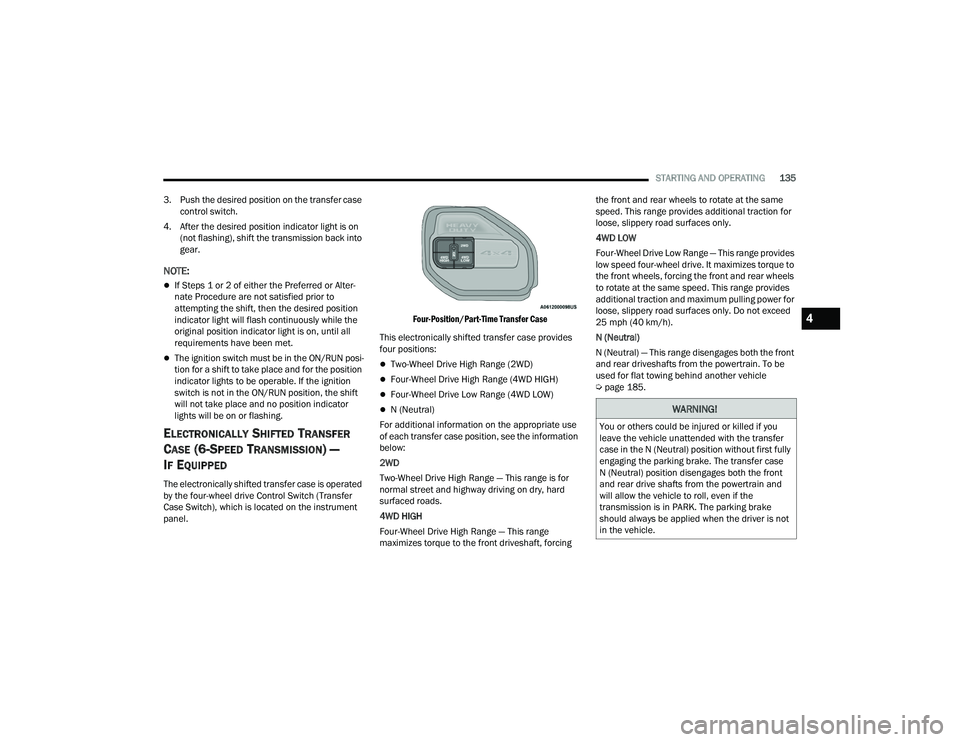
Four-Position/Part-Time Transfer Case
This electronically shifted transfer case provides
four positions:
Two-Wheel Drive High Range (2WD)
Four-Wheel Drive High Range (4WD HIGH)
Four-Wheel Drive Low Range (4WD LOW)
N (Neutral)
For additional information on the appropriate use
of each transfer case position, see the information
below:
2WD
Two-Wheel Drive High Range — This range is for
normal street and highway driving on dry, hard
surfaced roads.
4WD HIGH
Four-Wheel Drive High Range — This range
maximizes torque to the front driveshaft, forcing the front and rear wheels to rotate at the same
speed. This range provides additional traction for
loose, slippery road surfaces only.
4WD LOW
Four-Wheel Drive Low Range — This range provides
low speed four-wheel drive. It maximizes torque to
the front wheels, forcing the front and rear wheels
to rotate at the same speed. This range provides
additional traction and maximum pulling power for
loose, slippery road surfaces only. Do not exceed
25 mph (40 km/h).
N (Neutral)
N (Neutral) — This range disengages both the front
and rear driveshafts from the powertrain. To be
used for flat towing behind another vehicle
Ú
page 185.WARNING!
You or others could be injured or killed if you
leave the vehicle unattended with the transfer
case in the N (Neutral) position without first fully
engaging the parking brake. The transfer case
N (Neutral) position disengages both the front
and rear drive shafts from the powertrain and
will allow the vehicle to roll, even if the
transmission is in PARK. The parking brake
should always be applied when the driver is not
in the vehicle.
4
22_DPF_OM_EN_USC_t.book Page 135
Page 159 of 428

STARTING AND OPERATING157
NOTE:When operating conditions have been met, the
LaneSense system will monitor if the driver’s
hands are on the steering wheel and provide an
audible and visual warning to the driver if removed.
The system will cancel if the driver does not return
their hands to the wheel.
TURNING LANESENSE ON OR OFF
The LaneSense button is located on the
switch panel below the Uconnect display.
NOTE:If your vehicle is equipped with a 12–inch
Uconnect Display screen, the LaneSense button is
located above the display.
To turn the LaneSense system on, push the
LaneSense button (LED turns off). A “LaneSense
On” message is shown in the instrument cluster
display.
To turn the LaneSense system off, push the
LaneSense button again (LED turns on).
NOTE:The LaneSense system will retain the last system
state (on or off) from the last ignition cycle when
the ignition is changed to the ON/RUN position.
LANESENSE WARNING MESSAGE
The LaneSense system will indicate the current
lane drift condition through the instrument cluster
display.
When the LaneSense system is on, the lane lines
are gray when both of the lane boundaries have
not been detected and the LaneSense telltale
is solid white.
System ON (Gray Lines) With White Telltale
Left Lane Departure — Only Left Lane Detected
When the LaneSense system is on, the Lane-
Sense Telltale is solid white when only the
left lane marking has been detected and the
system is ready to provide visual warnings in the
instrument cluster display if an unintentional
lane departure occurs on the left side.
When the LaneSense system senses the lane
has been approached and is in a lane departure
situation, the visual warning in the instrument
cluster display will show the left lane line
flashing yellow (on/off). The LaneSense telltale changes from solid white to flashing yellow.
Lane Crossed (Flashing Yellow Lane Line) With Yellow Telltale
NOTE:The LaneSense system operates with similar
behavior for a right lane departure when only the
right lane marking has been detected.
4
22_DPF_OM_EN_USC_t.book Page 157
Page 193 of 428
MULTIMEDIA191
UCONNECT SETTINGS
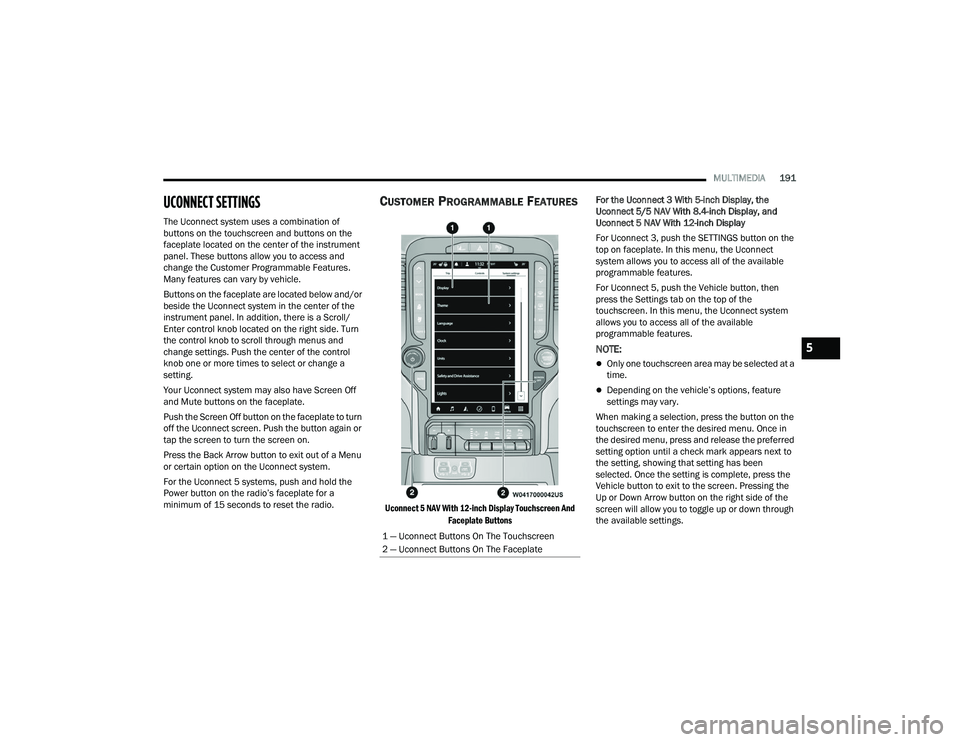
The Uconnect system uses a combination of
buttons on the touchscreen and buttons on the
faceplate located on the center of the instrument
panel. These buttons allow you to access and
change the Customer Programmable Features.
Many features can vary by vehicle.
Buttons on the faceplate are located below and/or
beside the Uconnect system in the center of the
instrument panel. In addition, there is a Scroll/
Enter control knob located on the right side. Turn
the control knob to scroll through menus and
change settings. Push the center of the control
knob one or more times to select or change a
setting.
Your Uconnect system may also have Screen Off
and Mute buttons on the faceplate.
Push the Screen Off button on the faceplate to turn
off the Uconnect screen. Push the button again or
tap the screen to turn the screen on.
Press the Back Arrow button to exit out of a Menu
or certain option on the Uconnect system.
For the Uconnect 5 systems, push and hold the
Power button on the radio’s faceplate for a
minimum of 15 seconds to reset the radio.
CUSTOMER PROGRAMMABLE FEATURES
Uconnect 5 NAV With 12-inch Display Touchscreen And
Faceplate Buttons
For the Uconnect 3 With 5-inch Display, the
Uconnect 5/5 NAV With 8.4-inch Display, and
Uconnect 5 NAV With 12-inch Display
For Uconnect 3, push the SETTINGS button on the
top on faceplate. In this menu, the Uconnect
system allows you to access all of the available
programmable features.
For Uconnect 5, push the Vehicle button, then
press the Settings tab on the top of the
touchscreen. In this menu, the Uconnect system
allows you to access all of the available
programmable features.
NOTE:
Only one touchscreen area may be selected at a
time.
Depending on the vehicle’s options, feature
settings may vary.
When making a selection, press the button on the
touchscreen to enter the desired menu. Once in
the desired menu, press and release the preferred
setting option until a check mark appears next to
the setting, showing that setting has been
selected. Once the setting is complete, press the
Vehicle button to exit to the screen. Pressing the
Up or Down Arrow button on the right side of the
screen will allow you to toggle up or down through
the available settings.
1 — Uconnect Buttons On The Touchscreen
2 — Uconnect Buttons On The Faceplate
5
22_DPF_OM_EN_USC_t.book Page 191
Page 286 of 428

284SAFETY
How To Disengage The Automatic Locking Mode
Unbuckle the combination lap/shoulder belt and
allow it to retract completely to disengage the
Automatic Locking Mode and activate the vehicle
sensitive (emergency) locking mode.
SUPPLEMENTAL RESTRAINT SYSTEMS
(SRS)
Some of the safety features described in this
section may be standard equipment on some
models, or may be optional equipment on others. If
you are not sure, ask an authorized dealer. The air bag system must be ready to protect you in
a collision. The Occupant Restraint Controller
(ORC) monitors the internal circuits and
interconnecting wiring associated with the
electrical Air Bag System Components. Your
vehicle may be equipped with the following Air Bag
System Components:
Air Bag System Components
Occupant Restraint Controller (ORC)
Air Bag Warning Light
Steering Wheel and Column
Instrument Panel
Knee Impact Bolsters
Driver and Front Passenger Air Bags
Seat Belt Buckle Switch
Supplemental Side Air Bags — If Equipped
Front and Side Impact Sensors — If Equipped
Seat Belt Pretensioners — If Equipped
Air Bag Warning Light
The Occupant Restraint Controller (ORC)
monitors the readiness of the electronic
parts of the air bag system whenever the
ignition switch is in the START or ON/RUN
position. If the ignition switch is in the OFF position
or in the ACC position, the air bag system is not on
and the air bags will not inflate. The ORC contains a backup power supply system
that may deploy the air bag system even if the
battery loses power or it becomes disconnected
prior to deployment.
The ORC turns on the Air Bag Warning Light in the
instrument panel for approximately four to eight
seconds for a self-check when the ignition switch is
first in the ON/RUN position. After the self-check,
the Air Bag Warning Light will turn off. If the ORC
detects a malfunction in any part of the system, it
turns on the Air Bag Warning Light, either
momentarily or continuously. A single chime will
sound to alert you if the light comes on again after
initial startup.
The ORC also includes diagnostics that will
illuminate the instrument panel Air Bag Warning
Light if a malfunction is detected that could affect
the air bag system. The diagnostics also record the
nature of the malfunction. While the air bag system
is designed to be maintenance free, if any of the
following occurs, have an authorized dealer
service the air bag system immediately.The Air Bag Warning Light does not come on
during the four to eight seconds when the igni
-
tion switch is first in the ON/RUN position.
The Air Bag Warning Light remains on after the
four to eight-second interval.
The Air Bag Warning Light comes on intermit -
tently or remains on while driving.
WARNING!
The seat belt assembly must be replaced if the
switchable Automatic Locking Retractor (ALR)
feature or any other seat belt function is not
working properly when checked according to
the procedures in the Service Manual.
Failure to replace the seat belt assembly
could increase the risk of injury in collisions.
Do not use the Automatic Locking Mode to
restrain occupants who are wearing the seat
belt or children who are using booster seats.
The locked mode is only used to install
rear-facing or forward-facing child restraints
that have a harness for restraining the child.
22_DPF_OM_EN_USC_t.book Page 284
Page 287 of 428

SAFETY285
NOTE:If the speedometer, tachometer, or any engine
related gauges are not working, the Occupant
Restraint Controller (ORC) may also be disabled. In
this condition the air bags may not be ready to
inflate for your protection. Have an authorized
dealer service the air bag system immediately.
Redundant Air Bag Warning Light
If a fault with the Air Bag Warning Light is
detected, which could affect the
Supplemental Restraint System (SRS),
the Redundant Air Bag Warning Light will
illuminate on the instrument panel. The
Redundant Air Bag Warning Light will stay on until
the fault is cleared. In addition, a single chime will
sound to alert you that the Redundant Air Bag
Warning Light has come on and a fault has been
detected. If the Redundant Air Bag Warning Light comes on intermittently or remains on while driving
have an authorized dealer service the vehicle
immediately Ú
page 94.
Front Air Bags
This vehicle has front air bags and lap/shoulder
belts for both the driver and front passenger. The
front air bags are a supplement to the seat belt
restraint systems. The driver front air bag is
mounted in the center of the steering wheel. The
passenger front air bag is mounted in the
instrument panel, above the glove compartment.
The words “SRS AIRBAG” or “AIRBAG” are
embossed on the air bag covers.
Front Air Bag/Knee Bolster Locations
Driver And Passenger Front Air Bag
Features
The Advanced Front Air Bag system has multistage
driver and front passenger air bags. This system
provides output appropriate to the severity and
type of collision as determined by the Occupant
Restraint Controller (ORC), which may receive
information from the front impact sensors (if
equipped) or other system components.
WARNING!
Ignoring the Air Bag Warning Light in your
instrument panel could mean you won’t have the
air bag system to protect you in a collision. If the
light does not come on as a bulb check when the
ignition is first turned on, stays on after you start
the vehicle, or if it comes on as you drive, have
an authorized dealer service the air bag system
immediately.
1 — Driver And Passenger Front Air Bags
2 — Driver And Passenger Knee Impact Bolsters
WARNING!
Being too close to the steering wheel or instru -
ment panel during front air bag deployment
could cause serious injury, including death. Air
bags need room to inflate. Sit back, comfort -
ably extending your arms to reach the steering
wheel or instrument panel.
Never place a rear-facing child restraint in
front of an air bag. A deploying passenger
front air bag can cause death or serious injury
to a child 12 years or younger, including a
child in a rear-facing child restraint.
Never install a rear-facing child restraint in the
front seat of a vehicle. Only use a rear-facing
child restraint in the rear seat. If the vehicle
does not have a rear seat, do not transport a
rear-facing child restraint in that vehicle.
6
22_DPF_OM_EN_USC_t.book Page 285