service RAM CHASSIS CAB 2023 User Guide
[x] Cancel search | Manufacturer: RAM, Model Year: 2023, Model line: CHASSIS CAB, Model: RAM CHASSIS CAB 2023Pages: 444, PDF Size: 20.51 MB
Page 67 of 444

GETTING TO KNOW YOUR VEHICLE65
Vacation/Storage
For information on maintaining the Climate Control
system when the vehicle is being stored for an
extended period of time, see Úpage 407.
Window Fogging
Vehicle windows tend to fog on the inside in mild,
rainy, and/or humid weather. To clear the
windows, select Defrost or Mix mode and increase
the front blower speed. Do not use the
Recirculation mode without A/C for long periods,
as fogging may occur.
Outside Air Intake
Make sure the air intake, located directly in front of
the windshield, is free of obstructions, such as
leaves. Leaves collected in the air intake may
reduce airflow, and if they enter the plenum, they
could plug the water drains. In Winter months,
make sure the air intake is clear of ice, slush, and
snow.
Cabin Air Filter
The Climate Control system filters out dust and
pollen from the air. Contact an authorized dealer to
service your cabin air filter, and to have it replaced
when needed.
Operating Tips ChartINTERIOR STORAGE AND EQUIPMENT
STORAGE
Glove Compartment
The glove compartment is located on the
passenger side of the instrument panel and
features both an upper and lower storage area.
NOTE:Not all vehicles are equipped with a door over the
upper storage area.
Glove Compartment
WEATHER CONTROL SETTINGS
Hot Weather And
Vehicle Interior Is Very Hot Set the mode control to
(Panel Mode),
(A/C) on, and blower
on high. Roll down the windows for a minute
to flush out the hot air. Adjust the controls as needed to achieve comfort.
Warm Weather Turn (A/C) on and
set the mode control to
(Panel Mode).
Cool Sunny Operate in (Bi-Level
Mode).
Cool & Humid Conditions Set the mode control to
(Floor Mode) and
turn (A/C) on to
keep windows clear.
Cold Weather Set the mode control to
(Floor Mode). If
windshield fogging
starts to occur, move
the control to (Mix Mode).
1 — Upper Glove Compartment Release Button
(If Equipped)
2 — Upper Glove Compartment
3 — Lower Glove Compartment
2
23_DPF_OM_EN_USC_t.book Page 65
Page 81 of 444
GETTING TO KNOW YOUR INSTRUMENT PANEL79
Use this QR code to access your
digital experience.
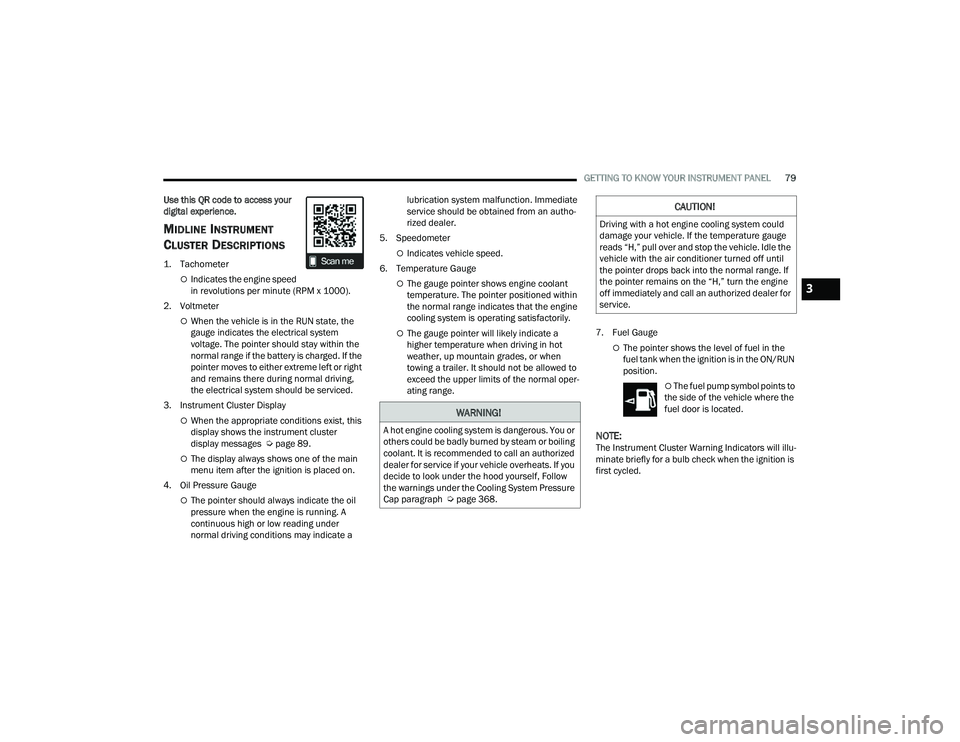
MIDLINE INSTRUMENT
C
LUSTER DESCRIPTIONS
1. Tachometer
Indicates the engine speed
in revolutions per minute (RPM x 1000).
2. Voltmeter
When the vehicle is in the RUN state, the
gauge indicates the electrical system
voltage. The pointer should stay within the
normal range if the battery is charged. If the
pointer moves to either extreme left or right
and remains there during normal driving,
the electrical system should be serviced.
3. Instrument Cluster Display
When the appropriate conditions exist, this
display shows the instrument cluster
display messages Ú page 89.
The display always shows one of the main
menu item after the ignition is placed on.
4. Oil Pressure Gauge
The pointer should always indicate the oil
pressure when the engine is running. A
continuous high or low reading under
normal driving conditions may indicate a lubrication system malfunction. Immediate
service should be obtained from an autho
-
rized dealer.
5. Speedometer
Indicates vehicle speed.
6. Temperature Gauge
The gauge pointer shows engine coolant
temperature. The pointer positioned within
the normal range indicates that the engine
cooling system is operating satisfactorily.
The gauge pointer will likely indicate a
higher temperature when driving in hot
weather, up mountain grades, or when
towing a trailer. It should not be allowed to
exceed the upper limits of the normal oper -
ating range. 7. Fuel Gauge
The pointer shows the level of fuel in the
fuel tank when the ignition is in the ON/RUN
position.
The fuel pump symbol points to
the side of the vehicle where the
fuel door is located.
NOTE:The Instrument Cluster Warning Indicators will illu -
minate briefly for a bulb check when the ignition is
first cycled.
WARNING!
A hot engine cooling system is dangerous. You or
others could be badly burned by steam or boiling
coolant. It is recommended to call an authorized
dealer for service if your vehicle overheats. If you
decide to look under the hood yourself, Follow
the warnings under the Cooling System Pressure
Cap paragraph Ú page 368.
CAUTION!
Driving with a hot engine cooling system could
damage your vehicle. If the temperature gauge
reads “H,” pull over and stop the vehicle. Idle the
vehicle with the air conditioner turned off until
the pointer drops back into the normal range. If
the pointer remains on the “H,” turn the engine
off immediately and call an authorized dealer for
service.
3
23_DPF_OM_EN_USC_t.book Page 79
Page 83 of 444
GETTING TO KNOW YOUR INSTRUMENT PANEL81
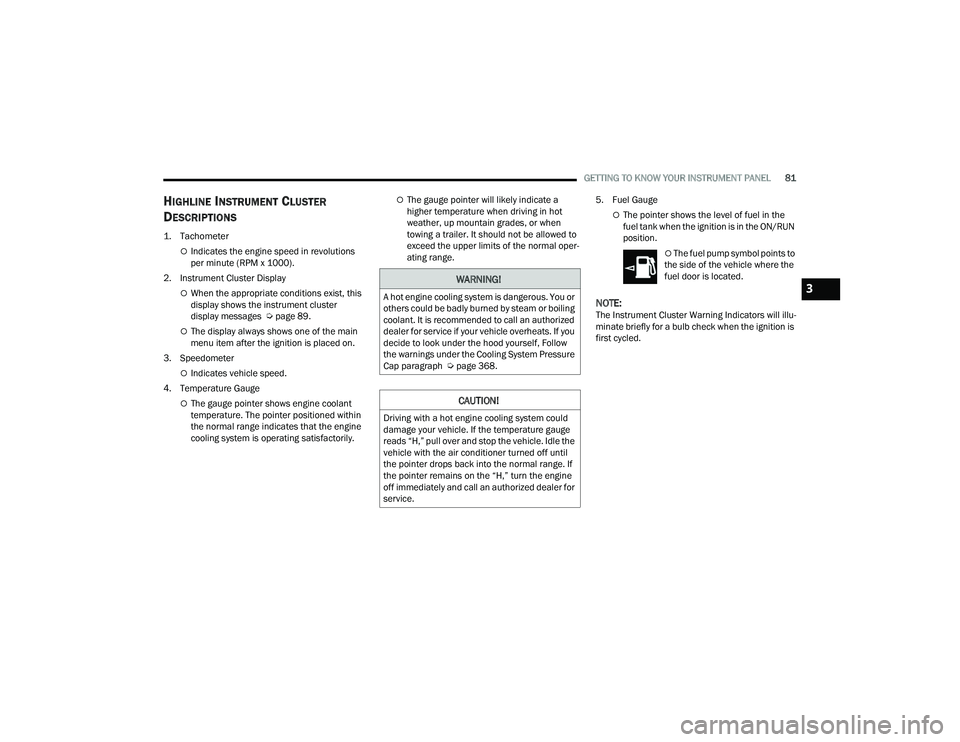
HIGHLINE INSTRUMENT CLUSTER
D
ESCRIPTIONS
1. Tachometer
Indicates the engine speed in revolutions
per minute (RPM x 1000).
2. Instrument Cluster Display
When the appropriate conditions exist, this
display shows the instrument cluster
display messages Ú page 89.
The display always shows one of the main
menu item after the ignition is placed on.
3. Speedometer
Indicates vehicle speed.
4. Temperature Gauge
The gauge pointer shows engine coolant
temperature. The pointer positioned within
the normal range indicates that the engine
cooling system is operating satisfactorily.
The gauge pointer will likely indicate a
higher temperature when driving in hot
weather, up mountain grades, or when
towing a trailer. It should not be allowed to
exceed the upper limits of the normal oper -
ating range. 5. Fuel Gauge
The pointer shows the level of fuel in the
fuel tank when the ignition is in the ON/RUN
position.
The fuel pump symbol points to
the side of the vehicle where the
fuel door is located.
NOTE:The Instrument Cluster Warning Indicators will illu -
minate briefly for a bulb check when the ignition is
first cycled.
WARNING!
A hot engine cooling system is dangerous. You or
others could be badly burned by steam or boiling
coolant. It is recommended to call an authorized
dealer for service if your vehicle overheats. If you
decide to look under the hood yourself, Follow
the warnings under the Cooling System Pressure
Cap paragraph Ú page 368.
CAUTION!
Driving with a hot engine cooling system could
damage your vehicle. If the temperature gauge
reads “H,” pull over and stop the vehicle. Idle the
vehicle with the air conditioner turned off until
the pointer drops back into the normal range. If
the pointer remains on the “H,” turn the engine
off immediately and call an authorized dealer for
service.
3
23_DPF_OM_EN_USC_t.book Page 81
Page 85 of 444
GETTING TO KNOW YOUR INSTRUMENT PANEL83
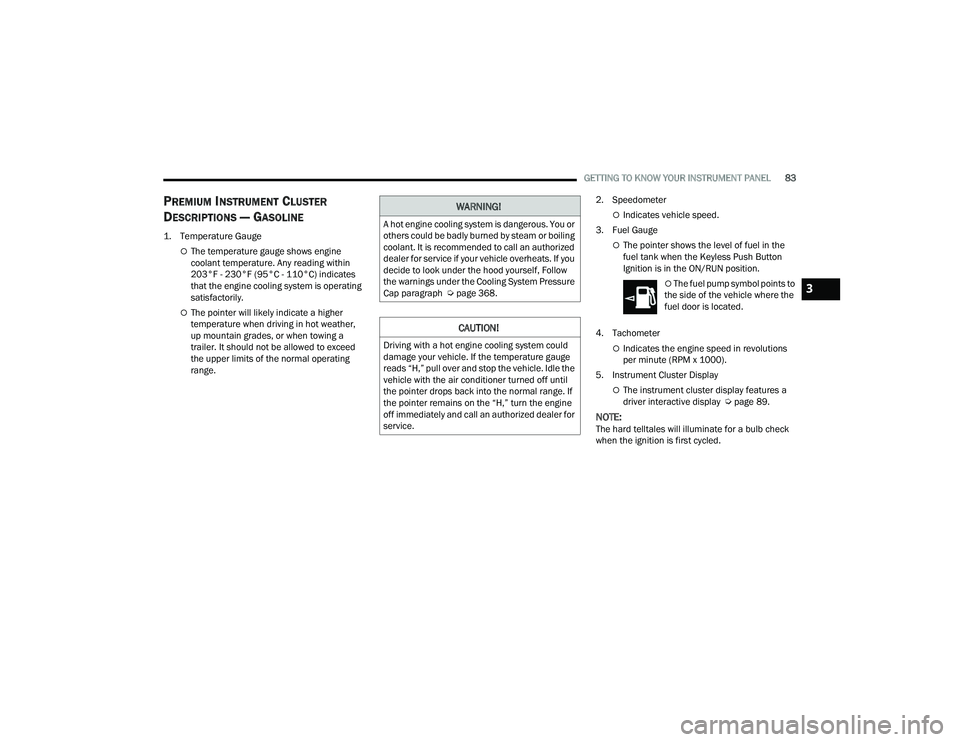
PREMIUM INSTRUMENT CLUSTER
D
ESCRIPTIONS — GASOLINE
1. Temperature Gauge
The temperature gauge shows engine
coolant temperature. Any reading within
203°F - 230°F (95°C - 110°C) indicates
that the engine cooling system is operating
satisfactorily.
The pointer will likely indicate a higher
temperature when driving in hot weather,
up mountain grades, or when towing a
trailer. It should not be allowed to exceed
the upper limits of the normal operating
range. 2. Speedometer
Indicates vehicle speed.
3. Fuel Gauge
The pointer shows the level of fuel in the
fuel tank when the Keyless Push Button
Ignition is in the ON/RUN position.
The fuel pump symbol points to
the side of the vehicle where the
fuel door is located.
4. Tachometer
Indicates the engine speed in revolutions
per minute (RPM x 1000).
5. Instrument Cluster Display
The instrument cluster display features a
driver interactive display Ú page 89.
NOTE:The hard telltales will illuminate for a bulb check
when the ignition is first cycled.
WARNING!
A hot engine cooling system is dangerous. You or
others could be badly burned by steam or boiling
coolant. It is recommended to call an authorized
dealer for service if your vehicle overheats. If you
decide to look under the hood yourself, Follow
the warnings under the Cooling System Pressure
Cap paragraph Úpage 368.
CAUTION!
Driving with a hot engine cooling system could
damage your vehicle. If the temperature gauge
reads “H,” pull over and stop the vehicle. Idle the
vehicle with the air conditioner turned off until
the pointer drops back into the normal range. If
the pointer remains on the “H,” turn the engine
off immediately and call an authorized dealer for
service.
3
23_DPF_OM_EN_USC_t.book Page 83
Page 87 of 444
GETTING TO KNOW YOUR INSTRUMENT PANEL85
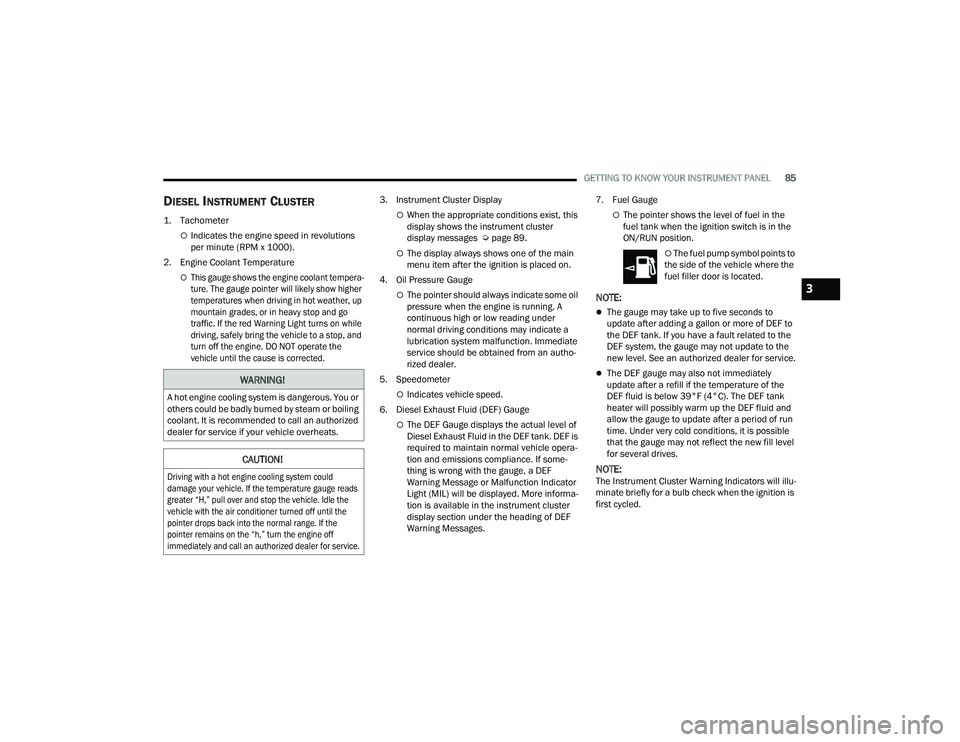
DIESEL INSTRUMENT CLUSTER
1. Tachometer
Indicates the engine speed in revolutions
per minute (RPM x 1000).
2. Engine Coolant Temperature
This gauge shows the engine coolant tempera -
ture. The gauge pointer will likely show higher
temperatures when driving in hot weather, up
mountain grades, or in heavy stop and go
traffic. If the red Warning Light turns on while
driving, safely bring the vehicle to a stop, and
turn off the engine. DO NOT operate the
vehicle until the cause is corrected.
3. Instrument Cluster Display
When the appropriate conditions exist, this
display shows the instrument cluster
display messages Ú
page 89.
The display always shows one of the main
menu item after the ignition is placed on.
4. Oil Pressure Gauge
The pointer should always indicate some oil
pressure when the engine is running. A
continuous high or low reading under
normal driving conditions may indicate a
lubrication system malfunction. Immediate
service should be obtained from an autho -
rized dealer.
5. Speedometer
Indicates vehicle speed.
6. Diesel Exhaust Fluid (DEF) Gauge
The DEF Gauge displays the actual level of
Diesel Exhaust Fluid in the DEF tank. DEF is
required to maintain normal vehicle opera -
tion and emissions compliance. If some -
thing is wrong with the gauge, a DEF
Warning Message or Malfunction Indicator
Light (MIL) will be displayed. More informa -
tion is available in the instrument cluster
display section under the heading of DEF
Warning Messages. 7. Fuel Gauge
The pointer shows the level of fuel in the
fuel tank when the ignition switch is in the
ON/RUN position.
The fuel pump symbol points to
the side of the vehicle where the
fuel filler door is located.
NOTE:
The gauge may take up to five seconds to
update after adding a gallon or more of DEF to
the DEF tank. If you have a fault related to the
DEF system, the gauge may not update to the
new level. See an authorized dealer for service.
The DEF gauge may also not immediately
update after a refill if the temperature of the
DEF fluid is below 39°F (4°C). The DEF tank
heater will possibly warm up the DEF fluid and
allow the gauge to update after a period of run
time. Under very cold conditions, it is possible
that the gauge may not reflect the new fill level
for several drives.
NOTE:The Instrument Cluster Warning Indicators will illu -
minate briefly for a bulb check when the ignition is
first cycled.
WARNING!
A hot engine cooling system is dangerous. You or
others could be badly burned by steam or boiling
coolant. It is recommended to call an authorized
dealer for service if your vehicle overheats.
CAUTION!
Driving with a hot engine cooling system could
damage your vehicle. If the temperature gauge reads
greater “H,” pull over and stop the vehicle. Idle the
vehicle with the air conditioner turned off until the
pointer drops back into the normal range. If the
pointer remains on the “h,” turn the engine off
immediately and call an authorized dealer for service.
3
23_DPF_OM_EN_USC_t.book Page 85
Page 89 of 444
GETTING TO KNOW YOUR INSTRUMENT PANEL87
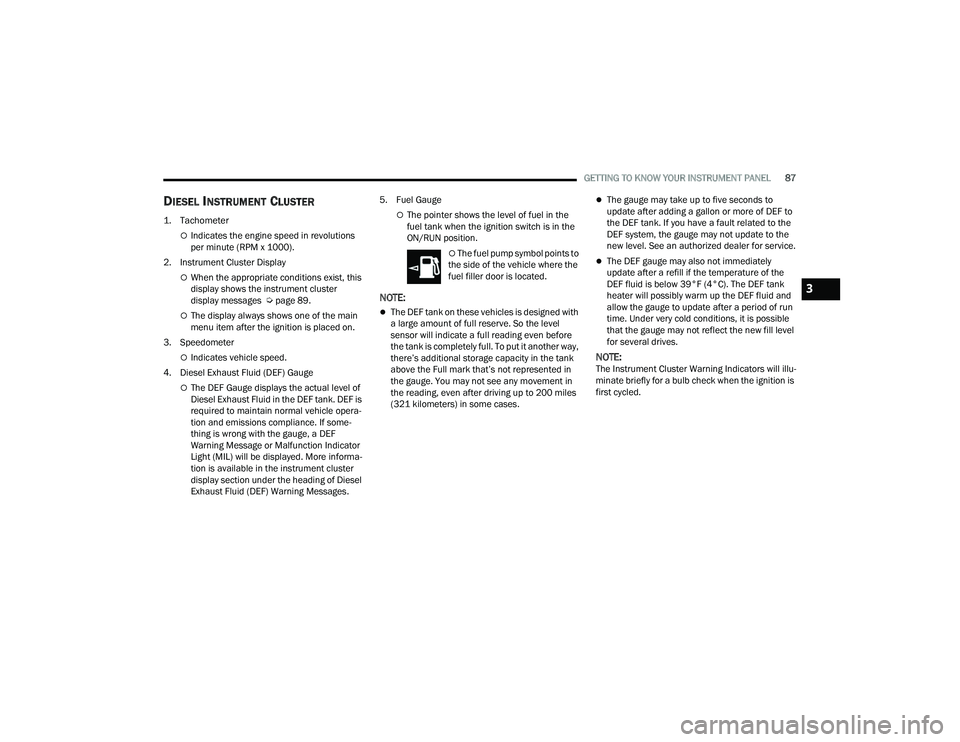
DIESEL INSTRUMENT CLUSTER
1. Tachometer
Indicates the engine speed in revolutions
per minute (RPM x 1000).
2. Instrument Cluster Display
When the appropriate conditions exist, this
display shows the instrument cluster
display messages Ú page 89.
The display always shows one of the main
menu item after the ignition is placed on.
3. Speedometer
Indicates vehicle speed.
4. Diesel Exhaust Fluid (DEF) Gauge
The DEF Gauge displays the actual level of
Diesel Exhaust Fluid in the DEF tank. DEF is
required to maintain normal vehicle opera -
tion and emissions compliance. If some -
thing is wrong with the gauge, a DEF
Warning Message or Malfunction Indicator
Light (MIL) will be displayed. More informa -
tion is available in the instrument cluster
display section under the heading of Diesel
Exhaust Fluid (DEF) Warning Messages. 5. Fuel Gauge
The pointer shows the level of fuel in the
fuel tank when the ignition switch is in the
ON/RUN position.
The fuel pump symbol points to
the side of the vehicle where the
fuel filler door is located.
NOTE:
The DEF tank on these vehicles is designed with
a large amount of full reserve. So the level
sensor will indicate a full reading even before
the tank is completely full. To put it another way,
there’s additional storage capacity in the tank
above the Full mark that’s not represented in
the gauge. You may not see any movement in
the reading, even after driving up to 200 miles
(321 kilometers) in some cases.
The gauge may take up to five seconds to
update after adding a gallon or more of DEF to
the DEF tank. If you have a fault related to the
DEF system, the gauge may not update to the
new level. See an authorized dealer for service.
The DEF gauge may also not immediately
update after a refill if the temperature of the
DEF fluid is below 39°F (4°C). The DEF tank
heater will possibly warm up the DEF fluid and
allow the gauge to update after a period of run
time. Under very cold conditions, it is possible
that the gauge may not reflect the new fill level
for several drives.
NOTE:The Instrument Cluster Warning Indicators will illu -
minate briefly for a bulb check when the ignition is
first cycled.
3
23_DPF_OM_EN_USC_t.book Page 87
Page 91 of 444
GETTING TO KNOW YOUR INSTRUMENT PANEL89
PREMIUM INSTRUMENT CLUSTER
D
ESCRIPTIONS — DIESEL
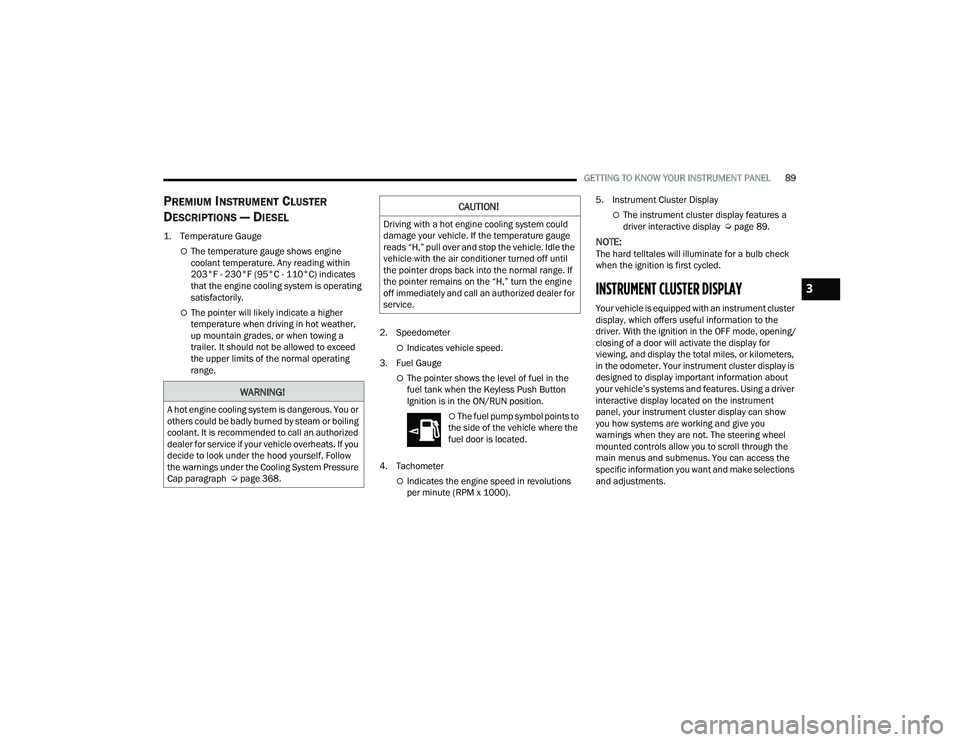
1. Temperature Gauge
The temperature gauge shows engine
coolant temperature. Any reading within
203°F - 230°F (95°C - 110°C) indicates
that the engine cooling system is operating
satisfactorily.
The pointer will likely indicate a higher
temperature when driving in hot weather,
up mountain grades, or when towing a
trailer. It should not be allowed to exceed
the upper limits of the normal operating
range. 2. Speedometer
Indicates vehicle speed.
3. Fuel Gauge
The pointer shows the level of fuel in the
fuel tank when the Keyless Push Button
Ignition is in the ON/RUN position.
The fuel pump symbol points to
the side of the vehicle where the
fuel door is located.
4. Tachometer
Indicates the engine speed in revolutions
per minute (RPM x 1000). 5. Instrument Cluster Display
The instrument cluster display features a
driver interactive display Ú
page 89.
NOTE:The hard telltales will illuminate for a bulb check
when the ignition is first cycled.
INSTRUMENT CLUSTER DISPLAY
Your vehicle is equipped with an instrument cluster
display, which offers useful information to the
driver. With the ignition in the OFF mode, opening/
closing of a door will activate the display for
viewing, and display the total miles, or kilometers,
in the odometer. Your instrument cluster display is
designed to display important information about
your vehicle’s systems and features. Using a driver
interactive display located on the instrument
panel, your instrument cluster display can show
you how systems are working and give you
warnings when they are not. The steering wheel
mounted controls allow you to scroll through the
main menus and submenus. You can access the
specific information you want and make selections
and adjustments.
WARNING!
A hot engine cooling system is dangerous. You or
others could be badly burned by steam or boiling
coolant. It is recommended to call an authorized
dealer for service if your vehicle overheats. If you
decide to look under the hood yourself, Follow
the warnings under the Cooling System Pressure
Cap paragraph Úpage 368.
CAUTION!
Driving with a hot engine cooling system could
damage your vehicle. If the temperature gauge
reads “H,” pull over and stop the vehicle. Idle the
vehicle with the air conditioner turned off until
the pointer drops back into the normal range. If
the pointer remains on the “H,” turn the engine
off immediately and call an authorized dealer for
service.
3
23_DPF_OM_EN_USC_t.book Page 89
Page 100 of 444
98GETTING TO KNOW YOUR INSTRUMENT PANEL
Fuel Gauge
Hide Range
Show Range
Defaults (Restores All Settings To Default Settings)
Restore
Cancel
Commercial Settings — If Equipped
Commercial Settings allows the driver to set and
recall additional features when the transmission is
in PARK.
Push and release the up or down arrow
button until Commercial Settings displays in the
instrument cluster display.
Follow the prompts to enter the required PIN and
enter the Commercial Settings submenu.
NOTE:If your vehicle is equipped with a touchscreen
radio, “Commercial Settings” will replace “Vehicle
Settings” in the instrument cluster display. The
Commercial Settings menu will only include the
settings below Ú page 199. Commercial Settings allows you to access the
following features (if equipped):
Power Take Off (PTO)
Remote Ignition
Idle Control
Backup Alarm
ParkSense
Aux Switches
PIN Setup
NOTE:If the vehicle’s PIN is forgotten or not known, see
an authorized dealer to have the PIN reset.
DIESEL MESSAGES AND WARNINGS
Diesel Particulate Filter (DPF) Messages
The Cummins® diesel engine meets all diesel
emissions standards, resulting in one of the lowest
emitting diesel engines ever produced. To achieve
these emissions standards, your vehicle is
equipped with a state-of-the-art engine and
exhaust system. These systems are seamlessly
integrated into your vehicle and managed by the
Powertrain Control Module (PCM). The PCM
manages engine combustion to allow the exhaust
system’s catalyst to trap and burn Particulate
Matter (PM) pollutants, with no input or interaction
on your part.
Your vehicle has the ability to alert you to
additional maintenance required on your vehicle or
engine. The following messages may display in
your instrument cluster display:
Perform Service
— Your vehicle will require emis -
sions maintenance at a set interval. To help
remind you when this maintenance is due, the
instrument cluster display will display “Perform
Service”. When the “Perform Service” message
is displayed in the instrument cluster display it is
necessary to have the emissions maintenance
performed. Emissions maintenance may
include replacing the Closed Crankcase Ventila -
tion (CCV) filter element. The procedure for
clearing and resetting the "Perform Service"
indicator message is located in the appropriate
Service Information.
Favorite Menus
Trip Info Navigation Off Road
Trailer Tow –
If Equipped
(show/hide) Audio (show/
hide)
WARNING!
A hot exhaust system can start a fire if you park
over materials that can burn. Such materials
might be grass or leaves coming into contact
with your exhaust system. Do not park or
operate your vehicle in areas where your
exhaust system can contact anything that can
burn.
23_DPF_OM_EN_USC_t.book Page 98
Page 101 of 444
GETTING TO KNOW YOUR INSTRUMENT PANEL99
Exhaust System — Regeneration Required
Now — "Exhaust Filter XX% Full Safely Drive at
Highway Speeds to Remedy" will be displayed in
the instrument cluster display if the exhaust
particulate filter reaches 80% of its maximum
storage capacity. Under conditions of exclusive
short duration and low speed driving cycles,
your Cummins® diesel engine and exhaust
after-treatment system may never reach the
conditions required to remove the trapped PM.
If this occurs, the “Exhaust Filter XX% Full Safely
Drive at Highway Speeds to Remedy” message
will be displayed in the instrument cluster
display. If this message is displayed, you will
hear one chime to assist in alerting you of this
condition
By simply driving your vehicle at highway speeds
for as little as 45 minutes, you can remedy the
condition in the particulate filter system and
allow your Cummins® diesel engine and
exhaust after-treatment system to remove the
trapped PM and restore the system to normal
operating condition.
Exhaust System — Regeneration In Process
Exhaust Filter XX% Full — Indicates that the DPF
is self-cleaning. Maintain your current driving
condition until regeneration is completed.
Exhaust System — Regeneration Completed —
This message indicates that the DPF
self-cleaning is completed. If this message is
displayed, you will hear one chime to assist in
alerting you of this condition.
Exhaust Service Required — See Dealer Now —
This message indicates regeneration has been
disabled due to a system malfunction. At this
point the engine Powertrain Control Module
(PCM) will register a fault code, the instrument
panel will display a MIL light.
Exhaust Filter Full — Power Reduced See
Dealer — This message indicates the PCM has
derated the engine to limit the likelihood of
permanent damage to the after-treatment
system. If this condition is not corrected and a
dealer service is not performed, extensive
exhaust after-treatment damage can occur. To
correct this condition it will be necessary to have
your vehicle serviced by an authorized dealer.
NOTE:Failing to follow the oil change indicator, changing
your oil and resetting the oil change indicator by
0 miles remaining will prevent the diesel exhaust
filter from performing it's cleaning routine. This will
shortly result in a Malfunction Indicator Light (MIL)
and reduced engine power. Only an authorized
dealer will be able to correct this condition.
Cold Ambient Derate Mode Messages
The vehicle will display messages when a derate
(engine power reduction) is activated to protect the
engine during start-up in cold ambient
temperatures.
Engine Power Reduced During Warm-up — This
message will display during start-up when the
ambient temperature is between 10°F (-12°C)
and -10°F (-23°C).
Engine Power Reduced Up To 30 Sec (Seconds)
During Warm-up — This message will display
during start-up when the ambient temperature
is between -10°F (-23°C) and -25°F (-32°C).
CAUTION!
See an authorized dealer, as damage to the
exhaust system could occur soon with continued
operation.
CAUTION!
See an authorized dealer, as damage to the
exhaust system could occur soon with continued
operation.
3
23_DPF_OM_EN_USC_t.book Page 99
Page 102 of 444
100GETTING TO KNOW YOUR INSTRUMENT PANEL
Engine Power Reduced Up To 2 Min (Minutes)
During Warm-up — This message will display
during start-up when the ambient temperature
is -25°F (-32°C) and below.
Your vehicle is equipped with an engine warm
up protection feature that may limit engine
performance after cold starting at low ambient
temperatures. The length of time engine speed
is limited is dependent upon engine coolant
temperature. Engine speed may be briefly
limited to 1,000 RPM after starting with coolant
temperature below freezing conditions, and
may be limited to 1,000 RPM for up to approxi -
mately two minutes under more severe cold
conditions.
Coolant Low — This telltale will turn on to indi -
cate the vehicle coolant level is low
Ú page 353.
Diesel Exhaust Fluid (DEF) Warning
Messages
There are four different messages which are
displayed if the vehicle detects that the DEF
system has been filled with a fluid other than DEF,
has experienced component failures, or when
tampering has been detected. The vehicle may be
limited to a maximum speed of 5 mph (8 km/h) if
the DEF system is not serviced within less than
200 miles (322 km) of the fault being detected. When the DEF system needs to be serviced the
following warnings will display:
DEF Low Refill Soon
— This message will display
when the low level is reached, during vehicle start
up, and with increased frequency during vehicle
operation. It will be accompanied by a single
chime. Approximately 5 gallons (19 Liters) of DEF
is required to refill the tank when this message is
initially displayed on pickup applications, and
approximately 7 gallons (26 Liters) are required
on chassis-cab applications.
Speed Limited to 5 MPH in XXX mi Refill DEF —
This message will continuously display if the
“DEF Low Refill Soon” message is ignored, and
the frequency of occurrence of the chime will
increase unless up to 2 gallons (7.5 Liters) of
DEF is added to the tank.
5 MPH Max Speed on Restart, Long Idle or
Refuel Refill DEF — This message will continu -
ously display when the counter reaches zero,
and will be accompanied by a periodic chime.
The vehicle will only be capable of a maximum
speed of 5 mph upon the first of the following
conditions to occur:
If the vehicle is shutoff and restarted.
If the vehicle is idled for an extended period
of time, approximately one hour or greater.
If the system detects that the level of fuel in
the tank has increased. Add a minimum of 2 gallons (7.5 Liters) of DEF
to the tank in order to avoid vehicle operation at
a maximum speed of 5 mph (8 km/h).
NOTE:A minimum of 2 gallons (7.5 Liters) may be
required to restore normal vehicle operation.
Although the vehicle will start normally and can be
placed in gear after this message has been initially
displayed, extreme caution should be utilized since
the vehicle will only be capable of maneuvering at
a maximum speed of 5 mph (8 km/h).
Diesel Exhaust Fluid (DEF) Fault Warning
Messages
There are five different messages which are
displayed if the vehicle detects that the DEF
system has been filled with a fluid other than DEF,
has experienced component failures, or when
tampering has been detected. The vehicle may be
limited to a maximum speed of 5 mph (8 km/h) if
the DEF system is not serviced within less than
200 miles (322 km) of the fault being detected.
When the DEF system needs to be serviced the
following warnings will display:
Service DEF System See Dealer — This message
will display when the fault is initially detected,
each time the vehicle is started, and periodically
during driving. The message will be accompa -
nied by a single chime. We recommend you
23_DPF_OM_EN_USC_t.book Page 100