phone Ram ProMaster 2015 User Guide
[x] Cancel search | Manufacturer: RAM, Model Year: 2015, Model line: ProMaster, Model: Ram ProMaster 2015Pages: 425, PDF Size: 2.97 MB
Page 191 of 425
Uconnect® 5.0 VOICE RECOGNITION QUICK TIPS
Introducing Uconnect®
Start using Uconnect® Voice Recognition with these
helpful quick tips. It provides the key Voice Commands
and tips you need to know to control your Uconnect® 5.0
system.
Key Features:
•5.0” Full Color Touchscreen Display
• Bluetooth® With Integrated Voice Control
• GPS Navigation (If Equipped)
Get Started
1. Visit UconnectPhone.com to check mobile device and
feature compatibility and to find phone pairing in-
structions.
Uconnect® 5.0
4
UNDERSTANDING YOUR INSTRUMENT PANEL 189
Page 192 of 425
2. Reduce background noise. Wind and passenger con-versations are examples of noise that may impact
recognition.
3. Speak clearly at a normal pace and volume while facing straight ahead. The microphone is positioned
on the rearview mirror and aimed at the driver.
4. Each time you give a Voice Command, you must first push either the VR or PHONE button, wait until after
the beep, then say your Voice Command.
5. You can interrupt the help message or system prompts by pushing the VR or PHONE button and saying a
Voice Command from current category.
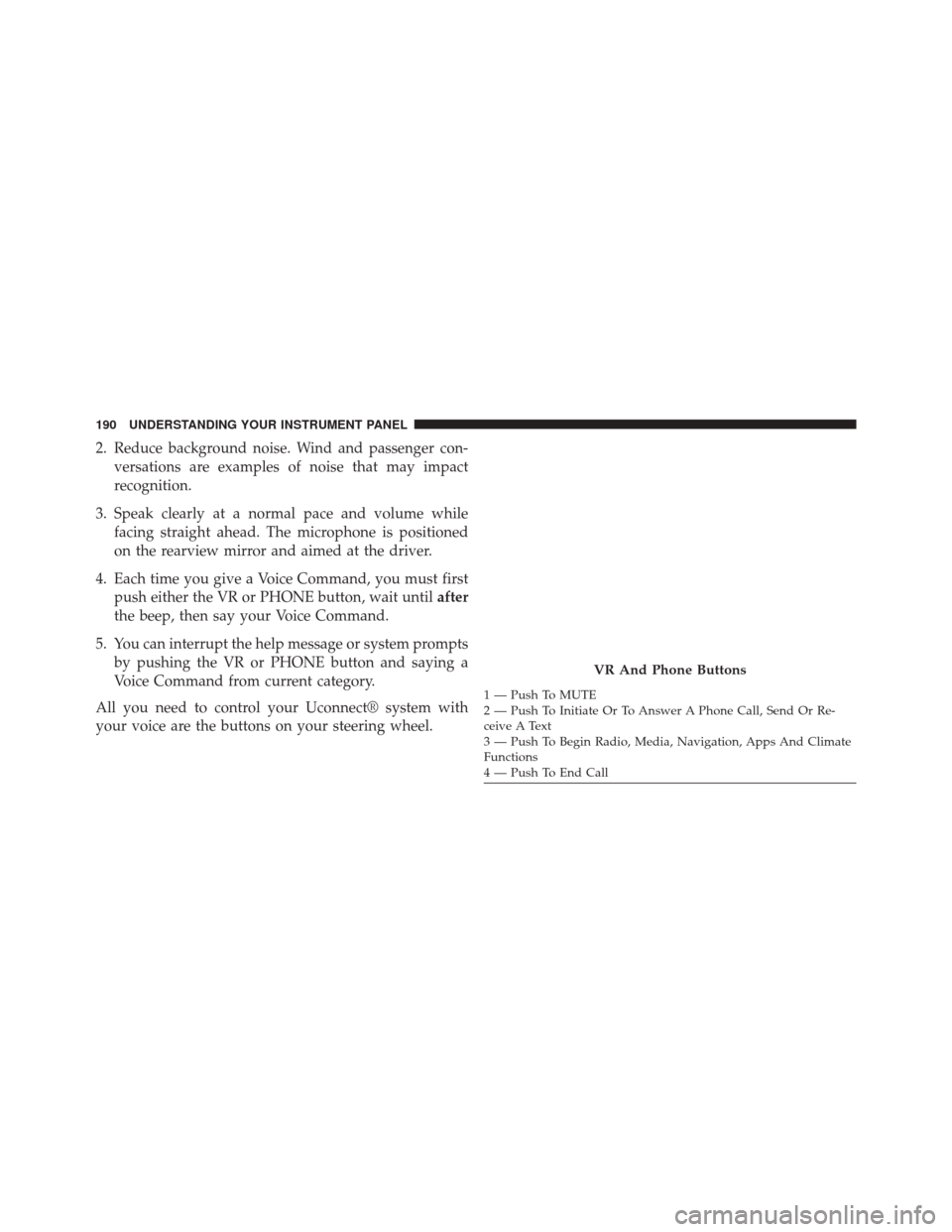
All you need to control your Uconnect® system with
your voice are the buttons on your steering wheel.
VR And Phone Buttons
1 — Push To MUTE
2 — Push To Initiate Or To Answer A Phone Call, Send Or Re-
ceive A Text
3 — Push To Begin Radio, Media, Navigation, Apps And Climate
Functions
4 — Push To End Call
190 UNDERSTANDING YOUR INSTRUMENT PANEL
Page 196 of 425

Voice Text Reply
Uconnect® will announceincomingtext messages. Push
the PHONE button
and say Listen.(Must have
compatible mobile phone paired to Uconnect® sys-
tem.)
1. Once an incoming text message is read to you, push the PHONE button
. After the beep, say... “Re-
ply.”
2. Listen to the Uconnect® prompts. After the beep, repeat one of the pre-defined messages and follow the
system prompts.
PRE-DEFINED VOICE TEXT REPLY RESPONSES
Yes. Stuck in traffic. See you later.No. Start without me.I’ll be late.
Okay. Where are you? I will be
minutes late.
Call me. Are you there
yet?
I’ll call you later. I need direc-
tions. See you in
I’m on my way. Can’t talk right
now.
I’m lost. Thanks.
TIP: Your mobile phone must have the full implementa-
tion of the Message Access Profile (MAP) to take advan-
tage of this feature. For details about MAP, visit
UconnectPhone.com. Apple iPhone® iOS6 or later sup-
ports reading incomingtext messages only.
194 UNDERSTANDING YOUR INSTRUMENT PANEL
Page 323 of 425

6. Once the engine is started, disconnect the jumpercables in the reverse sequence:
Disconnecting The Jumper Cables
1. Disconnect the negative end (-)of the jumper cable
from the remote negative (-)post of the vehicle with
the discharged battery.
2. Disconnect the opposite end of the negative (-)jumper
cable from the negative (-)post of the booster battery.
3. Disconnect the positive end (+)of the jumper cable
from the positive (+)post of the booster battery.
4. Disconnect the opposite end of the positive (+)jumper
cable from the remote positive (+)post of the dis-
charged vehicle.
5. Close the cover of the Front Power Distribution Cen- ter. If frequent jump-starting is required to start your vehicle
you should have the battery and charging system in-
spected at your authorized dealer.
CAUTION!
Accessories plugged into the vehicle power outlets
draw power from the vehicle’s battery, even when not
in use (i.e., cellular phones, etc.). Eventually, if
plugged in long enough without engine operation,
the vehicle’s battery will discharge sufficiently to
degrade battery life and/or prevent the engine from
starting.
6
WHAT TO DO IN EMERGENCIES 321
Page 400 of 425

facilities, factory-trained technicians, special tools, and
the latest information to ensure the vehicle is fixed
correctly and in a timely manner.
This is why you should always talk to an authorized
dealer service manager first. Most matters can be re-
solved with this process.
•If for some reason you are still not satisfied, talk to the
general manager or owner of the authorized dealer.
They want to know if you need assistance.
•
If an authorized dealer is unable to resolve the concern,
you may contact the manufacturer’s customer center.
Any communication to the manufacturer’s customer cen-
ter should include the following information:
• Owner’s name and address
• Owner’s telephone number (home and office)
• Authorized dealer name
• Vehicle Identification Number (VIN)
• Vehicle delivery date and mileage
FCA USA LLC Customer Center
P.O. Box 21–8004
Auburn Hills, MI 48321–8004
Phone: (866) 726-4636
FCA Canada Inc. Customer Center
P.O. Box 1621
Windsor, Ontario N9A 4H6
Phone: (800) 465-2001 English / (800) 387-9983 French
In Mexico Contact
Av. Prolongacion Paseo de la Reforma, 1240
Sante Fe C.P. 05109
Mexico, D. F.
In Mexico City: 5081-7568
Outside Mexico City: 1-800-505-1300
398 IF YOU NEED CONSUMER ASSISTANCE
Page 403 of 425

If NHTSA receives similar complaints, it may open an
investigation, and if it finds that a safety defect exists in
a group of vehicles, it may order a recall and remedy
campaign. However, NHTSA cannot become involved in
individual problems between you, your authorized
dealer, and the manufacturer.
To contact NHTSA, you may either call the Auto Safety
Hotline toll free at 1-888-327-4236 (TTY: 1-800-424-9153),
or go to http://www.safercar.gov; or write to: Adminis-
trator, NHTSA, 1200 New Jersey Avenue, SE., West
Building, Washington, D.C. 20590.
You can also obtain other information about motor
vehicle safety from http://www.safercar.gov.In Canada
If you believe that your vehicle has a safety defect, you
should contact the Customer Service Department imme-
diately. Canadian customers who wish to report a safety
defect to the Canadian government should contact Trans-
port Canada, Motor Vehicle Defect Investigations and
Recalls at 1-800-333-0510 or go to http://www.tc.gc.ca/
roadsafety/
PUBLICATION ORDER FORMS
To order the following manuals, you may use either the
website or the phone numbers listed below. Visa, Mas-
tercard, American Express, and Discover orders are ac-
cepted. If you prefer mailing your payment, please call
for an order form.
NOTE:A street address is required when ordering
manuals (no P.O. Boxes).
9
IF YOU NEED CONSUMER ASSISTANCE 401
Page 410 of 425
Carbon Monoxide Warning...................64
Cargo Light ..............................96
Car Washes ............................ .356
Cellular Phone .......................... .182
Certification Label ........................ .269
Chains, Tire ............................ .254
Chart, Tire Sizing ........................ .232
Check Engine Light (Malfunction Indicator Light) ............128, 331
Checking Your Vehicle For Safety ...............63
Checks, Safety ............................63
Child Restraint ............................52
Child Restraints Booster Seats ...........................57
Child Restraints .........................52
Infants And Child Restraints ................55
Older Children And Child Restraints ..........55
Cigar Lighter ............................118
Clean Air Gasoline ........................262 Climate Control
..........................183
Manual ............................. .183
Cold Weather Operation ....................201
Compact Disc (CD) Maintenance ..............182
Compact Spare Tire ........................249
Console, Overhead ........................114
Contract, Service ..........................399
Coolant Pressure Cap (Radiator Cap) ...........349
Cooling System .......................... .346
Adding Coolant (Antifreeze) ...............348
Coolant Capacity .......................382
Coolant Level ..................... .346, 350
Disposal Of Used Coolant .................350
Drain, Flush, And Refill ...................346
Inspection ............................350
Points To Remember .....................350
Pressure Cap ..........................349
Radiator Cap ..........................349
Selection Of Coolant (Antifreeze) ......347, 382, 383
408 INDEX