instrument panel Ram ProMaster 2016 User Guide
[x] Cancel search | Manufacturer: RAM, Model Year: 2016, Model line: ProMaster, Model: Ram ProMaster 2016Pages: 448, PDF Size: 3.28 MB
Page 95 of 448
Headlights
To turn on the headlights, turn the end of the
multifunction lever to the headlight position.
When the headlight switch is on, the parking
lights, taillights, license plate light, the clear-
ance lights and instrument panel lights are also turned
on. To turn off the headlights, turn the end of the
multifunction lever back to the O (Off) position.
Dimmer Controls
The dimmer controls are located on the left side of the
instrument panel below the instrument cluster. Pushing the up or down arrow will increase or decrease
the brightness of the instrument panel lights.Dimmer Controls
3
UNDERSTANDING THE FEATURES OF YOUR VEHICLE 93
Page 96 of 448
Ambient Light
The vehicle is equipped with ambient light on the dome
lamp, the ambient light will be on all the time with the
option of dimming it with the dimmer controls.
Daytime Running Lights — If Equipped
NOTE:When the headlights are turned on, the Daytime
Running Lights will be deactivated.
To activate the Daytime Running Lights (DRL), rotate the
end of the multifunction lever to the O (Off) position.
NOTE: The low beams and side/taillights will not be on
with DRL. The DRL function may be programmed to be
ON or OFF through the Uconnect system screen if
equipped, or through the instrument clusters menu.
Refer to “Uconnect Settings” or “EVIC” in “Understand-
ing Your Instrument Panel” for further information. The Daytime Running Lights will come on whenever the
ignition is ON, the headlight switch is off, the parking
brake is off, and the turn signal is off.
Battery Saver
To protect the life of your vehicle’s battery when the
ignition is OFF and any door is left ajar for 15 minutes the
interior lights will automatically turn off.
NOTE:
Battery saver mode is cancelled if the ignition is
ON.
Fog Lights — If Equipped
The fog light switch is located on the center
stack of the instrument panel, just below the
climate controls. Push the switch once to turn
the fog lights on. Push the switch a second time to turn
the fog lights off.
94 UNDERSTANDING THE FEATURES OF YOUR VEHICLE
Page 97 of 448
Turn Signals
Move the multifunction lever up or down and the arrows
on each side of the instrument cluster flash to show
proper operation of the front and rear turn signal lights.
NOTE:If either light remains on and does not flash, or
there is a very fast flash rate, check for a defective outside
light bulb. If an indicator fails to light when the lever is
moved, it would suggest that the indicator bulb is
defective.
Parking Lights
These lights can only be turned on with ignition key in
the STOP position or removed, by moving the end of the
multifunction lever to O (off) position and then to the
headlight position.
The warning light telltale in the instrument panel comes
on. The lights stay on until the next ignition cycle is
performed.
Lane Change Assist
Tap the lever up or down once, without moving beyond
the detent, and the turn signal (right or left) will flash five
times then automatically turn off.
High Beam/Low Beam Select Switch
Pull the multifunction lever toward you to switch the
headlights to high beam. Pull the lever a second time to
switch the headlights back to low beam.
Flash-To-Pass
You can signal another vehicle with your headlights by
partially pulling the multifunction lever toward the steer-
ing wheel. This will cause the high beam headlights to
turn on until the lever is released.
Follow Me Home/Headlight Delay
When this feature is selected the driver can choose to
have the headlights remain on for a preset period of time.
3
UNDERSTANDING THE FEATURES OF YOUR VEHICLE 95
Page 98 of 448

Activation
Remove the key or turn the ignition to the OFF/LOCK
position, and pull the multifunction lever toward the
steering wheel, within two minutes. Each time the lever
is pulled, the activation of the lights will be extended by
30 seconds. The activation of the lights can be extended to
a maximum of 210 seconds.
The warning light on the instrument panel will light up
and the corresponding message will appear in the EVIC
display for as long as the function is activated. The
warning light comes on when the lever is operated and
stays on until the function is automatically deactivated.
Each movement of the lever only increases the amount of
time the lights stay on.
Deactivation
Pull the multifunction lever toward the steering wheel
and hold it for more than two seconds.
Interior Lights
These lights are mounted between the sun visors on the
overhead shelf. Each light is turned on by pushing the
corresponding switch.
96 UNDERSTANDING THE FEATURES OF YOUR VEHICLE
Page 107 of 448

The drivers preferred units can be selected through the
radio settings if equipped. Refer to ”Uconnect Settings”
in “Understanding Your Instrument Panel” for more
information. The speed increment shown is dependant
on the chosen speed unit of U.S. (mph) or Metric (km/h):
U.S. Speed (mph)
•Tapping the Speed Control lever up (+) once will result
in a 1 mph increase in set speed. Each subsequent tap
of the lever results in an increase of 1 mph.
• If the lever is continually held up, the set speed will
continue to increase until the lever is released, then the
new set speed will be established. Metric Speed (km/h)
•
Tapping the Speed Control lever up (+) once will result
in a 1 km/h increase in set speed. Each subsequent tap
of the lever results in an increase of 1 km/h.
• If the lever is continually held up, the set speed will
continue to increase until the lever is released, then the
new set speed will be established.
To Decrease Speed
When the Electronic Speed Control is set, you can decrease
speed by tapping the Speed Control lever down (-).
3
UNDERSTANDING THE FEATURES OF YOUR VEHICLE 105
Page 108 of 448

The drivers preferred units can be selected through the
radio settings if equipped. Refer to ”Uconnect Settings”
in “Understanding Your Instrument Panel” for more
information. The speed increment shown is dependant
on the chosen speed unit of U.S. (mph) or Metric (km/h):
U.S. Speed (mph)
•Tapping the Speed Control lever down (-) once will
result in a 1 mph decrease in set speed. Each subse-
quent tap of the lever results in a decrease of 1 mph.
• If the lever is continually held down, the set speed will
continue to decrease until the lever is released, then
the new set speed will be established.
Metric Speed (km/h)
• Tapping the Speed Control lever down (-) once will
result in a 1 km/h decrease in set speed. Each subse-
quent tap of the lever results in a decrease of 1 km/h. •
If the lever is continually held down, the set speed will
continue to decrease until the lever is released, then
the new set speed will be established.
To Accelerate For Passing
Press the accelerator as you would normally. When the
pedal is released, the vehicle will return to the set speed.
Using Electronic Speed Control On Hills
The transmission may downshift on hills to maintain the
vehicle set speed.
NOTE: The Electronic Speed Control system maintains
speed up and down hills. A slight speed change on
moderate hills is normal.
On steep hills, a greater speed loss or gain may occur so
it may be preferable to drive without Electronic Speed
Control.
106 UNDERSTANDING THE FEATURES OF YOUR VEHICLE
Page 111 of 448
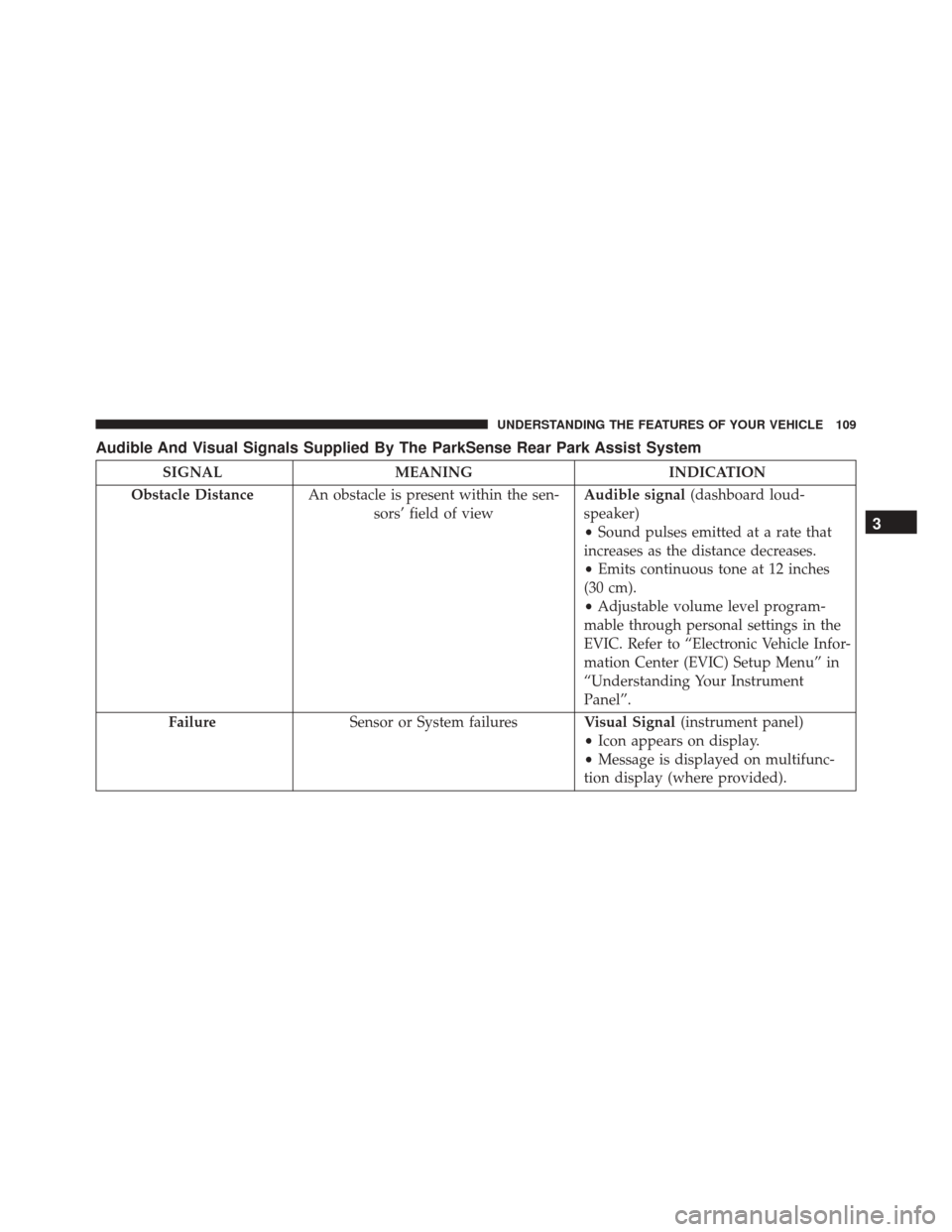
Audible And Visual Signals Supplied By The ParkSense Rear Park Assist System
SIGNALMEANING INDICATION
Obstacle Distance An obstacle is present within the sen-
sors’ field of view Audible signal
(dashboard loud-
speaker)
• Sound pulses emitted at a rate that
increases as the distance decreases.
• Emits continuous tone at 12 inches
(30 cm).
• Adjustable volume level program-
mable through personal settings in the
EVIC. Refer to “Electronic Vehicle Infor-
mation Center (EVIC) Setup Menu” in
“Understanding Your Instrument
Panel”.
Failure Sensor or System failures Visual Signal(instrument panel)
• Icon appears on display.
• Message is displayed on multifunc-
tion display (where provided).
3
UNDERSTANDING THE FEATURES OF YOUR VEHICLE 109
Page 112 of 448
While audible signals are emitted, the audio system is not
muted.
The audible signal is turned off immediately if the
distance increases. The tone cycle remains constant if the
distance measured by the inner sensors is constant. If this
condition occurs for the external sensors, the signal is
turned off after three seconds (stopping warnings during
maneuvers parallel to walls).
ParkSense Rear Park Assist Failure Indications
A malfunction of the ParkSense Rear Park Assist sensors
or system is indicated, during REVERSE gear engage-
ment, by the instrument panel warning icon.The warning icon is illuminated and a message
is displayed on the multifunction display (if
equipped). Refer to “Instrument Cluster De-
scriptions” in “Understanding Your Instrument
Panel” for further information. The sensors and wiring are tested continuously when the
ignition is in the ON/RUN position. Failures are indi-
cated immediately if they occur when the system is ON.
Even if the system is able to identify that a specific sensor
is in failure condition, the instrument cluster display
shall indicate that the ParkSense Rear Park Assist system
is unavailable, without reference to the sensor in failure
condition. If even a single sensor fails, the entire system
must be disabled. The system is turned off automatically.Cleaning The ParkSense Rear Park Assist
System
Clean the ParkSense Rear Park Assist sensors with water,
car wash soap and a soft cloth. Do not use rough or hard
cloths. In washing stations, clean sensors quickly keeping
the vapor jet/high pressure washing nozzles at least 4
inches (10 cm) from the sensors. Do not scratch or poke
the sensors. Otherwise, you could damage the sensors.
110 UNDERSTANDING THE FEATURES OF YOUR VEHICLE
Page 122 of 448

CAUTION!(Continued)
prevent the engine from starting.
• Accessories that draw higher power (i.e., coolers,
vacuum cleaners, lights, etc.) will degrade the bat-
tery even more quickly. Only use these intermit-
tently and with greater caution.
• After the use of high power draw accessories, or
long periods of the vehicle not being started (with
accessories still plugged in), the vehicle must be
driven a sufficient length of time to allow the
generator to recharge the vehicle’s battery.
AUXILIARY SWITCHES — IF EQUIPPED
Your vehicle may be equipped with two auxiliary
switches located on the instrument panel to the left of the
steering column which can be used to power various electronic devices. Connections to the switches are found
in the right central pillar fuse panel at the base of the
passenger side B pillar.Auxiliary Upfitter Switches
120 UNDERSTANDING THE FEATURES OF YOUR VEHICLE
Page 124 of 448
CUPHOLDERS
The cupholders for the drivers and passenger area are
located near the floor just under the center stack storage
compartment. There are cupholders located in each door
panel as well as one single cupholder located to the right
of the manual climate controls.
STORAGE
Glove Compartments
The glove compartments are located on the right side of
the instrument panel.
Cupholders
Glove Compartments1 — Upper Glove Compartment
2 — Lower Glove Compartment
122 UNDERSTANDING THE FEATURES OF YOUR VEHICLE