service RAM PROMASTER 2022 Owner's Guide
[x] Cancel search | Manufacturer: RAM, Model Year: 2022, Model line: PROMASTER, Model: RAM PROMASTER 2022Pages: 268, PDF Size: 13.26 MB
Page 146 of 268

144SAFETY
Overtaking/Passing
The BSM system is designed not to issue an alert
on stationary objects such as guardrails, posts,
walls, foliage, berms, snow banks, car washes, etc.
However, occasionally the system may alert on
such objects. This is normal operation and your
vehicle does not require service.
The BSM system will not alert you of objects that
are traveling in the opposite direction of the vehicle
in adjacent lanes Ú page 256.
Opposing Traffic
Rear Cross Path (RCP)
RCP is intended to aid the driver when backing out
of parking spaces where their vision of oncoming
vehicles may be blocked. Proceed slowly and
cautiously out of the parking space until the rear
end of the vehicle is exposed. The RCP system will
then have a clear view of the cross traffic, and if an
oncoming vehicle is detected, alert the driver.
RCP Detection Zones
RCP monitors the rear detection zones on both
sides of the vehicle, for objects that are moving
toward the side of the vehicle with a minimum
speed of approximately 3 mph (5 km/h), to objects
moving a maximum of approximately 20 mph
(32 km/h), such as in parking lot situations.
WARNING!
The Blind Spot Monitoring system is only an aid
to help detect objects in the blind spot zones.
The BSM system is not designed to detect
pedestrians, bicyclists, or animals. Even if your
vehicle is equipped with the BSM system, always
check your vehicle’s mirrors, glance over your
shoulder, and use your turn signal before
changing lanes. Failure to do so can result in
serious injury or death.
22_VF_OM_EN_USC_t.book Page 144
Page 152 of 268

150SAFETY
FCW Limited Warning
If the instrument cluster displays “FCW Limited
Functionality” or “FCW Limited Functionality Clean
Front Windshield” momentarily, there may be a
condition that limits FCW functionality. Although
the vehicle is still drivable under normal
conditions, the active braking may not be fully
available. Once the condition that limited the
system performance is no longer present, the
system will return to its full performance state.
If the problem persists, see an authorized dealer.
Service FCW Warning
If the system turns off, and the instrument cluster
displays: “FCW Unavailable Service Required”,
this indicates there is an internal system fault.
Although the vehicle is still drivable under normal
conditions, have the system checked by an
authorized dealer.
“FCW Temporarily Unavailable” Warning
The “FCW Temporarily Unavailable” warning will be
displayed when conditions temporarily deactivate
the system. This most often occurs at times of poor
visibility, such as in snow or heavy rain. The system
may also become temporarily blinded due to
obstructions, such as mud, dirt or ice. In these
cases, the instrument cluster display will show
“FCW Temporarily Unavailable” and the system will
deactivate. The “FCW Temporarily Unavailable” message can
sometimes be displayed while driving in highly
reflective areas (i.e. tunnels with reflective tiles, or
ice and snow). The system will recover after the
vehicle has left these areas. Under rare conditions,
when the camera is not tracking any vehicles or
objects in its path, this warning may temporarily
occur. If weather conditions are not a factor, the
driver should examine the fascia/bumper where
the camera is located. It may require cleaning or
removal of an obstruction from the fascia/bumper
cover.NOTE:
If the “FCW Temporarily Unavailable” message
occurs frequently (e.g. more than once on every
trip) without any snow, rain, mud, or other
obstruction, have the camera realigned at an
authorized dealer.
Installing a snow plow or front-end protector is
not recommended. Doing so may block the
camera and inhibit FCW operation.
Use only a soft cloth for cleaning. Do not use
solvents or abrasive pastes.
Precautions While Driving With FCW
In certain driving conditions, such as:
Driving in the vicinity of a curve
Small vehicles and/or not aligned to the lane
Lane changing of other vehicles
Passing of vehicles in an oncoming intersection
The intervention of the system could be
unexpected or delayed. The driver must therefore
always pay particular attention, while maintaining
control of the vehicle to drive in complete safety.
Driving In The Vicinity Of A Curve
Entering or exiting a large curve, the system could
detect the presence of a vehicle that is in front of
the vehicle, but that does not preside in the same
lane. In cases such as this, the system might
respond.
Driving In The Vicinity Of A Curve
22_VF_OM_EN_USC_t.book Page 150
Page 156 of 268
154SAFETY
OCCUPANT RESTRAINT SYSTEMS
Some of the most important safety features in your
vehicle are the restraint systems:
OCCUPANT RESTRAINT SYSTEMS
F
EATURES
Seat Belt Systems
Supplemental Restraint Systems (SRS) Air Bags
Child Restraints
Some of the safety features described in this
section may be standard equipment on some
models, or may be optional equipment on others.
If you are not sure, ask an authorized dealer.
IMPORTANT SAFETY PRECAUTIONS
Please pay close attention to the information in
this section. It tells you how to use your restraint
system properly, to keep you and your passengers
as safe as possible.
Here are some simple steps you can take to
minimize the risk of harm from a deploying air bag:
1. Children 12 years old and under should always ride buckled up in the rear seat of a
vehicle with a rear seat.
2. A child who is not big enough to wear the vehicle seat belt properly must be secured in
the appropriate child restraint or belt-positioning booster seat in a rear seating
position Ú
page 168.
3. If a child from 2 to 12 years old (not in a rear-facing child restraint) must ride in the
front passenger seat, move the seat as far
back as possible and use the proper child
restraint Ú page 168.
4. Never allow children to slide the shoulder belt behind them or under their arm.
5. You should read the instructions provided with your child restraint to make sure that you are
using it properly.
6. All occupants should always wear their lap and shoulder belts properly.
7. The driver and front passenger seats should be moved back as far as practical to allow the
front air bags room to inflate.
8. Do not lean against the door or window. If your vehicle has side air bags, and deployment
occurs, the side air bags will inflate forcefully
into the space between occupants and the
door and occupants could be injured.
9. If the air bag system in this vehicle needs to be modified to accommodate a disabled person,
see Úpage 253 for customer service contact
information.
SEAT BELT SYSTEMS
Buckle up even though you are an excellent driver,
even on short trips. Someone on the road may be
a poor driver and could cause a collision that
includes you. This can happen far away from home
or on your own street.
Research has shown that seat belts save lives, and
they can reduce the seriousness of injuries in a
collision. Some of the worst injuries happen when
people are thrown from the vehicle. Seat belts
reduce the possibility of ejection and the risk of
injury caused by striking the inside of the vehicle.
Everyone in a motor vehicle should be belted at all
times.
WARNING!
Never place a rear-facing child restraint in
front of an air bag. A deploying passenger
front air bag can cause death or serious injury
to a child 12 years or younger, including a
child in a rear-facing child restraint.
Never install a rear-facing child restraint in the
front seat of a vehicle. Only use a rear-facing
child restraint in the rear seat. If the vehicle
does not have a rear seat, do not transport a
rear-facing child restraint in that vehicle.
22_VF_OM_EN_USC_t.book Page 154
Page 162 of 268
160SAFETY
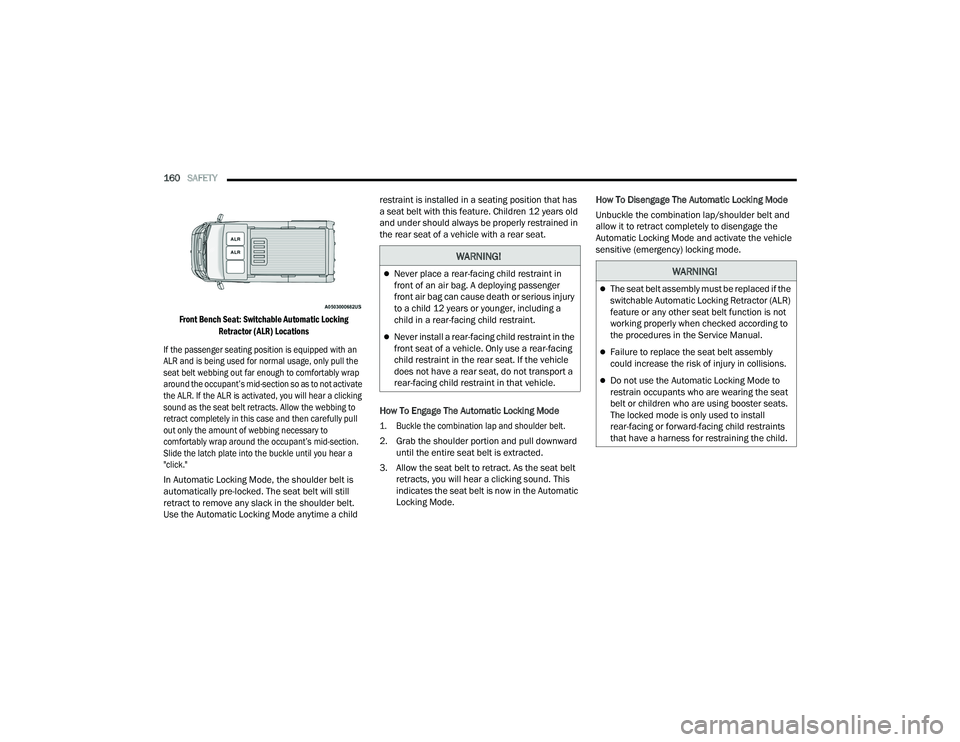
Front Bench Seat: Switchable Automatic Locking Retractor (ALR) Locations
If the passenger seating position is equipped with an
ALR and is being used for normal usage, only pull the
seat belt webbing out far enough to comfortably wrap
around the occupant’s mid-section so as to not activate
the ALR. If the ALR is activated, you will hear a clicking
sound as the seat belt retracts. Allow the webbing to
retract completely in this case and then carefully pull
out only the amount of webbing necessary to
comfortably wrap around the occupant’s mid-section.
Slide the latch plate into the buckle until you hear a
"click."
In Automatic Locking Mode, the shoulder belt is
automatically pre-locked. The seat belt will still
retract to remove any slack in the shoulder belt.
Use the Automatic Locking Mode anytime a child restraint is installed in a seating position that has
a seat belt with this feature. Children 12 years old
and under should always be properly restrained in
the rear seat of a vehicle with a rear seat.
How To Engage The Automatic Locking Mode
1. Buckle the combination lap and shoulder belt.
2. Grab the shoulder portion and pull downward
until the entire seat belt is extracted.
3. Allow the seat belt to retract. As the seat belt retracts, you will hear a clicking sound. This
indicates the seat belt is now in the Automatic
Locking Mode. How To Disengage The Automatic Locking Mode
Unbuckle the combination lap/shoulder belt and
allow it to retract completely to disengage the
Automatic Locking Mode and activate the vehicle
sensitive (emergency) locking mode.
WARNING!
Never place a rear-facing child restraint in
front of an air bag. A deploying passenger
front air bag can cause death or serious injury
to a child 12 years or younger, including a
child in a rear-facing child restraint.
Never install a rear-facing child restraint in the
front seat of a vehicle. Only use a rear-facing
child restraint in the rear seat. If the vehicle
does not have a rear seat, do not transport a
rear-facing child restraint in that vehicle.
WARNING!
The seat belt assembly must be replaced if the
switchable Automatic Locking Retractor (ALR)
feature or any other seat belt function is not
working properly when checked according to
the procedures in the Service Manual.
Failure to replace the seat belt assembly
could increase the risk of injury in collisions.
Do not use the Automatic Locking Mode to
restrain occupants who are wearing the seat
belt or children who are using booster seats.
The locked mode is only used to install
rear-facing or forward-facing child restraints
that have a harness for restraining the child.
22_VF_OM_EN_USC_t.book Page 160
Page 163 of 268

SAFETY161
SUPPLEMENTAL RESTRAINT SYSTEMS
(SRS)
Some of the safety features described in this
section may be standard equipment on some
models, or may be optional equipment on others.
If you are not sure, ask an authorized dealer.
The air bag system must be ready to protect you in a
collision. The Occupant Restraint Controller (ORC)
monitors the internal circuits and interconnecting
wiring associated with the electrical Air Bag System
Components. Your vehicle may be equipped with the
following Air Bag System Components:
Air Bag System Components
Occupant Restraint Controller (ORC)
Air Bag Warning Light
Steering Wheel and Column
Instrument Panel
Driver and Front Passenger Air Bags
Seat Belt Buckle Switch
Supplemental Side Air Bags
Front and Side Impact Sensors
Seat Belt Pretensioners
Air Bag Warning Light
The Occupant Restraint Controller (ORC)
monitors the readiness of the electronic
parts of the air bag system whenever the
ignition switch is in the AVV (START) or
MAR (ACC/ON/RUN) position. If the ignition switch
is in the STOP (OFF/LOCK) position the air bag
system is not on and the air bags will not inflate.
The ORC contains a backup power supply system
that may deploy the air bag system even if the
battery loses power or it becomes disconnected
prior to deployment.
The ORC turns on the Air Bag Warning Light in the
instrument panel for approximately four to eight
seconds for a self-check when the ignition switch is
in the MAR (ACC/ON/RUN) position. After the
self-check, the Air Bag Warning Light will turn off.
If the ORC detects a malfunction in any part of the
system, it turns on the Air Bag Warning Light, either
momentarily or continuously. A single chime will
sound to alert you if the light comes on again after
initial startup.
The ORC also includes diagnostics that will
illuminate the instrument panel Air Bag Warning
Light if a malfunction is detected that could affect
the air bag system. The diagnostics also record the
nature of the malfunction. While the air bag system
is designed to be maintenance free, if any of the following occurs, have an authorized dealer
service the air bag system immediately.The Air Bag Warning Light does not come on
during the four to eight seconds when the igni
-
tion switch is first in the MAR (ACC/ON/RUN)
position.
The Air Bag Warning Light remains on after the
four to eight-second interval.
The Air Bag Warning Light comes on intermit -
tently or remains on while driving.
NOTE:If the speedometer, tachometer, or any engine
related gauges are not working, the Occupant
Restraint Controller (ORC) may also be disabled.
In this condition the air bags may not be ready to
inflate for your protection. Have an authorized
dealer service the air bag system immediately.
WARNING!
Ignoring the Air Bag Warning Light in your
instrument panel could mean you won’t have the
air bag system to protect you in a collision. If the
light does not come on as a bulb check when the
ignition is first turned on, stays on after you start
the vehicle, or if it comes on as you drive, have
an authorized dealer service the air bag system
immediately.
6
22_VF_OM_EN_USC_t.book Page 161
Page 168 of 268

166SAFETY
If you do have a collision which deploys the air
bags, any or all of the following may occur:
The air bag material may sometimes cause abra -
sions and/or skin reddening to the occupants as
the air bags deploy and unfold. The abrasions are
similar to friction rope burns or those you might
get sliding along a carpet or gymnasium floor.
They are not caused by contact with chemicals.
They are not permanent and normally heal
quickly. However, if you haven’t healed signifi -
cantly within a few days, or if you have any blis -
tering, see your doctor immediately.
As the air bags deflate, you may see some
smoke-like particles. The particles are a normal
by-product of the process that generates the
non-toxic gas used for air bag inflation. These
airborne particles may irritate the skin, eyes,
nose, or throat. If you have skin or eye irritation,
rinse the area with cool water. For nose or throat
irritation, move to fresh air. If the irritation
continues, see your doctor. If these particles
settle on your clothing, follow the garment
manufacturer’s instructions for cleaning.
Do not drive your vehicle after the air bags have
deployed. If you are involved in another collision,
the air bags will not be in place to protect you.
NOTE:
Air bag covers may not be obvious in the interior
trim, but they will open during air bag deployment.
After any collision, the vehicle should be taken
to an authorized dealer immediately.
Fuel Cut Off Switch
Your vehicle is equipped with a Fuel Cut Off switch.
In the event of an accident, if the communication
network remains intact, and the power remains
intact, depending on the nature of the event, the
Fuel Cut Off Switch may perform the following
functions:
Cut off fuel to the engine and turn off the
engine.
Flash hazard lights as long as the battery has
power or until the hazard light button is pressed.
The hazard lights can be deactivated by
pressing the hazard light button.
Turn on the interior lights, which remain on as
long as the battery has power.
Unlock the power door locks.
NOTE:
After an accident, remember to cycle the ignition to
the STOP (OFF/LOCK) position and remove the key
from the ignition switch to avoid draining the battery.
Carefully check the vehicle for fuel leaks in the
engine compartment and on the ground near the
engine compartment and fuel tank before resetting
the system and starting the engine. If there are no
fuel leaks or damage to the vehicle electrical devices
(e.g. headlights) after an accident, reset the Fuel Cut
Off Switch by following the procedure described
below. If you have any doubt, contact an authorized
dealer.
WARNING!
Deployed air bags and seat belt pretensioners
cannot protect you in another collision. Have the air
bags, seat belt pretensioners, and the seat belt
retractor assemblies replaced by an authorized
dealer immediately. Also, have the Occupant
Restraint Controller System serviced as well.
22_VF_OM_EN_USC_t.book Page 166
Page 169 of 268

SAFETY167
(Continued)
Fuel Cut Off Switch Reset Procedure
In order to reset the Fuel Cut Off Switch after an
event push the “A” Button located underneath the
instrument panel on the passenger side.
Fuel Cut Off Switch
Maintaining Your Air Bag System
Event Data Recorder (EDR)
This vehicle is equipped with an event data recorder
(EDR). The main purpose of an EDR is to record, in
certain crash or near crash-like situations, such as
an air bag deployment or hitting a road obstacle,
data that will assist in understanding how a vehicle’s
systems performed. The EDR is designed to record
data related to vehicle dynamics and safety systems
WARNING!
If, after an accident, you smell fuel or see leaks
from the fuel system, do not reset the Fuel Cut
Off Switch to avoid the risk of fire. Before
resetting the Fuel Cut Off Switch, carefully check
for fuel leaks or damage to the vehicle electrical
devices (e.g. headlights).
WARNING!
Modifications to any part of the air bag system
could cause it to fail when you need it. You
could be injured if the air bag system is not
there to protect you. Do not modify the compo-
nents or wiring, including adding any kind of
badges or stickers to the steering wheel hub
trim cover or the upper passenger side of the
instrument panel. Do not modify the front
fascia/bumper, vehicle body structure, or add
aftermarket side steps or running boards.
It is dangerous to try to repair any part of the
air bag system yourself. Be sure to tell anyone
who works on your vehicle that it has an air
bag system.
Do not attempt to modify any part of your air
bag system. The air bag may inflate accidentally
or may not function properly if modifications are
made. Take your vehicle to an authorized dealer
for any air bag system service. If your seat,
including your trim cover and cushion, needs to
be serviced in any way (including removal or
loosening/tightening of seat attachment bolts),
take the vehicle to an authorized dealer. Only
manufacturer approved seat accessories may
be used. If it is necessary to modify the air bag
system for persons with disabilities, contact an
authorized dealer.
WARNING!
6
22_VF_OM_EN_USC_t.book Page 167
Page 170 of 268
168SAFETY
for a short period of time, typically 30 seconds or
less. The EDR in this vehicle is designed to record
such data as:
How various systems in your vehicle were oper -
ating;
Whether or not the driver and passenger safety
belts were buckled/fastened;
How far (if at all) the driver was depressing the
accelerator and/or brake pedal; and,
How fast the vehicle was traveling.
These data can help provide a better
understanding of the circumstances in which
crashes and injuries occur.
NOTE:EDR data are recorded by your vehicle only if a
non-trivial crash situation occurs; no data are
recorded by the EDR under normal driving condi -
tions and no personal data (e.g., name, gender,
age, and crash location) are recorded. However,
other parties, such as law enforcement, could
combine the EDR data with the type of personally
identifying data routinely acquired during a crash
investigation.
To read data recorded by an EDR, special equipment
is required, and access to the vehicle or the EDR is
needed. In addition to the vehicle manufacturer,
other parties, such as law enforcement, that have
the special equipment, can read the information if
they have access to the vehicle or the EDR.
CHILD RESTRAINTS
Everyone in your vehicle needs to be buckled up at
all times, including babies and children. Every
state in the United States, and every Canadian
province, requires that small children ride in
proper restraint systems. This is the law, and you
can be prosecuted for ignoring it.
Children 12 years or younger should ride properly
buckled up in a rear seat, if available. According to
crash statistics, children are safer when properly
restrained in the rear seats rather than in the front.
There are different sizes and types of restraints for
children from newborn size to the child almost
large enough for an adult safety belt. Always check
the child seat Owner’s Manual to make sure you
have the correct seat for your child. Carefully read
and follow all the instructions and warnings in the
child restraint Owner’s Manual and on all the
labels attached to the child restraint.
Before buying any restraint system, make sure that
it has a label certifying that it meets all applicable
Safety Standards. You should also make sure that
you can install it in the vehicle where you will use it.
NOTE:
For additional information, refer to http://
www.nhtsa.gov/parents-and-caregivers or
call: 1–888–327–4236
Canadian residents should refer to Transport
Canada’s website for additional information:
http://www.tc.gc.ca/en/services/road/
child-car-seat-safety.htmlWARNING!
In a collision, an unrestrained child can become
a projectile inside the vehicle. The force required
to hold even an infant on your lap could become
so great that you could not hold the child, no
matter how strong you are. The child and others
could be badly injured or killed. Any child riding
in your vehicle should be in a proper restraint for
the child’s size.
22_VF_OM_EN_USC_t.book Page 168
Page 175 of 268

SAFETY173
(Continued)
TRANSPORTING PETS
Air Bags deploying in the front seat could harm
your pet. An unrestrained pet will be thrown about
and possibly injured, or injure a passenger during
panic braking or in a collision.
Pets should be restrained in the rear seat (if equipped)
in pet harnesses or pet carriers that are secured by
seat belts.
CONNECTED VEHICLES
Privacy of any wireless and wired communications
cannot be assured. Third parties may unlawfully
intercept information and private communications
without your consent. For further information, refer to
“Data Collection & Privacy” in your Uconnect Owner’s
Manual Supplement or “Onboard Diagnostic System
(OBD II) Cybersecurity”
Ú
page 119.
SAFETY CHECKS YOU SHOULD MAKE
I
NSIDE THE VEHICLE
Seat Belts
Inspect the seat belt system periodically, checking
for cuts, frays, and loose parts. Damaged parts
must be replaced immediately. Do not
disassemble or modify the system.
If your vehicle is involved in a collision, or if you
have questions regarding the seat belt or retractor
conditions, take your vehicle to an authorized FCA
dealer or authorized FCA Certified Collision Care
Program facility for inspection.
Air Bag Warning Light
The Air Bag Warning Light will turn on for
four to eight seconds as a bulb check
when the ignition switch is first placed in
the MAR (ACC/ON/RUN) position. If the
light is either not on during starting, stays on, or
turns on while driving, have the system inspected
at an authorized dealer as soon as possible. After
the bulb check, this light will illuminate with a
single chime when a fault with the Air Bag System
has been detected. It will stay on until the fault is
removed. If the light comes on intermittently or
remains on while driving, have an authorized
dealer service the vehicle immediately
Ú page 154.
Defroster
Check operation by selecting the defrost mode and
place the blower control on high speed. You should
be able to feel the air directed against the
windshield. See an authorized dealer for service if
your defroster is inoperable.
Floor Mat Safety Information
Always use floor mats designed to fit your vehicle.
Only use a floor mat that does not interfere with the
operation of the accelerator, brake or clutch pedals.
Only use a floor mat that is securely attached using the
floor mat fasteners so it cannot slip out of position and
interfere with the accelerator, brake or clutch pedals or
impair safe operation of your vehicle in other ways.
WARNING!
It is not possible to know or to predict all of the
possible outcomes if your vehicle’s systems are
breached. It may be possible that vehicle
systems, including safety related systems, could
be impaired or a loss of vehicle control could
occur that may result in an accident involving
serious injury or death.
WARNING!
An improperly attached, damaged, folded,
or stacked floor mat, or damaged floor mat
fasteners may cause your floor mat to interfere
with the accelerator, brake, or clutch pedals and
cause a loss of vehicle control. To prevent
SERIOUS INJURY or DEATH:
ALWAYS securely attach your floor
mat using the floor mat fasteners.
DO NOT install your floor mat upside
down or turn your floor mat over.
Lightly pull to confirm mat is secured using the
floor mat fasteners on a regular basis.
6
22_VF_OM_EN_USC_t.book Page 173
Page 178 of 268
176
IN CASE OF EMERGENCY
HAZARD WARNING FLASHERS
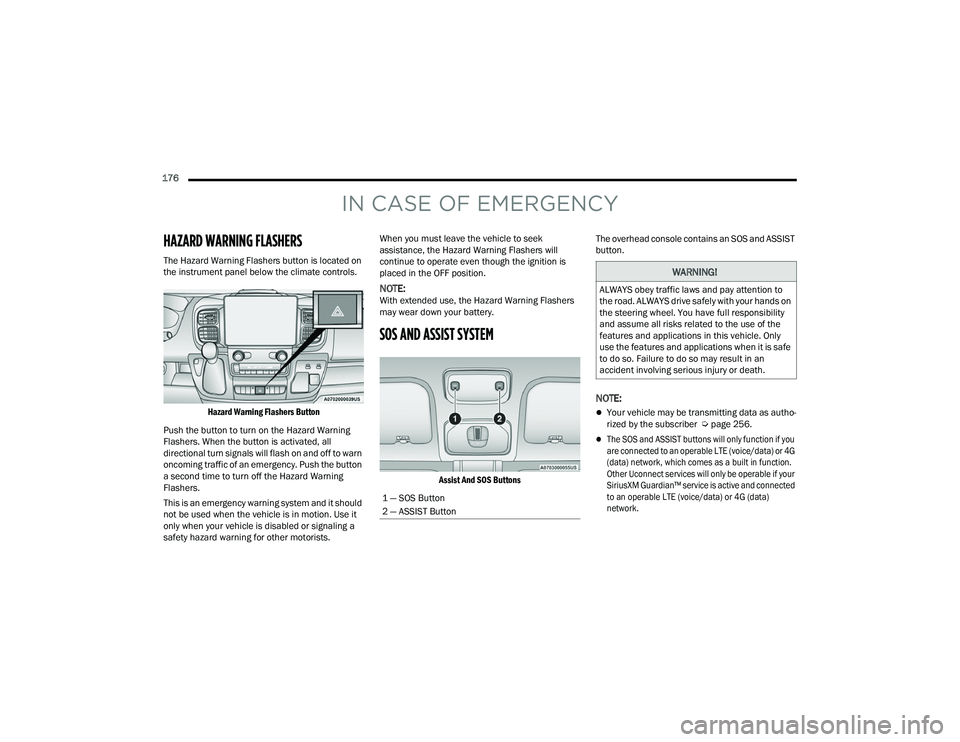
The Hazard Warning Flashers button is located on
the instrument panel below the climate controls.
Hazard Warning Flashers Button
Push the button to turn on the Hazard Warning
Flashers. When the button is activated, all
directional turn signals will flash on and off to warn
oncoming traffic of an emergency. Push the button
a second time to turn off the Hazard Warning
Flashers.
This is an emergency warning system and it should
not be used when the vehicle is in motion. Use it
only when your vehicle is disabled or signaling a
safety hazard warning for other motorists. When you must leave the vehicle to seek
assistance, the Hazard Warning Flashers will
continue to operate even though the ignition is
placed in the OFF position.
NOTE:With extended use, the Hazard Warning Flashers
may wear down your battery.
SOS AND ASSIST SYSTEM
Assist And SOS Buttons
The overhead console contains an SOS and ASSIST
button.
NOTE:
Your vehicle may be transmitting data as autho
-
rized by the subscriber Ú page 256.
The SOS and ASSIST buttons will only function if you
are connected to an operable LTE (voice/data) or 4G
(data) network, which comes as a built in function.
Other Uconnect services will only be operable if your
SiriusXM Guardian™ service is active and connected
to an operable LTE (voice/data) or 4G (data)
network.
1 — SOS Button
2 — ASSIST Button
WARNING!
ALWAYS obey traffic laws and pay attention to
the road. ALWAYS drive safely with your hands on
the steering wheel. You have full responsibility
and assume all risks related to the use of the
features and applications in this vehicle. Only
use the features and applications when it is safe
to do so. Failure to do so may result in an
accident involving serious injury or death.
22_VF_OM_EN_USC_t.book Page 176