change wheel RAM PROMASTER 2023 User Guide
[x] Cancel search | Manufacturer: RAM, Model Year: 2023, Model line: PROMASTER, Model: RAM PROMASTER 2023Pages: 296, PDF Size: 12.31 MB
Page 106 of 296

104STARTING AND OPERATING
The Active Driving Assist system DOES NOT:
Warn or prevent collisions with other vehicles
Steer your vehicle around stopped vehicles,
slower vehicles, construction equipment,
pedestrians, or animals
Respond to traffic lights or stop signs
Merge onto highways or exit off ramps
Turn your vehicle
Change lanes
React to cross traffic
NOTE:Adaptive Cruise Control (ACC) is a core component
of ADA. For ACC system limitations Ú page 89.
The Active Driving Assist system may have limited
or reduced functionality when one of the following
conditions occur:
The vehicle’s radar sensors and/or forward facing
camera is damaged, covered, misaligned, or
obstructed (e.g. by mud, ice, snow, etc.)
If the suspension alignment is not correct, if the
vehicle is modified (e.g. lifting or lowering the
suspension, installing different sized wheels
or tires)
Driving near highway toll booths
NOTE:If damage to the windshield occurs, have the wind -
shield replaced by an authorized dealer as soon as
possible.
PARKSENSE FRONT/REAR PARK ASSIST —
IF EQUIPPED
The ParkSense Park Assist system provides visual
and audible indications of the distance between
the rear, and if equipped, the front fascia/bumper
and a detected obstacle when backing up or
moving forward (e.g. during a parking maneuver).
For limitations of the system (e.g. during a parking
maneuver), see Ú page 110.
NOTE:
The system is designed to assist the driver and
not to substitute the driver.
The driver must stay in full control of the vehicle's
acceleration and braking and is responsible for
controlling the vehicle's movements.
ParkSense will retain the last system state
(enabled or disabled) from the last ignition cycle
when the ignition is placed in the ON/RUN position.
ParkSense is active when the gear selector is
shifted to REVERSE or to a forward gear and an
obstacle is detected, as long as the system is on.
Do not use a hand-held device when the Active
Driving Assist system is engaged.
Maintain a safe distance from other vehicles
and pay attention to traffic conditions.
Do not place any objects on the steering wheel
(e.g. steering wheel covers) which could inter -
fere with the hand detection sensors.
Always pay attention to the road when using the
Active Driving Assist system. ADA will not steer to
avoid safety hazards, construction zones, objects,
or roadway impediments. You need to maintain
control to steer and brake the vehicle in such situ -
ations and when merging into traffic, entering the
highway, making a turn for crossing traffic, or stop-
ping for traffic control devices.
WARNING!
23_VF_OM_EN_USC_t.book Page 104
Page 119 of 296

STARTING AND OPERATING117
NOTE:
When operating conditions have been met, the
LaneSense system will monitor if the driver’s
hands are on the steering wheel and provide
an audible and visual warning to the driver if
removed. The system will cancel if the driver
does not return their hands to the wheel.
LaneSense is a driving assist system, not an
emergency system, and does not replace the
driver. The driver is always responsible for
controlling the vehicle and must intervene as
required. The LaneSense system is designed to
assist the driver and not to substitute the driver.
TURNING LANESENSE ON OR OFF
The LaneSense button is located on the
switch panel below the Uconnect display.
To turn the LaneSense system on, push the
LaneSense button (LED turns off). A “LaneSense
On” message is shown in the instrument cluster
display.
To turn the LaneSense system off, push the
LaneSense button twice (LED turns on).
NOTE:The LaneSense system will retain the last system
state on or off from the last ignition cycle when the
ignition is placed in the ON/RUN position.
LANESENSE WARNING MESSAGE
The LaneSense system will indicate the current
lane drift condition through the instrument cluster
display.
When the LaneSense system is on, the lane lines
are gray when both of the lane boundaries have
not been detected and the LaneSense telltale
is solid white.
System ON (Gray Lines) With White Telltale
Left Lane Departure — Only Left Lane Detected
When the LaneSense system is on, the Lane-
Sense Telltale is solid white when only the
left lane marking has been detected and the
system is ready to provide visual warnings in the
instrument cluster display if an unintentional
lane departure occurs on the left side.
When the LaneSense system senses the lane has
been approached and is in a lane departure situa -
tion, the visual warning in the instrument cluster
display will show the left lane line flashing yellow
(on/off). The LaneSense telltale changes from
solid white to flashing yellow.
Lane Approached (Flashing Yellow Lane Line) With Yellow Telltale
NOTE:The LaneSense system operates with similar
behavior for a right lane departure when only the
right lane marking has been detected.
4
23_VF_OM_EN_USC_t.book Page 117
Page 120 of 296

118STARTING AND OPERATING
Left Lane Departure — Both Lane Lines Detected
When the LaneSense system is on and both the lane
markings have been detected, the system is armed
to provide visual warnings in the instrument cluster
display and a torque warning in the steering wheel if
an unintentional lane departure occurs. The lane
lines turn from gray to white and the LaneSense tell-
tale is solid green.
Lanes Sensed (White Lines) With Green Telltale
When the LaneSense system senses a lane drift
situation, the left lane line turns solid yellow.
The LaneSense telltale changes from solid
green to solid yellow. At this time torque is
applied to the steering wheel in the opposite
direction of the lane boundary. For example: If approaching the left side of the
lane the steering wheel will turn to the right.
Lane Sensed (Solid Yellow Lane Line) With Solid Yellow Telltale
When the LaneSense system senses the lane
has been approached and is in a lane departure
situation, the left lane line flashes yellow
(on/off). The LaneSense telltale changes
from solid yellow to flashing yellow. At this time
torque is applied to the steering wheel in the
opposite direction of the lane boundary. For example: If approaching the left side of the
lane the steering wheel will turn to the right.
Lane Approached (Flashing Yellow Lane Line) With Flashing Yellow Telltale
NOTE:The LaneSense system operates with similar
behavior for a right lane departure.
23_VF_OM_EN_USC_t.book Page 118
Page 155 of 296

SAFETY153
ELECTRONIC BRAKE CONTROL (EBC)
S
YSTEM
Your vehicle is equipped with an advanced
Electronic Brake Control (EBC) system that
includes the Brake Assist System (BAS), Crosswind
Assist (CWA), Electronic Stability Control (ESC), Hill
Start Assist (HSA), Traction Control System (TCS),
and Trailer Sway Control (TSC). These systems
complement the Anti-Lock Brake System (ABS) by
optimizing the vehicle braking capability during
emergency braking maneuvers.
Brake Assist System (BAS)
The BAS is designed to optimize the vehicle’s braking
capability during emergency braking maneuvers.
The system detects an emergency braking situation
by sensing the rate and amount of brake application
and then applies optimum pressure to the brakes.
This can help reduce braking distances. The BAS
complements the Anti-Lock Brake System (ABS).
Applying the brakes very quickly results in the best BAS
assistance. To receive the benefit of the system, you
must apply continuous braking pressure during the
stopping sequence (do not “pump” the brakes). Do not
reduce brake pedal pressure unless braking is no
longer desired. Once the brake pedal is released,
the BAS is deactivated.
Crosswind Assist (CWA)
CWA helps keep your vehicle from drifting out of its lane
due to unexpected crosswinds by means of targeted
braking of individual wheels. The system will provide
automatic stability assistance to counteract the effect
of strong side wind. If a strong lateral wind is detected,
front and rear brakes on the affected side are applied,
creating a steering effect that mitigates the crosswind
influence. During system intervention, the driver should
perceive the natural stable handling feel of the vehicle.
Crosswind Assist will activate automatically when
the vehicle reaches speeds above approximately
43 mph (70 km/h). When the system is activated,
the ESC Warning Light in the instrument cluster will
blink to warn the driver.
Electronic Roll Mitigation (ERM)
The ERM system anticipates the potential for
wheel lift by monitoring the driver’s steering wheel
input and the speed of the vehicle. When ERM
determines that the rate of change of the steering
wheel angle and vehicle’s speed are sufficient to
potentially cause wheel lift, it then applies the
appropriate brake and may also reduce engine
power to lessen the chance that wheel lift will
occur. ERM can only reduce the chance of wheel
lift occurring during severe or evasive driving
maneuvers; it cannot prevent wheel lift due to
other factors, such as road conditions, leaving the
roadway, striking objects or other vehicles.WARNING!
The Brake Assist System (BAS) cannot prevent the
natural laws of physics from acting on the vehicle,
nor can it increase the traction afforded by prevailing
road conditions. BAS cannot prevent collisions,
including those resulting from excessive speed in
turns, driving on very slippery surfaces, or
hydroplaning. The capabilities of a BAS-equipped
vehicle must never be exploited in a reckless or
dangerous manner, which could jeopardize the
user's safety or the safety of others.
WARNING!
Many factors, such as vehicle loading, road
conditions and driving conditions, influence
the chance that wheel lift or rollover may occur.
ERM cannot prevent all wheel lift or rollovers,
especially those that involve leaving the roadway
or striking objects or other vehicles. The
capabilities of an ERM-equipped vehicle must
never be exploited in a reckless or dangerous
manner which could jeopardize the user's safety
or the safety of others.
6
23_VF_OM_EN_USC_t.book Page 153
Page 156 of 296

154SAFETY
Electronic Stability Control (ESC)
ESC enhances directional control and stability of
the vehicle under various driving conditions. ESC
corrects for over/under steering of the vehicle by
applying the brake of the appropriate wheel(s) to
counteract the previous conditions listed. Engine
power may also be reduced to help the vehicle
maintain the desired path.
Oversteer – when the vehicle is turning more
than appropriate for the steering wheel position.
Understeer – when the vehicle is turning less
than appropriate for the steering wheel position.
ESC uses sensors in the vehicle to determine the
vehicle path intended by the driver and compares
it to the actual path of the vehicle. When the actual
path does not match the intended path, ESC applies
the brake of the appropriate wheel to assist in
counteracting the oversteer or understeer condition.
ESC Operating Modes
The ESC OFF button is located in the
center switch bank, next to the hazard
flasher switch.
ESC On
This mode is the normal operating mode for
ESC equipped vehicles. Whenever the vehicle is
started, the ESC system will be in this mode. This
mode should be used for most driving situations.
ESC should only be turned off for the following
specific reasons.
ESC Partial Off
This mode is entered by momentarily pushing the
ESC OFF button.
When in the “Partial Off” mode, the TCS portion of
ESC, except for the “limited slip” feature described
in the TCS section, has been disabled and the ESC
OFF Indicator Light will be illuminated. When in the
“Partial Off” mode, ESC will operate without engine
torque management. This mode is intended to be
used if the vehicle is in deep snow, sand or gravel
conditions and more wheel spin than ESC would
normally allow is required to gain traction. To turn
ESC on again, momentarily push the ESC OFF
button. This will restore the normal “ESC On” mode
of operation.WARNING!
Electronic Stability Control (ESC) cannot prevent
the natural laws of physics from acting on the
vehicle, nor can it increase the traction afforded by
prevailing road conditions. ESC cannot prevent
accidents, including those resulting from exces -
sive speed in turns, driving on very slippery
surfaces, or hydroplaning. ESC also cannot
prevent accidents resulting from loss of vehicle
control due to inappropriate driver input for the
conditions. Only a safe, attentive, and skillful
driver can prevent accidents. The capabilities of
an ESC equipped vehicle must never be exploited
in a reckless or dangerous manner which could
jeopardize the user’s safety or the safety of others.
Vehicle modifications, or failure to properly
maintain your vehicle, may change the
handling characteristics of your vehicle, and
may negatively affect the performance of the
ESC system. Changes to the steering system,
suspension, braking system, tire type and size
or wheel size may adversely affect ESC perfor -
mance. Improperly inflated and unevenly worn
tires may also degrade ESC performance. Any
vehicle modification or poor vehicle mainte -
nance that reduces the effectiveness of the
ESC system can increase the risk of loss of
vehicle control, vehicle rollover, personal
injury and death.
23_VF_OM_EN_USC_t.book Page 154
Page 164 of 296
162SAFETY
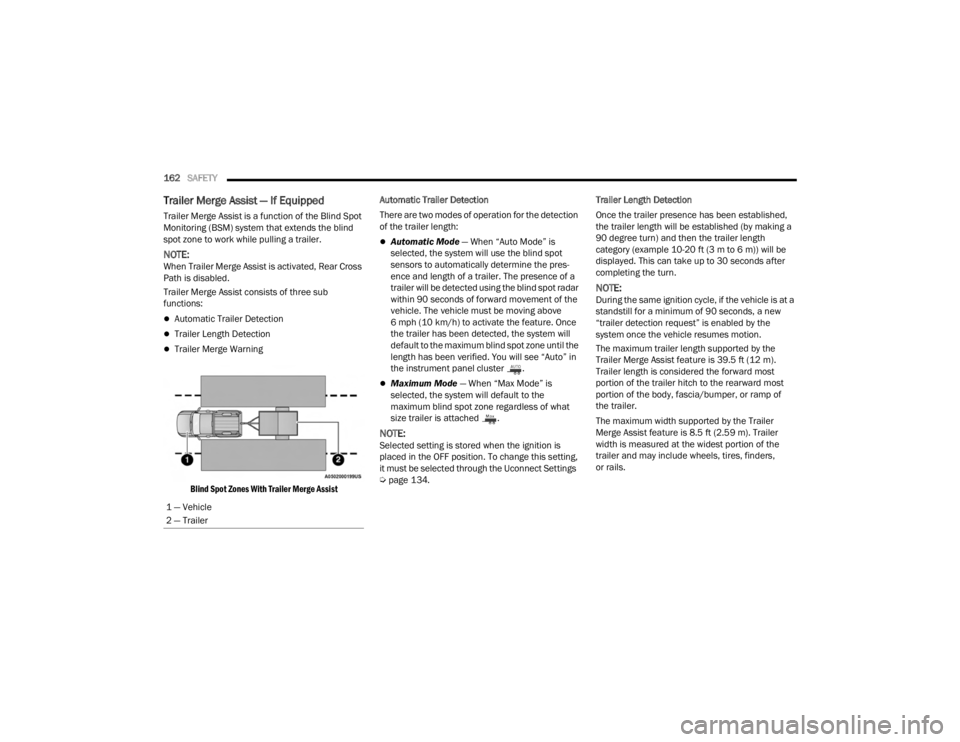
Trailer Merge Assist — If Equipped
Trailer Merge Assist is a function of the Blind Spot
Monitoring (BSM) system that extends the blind
spot zone to work while pulling a trailer.
NOTE:When Trailer Merge Assist is activated, Rear Cross
Path is disabled.
Trailer Merge Assist consists of three sub
functions:
Automatic Trailer Detection
Trailer Length Detection
Trailer Merge Warning
Blind Spot Zones With Trailer Merge Assist
Automatic Trailer Detection
There are two modes of operation for the detection
of the trailer length:
Automatic Mode
— When “Auto Mode” is
selected, the system will use the blind spot
sensors to automatically determine the pres -
ence and length of a trailer. The presence of a
trailer will be detected using the blind spot radar
within 90 seconds of forward movement of the
vehicle. The vehicle must be moving above
6 mph (10 km/h) to activate the feature. Once
the trailer has been detected, the system will
default to the maximum blind spot zone until the
length has been verified. You will see “Auto” in
the instrument panel cluster .
Maximum Mode — When “Max Mode” is
selected, the system will default to the
maximum blind spot zone regardless of what
size trailer is attached .
NOTE:Selected setting is stored when the ignition is
placed in the OFF position. To change this setting,
it must be selected through the Uconnect Settings
Ú page 134. Trailer Length Detection
Once the trailer presence has been established,
the trailer length will be established (by making a
90 degree turn) and then the trailer length
category (example 10-20 ft (3 m to 6 m)) will be
displayed. This can take up to 30 seconds after
completing the turn.
NOTE:During the same ignition cycle, if the vehicle is at a
standstill for a minimum of 90 seconds, a new
“trailer detection request” is enabled by the
system once the vehicle resumes motion.
The maximum trailer length supported by the
Trailer Merge Assist feature is 39.5 ft (12 m).
Trailer length is considered the forward most
portion of the trailer hitch to the rearward most
portion of the body, fascia/bumper, or ramp of
the trailer.
The maximum width supported by the Trailer
Merge Assist feature is 8.5 ft (2.59 m). Trailer
width is measured at the widest portion of the
trailer and may include wheels, tires, finders,
or rails.
1 — Vehicle
2 — Trailer
23_VF_OM_EN_USC_t.book Page 162
Page 171 of 296

SAFETY169
NOTE:
The TPMS is not intended to replace normal tire
care and maintenance or to provide warning of
a tire failure or condition.
The TPMS should not be used as a tire pressure
gauge while adjusting your tire pressure.
Driving on a significantly underinflated tire
causes the tire to overheat and can lead to tire
failure. Underinflation also reduces fuel effi -
ciency and tire tread life, and may affect the
vehicle’s handling and stopping ability.
The TPMS is not a substitute for proper tire
maintenance, and it is the driver’s responsibility
to maintain correct tire pressure using an accu -
rate tire pressure gauge, even if underinflation
has not reached the level to trigger illumination
of the TPMS Warning Light.
Seasonal temperature changes will affect tire
pressure, and the TPMS will monitor the actual
tire pressure in the tire Ú page 280.
Base System
This is the TPMS Warning Light located in
the instrument cluster.
The TPMS uses wireless technology with wheel
rim mounted electronic sensors to monitor tire
pressure levels. Sensors, mounted to each wheel as part of the valve stem, transmit tire pressure
readings to the receiver module.
NOTE:It is particularly important for you to check the tire
pressure in all of the tires on your vehicle regularly
and to maintain the proper pressure.
The TPMS consists of the following components:
Receiver module
Four Tire Pressure Monitoring System sensors
Tire Pressure Monitoring System Warning Light
Tire Pressure Monitoring System Low
Pressure Warnings
The Tire Pressure Monitoring System Warning Light
will illuminate in the instrument cluster, an audible
chime will be activated, and the “Check tire
pressure” message will display when one or more
of the four active road tire pressures are low.
Should this occur, you should stop as soon as
possible, check the inflation pressure of each
tire on your vehicle, and inflate each tire to the
vehicle’s recommended cold placard pressure
value. The system will automatically update and
the Tire Pressure Monitoring System Warning Light
will extinguish once the updated tire pressures
have been received. The vehicle may need to be
driven for up to 20 minutes above 15 mph
(24 km/h) to receive this information.
CAUTION!
The TPMS has been optimized for the original
equipment tires and wheels. TPMS pressures and
warning have been established for the tire size
equipped on your vehicle. Undesirable system
operation or sensor damage may result when
using replacement equipment that is not of the
same size, type, and/or style. Aftermarket wheels
can cause sensor damage.
Using aftermarket tire sealants may cause the Tire
Pressure Monitoring System (TPMS) sensor to
become inoperable. After using an aftermarket
tire sealant it is recommended that you take your
vehicle to an authorized dealership to have your
sensor function checked.
After inspecting or adjusting the tire pressure
always reinstall the valve stem cap. This will
prevent moisture and dirt from entering the
valve stem, which could damage the TPMS
sensor.
6
23_VF_OM_EN_USC_t.book Page 169
Page 198 of 296

196IN CASE OF EMERGENCY
NOTE:
Your vehicle may be transmitting data as autho -
rized by the subscriber.
Never place anything on or near the vehicle’s LTE
(voice/data) or 4G (data) and GPS antennas. You
could prevent LTE (voice/data) or 4G (data) and GPS
signal reception, which can prevent your vehicle
from placing an emergency call. An operable LTE
(voice/data) or 4G (data) network connection and a
GPS signal is required for the SOS Call system to
function properly.
NOTE:Changes or modifications not expressly approved
by the party responsible for compliance could void
the user's authority to operate the equipment. Automatic SOS — If Equipped
Automatic SOS is a hands-free safety service that can
immediately connect you with help in the event that
your vehicle’s airbags deploy. Please refer to your
provided radio supplement for complete information.
ASSIST Call
The ASSIST Button is used to automatically
connect you to any one of the following support
centers:
Roadside Assistance – If you get a flat tire, or
need a tow, just push the ASSIST button and
you’ll be connected to someone who can help.
Roadside Assistance will know what vehicle
you’re driving and its location. Additional fees
may apply for roadside assistance.
SiriusXM Guardian™ Customer Care – In-vehicle
support for SiriusXM Guardian™.
Vehicle Customer Care – Total support for all
other vehicle issues.
Uconnect Customer Care - Total support for
Radio, Phone and NAV issues.
JACKING AND TIRE CHANGING
Use this QR code to access your
digital experience.
WARNING!
ALWAYS obey traffic laws and pay attention to
the road. ALWAYS drive safely with your hands on
the steering wheel. You have full responsibility
and assume all risks related to the use of the
features and applications in this vehicle. Only
use the features and applications when it is safe
to do so. Failure to do so may result in an
accident involving serious injury or death.
CAUTION!
To avoid damage to the mirror during cleaning,
never spray any cleaning solution directly onto
the mirror. Apply the solution onto a clean cloth
and wipe the mirror clean.
WARNING!
Do not attempt to change a tire on the side of
the vehicle close to moving traffic. Pull far
enough off the road to avoid the danger of
being hit when operating the jack or changing
the wheel.
Being under a jacked-up vehicle is dangerous.
The vehicle could slip off the jack and fall on you.
You could be crushed. Never put any part of your
body under a vehicle that is on a jack. If you need
to get under a raised vehicle, take it to a service
center where it can be raised on a lift.
Never start or run the engine while the vehicle
is on a jack.
The jack is designed to be used as a tool for
changing tires only. The jack should not be
used to lift the vehicle for service purposes.
The vehicle should be jacked on a firm level
surface only. Avoid ice or slippery areas.
23_VF_OM_EN_USC_t.book Page 196
Page 199 of 296

IN CASE OF EMERGENCY197
PREPARATIONS FOR JACKING
1. Park the vehicle on a firm, level surface. Avoid
ice or slippery areas.
2. Turn on the Hazard Warning Flashers.
3. Apply the parking brake firmly.
4. Place the transmission in PARK (P) or REVERSE (R) for manual transmission.
5. Turn the ignition OFF.
6. Block both front and rear of the wheel diagonally opposite of the jacking position.
For example, if the driver’s front wheel is being
changed, block the passenger’s rear wheel.
Wheel Blocked Example
NOTE:Passengers should not remain in the vehicle when
the vehicle is being lifted or raised.
JACK AND TOOLS LOCATION
Depending on vehicle trim level, the jack and tools
are stored under the front passenger seat in a box,
or strapped behind the driver seat in a tool bag.
Tools may vary.
Jack Tool Bag Location — If Equipped
Jack Kit Location — If Equipped
WARNING!
Do not attempt to change a tire on the side of
the vehicle close to moving traffic. Pull far
enough off the road to avoid being hit when
operating the jack or changing the wheel.
7
23_VF_OM_EN_USC_t.book Page 197
Page 202 of 296

200IN CASE OF EMERGENCY
(Continued)
5. Pull the retainer through the center of the
wheel.
Retainer
JACKING INSTRUCTIONS
Jack Warning Label
Assembled Jack
1. Loosen (but do not remove) the wheel lug bolts by turning them counterclockwise one
turn while the wheel is still on the ground.
WARNING!
Carefully follow these tire changing warnings to
help prevent personal injury or damage to your
vehicle:
Always park on a firm, level surface as far from
the edge of the roadway as possible before
raising the vehicle.
Turn on the Hazard Warning Flashers.
Apply the parking brake firmly and place an
automatic transmission in PARK; a manual
transmission in REVERSE.
Block the wheel diagonally opposite of the
wheel that is to be raised.
Never start or run the engine with the vehicle
on a jack.
Do not let anyone sit in the vehicle when it is
on a jack.
Do not get under the vehicle when it is on a
jack. If you need to get under a raised vehicle,
take it to a service center where it can be
raised on a lift.
Only use the jack in the positions indicated
and for lifting this vehicle during a tire change.
If working on or near a roadway, be extremely
careful of motor traffic.
To assure that spare tires, flat or inflated, are
securely stowed, spares must be stowed with
the valve stem facing the ground.
WARNING!
23_VF_OM_EN_USC_t.book Page 200