door lock RAM PROMASTER 2023 Owner's Manual
[x] Cancel search | Manufacturer: RAM, Model Year: 2023, Model line: PROMASTER, Model: RAM PROMASTER 2023Pages: 296, PDF Size: 12.31 MB
Page 124 of 296

122STARTING AND OPERATING
(Continued)
REFUELING THE VEHICLE
The gas cap is located behind the fuel filler door on
the left side of the vehicle. If the gas cap is lost or
damaged, be sure to use the correct replacement
cap for this vehicle.
1. Open the fuel filler door.
2. Remove the fuel cap by rotating it counter-
clockwise.
Fuel Filler
3. Fully insert the fuel nozzle into the filler pipe.
4. Fill the vehicle with fuel.
NOTE:
When the fuel nozzle “clicks” or shuts off,
the fuel tank is full.
Wait five seconds before removing the fuel
nozzle to allow excess fuel to drain from the
nozzle. 5. Remove the fuel nozzle, reinstall fuel cap and
close fuel filler door.
NOTE:During fuel fill, nozzle position could affect the flow
of fuel. For best results, allow the nozzle to rest
naturally in the filler tube - do not raise the handle
to increase the fill angle.
WARNING!
Drivers must be careful when backing up even
when using the Surround View Camera. Always
check carefully behind your vehicle, and be
sure to check for pedestrians, animals, other
vehicles, obstructions, or blind spots before
backing up. You are responsible for the safety of
your surroundings and must continue to pay
attention while backing up. Failure to do so can
result in serious injury or death.
CAUTION!
To avoid vehicle damage, Surround View
should only be used as a parking aid.
The Surround View camera is unable to view
every obstacle or object in your drive path.
To avoid vehicle damage, the vehicle must be
driven slowly when using Surround View to
be able to stop in time when an obstacle is
seen. It is recommended that the driver look
frequently over his/her shoulder when using
Surround View.
WARNING!
Never have any smoking materials lit in or
near the vehicle when the fuel door is open or
the tank is being filled.
Never add fuel when the engine is running.
This is in violation of most state and federal
fire regulations and may cause the Malfunc -
tion Indicator Light to turn on.
A fire may result if fuel is pumped into a
portable container that is inside of a vehicle.
You could be burned. Always place fuel
containers on the ground while filling.
CAUTION!
Damage to the fuel system or emissions
control system could result from using an
improper fuel tank filler tube cap.
A poorly fitting fuel filler cap could let impuri -
ties into the fuel system.
23_VF_OM_EN_USC_t.book Page 122
Page 146 of 296

144MULTIMEDIA
Lights
When the Lights button is pressed on the touchscreen, the system displays the options related to the vehicle’s exterior and interior lights.
NOTE:
When the “Daytime Running Lights” feature is selected, the daytime running lights can be turned on or off. This feature is only allowed by law in the country
of the vehicle purchase.
Depending on the vehicle’s options, feature settings may vary.
Setting Name Description
Headlight Off DelayThis setting will allow you to set the amount of time it takes for the headlights to shut off after the
vehicle is turned off. The available settings are “0 sec”, “30 sec”, “60 sec”, and “90 sec”.
Greeting Lights When the “Greeting Lights” feature is selected, it allows the adjustment of the amount of time the
headlights remain on after the doors are unlocked with the key fob. The available settings are “0 sec”,
“30 sec”, “60 sec”, and “90 sec”.
Auto Dim High Beams This setting will allow you to turn the Auto Dim High Beams on or off.
Daytime Running Lights This setting will allow you to turn the Daytime Running Lights on or off.
Cornering Lights
When this setting is selected, if the steering wheel rotation angle is large or the turn signal indicators are on, a
light (incorporated in the fog light) will turn on, on the relevant side to improve visibility at night.
Flash Lights With Lock This setting will allow you to turn the flashing of the lights when the Lock button is pushed on the key
fob on or off.
Headlights with Wipers This setting will turn the headlights on when the wipers are activated.
Headlight Sensitivity This setting will allow you to set the sensitivity of the headlights dependent on the amount of visible
light. The greater the sensitivity set, the less the external light variation required to turn on the
lights (e.g. with a setting on level 3 at sunset, the headlights turn on earlier than in levels 1 and 2).
The available levels are “Level 1: Minimum Sensitivity”, “Level 2: Medium Sensitivity”, and
“Level 3: Maximum Sensitivity”.
23_VF_OM_EN_USC_t.book Page 144
Page 147 of 296

MULTIMEDIA145
Brakes
Doors & Locks
When the Brakes button is pressed on the touchscreen, the system will display a setting related to the vehicle’s brake system.
NOTE:Depending on the vehicle’s options, feature settings may vary.
Setting Name Description
Auto Park BrakeThis setting will turn the Auto Park Brake on or off.
Brake Service This setting will allow you to set the brakes for service. When the setting is selected, a pop-up will
display with “Yes” and “No” options.
Hold ‘n Go This setting will turn the Hold ‘n Go on or off.
When the Doors & Locks button is pressed on the touchscreen, the system displays the options related to locking and unlocking the vehicle’s doors.
NOTE:
The Auto Door Locks feature default condition is enabled. When enabled, the door locks will lock automatically when the vehicle’s speed exceeds 12 mph
(20 km/h). The Auto Door Locks feature can be enabled or disabled by an authorized dealer per written request of the customer. Please see an authorized
dealer for service.
Depending on the vehicle’s options, feature settings may vary.
Setting Name Description
Auto Door LocksThis setting will allow you to change if the doors lock automatically when the vehicle reaches 12 mph
(20 km/h).
Auto Unlock On Exit This setting will unlock the doors when any of the doors are opened from the inside.
Flash Lights With Lock This setting will allow you to turn the flashing of the lights when the Lock button is pushed on the key
fob on or off.
5
23_VF_OM_EN_USC_t.book Page 145
Page 148 of 296

146MULTIMEDIA
Key Off Options
Sound Horn With Lock This setting will sound the horn when the Lock button is pushed on the key fob. The “Off” setting will
not sound the horn when the Lock button is pushed. The “1st Press” setting will sound the horn when
the Lock button is pushed once. The “2nd Press” setting will sound the horn when the Lock button is
pushed twice.
Sound Horn With Remote Start This setting will sound the horn when the remote start is activated from the key fob.
Remote Door Unlock, Door Lock/1st Press Of Key
Fob Unlocks This setting will change how many pushes of the Unlock button on the key fob are needed to unlock all
the doors. The “Driver Door” setting will only unlock the driver door on the first push on the Unlock
button. The “All Doors” setting will unlock all doors with only one push of the Unlock button.
Passive Entry This setting will allow you to turn the Passive Entry feature (Keyless Enter ‘n Go™) between “Off”, “All”,
and “Approach”.
Setting Name
Description
When the Key Off Options Options button is pressed on the touchscreen, the system displays the options related to vehicle shutoff. These settings will only
activate when the ignition is set to OFF.
NOTE:Depending on the vehicle’s options, feature settings may vary.
Setting NameDescription
Radio Off DelayThis setting will keep the radio on for the selected amount of time after vehicle shut off. The available
options are “0 min” and “20 min”.
Radio Off with Door This setting will keep the radio on when a door is opened or until the Radio Off Delay time is reached.
The available settings are “On” and “Off”.
23_VF_OM_EN_USC_t.book Page 146
Page 186 of 296
184SAFETY
Turn on the interior lights, which remain on as
long as the battery has power.
Unlock the power door locks.
NOTE:After an accident, remember to cycle the ignition
to the STOP (OFF/LOCK) position and remove the
key from the ignition switch to avoid draining the
battery. Carefully check the vehicle for fuel leaks in
the engine compartment and on the ground near
the engine compartment and fuel tank before
resetting the system and starting the engine.
If there are no fuel leaks or damage to the vehicle
electrical devices (e.g. headlights) after an
accident, reset the Fuel Cut Off Switch by following
the procedure described below. If you have any
doubt, contact an authorized dealer.
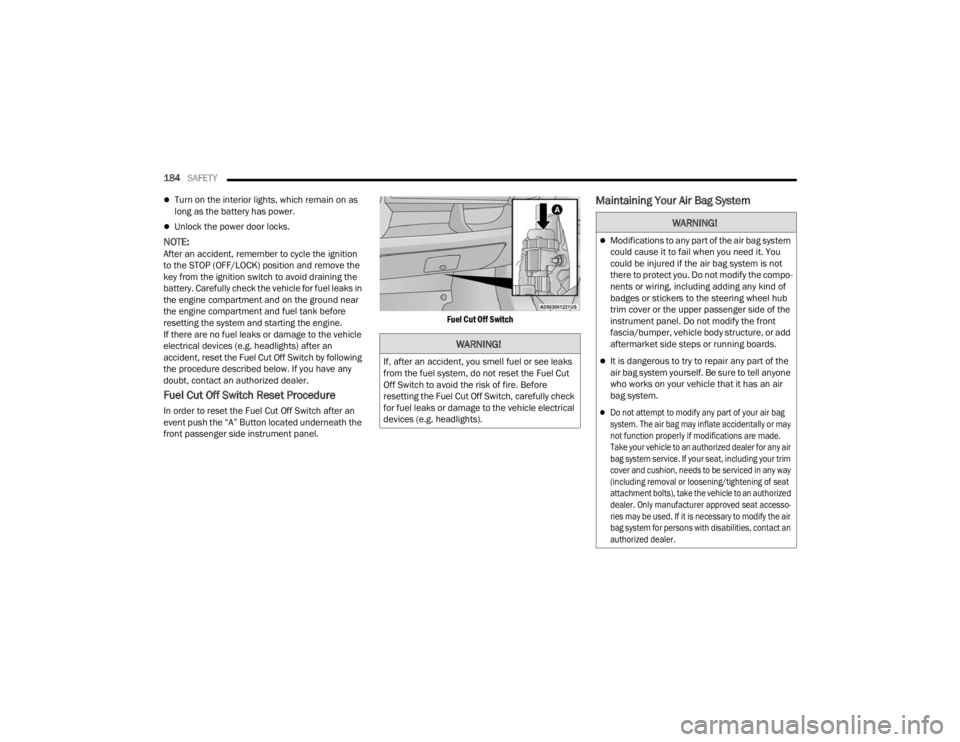
Fuel Cut Off Switch Reset Procedure
In order to reset the Fuel Cut Off Switch after an
event push the “A” Button located underneath the
front passenger side instrument panel.
Fuel Cut Off Switch
Maintaining Your Air Bag System
WARNING!
If, after an accident, you smell fuel or see leaks
from the fuel system, do not reset the Fuel Cut
Off Switch to avoid the risk of fire. Before
resetting the Fuel Cut Off Switch, carefully check
for fuel leaks or damage to the vehicle electrical
devices (e.g. headlights).
WARNING!
Modifications to any part of the air bag system
could cause it to fail when you need it. You
could be injured if the air bag system is not
there to protect you. Do not modify the compo
-
nents or wiring, including adding any kind of
badges or stickers to the steering wheel hub
trim cover or the upper passenger side of the
instrument panel. Do not modify the front
fascia/bumper, vehicle body structure, or add
aftermarket side steps or running boards.
It is dangerous to try to repair any part of the
air bag system yourself. Be sure to tell anyone
who works on your vehicle that it has an air
bag system.
Do not attempt to modify any part of your air bag
system. The air bag may inflate accidentally or may
not function properly if modifications are made.
Take your vehicle to an authorized dealer for any air
bag system service. If your seat, including your trim
cover and cushion, needs to be serviced in any way
(including removal or loosening/tightening of seat
attachment bolts), take the vehicle to an authorized
dealer. Only manufacturer approved seat accesso -
ries may be used. If it is necessary to modify the air
bag system for persons with disabilities, contact an
authorized dealer.
23_VF_OM_EN_USC_t.book Page 184
Page 193 of 296

SAFETY191
(Continued)
PERIODIC SAFETY CHECKS YOU SHOULD
M
AKE OUTSIDE THE VEHICLE
Tires
Examine tires for excessive tread wear and uneven
wear patterns. Check for stones, nails, glass, or
other objects lodged in the tread or sidewall.
Inspect the tread for cuts and cracks. Inspect
sidewalls for cuts, cracks, and bulges. Check the
lug nut/bolt torque for tightness. Check the tires
(including spare) for proper cold inflation pressure.
Lights
Have someone observe the operation of brake
lights and exterior lights while you work the
controls. Check turn signal and high beam
indicator lights on the instrument panel.
Door Latches
Check for proper closing, latching, and locking.
Fluid Leaks
Check area under the vehicle after overnight
parking for fuel, coolant, oil, or other fluid leaks.
Also, if gasoline fumes are detected or if fuel or
brake fluid leaks are suspected, the cause should
be located and corrected immediately.
ALWAYS REMOVE THE EXISTING
FLOOR MAT FROM THE VEHICLE
before installing any other floor mat.
NEVER install or stack an additional
floor mat on top of an existing floor mat.
ONLY install floor mats designed to fit your vehicle.
NEVER install a floor mat that cannot be properly
attached and secured to your vehicle. If a floor mat
needs to be replaced, only use a FCA approved
floor mat for the specific make, model, and year of
your vehicle.
ONLY use the driver’s side floor mat on the driver’s
side floor area. To check for interference, with the
vehicle properly parked with the engine off, fully
depress the accelerator, the brake, and the clutch
pedal (if present) to check for interference. If your
floor mat interferes with the operation of any
pedal, or is not secure to the floor, remove the
floor mat from the vehicle and place the floor mat
in your trunk.
ONLY use the passenger’s side floor mat on
the passenger’s side floor area.
WARNING!
ALWAYS make sure objects cannot fall or slide into
the driver’s side floor area when the vehicle is
moving. Objects can become trapped under accel -
erator, brake, or clutch pedals and could cause a
loss of vehicle control.
NEVER place any objects under the floor mat
(e.g., towels, keys, etc.). These objects could
change the position of the floor mat and may
cause interference with the accelerator,
brake, or clutch pedals.
If the vehicle carpet has been removed and
re-installed, always properly attach carpet to
the floor and check the floor mat fasteners are
secure to the vehicle carpet. Fully depress
each pedal to check for interference with the
accelerator, brake, or clutch pedals then
re-install the floor mats.
It is recommended to only use mild soap and
water to clean your floor mats. After cleaning,
always check your floor mat has been properly
installed and is secured to your vehicle using
the floor mat fasteners by lightly pulling mat.
WARNING!
6
23_VF_OM_EN_USC_t.book Page 191
Page 194 of 296

192SAFETY
(Continued)
EXHAUST GAS
The best protection against carbon monoxide entry
into the vehicle body is a properly maintained
engine exhaust system.Whenever a change is noticed in the sound of the
exhaust system, when exhaust fumes can be
detected inside the vehicle, or when the underside
or rear of the vehicle is damaged, have an
authorized dealer inspect the complete exhaust
system and adjacent body areas for broken,
damaged, deteriorated, or mispositioned parts.
Open seams or loose connections could permit
exhaust fumes to seep into the passenger
compartment. In addition, inspect the exhaust
system each time the vehicle is raised for
lubrication or oil change. Replace as required.
CARBON MONOXIDE WARNINGS
WARNING!
Exhaust gases can injure or kill. They contain
carbon monoxide (CO), which is colorless
and odorless. Breathing it can make you
unconscious and can eventually poison you.
To avoid breathing (CO), follow these safety tips:
Do not run the engine in a closed garage or in
confined areas any longer than needed to
move your vehicle in or out of the area.
If you are required to drive with the trunk/lift
-
gate/rear doors open, make sure that all
windows are closed and the climate control
BLOWER switch is set at high speed. DO NOT
use the recirculation mode.
If it is necessary to sit in a parked vehicle with
the engine running, adjust your heating or
cooling controls to force outside air into the
vehicle. Set the blower at high speed.
WARNING!
Carbon monoxide (CO) in exhaust gases is
deadly. Follow the precautions below to prevent
carbon monoxide poisoning:
Do not inhale exhaust gases. They contain carbon
monoxide, a colorless and odorless gas, which can
kill. Never run the engine in a closed area, such as
a garage, and never sit in a parked vehicle with the
engine running for an extended period. If the
vehicle is stopped in an open area with the engine
running for more than a short period, adjust the
ventilation system to force fresh, outside air into
the vehicle.
Guard against carbon monoxide with proper
maintenance. Have the exhaust system
inspected every time the vehicle is raised.
Have any abnormal conditions repaired
promptly. Until repaired, drive with all side
windows fully open.
When exiting the vehicle, always make sure
the ignition is in the OFF position, remove the
key fob from the vehicle, and lock your vehicle.
WARNING!
23_VF_OM_EN_USC_t.book Page 192
Page 215 of 296

IN CASE OF EMERGENCY213
If tire pressure is less than 19 psi (1.3 Bar):
The tire is too badly damaged. Do not attempt to
drive the vehicle further. Call for assistance.
If the tire pressure is 19 psi (1.3 Bar) or higher:
1. Push the Power Button (1) to turn on Tire Service Kit and inflate the tire to the pressure
indicated on the tire and loading information
label on the driver-side door opening.
NOTE:If the tire becomes overinflated, push the Deflation
Button to reduce the tire pressure to the recom -
mended inflation pressure before continuing.
2. Disconnect the Tire Service Kit from the valve stem, reinstall the cap on the valve stem and
unplug from 12 Volt outlet.
3. Place the Tire Service Kit in its proper storage area in the vehicle.
4. Have the tire inspected and repaired or replaced at the earliest opportunity at an
authorized dealer or tire service center.
5. Remove the Speed Limit sticker from the instrument panel after the tire has been
repaired.
6. Replace the Sealant Bottle (4) and Sealant Hose (3) assembly at an authorized dealer as
soon as possible Ú page 213.
NOTE:When having the tire serviced, advise the autho -
rized dealer or service center that the tire has been
sealed using the Tire Service Kit.
(F) Sealant Bottle And Hose Replacement:
1. Replace the Tire Service Kit Sealant Bottle (4) and Sealant Hose (3) prior to the expiration
date (printed at the upper right hand corner
on the bottle label) to assure optimum
operation of the system
Ú
page 213.
Tire Service Kit Sealant Expiration Date Location
2. Uncoil the Sealant Hose (3) (clear in color).
3. Locate the red colored round Sealant Bottle release button at the lower right hand corner
of the kit. 4. Push and hold the Sealant Bottle release
button, then pull out the bottle holding the
button.
5. Clean any remaining sealant from the Tire Service Kit housing.
6. Position the new Sealant Bottle (4) in the housing so that the Sealant Hose (3) aligns
with the hose slot in the front of the housing.
Push and hold the Sealant Bottle release
button, then push the bottle into the housing
by holding the button. An audible click will be
heard indicating the bottle is locked into place.
Release the button.
7. Verify that the cap is installed on the fitting at the end of the Sealant Hose (3) and return the
hose to its storage area (located on top of the
housing).
8. Return the Tire Service Kit to its storage location in the vehicle.
7
23_VF_OM_EN_USC_t.book Page 213
Page 225 of 296

SERVICING AND MAINTENANCE223
Mileage Or Time Passed (Whichever Comes First)
20,000
30,000
40,000
50,000
60,000
70,000
80,000
90,000
100,000
110,000
120,000
130,000
140,000
150,000
Or Years: 2 3 4 5 6 7 8 9 10 11 12 13 14 15
Or Kilometers:
32,000
48,000
64,000
80,000
96,000
112,000
128,000
144,000
160,000
176,000
192,000
208,000
224,000
240,000
Additional Inspections
Inspect the CV/Universal joints. X X X X X X X X X X X X X X
Inspect front suspension, tie rod ends, boot seals, and replace if
necessary. X X X X X X X
Inspect the brake pads, replace as necessary. X X X X X X X
Inspect the rear door net block gap, adjust/replace as necessary. XXXXX
Additional Maintenance
Replace the engine air cleaner filter. XXXXX
Inspect the cabin air filter, replace as necessary. X X X X X X X
Replace the Brake Fluid every two years.
1X X X X X X X
Replace the spark plugs.
1X
8
23_VF_OM_EN_USC_t.book Page 223
Page 233 of 296

SERVICING AND MAINTENANCE231
2. Remove and replace the cabin air filter from the filter retainer.
Removing Air Filter
3. Install the cabin air filter/filter retainer back into the fresh air inlet. When installing the filter retainer
make sure the retainer is fully engaged.
4. Install the two screws back into the assembly to secure the filter retainer to the fresh air inlet.
BODY LUBRICATION
Locks and all body pivot points, including such
items as seat tracks, door hinge pivot points and
rollers, liftgate, tailgate, decklid, sliding doors and
hood hinges, should be lubricated periodically with
a lithium-based grease, such as Mopar® Spray
White Lube to ensure quiet, easy operation and
to protect against rust and wear. Prior to the
application of any lubricant, the parts concerned
should be wiped clean to remove dust and grit;
after lubricating, excess oil and grease should be
removed. Particular attention should also be given
to hood latching components to ensure proper
function. When performing other underhood
services, the hood latch release mechanism, and
safety catch should be cleaned and lubricated.
The external lock cylinders should be lubricated
twice a year, preferably in the Autumn and Spring.
Apply a small amount of a high quality lubricant,
such as Mopar® Lock Cylinder Lubricant directly
into the lock cylinder.
WINDSHIELD WIPER BLADES
Clean the rubber edges of the wiper blades and the
windshield periodically with a sponge or soft cloth
and a mild nonabrasive cleaner. This will remove
accumulations of salt or road film.
Operation of the wipers on dry glass for long
periods may cause deterioration of the wiper
blades. Always use washer fluid when using the
wipers to remove salt or dirt from a dry windshield.
Avoid using the wiper blades to remove frost or ice
from the windshield. Keep the blade rubber out of
contact with petroleum products such as engine
oil, gasoline, etc.
NOTE:Life expectancy of wiper blades varies depending
on geographical area and frequency of use. If chat -
tering, marks, water lines or wet spots are present,
clean the wiper blades or replace as necessary.
1 — Fresh Air Inlet
2 — Cabin Air Filter
3 — Cabin Air Filter Retainer
8
23_VF_OM_EN_USC_t.book Page 231