lights RAM PROMASTER 2023 Service Manual
[x] Cancel search | Manufacturer: RAM, Model Year: 2023, Model line: PROMASTER, Model: RAM PROMASTER 2023Pages: 296, PDF Size: 12.31 MB
Page 193 of 296
SAFETY191
(Continued)
PERIODIC SAFETY CHECKS YOU SHOULD
M
AKE OUTSIDE THE VEHICLE
Tires
Examine tires for excessive tread wear and uneven
wear patterns. Check for stones, nails, glass, or
other objects lodged in the tread or sidewall.
Inspect the tread for cuts and cracks. Inspect
sidewalls for cuts, cracks, and bulges. Check the
lug nut/bolt torque for tightness. Check the tires
(including spare) for proper cold inflation pressure.
Lights
Have someone observe the operation of brake
lights and exterior lights while you work the
controls. Check turn signal and high beam
indicator lights on the instrument panel.
Door Latches
Check for proper closing, latching, and locking.
Fluid Leaks
Check area under the vehicle after overnight
parking for fuel, coolant, oil, or other fluid leaks.
Also, if gasoline fumes are detected or if fuel or
brake fluid leaks are suspected, the cause should
be located and corrected immediately.
ALWAYS REMOVE THE EXISTING
FLOOR MAT FROM THE VEHICLE
before installing any other floor mat.
NEVER install or stack an additional
floor mat on top of an existing floor mat.
ONLY install floor mats designed to fit your vehicle.
NEVER install a floor mat that cannot be properly
attached and secured to your vehicle. If a floor mat
needs to be replaced, only use a FCA approved
floor mat for the specific make, model, and year of
your vehicle.
ONLY use the driver’s side floor mat on the driver’s
side floor area. To check for interference, with the
vehicle properly parked with the engine off, fully
depress the accelerator, the brake, and the clutch
pedal (if present) to check for interference. If your
floor mat interferes with the operation of any
pedal, or is not secure to the floor, remove the
floor mat from the vehicle and place the floor mat
in your trunk.
ONLY use the passenger’s side floor mat on
the passenger’s side floor area.
WARNING!
ALWAYS make sure objects cannot fall or slide into
the driver’s side floor area when the vehicle is
moving. Objects can become trapped under accel -
erator, brake, or clutch pedals and could cause a
loss of vehicle control.
NEVER place any objects under the floor mat
(e.g., towels, keys, etc.). These objects could
change the position of the floor mat and may
cause interference with the accelerator,
brake, or clutch pedals.
If the vehicle carpet has been removed and
re-installed, always properly attach carpet to
the floor and check the floor mat fasteners are
secure to the vehicle carpet. Fully depress
each pedal to check for interference with the
accelerator, brake, or clutch pedals then
re-install the floor mats.
It is recommended to only use mild soap and
water to clean your floor mats. After cleaning,
always check your floor mat has been properly
installed and is secured to your vehicle using
the floor mat fasteners by lightly pulling mat.
WARNING!
6
23_VF_OM_EN_USC_t.book Page 191
Page 196 of 296

194IN CASE OF EMERGENCY
(Continued)
SOS Call
1. Push the SOS Call button on the overhead
console.
NOTE:In case the SOS Call button is pushed in error,
there will be a ten second delay before the SOS
Call system initiates a call to a SOS operator.
To cancel the SOS Call connection, push the SOS
call button on the overhead console or press the
cancellation button on the Device Screen. Termi -
nation of the SOS Call will turn off the green LED
light on the overhead console.
2. The LED lights located within the SOS and ASSIST buttons on the overhead console
will turn green once a connection to a SOS
operator has been made.
3. Once a connection between the vehicle and a SOS operator is made, the SOS Call system
may transmit the following important vehicle
information to a SOS operator:
Indication that the occupant placed a
SOS Call
The vehicle brand
The last known GPS coordinates of the
vehicle
4. You should be able to speak with the SOS operator through the vehicle audio system to
determine if additional help is needed.
NOTE:
Your vehicle may be transmitting data as
authorized by the subscriber.
Once a connection is made between the
vehicle’s SOS Call system and the SOS oper -
ator, the SOS operator may be able to open
a voice connection with the vehicle to deter -
mine if additional help is needed. Once the
SOS operator opens a voice connection with
the vehicle’s SOS Call system, the operator
should be able to speak with you or other
vehicle occupants and hear sounds occur -
ring in the vehicle. The vehicle’s SOS Call
system will attempt to remain connected
with the SOS operator until the SOS oper -
ator terminates the connection. 5. The SOS operator may attempt to contact
appropriate emergency responders and
provide them with important vehicle
information and GPS coordinates.
WARNING!
ALWAYS obey traffic laws and pay attention to
the road. ALWAYS drive safely with your hands on
the steering wheel. You have full responsibility
and assume all risks related to the use of the
features and applications in this vehicle.
Only use the features and applications when it is
safe to do so. Failure to do so may result in an
accident involving serious injury or death.
WARNING!
If anyone in the vehicle could be in danger
(e.g., fire or smoke is visible, dangerous road
conditions or location), do not wait for voice
contact from an Emergency Services Agent. All
occupants should exit the vehicle immediately
and move to a safe location.
Never place anything on or near the vehicle’s
operable network and GPS antennas. You
could prevent operable network and GPS
signal reception, which can prevent your
vehicle from placing an emergency call.
An operable network and GPS signal reception
is required for the SOS Call system to function
properly.
23_VF_OM_EN_USC_t.book Page 194
Page 197 of 296

IN CASE OF EMERGENCY195
SOS Call System Limitations
Vehicles sold in Mexico DO NOT have SOS Call
system capabilities.
SOS or other emergency line operators in Mexico
may not answer or respond to SOS system calls. If the SOS Call system detects a malfunction,
any of the following may occur at the time the
malfunction is detected, and at the beginning of
each ignition cycle:
The overhead console lights located within the
SOS and ASSIST buttons will continuously illumi
-
nate red.
The Device Screen will display the following
message: “Vehicle device requires service.
Please contact an authorized dealer.”
An In-Vehicle Audio message will state “Vehicle
device requires service. Please contact an
authorized dealer.” Even if the SOS Call system is fully functional,
factors beyond FCA US LLC’s control may prevent
or stop the SOS Call system operation. These
include, but are not limited to, the following
factors:
The ignition is in the OFF position
The vehicle’s electrical systems are not intact
The SOS Call system software and/or hardware
are damaged during a crash
The vehicle battery loses power or becomes
disconnected during a vehicle crash
LTE (voice/data) or 4G (data) network and/or
Global Positioning Satellite signals are unavail
-
able or obstructed
Equipment malfunction at the SOS operator
facility
Operator error by the SOS operator
LTE (voice/data) or 4G (data) network congestion
Weather
Buildings, structures, geographic terrain, or
tunnels
The SOS Call system is embedded into the
vehicle’s electrical system. Do not add after -
market electrical equipment to the vehicle’s elec -
trical system. This may prevent your vehicle from
sending a signal to initiate an emergency call.
To avoid interference that can cause the SOS Call
system to fail, never add aftermarket equipment
(e.g., two-way mobile radio, CB radio, data
recorder, etc.) to your vehicle’s electrical system
or modify the antennas on your vehicle. IF YOUR
VEHICLE LOSES BATTERY POWER FOR ANY
REASON (INCLUDING DURING OR AFTER AN ACCI -
DENT), THE UCONNECT FEATURES, APPS AND
SERVICES, AMONG OTHERS, WILL NOT OPERATE.
Modifications to any part of the SOS Call
system could cause the air bag system to fail
when you need it. You could be injured if the
air bag system is not there to help protect you.
WARNING!
WARNING!
Ignoring the overhead console light could
mean you will not have SOS Call services.
If the overhead console light is illuminated,
have an authorized dealer service the SOS
Call system immediately.
The Occupant Restraint Control module turns
on the air bag Warning Light on the instrument
panel if a malfunction in any part of the
system is detected. If the Air Bag Warning
Light is illuminated, have an authorized dealer
service the Occupant Restraint Control system
immediately.
7
23_VF_OM_EN_USC_t.book Page 195
Page 223 of 296
221
SERVICING AND MAINTENANCE
SCHEDULED SERVICING
Your vehicle is equipped with an automatic oil
change indicator system. The oil change indicator
system will remind you that it is time to take your
vehicle in for scheduled maintenance.
Based on engine operation conditions, the oil change
indicator message will illuminate in the instrument
cluster. This means that service is required for your
vehicle. Operating conditions such as frequent
short-trips, trailer tow, and extremely hot or cold
ambient temperatures will influence when the “Oil
Change Required” message is displayed. Have the
vehicle serviced as soon as possible, within the next
500 miles (805 km).
An authorized dealer will reset the oil change
indicator message after completing the scheduled
oil change. If a scheduled oil change is performed
by someone other than an authorized dealer, the
message can be reset by referring to the steps
described under Instrument Cluster Display
Ú
page 57.
NOTE:Under no circumstances should oil change
intervals exceed 10,000 miles (16,000 km),
12 months or 350 hours of engine run time,
whichever comes first. The 350 hours of engine
run or idle time is generally only a concern for fleet
customers. Once A Month Or Before A Long Trip:
Check engine oil level
Check windshield washer fluid level
Check the tire pressures and look for unusual
wear or damage. Rotate at the first sign of irreg
-
ular wear, even if it occurs before the oil indi -
cator system turns on
Check the fluid levels of the coolant reservoir,
and brake master cylinder and fill as needed
Check function of all interior and exterior lights
8
23_VF_OM_EN_USC_t.book Page 221
Page 244 of 296
242SERVICING AND MAINTENANCE
Interior Fuses
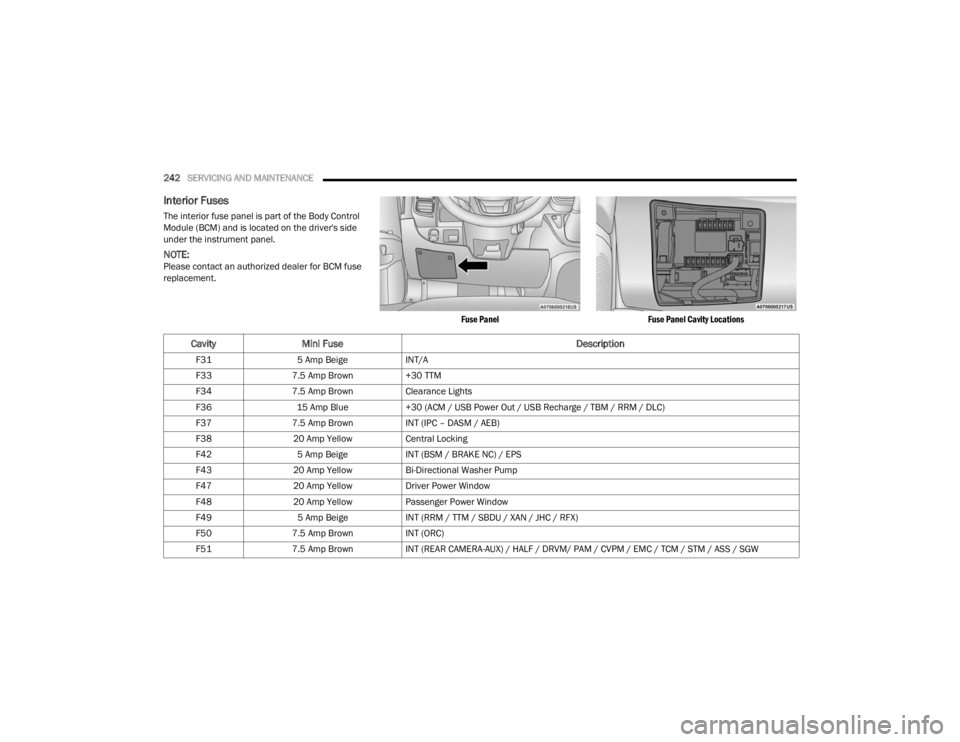
The interior fuse panel is part of the Body Control
Module (BCM) and is located on the driver's side
under the instrument panel.
NOTE:Please contact an authorized dealer for BCM fuse
replacement.
Fuse PanelFuse Panel Cavity Locations
CavityMini Fuse Description
F315 Amp Beige INT/A
F33 7.5 Amp Brown +30 TTM
F34 7.5 Amp Brown Clearance Lights
F36 15 Amp Blue +30 (ACM / USB Power Out / USB Recharge / TBM / RRM / DLC)
F37 7.5 Amp Brown INT (IPC – DASM / AEB)
F38 20 Amp Yellow Central Locking
F42 5 Amp Beige INT (BSM / BRAKE NC) / EPS
F43 20 Amp Yellow Bi-Directional Washer Pump
F47 20 Amp Yellow Driver Power Window
F48 20 Amp Yellow Passenger Power Window
F49 5 Amp Beige INT (RRM / TTM / SBDU / XAN / JHC / RFX)
F50 7.5 Amp Brown INT (ORC)
F51 7.5 Amp Brown INT (REAR CAMERA-AUX) / HALF / DRVM/ PAM / CVPM / EMC / TCM / STM / ASS / SGW
23_VF_OM_EN_USC_t.book Page 242
Page 248 of 296

246SERVICING AND MAINTENANCE
Replacing Exterior Bulbs
HEADLAMPS LOW BEAM AND HIGH BEAM
See the following steps to replace:
1. Disconnect the negative battery terminal.
2. Remove the headlamp retaining screws.
3. Remove the headlamp assembly from the
vehicle (by moving the headlamp to release
the lower slides from the headlamp mounting
on the vehicle).
4. Disconnect the headlamp harness electrical connector.
5. Remove appropriate plastic cap from the back of the headlamp housing.
6. Detach the wire connector from the bulb.
7. Rotate the bulb counterclockwise and remove it from the reflector.
8. Install a new bulb.
9. Rotate the new bulb clockwise to lock it in place.
10. Reinstall the wire connector.
11. Reinstall the access cap and rotate to lock into place.
12. Connect the headlamp harness electrical connector. 13. Carefully reinstall headlamp in the same
position on the vehicle, so as not to affect
headlamp aiming.
14. Reinstall the headlamp screws.
15. Connect the negative battery terminal.
16. Check lights to make sure they are operating correctly.
FRONT TURN SIGNAL/PARKING LAMPS
See the following steps to replace:
1. Remove one retaining screw on the lower headlamp filler panel. Remove filler panel.
2. Remove two retaining screws on the upper headlamp filler panel. Remove filler panel.
3. Remove one upper retaining screw from the headlamp housing.
4. Remove two lower retaining screws from the headlamp housing.
5. Pull Headlamp forward, disconnect the harness electrical connector and remove the
headlamp assembly from vehicle.
6. Rotate the bulb counterclockwise and remove.
7. Install the bulb into socket, and rotate bulb/ socket clockwise into lamp locking it in place.
8. Carefully reinstall headlamp in the same position on the vehicle, so as not to affect
headlamp aiming. 9. Install the one upper retaining screw on
headlamp housing.
10. Install the two lower retaining screws on headlamp housing.
11. Carefully reinstall the lower headlamp filler panel and one retaining screw.
12. Carefully reinstall the upper headlamp filler panel and two retaining screws.DAYTIME RUNNING LAMP (DRL)/FRONT SIDE
MARKER LAMP
See the following steps to replace:
1. Remove one retaining screw on the lower headlamp filler panel. Remove filler panel.
2. Remove two retaining screws on the upper headlamp filler panel. Remove filler panel.
3. Remove one upper retaining screw from the headlamp housing.
4. Remove two lower retaining screws from the headlamp housing.
5. Pull Headlamp forward, disconnect the harness electrical connector and remove the
headlamp assembly from vehicle.
6. Remove the (DRL), side marker bulb by pulling straight out.
7. Replace lamp as required and lock in place.
8. Reinstall plastic cap.
23_VF_OM_EN_USC_t.book Page 246
Page 268 of 296
266SERVICING AND MAINTENANCE
BODY AND UNDERBODY MAINTENANCE
Cleaning Headlights
Your vehicle is equipped with plastic headlights
and fog lights that are lighter and less susceptible
to stone breakage than glass headlights.
Plastic is not as scratch resistant as glass and
therefore different lens cleaning procedures must
be followed.
To minimize the possibility of scratching the lenses
and reducing light output, avoid wiping with a dry
cloth. To remove road dirt, wash with a mild soap
solution followed by rinsing.
Do not use abrasive cleaning components,
solvents, steel wool or other aggressive material to
clean the lenses.
PRESERVING THE BODYWORK
Washing
Wash your vehicle regularly. Always wash your
vehicle in the shade using Mopar® Car Wash, or
a mild car wash soap, and rinse the panels
completely with water.
If insects, tar, or other similar deposits have
accumulated on your vehicle, use Mopar®
Super Kleen Bug and Tar Remover to remove.
Use a high quality cleaner wax, such as Mopar®
Cleaner Wax to remove road film, stains and to protect your paint finish. Use precautions to not
scratch the paint.
Avoid using abrasive compounds and power
buffing that may diminish the gloss or thin out
the paint finish.
Special Care
If you drive on salted or dusty roads or if you
drive near the ocean, hose off the undercarriage
at least once a month.
It is important that the drain holes in the lower
edges of the doors, rocker panels, and trunk be
kept clear and open.
If you detect any stone chips or scratches in the
paint, touch them up immediately.
If your vehicle is damaged due to a collision or
similar cause that destroys the paint and protec
-
tive coating, have your vehicle repaired as soon
as possible.
If you carry special cargo such as chemicals,
fertilizers, de-icer salt, etc., be sure that such
materials are well packaged and sealed.
If a lot of driving is done on gravel roads,
consider mud or stone shields behind each
wheel.
Use Mopar® Touch Up Paint on scratches as
soon as possible. An authorized dealer has
touch up paint to match the color of your
vehicle.
INTERIORS
SEATS AND FABRIC PARTS
Use Mopar® Total Clean to clean fabric upholstery
and carpeting.
CAUTION!
Do not use abrasive or strong cleaning mate -
rials such as steel wool or scouring powder
that will scratch metal and painted surfaces.
Use of power washers exceeding 1,200 psi
(8,274 kPa) can result in damage or removal
of paint and decals.
WARNING!
Do not use volatile solvents for cleaning
purposes. Many are potentially flammable,
and if used in closed areas they may cause
respiratory harm.
23_VF_OM_EN_USC_t.book Page 266
Page 285 of 296

283
INDEX
A
Active Driving Assist....................................... 100Active Speed Limiter........................................ 86Adaptive Cruise Control (ACC)
(Cruise Control)................................................ 87Adding Engine Coolant (Antifreeze)............... 233Adding Washing Fluid.................................... 226Additives, Fuel............................................... 271Air Bag........................................................... 179Air Bag Operation...................................... 180Air Bag Warning Light................................ 178Enhanced Accident Response...................220Event Data Recorder (EDR)....................... 220If Deployment Occurs................................ 183Maintaining Your Air Bag System.............. 184Maintenance............................................. 184Side Air Bags............................................. 180Transporting Pets...................................... 190Air Bag Light..................................65, 178, 190Air Cleaner, Engine (Engine Air
Cleaner Filter)...................................... 228, 229Air Conditioner Maintenance......................... 229Air Conditioner Refrigerant.................. 229, 230Air Conditioner System.................................. 229Air Conditioning Filter............................. 43, 230Air Conditioning, Operating Tips................ 43, 44
Air Filter........................................................ 228Air PressureTires......................................................... 256AlarmSecurity Alarm...................................... 20, 68Alarm SystemSecurity Alarm............................................. 20Alterations/ModificationsVehicle........................................................... 8Antifreeze (Engine Coolant)................. 233, 273Disposal................................................... 234Anti-Lock Brake System (ABS)...................... 152Anti-Lock Warning Light................................... 68Assist, Hill Start............................................. 155Audio Systems (Radio).................................. 133Auto Down Power Windows............................. 49Auto Up Power Windows.................................. 49Automatic Door Locks...................................... 23Automatic Headlights....................................... 34Automatic High Beams.................................... 34Automatic Transmission.........................81, 236Adding Fluid.............................................. 236Fluid And Filter Change............................ 236Fluid Change............................................ 236Fluid Level Check..................................... 236
Fluid Type........................................ 236, 274Special Additives...................................... 236AUX Cord..........................................................45Auxiliary Driving Systems.............................. 158
B
Base / Midline Instrument Cluster
S
............53Battery................................................... 66, 227Charging System Light.................................66Keyless Key Fob Replacement....................14Belts, Seat.................................................... 190Blind Spot Monitoring................................... 158Body Builders Guide........................................... 8Body Mechanism Lubrication........................ 231B-Pillar Location............................................ 253Brake Assist System..................................... 153Brake Control System, Electronic.................. 153Brake Fluid........................................... 235, 274Brake System....................................... 235, 269Anti-Lock (ABS)......................................... 152Fluid Check............................................... 235Master Cylinder........................................ 235Parking........................................................78Warning Light...............................................6611
23_VF_OM_EN_USC_t.book Page 283
Page 287 of 296

285
E
Electric Brake Control System
....................... 153Electric Parking Brake..................................... 78Electric Remote Mirrors................................... 32Electrical Power Outlets................................... 46Electronic Speed Control (Cruise Control)........ 88Electronic Stability Control (ESC)...................154Electronic Throttle Control Warning Light........ 67Emergency Braking........................................ 167Emergency, In Case Of Freeing Vehicle When Stuck...................... 218Jacking...................................................... 196Jump Starting............................................ 214Emission Control System Maintenance........... 74Engine........................................................... 225Air Cleaner................................................. 228Block Heater............................................... 77Break-In Recommendations........................ 78Checking Oil Level..................................... 226Compartment............................................ 225Compartment Identification...................... 225Coolant (Antifreeze)......................... 233, 273Cooling...................................................... 233Exhaust Gas Caution................................. 192Fails To Start............................................... 77Flooded, Starting......................................... 77Fuel Requirements.......................... 270, 273Jump Starting............................................ 214
Oil.................................................... 228, 273Oil Filler Cap............................................. 225Oil Filter.................................................... 228Oil Selection.................................... 228, 273Oil Synthetic............................................. 228Overheating.............................................. 216Starting........................................................ 76Enhanced Accident Response Feature......... 220Entry System, Illuminated................................ 38Ethanol......................................................... 271Exhaust Gas Cautions................................... 192Exhaust System................................... 192, 232Exterior Lights.........................................33, 191
F
FiltersAir Cleaner
................................................ 228Air Conditioning..................................43, 230Engine Oil................................................. 228Engine Oil Disposal................................... 228FlashersHazard Warning........................................ 193Turn Signals............................................. 191Flat Tire Changing................................ 249, 260Flat Tire Stowage................................. 249, 260Flooded Engine Starting................................... 77Fluid Capacities............................................ 273Fluid Leaks................................................... 191
Fluid Level ChecksAutomatic Transmission........................... 236Brake........................................................ 235Cooling System......................................... 233Engine Oil................................................. 226Fog Lights........................................................35Fold-Flat Seats.................................................23Forward Collision Warning............................ 164Four-Way Hazard Flasher.............................. 193Freeing A Stuck Vehicle................................. 218Fuel............................................................... 270Additives................................................... 271Clean Air................................................... 271Ethanol..................................................... 271Filler Cap (Gas Cap).................................. 122Gasoline................................................... 270Materials Added....................................... 271Methanol.................................................. 271Octane Rating.................................. 270, 273Requirements.................................. 270, 273Tank Capacity........................................... 273Fuses............................................................ 236
G
Gas Cap (Fuel Filler Cap)...................... 122, 123Gasoline, Clean Air........................................ 271Gasoline, Reformulated................................ 27111
23_VF_OM_EN_USC_t.book Page 285
Page 288 of 296

286 Gauges Fuel
............................................................. 69Gear Ranges.................................................... 82Gear Selector Override.................................. 217Glass Cleaning............................................... 268Gross Axle Weight Rating..................... 123, 125Gross Vehicle Weight Rating................ 123, 124GuideBody Builders................................................ 8GVWR............................................................ 123
H
HazardDriving Through Flowing, Rising, Or Shallow Standing Water
..................................... 131Hazard Warning Flashers.............................. 193Head Restraints............................................... 28HeadlightsAutomatic.................................................... 34Cleaning.................................................... 266High Beam.................................................. 34High Beam/Low Beam Select Switch.......... 34Passing........................................................ 34Switch......................................................... 33Heated Mirrors................................................ 33Heated Seats................................................... 26Heater, Engine Block....................................... 77High Beam/Low Beam Select (Dimmer)
Switch.............................................................. 34Hill Start Assist.............................................. 155
HitchesTrailer Towing........................................... 126Hood Prop........................................................ 50Hood Release.................................................. 50
I
Ignition............................................................. 16Switch.......................................................... 16Illuminated Entry.............................................. 38Immobilizer (Sentry Key).................................. 16Inside Rearview Mirror............................30, 193Instrument ClusterDescriptions................................................ 55Display......................................................... 56Display Controls........................................... 56Menu Items................................................. 57Instrument Panel Lens Cleaning................... 267Intelligent Speed Assist................................... 87Interior And Instrument Lights......................... 36Interior Appearance Care.............................. 266Interior Lights................................................... 36Intermittent Wipers (Delay Wipers).................. 39InverterPower.......................................................... 47iPod/USB/MP3 Control.................................... 45
J
Jack Location................................................ 196Jack Operation.............................................. 196Jacking And Tire Changing............................ 196
Jacking And Tire Changing
S
..................... 196Jacking And Tire Changing Instructions......... 197Jump Starting................................................ 214
K
Key Fob............................................................13Programming Additional Key Fobs...............15Key Fob Battery Service (Remote
Keyless Entry)..................................................14Key Fob Programming (Remote
Keyless Entry)..................................................15Keyless Enter ‘n Go™.......................................22Passive Entry...............................................22Keys.................................................................13Replacement...............................................15Sentry (Immobilizer).....................................16
L
Lane Change Assist..........................................35LaneSense.................................................... 116Lap/Shoulder Belts....................................... 172Latches......................................................... 191Hood............................................................50Lead Free Gasoline....................................... 270Leaks, Fluid................................................... 191Life Of Tires................................................... 258Light Bulbs........................................... 191, 244
23_VF_OM_EN_USC_t.book Page 286