lane assist RAM PROMASTER 2023 Owners Manual
[x] Cancel search | Manufacturer: RAM, Model Year: 2023, Model line: PROMASTER, Model: RAM PROMASTER 2023Pages: 296, PDF Size: 12.31 MB
Page 4 of 296

2
INTRODUCTION
SYMBOLS KEY ...........................................................8
VAN CONVERSIONS/CAMPERS ..............................8
VEHICLE MODIFICATIONS/ALTERATIONS .............8
SYMBOL GLOSSARY.................................................9
GETTING TO KNOW YOUR VEHICLE
KEYS ....................................................................... 13 Key Fob .............................................................13
SENTRY KEY ........................................................... 16
IGNITION SWITCH .................................................. 16
Keyless Enter ‘n Go™ Ignition .........................16
REMOTE START — IF EQUIPPED .......................... 18
How To Use Remote Start ................................18
To Exit Remote Start Mode .............................19
Remote Start Defrost Mode Activation —
If Equipped........................................................19
Remote Start Comfort Systems —
If Equipped........................................................19
Remote Start Windshield Wiper De-Icer
Activation — If Equipped ..................................19
Remote Start Abort Message ..........................20
VEHICLE SECURITY SYSTEM — IF EQUIPPED .... 20
To Arm The System ..........................................20
To Disarm The System .....................................20
Rearming Of The System .................................20
Security System Manual Override ...................21 DOORS ....................................................................21
Power Door Locks ...........................................21
Auto Unlock Doors............................................22
Keyless Enter ‘n Go™ — Passive Entry ...........22
Automatic Door Locks ......................................23
STEERING WHEEL ..................................................23
Telescoping Steering Column..........................23
SEATS ......................................................................23
Manual Adjustments ........................................24
Heated Seats — If Equipped ............................26
Fold Down Tray — If Equipped .........................27
Adjustable Armrests — If Equipped .................27
Head Restraints ..............................................28
UCONNECT VOICE RECOGNITION —
IF EQUIPPED ...........................................................29
Introducing Voice Recognition.........................29
Basic Voice Commands ...................................29
Get Started .......................................................29
Additional Information .....................................30
MIRRORS ...............................................................30
Inside Rearview Mirror .....................................30
Outside Mirrors ................................................31
Outside Mirrors With Turn Signal And
Approach Lighting — If Equipped.....................31
Power Mirrors — If Equipped ...........................32
Power Folding Outside Mirrors —
If Equipped........................................................32
Heated Mirrors — If Equipped..........................33 EXTERIOR LIGHTS.................................................. 33
Multifunction Lever ......................................... 33
Headlights ........................................................ 33
Daytime Running Lights (DRLs) —
If Equipped ...................................................... 33
High/Low Beam Switch .................................. 34
Automatic High Beam Headlamp Control —
If Equipped .......................................................34
Flash-To-Pass .................................................. 34
Automatic Headlights — If Equipped .............. 34
Parking Lights .................................................. 34
Headlight Delay ................................................ 34
Fog Lights — If Equipped ................................. 35
Turn Signals...................................................... 35
Lane Change Assist..........................................35
Battery Saver .................................................... 35
INTERIOR LIGHTS ................................................. 36
Courtesy Lights.................................................36
Illuminated Entry — If Equipped ...................... 38
WIPERS AND WASHERS ...................................... 38
Windshield Wiper Operation ........................... 39
Rain Sensing Wipers — If Equipped ................39
CLIMATE CONTROLS ............................................ 40
Manual Climate Control Descriptions And
Functions .......................................................... 40
Additional Rear Climate Control —
If Equipped .......................................................43
Operating Tips .................................................. 43
23_VF_OM_EN_USC_t.book Page 2
Page 6 of 296

4
Indications On The Display ........................... 102
Minimum Risk Maneuver.............................. 103 System Status................................................ 103
System Operation/Limitations ..................... 103
PARKSENSE FRONT/REAR PARK ASSIST —
IF EQUIPPED ........................................................ 104
ParkSense Sensors ....................................... 105
ParkSense Warning Display.......................... 105
ParkSense Display ........................................ 105
Enabling And Disabling ParkSense .............. 108
Service The ParkSense Park Assist
System ........................................................... 108ParkSense Park Assist Failure Indications .. 108
Cleaning The ParkSense System ................. 108ParkSense Park Assist System Usage
Precautions .................................................... 109
Side Distance Warning System ................... 110
PARKSENSE ACTIVE PARK ASSIST
SYSTEM — IF EQUIPPED ..................................... 112
Enabling And Disabling The ParkSense
Active Park Assist System ............................. 112
Parallel/Perpendicular Parking Space
Assistance Operation .................................... 113
Exiting The Parking Space ............................ 116
LANESENSE — IF EQUIPPED ............................. 116
LaneSense Operation ................................... 116Turning LaneSense On Or Off ....................... 117
LaneSense Warning Message ...................... 117Changing LaneSense Status ........................ 119
PARKVIEW REAR BACK UP CAMERA .............. 119 SURROUND VIEW CAMERA SYSTEM —
IF EQUIPPED ........................................................ 120
REFUELING THE VEHICLE ................................... 122
Loose Fuel Filler Cap Message .................... 123
VEHICLE LOADING .............................................. 123
Vehicle Certification Label ............................ 123
Gross Vehicle Weight Rating (GVWR) .......... 123
Gross Axle Weight Rating (GAWR) ............... 123
Tire Size ......................................................... 123
Rim Size ......................................................... 124
Inflation Pressure .......................................... 124
Curb Weight ................................................... 124
Overloading.................................................... 124
Loading ......................................................... 124
TRAILER TOWING ................................................ 124
Common Towing Definitions......................... 124
Trailer Hitch Classification ............................ 126
Trailer Towing Weights (Maximum Trailer
Weight Ratings) ............................................ 126
Trailer And Tongue Weight ........................... 127Towing Requirements .................................. 127
Towing Tips ................................................... 130
RECREATIONAL TOWING (BEHIND
MOTORHOME) .................................................... 130
Towing This Vehicle Behind Another
Vehicle ........................................................... 130
Recreational Towing...................................... 131
DRIVING TIPS ....................................................... 131
Driving On Slippery Surfaces ....................... 131
Driving Through Water ................................. 131
MULTIMEDIA
UCONNECT SYSTEMS ......................................... 133
CYBERSECURITY ................................................. 133
UCONNECT SETTINGS ........................................ 134 Customer Programmable Features ............. 134
RADIO OPERATION AND MOBILE PHONES...... 151
Regulatory And Safety Information .............. 151
SAFETY
SAFETY FEATURES .............................................. 152Anti-Lock Brake System (ABS)...................... 152
Electronic Brake Control (EBC) System ...... 153
DROWSY DRIVER DETECTION (DDD) —
IF EQUIPPED ......................................................... 157
To Activate/Deactivate ................................. 157
System Operation.......................................... 157
AUXILIARY DRIVING SYSTEMS .......................... 158
Blind Spot Monitoring (BSM) —
If Equipped ................................................... 158
Forward Collision Warning (FCW) With
Mitigation — If Equipped ............................... 164
Tire Pressure Monitoring
System (TPMS) .............................................. 168
OCCUPANT RESTRAINT SYSTEMS ................... 170
Occupant Restraint Systems Features ....... 170
Important Safety Precautions ...................... 170
Seat Belt Systems ........................................ 171
Supplemental Restraint Systems (SRS) ...... 178Child Restraints ............................................. 185
23_VF_OM_EN_USC_t.book Page 4
Page 37 of 296

GETTING TO KNOW YOUR VEHICLE35
Headlights with ignition in the OFF position.
With the ignition in the OFF position, the headlights
can be switched on for a maximum time of
8 minutes. To turn on the headlights with the
ignition in the OFF position, turn the end of the
multifunction lever to the headlight position.
NOTE:If the headlight delay function is disabled in the
Uconnect Setting, when you put the ignition in the
OFF position with the multifunction lever already
set in the headlight position, the headlights remain
on for 8 minutes.
FOG LIGHTS — IF EQUIPPED
The fog light switch is located on the
instrument panel to the left of the
steering column.
To activate the front fog lights, turn on the parking
lights or the low beam headlights and push the
fog light button. To turn off the front fog lights,
push the fog light button a second time or turn
off the headlight switch. An indicator light in the
instrument cluster illuminates when the fog lights
are turned on.
NOTE:The fog lights will operate with the low beam head -
lights or parking lights on. Selecting the high beam
headlights will turn off the fog lights.
If the vehicle’s ignition is turned off, the fog lights
will also turn off.
Cornering Lights
The cornering lights are a feature to improve visibility at
night while turning the vehicle. When activated, a light
incorporated in the front fog light will illuminate on the
side of the vehicle the steering wheel is rotated or the
turn signal indicator is on. It can be activated through
the Uconnect system
Ú
page 134.
TURN SIGNALS
Move the multifunction lever up or down and the
arrows on each side of the instrument cluster will
flash to show proper operation of the front and rear
turn signals.
NOTE:When the Daytime Running Lights are on and a
turn signal is activated, the Daytime Running Lamp
will turn off on the side of the vehicle in which the
turn signal is flashing. The Daytime Running Lamp
will turn back on when the turn signal is turned off. If either light remains on and does not flash, or
there is a very fast flash rate, check for a defective
outside light bulb.
LANE CHANGE ASSIST
Lightly push the multifunction lever up or down, without
moving beyond the detent, and the turn signal will flash
five times then automatically turn off.
BATTERY SAVER
To protect the life of your vehicle’s battery, when
the ignition is OFF and any door is left ajar for
15 minutes, the interior lights will automatically
turn off.
NOTE:Battery saver mode is canceled if the ignition is
placed in the ON/RUN position.
2
23_VF_OM_EN_USC_t.book Page 35
Page 100 of 296
98STARTING AND OPERATING
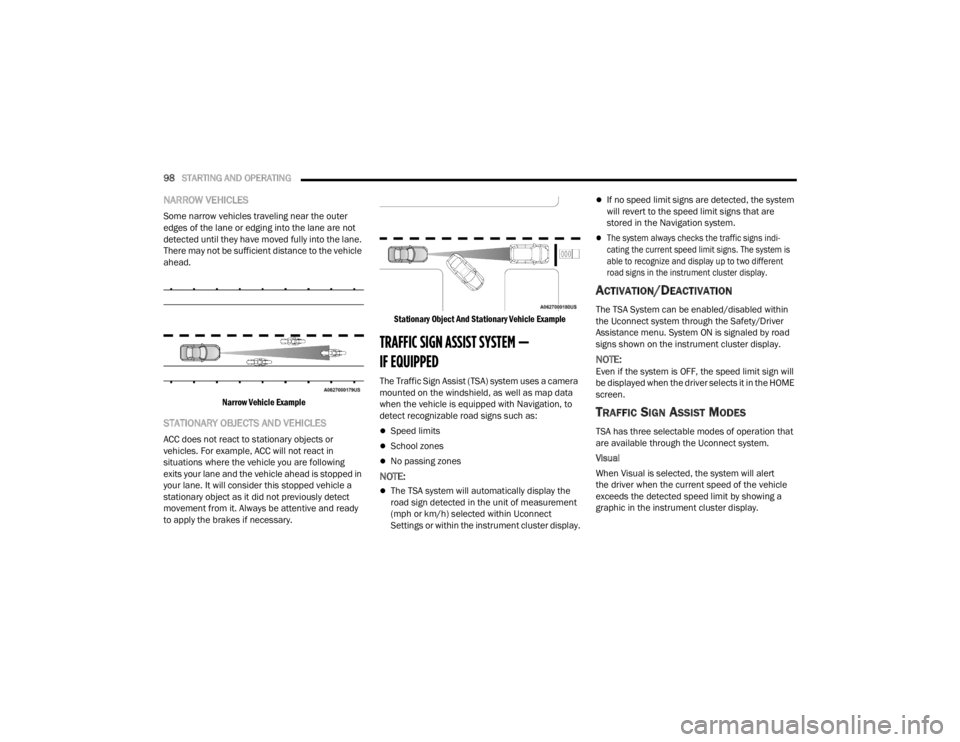
NARROW VEHICLES
Some narrow vehicles traveling near the outer
edges of the lane or edging into the lane are not
detected until they have moved fully into the lane.
There may not be sufficient distance to the vehicle
ahead.
Narrow Vehicle Example
STATIONARY OBJECTS AND VEHICLES
ACC does not react to stationary objects or
vehicles. For example, ACC will not react in
situations where the vehicle you are following
exits your lane and the vehicle ahead is stopped in
your lane. It will consider this stopped vehicle a
stationary object as it did not previously detect
movement from it. Always be attentive and ready
to apply the brakes if necessary.
Stationary Object And Stationary Vehicle Example
TRAFFIC SIGN ASSIST SYSTEM —
IF EQUIPPED
The Traffic Sign Assist (TSA) system uses a camera
mounted on the windshield, as well as map data
when the vehicle is equipped with Navigation, to
detect recognizable road signs such as:
Speed limits
School zones
No passing zones
NOTE:
The TSA system will automatically display the
road sign detected in the unit of measurement
(mph or km/h) selected within Uconnect
Settings or within the instrument cluster display.
If no speed limit signs are detected, the system
will revert to the speed limit signs that are
stored in the Navigation system.
The system always checks the traffic signs indi-
cating the current speed limit signs. The system is
able to recognize and display up to two different
road signs in the instrument cluster display.
ACTIVATION/DEACTIVATION
The TSA System can be enabled/disabled within
the Uconnect system through the Safety/Driver
Assistance menu. System ON is signaled by road
signs shown on the instrument cluster display.
NOTE:Even if the system is OFF, the speed limit sign will
be displayed when the driver selects it in the HOME
screen.
TRAFFIC SIGN ASSIST MODES
TSA has three selectable modes of operation that
are available through the Uconnect system.
Visual
When Visual is selected, the system will alert
the driver when the current speed of the vehicle
exceeds the detected speed limit by showing a
graphic in the instrument cluster display.
23_VF_OM_EN_USC_t.book Page 98
Page 102 of 296

100STARTING AND OPERATING
ACTIVE DRIVING ASSIST SYSTEM —
IF EQUIPPED
OPERATION
The Active Driving Assist (ADA) system is combined
with the Adaptive Cruise Control (ACC) system,
and centers the vehicle in the driving lane while
traveling at speeds up to 93 mph (150 km/h).
For ACC system operating instructions and system
limitations, see Úpage 89.
NOTE:
The driver should always obey traffic laws and
speed limits. Never drive above applicable
speed limit restrictions.
The driver can override ADA at any time by
braking, accelerating, or steering the vehicle.
Just like ACC, ADA will maintain a set speed as long
as the set distance between your vehicle and the
vehicle in front is maintained. ADA will also keep
your vehicle centered between the lane lines, and
monitor for other vehicles in adjacent lanes by
utilizing the Blind Spot Monitoring sensors.
ADA uses sensors within the steering wheel to
monitor driver attentiveness. ADA requires the
driver’s hands on the steering wheel at all times.
The system will generally aim to keep the vehicle
centered in the lane, but when the driver turns the
steering wheel (e.g. to move farther away from a
large vehicle in the next lane) the system will
reduce its control and enter "co-steering" mode.
While in co-steering mode, the system will provide
reduced assistance and allow the driver to control
the path of the vehicle. Once the driver stops
providing input to the steering wheel, the system
will require a few seconds to fully resume lane
centering assistance, especially during curves.
Do not place any objects on the steering wheel
(e.g. steering wheel covers) which could inter -
fere with the hand detection sensors.
Always pay attention to the road when using
the Active Driving Assist system. ADA will not
steer to avoid safety hazards, construction
zones, objects, or roadway impediments.
You need to maintain control to steer and
brake the vehicle in such situations and when
merging into traffic, entering the highway,
making a turn for crossing traffic, or stopping
for traffic control devices.
WARNING!WARNING!
The Active Driving Assist (ADA) system is a
convenience system. It is not a substitute for
active driver involvement. It is always the driver’s
responsibility to be attentive of road traffic, weather
conditions, vehicle speed, distance to the vehicle
ahead, position in the lane compared to other
vehicles, and brake operation to ensure safe
operation of the vehicle under all road conditions.
Your complete attention is always required while
driving to maintain safe control of your vehicle.
Failure to follow these warnings can result in a
collision and death or serious personal injury.
You should not utilize the ADA system:
When driving in complex driving situations
(e.g. urban environments, construction zones,
etc.), adverse weather or low visibility condi -
tions (e.g. rain, snow, fog, sleet, dust), or
adverse road conditions (e.g. heavy traffic,
worn or missing lane markings, etc.).
When entering a highway on-ramp or exiting
an off-ramp, when driving on roads that are
icy, snow covered, or slippery.
When circumstances do not allow safe driving
at a constant speed.
23_VF_OM_EN_USC_t.book Page 100
Page 103 of 296
STARTING AND OPERATING101
TURNING ACTIVE DRIVING ASSIST
O
N OR OFF
Active Driving Assist On/Off Button
To enable the Active Driving Assist system,
proceed as follows:
1. Push the Active Driving Assist on/off button located on the right side of the steering
wheel. The steering wheel image will display
white in the instrument cluster display until
the system is engaged. If ACC was previously
turned off, pushing this button will activate
just the lane centering feature of the ADA
system. Push the ACC button to activate both
ACC and ADA Systems.
2. If ACC was active and engaged before pushing the ADA on/off button, ACC will remain engaged and
ADA will become enabled and then engaged (once
all other conditions are met).
3. If ACC was not enabled before pushing the ADA
on/off button, push the SET (+) button or the
SET (-) button and release when the desired
driving speed is shown in the instrument
cluster display.
4. If desired, adjust the ACC distance setting by pushing the Distance Setting button.
When all system conditions are met as described
in “System Engagement Conditions” in the next
section, the system will engage and the steering
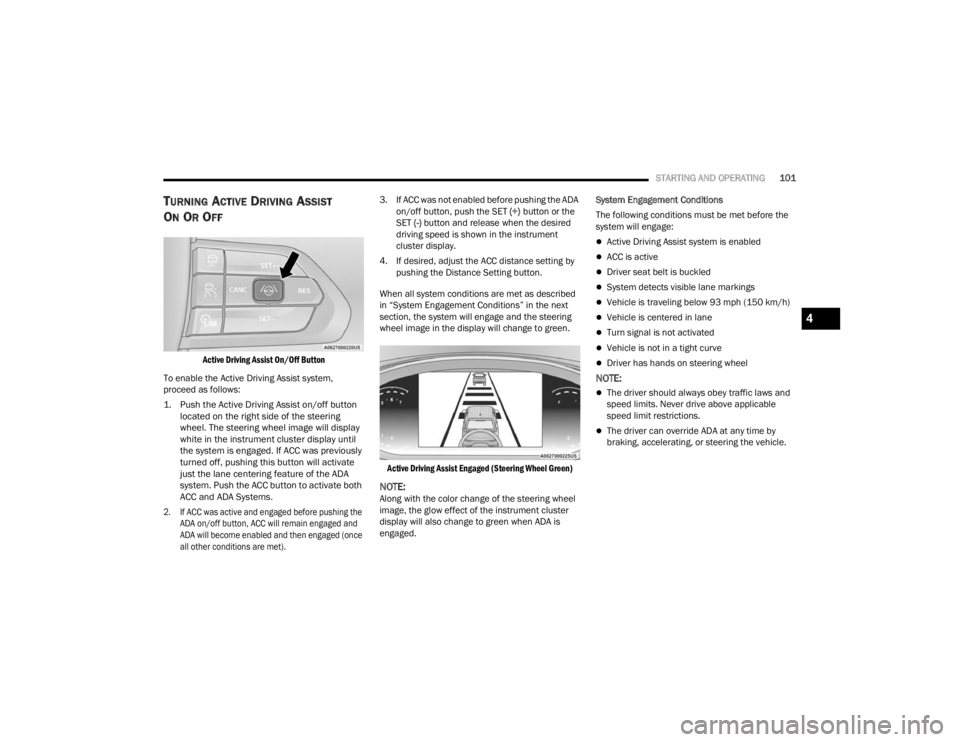
wheel image in the display will change to green.
Active Driving Assist Engaged (Steering Wheel Green)
NOTE:Along with the color change of the steering wheel
image, the glow effect of the instrument cluster
display will also change to green when ADA is
engaged. System Engagement Conditions
The following conditions must be met before the
system will engage:
Active Driving Assist system is enabled
ACC is active
Driver seat belt is buckled
System detects visible lane markings
Vehicle is traveling below 93 mph (150 km/h)
Vehicle is centered in lane
Turn signal is not activated
Vehicle is not in a tight curve
Driver has hands on steering wheel
NOTE:
The driver should always obey traffic laws and
speed limits. Never drive above applicable
speed limit restrictions.
The driver can override ADA at any time by
braking, accelerating, or steering the vehicle.
4
23_VF_OM_EN_USC_t.book Page 101
Page 104 of 296
102STARTING AND OPERATING
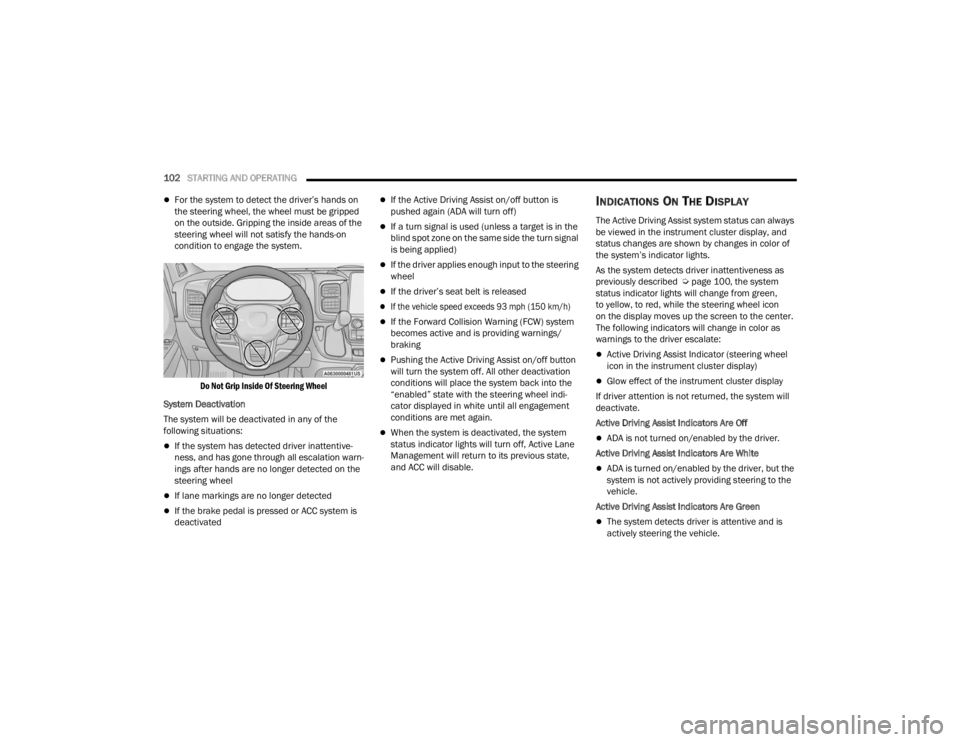
For the system to detect the driver’s hands on
the steering wheel, the wheel must be gripped
on the outside. Gripping the inside areas of the
steering wheel will not satisfy the hands-on
condition to engage the system.
Do Not Grip Inside Of Steering Wheel
System Deactivation
The system will be deactivated in any of the
following situations:
If the system has detected driver inattentive -
ness, and has gone through all escalation warn -
ings after hands are no longer detected on the
steering wheel
If lane markings are no longer detected
If the brake pedal is pressed or ACC system is
deactivated
If the Active Driving Assist on/off button is
pushed again (ADA will turn off)
If a turn signal is used (unless a target is in the
blind spot zone on the same side the turn signal
is being applied)
If the driver applies enough input to the steering
wheel
If the driver’s seat belt is released
If the vehicle speed exceeds 93 mph (150 km/h)
If the Forward Collision Warning (FCW) system
becomes active and is providing warnings/
braking
Pushing the Active Driving Assist on/off button
will turn the system off. All other deactivation
conditions will place the system back into the
“enabled” state with the steering wheel indi -
cator displayed in white until all engagement
conditions are met again.
When the system is deactivated, the system
status indicator lights will turn off, Active Lane
Management will return to its previous state,
and ACC will disable.
INDICATIONS ON THE DISPLAY
The Active Driving Assist system status can always
be viewed in the instrument cluster display, and
status changes are shown by changes in color of
the system’s indicator lights.
As the system detects driver inattentiveness as
previously described Ú page 100, the system
status indicator lights will change from green,
to yellow, to red, while the steering wheel icon
on the display moves up the screen to the center.
The following indicators will change in color as
warnings to the driver escalate:
Active Driving Assist Indicator (steering wheel
icon in the instrument cluster display)
Glow effect of the instrument cluster display
If driver attention is not returned, the system will
deactivate.
Active Driving Assist Indicators Are Off
ADA is not turned on/enabled by the driver.
Active Driving Assist Indicators Are White
ADA is turned on/enabled by the driver, but the
system is not actively providing steering to the
vehicle.
Active Driving Assist Indicators Are Green
The system detects driver is attentive and is
actively steering the vehicle.
23_VF_OM_EN_USC_t.book Page 102
Page 105 of 296
STARTING AND OPERATING103
(Continued)
Active Driving Assist Indicators Are Yellow
Driver inattentiveness has been detected,
warning the driver to place hands on the
steering wheel.
Active Driving Assist Indicators Are Red
Driver inattentiveness is still being detected,
warning the driver to place hands on the
steering wheel. This warning is also issued when
the system has detected a tight curve and is
warning the driver to take control
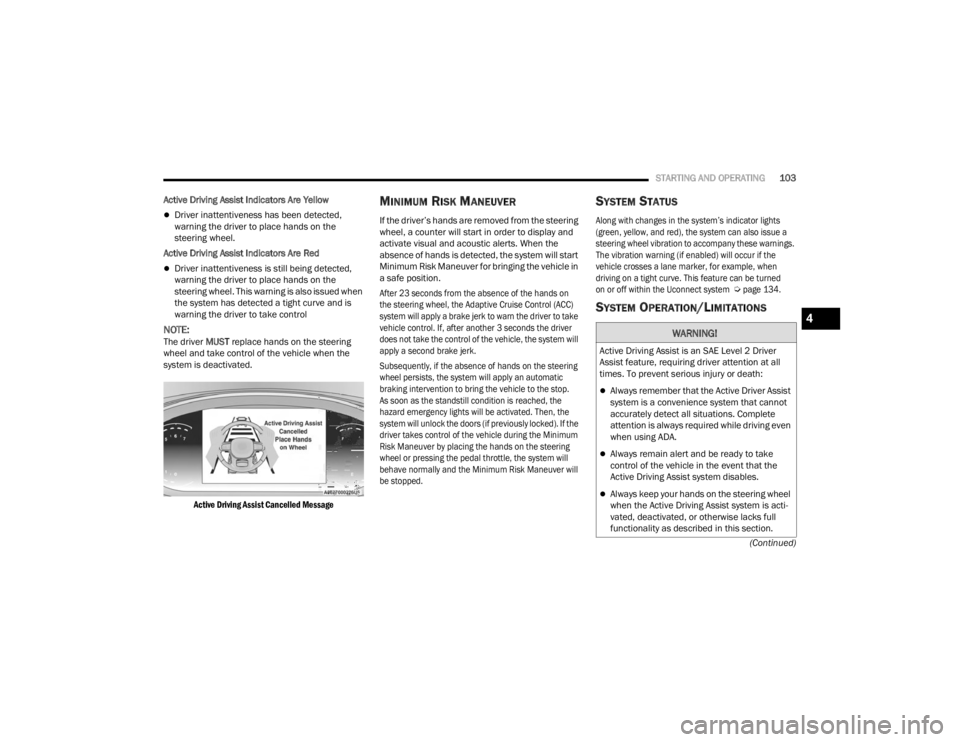
NOTE:The driver MUST replace hands on the steering
wheel and take control of the vehicle when the
system is deactivated.
Active Driving Assist Cancelled Message
MINIMUM RISK MANEUVER
If the driver’s hands are removed from the steering
wheel, a counter will start in order to display and
activate visual and acoustic alerts. When the
absence of hands is detected, the system will start
Minimum Risk Maneuver for bringing the vehicle in
a safe position.
After 23 seconds from the absence of the hands on
the steering wheel, the Adaptive Cruise Control (ACC)
system will apply a brake jerk to warn the driver to take
vehicle control. If, after another 3 seconds the driver
does not take the control of the vehicle, the system will
apply a second brake jerk.
Subsequently, if the absence of hands on the steering
wheel persists, the system will apply an automatic
braking intervention to bring the vehicle to the stop.
As soon as the standstill condition is reached, the
hazard emergency lights will be activated. Then, the
system will unlock the doors (if previously locked). If the
driver takes control of the vehicle during the Minimum
Risk Maneuver by placing the hands on the steering
wheel or pressing the pedal throttle, the system will
behave normally and the Minimum Risk Maneuver will
be stopped.
SYSTEM STATUS
Along with changes in the system’s indicator lights
(green, yellow, and red), the system can also issue a
steering wheel vibration to accompany these warnings.
The vibration warning (if enabled) will occur if the
vehicle crosses a lane marker, for example, when
driving on a tight curve. This feature can be turned
on or off within the Uconnect system
Ú
page 134.
SYSTEM OPERATION/LIMITATIONS
WARNING!
Active Driving Assist is an SAE Level 2 Driver
Assist feature, requiring driver attention at all
times. To prevent serious injury or death:
Always remember that the Active Driver Assist
system is a convenience system that cannot
accurately detect all situations. Complete
attention is always required while driving even
when using ADA.
Always remain alert and be ready to take
control of the vehicle in the event that the
Active Driving Assist system disables.
Always keep your hands on the steering wheel
when the Active Driving Assist system is acti -
vated, deactivated, or otherwise lacks full
functionality as described in this section.
4
23_VF_OM_EN_USC_t.book Page 103
Page 106 of 296

104STARTING AND OPERATING
The Active Driving Assist system DOES NOT:
Warn or prevent collisions with other vehicles
Steer your vehicle around stopped vehicles,
slower vehicles, construction equipment,
pedestrians, or animals
Respond to traffic lights or stop signs
Merge onto highways or exit off ramps
Turn your vehicle
Change lanes
React to cross traffic
NOTE:Adaptive Cruise Control (ACC) is a core component
of ADA. For ACC system limitations Ú page 89.
The Active Driving Assist system may have limited
or reduced functionality when one of the following
conditions occur:
The vehicle’s radar sensors and/or forward facing
camera is damaged, covered, misaligned, or
obstructed (e.g. by mud, ice, snow, etc.)
If the suspension alignment is not correct, if the
vehicle is modified (e.g. lifting or lowering the
suspension, installing different sized wheels
or tires)
Driving near highway toll booths
NOTE:If damage to the windshield occurs, have the wind -
shield replaced by an authorized dealer as soon as
possible.
PARKSENSE FRONT/REAR PARK ASSIST —
IF EQUIPPED
The ParkSense Park Assist system provides visual
and audible indications of the distance between
the rear, and if equipped, the front fascia/bumper
and a detected obstacle when backing up or
moving forward (e.g. during a parking maneuver).
For limitations of the system (e.g. during a parking
maneuver), see Ú page 110.
NOTE:
The system is designed to assist the driver and
not to substitute the driver.
The driver must stay in full control of the vehicle's
acceleration and braking and is responsible for
controlling the vehicle's movements.
ParkSense will retain the last system state
(enabled or disabled) from the last ignition cycle
when the ignition is placed in the ON/RUN position.
ParkSense is active when the gear selector is
shifted to REVERSE or to a forward gear and an
obstacle is detected, as long as the system is on.
Do not use a hand-held device when the Active
Driving Assist system is engaged.
Maintain a safe distance from other vehicles
and pay attention to traffic conditions.
Do not place any objects on the steering wheel
(e.g. steering wheel covers) which could inter -
fere with the hand detection sensors.
Always pay attention to the road when using the
Active Driving Assist system. ADA will not steer to
avoid safety hazards, construction zones, objects,
or roadway impediments. You need to maintain
control to steer and brake the vehicle in such situ -
ations and when merging into traffic, entering the
highway, making a turn for crossing traffic, or stop-
ping for traffic control devices.
WARNING!
23_VF_OM_EN_USC_t.book Page 104
Page 119 of 296

STARTING AND OPERATING117
NOTE:
When operating conditions have been met, the
LaneSense system will monitor if the driver’s
hands are on the steering wheel and provide
an audible and visual warning to the driver if
removed. The system will cancel if the driver
does not return their hands to the wheel.
LaneSense is a driving assist system, not an
emergency system, and does not replace the
driver. The driver is always responsible for
controlling the vehicle and must intervene as
required. The LaneSense system is designed to
assist the driver and not to substitute the driver.
TURNING LANESENSE ON OR OFF
The LaneSense button is located on the
switch panel below the Uconnect display.
To turn the LaneSense system on, push the
LaneSense button (LED turns off). A “LaneSense
On” message is shown in the instrument cluster
display.
To turn the LaneSense system off, push the
LaneSense button twice (LED turns on).
NOTE:The LaneSense system will retain the last system
state on or off from the last ignition cycle when the
ignition is placed in the ON/RUN position.
LANESENSE WARNING MESSAGE
The LaneSense system will indicate the current
lane drift condition through the instrument cluster
display.
When the LaneSense system is on, the lane lines
are gray when both of the lane boundaries have
not been detected and the LaneSense telltale
is solid white.
System ON (Gray Lines) With White Telltale
Left Lane Departure — Only Left Lane Detected
When the LaneSense system is on, the Lane-
Sense Telltale is solid white when only the
left lane marking has been detected and the
system is ready to provide visual warnings in the
instrument cluster display if an unintentional
lane departure occurs on the left side.
When the LaneSense system senses the lane has
been approached and is in a lane departure situa -
tion, the visual warning in the instrument cluster
display will show the left lane line flashing yellow
(on/off). The LaneSense telltale changes from
solid white to flashing yellow.
Lane Approached (Flashing Yellow Lane Line) With Yellow Telltale
NOTE:The LaneSense system operates with similar
behavior for a right lane departure when only the
right lane marking has been detected.
4
23_VF_OM_EN_USC_t.book Page 117