change time Ram ProMaster City 2020 User Guide
[x] Cancel search | Manufacturer: RAM, Model Year: 2020, Model line: ProMaster City, Model: Ram ProMaster City 2020Pages: 350, PDF Size: 13.27 MB
Page 244 of 350

241
SERVICING AND MAINTENANCE
SCHEDULED SERVICING
Your vehicle is equipped with an automatic oil change indicator
system. The oil change indicator system will remind you that it is
time to take your vehicle in for scheduled maintenance.
Based on engine operation conditions, the oil change indi-
cator message will illuminate. This means that service is
required for your vehicle. Operating conditions such as
frequent short-trips, trailer tow, extended engine idle time,
extremely hot or cold ambient temperatures will influence
when the “Oil Change Required” message is displayed.
Severe Operating Conditions can cause the change oil
message to illuminate as early as 3,500 miles (5,600 km) since
last reset. Have your vehicle serviced as soon as possible,
within the next 500 miles (805 km).
Your authorized dealer will reset the oil change indicator message
after completing the scheduled oil change. If a scheduled oil change
is performed by someone other than your authorized dealer, the
message can be reset by referring to the steps described under “Oil
Change Reset” in “Instrument Cluster Display” in “Getting To
Know Your Instrument Panel” for further information.
NOTE:
Under no circumstances should oil change intervals exceed
10,000 miles (16,000 km), 350 hours of engine run time or
12 months, whichever comes first. The 350 hours of engine run
or idle time is generally only a concern for fleet customers.
Severe Duty All Models
Change Engine Oil at 4,000 miles (6,500 km) or 350 hours of engine
run time if the vehicle is operated in a dusty and off road environ -
ment or is operated predominantly at idle, or only very low engine
RPM. This type of vehicle use is considered Severe Duty.
Once A Month Or Before A Long Trip:
• Check engine oil level.
• Check windshield washer fluid level.
• Check tire pressure and look for unusual wear or damage. Rotate tires at the first sign of irregular wear, even if it
occurs before the oil indicator system turns on.
• Check the fluid levels of the coolant reservoir and brake master cylinder, fill as needed.
• Check function of all interior and exterior lights.
7
2020_RAM_PROMASTER_CITY_OM_USA=GUID-7B6A7FCA-79B0-423F-95C5-ED2A949C3D13=1=en=.book Page 241
Page 246 of 350
SERVICING AND MAINTENANCE 243
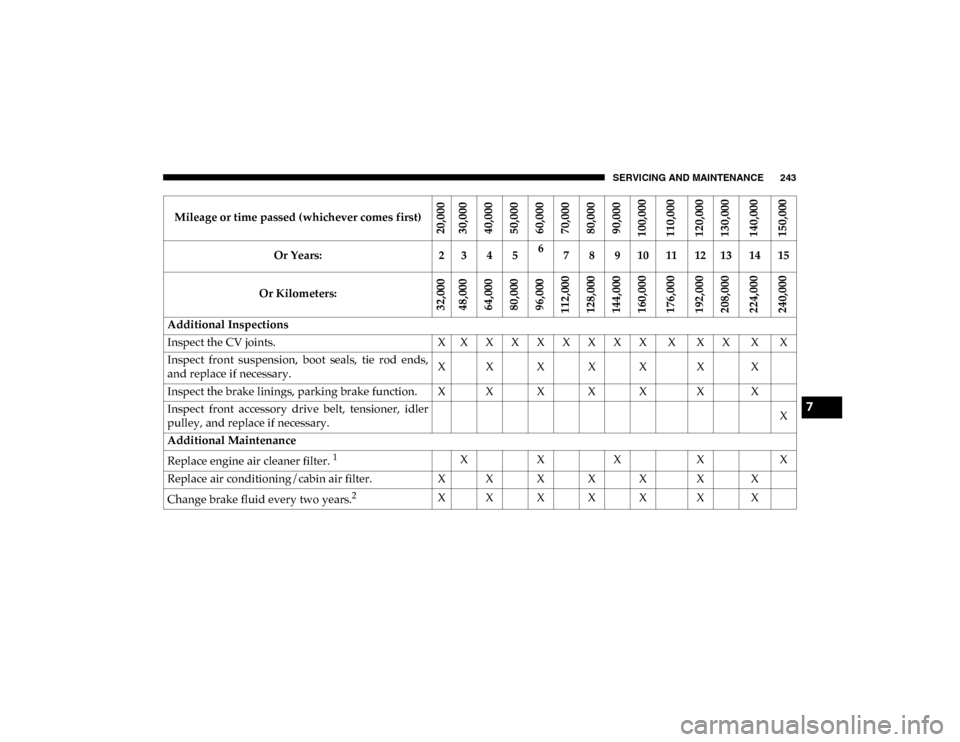
Mileage or time passed (whichever comes first)
20,00030,000
40,00050,00060,00070,00080,00090,000
100,000
110,000120,000130,000
140,000150,000
Or Years: 2 3 4 56
7 8 9 10 11 12 13 14 15
Or Kilometers:
32,000 48,000
64,00080,00096,000
112,000 128,000144,000160,000
176,000192,000208,000
224,000240,000
Additional Inspections
Inspect the CV joints. X X X X X X X X X X X X X X
Inspect front suspension, boot seals, tie rod ends,
and replace if necessary. X X X X X X X
Inspect the brake linings, parking brake function. X X X X X X X
Inspect front accessory drive belt, tensioner, idler
pulley, and replace if necessary. X
Additional Maintenance
Replace engine air cleaner filter.
1X XX XX
Replace air conditioning/cabin air filter. X X X X X X X
Change brake fluid every two years.
2X X X X X X X
7
2020_RAM_PROMASTER_CITY_OM_USA=GUID-7B6A7FCA-79B0-423F-95C5-ED2A949C3D13=1=en=.book Page 243
Page 247 of 350
244 SERVICING AND MAINTENANCE
(Continued)
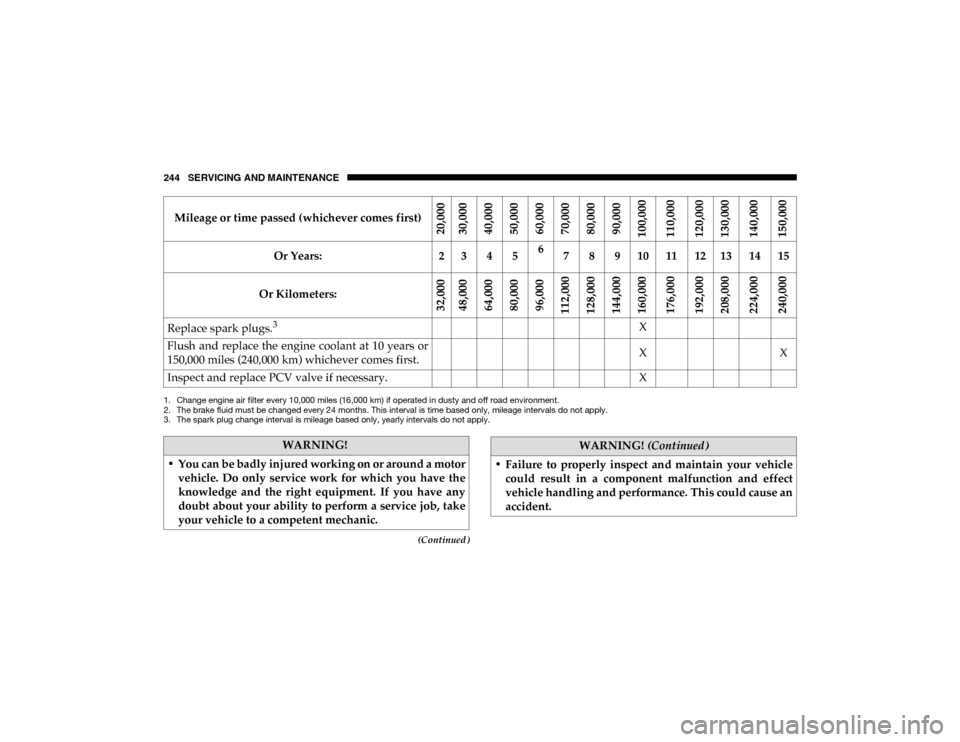
Replace spark plugs.3X
Flush and replace the engine coolant at 10 years or
150,000 miles (240,000 km) whichever comes first. X
X
Inspect and replace PCV valve if necessary. X
1. Change engine air filter every 10,000 miles (16,000 km) if operated in dusty and off road environment.
2. The brake fluid must be changed every 24 months. This interval is time based only, mileage intervals do not apply.
3. The spark plug change interval is mileage based only, yearly intervals do not apply.
Mileage or time passed (whichever comes first)
20,000
30,000
40,00050,00060,00070,00080,00090,000
100,000
110,000120,000130,000
140,000150,000
Or Years: 2 3 4 56
7 8 9 10 11 12 13 14 15
Or Kilometers:
32,000 48,000
64,00080,00096,000
112,000 128,000144,000160,000
176,000192,000208,000
224,000240,000
WARNING!
• You can be badly injured working on or around a motor vehicle. Do only service work for which you have the
knowledge and the right equipment. If you have any
doubt about your ability to perform a service job, take
your vehicle to a competent mechanic.
• Failure to properly inspect and maintain your vehiclecould result in a component malfunction and effect
vehicle handling and performance. This could cause an
accident.
WARNING! (Continued)
2020_RAM_PROMASTER_CITY_OM_USA=GUID-7B6A7FCA-79B0-423F-95C5-ED2A949C3D13=1=en=.book Page 244
Page 251 of 350
248 SERVICING AND MAINTENANCE
Pressure Washing
DEALER SERVICE
An authorized dealer has the qualified service personnel,
special tools, and equipment to perform all service opera-
tions in an expert manner. Service Manuals are available
which include detailed service information for your vehicle.
Refer to these Service Manuals before attempting any proce -
dure yourself.
NOTE:
Intentional tampering with emissions control systems may
void your warranty and could result in civil penalties being
assessed against you.
Engine Oil
Change Engine Oil
The oil change indicator system will remind you that it is
time to take your vehicle in for scheduled maintenance. Refer
to the “Maintenance Plan” in this chapter for further infor -
mation.
NOTE:
Under no circumstances should oil change intervals exceed
10,000 miles (16,000 km), 12 months or 350 hours of engine
run time, whichever comes first. The 350 hours of engine run
or idle time is generally only a concern for fleet customers.
CAUTION!
Cleaning the engine compartment with a high pressure
washer is not recommended. Precautions have been
taken to safeguard all parts and connections however,
the pressures generated by these machines is such that
complete protection against water ingress cannot be
guaranteed.
WARNING!
You can be badly injured working on or around a motor
vehicle. Only do service work for which you have the
knowledge and the proper equipment. If you have any
doubt about your ability to perform a service job, take
your vehicle to a competent mechanic.
2020_RAM_PROMASTER_CITY_OM_USA=GUID-7B6A7FCA-79B0-423F-95C5-ED2A949C3D13=1=en=.book Page 248
Page 256 of 350
SERVICING AND MAINTENANCE 253
Wiper Service Position
If it is necessary to lift the blade from the windshield (In the
event of snow or blade replacement) Proceed as directed:
1. Rotate the end of the multifunction lever to the OFF posi-
tion.
2. Turn the ignition to the MAR-ON position then to STOP.
3. After turning the ignition to the STOP, within two minutes move the right stalk upward, into the unstable
(“anti-panic”) position, for at least half of a second. The
windshield wiper then executes part of a stroke; at each
command, approximately 1/3 of a normal wiper stroke is
triggered.
NOTE:
The previous operation can be repeated up to three times. In
order to move the blades to the most suitable position.
4. Lift the blade from the windshield and proceed with the required operation. 5. Carefully lower the blade, bringing it back in contact with
the windshield.
6. Bring the blade to the initial rest position, turning the ignition to MAR-ON.
NOTE:
Do not operate the wiper with the blades lifted from the
windshield.
Exhaust System
The best protection against carbon monoxide entry into the
vehicle body is a properly maintained engine exhaust
system.
If you notice a change in the sound of the exhaust system; or
if the exhaust fumes can be detected inside the vehicle; or
when the underside or rear of the vehicle is damaged; have
an authorized technician inspect the complete exhaust
system and adjacent body areas for broken, damaged, dete -
riorated, or mispositioned parts. Open seams or loose
connections could permit exhaust fumes to seep into the
passenger compartment. In addition, have the exhaust
system inspected each time the vehicle is raised for lubrica -
tion or oil change. Replace as required.
7
2020_RAM_PROMASTER_CITY_OM_USA=GUID-7B6A7FCA-79B0-423F-95C5-ED2A949C3D13=1=en=.book Page 253
Page 307 of 350

304 TECHNICAL SPECIFICATIONS
Chassis
ComponentFluid, Lubricant, or Genuine Part
Automatic Transmission Use only Mopar ZF 8&9 Speed ATF Automatic Transmission Fluid, or equivalent.
Failure to use the correct fluid may affect the function or performance of your
transmission.
Brake Master Cylinder We recommend you use Mopar DOT 4.
The fluid must be changed every 24 months. This interval is time based only, mileage
intervals do not apply.
Power Steering Reservoir Use Pentosin CHF 11S power steering fluid meeting FCA Material Standard
MS-11655.
2020_RAM_PROMASTER_CITY_OM_USA=GUID-7B6A7FCA-79B0-423F-95C5-ED2A949C3D13=1=en=.book Page 304
Page 309 of 350
306 MULTIMEDIA
NOTE:
• FCA US LLC or your dealer may contact you directlyregarding software updates.
• To help further improve vehicle security and minimize the potential risk of a security breach, vehicle owners should:
• Routinely check www.driveuconnect.com/support/
software-update.html (US Residents) or www.driveu-
connect.ca (Canadian Residents) to learn about avail -
able Uconnect software updates.
• Only connect and use trusted media devices (e.g. personal mobile phones, USBs, CDs). Privacy of any wireless and wired communications cannot
be assured. Third parties may unlawfully intercept informa
-
tion and private communications without your consent. For
further information, refer to “Onboard Diagnostic System
(OBD II) Cybersecurity” in “Getting To Know Your Instru-
ment Panel”.
UCONNECT SETTINGS
The Uconnect system uses a combination of buttons on the
touchscreen and buttons on the faceplate located on the
center of the instrument panel that allows you to access and
change the customer programmable features. Many features
can vary by vehicle.
• ONLY insert media (e.g., USB, SD card, or CD) into
your vehicle if it came from a trusted source. Media of
unknown origin could possibly contain malicious soft -
ware, and if installed in your vehicle, it may increase
the possibility for vehicle systems to be breached.
• As always, if you experience unusual vehicle behavior, take your vehicle to your nearest authorized dealer
immediately.
WARNING! (Continued)
CAUTION!
Do NOT attach any object to the touchscreen, doing so
can result in damage to the touchscreen.
2020_RAM_PROMASTER_CITY_OM_USA=GUID-7B6A7FCA-79B0-423F-95C5-ED2A949C3D13=1=en=.book Page 306
Page 310 of 350
MULTIMEDIA 307
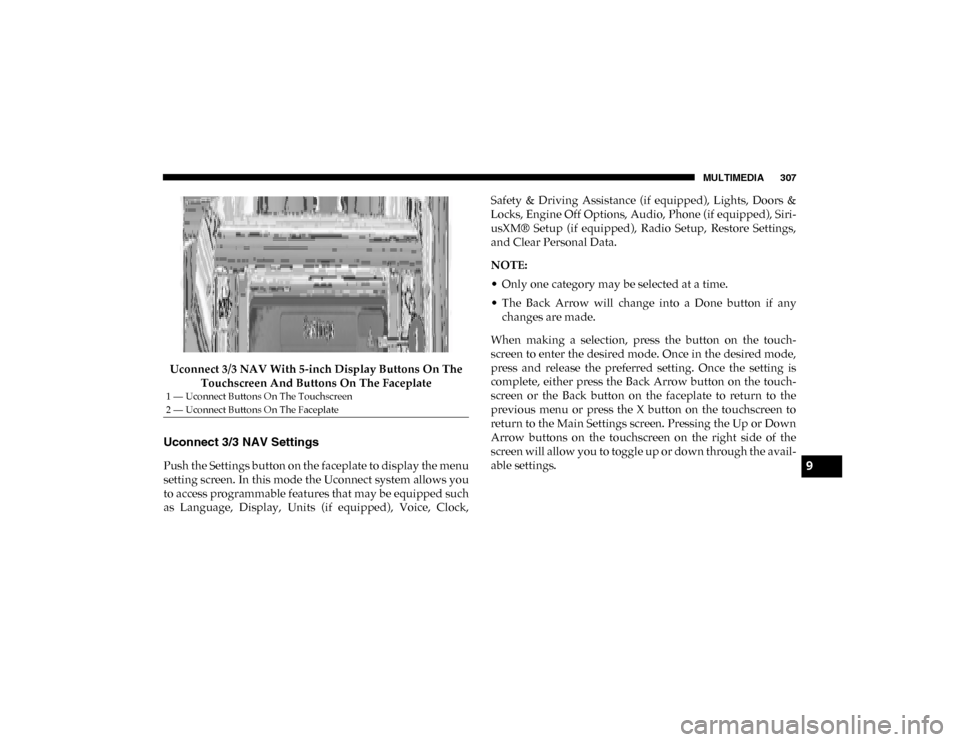
Uconnect 3/3 NAV With 5-inch Display Buttons On The Touchscreen And Buttons On The Faceplate
Uconnect 3/3 NAV Settings
Push the Settings button on the faceplate to display the menu
setting screen. In this mode the Uconnect system allows you
to access programmable features that may be equipped such
as Language, Display, Units (if equipped), Voice, Clock, Safety & Driving Assistance (if equipped), Lights, Doors &
Locks, Engine Off Options, Audio, Phone (if equipped), Siri
-
usXM® Setup (if equipped), Radio Setup, Restore Settings,
and Clear Personal Data.
NOTE:
• Only one category may be selected at a time.
• The Back Arrow will change into a Done button if any changes are made.
When making a selection, press the button on the touch -
screen to enter the desired mode. Once in the desired mode,
press and release the preferred setting. Once the setting is
complete, either press the Back Arrow button on the touch -
screen or the Back button on the faceplate to return to the
previous menu or press the X button on the touchscreen to
return to the Main Settings screen. Pressing the Up or Down
Arrow buttons on the touchscreen on the right side of the
screen will allow you to toggle up or down through the avail -
able settings.
1 — Uconnect Buttons On The Touchscreen
2 — Uconnect Buttons On The Faceplate
9
2020_RAM_PROMASTER_CITY_OM_USA=GUID-7B6A7FCA-79B0-423F-95C5-ED2A949C3D13=1=en=.book Page 307
Page 311 of 350
308 MULTIMEDIA
Display
After pressing the Display button on the touchscreen, the following settings will be available:Setting Name Selectable Options
Set Language English/Français/Español
NOTE:
When the “Set Language” feature is selected, you may select one of multiple languages (English/Français/Español) for all
display nomenclature, including the trip functions and the navigation system (if equipped). Press the Set Language button
on the touchscreen, then press the desired language button on the touchscreen until a check-mark appears next to the
language, showing that setting has been selected. Display Mode Manual Auto
Brightness With Headlights ON With Headlights OFF
NOTE:
To make changes to the “Brightness” setting, the headlights must be on and the interior dimmer switch must not be in the
"party" or "parade" positions. Units — If Equipped USMetric
NOTE:
When selecting the “Units” setting, the changes can be made to the Distance (mi, km), Fuel Consumption (MPG if set to mi,
L/100 km or km/L if set to km), and Temperature (°C, °F). Touchscreen Beep On Off
Display Trip B On Off
NOTE:
Press the relevant button to activate/deactivate the displaying of the Trip B on the instrument cluster display.
2020_RAM_PROMASTER_CITY_OM_USA=GUID-7B6A7FCA-79B0-423F-95C5-ED2A949C3D13=1=en=.book Page 308
Page 316 of 350
MULTIMEDIA 313
Audio
After pressing the Audio button on the touchscreen, the following settings will be available:Setting Name Selectable Options
Equalizer + –
NOTE:
When in this display, you may adjust the “Bass”, “Mid”, and “Treble” settings. Adjust the settings with the + and – setting
buttons on the touchscreen or by selecting any point on the scale between the + and – buttons on the touchscreen. Bass/Mid/
Treble also allow you to simply slide your finger up or down to change the setting as well as press directly on the desired
setting. Balance/Fade — If Equipped Speaker Icon
Arrow Buttons
NOTE:
When in this display, you may adjust the “Balance/Fade” (if equipped) of the audio by using the Arrow buttons on the
touchscreen to adjust the sound level of the right and left side speakers. Press the “Speaker Icon” on the touchscreen to reset
the balance to the factory setting. Speed Adjusted Volume Off12 3
NOTE:
The “Speed Adjusted Volume” feature increases or decreases volume relative to vehicle speed. Surround Sound — If Equipped On
Off
Loudness On Off
NOTE:
The “Loudness” feature improves sound quality at lower volumes when enabled.
9
2020_RAM_PROMASTER_CITY_OM_USA=GUID-7B6A7FCA-79B0-423F-95C5-ED2A949C3D13=1=en=.book Page 313