lights Ram ProMaster City 2020 User Guide
[x] Cancel search | Manufacturer: RAM, Model Year: 2020, Model line: ProMaster City, Model: Ram ProMaster City 2020Pages: 350, PDF Size: 13.27 MB
Page 47 of 350
44 GETTING TO KNOW YOUR VEHICLE
High Beams
With the low beams activated, pull the multifunction lever
towards the steering wheel to turn on the high beams. A high
beam symbol will illuminate in the cluster to indicate the
high beams are on. Pull the multifunction lever a second time
to switch the headlights back to low beam.
NOTE:
If the vehicle’s ignition is turned off, both high and low beam
headlights will also turn off.
Flash-To-Pass
You can signal another vehicle with your headlights by
partially pulling the multifunction lever toward the steering
wheel. This will cause the high beam headlights to turn on
until the lever is released.
Parking Lights
These lights can only be turned on with ignition key in the
STOP (OFF/LOCK) position or removed, by moving the end
of the multifunction lever to O (Off) position and then to the
headlight position.
The warning light telltale in the instrument panel comes on.
The lights stay on until the next ignition cycle is performed.
Follow Me Home/Headlight Delay
When this feature is selected, the driver can choose to have
the headlights remain on for a preset period of time after the
engine is turned off.
Activation
Remove the key or turn the ignition to the STOP (OFF/
LOCK) position, and pull the multifunction lever toward the
steering wheel within two minutes. Each time the lever is
pulled, the activation of the lights will be extended by 30
seconds. The activation of the lights can be extended to a
maximum of 210 seconds.
2020_RAM_PROMASTER_CITY_OM_USA=GUID-7B6A7FCA-79B0-423F-95C5-ED2A949C3D13=1=en=.book Page 44
Page 48 of 350
GETTING TO KNOW YOUR VEHICLE 45
Deactivation
Pull the multifunction lever toward the steering wheel and
hold it for more than two seconds.
Fog Lights — If Equipped
The fog light switch is located on the center stack of the
instrument panel, just below the climate controls.Push the switch once to turn the fog lights on.
Push the switch a second time to turn the fog
lights off.
NOTE:
If the vehicle’s ignition is turned off, the fog lights will also
turn off.
Turn Signals
Move the multifunction lever up or down and the arrows on
each side of the instrument cluster flash to show proper oper -
ation of the front and rear turn signal lights.
NOTE:
If either light remains on and does not flash, or there is a very
fast flash rate, check for a defective outside light bulb. If an
indicator fails to light when the lever is moved, it would
suggest that the indicator bulb is defective.
Lane Change Assist
Tap the lever up or down once, without moving beyond the
detent, and the turn signal (right or left) will flash five times
then automatically turn off.
2
2020_RAM_PROMASTER_CITY_OM_USA=GUID-7B6A7FCA-79B0-423F-95C5-ED2A949C3D13=1=en=.book Page 45
Page 49 of 350
46 GETTING TO KNOW YOUR VEHICLE
INTERIOR LIGHTS
Courtesy/Interior Lights
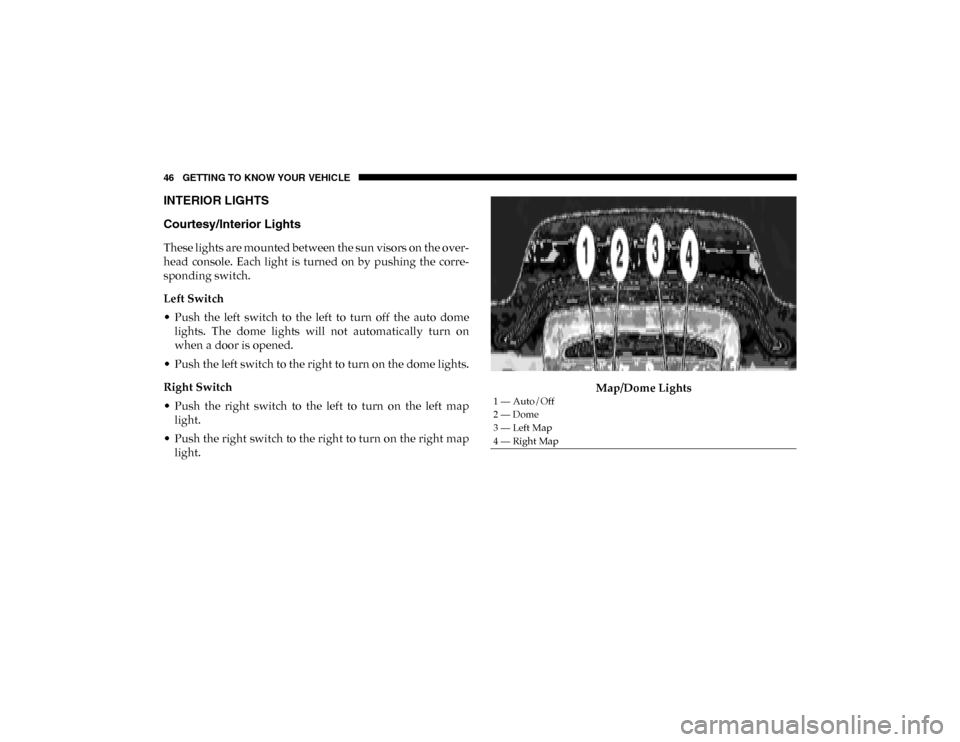
These lights are mounted between the sun visors on the over-
head console. Each light is turned on by pushing the corre -
sponding switch.
Left Switch
• Push the left switch to the left to turn off the auto dome lights. The dome lights will not automatically turn on
when a door is opened.
• Push the left switch to the right to turn on the dome lights.
Right Switch
• Push the right switch to the left to turn on the left map light.
• Push the right switch to the right to turn on the right map light. Map/Dome Lights
1 — Auto/Off
2 — Dome
3 — Left Map
4 — Right Map
2020_RAM_PROMASTER_CITY_OM_USA=GUID-7B6A7FCA-79B0-423F-95C5-ED2A949C3D13=1=en=.book Page 46
Page 50 of 350

GETTING TO KNOW YOUR VEHICLE 47
Rear Lights
Cargo VehicleCargo Vehicle Interior Lamp Locations Lateral Roof Light
This is located on the right side of the load compartment.
Rear Roof Light
This is located on the rear panel of the load compartment.
In auto-mode, the light comes on automatically when you
open the sliding doors and the rear wing doors, and goes out
when you close them.
• Push the left-hand side of the lens to switch the light off
when the doors are open.
• Push the right hand side of the lens to switch the light on when the doors are open.
1 — Lateral Roof Light
2 — Rear Roof Light
2
2020_RAM_PROMASTER_CITY_OM_USA=GUID-7B6A7FCA-79B0-423F-95C5-ED2A949C3D13=1=en=.book Page 47
Page 52 of 350

GETTING TO KNOW YOUR VEHICLE 49
Second Row Seating And Rear Roof Lights Operation
In auto-mode, the light comes on automatically when you
open the sliding doors and the rear wing doors, and goes out
when you close them.
• Push the left-hand side of the lens to switch the light offwhen the doors are open.
• Push the right-hand side of the lens to switch the light on when the doors are open.
Interior Light
1 — Off
2 — Auto
3 — On
2
2020_RAM_PROMASTER_CITY_OM_USA=GUID-7B6A7FCA-79B0-423F-95C5-ED2A949C3D13=1=en=.book Page 49
Page 75 of 350
72 GETTING TO KNOW YOUR VEHICLE
(Continued)
ROOF RACK — IF EQUIPPED
The crossbars and siderails are designed to carry the weight
on vehicles equipped with a luggage rack. The load must not
exceed 150 lbs (68 kg), and should be uniformly distributed
over the luggage rack crossbars.
NOTE:
If not equipped with crossbars, an authorized dealer can
order and install Mopar crossbars built specifically for this
roof rack system.
WARNING!
To avoid serious injury or death:
• Only devices designed for use in this type of outlet should be inserted into any 12 Volt outlet.
• Do not touch with wet hands.
• Close the lid when not in use and while driving the vehicle.
• If this outlet is mishandled, it may cause an electric shock and failure.
CAUTION!
• Many accessories that can be plugged in draw power from the vehicle's battery, even when not in use (i.e.,
cellular phones, etc.). Eventually, if plugged in long
enough, the vehicle's battery will discharge sufficiently
to degrade battery life and/or prevent the engine from
starting.
• Accessories that draw higher power (i.e., coolers,vacuum cleaners, lights, etc.) will degrade the battery
even more quickly. Only use these intermittently and
with greater caution.
• After the use of high power draw accessories, or long periods of the vehicle not being started (with accesso -
ries still plugged in), the vehicle must be driven a suffi -
cient length of time to allow the generator to recharge
the vehicle's battery. CAUTION!
(Continued)
2020_RAM_PROMASTER_CITY_OM_USA=GUID-7B6A7FCA-79B0-423F-95C5-ED2A949C3D13=1=en=.book Page 72
Page 82 of 350

GETTING TO KNOW YOUR INSTRUMENT PANEL 79
•UP Arrow Button
Push and release the up arrow button to scroll upward
through the main menu and submenus.
• DOWN Arrow Button
Push and release the down arrow button to scroll down -
ward through the main menu and submenus.
NOTE:
If equipped with a Uconnect system, some of the menu items
will be present in the radio head unit. Refer to “Uconnect
Settings” in “Multimedia” for further information.
Dimmer:
With headlights on and without entering in the menu, push
the up or down arrow button to increase or decrease the
brightness of the instrument panel, graphics and command
buttons. Selecting An Option Of The Main Menu With Submenu:
1. Briefly push and release the
MENU button to display the
first submenu option.
2. Push and release the up or down arrow button (by single
pushes) to scroll through all the submenu options.
3. Briefly push and release the MENU button to select the
displayed submenu option and to open the relevant setup
menu.
4. Push and release the up or down arrow button (by single
pushes) to select the new setting for this submenu option.
5. Briefly push and release the MENU button to store the
new setting and go back to the previously selected
submenu option.
6. Push and hold the MENU button to return to the main
menu (short hold) or the main screen (longer hold).
3
2020_RAM_PROMASTER_CITY_OM_USA=GUID-7B6A7FCA-79B0-423F-95C5-ED2A949C3D13=1=en=.book Page 79
Page 87 of 350
84 GETTING TO KNOW YOUR INSTRUMENT PANEL
NOTE:
The range depends on several factors: driving style, type of
route (freeway, residential, mountain roads, etc.), conditions
of use of the vehicle (load, tire pressure, etc.). Trip planning
must take into account the above notes.
Travel Distance
This value shows the distance covered since the last reset.
Average Fuel Consumption
This value shows the approximate average consumption
since the last reset.
Current Fuel Consumption
This indicates the fuel consumption. The value is constantly
updated. The message “----” will appear on the display if the
vehicle is parked with the engine running.
Average Speed
This value shows the vehicle's average speed as a function of
the overall time elapsed since the last reset.
Travel Time
This value shows the time elapsed since the last reset.WARNING LIGHTS AND MESSAGES
The warning/indicator lights will illuminate in the instrument
panel together with a dedicated message and/or acoustic signal
when applicable. These indications are indicative and precau-
tionary and as such must not be considered as exhaustive and/
or alternative to the information contained in the Owner’s
Manual, which you are advised to read carefully in all cases.
Always refer to the information in this chapter in the event of a
failure indication. All active telltales will display first if appli -
cable. The system check menu may appear different based upon
equipment options and current vehicle status. Some telltales are
optional and may not appear.
Red Warning Lights
Air Bag Warning Light
This light will turn on for four to eight seconds as a bulb
check when the ignition is placed in the ON/RUN or
MAR/ON/RUN position. If the light is either not on
during startup, stays on, or turns on while driving, have the
system inspected at an authorized dealer as soon as possible.
This light will illuminate with a single chime when a fault with
the Air Bag Warning Light has been detected, it will stay on until
the fault is cleared. If the light comes on intermittently or
remains on while driving, have an authorized dealer service the
vehicle immediately.
2020_RAM_PROMASTER_CITY_OM_USA=GUID-7B6A7FCA-79B0-423F-95C5-ED2A949C3D13=1=en=.book Page 84
Page 91 of 350
88 GETTING TO KNOW YOUR INSTRUMENT PANEL
Seat Belt Reminder Warning Light When the ignition is first placed in the ON/RUN or
MAR/ON/RUN position, if the driver’s seat belt is
unbuckled, a chime will sound and the light will
turn on. When driving, if the driver or front passenger seat
belt remains unbuckled, the Seat Belt Reminder Light will
flash or remain on continuously and a chime will sound.
Refer to “Occupant Restraint Systems” in “Safety” for
further information.
Transmission Fault Warning Light
This light will illuminate (together with a message in
the instrument cluster display and a buzzer) to indi -
cate a transmission fault. Contact your authorized
dealer if the message remains after restarting the engine. Engine Oil Level Warning Light
This warning light appears on the panel when the
engine oil level falls below the minimum recom -
mended value. Restore the correct engine oil level or
contact your authorized dealer for service.
Yellow Warning Lights
Anti-Lock Brake System (ABS) Warning Light
This light monitors the Anti-Lock Brake System (ABS).
The light will turn on when the ignition is placed in the
ON/RUN or MAR/ON/RUN position and may stay
on for as long as four seconds.
If the ABS light remains on or turns on while driving, then
the Anti-Lock portion of the brake system is not functioning
and service is required. However, the conventional brake
system will continue to operate normally if the brake
warning light is not on.
If the ABS light is on, the brake system should be serviced as
soon as possible to restore the benefits of Anti-Lock Brakes.
If the ABS light does not turn on when the ignition is placed
in the ON/RUN or MAR/ON/RUN position, have the light
inspected by an authorized dealer.
CAUTION!
Continuous driving with the Transmission Temperature
Warning Light illuminated will eventually cause severe
transmission damage or transmission failure.
2020_RAM_PROMASTER_CITY_OM_USA=GUID-7B6A7FCA-79B0-423F-95C5-ED2A949C3D13=1=en=.book Page 88
Page 95 of 350

92 GETTING TO KNOW YOUR INSTRUMENT PANEL
Electronic Stability Control (ESC) Warning Light — If
Equipped
The Electronic Stability Control (ESC) Indicator Light in
the instrument cluster will come on when the ignition is
placed in the ON/RUN or MAR/ON/RUN position, and
when ESC is activated. It should go out with the engine running. If
the “ESC Indicator Light” comes on continuously with the engine
running, a malfunction has been detected in the ESC system. If this
light remains on after several ignition cycles, and the vehicle has
been driven several miles (kilometers) at speeds greater than
30 mph (48 km/h), see your authorized dealer as soon as possible
to have the problem diagnosed and corrected.
• The “ESC OFF Indicator Light” and the “ESC Indicator Light” come on momentarily each time the ignition is
placed in the ON/RUN or MAR/ON/RUN position.
• Each time the ignition is turned to ON/RUN or MAR/ON/ RUN, the ESC system will be on, even if it was turned off
previously.
• The ESC system will make buzzing or clicking sounds when it is active. This is normal; the sounds will stop when
ESC becomes inactive.
• This light will come on when the vehicle is in an ESC event. Electronic Stability Control (ESC) OFF Warning Light —
If Equipped
This warning light indicates the Electronic Stability
Control (ESC) is off.
Each time the ignition is turned to ON/RUN or ACC/ON/RUN,
the ESC system will be on, even if it was turned off previously.
Green Indicator Lights
Turn Signal Indicator Lights When the left or right turn signal is activated, the
turn signal indicator will flash independently and
the corresponding exterior turn signal lamps will
flash. Turn signals can be activated when the multifunction
lever is moved down (left) or up (right).
NOTE:
• A continuous chime will sound if the vehicle is driven more than 1 mile (1.6 km) with either turn signal on.
• Check for an inoperative outside light bulb if either indicator flashes at a rapid rate.
2020_RAM_PROMASTER_CITY_OM_USA=GUID-7B6A7FCA-79B0-423F-95C5-ED2A949C3D13=1=en=.book Page 92