USB RENAULT ALASKAN 2017 User Guide
[x] Cancel search | Manufacturer: RENAULT, Model Year: 2017, Model line: ALASKAN, Model: RENAULT ALASKAN 2017Pages: 340, PDF Size: 6.93 MB
Page 174 of 340
CAUTION
•
Do not force the CD into the slot. This could
damage the player.
• Do not use
8cm(3.1 in) discs.
CD insert (CD player)
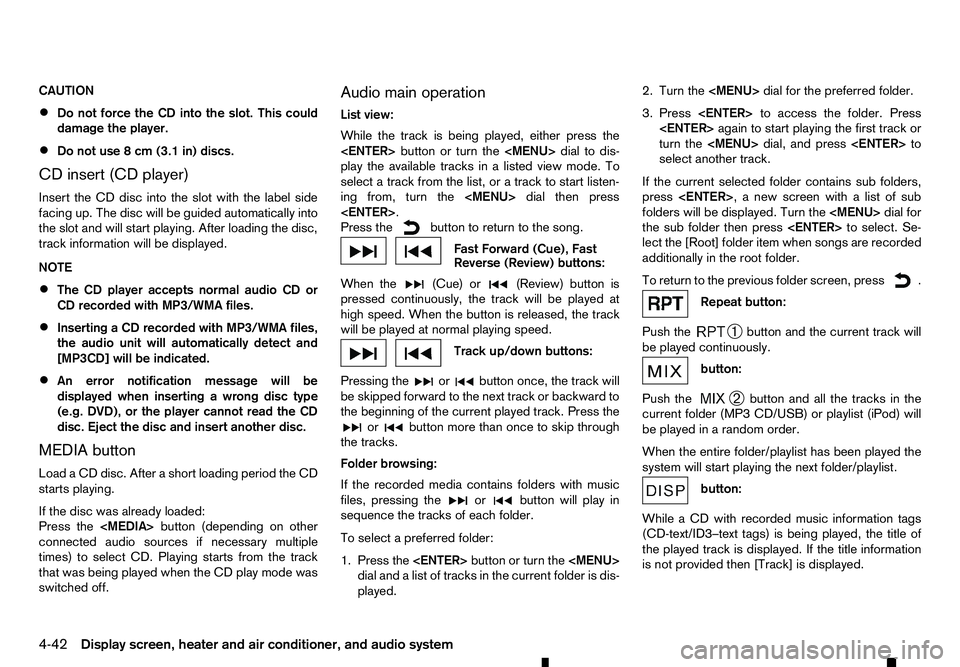
Insert the CD disc into the slot with the label side
facing up. The disc will be guided automatically into
the slot and will start playing. After loading the disc,
track information will be displayed.
NOTE
• The CD player accepts normal audio CD or
CD recorded with MP3/WMA files.
• Inserting
aCDrecorded with MP3/WMA files,
the audio unit will automatically detect and
[MP3CD] will be indicated.
• An error notification message will be
displayed when inserting
awrong disc type
(e.g. DVD), or the player cannot read the CD
disc. Eject the disc and insert another disc.
MEDIA button
Load aCDd isc. After ashort loading period the CD
starts playing.
If the disc was already loaded:
Press the
connected audio sources if necessary multiple
times) to select CD. Playing starts from the track
that was being played when the CD play mode was
switched off. Audio main operation
List view:
While the track is being played, either press the
button or turn the
Page 175 of 340
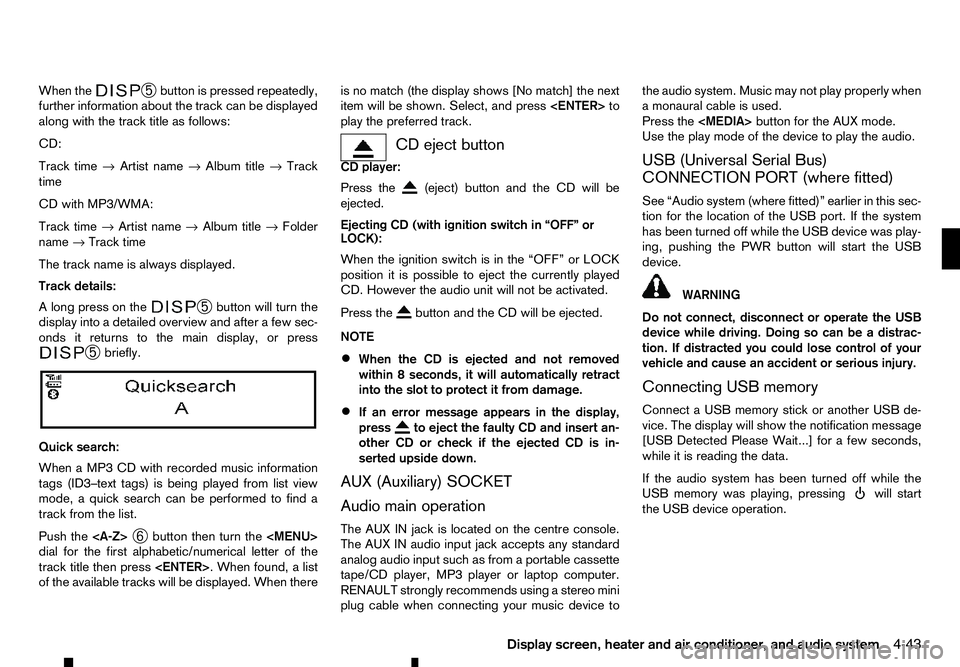
When the
➄
button is pressed repeatedly,
further information about the track can be displayed
along with the track title as follows:
CD:
Track time →Artist name →Album title →Track
time
CD with MP3/WMA:
Track time →Artist name →Album title →Folder
name →Track time
The track name is always displayed.
Track details:
Al ong press on the ➄
button will turn the
display into adetailed overview and after afew sec-
onds it returns to the main display, or press ➄
briefly.
Quick search:
When aMP3 CD with recorded music information
tags (ID3–text tags) is being played from list view
mode, aquick search can be performed to find a
track from the list.
Push the
➅button then turn the
Page 176 of 340
CAUTION
•
Do not force the USB device into the USB
port. Inserting the USB device tilted or up-
side-down into the port may damage the port.
Make sure that the USB device is connected
correctly into the USB port.
• Do not grab the USB port cover (where fitted)
when pulling the USB device out of the port.
This could damage the port and the cover.
• Do not leave the USB cable in
aplace where
it can be pulled unintentionally. Pulling the
cable may damage the port.
• Do not locate objects near the USB device to
prevent the objects from leaning on the USB
device and the port. Pressure from the ob-
jects may damage the USB device and the
port.
The vehicle is not equipped with aUSB device.
USB devices should be purchased separately as
necessary.
This system cannot be used to format USB devices.
To format aUSB device, use apersonal computer.
In some areas, the USB device for the front seats
plays only sound without images for regulatory rea-
sons, even when the vehicle is parked.
This system supports various USB connection port
devices, USB hard drives and iPod players. Some
USB devices may not be supported by this system.
• Partitioned USB devices may not play correctly. •
Some characters used in other languages (Chi-
nese, Japanese, etc.) may not appear properly in
the display. Using English language characters
with
aUSB device is recommended.
General notes for USB use:
Refer to your device manufacturer’s owner informa-
tion regarding the proper use and care of the de-
vice.
MEDIA button
To operate the USB device press
repeatedly until [USB] is available.
Audio main operation
The following operations are identical to the audio
main operation of the Compact Disc (CD) opera-
tion. For details, see “Compact Disc (CD)
operation” earlier in this section.
• List view
• Quick search
• ,
•
MIX (Random play)
• RPT (Repeat track)
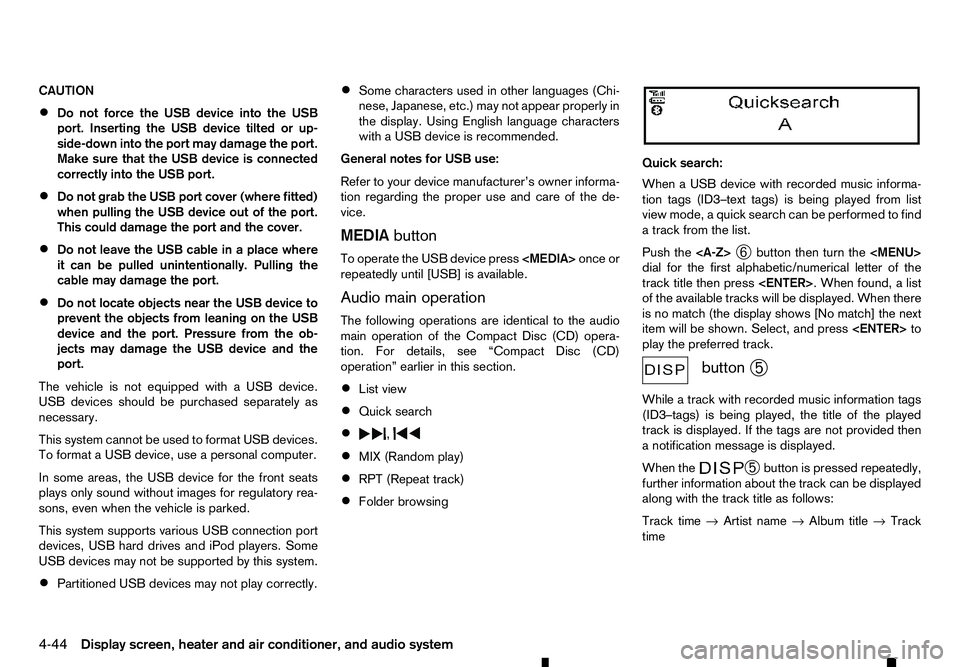
• Folder browsing Quick search:
When
aUSB device with recorded music informa-
tion tags (ID3–text tags) is being played from list
view mode, aquick search can be performed to find
at rack from the list.
Push the
➅button then turn the
Page 177 of 340
Track details:
Al ong press on the ➄
button will turn the
display into adetailed overview and after afew sec-
onds it returns to the main display, or press ➄
briefly.
iPod PLAYER OPERATION
(where fitted)
Connecting iPod
Open the console lid and connect the iPod cable to
the USB connector. The battery of the iPod will be
charged during the connection to the vehicle. The
display will show the notification message [iPod
reading the data.
If the audio system has been turned off while the
iPod was playing, pressing will start the iPod
operation. During the connection, the iPod can only be operated with the audio controls.
*i Pod and iPhone are trademarks of Apple Inc., reg-
istered in the U.S. and other countries. WARNING
Do not connect, disconnect or operate the USB
device while driving. Doing so can be adistrac-
tion. If distracted you could lose control of your
vehicle and cause an accident or serious injury.
CAUTION
• Do not force the iPod cable into the USB port.
Inserting the iPod cable tilted or upside- down into the port may damage the port. Make sure
that the iPod cable is connected correctly into
the USB port.
• Do not locate objects near the iPod cable to
prevent the objects from leaning on the iPod
cable and the port. Pressure from the objects
may damage the iPod cable and the port.
Refer to your device manufacturer’s owners manual
regarding the proper use and care of the device.
Compatibility:
NOTE
• At the time of publication, this audio system
was tested with the latest iPod players/iPhone
available. Due to the frequent update of con-
sumer devices like MP3 players, RENAULT
cannot guarantee that all new iPod players/
iPhone launched will be compatible with this
audio system.
• Some iPod operations may not be available
with this system.
• Make sure that the iPod/iPhone is updated
with the latest firmware.
• iPod Shuffle and iPod mini cannot be used
with this system.
• Full functionality of iPhone USB and Bluetooth
Audio may not be available to the user if the
same device is connected by USB and Blue-
tooth simultaneously. MEDIA
button
To operate the iPod press
peatedly until [iPod
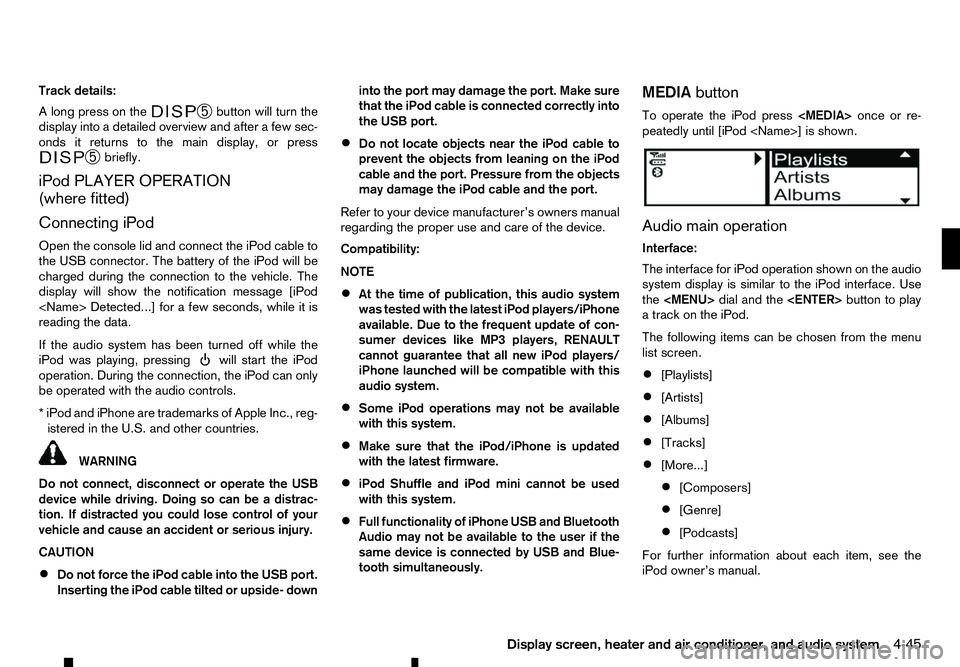
Audio main operation
Interface:
The interface for iPod operation shown on the audio
system display is similar to the iPod interface. Use
the
Page 182 of 340
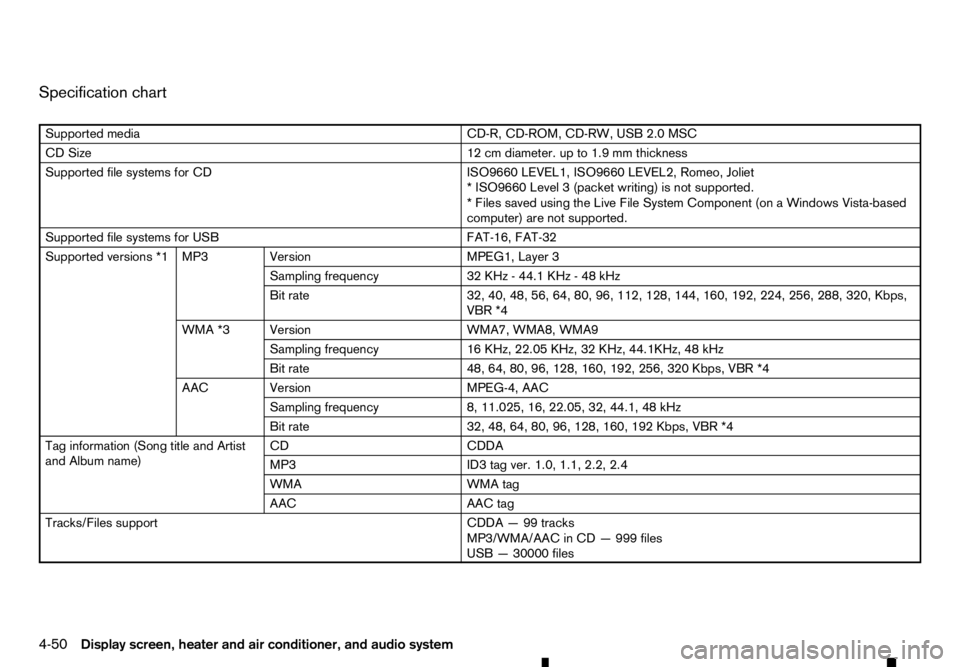
Specification chart
Supported media
CD-R, CD-ROM, CD-RW, USB 2.0 MSC
CD Size 12 cm diameter. up to 1.9 mm thickness
Supported file systems for CD ISO9660 LEVEL1, ISO9660 LEVEL2, Romeo, Joliet
*I SO9660 Level 3(packet writing) is not supported.
*F iles saved using the Live File System Component (on aWindows Vista-based
computer) are not supported.
Supported file systems for USB FAT-16, FAT-32
Supported versions *1 MP3 Version MPEG1, Layer 3
Sampling frequency 32 KHz-44.1 KHz -48kHz
Bit rate 32, 40, 48, 56, 64, 80, 96, 112, 128, 144, 160, 192, 224, 256, 288, 320, Kbps,
R *4
WMA *3 Version WMA7, WMA8, WMA9
Sampling frequency 16 KHz, 22.05 KHz, 32 KHz, 44.1KHz, 48 kHz
Bit rate 48, 64, 80, 96, 128, 160, 192, 256, 320 Kbps,
R *4
AAC Version MPEG-4, AAC
Sampling frequency 8, 11.025, 16, 22.05, 32, 44.1, 48 kHz
Bit rate 32, 48, 64, 80, 96, 128, 160, 192 Kbps,
R *4
Tag information (Song title and Artist
and Album name) CD
CDDA
MP3 ID3 tag ver. 1.0, 1.1, 2.2, 2.4
WMA WMA tag
AAC AAC tag
Tracks/Files support CDDA—99tracks
MP3/WMA/AAC in CD —999 files
USB —30000 files
4-50 Display screen, heater and air conditioner, and audio system
Page 183 of 340
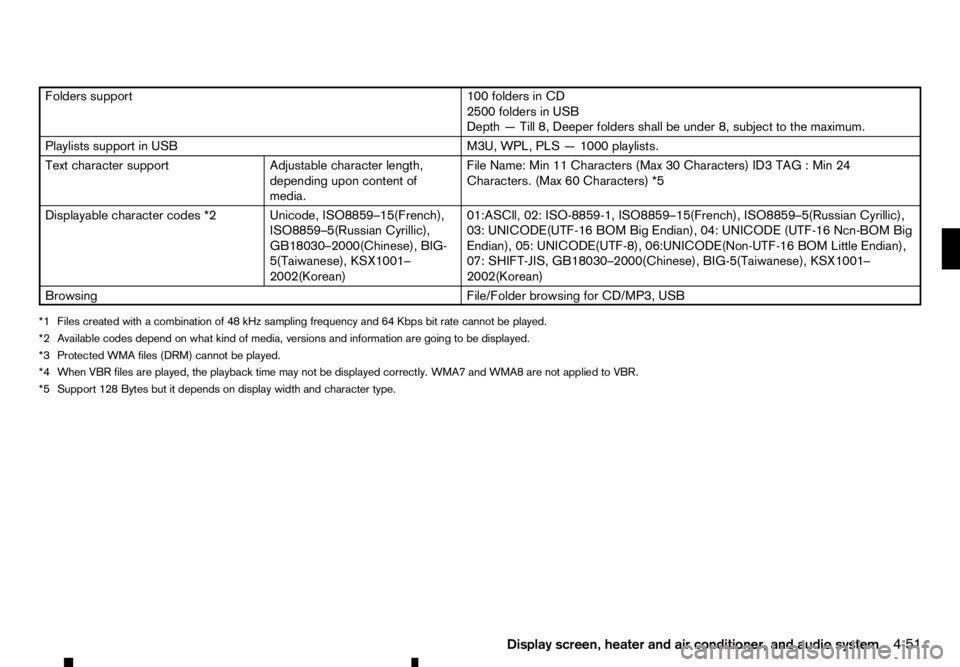
Folders support
100 folders in CD
2500 folders in USB
Depth —Till 8, Deeper folders shall be under 8, subject to the maximum.
Playlists support in USB M3U, WPL, PLS—1000 playlists.
Text character support Adjustable character length,
depending upon content of
media. File Name: Min 11 Characters (Max 30 Characters) ID3 TAG
:Min 24
Characters. (Max 60 Characters) *5
Displayable character codes *2 Unicode, ISO8859–15(French), ISO8859–5(Russian Cyrillic),
GB18030–2000(Chinese), BIG-
5(Taiwanese), KSX1001–
2002(Korean)01:ASCll, 02: ISO-8859-1, ISO8859–15(French), ISO8859–5(Russian Cyrillic),
03: UNICODE(UTF-16 BOM Big Endian), 04: UNICODE (UTF-16 Ncn-BOM Big
Endian), 05: UNICODE(UTF-8), 06:UNICODE(Non-UTF-16 BOM Little Endian),
07: SHIFT-JIS, GB18030–2000(Chinese), BIG-5(Taiwanese), KSX1001–
2002(Korean)
Browsing File/Folder browsing for CD/MP3, USB
*1 Files created with acombination of 48 kHz sampling frequency and 64 Kbps bit rate cannot be played.
*2 Available codes depend on what kind of media, versions and information are going to be displayed. *3 Protected WMA files (DRM) cannot be played.
*4 When
R files are played, the playback time may not be displayed correctly. WMA7 and WMA8 are not applied to
R. *5 Support 128 Bytes but it depends on display width and character type.
Display screen, heater and air conditioner, and audio system4-51
Page 186 of 340
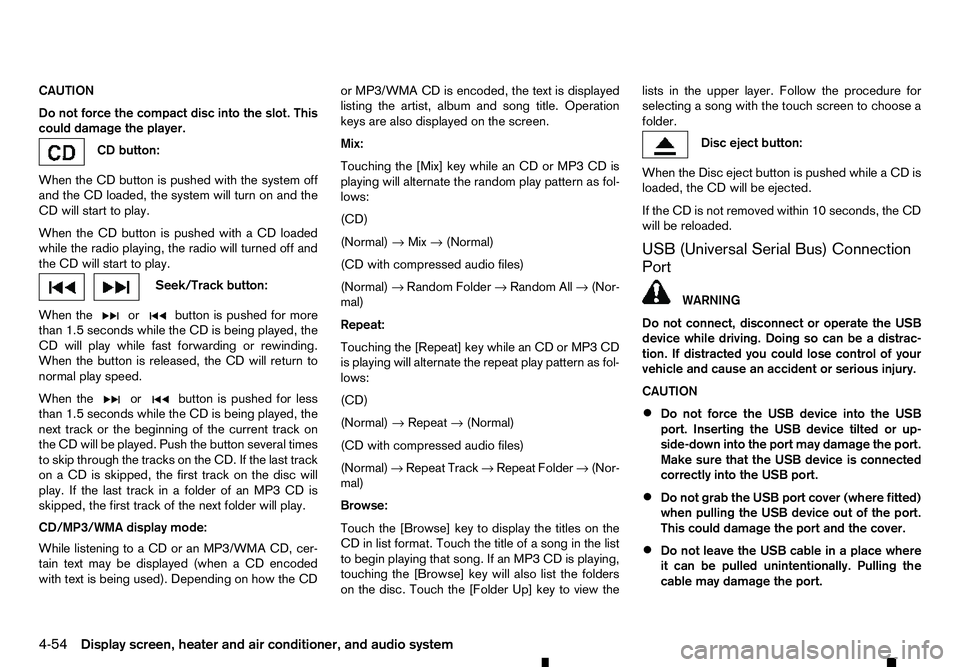
CAUTION
Do not force the compact disc into the slot. This
could damage the player. CD button:
When the CD button is pushed with the system off
and the CD loaded, the system will turn on and the
CD will start to play.
When the CD button is pushed with aCDloaded
while the radio playing, the radio will turned off and
the CD will start to play. Seek/Track button:
When the or button is pushed for more
than 1.5 seconds while the CD is being played, the
CD will play while fast forwarding or rewinding.
When the button is released, the CD will return to
normal play speed.
When the or button is pushed for less
than 1.5 seconds while the CD is being played, the
next track or the beginning of the current track on
the CD will be played. Push the button several times
to skip through the tracks on the CD. If the last track
on aCDiss kipped, the first track on the disc will
play. If the last track in afolder of an MP3 CD is
skipped, the first track of the next folder will play.
CD/MP3/WMA display mode:
While listening to aCDoranMP3/WMA CD, cer-
tain text may be displayed (when aCDencoded
with text is being used). Depending on how the CD or MP3/WMA CD is encoded, the text is displayed
listing the artist, album and song title. Operation
keys are also displayed on the screen.
Mix:
Touching the [Mix] key while an CD or MP3 CD is
playing will alternate the random play pattern as fol-
lows:
(CD)
(Normal)
→Mix →(Normal)
(CD with compressed audio files)
(Normal) →Random Folder →Random All →(Nor-
mal)
Repeat:
Touching the [Repeat] key while an CD or MP3 CD
is playing will alternate the repeat play pattern as fol-
lows:
(CD)
(Normal) →Repeat →(Normal)
(CD with compressed audio files)
(Normal) →Repeat Track →Repeat Folder →(Nor-
mal)
Browse:
Touch the [Browse] key to display the titles on the
CD in list format. Touch the title of asong in the list
to begin playing that song. If an MP3 CD is playing,
touching the [Browse] key will also list the folders
on the disc. Touch the [Folder Up] key to view the lists in the upper layer. Follow the procedure for
selecting asong with the touch screen to choose a
folder. Disc eject button:
When the Disc eject button is pushed while aCDis
loaded, the CD will be ejected.
If the CD is not removed within 10 seconds, the CD
will be reloaded.
USB (Universal Serial Bus) Connection
Port WARNING
Do not connect, disconnect or operate the USB
device while driving. Doing so can be adistrac-
tion. If distracted you could lose control of your
vehicle and cause an accident or serious injury.
CAUTION
• Do not force the USB device into the USB
port. Inserting the USB device tilted or up-
side-down into the port may damage the port.
Make sure that the USB device is connected
correctly into the USB port.
• Do not grab the USB port cover (where fitted)
when pulling the USB device out of the port.
This could damage the port and the cover.
• Do not leave the USB cable in
aplace where
it can be pulled unintentionally. Pulling the
cable may damage the port.
4-54 Display screen, heater and air conditioner, and audio system
Page 187 of 340
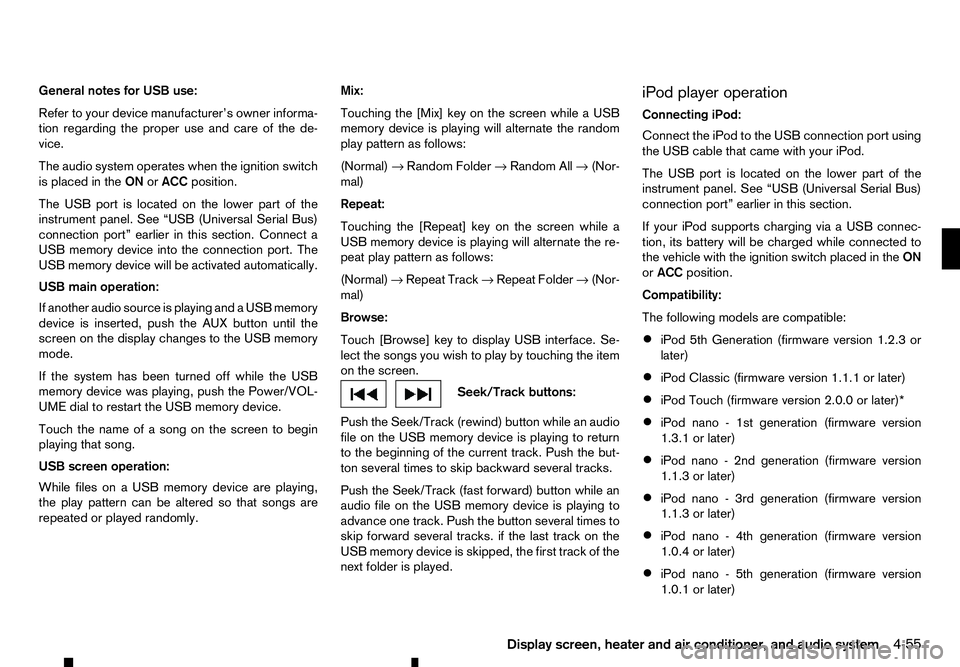
General notes for USB use:
Refer to your device manufacturer’s owner informa-
tion regarding the proper use and care of the de-
vice.
The audio system operates when the ignition switch
is placed in the ONorACC position.
The USB port is located on the lower part of the
instrument panel. See “USB (Universal Serial Bus)
connection port” earlier in this section. Connect a
USB memory device into the connection port. The
USB memory device will be activated automatically.
USB main operation:
If another audio source is playing and aUSB memory
device is inserted, push the AUX button until the
screen on the display changes to the USB memory
mode.
If the system has been turned off while the USB
memory device was playing, push the Power/VOL-
UME dial to restart the USB memory device.
Touch the name of asong on the screen to begin
playing that song.
USB screen operation:
While files on aUSB memory device are playing,
the play pattern can be altered so that songs are
repeated or played randomly. Mix:
Touching the [Mix] key on the screen while aUSB
memory device is playing will alternate the random
play pattern as follows:
(Normal) →Random Folder →Random All →(Nor-
mal)
Repeat:
Touching the [Repeat] key on the screen while a
USB memory device is playing will alternate the re-
peat play pattern as follows:
(Normal) →Repeat Track →Repeat Folder →(Nor-
mal)
Browse:
Touch [Browse] key to display USB interface. Se-
lect the songs you wish to play by touching the item
on the screen. Seek/Track buttons:
Push the Seek/Track (rewind) button while an audio
file on the USB memory device is playing to return
to the beginning of the current track. Push the but-
ton several times to skip backward several tracks.
Push the Seek/Track (fast forward) button while an
audio file on the USB memory device is playing to
advance one track. Push the button several times to
skip forward several tracks. if the last track on the
USB memory device is skipped, the first track of the
next folder is played. iPod player operation
Connecting iPod:
Connect the iPod to the USB connection port using
the USB cable that came with your iPod.
The USB port is located on the lower part of the
instrument panel. See “USB (Universal Serial Bus)
connection port” earlier in this section.
If your iPod supports charging via
aUSB connec-
tion, its battery will be charged while connected to
the vehicle with the ignition switch placed in the ON
or ACC position.
Compatibility:
The following models are compatible:
• iPod 5th Generation (firmware version 1.2.3 or
later)
• iPod Classic (firmware version 1.1.1 or later)
• iPod Touch (firmware version 2.0.0 or later)*
• iPod nano
-1st generation (firmware version
1.3.1 or later)
• iPod nano
-2nd generation (firmware version
1.1.3 or later)
• iPod nano
-3rd generation (firmware version
1.1.3 or later)
• iPod nano
-4th generation (firmware version
1.0.4 or later)
• iPod nano
-5th generation (firmware version
1.0.1 or later)
Display screen, heater and air conditioner, and audio system 4-55
Page 190 of 340
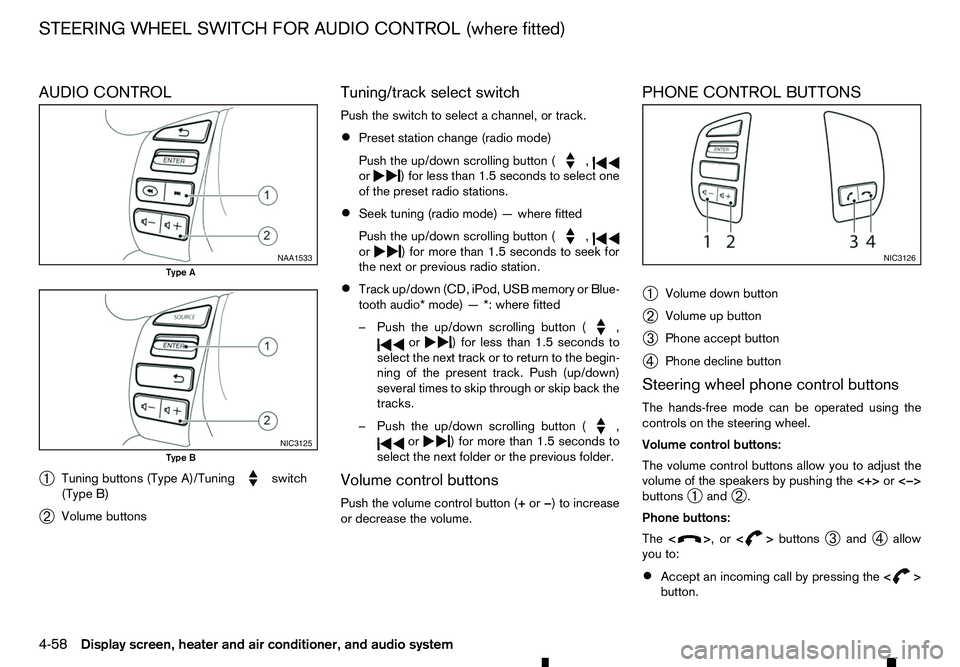
AUDIO CONTROL
➀ Tuning buttons (Type A)/Tuning switch
(Type B)
➁ Volume buttons Tuning/track select switch
Push the switch to select
achannel, or track.
• Preset station change (radio mode)
Push the up/down scrolling button ( ,
or )f
or less than 1.5 seconds to select one
of the preset radio stations.
• Seek tuning (radio mode)
—where fitted
Push the up/down scrolling button ( ,
or )f
or more than 1.5 seconds to seek for
the next or previous radio station.
• Track up/down (CD, iPod, USB memory or Blue-
tooth audio* mode)
—*:where fitted
–P ush the up/down scrolling button ( ,
or )f
or less than 1.5 seconds to
select the next track or to return to the begin-
ning of the present track. Push (up/down)
several times to skip through or skip back the
tracks.
–P ush the up/down scrolling button ( ,
or )f
or more than 1.5 seconds to
select the next folder or the previous folder.
Volume control buttons
Push the volume control button (+ or−)toi ncrease
or decrease the volume. PHONE CONTROL BUTTONS
➀
Volume down button
➁ Volume up button
➂ Phone accept button
➃ Phone decline button
Steering wheel phone control buttons
The hands-free mode can be operated using the
controls on the steering wheel.
Volume control buttons:
The volume control buttons allow you to adjust the
volume of the speakers by pushing the <+>or<−>
buttons ➀and
➁.
Phone buttons:
The < > ,or<
> buttons
➂and
➃allow
you to:
• Accept an incoming call by pressing the
< >
button. NAA1533
Type A
NIC3125
Type B NIC3126
STEERING WHEEL SWITCH FOR AUDIO CONTROL (where fitted)
4-58 Display screen, heater and air conditioner, and audio system
Page 191 of 340
•
Reject an incoming call by pressing the
< >
button during the incoming call.
• End an active call by pushing the
< >
button
once.
• Redial the last outgoing call by pressing the
< >
button for more than
2seconds. BLUETOOTH
®MOBILE PHONE
FEATURE WARNING
Whilst
driving, using the mobile phone is ex-
tremely dangerous because it significantly im-
pairs your concentration and diminishes your re-
action capabilities to sudden changes on the
road, and it may lead to afatal accident. This
applies to all phone call situations such as when
receiving an incoming call, during aphone con-
versation, when calling through the phone book
search, etc.
CAUTION
Certain country jurisdictions prohibit the use of
the mobile phone in the car without hands-free
support.
This chapter provides information about the hands-
free phone system using aBluetooth
®connection.
Bluetooth
®is aw ireless radio communication stan-
dard. This system offers ahands-free facility for your
mobile telephone to enhance driving comfort.
In order to use your mobile phone with the Blue-
tooth
®of the audio system, the mobile phone must
first be setup. For details, see “BLUETOOTH®
settings” later in this section. Once it has been
setup, the hands-free mode is automatically acti-
vated on the registered mobile phone (via Blue-
tooth
®)w hen it comes into range. An
otification message appears on the audio display
when the phone is connected, when an incoming
call is being received, as well as when acall is initi-
ated.
When acall is active, the audio system, microphone
(located in the ceiling in front of the rear view mir-
ror), and steering wheel switches enable hands-free
communication.
If the audio system is in use at the time, the radio,
CD, iPod, USB audio, Bluetooth audio or AUX
source mode will be muted and will stay muted until
the active call has ended.
The Bluetooth
®system may not be able to connect
with your mobile phone for the following reasons:
• The mobile phone is too far away from the ve-
hicle.
• The Bluetooth
®mode on your mobile phone has
not been activated.
• Your mobile phone has not been paired with the
Bluetooth
®system of the audio unit.
• The mobile phone does not support Bluetooth
®
technology (BT Core v2.0).
NOTE
• For models with Audio with Navigation sys-
tem see the separately provided Owner’s
Manual.
• For details, see your mobile phone’s Owner’s
Manual.
BLUETOOTH® HANDS-FREE PHONE SYSTEM (without navigation system
and colour display)
Display screen, heater and air conditioner, and audio system 4-59