brake RENAULT ALASKAN 2017 User Guide
[x] Cancel search | Manufacturer: RENAULT, Model Year: 2017, Model line: ALASKAN, Model: RENAULT ALASKAN 2017Pages: 340, PDF Size: 6.93 MB
Page 83 of 340
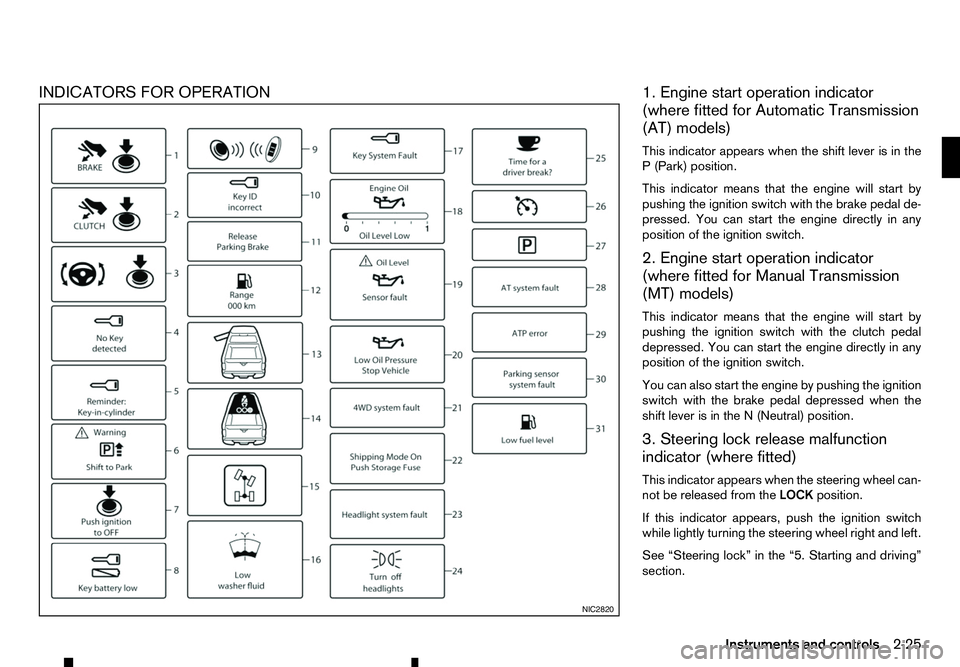
INDICATORS FOR OPERATION
1. Engine start operation indicator
(where fitted for Automatic Transmission
(AT) models)
This indicator appears when the shift lever is in the P( Park) position.
This indicator means that the engine will start by
pushing the ignition switch with the brake pedal de-
pressed. You can start the engine directly in any
position of the ignition switch.
2. Engine start operation indicator
(where fitted for Manual Transmission
(MT) models)
This indicator means that the engine will start by
pushing the ignition switch with the clutch pedal depressed. You can start the engine directly in any
position of the ignition switch.
You can also start the engine by pushing the ignition
switch with the brake pedal depressed when the
shift lever is in the N(Neutral) position.
3. Steering lock release malfunction
indicator (where fitted)
This indicator appears when the steering wheel can-
not be released from the LOCKposition.
If this indicator appears, push the ignition switch
while lightly turning the steering wheel right and left.
See “Steering lock” in the “5. Starting and driving”
section. NIC2820
Instruments and controls
2-25
Page 84 of 340
4. No Key Detected warning
(where fitted)
This warning appears when the door is closed with
the Remote Control Key left outside the vehicle and
the ignition switch in the ONposition. Make sure
that the Remote Control Key is inside the vehicle.
See “Remote Control Key system (where fitted)” in
the “3. Pre-driving checks and adjustments” section
for more details.
5. Key reminder warning (where fitted)
This warning appears if the driver’s side door is
opened while the key is left in the ignition switch and
ignition switch is in the ACC,OFForLOCK position.
Remove the key and take it with you when leaving
the vehicle.
6. Shift to Park warning (where fitted for
AT models)
This warning appears when the ignition switch is
pushed to stop the engine with the shift lever in any
position except the P(Park) position.
If this warning appears, move the shift lever to the P
(Park) position or push the ignition switch to the ON
position.
An inside warning chime will also sound. (See
“Shifting” in the “5. Starting and driving” section.) 7. Push ignition to OFF warning (where
fitted for AT models)
This warning appears when the shift lever is moved
to the
P(Park) position with the ignition switch in the
ACC position after the Shift to Park warning ap-
pears.
To push the ignition switch to the OFFposition, per-
form the following procedure:
Shift to Park warning →(Move the shift lever to P)
→ PUSH warning →(Push the ignition switch →
ignition switch position is turned to ON)→PUSH
warning →(Push the ignition switch →ignition
switch position is turned to OFF)
8. Key Battery low warning
(where fitted)
This warning appears when the Remote Control Key
battery is running out of power.
If this warning appears, replace the battery with a
new one. (See “Remote Control Key battery
replacement” in the “8. Maintenance and
do-it-yourself” section.)
9. Engine start operation for Remote
Control Key system indicator
(where fitted)
This indicator appears when the Remote Control
Key battery is running out of power and when the
Remote Control Key system and vehicle are not
communicating normally. If this indicator appears, touch the ignition switch
with the Remote Control Key while depressing the
brake pedal. (See “Remote Control Key battery
discharge” in the “5. Starting and driving” section.)
10. Key ID Incorrect warning
(where fitted)
This warning appears when the ignition switch is
placed from the LOCKposition and the Remote
Control Key cannot be recognised by the system.
You cannot start the engine with an unregistered
key. Use the registered Remote Control Key.
See “Remote Control Key system (where fitted)” in
the “3. Pre-driving checks and adjustments” sec-
tion.
11. Release Parking Brake warning
This warning appears when the vehicle speed is
above 7km/h (4 MPH) and the parking brake is
applied. Stop the vehicle and release the parking
brake.
12. Low fuel warning
This warning appears when the fuel level in the tank
is getting low. Refuel as soon as it is convenient,
preferably before the fuel gauge reaches the empty
(0) position.
There will be asmall reserve of fuel remaining in
the tank when the fuel gauge reaches the empty
(0) position.
2-26 Instruments and controls
Page 86 of 340
22. Shipping Mode On Push Storage
Fuse warning (where fitted)
This warning may appear if the extended storage
fuse switch is not pushed in (switched on). When
this warning appears, push in (switch on) the ex- tended storage fuse switch to turn off the warning.
For more information, see “Fuses” in the “8. Main-
tenance and do-it-yourself” section.
23. Headlight System Error warning
(where fitted)
This warning appears if the LED headlights are mal-
functioning. Have the system checked by an ap-
proved dealer or qualified workshop.
24. Reminder Turn OFF Headlights
warning
This warning appears when the driver side door is
opened with the headlight switch is left ONand the
ignition switch is placed in the OFF,ACCorLOCK
position. Place the headlight switch in the
formation, see “Headlight and turn signal switch” in
the “2. Instruments and controls” section.
25. Time for adriver break? indicator
This indicator appears when the set [Timer] alarm activates. You can set the time for up to 6hours.
(See “Settings” earlier in this section.) 26. Cruise control indicator
(where fitted)
This indicator shows the cruise control system sta-
tus. The status is shown by the colour.
See “Cruise control (where fitted)” in the “5. Start-
ing and driving” section for details.
27. Automatic Transmission (AT)
position indicator (AT models)
This indicator shows the automatic shift position.
In the manual shift mode, when the transmission
does not shift to the selected gear due to
atrans-
mission protection mode, the AT position indicator
will blink and achime will sound.
For further details, see “Driving with Automatic
Transmission (AT)” in the “5. Starting and driving”
section.
28. Automatic Transmission (AT) Error
warning (AT models)
If the Automatic Transmission (AT) Error warning
appears while the engine is running, or while driv-
ing, it may indicate that the AT is not functioning
properly and may need servicing. Have the system
checked, and if necessary repaired, by an approved
dealer or qualified workshop promptly. 29. Automatic Transmission (AT) park
warning (AT models)
This warning indicates that the Automatic Transmis-
sion (AT) parking function is not engaged. If the
transfer control is not secured in any driving position
while the AT shift lever is in the
P(Park) position, the
transmission will disengage and the wheels will not
lock.
For 4WD model: If the ATP warning appears with
the shift lever in the P(Park) position, shift the
Four-Wheel Drive (4WD) mode switch to the
<2WD>, <4H> or <4LO> position again with the
shift lever in the N(Neutral) position. (See “Four-
Wheel Drive (4WD) (where fitted)” in the “5. Start-
ing and driving” section.) WARNING
If the 4WD mode indicator (see “4WD mode
indicator” in the “5. Starting and driving” section)
is OFF or the ATP warning light is ON, this indi-
cates that the automatic transmission P(Park)
position will not function and could result in the
vehicle moving unexpectedly, causing serious
personal injury or property damage. Always set
the parking brake.
30. Parking Sensor Error warning
(where fitted)
This warning appears when the parking sensor (so-
nar) system is not functioning properly. If the warn-
ing appears, have the system checked by an ap-
proved dealer or qualified workshop.
2-28 Instruments and controls
Page 105 of 340
3
Pre-driving checks and adjustments
Pre-driving checks and adjustments
Keys ........................................................................V
3-2 Key (where fitted) ............................................... 3-2
Anti-Theft System (ATS*) key (where fitted) ........ 3-2
Remote Control Key (where fitted) ...................... 3-2
Doors ...................................................................... 3-4 Locking with key ................................................. 3-4
Opening with inside door handle ......................... 3-4
Locking with power door lock switch .................. 3-4
Rear access doors (King Cab models)................ 3-5
Child safety rear door locks (Double Cab
models) .............................................................. 3-5
Remote keyless entry system (where fitted) .............. 3-6
Using remote keyless entry system ..................... 3-6
Remote Control Key system (where fitted) ............... 3-7
Remote Control Key operating range .................. 3-9
Using Remote Control Key system ...................... 3-9
Battery saver system........................................... 3-10
Warning and audible reminders .......................... 3-11
Troubleshooting guide ........................................ 3-12
Using remote keyless entry system ..................... 3-14
Hazard indicator and horn operation.................... 3-15
Security system (where fitted) .................................. 3-15
Theft warning system (where fitted)..................... 3-15 Anti-Theft System (ATS) ..................................... 3-16
Bonnet..................................................................V
... 3-17 Opening bonnet.................................................. 3-17
Closing bonnet ................................................... 3-17
Fuel filler lid and cap ................................................ 3-18
Opening fuel filler lid ........................................... 3-18
Fuel filler cap ...................................................... 3-18
AdBlue® filler lid and cap ........................................ 3-19 Opening AdBlue® filler lid .................................. 3-20
Locking AdBlue® filler lid ................................... 3-20
AdBlue® filler cap .............................................. 3-20
Cargo bed (where fitted).......................................... 3-20 Tailgate .............................................................. 3-20
Tie down hooks (where fitted) ............................. 3-21
C-Channel system (where fitted) ......................... 3-21
Steering wheel......................................................... 3-23 Steering wheel adjustment .................................. 3-23
Mirrors..................................................................... 3-23 Inside rearview mirror ......................................... 3-23
Outside rearview mirrors..................................... 3-25
Vanity mirror (where fitted) .................................. 3-26
Parking brake .......................................................... 3-26
Page 130 of 340
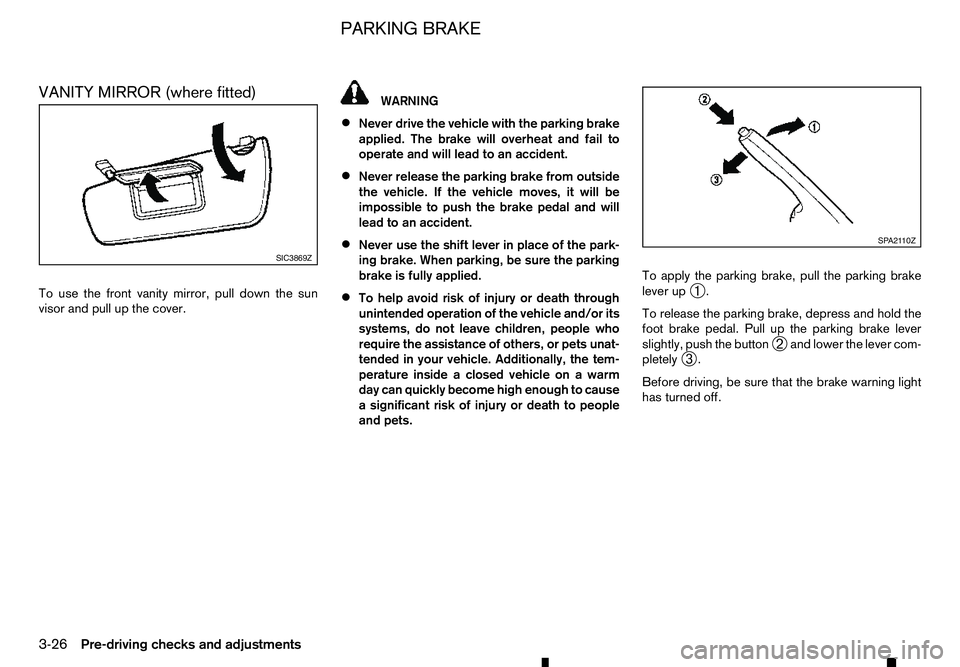
VANITY MIRROR (where fitted)
To use the front vanity mirror, pull down the sun
visor and pull up the cover. WARNING
• Never drive the vehicle with the parking brake
applied. The brake will overheat and fail to
operate and will lead to an accident.
• Never release the parking brake from outside
the vehicle. If the vehicle moves, it will be
impossible to push the brake pedal and will
lead to an accident.
• Never use the shift lever in place of the park-
ing brake. When parking, be sure the parking
brake is fully applied.
• To help avoid risk of injury or death through
unintended operation of the vehicle and/or its
systems, do not leave children, people who
require the assistance of others, or pets unat-
tended in your vehicle. Additionally, the tem-
perature inside
aclosed vehicle on awarm
day can quickly become high enough to cause
as ignificant risk of injury or death to people
and pets. To apply the parking brake, pull the parking brake
lever up
➀.
To release the parking brake, depress and hold the
foot brake pedal. Pull up the parking brake lever
slightly, push the button ➁and lower the lever com-
pletely ➂.
Before driving, be sure that the brake warning light
has turned off. SIC3869Z SP A2110Z
PARKING BRAKE
3-26 Pre-driving checks and adjustments
Page 151 of 340
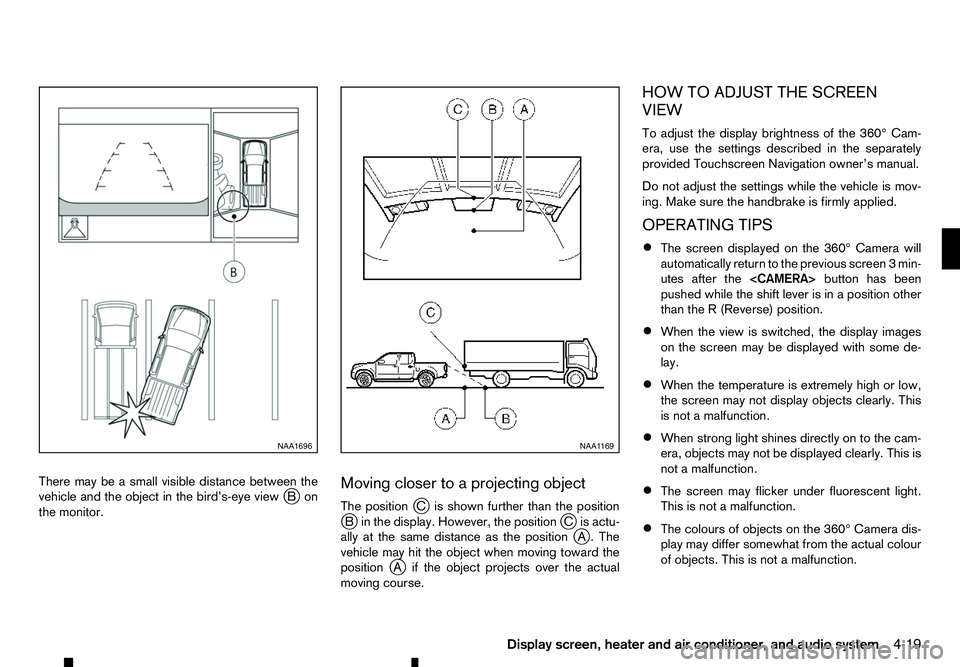
There may be
asmall visible distance between the
vehicle and the object in the bird’s-eye view j
Bon
the monitor. Moving closer to
aprojecting object
The position jCi sshown further than the position
j Bi nthe display. However, the position jCi sactu-
ally at the same distance as the position j
A. The
vehicle may hit the object when moving toward the
position j
Ai fthe object projects over the actual
moving course. HOW TO ADJUST THE SCREEN
VIEW
To adjust the display brightness of the 360° Cam-
era, use the settings described in the separately
provided Touchscreen Navigation owner’s manual.
Do not adjust the settings while the vehicle is mov-
ing. Make sure the handbrake is firmly applied.
OPERATING TIPS
• The screen displayed on the 360° Camera will
automatically return to the previous screen
3min-
utes after the
pushed while the shift lever is in aposition other
than the R(Reverse) position.
• When the view is switched, the display images
on the screen may be displayed with some de-
lay.
• When the temperature is extremely high or low,
the screen may not display objects clearly. This
is not
amalfunction.
• When strong light shines directly on to the cam-
era, objects may not be displayed clearly. This is
not
amalfunction.
• The screen may flicker under fluorescent light.
This is not
amalfunction.
• The colours of objects on the 360° Camera dis-
play may differ somewhat from the actual colour
of objects. This is not
amalfunction. NAA1696 NAA1 169
Display screen, heater and air conditioner, and audio system 4-19
Page 195 of 340
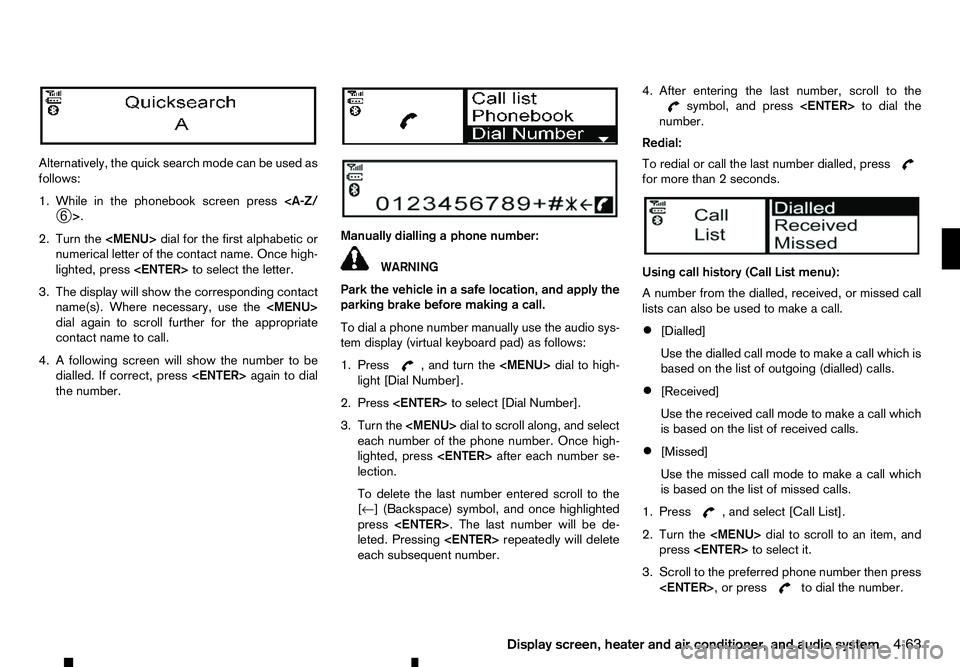
Alternatively, the quick search mode can be used as
follows:
1. While in the phonebook screen press
2. Turn the
Page 203 of 340
Electronic Stability Programme (ESP) OFF
switch................................................................. 5-35
Active Emergency Braking system (where fitted) ...... 5-35 System operation ................................................ 5-35
Hill descent control system (where fitted) ................. 5-38 Hill descent control switch .................................. 5-38
Hill start assist system (where fitted) ........................ 5-39
Cruise control (where fitted) .................................... 5-39 Precautions on cruise control .............................. 5-40
Cruise control operations.................................... 5-40
Speed limiter (where fitted) ...................................... 5-42 Speed limiter operations ..................................... 5-42
ECO drive report ..................................................... 5-44
Parking .................................................................... 5-44 Parking sensor (sonar) system (where fitted) ............ 5-46 Parking sensor (sonar) system OFF switch ......... 5-47
Parking sensor (sonar) system settings ............... 5-47
Trailer towing ........................................................... 5-48
Operating precautions ........................................ 5-48
Tyre pressure ..................................................... 5-48
Safety chains ...................................................... 5-48
Trailer brakes...................................................... 5-48
Trailer detection (where fitted) ............................ 5-48
Vehicle security........................................................ 5-49
Power steering system............................................. 5-49
Brake system ........................................................... 5-49
Brake precautions .............................................. 5-49
Anti-lock Braking System (ABS).......................... 5-50
Cold weather driving................................................ 5-51 Battery ............................................................... 5-51
Engine coolant .................................................... 5-51
Tyre equipment ................................................... 5-51
Special winter equipment.................................... 5-52
Parking brake ..................................................... 5-52 Corrosion protection ........................................... 5-52
Page 204 of 340
During the first 1,600 km (1,000 miles), follow these
recommendations to obtain maximum engine per-
formance and ensure the future reliability and
economy of your new vehicle. Failure to follow these
recommendations may result in shortened engine
life and reduced engine performance.
• Do not drive at
aconstant speed, either fast or
slow, for long periods of time.
• Do not run the engine over 4,000 rpm.
• Do not accelerate at full throttle in any gear.
• Do not start quickly.
• Do not brake hard as much as possible.
• Do not tow
atrailer for at least the first 800 km
(500 miles). WARNING
The driving characteristics of your vehicle will
change remarkably by any additional load and its
distribution, as well as by adding optional equip-
ment (trailer coupling, roof rail, etc.). Your driv-
ing style and speed must be adjusted according
to the circumstances. Especially when carrying
heavy loads, your speed must be reduced ad-
equately.
• Make sure the area around the vehicle is clear.
• Check fluid levels such as engine oil, coolant,
brake (and clutch) fluid, window washer fluid as
frequently as possible, at least whenever you
refuel.
• Visually inspect tyres for their appearance and
condition. Measure and check the tyre pressure
for proper inflation.
• Check that all windows and lights are clean.
• Adjust the seat and head restraint positions.
• Adjust the inside and outside rearview mirror po-
sitions.
• Fasten your seat belt and ask all passengers to
do the same.
• Check that all doors are closed.
• Check the operation of the warning lights when
the ignition switch is placed in the “ON” position. •
Maintenance items in the “8. Maintenance and
do-it-yourself” section should be checked peri-
odically.
RUNNING-IN SCHEDULE
BEFORE STARTING ENGINE
5-2 Starting and driving
Page 209 of 340
•
Do not drive across steep slopes. Instead
drive either straight up or straight down the
slopes. Off-road vehicles can tip over side-
ways much more easily than they can forward
or backward.
• Many hills are too steep for any vehicle. If you
drive up them, you may stall. If you drive down
them, you may not be able to control your
speed. If you drive across them, you may roll
over.
• Do not shift ranges while driving on downhill
grades as this could cause loss of control of
the vehicle.
• Stay alert when driving to the top of
ahill. At
the top there could be adrop-off or other haz-
ard that could cause an accident.
• If your engine stalls or you cannot make it to
the top of
asteep hill, never attempt to turn
around. Your vehicle could tip or roll over.
Always back straight down in R(Reverse)
range. Never back down in N(Neutral) or with
the clutch pedal depressed (MT model) using
only the brake, as this could cause loss of
control.
• Heavy braking going down
ahill could cause
your brakes to overheat and fade, resulting in
loss of control and an accident. Apply brakes
lightly and use alow range to control your
speed.
• Unsecured cargo can be thrown around when
driving over rough terrain. Properly secure all cargo so it will not be thrown forward and
cause injury to you or your passengers.
• To avoid raising the centre of gravity exces-
sively, do not exceed the rated capacity of the
roof rail (where fitted) and evenly distribute
the load. Secure heavy loads in the cargo area
as far forward and as low as possible. Do not
equip the vehicle with tyres larger than speci-
fied in this manual. This could cause your ve-
hicle to roll over.
• Do not grip the inside or spokes of the steer-
ing wheel when driving off-road. The steering
wheel could move suddenly and injure your
hands. Instead drive with your fingers and
thumbs on the outside of the rim.
• Before operating the vehicle, ensure that the
driver and all passengers have their seat belts
fastened.
• Always drive with the floor mats in place as
the floor may became hot.
• Lower your speed when encountering strong
crosswinds. With
ahigher centre of gravity,
your vehicle is more affected by strong side
winds. Slower speeds ensure better vehicle
control.
• Do not drive beyond the performance capabil-
ity of the tyres, even with 4WD engaged.
• Do not attempt to raise two wheels off the
ground and shift the transmission to any drive
or reverse position with the engine running.
Doing so may result in drivetrain damage or unexpected vehicle movement which could
result in serious vehicle damage or personal
injury.
• Do not attempt to test
a4WD equipped ve-
hicle on a2-wheel dynamometer or similar
equipment even if the other two wheels are
raised off the ground. Make sure you inform
test facility personnel that your vehicle is
equipped with 4WD before it is placed on a dynamometer. Using the wrong test equip-
ment may result in drivetrain damage or unex-
pected vehicle movement which could result
in serious vehicle damage or personal injury.
• When
awheel is off the ground due to an
unlevel surface, do not spin the wheel exces-
sively.
• Accelerating quickly, sharp steering manoeu-
vres or sudden braking may cause loss of con-
trol.
• If at all possible, avoid sharp turning manoeu-
vres, particularly at high speeds. Your vehicle
has
ahigher centre of gravity than aconven-
tional passenger car. The vehicle is not de-
signed for cornering at the same speeds as
conventional passenger cars. Failure to oper- ate this vehicle correctly could result in loss
of control and/or arollover accident.
• Always use tyres of the same type, size, brand,
construction (bias, bias-belted or radial), and
tread pattern on all four wheels. Install tyre
chains on the rear wheels when driving on
slippery roads and drive carefully.
Starting and driving 5-7