instrument panel RENAULT ALASKAN 2017 User Guide
[x] Cancel search | Manufacturer: RENAULT, Model Year: 2017, Model line: ALASKAN, Model: RENAULT ALASKAN 2017Pages: 340, PDF Size: 6.93 MB
Page 61 of 340
The dte mode includes
alow range warning feature.
If the fuel level is low, the warning is displayed on
the screen.
When the fuel level drops even lower, the dte dis-
play will change to “———”.
• If the amount of fuel added is small, the distance
to empty shown just before the ignition switch is
placed in the “OFF” position may continue to be
displayed.
• When driving uphill or rounding curves, the fuel
in the tank shifts, which may momentarily change
the display.
Odometer/Twin trip odometer:
The odometer/twin trip odometer is displayed in the
vehicle information display when the ignition switch
is in the ON position.
The odometer ➀displays the total distance the
vehicle has been driven.
The twin trip odometer ➁displays the distance of
individual trips.
Changing twin trip odometer display:
Push the
instrument panel) to change the display as follows:
TRIP A →TRIP B →ODOMETER →TRIP A
Resetting twin trip odometer:
Push and hold the
more than 1second to reset the trip odometer to
zero. Odometer (models without colour
display)
Odometer/twin trip odometer:
The odometer/twin trip odometer is displayed when
the ignition switch is in the ON position.
The odometer
➀displays the total distance the
vehicle has been driven.
The twin trip odometer ➁displays the distance of
individual trips.
Changing trip odometer display:
Push the trip odometer reset switch ➂to change
the display as follows:
TRIP A →TRIP B →Trip computer mode →TRIP A
For trip computer information, see “Trip computer”
later in this section.
Resetting trip odometer:
While TRIP AorTRIPBisd isplayed push and hold
the trip odometer reset switch ➂for approximately
1s econd to reset the trip odometer to zero.
For further information, see “Trip computer” later in
this section. TACHOMETER AND ENGINE
COOLANT TEMPERATURE GAUGE
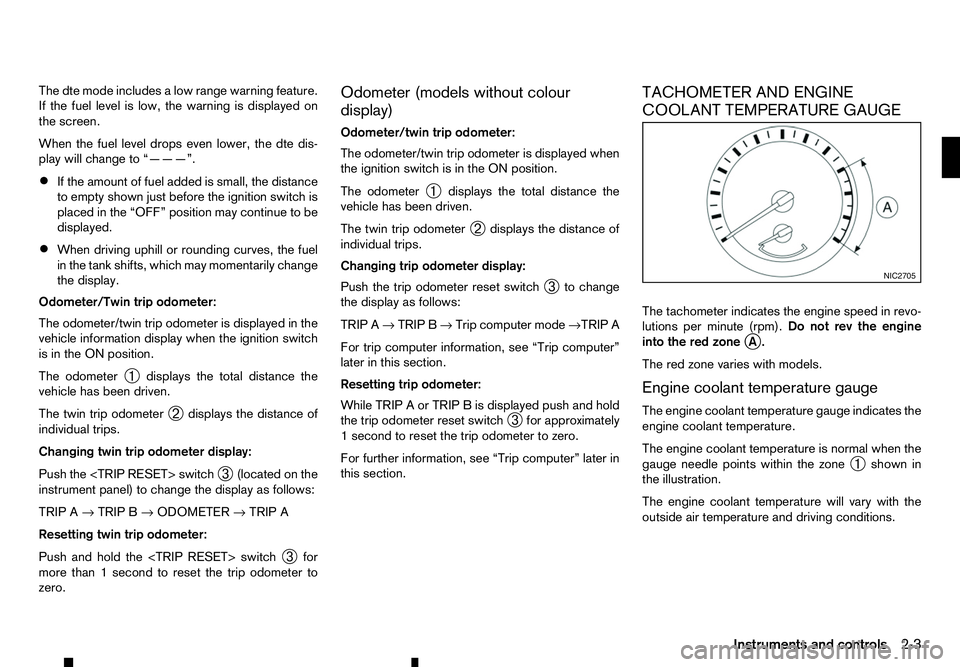
The tachometer indicates the engine speed in revo-
lutions per minute (rpm).
Do not rev the engine
into the red zone j
A.
The red zone varies with models.
Engine coolant temperature gauge
The engine coolant temperature gauge indicates the
engine coolant temperature.
The engine coolant temperature is normal when the
gauge needle points within the zone ➀shown in
the illustration.
The engine coolant temperature will vary with the
outside air temperature and driving conditions. NIC2705
Instruments and controls
2-3
Page 62 of 340
INSTRUMENT BRIGHTNESS
CONTROL
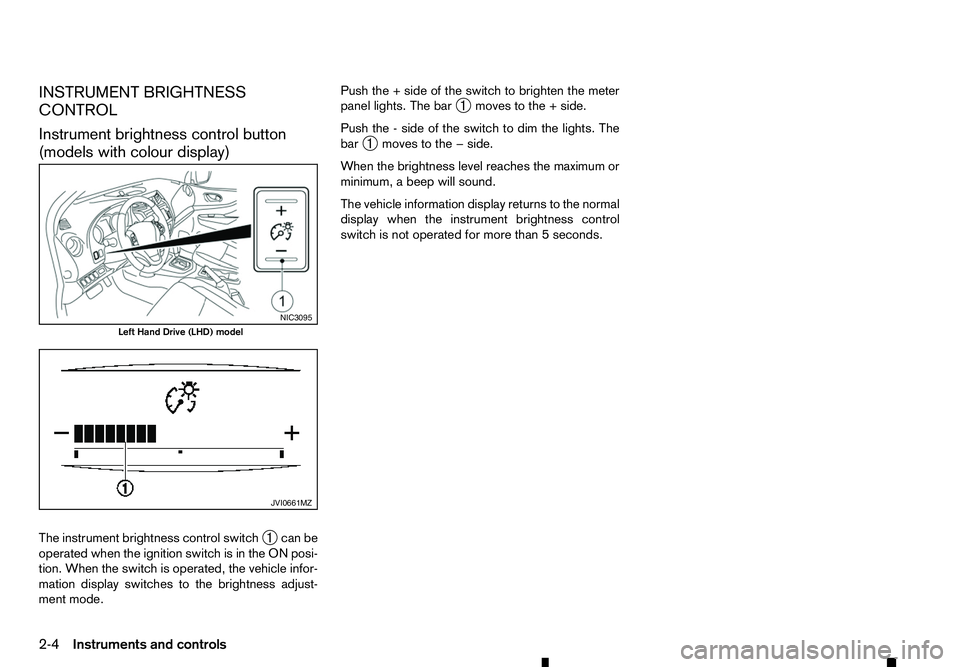
Instrument brightness control button
(models with colour display)
The instrument brightness control switch ➀can be
operated when the ignition switch is in the ON posi-
tion. When the switch is operated, the vehicle infor-
mation display switches to the brightness adjust-
ment mode. Push the
+side of the switch to brighten the meter
panel lights. The bar ➀moves to the
+side.
Push the -side of the switch to dim the lights. The
bar ➀moves to the
−side.
When the brightness level reaches the maximum or
minimum, abeep will sound.
The vehicle information display returns to the normal
display when the instrument brightness control
switch is not operated for more than 5seconds. NIC3095
Left Hand Drive (LHD) model
JVI0661MZ
2-4 Instruments and controls
Page 70 of 340
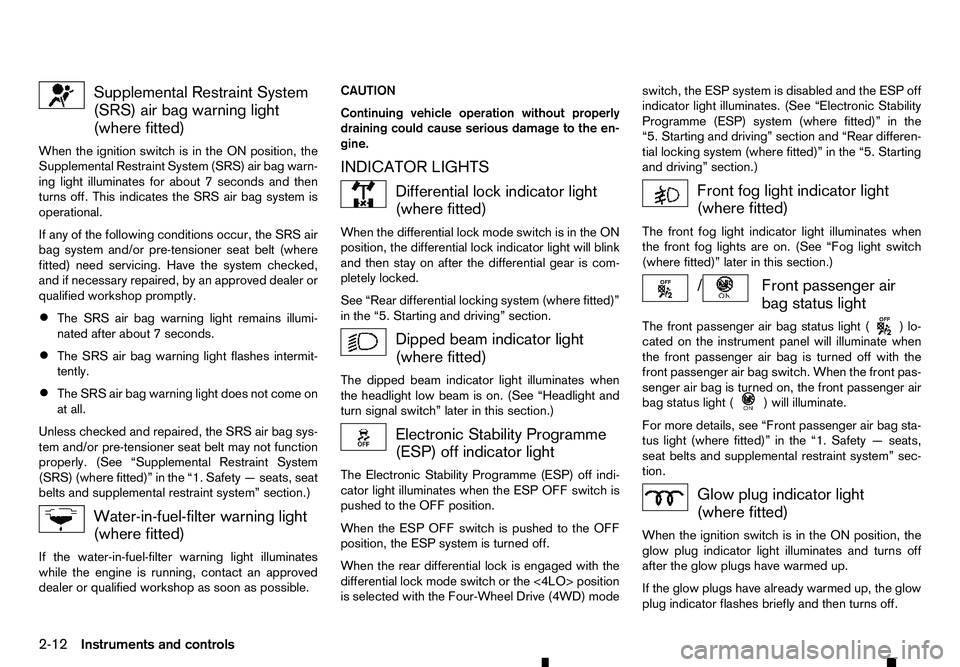
Supplemental Restraint System
(SRS) air bag warning light (where fitted)
When the ignition switch is in the ON position, the
Supplemental Restraint System (SRS) air bag warn-
ing light illuminates for about 7seconds and then
turns off. This indicates the SRS air bag system is
operational.
If any of the following conditions occur, the SRS air
bag system and/or pre-tensioner seat belt (where
fitted) need servicing. Have the system checked,
and if necessary repaired, by an approved dealer or
qualified workshop promptly.
• The SRS air bag warning light remains illumi-
nated after about
7seconds.
• The SRS air bag warning light flashes intermit-
tently.
• The SRS air bag warning light does not come on
at all.
Unless checked and repaired, the SRS air bag sys-
tem and/or pre-tensioner seat belt may not function
properly. (See “Supplemental Restraint System
(SRS) (where fitted)” in the “1. Safety —seats, seat
belts and supplemental restraint system” section.) Water-in-fuel-filter warning light
(where fitted)
If the water-in-fuel-filter warning light illuminates
while the engine is running, contact an approved
dealer or qualified workshop as soon as possible. CAUTION
Continuing vehicle operation without properly
draining could cause serious damage to the en-
gine.
INDICATOR LIGHTS Differential lock indicator light
(where fitted)
When the differential lock mode switch is in the ON
position, the differential lock indicator light will blink
and then stay on after the differential gear is com-
pletely locked.
See “Rear differential locking system (where fitted)”
in the “5. Starting and driving” section. Dipped beam indicator light
(where fitted)
The dipped beam indicator light illuminates when
the headlight low beam is on. (See “Headlight and
turn signal switch” later in this section.) Electronic Stability Programme
(ESP) off indicator light
The Electronic Stability Programme (ESP) off indi-
cator light illuminates when the ESP OFF switch is
pushed to the OFF position.
When the ESP OFF switch is pushed to the OFF
position, the ESP system is turned off.
When the rear differential lock is engaged with the
differential lock mode switch or the <4LO> position
is selected with the Four-Wheel Drive (4WD) mode switch, the ESP system is disabled and the ESP off
indicator light illuminates. (See “Electronic Stability
Programme (ESP) system (where fitted)” in the
“5. Starting and driving” section and “Rear differen-
tial locking system (where fitted)” in the “5. Starting
and driving” section.)
Front fog light indicator light
(where fitted)
The front fog light indicator light illuminates when
the front fog lights are on. (See “Fog light switch
(where fitted)” later in this section.) / Front passenger air
bag status light
The front passenger air bag status light ( )l
o-
cated on the instrument panel will illuminate when
the front passenger air bag is turned off with the
front passenger air bag switch. When the front pas-
senger air bag is turned on, the front passenger air
bag status light ( )w
ill illuminate.
For more details, see “Front passenger air bag sta-
tus light (where fitted)” in the “1. Safety —seats,
seat belts and supplemental restraint system” sec-
tion. Glow plug indicator light
(where fitted)
When the ignition switch is in the ON position, the
glow plug indicator light illuminates and turns off
after the glow plugs have warmed up.
If the glow plugs have already warmed up, the glow
plug indicator flashes briefly and then turns off.
2-12 Instruments and controls
Page 80 of 340
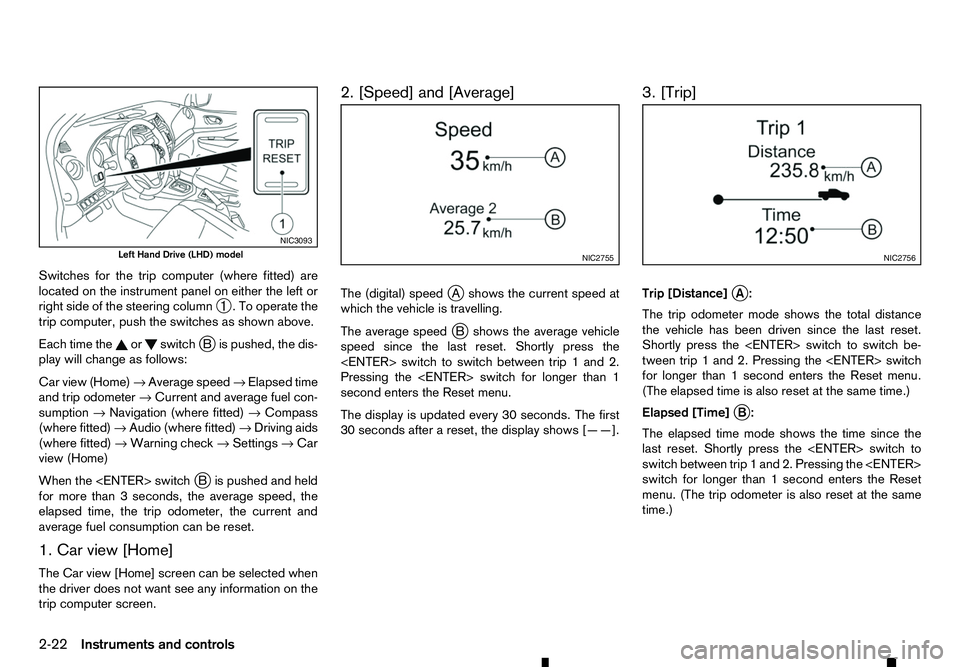
Switches for the trip computer (where fitted) are
located on the instrument panel on either the left or
right side of the steering column ➀.Too
perate the
trip computer, push the switches as shown above.
Each time the or switch
jBi spushed, the dis-
play will change as follows:
Car view (Home) →Average speed →Elapsed time
and trip odometer →Current and average fuel con-
sumption →Navigation (where fitted) →Compass
(where fitted) →Audio (where fitted) →Driving aids
(where fitted) →Warning check →Settings →Car
view (Home)
When the
Bi spushed and held
for more than 3seconds, the average speed, the
elapsed time, the trip odometer, the current and
average fuel consumption can be reset.
1. Car view [Home]
The Car view [Home] screen can be selected when
the driver does not want see any information on the
trip computer screen. 2. [Speed] and [Average]
The (digital) speed
jAs hows the current speed at
which the vehicle is travelling.
The average speed j
Bs hows the average vehicle
speed since the last reset. Shortly press the
Pressing the
second enters the Reset menu.
The display is updated every 30 seconds. The first
30 seconds after areset, the display shows [——]. 3. [Trip]
Trip [Distance]
jA:
The trip odometer mode shows the total distance
the vehicle has been driven since the last reset.
Shortly press the
tween trip 1and 2. Pressing the
for longer than 1second enters the Reset menu.
(The elapsed time is also reset at the same time.)
Elapsed [Time] j
B:
The elapsed time mode shows the time since the
last reset. Shortly press the
switch between trip 1and 2. Pressing the
switch for longer than 1second enters the Reset
menu. (The trip odometer is also reset at the same
time.) NIC3093
Left Hand Drive (LHD) model
NIC2755 NIC2756
2-22 Instruments and controls
Page 89 of 340
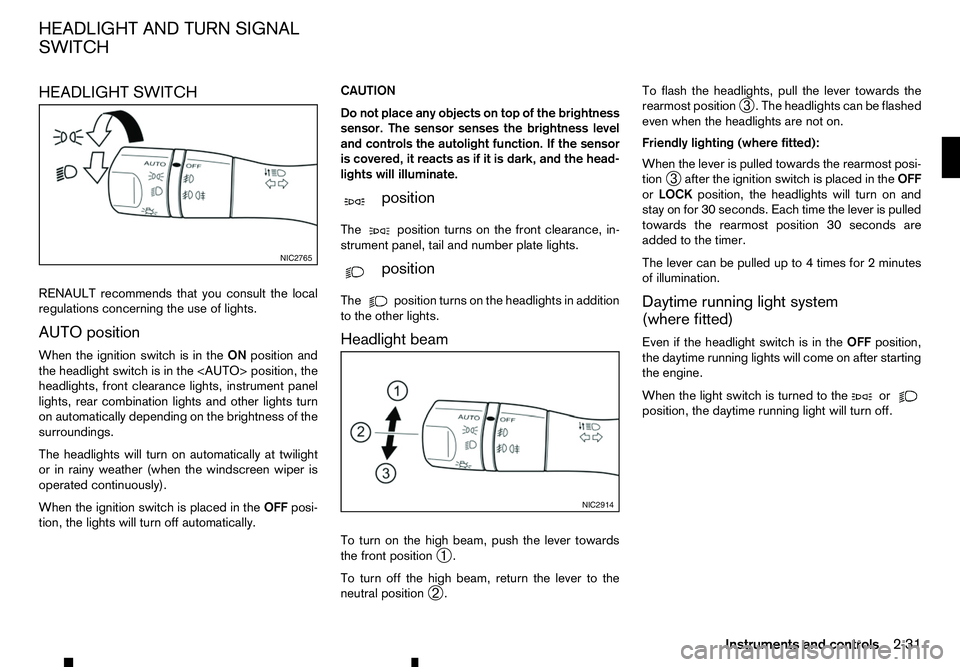
HEADLIGHT SWITCH
RENAULT recommends that you consult the local
regulations concerning the use of lights.
AUTO position
When the ignition switch is in the ONposition and
the headlight switch is in the
headlights, front clearance lights, instrument panel
lights, rear combination lights and other lights turn
on automatically depending on the brightness of the
surroundings.
The headlights will turn on automatically at twilight
or in rainy weather (when the windscreen wiper is
operated continuously).
When the ignition switch is placed in the OFFposi-
tion, the lights will turn off automatically. CAUTION
Do not place any objects on top of the brightness
sensor. The sensor senses the brightness level
and controls the autolight function. If the sensor
is covered, it reacts as if it is dark, and the head-
lights will illuminate.
m position
The position
turns on the front clearance, in-
strument panel, tail and number plate lights.
m position
The position
turns on the headlights in addition
to the other lights.
Headlight beam
To turn on the high beam, push the lever towards
the front position ➀.
To turn off the high beam, return the lever to the
neutral position ➁. To flash the headlights, pull the lever towards the
rearmost position
➂.T
he headlights can be flashed
even when the headlights are not on.
Friendly lighting (where fitted):
When the lever is pulled towards the rearmost posi-
tion ➂after the ignition switch is placed in the
OFF
or LOCK position, the headlights will turn on and
stay on for 30 seconds. Each time the lever is pulled
towards the rearmost position 30 seconds are
added to the timer.
The lever can be pulled up to 4times for 2minutes
of illumination.
Daytime running light system
(where fitted)
Even if the headlight switch is in the OFFposition,
the daytime running lights will come on after starting
the engine.
When the light switch is turned to the or
position, the daytime running light will turn off.NIC2765
NIC2914
HEADLIGHT AND TURN SIGNAL
SWITCH
Instruments and controls2-31
Page 93 of 340
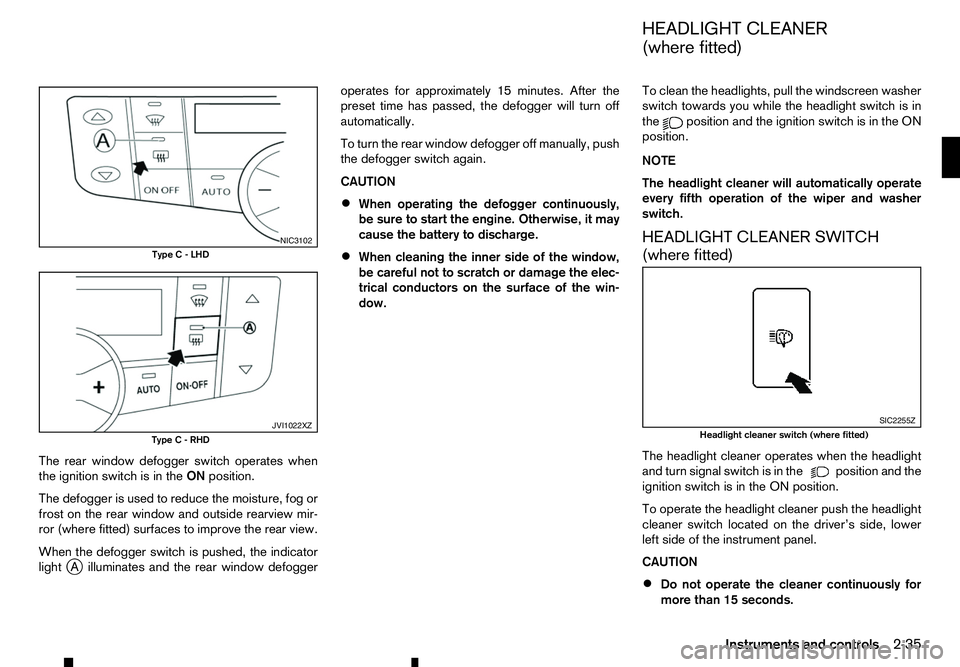
The rear window defogger switch operates when
the ignition switch is in the ONposition.
The defogger is used to reduce the moisture, fog or
frost on the rear window and outside rearview mir-
ror (where fitted) surfaces to improve the rear view.
When the defogger switch is pushed, the indicator
light j
Ai lluminates and the rear window defogger operates for approximately 15 minutes. After the
preset time has passed, the defogger will turn off
automatically.
To turn the rear window defogger off manually, push
the defogger switch again.
CAUTION
• When operating the defogger continuously,
be sure to start the engine. Otherwise, it may
cause the battery to discharge.
• When cleaning the inner side of the window,
be careful not to scratch or damage the elec-
trical conductors on the surface of the win-
dow. To clean the headlights, pull the windscreen washer
switch towards you while the headlight switch is in
the position and the ignition switch is in the ON
position.
NOTE
The headlight cleaner will automatically operate
every fifth operation of the wiper and washer
switch.
HEADLIGHT CLEANER SWITCH
(where fitted)
The headlight cleaner operates when the headlight
and turn signal switch is in the position and the
ignition switch is in the ON position.
To operate the headlight cleaner push the headlight
cleaner switch located on the driver’s side, lower
left side of the instrument panel.
CAUTION
• Do not operate the cleaner continuously for
more than 15 seconds. NIC3102
Type C-LHD JVI1022XZ
Type C-RHD SIC2255Z
Headlight cleaner switch (where fitted)
HEADLIGHT CLEANER
(where fitted)
Instruments and controls 2-35
Page 96 of 340
If the window does not close
automatically
If the power window automatic function (closing
only) does not operate properly, perform the follow-
ing procedure to initialise the power window sys-
tem.
1. With the engine running.
2. Close the door.
3. Open the window completely by operating the power window switch.
4. Pull the power window switch and hold it to close the window, and then hold the switch more than
3seconds after the window is closed completely.
5. Release the power window switch. Operate the window by the automatic function to confirm the
initialisation is complete.
If the power window automatic function does not
operate properly after performing the procedure above, have your vehicle checked by an approved
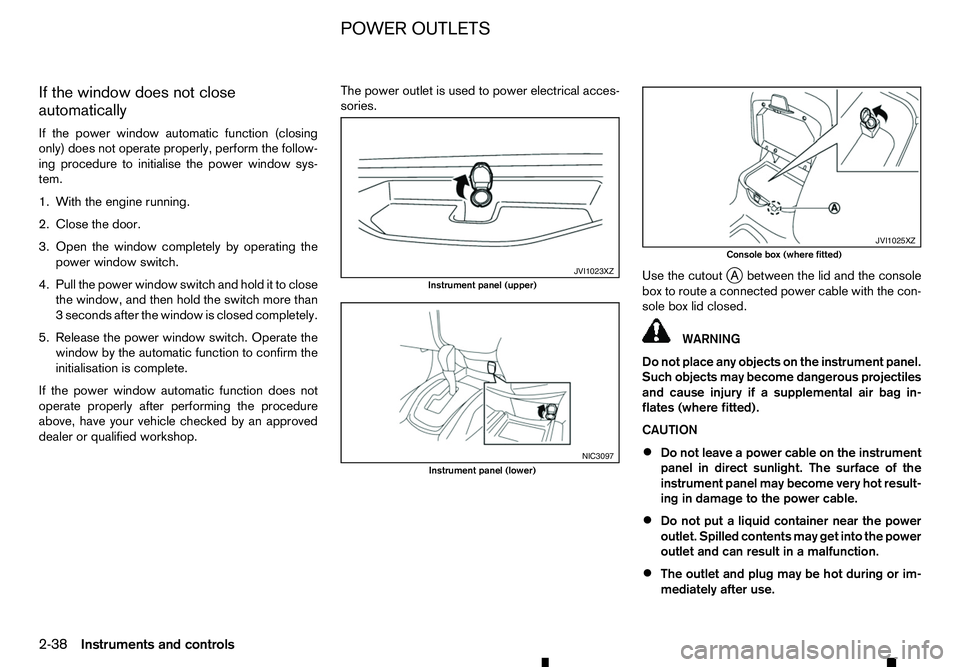
dealer or qualified workshop. The power outlet is used to power electrical acces-
sories.
Use the cutoutj
Ab etween the lid and the console
box to route aconnected power cable with the con-
sole box lid closed. WARNING
Do not place any objects on the instrument panel.
Such objects may become dangerous projectiles
and cause injury if asupplemental air bag in-
flates (where fitted).
CAUTION
• Do not leave
apower cable on the instrument
panel in direct sunlight. The surface of the
instrument panel may become very hot result-
ing in damage to the power cable.
• Do not put
aliquid container near the power
outlet. Spilled contents may get into the power
outlet and can result in amalfunction.
• The outlet and plug may be hot during or im-
mediately after use. JVI1023XZ
Instrument panel (upper)
NIC3097
Instrument panel (lower) JVI1025XZ
Console box (where fitted)
POWER OUTLETS
2-38 Instruments and controls
Page 114 of 340
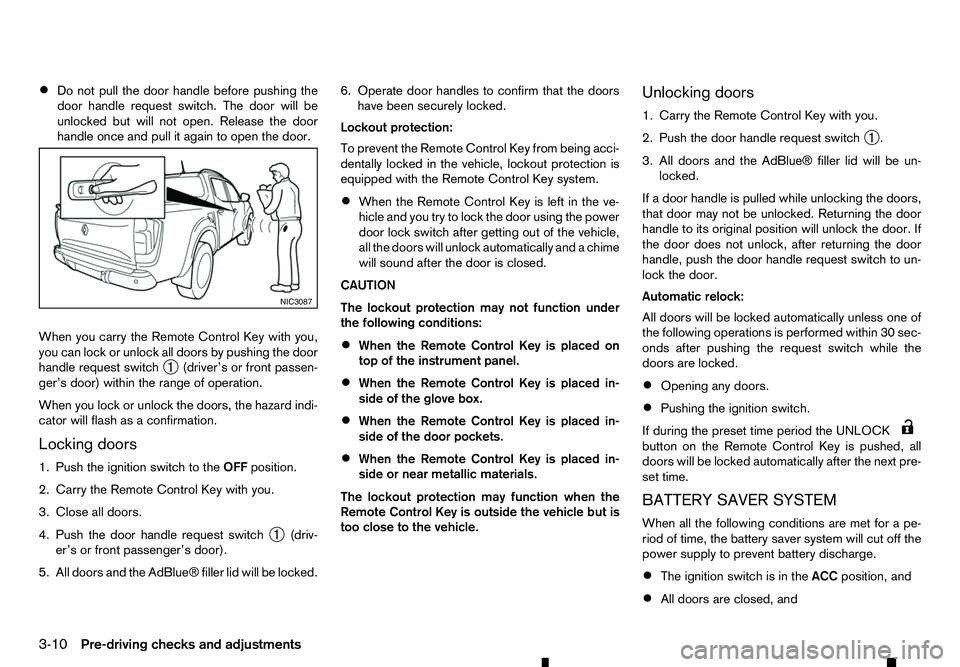
•
Do not pull the door handle before pushing the
door handle request switch. The door will be
unlocked but will not open. Release the door
handle once and pull it again to open the door.
When you carry the Remote Control Key with you,
you can lock or unlock all doors by pushing the door
handle request switch ➀(driver’s or front passen-
ger’s door) within the range of operation.
When you lock or unlock the doors, the hazard indi-
cator will flash as aconfirmation.
Locking doors
1. Push the ignition switch to the OFFposition.
2. Carry the Remote Control Key with you.
3. Close all doors.
4. Push the door handle request switch ➀(driv-
er’s or front passenger’s door).
5. All doors and the AdBlue® filler lid will be locked. 6. Operate door handles to confirm that the doors
have been securely locked.
Lockout protection:
To prevent the Remote Control Key from being acci-
dentally locked in the vehicle, lockout protection is
equipped with the Remote Control Key system.
• When the Remote Control Key is left in the ve-
hicle and you try to lock the door using the power
door lock switch after getting out of the vehicle,
all the doors will unlock automatically and
achime
will sound after the door is closed.
CAUTION
The lockout protection may not function under
the following conditions:
• When the Remote Control Key is placed on
top of the instrument panel.
• When the Remote Control Key is placed in-
side of the glove box.
• When the Remote Control Key is placed in-
side of the door pockets.
• When the Remote Control Key is placed in-
side or near metallic materials.
The lockout protection may function when the
Remote Control Key is outside the vehicle but is
too close to the vehicle. Unlocking doors
1. Carry the Remote Control Key with you.
2. Push the door handle request switch
➀.
3. All doors and the AdBlue® filler lid will be un- locked.
If ad oor handle is pulled while unlocking the doors,
that door may not be unlocked. Returning the door
handle to its original position will unlock the door. If
the door does not unlock, after returning the door
handle, push the door handle request switch to un-
lock the door.
Automatic relock:
All doors will be locked automatically unless one of
the following operations is performed within 30 sec-
onds after pushing the request switch while the
doors are locked.
• Opening any doors.
• Pushing the ignition switch.
If during the preset time period the UNLOCK button on the Remote Control Key is pushed, all
doors will be locked automatically after the next pre-
set time.
BATTERY SAVER SYSTEM
When all the following conditions are met for ape-
riod of time, the battery saver system will cut off the
power supply to prevent battery discharge.
• The ignition switch is in the
ACCposition, and
• All doors are closed, and NIC3087
3-10 Pre-driving checks and adjustments
Page 121 of 340
WARNING
• The bonnet must be closed and latched se-
curely before driving. Failure to do so could
cause the bonnet to fly open and result in an
accident.
• Never open the bonnet if steam or smoke is
coming from the engine compartment to
avoid injury.
OPENING BONNET
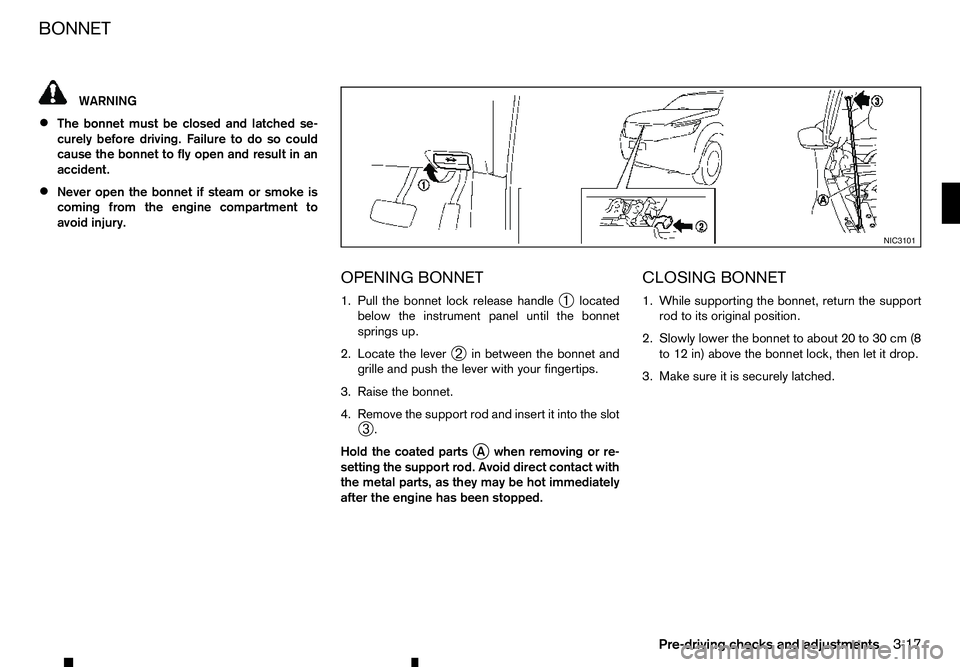
1. Pull the bonnet lock release handle➀located
below the instrument panel until the bonnet
springs up.
2. Locate the lever ➁in between the bonnet and
grille and push the lever with your fingertips.
3. Raise the bonnet.
4. Remove the support rod and insert it into the slot ➂.
Hold the coated parts j
Aw hen removing or re-
setting the support rod. Avoid direct contact with
the metal parts, as they may be hot immediately
after the engine has been stopped. CLOSING BONNET
1. While supporting the bonnet, return the support
rod to its original position.
2. Slowly lower the bonnet to about 20 to 30 cm (8 to 12 in) above the bonnet lock, then let it drop.
3. Make sure it is securely latched. NIC3101
BONNET
Pre-driving checks and adjustments
3-17
Page 122 of 340
WARNING
• Fuel is extremely flammable and highly explo-
sive under certain conditions. You could be
burned or seriously injured if it is misused or
mishandled. Always stop the engine and do
not smoke or allow open flames or sparks
near the vehicle when refuelling.
• Fuel may be under pressure. Turn the cap a
half of
aturn, and wait for any “hissing” sound
to stop to prevent fuel from spraying out and
possibly causing personal injury. Then remove
the cap.
• Use only an original equipment type fuel filler
cap as
areplacement. It has abuilt-in safety
valve needed for proper operation of the fuel
system and emission control system. An in-
correct cap can result in aserious malfunc-
tion and possible injury. OPENING FUEL FILLER LID
Fuel filler lid opener switch
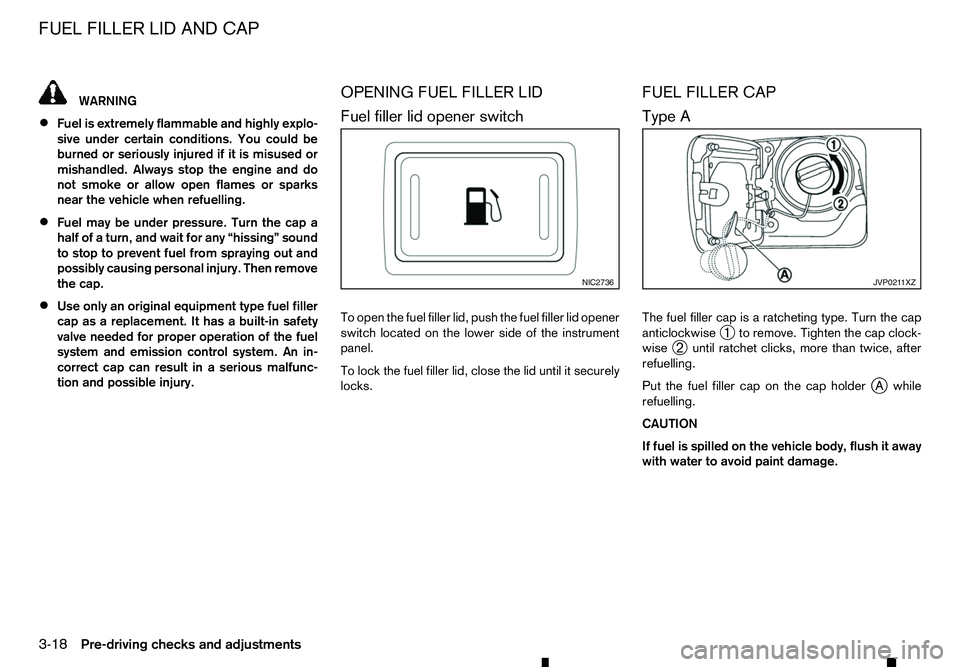
To open the fuel filler lid, push the fuel filler lid opener
switch located on the lower side of the instrument
panel.
To lock the fuel filler lid, close the lid until it securely
locks. FUEL FILLER CAP
Type A
The fuel filler cap is
aratcheting type. Turn the cap
anticlockwise ➀to remove. Tighten the cap clock-
wise ➁until ratchet clicks, more than twice, after
refuelling.
Put the fuel filler cap on the cap holder j
Aw hile
refuelling.
CAUTION
If fuel is spilled on the vehicle body, flush it away
with water to avoid paint damage. NIC2736 JVP021 1XZ
FUEL FILLER LID AND CAP
3-18
Pre-driving checks and adjustments