instrument panel RENAULT ALASKAN 2017 Owner's Manual
[x] Cancel search | Manufacturer: RENAULT, Model Year: 2017, Model line: ALASKAN, Model: RENAULT ALASKAN 2017Pages: 340, PDF Size: 6.93 MB
Page 154 of 340
OPERATING TIPS (models with
automatic air conditioner)
When the engine coolant temperature and outside
air temperature are low, the air flow from the foot
outlets may not operate. However, this is not amal-
function. After the coolant temperature warms up,
the air flow from the foot outlets will operate nor-
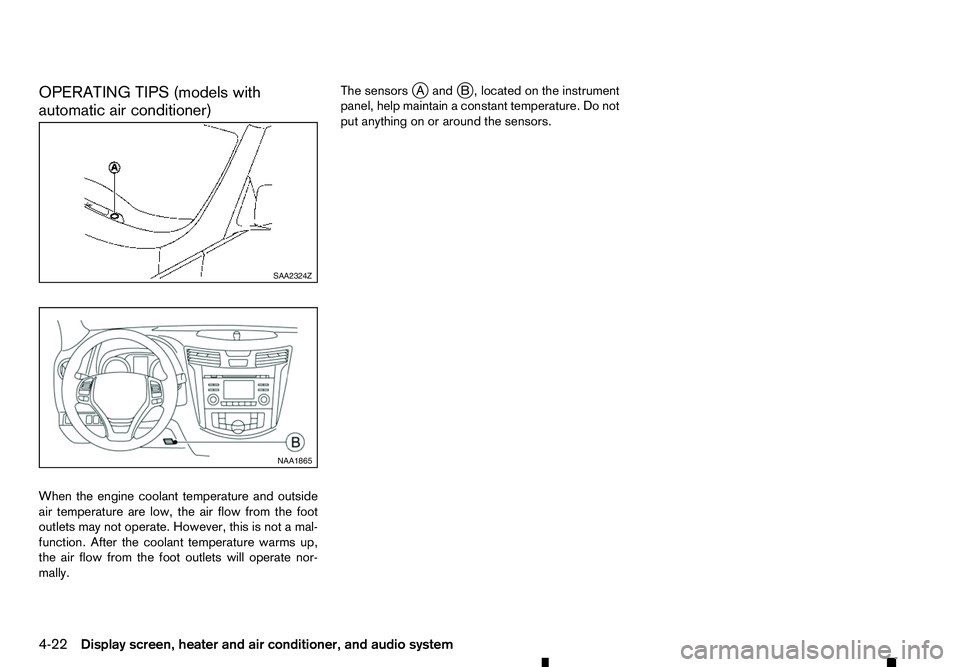
mally. The sensors
jAa ndjB, located on the instrument
panel, help maintain aconstant temperature. Do not
put anything on or around the sensors. SAA2324Z
NAA1865
4-22 Display screen, heater and air conditioner, and audio system
Page 167 of 340
ANTENNA
Roof
antenna
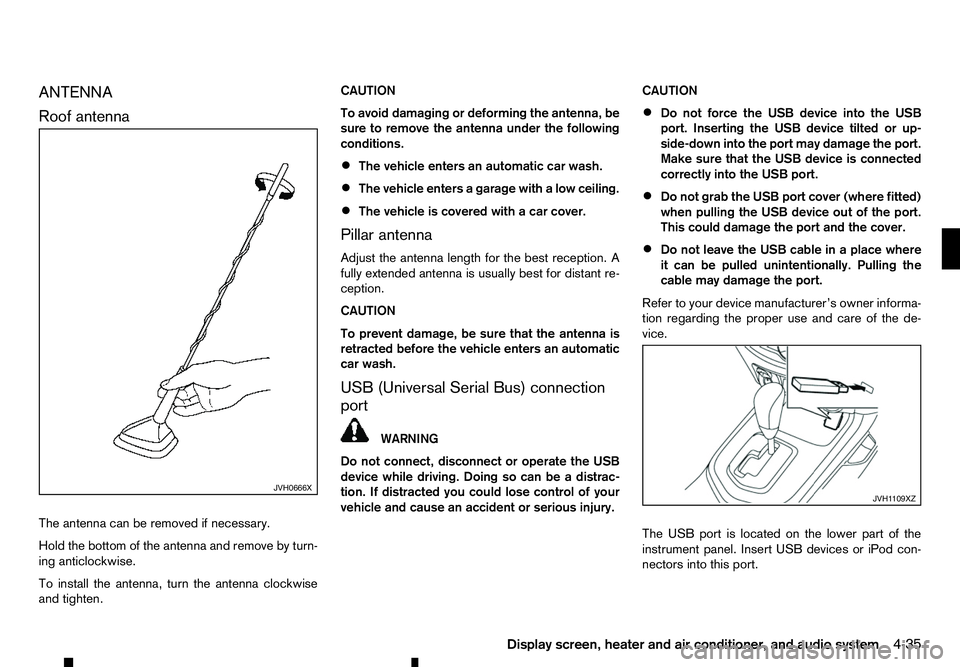
The antenna can be removed if necessary.
Hold the bottom of the antenna and remove by turn-
ing anticlockwise.
To install the antenna, turn the antenna clockwise
and tighten. CAUTION
To avoid damaging or deforming the antenna, be
sure to remove the antenna under the following
conditions.
• The vehicle enters an automatic car wash.
• The vehicle enters
agarage with alow ceiling.
• The vehicle is covered with
acar cover.
Pillar antenna
Adjust the antenna length for the best reception. A
fully extended antenna is usually best for distant re-
ception.
CAUTION
To prevent damage, be sure that the antenna is
retracted before the vehicle enters an automatic
car wash.
USB (Universal Serial Bus) connection
port WARNING
Do not connect, disconnect or operate the USB
device while driving. Doing so can be adistrac-
tion. If distracted you could lose control of your
vehicle and cause an accident or serious injury. CAUTION
• Do not force the USB device into the USB
port. Inserting the USB device tilted or up-
side-down into the port may damage the port.
Make sure that the USB device is connected
correctly into the USB port.
• Do not grab the USB port cover (where fitted)
when pulling the USB device out of the port.
This could damage the port and the cover.
• Do not leave the USB cable in
aplace where
it can be pulled unintentionally. Pulling the
cable may damage the port.
Refer to your device manufacturer’s owner informa-
tion regarding the proper use and care of the de-
vice.
The USB port is located on the lower part of the
instrument panel. Insert USB devices or iPod con-
nectors into this port. JVH0666X
JVH1 109XZ
Display screen, heater and air conditioner, and audio system 4-35
Page 168 of 340
AUX (Auxiliary) INPUT JACK
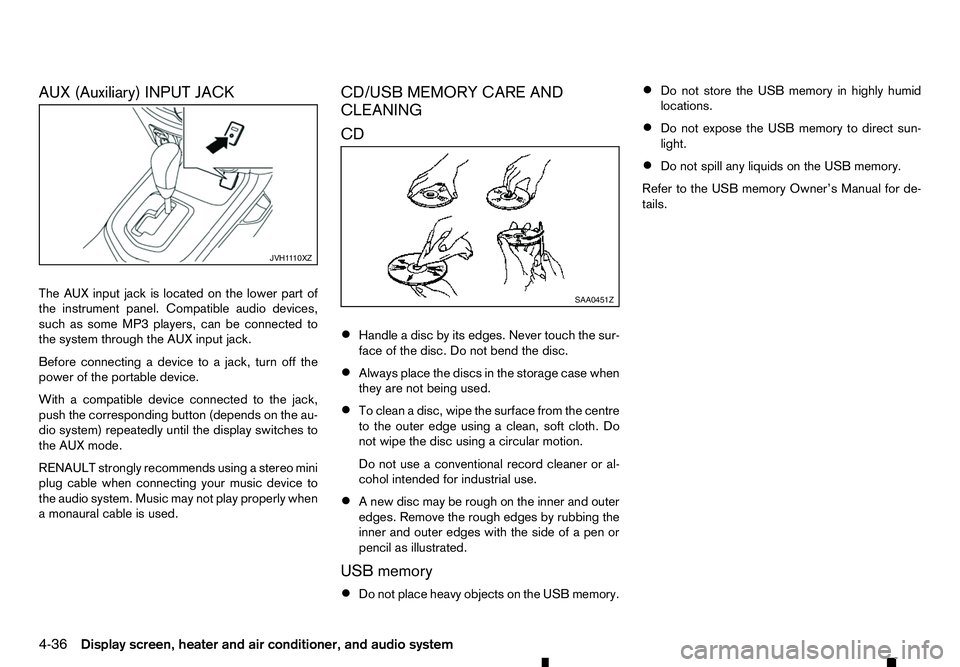
The AUX input jack is located on the lower part of
the instrument panel. Compatible audio devices,
such as some MP3 players, can be connected to
the system through the AUX input jack. Before connecting adevice to ajack, turn off the
power of the portable device.
With acompatible device connected to the jack,
push the corresponding button (depends on the au-
dio system) repeatedly until the display switches to
the AUX mode.
RENAULT strongly recommends using astereo mini
plug cable when connecting your music device to
the audio system. Music may not play properly when
am onaural cable is used. CD/USB MEMORY CARE AND
CLEANING
CD
•
Handle
adisc by its edges. Never touch the sur-
face of the disc. Do not bend the disc.
• Always place the discs in the storage case when
they are not being used.
• To clean
adisc, wipe the surface from the centre
to the outer edge using aclean, soft cloth. Do
not wipe the disc using acircular motion.
Do not use aconventional record cleaner or al-
cohol intended for industrial use.
• An
ew disc may be rough on the inner and outer
edges. Remove the rough edges by rubbing the
inner and outer edges with the side of apen or
pencil as illustrated.
USB memory
• Do not place heavy objects on the USB memory. •
Do not store the USB memory in highly humid
locations.
• Do not expose the USB memory to direct sun-
light.
• Do not spill any liquids on the USB memory.
Refer to the USB memory Owner’s Manual for de-
tails. JVH1
110XZ SAA0451Z
4-36 Display screen, heater and air conditioner, and audio system
Page 187 of 340
General notes for USB use:
Refer to your device manufacturer’s owner informa-
tion regarding the proper use and care of the de-
vice.
The audio system operates when the ignition switch
is placed in the ONorACC position.
The USB port is located on the lower part of the
instrument panel. See “USB (Universal Serial Bus)
connection port” earlier in this section. Connect a
USB memory device into the connection port. The
USB memory device will be activated automatically.
USB main operation:
If another audio source is playing and aUSB memory
device is inserted, push the AUX button until the
screen on the display changes to the USB memory
mode.
If the system has been turned off while the USB
memory device was playing, push the Power/VOL-
UME dial to restart the USB memory device.
Touch the name of asong on the screen to begin
playing that song.
USB screen operation:
While files on aUSB memory device are playing,
the play pattern can be altered so that songs are
repeated or played randomly. Mix:
Touching the [Mix] key on the screen while aUSB
memory device is playing will alternate the random
play pattern as follows:
(Normal) →Random Folder →Random All →(Nor-
mal)
Repeat:
Touching the [Repeat] key on the screen while a
USB memory device is playing will alternate the re-
peat play pattern as follows:
(Normal) →Repeat Track →Repeat Folder →(Nor-
mal)
Browse:
Touch [Browse] key to display USB interface. Se-
lect the songs you wish to play by touching the item
on the screen. Seek/Track buttons:
Push the Seek/Track (rewind) button while an audio
file on the USB memory device is playing to return
to the beginning of the current track. Push the but-
ton several times to skip backward several tracks.
Push the Seek/Track (fast forward) button while an
audio file on the USB memory device is playing to
advance one track. Push the button several times to
skip forward several tracks. if the last track on the
USB memory device is skipped, the first track of the
next folder is played. iPod player operation
Connecting iPod:
Connect the iPod to the USB connection port using
the USB cable that came with your iPod.
The USB port is located on the lower part of the
instrument panel. See “USB (Universal Serial Bus)
connection port” earlier in this section.
If your iPod supports charging via
aUSB connec-
tion, its battery will be charged while connected to
the vehicle with the ignition switch placed in the ON
or ACC position.
Compatibility:
The following models are compatible:
• iPod 5th Generation (firmware version 1.2.3 or
later)
• iPod Classic (firmware version 1.1.1 or later)
• iPod Touch (firmware version 2.0.0 or later)*
• iPod nano
-1st generation (firmware version
1.3.1 or later)
• iPod nano
-2nd generation (firmware version
1.1.3 or later)
• iPod nano
-3rd generation (firmware version
1.1.3 or later)
• iPod nano
-4th generation (firmware version
1.0.4 or later)
• iPod nano
-5th generation (firmware version
1.0.1 or later)
Display screen, heater and air conditioner, and audio system 4-55
Page 189 of 340
increased speed while reversing or fast forwarding.
When the button is released, the track returns to
normal play speed.
Bluetooth® audio player operation
If you have acompatible Bluetooth® audio device
that is capable of playing audio files, the device can be connected to the vehicle’s audio system so that
the audio files on the device play through the vehi-
cle’s speakers
Bluetooth® trademark:
m Bluetooth®
is
at rademark
owned by Bluetooth SIG, Inc.
and licensed to Robert Bosch
GmbH.
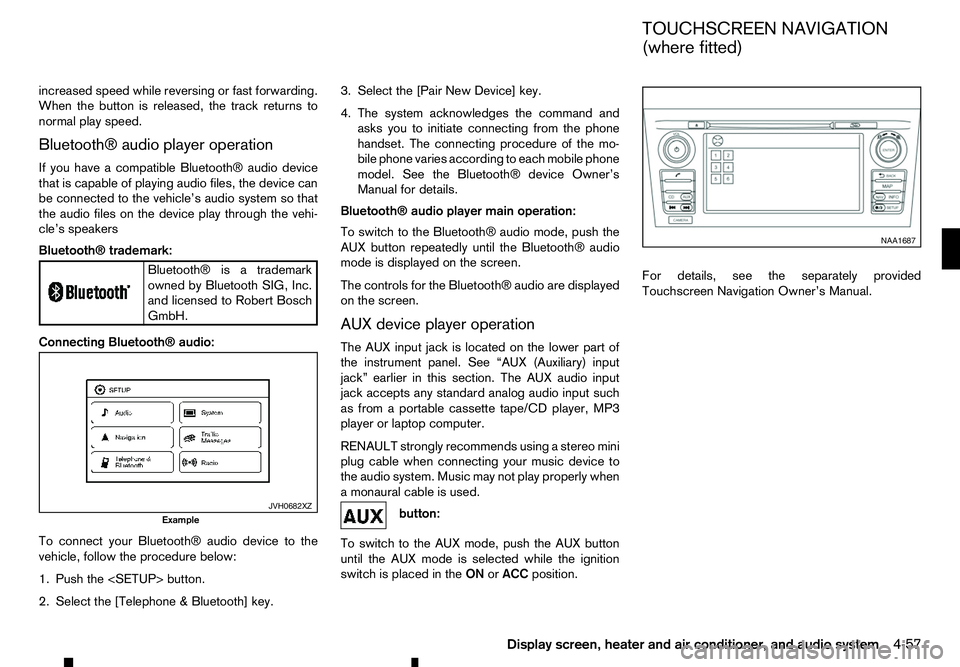
Connecting Bluetooth® audio:
To connect your Bluetooth® audio device to the
vehicle, follow the procedure below:
1. Push the
2. Select the [Telephone &Bluetooth] key. 3. Select the [Pair New Device] key.
4. The system acknowledges the command and
asks you to initiate connecting from the phone
handset. The connecting procedure of the mo-
bile phone varies according to each mobile phone
model. See the Bluetooth® device Owner’s
Manual for details.
Bluetooth® audio player main operation:
To switch to the Bluetooth® audio mode, push the
AUX button repeatedly until the Bluetooth® audio
mode is displayed on the screen.
The controls for the Bluetooth® audio are displayed on the screen.
AUX device player operation
The AUX input jack is located on the lower part of
the instrument panel. See “AUX (Auxiliary) input
jack” earlier in this section. The AUX audio input
jack accepts any standard analog audio input such
as from aportable cassette tape/CD player, MP3
player or laptop computer.
RENAULT strongly recommends using astereo mini
plug cable when connecting your music device to
the audio system. Music may not play properly when
am onaural cable is used. button:
To switch to the AUX mode, push the AUX button
until the AUX mode is selected while the ignition
switch is placed in the ONorACC position. For details, see the separately provided
Touchscreen Navigation Owner’s Manual.
JVH0682XZ
Example NAA1687
TOUCHSCREEN NAVIGATION
(where fitted)
Display screen, heater and air conditioner, and audio system 4-57
Page 218 of 340
range, it is possible for anyone, even someone who
does not carry the Remote Control Key, to push the
ignition switch to start the engine.
• The cargo bed area is not included in the operat-
ing range of the engine start function.
• If the Remote Control Key is placed on the in-
strument panel, inside the glove box, door pocket
or the corner of the interior compartment, the
Remote Control Key may not function.
• If the Remote Control Key is placed near the
door or window outside the vehicle, the Remote
Control Key may function.
AUTOMATIC TRANSMISSION (AT)
The ignition lock is designed so that the ignition
switch cannot be switched to the “LOCK” position
until the shift lever is moved to the P(Park) position.
When pushing the ignition switch to the “OFF” posi-
tion, make sure the shift lever is in the P(Park) posi-
tion.
When the ignition switch cannot be switched to the
“LOCK” position:
1. [Shift to Park] warning appears on the vehicle
information display and achime sounds.
2. Move the shift lever to the P(Park) position.
3. If the ignition switch is in the “ACC” position, [PUSH] warning appears on the vehicle informa-
tion display.
4. Push the ignition switch. The ignition switch is switched to the “OFF” position. 5. Open the door. The ignition switch turns to the
“LOCK” position.
For warnings and indicators on the vehicle informa-
tion display, see “Indicators for operation” in the
“2. Instruments and controls” section.
If the ignition switch is switched to the “LOCK”
position, the shift lever cannot be moved from the P
(Park) position. The shift lever can be moved if the
ignition switch is in the “ON” position with the foot-
brake pedal depressed.
STEERING LOCK
The ignition switch is equipped with an anti-theft
steering lock device.
To lock steering wheel
1. Place the ignition switch in the “OFF” position where the ignition switch position indicator will
not illuminate.
2. Open or close the door. The ignition switch turns to the “LOCK” position.
3. Turn the steering wheel 1/6 of aturn to the right
or left from the straight up position.
To unlock steering wheel
Push the ignition switch, and the steering wheel will
be automatically unlocked.
CAUTION
• If the battery of the vehicle is discharged, the
push-button ignition switch cannot be
switched from the “LOCK” position. •
If the steering lock release malfunction indi-
cator (where fitted) appears in the vehicle in-
formation display, push the ignition switch
again while rotating the steering wheel slightly
to the right and left. (See “Vehicle information
display” in the “2. Instruments and controls”
section.)
IGNITION SWITCH POSITIONS WARNING
Never place the ignition switch in the “OFF” posi-
tion while driving. The steering wheel may lock
and cause the driver to lose control of the ve-
hicle, resulting in serious vehicle damage or per-
sonal injury.
CAUTION
• Do not leave the vehicle for extended periods
of time when the ignition switch is in the “ON”
position and the engine is not running. This
can discharge the battery.
• Use electrical accessories with the engine
running to avoid discharging the vehicle bat-
tery. If you must use accessories while the
engine is not running, do not use them for
extended periods of time and do not use mul-
tiple electrical accessories at the same time.
5-16 Starting and driving
Page 236 of 340
•
When driving on extremely inclined surfaces
such as higher banked corners, the ESP sys-
tem may not operate properly and the ESP
warning light may illuminate. Do not drive
on these types of roads.
• When driving on an unstable surface such as
at urntable, ferry, elevator or ramp, the ESP
warning light may illuminate. This is not a
malfunction. Restart the engine after driving
onto astable surface.
• If wheels or tyres other than the RENAULT
recommended ones are used, the ESP sys-
tem may not operate properly and the ESP
warning light may illuminate.
• The ESP system is not
asubstitute for winter
tyres or tyre chains on asnow covered road.
The Electronic Stability Programme (ESP) system
uses various sensors to monitor driver inputs and
vehicle motion. Under certain driving conditions, the
ESP system performs the following functions:
• Controls brake pressure to reduce wheel slip on
one slipping drive wheel so power is transferred
to
an on slipping drive wheel on the same axle.
• Controls brake pressure and engine output to
reduce drive wheel slip based on vehicle speed
(traction control function). •
Controls brake pressure at individual wheels and
engine output to help the driver maintain control
of the vehicle in the following conditions:
–u
ndersteer (vehicle tends to not follow the
steered path despite increased steering in-
put)
–o versteer (vehicle tends to spin due to cer-
tain road or driving conditions).
The ESP system can help the driver to maintain con-
trol of the vehicle, but it cannot prevent loss of ve-
hicle control in all driving situations.
When the ESP system operates, the ESP warning
light in the instrument panel flashes so note the
following:
• The road may be slippery or the system may
determine some action is required to help the
vehicle on the steered path.
• You may feel
apulsation in the brake pedal and
hear anoise or vibration from under the bonnet.
This is normal and indicates that the ESP system
is working properly.
• Adjust your speed and driving to the road condi-
tions.
If am alfunction occurs in the system, the ESP warn-
ing light illuminates in the instrument panel. The
ESP system automatically turns off.
The ESP OFF switch is used to turn off the ESP
system. The ESP off indicator light illuminates
to indicate the ESP system is off. When the ESP
OFF switch is used to turn off the system, the ESP system still operates to prevent one drive wheel from
slipping by transferring power to
anon slipping drive
wheel. The ESP warning light flashes if this
occurs. All other ESP functions are off and the ESP
warning light will not flash. The ESP system is
automatically reset to on when the ignition switch is
placed in the OFFposition then back to the ONposi-
tion.
When the <4LO> position is selected with the Four-
Wheel Drive (4WD) mode switch, the ESP system
is disabled and the ESP OFF indicator light illumi-
nates.
See “Warning lights, indicator lights and audible
reminders” in the “2. Instruments and controls” sec-
tion and “Four-Wheel Drive (4WD) (where fitted)”
earlier in this section.
The computer has abuilt-in diagnostic feature that
tests the system each time you start the engine and
move the vehicle forward or in reverse at aslow
speed. When the self-test occurs, you may hear a
“clunk” noise and/or feel apulsation in the brake
pedal. This is normal and is not an indication of a
malfunction.
5-34 Starting and driving
Page 249 of 340
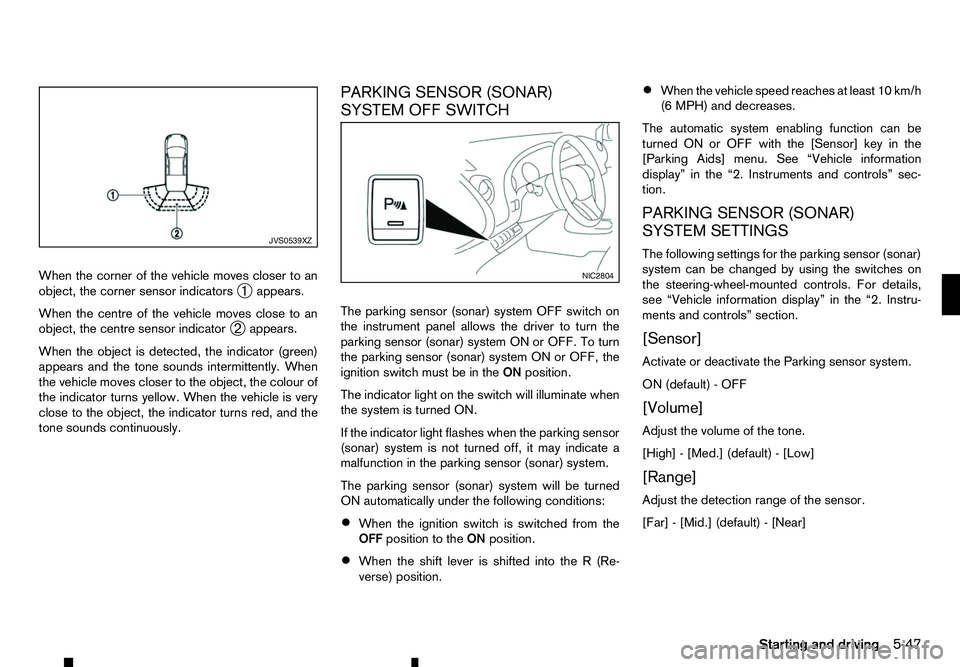
When the corner of the vehicle moves closer to an
object, the corner sensor indicators ➀appears.
When the centre of the vehicle moves close to an
object, the centre sensor indicator ➁appears.
When the object is detected, the indicator (green)
appears and the tone sounds intermittently. When
the vehicle moves closer to the object, the colour of
the indicator turns yellow. When the vehicle is very
close to the object, the indicator turns red, and the
tone sounds continuously. PARKING SENSOR (SONAR)
SYSTEM OFF SWITCH
The parking sensor (sonar) system OFF switch on
the instrument panel allows the driver to turn the
parking sensor (sonar) system ON or OFF. To turn
the parking sensor (sonar) system ON or OFF, the
ignition switch must be in the
ONposition.
The indicator light on the switch will illuminate when
the system is turned ON.
If the indicator light flashes when the parking sensor
(sonar) system is not turned off, it may indicate a
malfunction in the parking sensor (sonar) system.
The parking sensor (sonar) system will be turned
ON automatically under the following conditions:
• When the ignition switch is switched from the
OFF position to the ONposition.
• When the shift lever is shifted into the
R(Re-
verse) position. •
When the vehicle speed reaches at least 10 km/h
(6 MPH) and decreases.
The automatic system enabling function can be
turned ON or OFF with the [Sensor] key in the
[Parking Aids] menu. See “Vehicle information
display” in the “2. Instruments and controls” sec-
tion.
PARKING SENSOR (SONAR)
SYSTEM SETTINGS
The following settings for the parking sensor (sonar)
system can be changed by using the switches on
the steering-wheel-mounted controls. For details,
see “Vehicle information display” in the “2. Instru-
ments and controls” section.
[Sensor]
Activate or deactivate the Parking sensor system.
ON (default) -OFF
[Volume]
Adjust the volume of the tone.
[High] -[Med.] (default) -[Low]
[Range]
Adjust the detection range of the sensor.
[Far] -[Mid.] (default) -[Near] JVS0539XZ
NIC2804
Starting and driving
5-47
Page 252 of 340
While driving on
aslippery surface, be careful when
braking, accelerating or downshifting. Abrupt brak-
ing or acceleration could cause the wheels to skid
and result in an accident.
Wet brakes
When the vehicle is washed or driven through wa-
ter, the brakes may get wet. As aresult, your brak-
ing distance will be longer and the vehicle may pull
to one side during braking.
To dry the brakes, drive the vehicle at asafe speed
while lightly depressing the footbrake pedal to heat
up the brakes. Do this until the brakes return to nor-
mal. Avoid driving the vehicle at high speeds until
the brakes function correctly.
Parking brake running-in
Break in the parking brake shoes whenever the
stopping effect of the parking brake is weakened or
whenever the parking brake shoes and/or drums/
rotors are replaced, in order to assure the best brak-
ing performance.
This procedure is described in the vehicle service
manual and can be performed by an approved dealer
or qualified workshop.
ANTI-LOCK BRAKING SYSTEM (ABS) WARNING
The Anti-lock Braking System (ABS) is
asophis-
ticated device, but it cannot prevent accidents
resulting from careless or dangerous driving
techniques. It can help maintain vehicle control during braking on slippery surfaces. Remember
that stopping distances on slippery surfaces will
be longer than on normal surfaces even with ABS.
Stopping distances may also be longer on rough,
gravel or snow covered roads, or if you are using
tyre chains. Always maintain
asafe distance from
the vehicle in front of you. Ultimately, the driver
is responsible for safety.
Tyre type and condition may also affect braking
effectiveness.
• When replacing tyres, install the specified size
of tyres on all four wheels.
• When installing
aspare tyre, make sure that it
is the proper size and type as specified on the
tyre placard. (See “Vehicle identification” in
the “9. Technical information” section.)
• For detailed information, see “Tyres and
wheels” in the “9. Technical information” sec-
tion.
The Anti-lock Braking System (ABS) controls the
brakes so the wheels do not lock during hard brak-
ing or when braking on slippery surfaces. The sys-
tem detects the rotation speed at each wheel and
varies the brake fluid pressure to prevent each wheel
from locking and sliding. By preventing each wheel
from locking, the system helps the driver maintain
steering control and helps to minimise swerving and
spinning on slippery surfaces. Using system
Depress the brake pedal and hold it down. Depress
the brake pedal with firm steady pressure, but do
not pump the brakes. The ABS will operate to pre-
vent the wheels from locking up. Steer the vehicle to
avoid obstacles. WARNING
Do not pump the brake pedal. Doing so may re-
sult in increased stopping distances.
Self-test feature
The ABS includes electronic sensors, electric
pumps, hydraulic solenoids and acomputer. The
computer has abuilt-in diagnostic feature that tests
the system each time you start the engine and move
the vehicle at alow speed in forward or reverse.
When the self-test occurs, you may hear a“clunk”
noise and/or feel apulsation in the brake pedal. This
is normal and does not indicate amalfunction. If the
computer senses amalfunction, it switches the ABS
off and illuminates the ABS warning light on the
instrument panel. The brake system then operates
normally, but without anti-lock assistance. If the ABS
warning light illuminates during the self-test or while
driving, have the vehicle checked by an approved
dealer or qualified workshop.
Normal operation
The ABS operates at speeds above 5to10km/h (3
to 6M PH). The speed varies according to road con-
ditions.
5-50 Starting and driving
Page 326 of 340
Fog lights
–F ront—Location ............................................................ 0-3
–F ront—O peration ........................................................ 2-33
–R ear—O peration ......................................................... 2-33
–R eplacement ................................................................. 8-23
Four-wheel drive ................................................................. 5-26
–4 WD warning light ......................................................... 5-31
–O peration ...................................................................... 5-30
Freeing trapped vehicle ....................................................... 6-15
Fuel
–C apacity ........................................................................V
.. 9-2
–F iller lid ........................................................................V
. 3-18
–G auge ........................................................................V
..... 2-2
–I nformation ...................................................................... 9-2
Fuses ........................................................................V
.......... 8-18
–E ngine compartment ...................................................... 8-18
–E xtended storage .......................................................... 8-20
–P assenger compartment ................................................ 8-19
G Gauges
–M
eters and gauges .......................................................... 2-2
–O dometer ........................................................................V
2-2
–S peedometer .................................................................. 2-2
Glass
–C leaning ........................................................................V
.. 7-4
Glove box ........................................................................V
.... 2-39
HHands-Free Phone System ......................................... 4-59, 4-65
Hazard indicator flasher switch .............................................. 6-2
Hazard indicator operation
–R emote keyless entry ..................................................... 3-15 Head restraints ...................................................................... 1-6
–A
djustment ............................................................... 1-7, 1-8
–I nstallation ....................................................................... 1-7
–R emoval ........................................................................V
.. 1-7
Headlights
–C leaner ........................................................................V
. 2-35
–R eplacement (bulb) ....................................................... 8-21
Heated seats
–O peration ........................................................................V
1-5
Hill descent control system .................................................. 5-38
–S witch ........................................................................V
... 5-38
Hill Start Assist system ........................................................ 5-39
I Ignition
–I
gnition switch (Models without Remote Control Key
system) ........................................................................V
. 5-14
–I gnition switch positions (With Remote Control Key
system) ........................................................................V
. 5-16
–I gnition switch positions (Without Remote Control Key
system) ........................................................................V
. 5-14
–P ush-button ignition switch ............................................ 5-15
Indicator lights ..................................................................... 2-12
Injured persons ................................................................... 1-11
Instrument panel
–O verview ........................................................................V
. 0-8
Integrated key fob
–B attery replacement ...................................................... 8-13
Interior
–C leaning ........................................................................V
.. 7-3
–L ights —Information ..................................................... 8-22
–L ights —Operation ....................................................... 2-43
iPod player operation ........................................................... 4-45
ISOFIX
–A nchor locations ............................................................ 1-20
10-4 Index