rear view mirror RENAULT ALASKAN 2017 User Guide
[x] Cancel search | Manufacturer: RENAULT, Model Year: 2017, Model line: ALASKAN, Model: RENAULT ALASKAN 2017Pages: 340, PDF Size: 6.93 MB
Page 148 of 340
•
Yellow line
➁:a
pprox. 1m(3f t)
• Green line
➂:a
pprox. 2m(7f t)
• Green line
➃:a
pprox. 3m(10 ft)
Vehicle width guide lines and static predictive
course lines ➄:
Indicate the vehicle width when reversing.
Dynamic predictive course lines ➅:
The dynamic predictive course lines will be dis-
played on the monitor when the steering wheel is
turned. The course lines will move depending on
how much the steering wheel is turned and will not
be displayed while the steering wheel is in the neu-
tral position.
The front view will not be displayed when the vehicle
speed is above 10 km/h (6 MPH). WARNING
• The distance between objects viewed in the
rear view differs from actual distance because
aw ide-angle lens is used. Objects in the rear
view will appear visually opposite than when
viewed in the rear view and outside mirrors.
• On
asnow-covered or slippery road, there
may be adifference between the predictive
course line and the actual course line.
• The displayed lines on the rear view will ap-
pear slightly off to the right because the rear
view camera is not installed in the rear centre
of the vehicle. NOTE
When the monitor displays the front view and the
steering wheel turns about 90 degrees or less
from the neutral position, both the right and left
predictive course lines
➅are displayed. When
the steering wheel turns about 90 degrees or
more, aline is displayed only on the opposite
side of the turn.
Bird’s-eye view WARNING
• Objects in the bird’s-eye view will appear fur-
ther than the actual distance because the
bird’s-eye view is apseudo view that is pro-
cessed by combining the views from the cam-
eras on the outside mirrors, the front and the
rear of the vehicle.
• Tall objects, such as
akerb or avehicle, may
be misaligned or not displayed at the seam of
the views.
• Objects that are above the camera cannot be
displayed.
• The view for the bird’s-eye view may be mis-
aligned when the camera position alters.
• Al
ine on the ground may be misaligned and is
not seen as being straight at the seam of the
views. The misalignment will increase as the
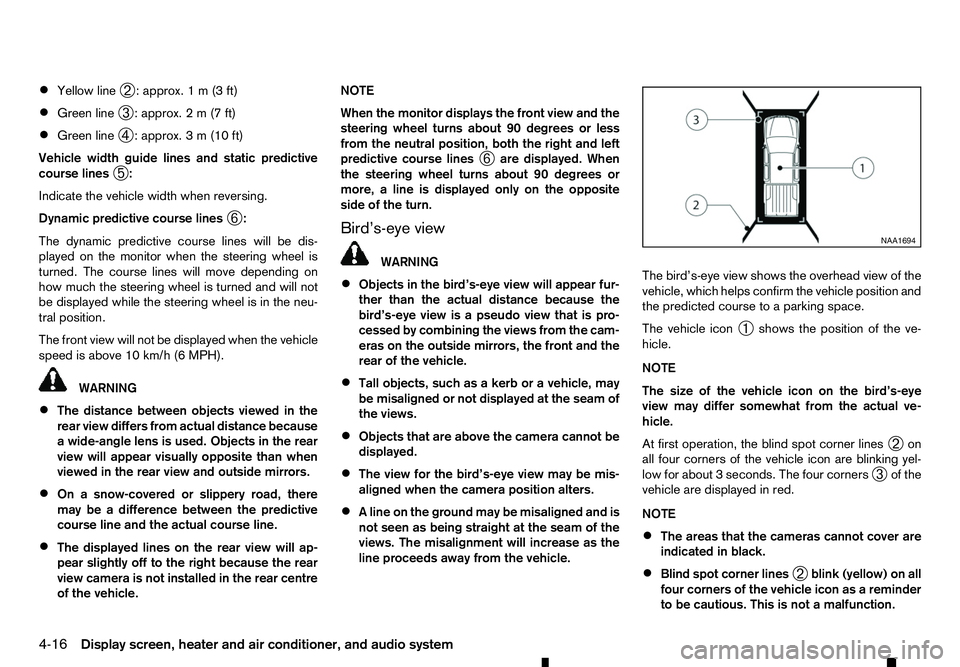
line proceeds away from the vehicle. The bird’s-eye view shows the overhead view of the
vehicle, which helps confirm the vehicle position and
the predicted course to
aparking space.
The vehicle icon ➀shows the position of the ve-
hicle.
NOTE
The size of the vehicle icon on the bird’s-eye
view may differ somewhat from the actual ve-
hicle.
At first operation, the blind spot corner lines ➁on
all four corners of the vehicle icon are blinking yel-
low for about 3seconds. The four corners
➂of the
vehicle are displayed in red.
NOTE
• The areas that the cameras cannot cover are
indicated in black.
• Blind spot corner lines
➁blink (yellow) on all
four corners of the vehicle icon as areminder
to be cautious. This is not amalfunction. NAA1694
4-16 Display screen, heater and air conditioner, and audio system
Page 149 of 340
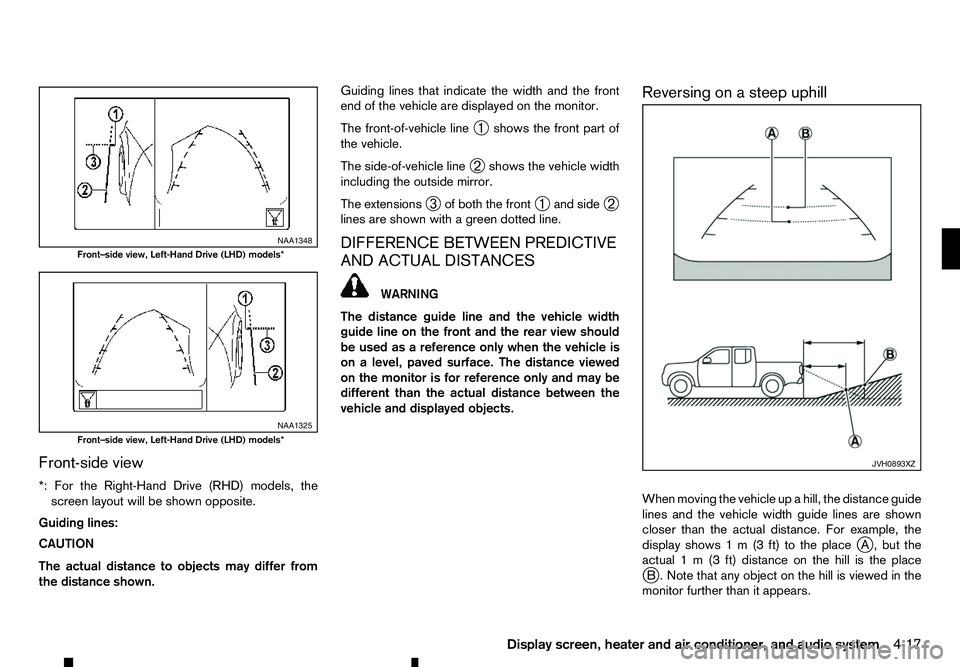
Front-side view
*: For the Right-Hand Drive (RHD) models, the screen layout will be shown opposite.
Guiding lines:
CAUTION
The actual distance to objects may differ from
the distance shown. Guiding lines that indicate the width and the front
end of the vehicle are displayed on the monitor.
The front-of-vehicle line
➀shows the front part of
the vehicle.
The side-of-vehicle line ➁shows the vehicle width
including the outside mirror.
The extensions ➂of both the front
➀and side
➁
lines are shown with agreen dotted line.
DIFFERENCE BETWEEN PREDICTIVE
AND ACTUAL DISTANCES WARNING
The distance guide line and the vehicle width
guide line on the front and the rear view should
be used as areference only when the vehicle is
on alevel, paved surface. The distance viewed
on the monitor is for reference only and may be
different than the actual distance between the
vehicle and displayed objects. Reversing on
asteep uphill
When moving the vehicle up ahill, the distance guide
lines and the vehicle width guide lines are shown
closer than the actual distance. For example, the
display shows 1m(3ft) to the place j
A, but the
actual 1m(3f t) distance on the hill is the place
j B. Note that any object on the hill is viewed in the
monitor further than it appears. NAA1348
Front–side view, Left-Hand Drive (LHD) models*
NAA1325
Front–side view, Left-Hand Drive (LHD) models*
JVH0893XZ
Display screen, heater and air conditioner, and audio system
4-17
Page 204 of 340
During the first 1,600 km (1,000 miles), follow these
recommendations to obtain maximum engine per-
formance and ensure the future reliability and
economy of your new vehicle. Failure to follow these
recommendations may result in shortened engine
life and reduced engine performance.
• Do not drive at
aconstant speed, either fast or
slow, for long periods of time.
• Do not run the engine over 4,000 rpm.
• Do not accelerate at full throttle in any gear.
• Do not start quickly.
• Do not brake hard as much as possible.
• Do not tow
atrailer for at least the first 800 km
(500 miles). WARNING
The driving characteristics of your vehicle will
change remarkably by any additional load and its
distribution, as well as by adding optional equip-
ment (trailer coupling, roof rail, etc.). Your driv-
ing style and speed must be adjusted according
to the circumstances. Especially when carrying
heavy loads, your speed must be reduced ad-
equately.
• Make sure the area around the vehicle is clear.
• Check fluid levels such as engine oil, coolant,
brake (and clutch) fluid, window washer fluid as
frequently as possible, at least whenever you
refuel.
• Visually inspect tyres for their appearance and
condition. Measure and check the tyre pressure
for proper inflation.
• Check that all windows and lights are clean.
• Adjust the seat and head restraint positions.
• Adjust the inside and outside rearview mirror po-
sitions.
• Fasten your seat belt and ask all passengers to
do the same.
• Check that all doors are closed.
• Check the operation of the warning lights when
the ignition switch is placed in the “ON” position. •
Maintenance items in the “8. Maintenance and
do-it-yourself” section should be checked peri-
odically.
RUNNING-IN SCHEDULE
BEFORE STARTING ENGINE
5-2 Starting and driving