warning lights RENAULT ALASKAN 2017 User Guide
[x] Cancel search | Manufacturer: RENAULT, Model Year: 2017, Model line: ALASKAN, Model: RENAULT ALASKAN 2017Pages: 340, PDF Size: 6.93 MB
Page 92 of 340
WARNING
In freezing temperatures, the washer fluid may
freeze on the windscreen and obscure your vi-
sion. Warm the windscreen with the defogger be-
fore you wash the windscreen.
CAUTION
• Do not operate the washer continuously for
longer than 30 seconds.
• Do not operate the washer if the window
washer fluid reservoir is empty.
• If the wiper operation is interrupted by snow
or ice, the wiper may stop moving to protect
its motor. If this occurs, turn the wiper switch
to the OFF position and remove the snow or
ice on and around the wiper arms. In approxi-
mately
1minute, turn the switch on again to
operate the wiper.
WINDSCREEN WIPER AND WASHER
SWITCH The windscreen wiper and washer operate when
the ignition switch is in the
ONposition.
Wiper operation
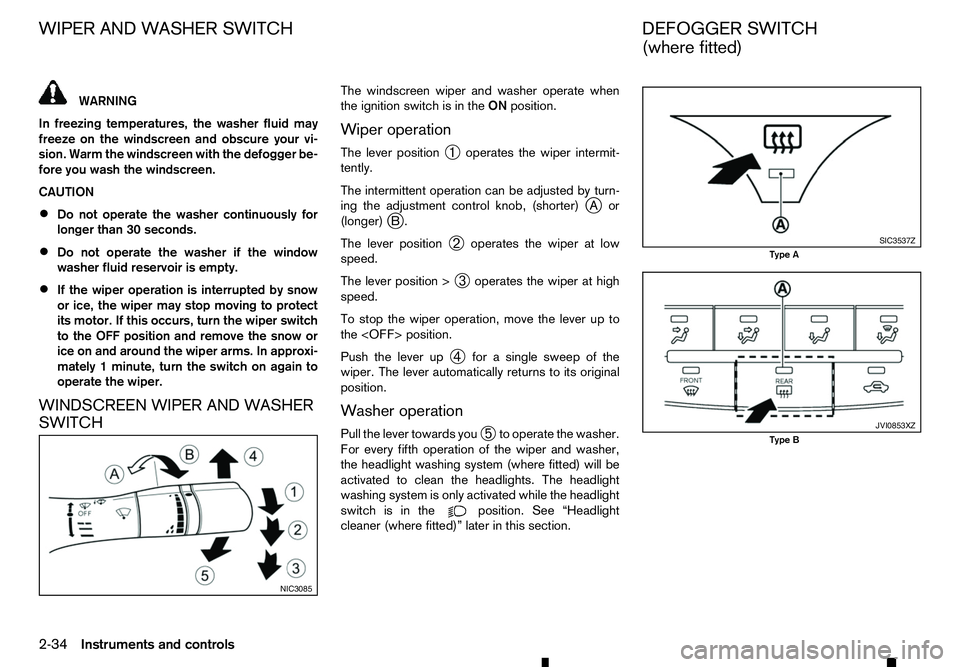
The lever position ➀operates the wiper intermit-
tently.
The intermittent operation can be adjusted by turn-
ing the adjustment control knob, (shorter) j
Aor
(longer) j
B.
The lever position ➁operates the wiper at low
speed.
The lever position > ➂operates the wiper at high
speed.
To stop the wiper operation, move the lever up to
the
Push the lever up ➃for
asingle sweep of the
wiper. The lever automatically returns to its original
position.
Washer operation
Pull the lever towards you ➄to operate the washer.
For every fifth operation of the wiper and washer,
the headlight washing system (where fitted) will be
activated to clean the headlights. The headlight
washing system is only activated while the headlight
switch is in the position. See “Headlight
cleaner (where fitted)” later in this section. NIC3085 SIC3537Z
Type A
JVI0853XZ
Type B
WIPER AND WASHER SWITCH
DEFOGGER SWITCH
(where fitted)
2-34 Instruments and controls
Page 97 of 340
•
This power outlet is not designed for use with
ac igarette lighter unit.
• Do not use accessories that exceed
acom-
bined power draw of 12 volt, 120W (10A)
• Do not use double adapters or more than one
electrical accessory.
• Use this power outlet with the engine running
to avoid discharging the vehicle battery.
• Avoid using when the air conditioner, head-
lights or rear window defogger is on (where
fitted).
• Push the plug in as far as it will go. If good
contact is not made, the plug may overheat or the internal temperature fuse may blow.
• Before inserting or disconnecting
aplug, be
sure that the electrical accessory being used
is turned OFF.
• When not in use, be sure to close the cap. Do
not allow water or any liquid to contact the
outlet. WARNING
• The storage compartments should not be
used while driving so that the full attention
may be given to vehicle operation.
• Keep the storage lids closed while driving to
help prevent injury in an accident or
asudden
stop.
GLOVE BOX
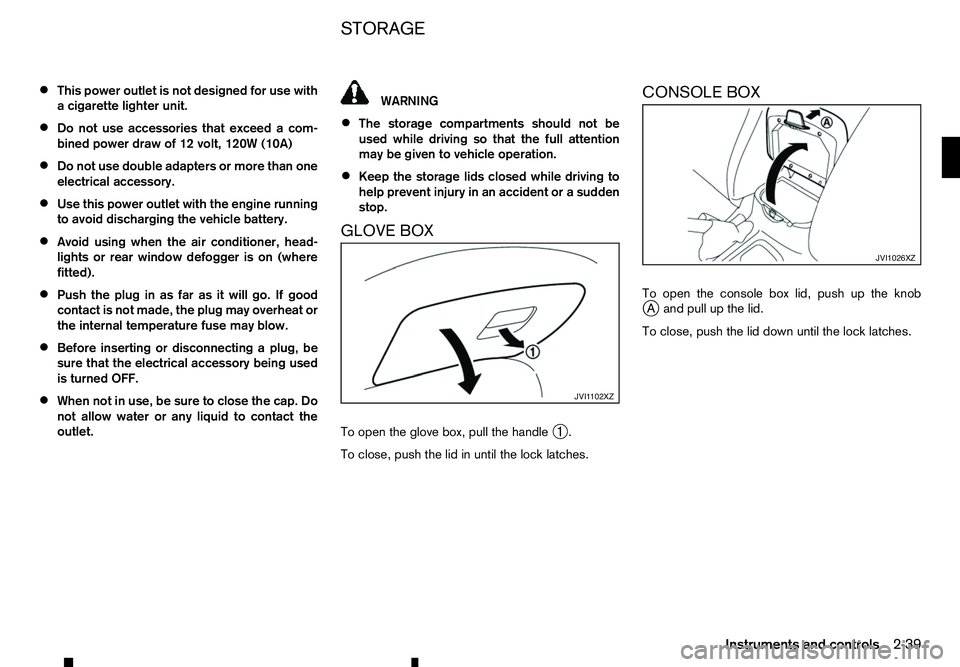
To open the glove box, pull the handle ➀.
To close, push the lid in until the lock latches. CONSOLE BOX
To open the console box lid, push up the knob
j
Aa nd pull up the lid.
To close, push the lid down until the lock latches. JVI1 102XZ JVI1026XZ
STORAGE
Instruments and controls
2-39
Page 204 of 340
During the first 1,600 km (1,000 miles), follow these
recommendations to obtain maximum engine per-
formance and ensure the future reliability and
economy of your new vehicle. Failure to follow these
recommendations may result in shortened engine
life and reduced engine performance.
• Do not drive at
aconstant speed, either fast or
slow, for long periods of time.
• Do not run the engine over 4,000 rpm.
• Do not accelerate at full throttle in any gear.
• Do not start quickly.
• Do not brake hard as much as possible.
• Do not tow
atrailer for at least the first 800 km
(500 miles). WARNING
The driving characteristics of your vehicle will
change remarkably by any additional load and its
distribution, as well as by adding optional equip-
ment (trailer coupling, roof rail, etc.). Your driv-
ing style and speed must be adjusted according
to the circumstances. Especially when carrying
heavy loads, your speed must be reduced ad-
equately.
• Make sure the area around the vehicle is clear.
• Check fluid levels such as engine oil, coolant,
brake (and clutch) fluid, window washer fluid as
frequently as possible, at least whenever you
refuel.
• Visually inspect tyres for their appearance and
condition. Measure and check the tyre pressure
for proper inflation.
• Check that all windows and lights are clean.
• Adjust the seat and head restraint positions.
• Adjust the inside and outside rearview mirror po-
sitions.
• Fasten your seat belt and ask all passengers to
do the same.
• Check that all doors are closed.
• Check the operation of the warning lights when
the ignition switch is placed in the “ON” position. •
Maintenance items in the “8. Maintenance and
do-it-yourself” section should be checked peri-
odically.
RUNNING-IN SCHEDULE
BEFORE STARTING ENGINE
5-2 Starting and driving
Page 217 of 340
Unlocking the steering wheel
1) Insert the key into the ignition switch.
2) Gently turn the ignition switch while rotating the steering wheel left and right. PRECAUTIONS ON PUSH-BUTTON
IGNITION SWITCH OPERATION WARNING
Do not operate the push-button ignition switch
while driving the vehicle except in an emergency.
(The engine will stop when the ignition switch is
pushed 3consecutive times or the ignition switch
is pushed and held for more than 2seconds.)
The steering wheel may lock and could cause
the driver to lose control of the vehicle. This could
result in serious vehicle damage or personal in-
jury.
REMOTE CONTROL KEY SYSTEM
The Remote Control Key system can operate the
ignition switch without taking the key out from your
pocket or bag. The operating environment and/or
conditions may affect the Remote Control Key sys-
tem operation.
Some indicators and warnings for operation are dis-
played in the vehicle information display and/or in
the meter. (See “Warning lights, indicator lights and
audible reminders” in the “2. Instruments and
controls” section and “Vehicle information display”
in the “2. Instruments and controls” section.)
CAUTION
• Be sure to carry the Remote Control Key with
you when operating the vehicle.
• Never leave the Remote Control Key inside
the vehicle when you leave the vehicle. •
If the vehicle battery is discharged, the igni-
tion switch cannot be switched from the
“LOCK” position, and if the steering lock is
engaged, the steering wheel cannot be
moved. Charge the battery as soon as pos-
sible. (See “Remote Control Key battery
replacement” in the “8. Maintenance and
do-it-yourself” section.)
Operating range
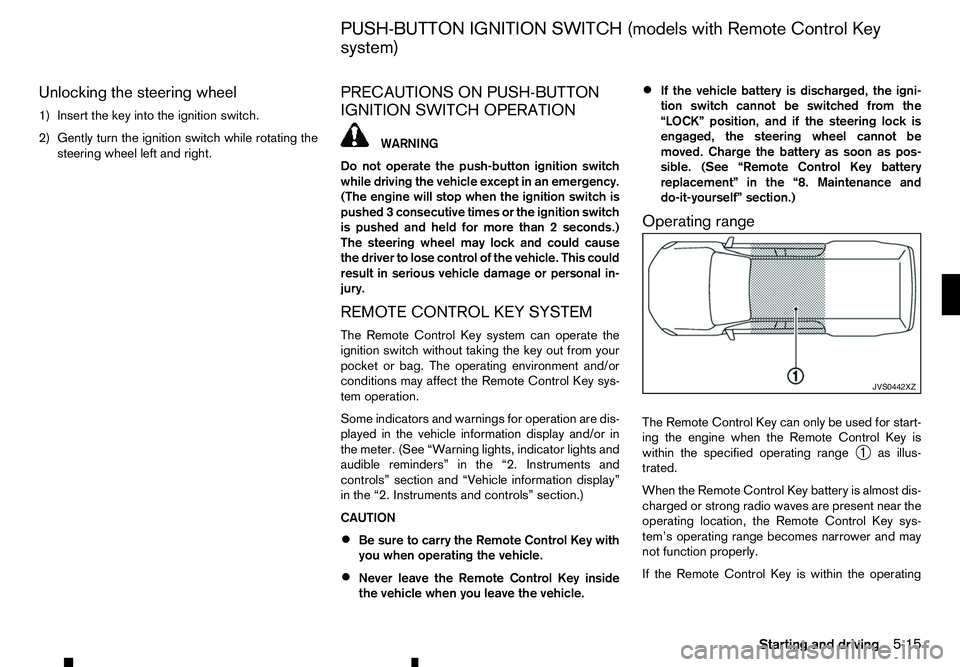
The Remote Control Key can only be used for start-
ing the engine when the Remote Control Key is
within the specified operating range ➀as illus-
trated.
When the Remote Control Key battery is almost dis-
charged or strong radio waves are present near the
operating location, the Remote Control Key sys-
tem’s operating range becomes narrower and may
not function properly.
If the Remote Control Key is within the operating JVS0442XZ
PUSH-BUTTON IGNITION SWITCH (models with Remote Control Key
system)
Starting and driving5-15
Page 222 of 340
•
PARKING THE VEHICLE
-Depress the foot-
brake pedal and, once the vehicle stops, move
the shift lever into the P(Park) position, pull
the parking brake lever and release the foot-
brake pedal.
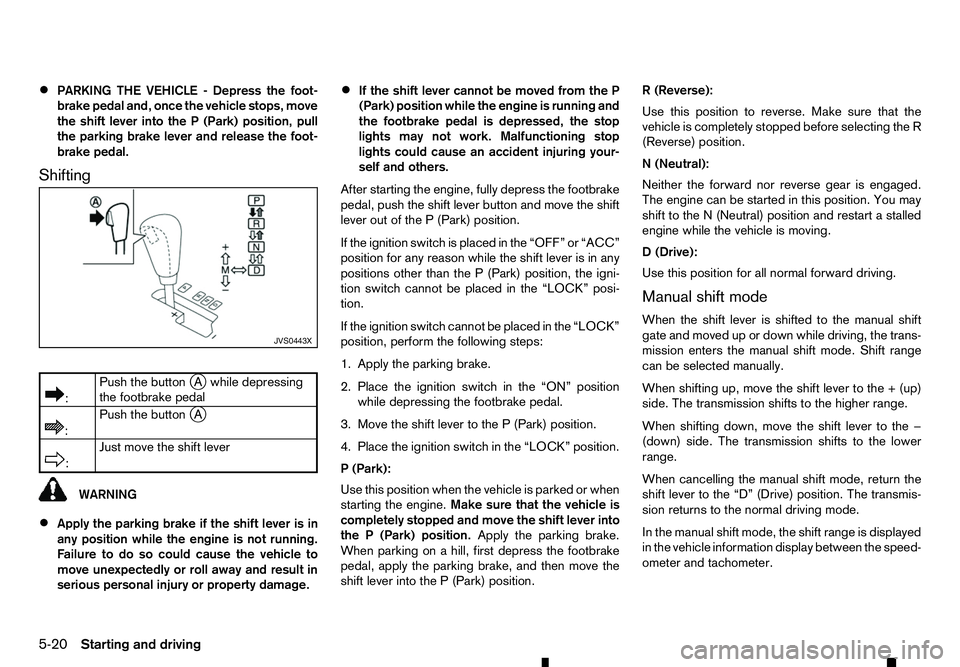
Shifting
m :
Push
the button
jAw hile depressing
the footbrake pedal
m :
Push
the button
jA
m :
Just
move the shift lever
WARNING
• Apply the parking brake if the shift lever is in
any position while the engine is not running.
Failure to do so could cause the vehicle to
move unexpectedly or roll away and result in
serious personal injury or property damage. •
If the shift lever cannot be moved from the P
(Park) position while the engine is running and
the footbrake pedal is depressed, the stop
lights may not work. Malfunctioning stop
lights could cause an accident injuring your-
self and others.
After starting the engine, fully depress the footbrake
pedal, push the shift lever button and move the shift
lever out of the P(Park) position.
If the ignition switch is placed in the “OFF” or “ACC”
position for any reason while the shift lever is in any
positions other than the P(Park) position, the igni-
tion switch cannot be placed in the “LOCK” posi-
tion.
If the ignition switch cannot be placed in the “LOCK”
position, perform the following steps:
1. Apply the parking brake.
2. Place the ignition switch in the “ON” position
while depressing the footbrake pedal.
3. Move the shift lever to the P(Park) position.
4. Place the ignition switch in the “LOCK” position.
P( Park):
Use this position when the vehicle is parked or when
starting the engine. Make sure that the vehicle is
completely stopped and move the shift lever into
the P(Park) position. Apply the parking brake.
When parking on ahill, first depress the footbrake
pedal, apply the parking brake, and then move the
shift lever into the P(Park) position. R(
Reverse):
Use this position to reverse. Make sure that the
vehicle is completely stopped before selecting the R
(Reverse) position.
N( Neutral):
Neither the forward nor reverse gear is engaged.
The engine can be started in this position. You may
shift to the N(Neutral) position and restart astalled
engine while the vehicle is moving.
D( Drive):
Use this position for all normal forward driving.
Manual shift mode
When the shift lever is shifted to the manual shift
gate and moved up or down while driving, the trans-
mission enters the manual shift mode. Shift range
can be selected manually.
When shifting up, move the shift lever to the +(up)
side. The transmission shifts to the higher range.
When shifting down, move the shift lever to the −
(down) side. The transmission shifts to the lower
range.
When cancelling the manual shift mode, return the
shift lever to the “D” (Drive) position. The transmis-
sion returns to the normal driving mode.
In the manual shift mode, the shift range is displayed
in the vehicle information display between the speed-
ometer and tachometer. JVS0443X
5-20 Starting and driving
Page 224 of 340
its normal operating condition. If it does not re-
turn to its normal operating condition, have an
approved dealer or qualified workshop check the
transmission and repair it if necessary.
DRIVING WITH MANUAL
TRANSMISSION (MT) WARNING
• Do not downshift abruptly on slippery roads.
This may cause aloss of control.
• Do not over-rev the engine when shifting to a
lower gear. This may cause
aloss of vehicle
control or engine damage.
CAUTION
• Do not rest your foot on the clutch pedal while
driving. This may damage the clutch system.
• Fully depress the clutch pedal before shifting
to help prevent transmission damage.
• Stop the vehicle completely before shifting
into the
R(Reverse) position.
• When the vehicle is stopped for
aperiod of
time, for example, waiting at stoplights, shift
to the N(Neutral) position and release the
clutch pedal with the footbrake pedal
depressed. Starting vehicle
1. After starting the engine, depress the clutch
pedal to the floor and move the shift lever to the
1( 1st), 2(2nd) or R(Reverse) position.
RENAULT recommends to start the vehicle in
2nd gear on level, flat ground and in the unladen
condition.
2. Slowly depress the accelerator pedal, releasing the clutch pedal and parking brake at the same
time.
Shifting gear
To change gears, or when upshifting or downshift-
ing, fully depress the clutch pedal, shift into the ap-
propriate gear, then slowly and smoothly release the
clutch pedal.
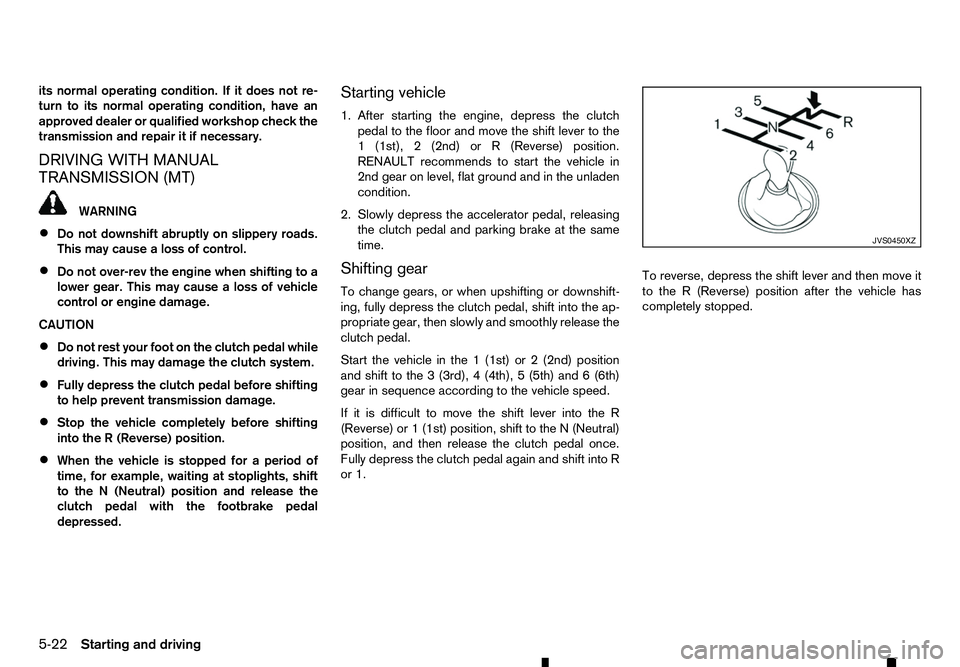
Start the vehicle in the 1(1st) or 2(2nd) position
and shift to the 3(3rd), 4(4th), 5(5th) and 6(6th)
gear in sequence according to the vehicle speed.
If it is difficult to move the shift lever into the R
(Reverse) or 1(1st) position, shift to the N(Neutral)
position, and then release the clutch pedal once.
Fully depress the clutch pedal again and shift into R
or 1. To reverse, depress the shift lever and then move it
to the
R(Reverse) position after the vehicle has
completely stopped. JVS0450XZ
5-22 Starting and driving
Page 230 of 340
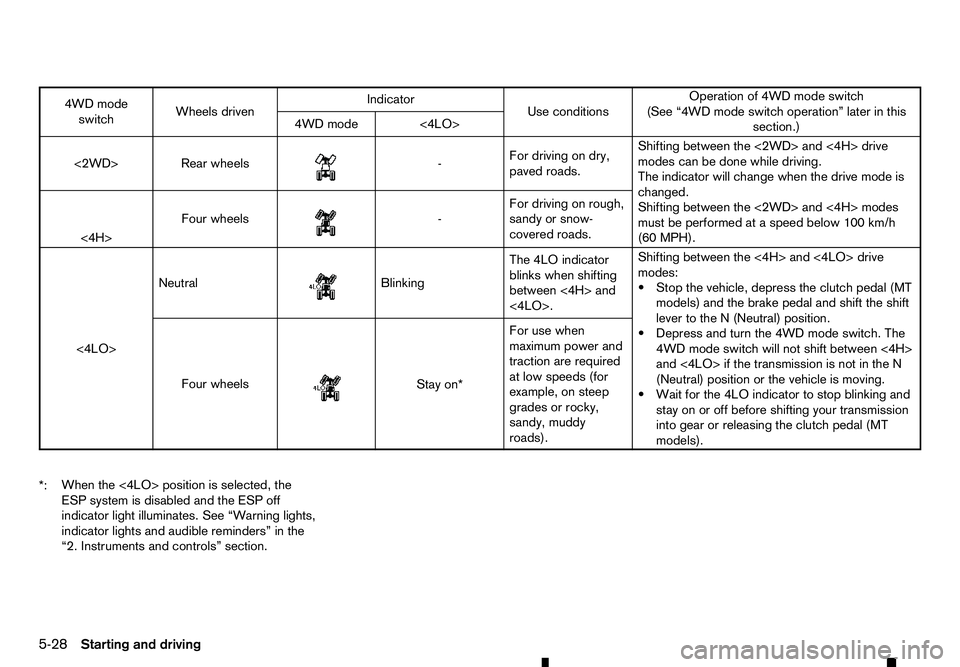
4WD mode
switch Wheels driven Indicator
Use conditions Operation of 4WD mode switch
(See “4WD mode switch operation” later in this section.)
4WD mode <4LO>
<2WD> Rear wheels
m -
For
driving on dry,
paved roads. Shifting between the <2WD> and <4H> drive
modes can be done while driving.
The indicator will change when the drive mode is
changed.
Shifting between the <2WD> and <4H> modes
must be performed at
aspeed below 100 km/h
(60 MPH).
<4H> Four wheels
m -
For
driving on rough,
sandy or snow-
covered roads.
<4LO> Neutral
m Blinking
The
4LO indicator
blinks when shifting
between <4H> and
<4LO>. Shifting between the <4H> and <4LO> drive
modes:
•S
top the vehicle, depress the clutch pedal (MT
models) and the brake pedal and shift the shift
lever to the N(Neutral) position.
•D epress and turn the 4WD mode switch. The
4WD mode switch will not shift between <4H>
and <4LO> if the transmission is not in the N
(Neutral) position or the vehicle is moving.
•W ait for the 4LO indicator to stop blinking and
stay on or off before shifting your transmission into gear or releasing the clutch pedal (MT
models).
Four wheels
m Stay
on*
For use when
maximum power and
traction are required
at low speeds (for
example, on steep
grades or rocky,
sandy, muddy
roads).
*: When the <4LO> position is selected, the
ESP system is disabled and the ESP off
indicator light illuminates. See “Warning lights,
indicator lights and audible reminders” in the
“2. Instruments and controls” section.
5-28 Starting and driving
Page 236 of 340
•
When driving on extremely inclined surfaces
such as higher banked corners, the ESP sys-
tem may not operate properly and the ESP
warning light may illuminate. Do not drive
on these types of roads.
• When driving on an unstable surface such as
at urntable, ferry, elevator or ramp, the ESP
warning light may illuminate. This is not a
malfunction. Restart the engine after driving
onto astable surface.
• If wheels or tyres other than the RENAULT
recommended ones are used, the ESP sys-
tem may not operate properly and the ESP
warning light may illuminate.
• The ESP system is not
asubstitute for winter
tyres or tyre chains on asnow covered road.
The Electronic Stability Programme (ESP) system
uses various sensors to monitor driver inputs and
vehicle motion. Under certain driving conditions, the
ESP system performs the following functions:
• Controls brake pressure to reduce wheel slip on
one slipping drive wheel so power is transferred
to
an on slipping drive wheel on the same axle.
• Controls brake pressure and engine output to
reduce drive wheel slip based on vehicle speed
(traction control function). •
Controls brake pressure at individual wheels and
engine output to help the driver maintain control
of the vehicle in the following conditions:
–u
ndersteer (vehicle tends to not follow the
steered path despite increased steering in-
put)
–o versteer (vehicle tends to spin due to cer-
tain road or driving conditions).
The ESP system can help the driver to maintain con-
trol of the vehicle, but it cannot prevent loss of ve-
hicle control in all driving situations.
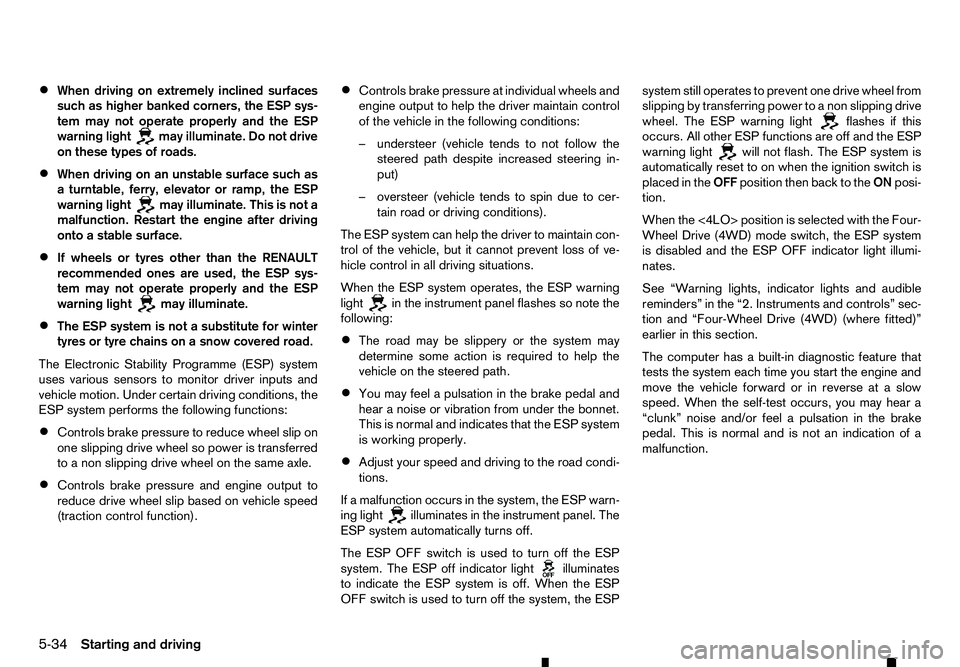
When the ESP system operates, the ESP warning
light in the instrument panel flashes so note the
following:
• The road may be slippery or the system may
determine some action is required to help the
vehicle on the steered path.
• You may feel
apulsation in the brake pedal and
hear anoise or vibration from under the bonnet.
This is normal and indicates that the ESP system
is working properly.
• Adjust your speed and driving to the road condi-
tions.
If am alfunction occurs in the system, the ESP warn-
ing light illuminates in the instrument panel. The
ESP system automatically turns off.
The ESP OFF switch is used to turn off the ESP
system. The ESP off indicator light illuminates
to indicate the ESP system is off. When the ESP
OFF switch is used to turn off the system, the ESP system still operates to prevent one drive wheel from
slipping by transferring power to
anon slipping drive
wheel. The ESP warning light flashes if this
occurs. All other ESP functions are off and the ESP
warning light will not flash. The ESP system is
automatically reset to on when the ignition switch is
placed in the OFFposition then back to the ONposi-
tion.
When the <4LO> position is selected with the Four-
Wheel Drive (4WD) mode switch, the ESP system
is disabled and the ESP OFF indicator light illumi-
nates.
See “Warning lights, indicator lights and audible
reminders” in the “2. Instruments and controls” sec-
tion and “Four-Wheel Drive (4WD) (where fitted)”
earlier in this section.
The computer has abuilt-in diagnostic feature that
tests the system each time you start the engine and
move the vehicle forward or in reverse at aslow
speed. When the self-test occurs, you may hear a
“clunk” noise and/or feel apulsation in the brake
pedal. This is normal and is not an indication of a
malfunction.
5-34 Starting and driving
Page 238 of 340
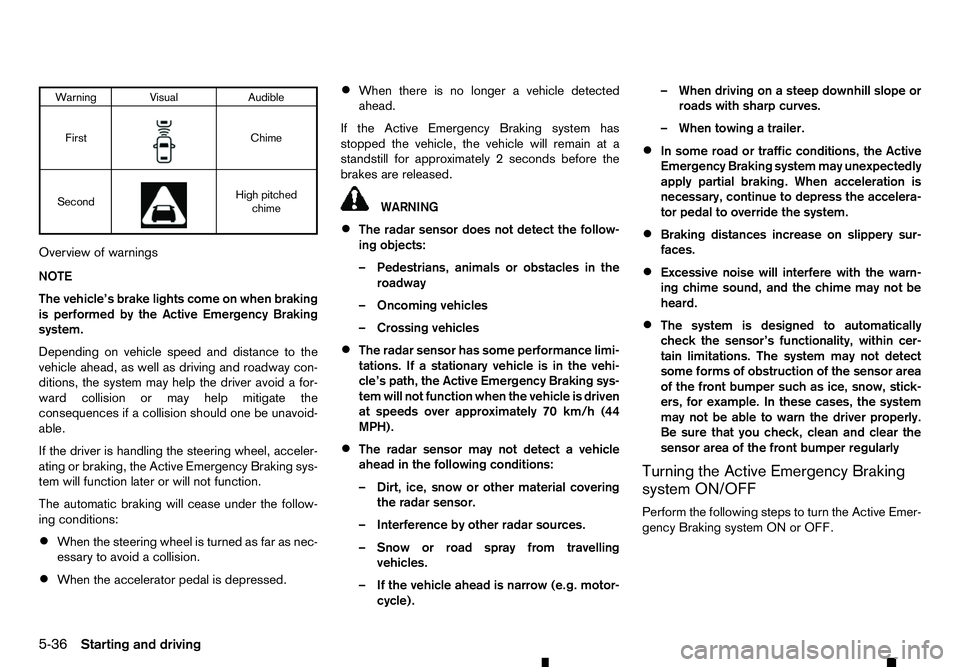
Warning Visual
Audible
First m Chime
Second m High pitched
chime
Overview of warnings
NOTE
The vehicle’s brake lights come on when braking
is performed by the Active Emergency Braking
system.
Depending on vehicle speed and distance to the
vehicle ahead, as well as driving and roadway con-
ditions, the system may help the driver avoid afor-
ward collision or may help mitigate the
consequences if acollision should one be unavoid-
able.
If the driver is handling the steering wheel, acceler-
ating or braking, the Active Emergency Braking sys-
tem will function later or will not function.
The automatic braking will cease under the follow-
ing conditions:
• When the steering wheel is turned as far as nec-
essary to avoid acollision.
• When the accelerator pedal is depressed. •
When there is no longer
avehicle detected
ahead.
If the Active Emergency Braking system has
stopped the vehicle, the vehicle will remain at a
standstill for approximately 2seconds before the
brakes are released. WARNING
• The radar sensor does not detect the follow-
ing objects:
–P edestrians, animals or obstacles in the
roadway
–O ncoming vehicles
–C rossing vehicles
• The radar sensor has some performance limi-
tations. If
astationary vehicle is in the vehi-
cle’s path, the Active Emergency Braking sys-
tem will not function when the vehicle is driven
at speeds over approximately 70 km/h (44
MPH).
• The radar sensor may not detect
avehicle
ahead in the following conditions:
–D irt, ice, snow or other material covering
the radar sensor.
–I nterference by other radar sources.
–S now or road spray from travelling
vehicles.
–I fthe vehicle ahead is narrow (e.g. motor-
cycle). –W
hen driving on asteep downhill slope or
roads with sharp curves.
–W hen towing atrailer.
• In some road or traffic conditions, the Active
Emergency Braking system may unexpectedly
apply partial braking. When acceleration is
necessary, continue to depress the accelera-
tor pedal to override the system.
• Braking distances increase on slippery sur-
faces.
• Excessive noise will interfere with the warn-
ing chime sound, and the chime may not be
heard.
• The system is designed to automatically
check the sensor’s functionality, within cer-
tain limitations. The system may not detect
some forms of obstruction of the sensor area
of the front bumper such as ice, snow, stick-
ers, for example. In these cases, the system
may not be able to warn the driver properly.
Be sure that you check, clean and clear the
sensor area of the front bumper regularly
Turning the Active Emergency Braking
system ON/OFF
Perform the following steps to turn the Active Emer-
gency Braking system ON or OFF.
5-36 Starting and driving
Page 240 of 340
WARNING
• Never rely solely on the hill descent control
system to control vehicle speed when driving
on steep downhill grades. Always drive care-
fully when using the hill descent control sys-
tem and decelerate the vehicle speed by de- pressing the brake pedal if necessary. Be
especially careful when driving on frozen,
muddy or extremely steep downhill roads.
Failure to control vehicle speed may result in
al oss of control of the vehicle and possible
serious injury or death.
• The hill descent control system may not con-
trol the vehicle speed on
ahill under all load
or road conditions. Always be prepared to de-
press the brake pedal to control vehicle
speed. Failure to do so may result in acolli-
sion or serious personal injury.
When the hill descent control system is activated, it
automatically applies smooth brakes to control
speed on asteep and slippery descent or off the
road without brake or accelerator operation. The hill
descent control system helps maintain vehicle speed
when driving under 25 km/h (16 MPH) on asteep
descent that engine braking alone in the <4H> or
<4LO> mode cannot control the speed.
NOTE
When the hill descent control system operates
continuously for along time, the temperature of
the Electronic Stability Programme (ESP) system
actuator may increase and the hill descent con- trol system may be temporarily disabled. The hill
descent control system on indicator light will turn
off. The hill descent control system will resume
operating automatically and the indicator light
will illuminate again when the temperature of the
ESP system actuator is reduced. If the indicator
light does not illuminate, turn off the system.
HILL DESCENT CONTROL SWITCH
When additional braking is required on steep down-
hill roads, activate the hill descent control system by
pushing the hill descent control switch on.
When the hill descent control system is activated,
the hill descent control system on indicator light will
illuminate. (See “Warning lights, indicator lights and audible reminders” in the “2. Instruments and
controls” section.) Also, the stop/tail lights illumi-
nate while the hill descent control system is applying
the brakes to control the vehicle speed. To activate the hill descent control system, satisfy all
of the following conditions:
• Shift the transmission to the forward (only 1st
gear for MT model) or reverse gear.
• Shift the 4WD mode switch to the <4H> or
<4LO> position and drive the vehicle at
aspeed
under 25 km/h (16 MPH).
See “Warning lights, indicator lights and audible
reminders” in the “2. Instruments and controls”
section.
• Push the hill descent control switch to the “ON”
position.
If the accelerator or brake pedal is depressed while
the hill descent control system is on, the system will
stop operating temporarily. As soon as the accel- erator or brake pedal is released, the hill descent
control system begins to function again if the hill
descent control operating conditions are fulfilled.
The hill descent control system on indicator light
blinks if the hill descent control switch is on and all
conditions for system activation are not met, or if the
system becomes disengaged for any reason.
To turn off the hill descent control system, push the
hill descent control switch to the “OFF” position. JVS0402XZ
HILL DESCENT CONTROL
SYSTEM (where fitted)
5-38 Starting and driving