parking brake RENAULT ALASKAN 2017 Owner's Manual
[x] Cancel search | Manufacturer: RENAULT, Model Year: 2017, Model line: ALASKAN, Model: RENAULT ALASKAN 2017Pages: 340, PDF Size: 6.93 MB
Page 246 of 340
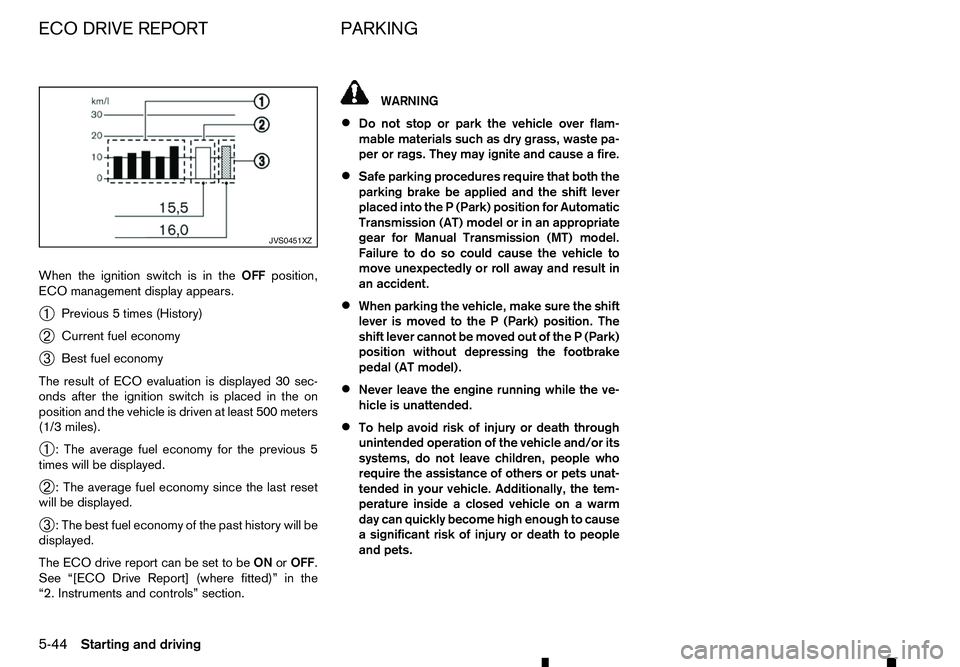
When the ignition switch is in the
OFFposition,
ECO management display appears.
➀ Previous
5times (History)
➁ Current fuel economy
➂ Best fuel economy
The result of ECO evaluation is displayed 30 sec-
onds after the ignition switch is placed in the on
position and the vehicle is driven at least 500 meters
(1/3 miles).
➀ :T
he average fuel economy for the previous 5
times will be displayed.
➁ :T
he average fuel economy since the last reset
will be displayed.
➂ :T
he best fuel economy of the past history will be
displayed.
The ECO drive report can be set to be ONorOFF.
See “[ECO Drive Report] (where fitted)” in the
“2. Instruments and controls” section. WARNING
• Do not stop or park the vehicle over flam-
mable materials such as dry grass, waste pa-
per or rags. They may ignite and cause afire.
• Safe parking procedures require that both the
parking brake be applied and the shift lever
placed into the
P(Park) position for Automatic
Transmission (AT) model or in an appropriate
gear for Manual Transmission (MT) model.
Failure to do so could cause the vehicle to
move unexpectedly or roll away and result in
an accident.
• When parking the vehicle, make sure the shift
lever is moved to the
P(Park) position. The
shift lever cannot be moved out of the P(Park)
position without depressing the footbrake
pedal (AT model).
• Never leave the engine running while the ve-
hicle is unattended.
• To help avoid risk of injury or death through
unintended operation of the vehicle and/or its systems, do not leave children, people who
require the assistance of others or pets unat-
tended in your vehicle. Additionally, the tem-
perature inside aclosed vehicle on awarm
day can quickly become high enough to cause
as ignificant risk of injury or death to people
and pets. JVS0451XZ
ECO DRIVE REPORT
PARKING
5-44 Starting and driving
Page 247 of 340
1. Firmly apply the parking brake.
2. Automatic Transmission (AT) model: Move the shift lever to the P(Park) position.
Manual Transmission (MT) model: Move the shift
lever to the R(Reverse) position. When parking
on an uphill grade, move the shift lever to the 1
(1st) position. 3. To help prevent the vehicle from moving into traf-
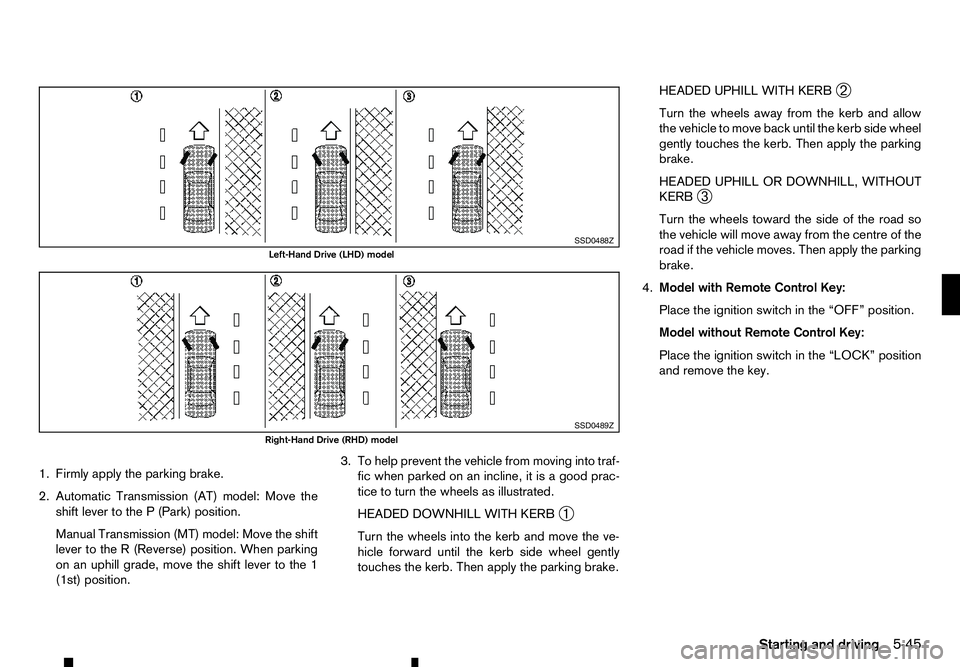
fic when parked on an incline, it is agood prac-
tice to turn the wheels as illustrated.
HEADED DOWNHILL WITH KERB ➀
Turn the wheels into the kerb and move the ve-
hicle forward until the kerb side wheel gently
touches the kerb. Then apply the parking brake. HEADED UPHILL WITH KERB
➁
Turn the wheels away from the kerb and allow
the vehicle to move back until the kerb side wheel
gently touches the kerb. Then apply the parking
brake.
HEADED UPHILL OR DOWNHILL, WITHOUT
KERB ➂
Turn the wheels toward the side of the road so
the vehicle will move away from the centre of the
road if the vehicle moves. Then apply the parking
brake.
4. Model with Remote Control Key:
Place the ignition switch in the “OFF” position.
Model without Remote Control Key:
Place the ignition switch in the “LOCK” position
and remove the key. SSD0488Z
Left-Hand Drive (LHD) model
SSD0489Z
Right-Hand Drive (RHD) model
Starting and driving5-45
Page 248 of 340
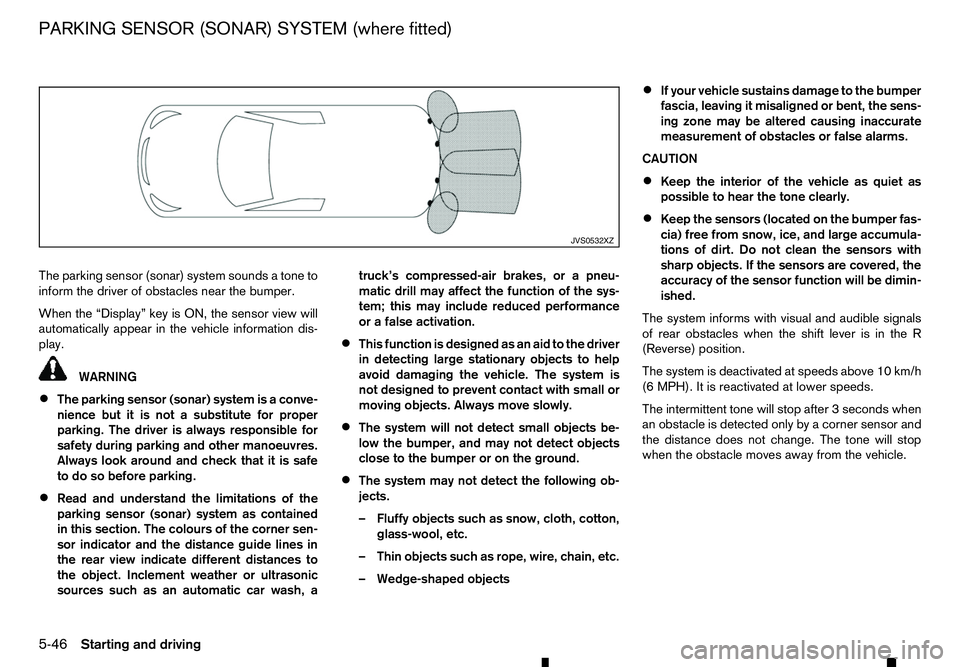
The parking sensor (sonar) system sounds
atone to
inform the driver of obstacles near the bumper.
When the “Display” key is ON, the sensor view will
automatically appear in the vehicle information dis-
play. WARNING
• The parking sensor (sonar) system is
aconve-
nience but it is not asubstitute for proper
parking. The driver is always responsible for
safety during parking and other manoeuvres.
Always look around and check that it is safe
to do so before parking.
• Read and understand the limitations of the
parking sensor (sonar) system as contained
in this section. The colours of the corner sen-
sor indicator and the distance guide lines in
the rear view indicate different distances to
the object. Inclement weather or ultrasonic
sources such as an automatic car wash, a truck’s compressed-air brakes, or
apneu-
matic drill may affect the function of the sys-
tem; this may include reduced performance
or afalse activation.
• This function is designed as an aid to the driver
in detecting large stationary objects to help
avoid damaging the vehicle. The system is
not designed to prevent contact with small or
moving objects. Always move slowly.
• The system will not detect small objects be-
low the bumper, and may not detect objects
close to the bumper or on the ground.
• The system may not detect the following ob-
jects.
–F
luffy objects such as snow, cloth, cotton,
glass-wool, etc.
–T hin objects such as rope, wire, chain, etc.
–W edge-shaped objects •
If your vehicle sustains damage to the bumper
fascia, leaving it misaligned or bent, the sens-
ing zone may be altered causing inaccurate
measurement of obstacles or false alarms.
CAUTION
• Keep the interior of the vehicle as quiet as
possible to hear the tone clearly.
• Keep the sensors (located on the bumper fas-
cia) free from snow, ice, and large accumula-
tions of dirt. Do not clean the sensors with
sharp objects. If the sensors are covered, the
accuracy of the sensor function will be dimin-
ished.
The system informs with visual and audible signals
of rear obstacles when the shift lever is in the R
(Reverse) position.
The system is deactivated at speeds above 10 km/h
(6 MPH). It is reactivated at lower speeds.
The intermittent tone will stop after 3seconds when
an obstacle is detected only by acorner sensor and
the distance does not change. The tone will stop
when the obstacle moves away from the vehicle. JVS0532XZ
PARKING SENSOR (SONAR) SYSTEM (where fitted)
5-46 Starting and driving
Page 250 of 340
Your new vehicle was designed to be used primarily
to carry passengers and luggage.
Towing atrailer will place additional loads on your
vehicle’s engine, drive train, steering, braking and
other systems. The towing of atrailer will exagger-
ate other conditions such as sway caused by cross-
winds, rough road surfaces or passing trucks.
Your driving style and speed must be adjusted ac-
cording to the circumstances. Before towing a
trailer, see an approved dealer or qualified work-
shop for an explanation about the proper use of tow-
ing equipment.
OPERATING PRECAUTIONS
• Avoid towing
atrailer during the running-in pe-
riod.
• Before driving, make sure that the lighting sys-
tem of the trailer works properly.
• Observe the legal maximum speeds for trailer
operation.
• Avoid abrupt starts, accelerations and stops.
• Avoid sharp turns and lane changes.
• Always drive your vehicle at
amoderate speed.
• Follow the trailer manufacturer’s instructions.
• Choose proper coupling devices (trailer hitch,
safety chain, roof carrier, etc.) for your vehicle
and trailer. These devices are available from an
approved dealer or qualified workshop where
you can also obtain more detailed information
about trailer towing. •
Never allow the total trailer load (trailer weight
plus its cargo weight) to exceed the maximum
set for the vehicle and the coupling device. See
an approved dealer or qualified workshop for
more information.
• The trailer must be loaded so that heavy goods
are placed over the axle. The maximum allowable
vertical load on the trailer hitch must not be ex-
ceeded.
• Have your vehicle serviced more often than at
the intervals specified in
aseparate maintenance
booklet.
• Trailer towing requires more fuel than under nor-
mal circumstances because of
aconsiderable
increase in traction power and resistance.
While towing atrailer, check the engine coolant
temperature indicator to prevent the vehicle from
overheating.
TYRE PRESSURE
When towing atrailer, inflate the vehicle tyres to the
maximum recommended COLD tyre pressure (for
full loading) indicated on the tyre placard.
Do not tow atrailer when the vehicle is installed with
at emporary spare tyre or acompact spare tyre.
SAFETY CHAINS
Always use asuitable chain between the vehicle
and trailer. The chain should be crossed and should
be attached to the hitch, not to the vehicle bumper
or axle. Be sure to leave enough slack in the chain
to permit turning corners. TRAILER BRAKES
Ensure that trailer brakes are installed as required
by local regulations. Also check that all other trailer
equipment conforms to local regulations.
Always block the wheels on both the vehicle and
trailer when parking. Apply the hand brake on the
trailer where fitted. Parking on
asteep slope is not
recommended.
If parking on asteep slope is unavoidable, place the
shift lever in the P(Park) position (Automatic trans-
mission model), or in an appropriate position
(Manual transmission model), and turn the front
wheels towards the kerb.
TRAILER DETECTION (where fitted)
When towing atrailer with agenuine RENAULT tow
bar electrical kit and the turn signal switch is used,
the electrical system of the vehicle will detect the
additional electrical load of the trailer lighting. As a
result, the direction indicator tone will be different.
TRAILER TOWING
5-48
Starting and driving
Page 252 of 340
While driving on
aslippery surface, be careful when
braking, accelerating or downshifting. Abrupt brak-
ing or acceleration could cause the wheels to skid
and result in an accident.
Wet brakes
When the vehicle is washed or driven through wa-
ter, the brakes may get wet. As aresult, your brak-
ing distance will be longer and the vehicle may pull
to one side during braking.
To dry the brakes, drive the vehicle at asafe speed
while lightly depressing the footbrake pedal to heat
up the brakes. Do this until the brakes return to nor-
mal. Avoid driving the vehicle at high speeds until
the brakes function correctly.
Parking brake running-in
Break in the parking brake shoes whenever the
stopping effect of the parking brake is weakened or
whenever the parking brake shoes and/or drums/
rotors are replaced, in order to assure the best brak-
ing performance.
This procedure is described in the vehicle service
manual and can be performed by an approved dealer
or qualified workshop.
ANTI-LOCK BRAKING SYSTEM (ABS) WARNING
The Anti-lock Braking System (ABS) is
asophis-
ticated device, but it cannot prevent accidents
resulting from careless or dangerous driving
techniques. It can help maintain vehicle control during braking on slippery surfaces. Remember
that stopping distances on slippery surfaces will
be longer than on normal surfaces even with ABS.
Stopping distances may also be longer on rough,
gravel or snow covered roads, or if you are using
tyre chains. Always maintain
asafe distance from
the vehicle in front of you. Ultimately, the driver
is responsible for safety.
Tyre type and condition may also affect braking
effectiveness.
• When replacing tyres, install the specified size
of tyres on all four wheels.
• When installing
aspare tyre, make sure that it
is the proper size and type as specified on the
tyre placard. (See “Vehicle identification” in
the “9. Technical information” section.)
• For detailed information, see “Tyres and
wheels” in the “9. Technical information” sec-
tion.
The Anti-lock Braking System (ABS) controls the
brakes so the wheels do not lock during hard brak-
ing or when braking on slippery surfaces. The sys-
tem detects the rotation speed at each wheel and
varies the brake fluid pressure to prevent each wheel
from locking and sliding. By preventing each wheel
from locking, the system helps the driver maintain
steering control and helps to minimise swerving and
spinning on slippery surfaces. Using system
Depress the brake pedal and hold it down. Depress
the brake pedal with firm steady pressure, but do
not pump the brakes. The ABS will operate to pre-
vent the wheels from locking up. Steer the vehicle to
avoid obstacles. WARNING
Do not pump the brake pedal. Doing so may re-
sult in increased stopping distances.
Self-test feature
The ABS includes electronic sensors, electric
pumps, hydraulic solenoids and acomputer. The
computer has abuilt-in diagnostic feature that tests
the system each time you start the engine and move
the vehicle at alow speed in forward or reverse.
When the self-test occurs, you may hear a“clunk”
noise and/or feel apulsation in the brake pedal. This
is normal and does not indicate amalfunction. If the
computer senses amalfunction, it switches the ABS
off and illuminates the ABS warning light on the
instrument panel. The brake system then operates
normally, but without anti-lock assistance. If the ABS
warning light illuminates during the self-test or while
driving, have the vehicle checked by an approved
dealer or qualified workshop.
Normal operation
The ABS operates at speeds above 5to10km/h (3
to 6M PH). The speed varies according to road con-
ditions.
5-50 Starting and driving
Page 254 of 340
4. Snow chains may be used if desired. Make sure
they are the proper size for the tyres on your
vehicle and are installed according to the chain
manufacturer’s instructions. Use chain tension-
ers when recommended by the tyre chain manu-
facturer to ensure atight fit. Loose end links of
the tyre chains must be secured or removed to
prevent the possibility of whipping action dam-
age to the wings or underbody. In addition, drive
at ar educed speed, otherwise, your vehicle may
be damaged and/or vehicle handling and perfor-
mance may be adversely affected.
SPECIAL WINTER EQUIPMENT
It is recommended that the following items be car-
ried in the vehicle during the winter:
• As
craper and stiff-bristled brush to remove ice
and snow from the windows.
• As
turdy, flat board to be placed under the jack
to give it firm support.
• As
hovel to dig the vehicle out of snowdrifts.
PARKING BRAKE
When parking in the area where the outside tem-
perature is below 0°C (32°F), do not apply the park-
ing brake to prevent it from freezing. For safe park-
ing:
• Place the shift lever in the
P(Park) position (Au-
tomatic transmission model).
• Place the shift lever in the
1(1st) or R(Reverse)
gear (Manual transmission model). •
Securely block the wheels.
CORROSION PROTECTION
Chemicals used for road surface deicing are ex-
tremely corrosive and will accelerate corrosion and
the deterioration of underbody components such as
the exhaust system, fuel and brake lines, brake
cables, floor pan and wings.
In the winter, the underbody must be cleaned
periodically. For additional information, see
“Cleaning exterior” in the “7. Appearance and
care” section of this manual.
For additional protection against rust and corrosion,
which may be required in some areas, consult an
approved dealer or qualified workshop.
5-52 Starting and driving
Page 256 of 340
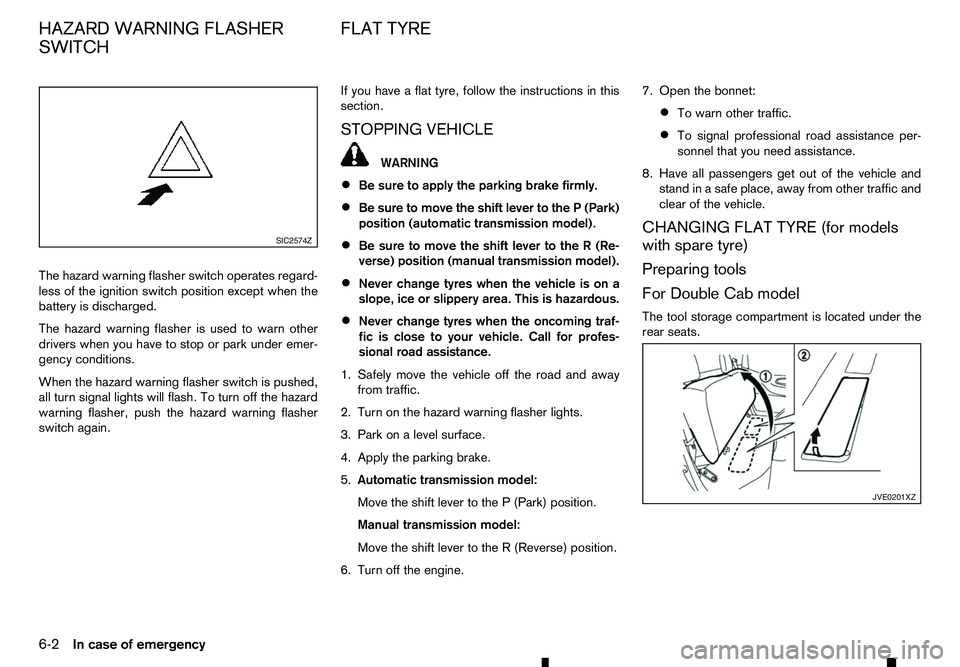
The hazard warning flasher switch operates regard-
less of the ignition switch position except when the
battery is discharged.
The hazard warning flasher is used to warn other drivers when you have to stop or park under emer-
gency conditions.
When the hazard warning flasher switch is pushed,
all turn signal lights will flash. To turn off the hazard
warning flasher, push the hazard warning flasher
switch again. If you have
aflat tyre, follow the instructions in this
section.
STOPPING VEHICLE WARNING
• Be sure to apply the parking brake firmly.
• Be sure to move the shift lever to the
P(Park)
position (automatic transmission model).
• Be sure to move the shift lever to the
R(Re-
verse) position (manual transmission model).
• Never change tyres when the vehicle is on a
slope, ice or slippery area. This is hazardous.
• Never change tyres when the oncoming traf-
fic is close to your vehicle. Call for profes-
sional road assistance.
1. Safely move the vehicle off the road and away from traffic.
2. Turn on the hazard warning flasher lights.
3. Park on alevel surface.
4. Apply the parking brake.
5. Automatic transmission model:
Move the shift lever to the P(Park) position.
Manual transmission model:
Move the shift lever to the R(Reverse) position.
6. Turn off the engine. 7. Open the bonnet:
• To warn other traffic.
• To signal professional road assistance per-
sonnel that you need assistance.
8. Have all passengers get out of the vehicle and stand in asafe place, away from other traffic and
clear of the vehicle.
CHANGING FLAT TYRE (for models
with spare tyre)
Preparing tools
For Double Cab model
The tool storage compartment is located under the
rear seats. SIC2574Z
JVE0201XZ
HAZARD WARNING FLASHER
SWITCH FLAT TYRE
6-2 In case of emergency
Page 265 of 340
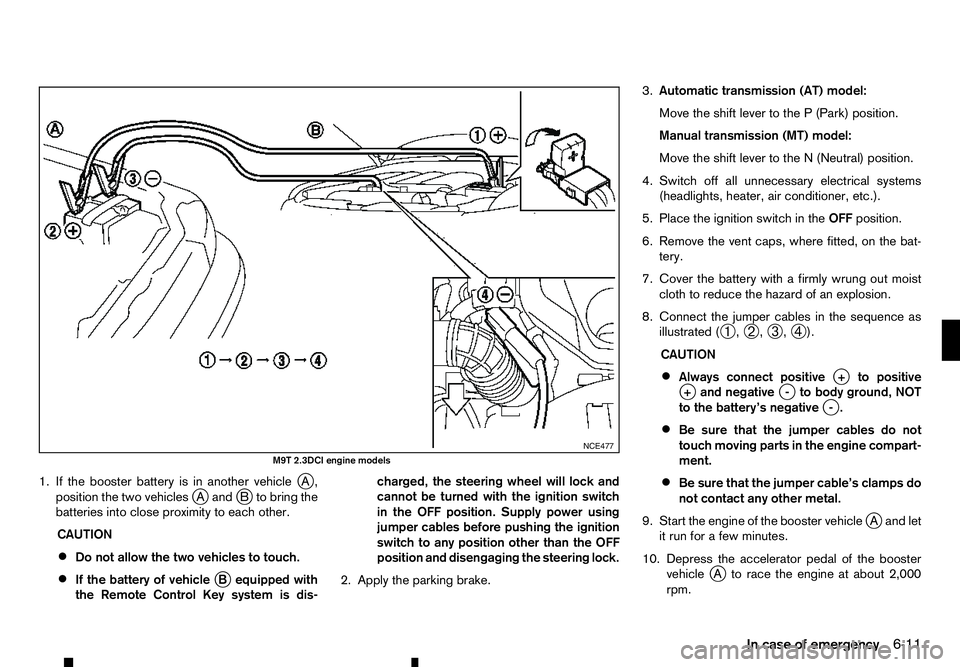
1. If the booster battery is in another vehicle
jA,
position the two vehicles j
Aa ndjBt obring the
batteries into close proximity to each other.
CAUTION
• Do not allow the two vehicles to touch.
• If the battery of vehicle
jBe quipped with
the Remote Control Key system is dis- charged, the steering wheel will lock and
cannot be turned with the ignition switch
in the OFF position. Supply power using
jumper cables before pushing the ignition
switch to any position other than the OFF
position and disengaging the steering lock.
2. Apply the parking brake. 3.
Automatic transmission (AT) model:
Move the shift lever to the P(Park) position.
Manual transmission (MT) model:
Move the shift lever to the N(Neutral) position.
4. Switch off all unnecessary electrical systems (headlights, heater, air conditioner, etc.).
5. Place the ignition switch in the OFFposition.
6. Remove the vent caps, where fitted, on the bat- tery.
7. Cover the battery with afirmly wrung out moist
cloth to reduce the hazard of an explosion.
8. Connect the jumper cables in the sequence as illustrated ( ➀,
➁ ,
➂ ,
➃ ).
CAUTION
• Always connect positive
j+t opositive
j +a nd negative j-t obody ground, NOT
to the battery’s negative j
-.
• Be sure that the jumper cables do not
touch moving parts in the engine compart-
ment.
• Be sure that the jumper cable’s clamps do
not contact any other metal.
9. Start the engine of the booster vehicle j
Aa nd let
it run for afew minutes.
10. Depress the accelerator pedal of the booster vehicle j
At orace the engine at about 2,000
rpm. NCE477
M9T 2.3DCI engine models
In case of emergency6-11
Page 266 of 340
11. Start the engine of the jumped vehicle
jBi nthe
normal manner.
CAUTION
Never keep the starter motor engaged for
more than 10 seconds. If the engine does not
start right away, place the ignition switch in
the “LOCK” position and wait at least 10 sec-
onds before trying again.
12. After the engine is started, carefully disconnect the jumper cables in the opposite sequence
from that illustrated ( ➃,
➂ ,
➁ ,
➀ ).
13. Remove and dispose of the cloth properly as it may be contaminated with corrosive acid.
14. Replace the vent caps, if removed. Do not attempt to start the engine by pushing the
vehicle.
CAUTION
• Automatic Transmission (AT) model cannot
be started by pushing. Attempting to do so
may cause damage to the transmission.
• Three-way catalyst equipped model should
not be started by pushing. Attempting to do
so may cause damage to the three-way cata-
lyst.
• Diesel Oxidation Catalyst equipped model
should not be started by pushing. Attempting
to do so may cause damage to the catalyst.
• Never try to start the engine by towing. When
the engine starts, the forward surge could
cause the vehicle to collide with the towing
vehicle. WARNING
• Never continue driving if your vehicle over-
heats. Doing so could cause engine damage
and/or avehicle fire.
• Never open the bonnet if steam is coming
out.
• Never remove the radiator or coolant reser-
voir cap while the engine is hot. If the radiator
or coolant reservoir cap is removed when the
engine is hot, pressurised hot water will spurt
out and possibly cause burning, scalding or
serious injury.
• If steam or coolant is coming from the engine,
stand clear of the vehicle to prevent getting
scalded.
• The engine cooling fan can start at any time
when the coolant temperature exceeds pre-
set degrees.
• Be careful not to allow your hands, hair, jewel-
lery or clothing to come into contact with, or
to get caught in the cooling fan or drive belts.
If your vehicle is overheating, or if you feel alack of
engine power, detect unusual noise, etc., take the
following steps:
1. Safely move the vehicle off the road away from traffic.
2. Turn on the hazard indicator flashers.
3. Apply the parking brake.
PUSH STARTING
IF YOUR VEHICLE OVERHEATS
6-12 In case of emergency
Page 268 of 340

2. Secure the steering wheel in
astraight ahead
position with rope or similar device.
3. Move the shift lever to the N(Neutral) position.
4. Release the parking brake.
5. Attach safety chains before towing.
Rear wheels on the ground:
RENAULT recommends that towing dollies be used
under the rear wheels when towing your vehicle or
the vehicle be placed on aflatbed tow truck as illus-
trated.
CAUTION
Never tow Automatic Transmission (AT) model
with the rear wheels on the ground. Doing so will
cause serious and expensive damage to the
transmission.
Manual Transmission (MT) model:
If you have to tow aMTvehicle with rear wheels on
the ground, perform the following procedures.
CAUTION
Observe the following restricted towing speeds
and distances.
• Speed: Below 50 km/h (30 MPH)
• Distance: Less than 65 km (40 miles)
1. Place the ignition switch in the “ON” position and turn all accessories off.
2. Move the shift lever to the N(Neutral) position.
3. Release the parking brake. 4. Attach safety chains whenever towing.
All four wheels on the ground:
RENAULT recommends that the vehicle be placed
on
aflatbed tow truck as illustrated.
CAUTION
Never tow Automatic Transmission (AT) model
with all four wheels on the ground. Doing so will
cause serious and expensive damage to the driv-
etrain.
Manual Transmission (MT) model:
If you have to tow aMTvehicle with all four wheels
on the ground, perform the following procedures.
CAUTION
• Never tow
aManual Transmission (MT) model
backward with all four wheels on the ground.
• Observe the following restricted towing
speeds and distances.
–S
peed: Below 50 km/h (30 MPH)
–D istance: Less than 65 km (40 miles)
1. Place the ignition switch in the “ON” position and turn all accessories off.
2. Move the shift lever to the N(Neutral) position.
3. Release the parking brake.
6-14 In case of emergency