radio RENAULT ALASKAN 2017 Owner's Manual
[x] Cancel search | Manufacturer: RENAULT, Model Year: 2017, Model line: ALASKAN, Model: RENAULT ALASKAN 2017Pages: 340, PDF Size: 6.93 MB
Page 191 of 340
•
Reject an incoming call by pressing the
< >
button during the incoming call.
• End an active call by pushing the
< >
button
once.
• Redial the last outgoing call by pressing the
< >
button for more than
2seconds. BLUETOOTH
®MOBILE PHONE
FEATURE WARNING
Whilst
driving, using the mobile phone is ex-
tremely dangerous because it significantly im-
pairs your concentration and diminishes your re-
action capabilities to sudden changes on the
road, and it may lead to afatal accident. This
applies to all phone call situations such as when
receiving an incoming call, during aphone con-
versation, when calling through the phone book
search, etc.
CAUTION
Certain country jurisdictions prohibit the use of
the mobile phone in the car without hands-free
support.
This chapter provides information about the hands-
free phone system using aBluetooth
®connection.
Bluetooth
®is aw ireless radio communication stan-
dard. This system offers ahands-free facility for your
mobile telephone to enhance driving comfort.
In order to use your mobile phone with the Blue-
tooth
®of the audio system, the mobile phone must
first be setup. For details, see “BLUETOOTH®
settings” later in this section. Once it has been
setup, the hands-free mode is automatically acti-
vated on the registered mobile phone (via Blue-
tooth
®)w hen it comes into range. An
otification message appears on the audio display
when the phone is connected, when an incoming
call is being received, as well as when acall is initi-
ated.
When acall is active, the audio system, microphone
(located in the ceiling in front of the rear view mir-
ror), and steering wheel switches enable hands-free
communication.
If the audio system is in use at the time, the radio,
CD, iPod, USB audio, Bluetooth audio or AUX
source mode will be muted and will stay muted until
the active call has ended.
The Bluetooth
®system may not be able to connect
with your mobile phone for the following reasons:
• The mobile phone is too far away from the ve-
hicle.
• The Bluetooth
®mode on your mobile phone has
not been activated.
• Your mobile phone has not been paired with the
Bluetooth
®system of the audio unit.
• The mobile phone does not support Bluetooth
®
technology (BT Core v2.0).
NOTE
• For models with Audio with Navigation sys-
tem see the separately provided Owner’s
Manual.
• For details, see your mobile phone’s Owner’s
Manual.
BLUETOOTH® HANDS-FREE PHONE SYSTEM (without navigation system
and colour display)
Display screen, heater and air conditioner, and audio system 4-59
Page 197 of 340
WARNING
• Use
aphone after stopping your vehicle in a
safe location. If you have to use aphone while
driving, exercise extreme caution at all times
so full attention may be given to vehicle op-
eration.
• If you are unable to devote full attention to
vehicle operation while talking on the phone,
pull off the road to
asafe location and stop
your vehicle.
CAUTION
To avoid discharging the vehicle battery, use a
phone after starting the engine.
Your vehicle is equipped with the Bluetooth®
Hands-Free Phone System. If you have acompat-
ible Bluetooth® enabled mobile phone, you can set
up the wireless connection between your mobile
phone and the in-vehicle phone module. With Blue-
tooth® wireless technology, you can make or re-
ceive ahands-free telephone call with your mobile
phone in the vehicle.
Once your mobile phone is connected to the in-ve-
hicle phone module, no other phone connecting pro-
cedure is required. Your phone is automatically re-
connected with the in-vehicle phone module when
the ignition switch is placed in the ON position with
the connected mobile phone turned on and carried
in the vehicle. You can register up to
5different Bluetooth® mo-
bile phones to the in-vehicle phone module. How-
ever, you can talk on only one mobile phone at a
time.
Before using the Bluetooth® Hands-Free Phone
System, refer to the following notes.
• Set up the wireless connection between
amo-
bile phone and the in-vehicle phone module be-
fore using the Bluetooth® Hands-Free Phone
System.
• Some Bluetooth® enabled mobile phones may
not be recognised by the in-vehicle phone mod-
ule.
• You will not be able to use
ahands-free phone
under the following conditions:
–Y our vehicle is outside of the mobile service
area.
–Y our vehicle is in an area where it is difficult
to receive mobile signal; such as in atunnel,
in an underground parking garage, near atall
building or in amountainous area.
–Y our mobile phone is locked to prevent it
from being dialled.
• When the radio wave condition is not ideal or
ambient sound is too loud, it may be difficult to
hear the other person’s voice during
acall.
• Immediately after the ignition switch is placed in
the ON position, it may be impossible to receive
ac
all for ashort period of time. •
Do not place the mobile phone in an area sur-
rounded by metal or far away from the in-vehicle
phone module to prevent tone quality degrada-
tion and wireless connection disruption.
• While
amobile phone is connected through the
Bluetooth® wireless connection, the battery
power of the mobile phone may discharge quicker than usual. The Bluetooth® Hands-Free
Phone System cannot charge mobile phones.
• Some mobile phones or other devices may cause
interference or
abuzzing noise to come from the
audio system speakers. Storing the device in a
different location may reduce or eliminate the
noise.
• Refer to the mobile phone owner’s manual re-
garding the telephone charges, mobile phone
antenna and body, etc.
• The signal strength display on the monitor will
not coincide with the signal strength display of
some mobile phones.
REGULATORY INFORMATION
Bluetooth® trademark
m Bluetooth®
is
at rademark
owned by Bluetooth SIG, Inc.
and licensed to Robert Bosch
GmbH.
BLUETOOTH® HANDS-FREE PHONE SYSTEM (with navigation system)
Display screen, heater and air conditioner, and audio system4-65
Page 198 of 340
EU RED Directive 2014/53/EU
Hereby, Robert Bosch Car Multimedia GmbH de-
clares that the radio equipment type LCN2K70A00/ LCN2K70A10 is in compliance with Directive 2014/
53/EU. The full text of the EU declaration of confor-
mity is available at the following internet address:
http://cert.bosch-carmultimedia.net
Any change of the radio equipment or usage with
other accessories, components or software as
specified will make are-assessment according com-
pliance to the legal approval necessary. Frequency Band
Radiated
Power
(EIRP) Hints/Restriction
2400 MHz –2480
MHz Bluetooth
<10 mW Internal not acces-
sible by user CONTROL BUTTONS AND
MICROPHONE
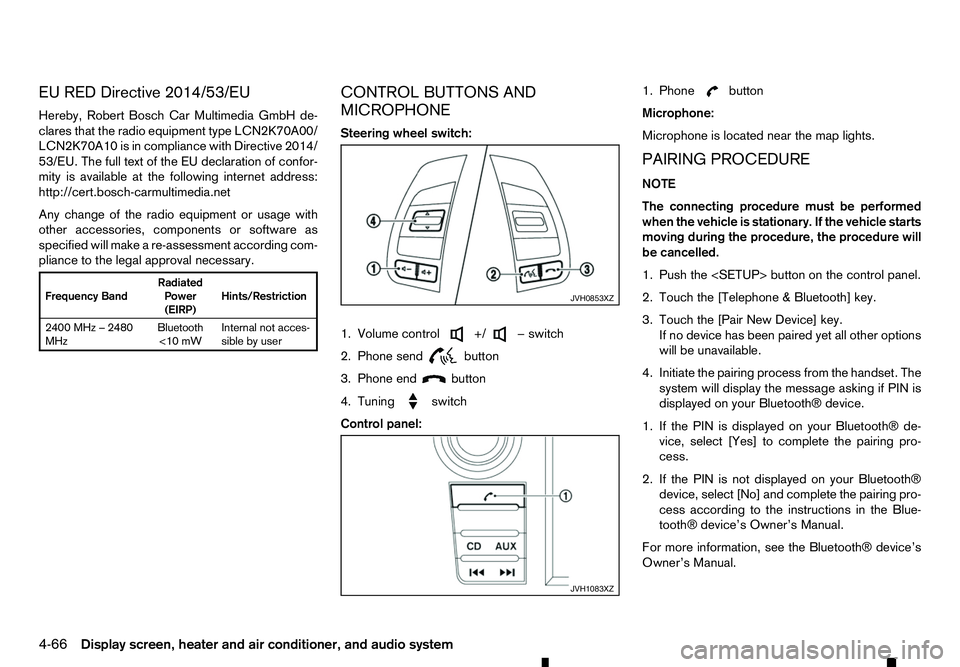
Steering wheel switch:
1. Volume control +/ −s
witch
2. Phone send
button
3. Phone end
button
4. Tuning
switch
Control panel:1. Phone button
Microphone:
Microphone is located near the map lights.
PAIRING PROCEDURE
NOTE
The connecting procedure must be performed
when the vehicle is stationary. If the vehicle starts
moving during the procedure, the procedure will
be cancelled.
1. Push the
2. Touch the [Telephone &Bluetooth] key.
3. Touch the [Pair New Device] key. If no device has been paired yet all other options
will be unavailable.
4. Initiate the pairing process from the handset. The system will display the message asking if PIN is
displayed on your Bluetooth® device.
1. If the PIN is displayed on your Bluetooth® de- vice, select [Yes] to complete the pairing pro-
cess.
2. If the PIN is not displayed on your Bluetooth® device, select [No] and complete the pairing pro-
cess according to the instructions in the Blue- tooth® device’s Owner’s Manual.
For more information, see the Bluetooth® device’s
Owner’s Manual. JVH0853XZ
JVH1083XZ
4-66 Display screen, heater and air conditioner, and audio system
Page 211 of 340
•
Avoid sudden steering.
• Avoid following too close to the vehicle in front.
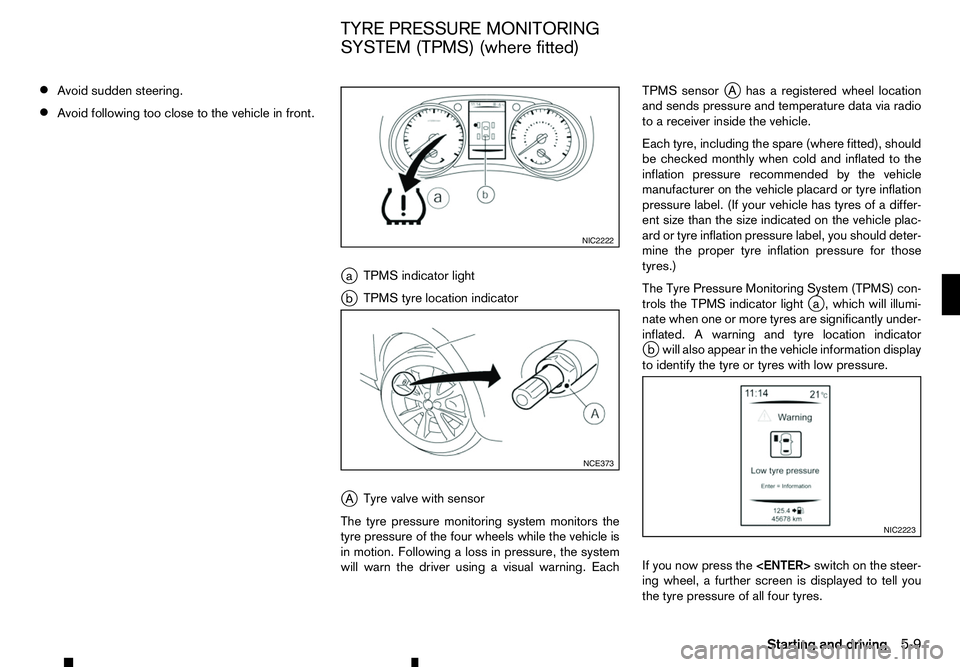
ja TPMS indicator light
j b TPMS tyre location indicator
j A Tyre valve with sensor
The tyre pressure monitoring system monitors the
tyre pressure of the four wheels while the vehicle is
in motion. Following aloss in pressure, the system
will warn the driver using avisual warning. Each TPMS sensor
jAh asaregistered wheel location
and sends pressure and temperature data via radio
to ar eceiver inside the vehicle.
Each tyre, including the spare (where fitted), should
be checked monthly when cold and inflated to the
inflation pressure recommended by the vehicle
manufacturer on the vehicle placard or tyre inflation
pressure label. (If your vehicle has tyres of adiffer-
ent size than the size indicated on the vehicle plac-
ard or tyre inflation pressure label, you should deter-
mine the proper tyre inflation pressure for those
tyres.)
The Tyre Pressure Monitoring System (TPMS) con-
trols the TPMS indicator light j
a, which will illumi-
nate when one or more tyres are significantly under-
inflated. Awarning and tyre location indicator
j bw ill also appear in the vehicle information display
to identify the tyre or tyres with low pressure.
If you now press the
ing wheel, afurther screen is displayed to tell you
the tyre pressure of all four tyres. NIC2222
NCE373
NIC2223
TYRE PRESSURE MONITORING
SYSTEM (TPMS) (where fitted)
Starting and driving5-9
Page 213 of 340
•
Replacing tyres with those not originally speci-
fied by RENAULT could affect the proper op-
eration of the TPMS.
• RENAULT recommends using only the Emer-
gency Tyre Sealant provided with your vehicle.
Other tyre sealants may damage the valve
stem seal which can cause the tyre to lose air
pressure. Visit an approved dealer or quali-
fied workshop as soon as possible after using
tyre repair sealant (for models equipped with
the emergency tyre puncture repair kit).
CAUTION
• The TPMS may not function properly when the
wheels are equipped with tyre chains or the
wheels are buried in snow.
• Do not place metallised film or any metal parts
(antenna, etc.) on the windows. This may
cause poor reception of the signals from the
tyre pressure sensors, and the TPMS will not
function properly.
Some devices and transmitters may tempo-
rarily interfere with the operation of the TPMS
and cause the TPMS indicator light to illumi-
nate. Some examples are:
–F acilities or electric devices using similar
radio frequencies are near the vehicle.
–I fatransmitter set to similar frequencies is
being used in or near the vehicle. –I
fac omputer (or similar equipment) or a
DC/AC converter is being used in or near
the vehicle.
–I fdevices which transmit electrical noise
are connected to the vehicle’s 12V power
supply.
• When inflating the tyres and checking the tyre
pressure, never bend the valves.
• Special aluminium valves are fitted to mount
the TPMS sensors on the wheels. The TPMS
sensor is fixed at the wheels by
anut. The nut
needs to be correctly fitted at atorque setting
of 7.5 ±0.5 N•m. If the TPMS sensor is tight-
ened exceeding the limit, there is apossibility
the sensor grommet will be damaged. If the
sensor is tightened under the limit, there is a
possibility of causing an air leak.
• Use valve caps that comply with the factory-
fitted valve cap specifications.
• Do not use metal valve caps.
• Fit the valve caps properly. Without the valve
caps the valve and tyre pressure monitor sen-
sors could be damaged.
• Do not damage the valves and sensors when
storing the wheels or fitting different tyres.
• Replace the sensor grommet and washer dur-
ing
atyre change. Once they have been re-
moved, the sensor grommet and washer can-
not be reused and must be replaced. The
TPMS sensors can be used again. •
Use caution when using tyre inflation equip-
ment with
arigid air supply tube, as leverage
applied by the long nozzle can damage the
valve stem.
Starting and driving 5-11
Page 214 of 340
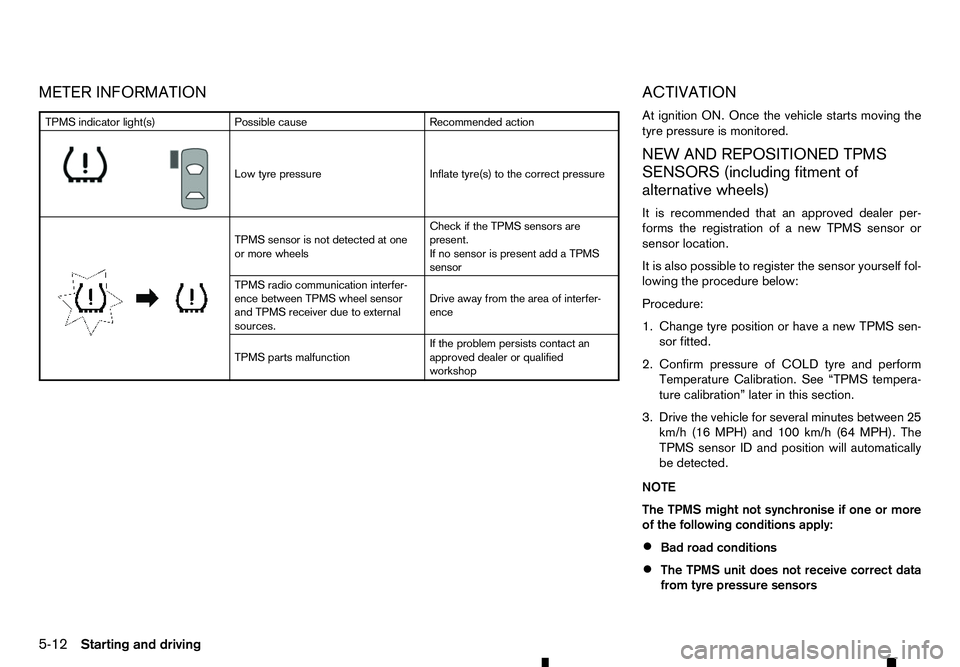
METER INFORMATION
ACTIVATION
At ignition ON. Once the vehicle starts moving the
tyre pressure is monitored.
NEW AND REPOSITIONED TPMSSENSORS (including fitment of
alternative wheels)
It is recommended that an approved dealer per-
forms the registration of anew TPMS sensor or
sensor location.
It is also possible to register the sensor yourself fol-
lowing the procedure below:
Procedure:
1. Change tyre position or have anew TPMS sen-
sor fitted.
2. Confirm pressure of COLD tyre and perform Temperature Calibration. See “TPMS tempera-
ture calibration” later in this section.
3. Drive the vehicle for several minutes between 25 km/h (16 MPH) and 100 km/h (64 MPH). The
TPMS sensor ID and position will automatically
be detected.
NOTE
The TPMS might not synchronise if one or more
of the following conditions apply:
• Bad road conditions
• The TPMS unit does not receive correct data
from tyre pressure sensors TPMS indicator light(s)
Possible cause Recommended action
m Low
tyre pressure
Inflate tyre(s) to the correct pressure
m TPMS
sensor is not detected at one
or more wheels Check if the TPMS sensors are
present.
If no sensor is present add aTPMS
sensor
TPMS radio communication interfer-
ence between TPMS wheel sensor
and TPMS receiver due to external
sources. Drive away from the area of interfer-
ence
TPMS parts malfunction If the problem persists contact an
approved dealer or qualified
workshop
5-12 Starting and driving
Page 216 of 340
![RENAULT ALASKAN 2017 Owners Manual To initiate TPMS temperature calibration use the
steering wheel switches to select the [Settings]
menu, followed by [Tyre Pressures]. Select [Cali-
brate] followed by [Start]. While the calibration pr](/img/7/58394/w960_58394-215.png "RENAULT ALASKAN 2017 Owners Manual To initiate TPMS temperature calibration use the
steering wheel switches to select the [Settings]
menu, followed by [Tyre Pressures]. Select [Cali-
brate] followed by [Start]. While the calibration pr")
To initiate TPMS temperature calibration use the
steering wheel switches to select the [Settings]
menu, followed by [Tyre Pressures]. Select [Cali-
brate] followed by [Start]. While the calibration pro-
cess is active, the message: [Resetting tyre pres-
sure system] will be displayed in the vehicle informa-
tion display. WARNING
Never remove the key or turn the ignition switch
to the
ing wheel will lock. This will cause the driver to
lose control of the vehicle and could result in
serious vehicle damage or personal injury.
MANUAL TRANSMISSION (MT)
The switch includes an anti-theft steering lock de-
vice.
The ignition key can only be removed when theswitch is in the
(0).
There is an “OFF” position ➀in between
and
cylinder.
To lock the steering wheel, remove the key. To
unlock the steering wheel, insert the key and turn
it gently while rotating the steering wheel slightly
right and left. KEY POSITIONS
LOCK (Normal parking position) (0):
The ignition key can only be removed at this posi-
tion.
OFF (1):
The engine can be turned off without locking the
steering wheel.
ACC (Accessories) (2):
This position activates electrical accessories such
as the radio when the engine is not running.
ON (Normal operating position) (3):
This position turns on the ignition system and elec-
trical accessories.
START (4):
This position starts the engine. As soon as the en-
gine has started, release the key immediately. It will
automatically return to the
STEERING LOCK
Locking the steering wheel
1) Place the ignition switch in the
tion.
2) Remove the key from the ignition switch.
3) Turn the steering wheel 1/6 of aturn clockwise
from the straight up position. SSD0392Z
IGNITION SWITCH (models without
Remote Control Key system)
5-14 Starting and driving
Page 217 of 340
Unlocking the steering wheel
1) Insert the key into the ignition switch.
2) Gently turn the ignition switch while rotating the steering wheel left and right. PRECAUTIONS ON PUSH-BUTTON
IGNITION SWITCH OPERATION WARNING
Do not operate the push-button ignition switch
while driving the vehicle except in an emergency.
(The engine will stop when the ignition switch is
pushed 3consecutive times or the ignition switch
is pushed and held for more than 2seconds.)
The steering wheel may lock and could cause
the driver to lose control of the vehicle. This could
result in serious vehicle damage or personal in-
jury.
REMOTE CONTROL KEY SYSTEM
The Remote Control Key system can operate the
ignition switch without taking the key out from your
pocket or bag. The operating environment and/or
conditions may affect the Remote Control Key sys-
tem operation.
Some indicators and warnings for operation are dis-
played in the vehicle information display and/or in
the meter. (See “Warning lights, indicator lights and
audible reminders” in the “2. Instruments and
controls” section and “Vehicle information display”
in the “2. Instruments and controls” section.)
CAUTION
• Be sure to carry the Remote Control Key with
you when operating the vehicle.
• Never leave the Remote Control Key inside
the vehicle when you leave the vehicle. •
If the vehicle battery is discharged, the igni-
tion switch cannot be switched from the
“LOCK” position, and if the steering lock is
engaged, the steering wheel cannot be
moved. Charge the battery as soon as pos-
sible. (See “Remote Control Key battery
replacement” in the “8. Maintenance and
do-it-yourself” section.)
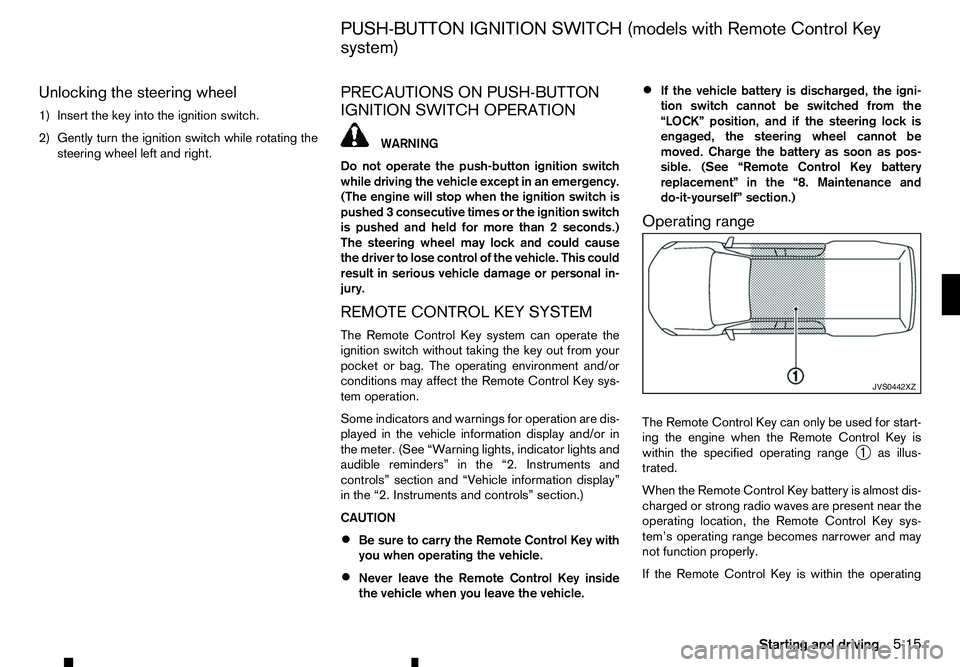
Operating range
The Remote Control Key can only be used for start-
ing the engine when the Remote Control Key is
within the specified operating range ➀as illus-
trated.
When the Remote Control Key battery is almost dis-
charged or strong radio waves are present near the
operating location, the Remote Control Key sys-
tem’s operating range becomes narrower and may
not function properly.
If the Remote Control Key is within the operating JVS0442XZ
PUSH-BUTTON IGNITION SWITCH (models with Remote Control Key
system)
Starting and driving5-15
Page 274 of 340
AIR FRESHENERS
Most air fresheners use asolvent that could affect
the vehicle interior. If you use an air freshener, take
the following precautions:
• Hanging-type air fresheners can cause perma-
nent discoloration when they contact vehicle in-
terior surfaces. Place the air freshener in
aloca-
tion that allows it to hang free and not contact an
interior surface.
• Liquid-type air fresheners typically clip on the
vents. These products can cause immediate
damage and discoloration when spilled on inte-
rior surfaces.
Carefully read and follow the manufacturer’s instruc-
tions before using air fresheners.
FLOOR MATS
The use of floor mats (where fitted) can extend the
life of your vehicle carpet and make it easier to clean
the interior. Regardless of what mats are used, be
sure they are fitted for your vehicle and are properly
positioned in the foot well to prevent interference
with pedal operation. Mats should be maintained
with regular cleaning and replaced if they become
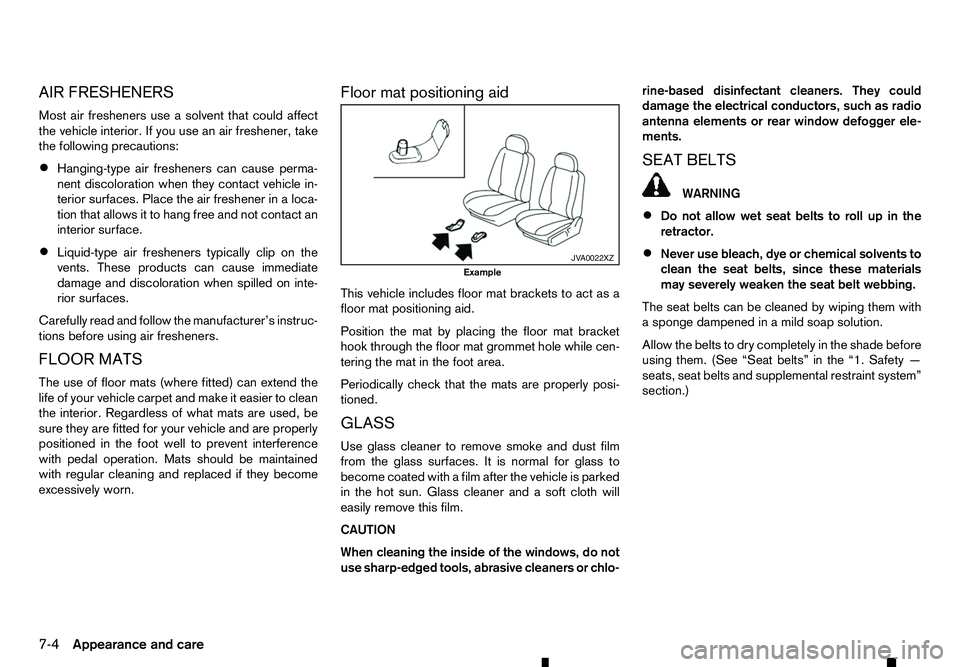
excessively worn. Floor mat positioning aid
This vehicle includes floor mat brackets to act as a
floor mat positioning aid.
Position the mat by placing the floor mat bracket
hook through the floor mat grommet hole while cen-
tering the mat in the foot area.
Periodically check that the mats are properly posi-
tioned.
GLASS
Use glass cleaner to remove smoke and dust film
from the glass surfaces. It is normal for glass to
become coated with afilm after the vehicle is parked
in the hot sun. Glass cleaner and asoft cloth will
easily remove this film.
CAUTION
When cleaning the inside of the windows, do not
use sharp-edged tools, abrasive cleaners or chlo- rine-based disinfectant cleaners. They could
damage the electrical conductors, such as radio
antenna elements or rear window defogger ele-
ments.
SEAT BELTS WARNING
• Do not allow wet seat belts to roll up in the
retractor.
• Never use bleach, dye or chemical solvents to
clean the seat belts, since these materials
may severely weaken the seat belt webbing.
The seat belts can be cleaned by wiping them with
as ponge dampened in amild soap solution.
Allow the belts to dry completely in the shade before
using them. (See “Seat belts” in the “1. Safety —
seats, seat belts and supplemental restraint system”
section.) JV A0022XZ
Example
7-4 Appearance and care
Page 307 of 340
9
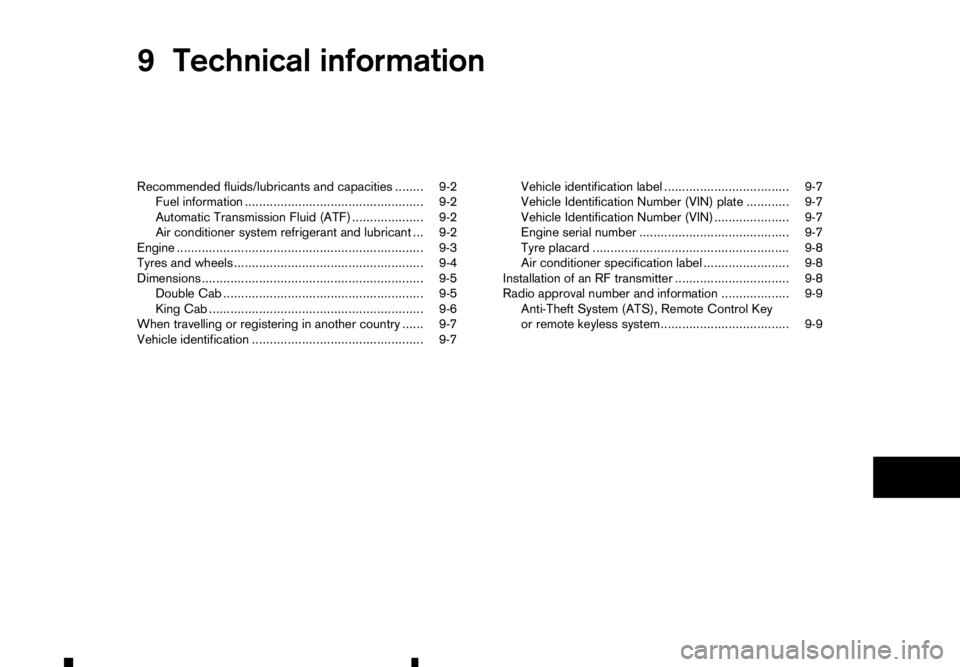
Technical information
Technical information
Recommended fluids/lubricants and capacities ........ 9-2 Fuel information .................................................. 9-2
Automatic Transmission Fluid (ATF) .................... 9-2
Air conditioner system refrigerant and lubricant ... 9-2
Engine ..................................................................... 9-3
Tyres and wheels ..................................................... 9-4
Dimensions .............................................................. 9-5 Double Cab ........................................................ 9-5
King Cab ............................................................ 9-6
When travelling or registering in another country ...... 9-7
Vehicle identification ................................................ 9-7 Vehicle identification label ................................... 9-7
Vehicle Identification Number (VIN) plate ............ 9-7
Vehicle Identification Number (VIN) ..................... 9-7
Engine serial number .......................................... 9-7
Tyre placard ....................................................... 9-8
Air conditioner specification label ........................ 9-8
Installation of an RF transmitter ................................ 9-8
Radio approval number and information ................... 9-9 Anti-Theft System (ATS), Remote Control Key
or remote keyless system.................................... 9-9