cruise control RENAULT ALASKAN 2017 Owners Manual
[x] Cancel search | Manufacturer: RENAULT, Model Year: 2017, Model line: ALASKAN, Model: RENAULT ALASKAN 2017Pages: 340, PDF Size: 6.93 MB
Page 72 of 340
Turn signal/hazard warning
lights
The turn signal/hazard warning lights blink when the
turn signal switch lever or hazard warning flasher
switch is on. (See “Turn signal switch” later in this
section or “Hazard warning flasher switch” in the
“6. In case of emergency” section.)
AUDIBLE REMINDERS
Brake pad wear warning The disc brake pads have audible wear warnings.
When abrake pad requires replacement, it will make
ah igh pitched scraping sound when the vehicle is in
motion. This scraping sound will first occur only
when the brake pedal is depressed. After more wear
of the brake pad, the sound will always be heard
even if the brake pedal is not depressed. Have the
brakes checked as soon as possible if the wear
warning sound is heard.
Have the system checked, and if necessary re-
paired, by an approved dealer or qualified workshop
promptly. (See “Brakes” in the “8. Maintenance and
do-it-yourself” section.)
Key reminder chime
The chime will sound if any of the following opera-
tions are detected:
Models with Remote Control Key system:
The chime will sound if the driver side door is opened
while the ignition switch is placed in the ACC posi-
tion. Models without Remote Control Key system:
The chime sounds if the driver’s side door is opened
while the key is left in the ignition switch and the
ignition switch is in the ACC, OFF or LOCK posi-
tion. Remove the key and take it with you when leav-
ing the vehicle.
Light reminder chime
The light reminder chime will sound if the driver’s
side door is opened and the headlight switch is in
either the or position, and the ignition
switch is in the ACC, OFF or LOCK position.
Be sure to turn the headlight switch to the
or
the vehicle.
Parking brake reminder chime
The parking brake reminder chime will sound if the
vehicle is driven at more than 7km/h (4 MPH) with
the parking brake applied. Stop the vehicle and re-
lease the parking brake.
Seat belt warning chime (where fitted)
When the vehicle speed exceeds 15 km/h (10
MPH), the chime will sound unless the driver’s and/
or the front passenger’s seat belts are securely fas-
tened. The chime will continue to sound for about
95 seconds until the seat belt is fastened. The vehicle information display
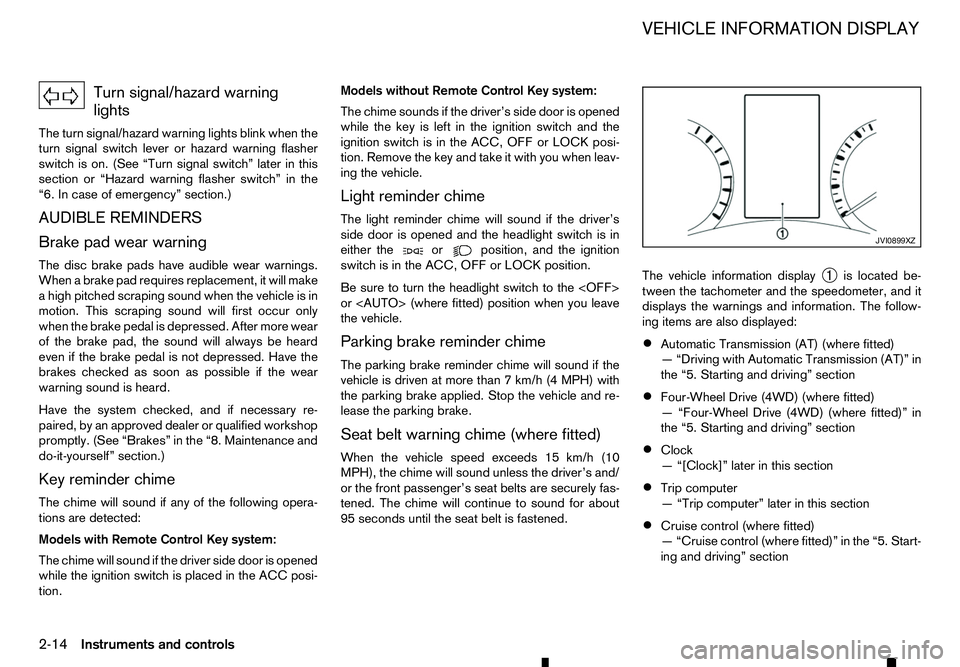
➀is located be-
tween the tachometer and the speedometer, and it
displays the warnings and information. The follow-
ing items are also displayed:
• Automatic Transmission (AT) (where fitted)
—“
Driving with Automatic Transmission (AT)” in
the “5. Starting and driving” section
• Four-Wheel Drive (4WD) (where fitted)
—“
Four-Wheel Drive (4WD) (where fitted)” in
the “5. Starting and driving” section
• Clock
—“
[Clock]” later in this section
• Trip computer
—“
Trip computer” later in this section
• Cruise control (where fitted)
—“
Cruise control (where fitted)” in the “5. Start-
ing and driving” section JVI0899XZ
VEHICLE INFORMATION DISPLAY
2-14 Instruments and controls
Page 86 of 340
22. Shipping Mode On Push Storage
Fuse warning (where fitted)
This warning may appear if the extended storage
fuse switch is not pushed in (switched on). When
this warning appears, push in (switch on) the ex- tended storage fuse switch to turn off the warning.
For more information, see “Fuses” in the “8. Main-
tenance and do-it-yourself” section.
23. Headlight System Error warning
(where fitted)
This warning appears if the LED headlights are mal-
functioning. Have the system checked by an ap-
proved dealer or qualified workshop.
24. Reminder Turn OFF Headlights
warning
This warning appears when the driver side door is
opened with the headlight switch is left ONand the
ignition switch is placed in the OFF,ACCorLOCK
position. Place the headlight switch in the
formation, see “Headlight and turn signal switch” in
the “2. Instruments and controls” section.
25. Time for adriver break? indicator
This indicator appears when the set [Timer] alarm activates. You can set the time for up to 6hours.
(See “Settings” earlier in this section.) 26. Cruise control indicator
(where fitted)
This indicator shows the cruise control system sta-
tus. The status is shown by the colour.
See “Cruise control (where fitted)” in the “5. Start-
ing and driving” section for details.
27. Automatic Transmission (AT)
position indicator (AT models)
This indicator shows the automatic shift position.
In the manual shift mode, when the transmission
does not shift to the selected gear due to
atrans-
mission protection mode, the AT position indicator
will blink and achime will sound.
For further details, see “Driving with Automatic
Transmission (AT)” in the “5. Starting and driving”
section.
28. Automatic Transmission (AT) Error
warning (AT models)
If the Automatic Transmission (AT) Error warning
appears while the engine is running, or while driv-
ing, it may indicate that the AT is not functioning
properly and may need servicing. Have the system
checked, and if necessary repaired, by an approved
dealer or qualified workshop promptly. 29. Automatic Transmission (AT) park
warning (AT models)
This warning indicates that the Automatic Transmis-
sion (AT) parking function is not engaged. If the
transfer control is not secured in any driving position
while the AT shift lever is in the
P(Park) position, the
transmission will disengage and the wheels will not
lock.
For 4WD model: If the ATP warning appears with
the shift lever in the P(Park) position, shift the
Four-Wheel Drive (4WD) mode switch to the
<2WD>, <4H> or <4LO> position again with the
shift lever in the N(Neutral) position. (See “Four-
Wheel Drive (4WD) (where fitted)” in the “5. Start-
ing and driving” section.) WARNING
If the 4WD mode indicator (see “4WD mode
indicator” in the “5. Starting and driving” section)
is OFF or the ATP warning light is ON, this indi-
cates that the automatic transmission P(Park)
position will not function and could result in the
vehicle moving unexpectedly, causing serious
personal injury or property damage. Always set
the parking brake.
30. Parking Sensor Error warning
(where fitted)
This warning appears when the parking sensor (so-
nar) system is not functioning properly. If the warn-
ing appears, have the system checked by an ap-
proved dealer or qualified workshop.
2-28 Instruments and controls
Page 203 of 340
Electronic Stability Programme (ESP) OFF
switch................................................................. 5-35
Active Emergency Braking system (where fitted) ...... 5-35 System operation ................................................ 5-35
Hill descent control system (where fitted) ................. 5-38 Hill descent control switch .................................. 5-38
Hill start assist system (where fitted) ........................ 5-39
Cruise control (where fitted) .................................... 5-39 Precautions on cruise control .............................. 5-40
Cruise control operations.................................... 5-40
Speed limiter (where fitted) ...................................... 5-42 Speed limiter operations ..................................... 5-42
ECO drive report ..................................................... 5-44
Parking .................................................................... 5-44 Parking sensor (sonar) system (where fitted) ............ 5-46 Parking sensor (sonar) system OFF switch ......... 5-47
Parking sensor (sonar) system settings ............... 5-47
Trailer towing ........................................................... 5-48
Operating precautions ........................................ 5-48
Tyre pressure ..................................................... 5-48
Safety chains ...................................................... 5-48
Trailer brakes...................................................... 5-48
Trailer detection (where fitted) ............................ 5-48
Vehicle security........................................................ 5-49
Power steering system............................................. 5-49
Brake system ........................................................... 5-49
Brake precautions .............................................. 5-49
Anti-lock Braking System (ABS).......................... 5-50
Cold weather driving................................................ 5-51 Battery ............................................................... 5-51
Engine coolant .................................................... 5-51
Tyre equipment ................................................... 5-51
Special winter equipment.................................... 5-52
Parking brake ..................................................... 5-52 Corrosion protection ........................................... 5-52
Page 241 of 340
WARNING
• Never rely solely on the hill start assist system
to prevent the vehicle from moving backward on ahill. Always drive carefully and attentively.
Depress the brake pedal when the vehicle is
stopped on asteep hill. Be especially careful
when stopped on ahill on frozen or muddy
roads. Failure to prevent the vehicle from roll-
ing backwards may result in aloss of control
of the vehicle and possible serious injury or
death.
• The hill start assist system is not designed to
hold the vehicle at
astandstill on ahill. De-
press the brake pedal when the vehicle is
stopped on asteep hill. Failure to do so may
cause the vehicle to roll backwards and may
result in acollision or serious personal injury.
• The hill start assist system may not prevent
the vehicle from rolling backwards on ahill
under all load or road conditions. Always be
prepared to depress the brake pedal to pre-
vent the vehicle from rolling backwards. Fail-
ure to do so may result in acollision or seri-
ous personal injury.
The hill start assist system automatically keeps the
brakes applied to help prevent the vehicle from roll-
ing backwards in the time it takes the driver to re-
lease the brake pedal and apply the accelerator
when the vehicle is stopped on ahill. The hill start assist system will operate automatically
under the following conditions:
• The transmission is shifted to
aforward or re-
verse gear.
• The vehicle is stopped completely on
ahill by
applying the brake.
The maximum holding time is 2seconds. After 2
seconds the vehicle will begin to roll back and the
hill start assist system will stop operating completely.
The hill start assist system will not operate when the
transmission is shifted to the N(Neutral) or P(Park)
position or on aflat and level road.
When the Electronic Stability Programme (ESP)
warning light illuminates in the meter, the hill start
assist system will not operate. (See “Electronic Sta-
bility Programme (ESP) system (where fitted)” ear-
lier in this section.) The cruise control system allows driving at constant
speeds without keeping your foot on the accelerator
pedal. WARNING
• The cruise control system ONLY maintains a
constant vehicle speed, it does not replace
the driver.
• Always observe the posted speed limits and
do not set the speed over them.
• Do not use the cruise control when driving
under the following conditions. Doing so
could cause
aloss of vehicle control and re-
sult in an accident.
–W hen it is not possible to keep the vehicle
at ac onstant speed
–W hen driving in heavy traffic
–W hen driving in traffic that varies speed
–W hen driving in windy areas
–W hen driving on winding or hilly roads
–W hen driving on slippery (rain, snow, ice,
etc.) roads
CAUTION
On manual Transmission (MT) model, do not shift
to the N(Neutral) position without depressing
the clutch pedal when the cruise control is oper-
HILL START ASSIST SYSTEM
(where fitted)
CRUISE CONTROL (where fitted)
Starting and driving 5-39
Page 242 of 340
ated. Should this occur, depress the clutch pedal
and turn the cruise control MAIN switch off im-
mediately. Failure to do so may cause engine
damage.
When the cruise control system is on the speed lim-
iter cannot be operated.
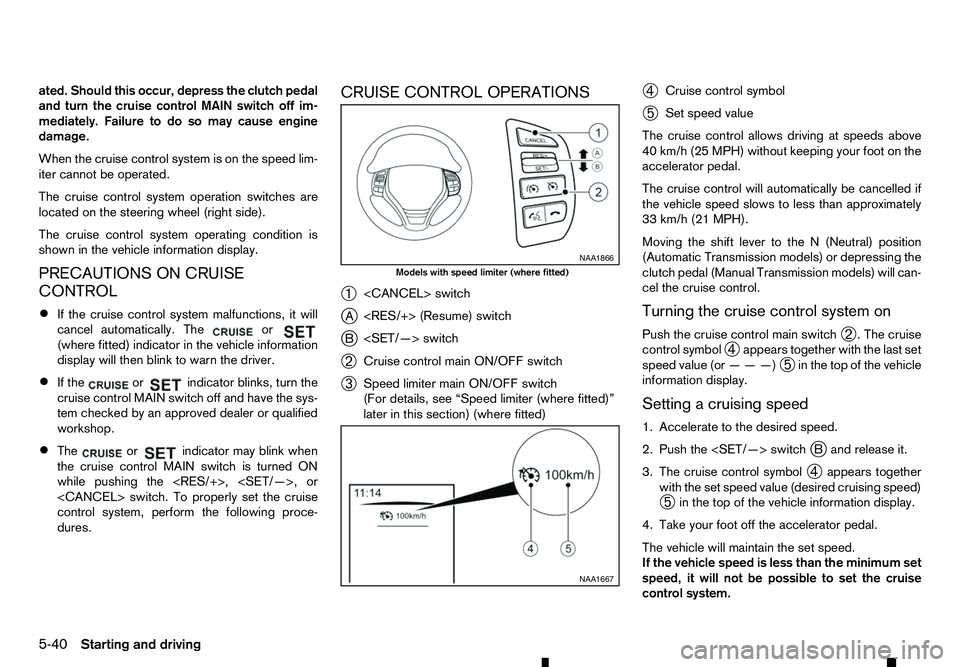
The cruise control system operation switches are
located on the steering wheel (right side).
The cruise control system operating condition is
shown in the vehicle information display.
PRECAUTIONS ON CRUISE
CONTROL
• If the cruise control system malfunctions, it will
cancel automatically. The or
(where fitted) indicator in the vehicle information
display will then blink to warn the driver.
• If the or indicator blinks, turn the
cruise control MAIN switch off and have the sys-
tem checked by an approved dealer or qualified
workshop.
• The or indicator may blink when
the cruise control MAIN switch is turned ON
while pushing the
control system, perform the following proce-
dures. CRUISE CONTROL OPERATIONS
➀
j A
j B
➁ Cruise control main ON/OFF switch
➂ Speed limiter main ON/OFF switch
(For details, see “Speed limiter (where fitted)”
later in this section) (where fitted) ➃
Cruise control symbol
➄ Set speed value
The cruise control allows driving at speeds above
40 km/h (25 MPH) without keeping your foot on the
accelerator pedal.
The cruise control will automatically be cancelled if
the vehicle speed slows to less than approximately
33 km/h (21 MPH).
Moving the shift lever to the N(Neutral) position
(Automatic Transmission models) or depressing the
clutch pedal (Manual Transmission models) will can-
cel the cruise control.
Turning the cruise control system on
Push the cruise control main switch ➁.T
he cruise
control symbol ➃appears together with the last set
speed value (or ———)
➄in the top of the vehicle
information display.
Setting acruising speed
1. Accelerate to the desired speed.
2. Push the
3. The cruise control symbol ➃appears together
with the set speed value (desired cruising speed)
➄ in the top of the vehicle information display.
4. Take your foot off the accelerator pedal.
The vehicle will maintain the set speed.
If the vehicle speed is less than the minimum set
speed, it will not be possible to set the cruise
control system. NAA1866
Models with speed limiter (where fitted)
NAA1667
5-40 Starting and driving
Page 243 of 340
Resuming at preset speed:
Push and release the
A.
The vehicle will resume the last set cruising speed
when the vehicle speed is over 40 km/h (25 MPH).
Changing acruising speed
Use any one of the following methods to change the
cruising speed.
Resetting to lower speed:
Use any one of the following methods to reset to a
lower speed.
• Slow the vehicle as normal using the footbrake
pedal.
When the vehicle reaches the desired cruising
speed, push and release the
j Bd ownwards.
The new set speed value will be displayed in the
top of the vehicle information display.
• Push and hold the
jBt ode-
crease the set speed in steps of 5km/h (3 MPH).
When the vehicle information display reaches
the desired speed, release the
for the setting to take effect.
• Quickly push and release the
j B. This will reduce the vehicle speed by about
1k m/h (1 MPH).
The new set speed value will be displayed in the
top of the vehicle information display. Resetting to higher speed:
Use any one of the following methods to reset to a
higher speed.
• Depress the accelerator pedal. When the ve-
hicle reaches the desired speed, push and re-
lease the
• Push and hold the
jAt oin-
crease the set speed in steps of 5km/h (3 MPH).
When the vehicle information display reaches the desired speed, release the
for the setting to take effect.
• Quickly push and release the
j A. This will increase the vehicle speed by about
1k m/h (1 MPH).
The new set speed value will be displayed in the
top of the vehicle information display.
Resuming at preset speed:
Push and release the
A.
The vehicle will resume the last set cruising speed
when the vehicle speed is over 40 km/h (25 MPH).
Passing another vehicle
Depress the accelerator pedal to accelerate. After
releasing the accelerator pedal, the vehicle will re-
turn to the previously set speed.
The set speed value ➄will flash until the vehicle
returns to the previously set speed. Cancelling cruising speed
Use any one of the following methods to cancel the
set speed.
•
Push the
➀.
• Tap the footbrake pedal.
• Push the cruise control MAIN switch
➁.T
he
indicator ➃will turn off.
Starting and driving 5-41
Page 244 of 340
The speed limiter allows you to set the desired ve-
hicle speed limit. While the speed limiter is acti-
vated, you can perform normal braking and accel-
eration, but the vehicle will not exceed the set speed.
When the vehicle reaches the set speed limit or if
the set speed limit is lower than the actual vehicle
speed, the accelerator pedal will not work until the
vehicle speed drops below the set speed limit.
When the actual vehicle speed exceeds the set
speed, an audible warning will be heard ashort time
after the set speed is exceeded and driver interven-
tion is not detected.
When the speed limiter is on the cruise control sys-
tem cannot be operated. WARNING
• The speed limiter will not automatically brake
the vehicle to the set speed limit.
• Always observe posted speed limits. Do not
set the speed above them.
• Always confirm the setting status of the speed
limiter in the vehicle information display.
• When the speed limiter is set, avoid hard ac-
celeration to reach the set limit to ensure that
the system can limit the speed of the vehicle
correctly.
• When additional floor mats are used, be sure
that they are correctly secured and that they
cannot interfere with the accelerator pedal. Mats not adapted to the vehicle may prevent
proper operation of the speed limiter.
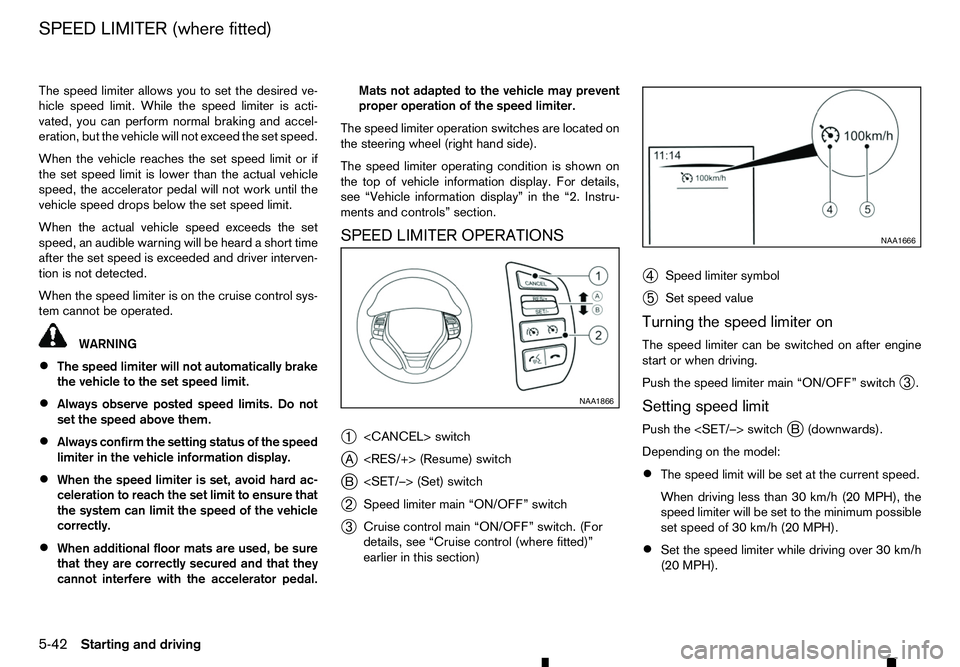
The speed limiter operation switches are located on
the steering wheel (right hand side).
The speed limiter operating condition is shown on
the top of vehicle information display. For details,
see “Vehicle information display” in the “2. Instru-
ments and controls” section.
SPEED LIMITER OPERATIONS
➀
j A
j B
➁ Speed limiter main “ON/OFF” switch
➂ Cruise control main “ON/OFF” switch. (For
details, see “Cruise control (where fitted)”
earlier in this section) ➃
Speed limiter symbol
➄ Set speed value
Turning the speed limiter on
The speed limiter can be switched on after engine
start or when driving.
Push the speed limiter main “ON/OFF” switch ➂.
Setting speed limit
Push the
Depending on the model:
• The speed limit will be set at the current speed.
When driving less than 30 km/h (20 MPH), the
speed limiter will be set to the minimum possible
set speed of 30 km/h (20 MPH).
• Set the speed limiter while driving over 30 km/h
(20 MPH). NAA1866 NAA1666
SPEED LIMITER (where fitted)
5-42 Starting and driving
Page 245 of 340
When the speed limit is set, the speed limiter sym-
bol ➃and the set speed value
➄will illuminate in
the vehicle information display. The limiter symbol
will turn green.
Changing aspeed limit
Use either of the following operations to change an
active speed limit:
• Push and release the
j Au pwards or
Each time you do this, the set speed will in-
crease or decrease by 1km/h (1 MPH).
• Push and hold the
j Au pwards or
The set speed will increase or decrease to the
next multiple of 5km/h (5 MPH) and then in
steps of 5km/h (5 MPH).
The new set speed limit value ➄will be displayed
in the vehicle information display.
When the actual vehicle speed exceeds the set
speed, an audible warning will be heard ashort time
after the set speed is exceeded and driver interven- tion is not detected.
Cancelling aspeed limit
To cancel aset speed limit, push the
switch ➀.T
he speed limiter symbol
➃and the set
speed value ➄in the vehicle information display
will be turned off.
It is also possible to override the speed limiter by
fully depressing the accelerator pedal beyond the
resistance point. WARNING
• The vehicle may accelerate when the speed
limiter cancels.
• When additional floor mats are used, be sure
that they are correctly secured and that they
cannot interfere with the accelerator pedal.
Mats not adapted to the vehicle may prevent
proper operation of the speed limiter.
Fully depress the accelerator pedal beyond the re-
sistance point. The speed limiter will be suspended
to allow driving above the set speed. The set speed
value ➄will flash and an audible warning will sound.
The speed limiter will automatically resume when
the vehicle speed drops below the set speed limit.
Resuming aprevious set speed
If as et speed limit has been cancelled, the set speed
will be stored in the speed limiter memory.
This speed limit can be reactivated by pressing the
Au pwards.
If the current vehicle speed is higher than the previ-
ous set speed, the accelerator pedal will not work
and the set speed value ➄will flash until the vehicle
speed drops below the set speed limit.
When the actual vehicle speed exceeds the set
speed, an audible warning will be heard ashort time
after the set speed is exceeded and driver interven- tion is not detected. Turning the speed limiter off
The speed limiter system will be turned off when
one of the following operations is performed:
•
Push the speed limiter main “ON/OFF” switch
➂ .T
he speed limiter symbol
➃and the set
speed value ➄in the vehicle information display
will be turned off.
• Push the cruise control main “ON/OFF” switch
➁ .T
he speed limiter information in the vehicle
information will be replaced with the cruise con-
trol information. For details see “Cruise control
(where fitted)” earlier in this section.
• When the vehicle is stopped and the ignition is
turned to the off position.
Turning off the speed limiter will erase the set
speed limit memory.
Speed limiter malfunction
If the speed limiter malfunctions, the speed limiter
symbol ➃in the vehicle information display will
flash.
Turn the speed limiter off by pushing the speed lim-
iter main “ON/OFF” switch ➂and have the system
checked by an approved dealer or qualified work-
shop.
Starting and driving 5-43
Page 253 of 340
When the ABS senses that one or more wheels are
close to locking up, the actuator rapidly applies and
releases hydraulic pressure. This action is similar to
pumping the brakes very quickly. You may feel a
pulsation in the brake pedal and hear anoise from
under the bonnet or feel avibration from the actua-
tor when it is operating. This is normal and indicates
that the ABS is operating properly. However, the
pulsation may indicate that road conditions are haz-
ardous and extra care is required while driving.
When the differential lock (where fitted) is engaged,
the ABS warning light illuminates. This indicates that
the anti-lock function is not fully operating. (See
“Rear differential locking system (where fitted)” ear-
lier in this section for the rear differential lock func-
tion.) WARNING
• Whatever the condition, drive with caution.
Accelerate and decelerate with great care. If
accelerating or decelerating too fast, the drive
wheels will lose even more traction.
• Allow more stopping distance in cold weather
driving. Braking should be started sooner than
on dry pavement.
• Keep at
agreater distance from the vehicle in
front of you on slippery roads.
• Wet ice (0°C, 32°F and freezing rain), very cold
snow and ice can be slick and very difficult to
drive on. The vehicle will have
alot less trac-
tion or grip under these conditions. Try to
avoid driving on wet ice until the road is salted
or sanded.
• Watch for slippery spots (glaring ice). These
may appear on an otherwise clear road in
shaded areas. If
apatch of ice is seen ahead,
brake before reaching it. Try not to brake while
actually on the ice, and avoid any sudden
steering manoeuvres.
• Do not use cruise control on slippery roads.
• Snow can trap dangerous exhaust gas under
your vehicle. Keep snow clear of the exhaust
pipe and from around your vehicle. BATTERY
If the battery is not fully charged during extremely
cold weather conditions, the battery fluid may freeze
and damage the battery. To maintain maximum effi-
ciency, the battery should be checked regularly. For
details, see “Battery” in the “8. Maintenance and
do-it-yourself” section of this manual.
ENGINE COOLANT
If the vehicle is to be left outside without anti-freeze,
drain the cooling system, including the engine block.
Refill before operating the vehicle. For details, see
“Engine cooling system” in the “8. Maintenance and
do-it-yourself” section of this manual.
TYRE EQUIPMENT
1. If you have snow tyres installed on the front/rear
wheels of your vehicle, they should be of the
same size, loading range, construction and type
(bias, bias-belted or radial) as the rear/front tyres.
2. If the vehicle is to be operated in severe winter conditions, snow tyres should be installed on all
four wheels.
3. For additional traction on icy roads, studded tyres may be used. However, some countries, prov-
inces and states prohibit their use. Check local,
state and provincial laws before installing stud-
ded tyres.
Skid and traction capabilities of studded snow
tyres, on wet or dry surfaces, may be poorer
than that of non-studded snow tyres.
COLD WEATHER DRIVING
Starting and driving5-51