oil change RENAULT ALASKAN 2017 Owners Manual
[x] Cancel search | Manufacturer: RENAULT, Model Year: 2017, Model line: ALASKAN, Model: RENAULT ALASKAN 2017Pages: 340, PDF Size: 6.93 MB
Page 73 of 340
•
Remote Control Key system (where fitted)
—“ Push-button ignition switch (models with Re-
mote Control Key system)” in the “5. Starting
and driving” section
• Oil control system (where fitted)
—“
Oil control system (where fitted for diesel
engine model)” later in this section
• Tyre Pressure information (where fitted)
—“
Tyre Pressure Monitoring System (TPMS)
(where fitted)” in the “5. Starting and driving”
section HOW TO USE THE VEHICLE
INFORMATION DISPLAY
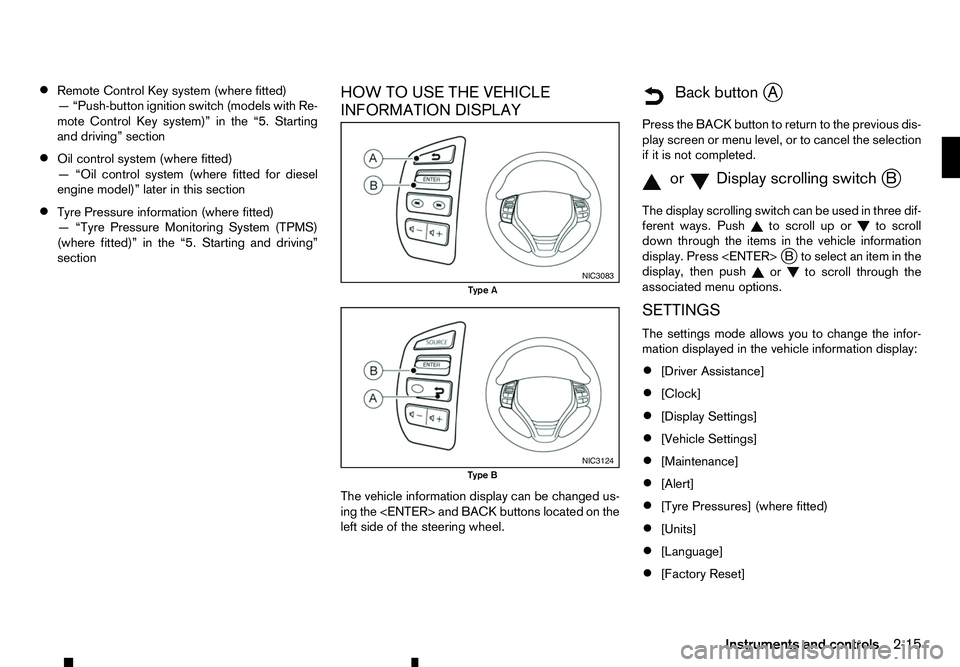
The vehicle information display can be changed us-
ing the
left side of the steering wheel.
m Back
button
jA
Press the BACK button to return to the previous dis-
play screen or menu level, or to cancel the selection if it is not completed.
m orm Display
scrolling switch
jB
The display scrolling switch can be used in three dif-
ferent ways. Push to scroll up or
to scroll
down through the items in the vehicle information
display. Press
display, then push or to scroll through the
associated menu options.
SETTINGS
The settings mode allows you to change the infor-
mation displayed in the vehicle information display:
• [Driver Assistance]
• [Clock]
• [Display Settings]
• [Vehicle Settings]
• [Maintenance]
• [Alert]
• [Tyre Pressures] (where fitted)
• [Units]
• [Language]
• [Factory Reset] NIC3083
Type A
NIC3124
Type B
Instruments and controls2-15
Page 76 of 340
![RENAULT ALASKAN 2017 Owners Manual [Turn Indicator]:
Select this sub-menu to enable/disable the items
described below to ONorOFF.
• [3 Flash On]
Select this sub-menu to enable/disable the [3
Flash On] lane change signal feature. See,](/img/7/58394/w960_58394-75.png "RENAULT ALASKAN 2017 Owners Manual [Turn Indicator]:
Select this sub-menu to enable/disable the items
described below to ONorOFF.
• [3 Flash On]
Select this sub-menu to enable/disable the [3
Flash On] lane change signal feature. See,")
[Turn Indicator]:
Select this sub-menu to enable/disable the items
described below to ONorOFF.
• [3 Flash On]
Select this sub-menu to enable/disable the [3
Flash On] lane change signal feature. See, “Turn
signal switch” in the “2. Instruments and
controls” section.
[Unlocking] (where fitted):
Select this sub-menu to enable/disable the items
described below to ONorOFF.
• [I-Key Door Lock]
Select this item to activate/deactivate the request
switch on the door. See, “Doors” in the “3. Pre-
driving checks and adjustments” section.
[Wipers]:
Select this sub-menu to enable/disable the items
described below to ONorOFF.
• [Speed Dependent]
Select this item to activate/deactivate the speed
dependent wiper speed feature. See, “Wiper
and washer switch” in the “2. Instruments and
controls” section.
[Maintenance]
The following sub-menus are available under the
[Maintenance] menu.
• [Service] •
[Filter]
• [Tyre]
• [Other]
[Service] (where fitted):
Select this item to show the remaining distance until
servicing is required.
To reset the service indicator, push
select [Yes].
The distance to service interval cannot be adjusted
manually. The interval is set automatically.
NOTE
Be sure the distance to service indicator is reset
after servicing. Otherwise, the service indicator
will continue to be displayed.
[Filter] (where fitted):
Select this item to set or reset the distance for re-
placing the oil filter.
The distance can be set from [———](off) to
30.000 km in 500 km increments.
[Tyre]:
Select this item to set or reset the distance for re-
placing the tyres.
The distance can be set from [———](off) to
30.000 km in 500 km increments. [Other]:
Select this item to set or reset
areminder for replac-
ing something other than service, the oil filter, or
tyres.
The distance can be set from [———](off) to
30.000 km in 500 km increments.
[Alert]
The following items are available under the [Alert]
menu.
• [Timer]
• [Navigation] (where fitted)
• [Phone] (where fitted)
• [Mail] (where fitted)
[Timer]:
Select this sub-menu to specify when the [Time for
ad river break?] message activates.
The time can be set from [———](off) to6hours
in increments of 30 minutes.
[Navigation] (where fitted):
Select this item to enable/disable the navigation sys-
tem information in the vehicle information display.
[Phone] (where fitted):
Select this item to enable/disable incoming call in-
formation in the vehicle information display.
[Mail] (where fitted):
Select this item to enable/disable incoming mail in-
formation in the vehicle information display.
2-18 Instruments and controls
Page 87 of 340
31. Low fuel level warning
The low fuel level warning appears on the vehicle
information display when the fuel level in the tank is
getting low. Refuel as soon as it is convenient, pref-
erably before the gauge reads the empty position.
For further details, see “Fuel gauge” earlier in this
section. OIL CONTROL SYSTEM (where fitted
for diesel engine model)
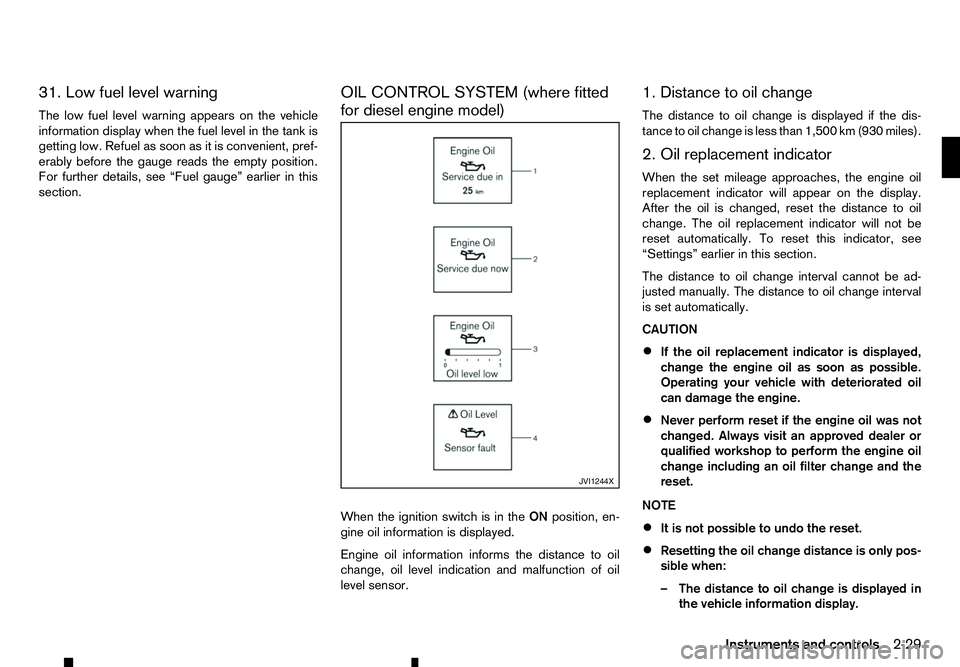
When the ignition switch is in the
ONposition, en-
gine oil information is displayed.
Engine oil information informs the distance to oil
change, oil level indication and malfunction of oil
level sensor. 1. Distance to oil change
The distance to oil change is displayed if the dis-
tance to oil change is less than 1,500 km (930 miles).
2. Oil replacement indicator
When the set mileage approaches, the engine oil
replacement indicator will appear on the display.
After the oil is changed, reset the distance to oil
change. The oil replacement indicator will not be
reset automatically. To reset this indicator, see
“Settings” earlier in this section.
The distance to oil change interval cannot be ad-
justed manually. The distance to oil change interval
is set automatically.
CAUTION
•
If the oil replacement indicator is displayed,
change the engine oil as soon as possible.
Operating your vehicle with deteriorated oil
can damage the engine.
• Never perform reset if the engine oil was not
changed. Always visit an approved dealer or
qualified workshop to perform the engine oil
change including an oil filter change and the
reset.
NOTE
• It is not possible to undo the reset.
• Resetting the oil change distance is only pos-
sible when:
–T
he distance to oil change is displayed in
the vehicle information display. JVI1244X
Instruments and controls
2-29
Page 88 of 340
–T
he oil replacement indicator is displayed
in the vehicle information display.
• The engine oil should be changed before the
distance to oil change reaches
0km(0miles).
Continued driving after the distance to oil
change reaches 0km(0miles) may result in
reduced engine performance.
• The Diesel Particulate Filter (DPF) may also
become saturated because regeneration is
restricted once the distance to oil change
reaches 0km(0m iles).
Have the vehicle inspected by an approved
dealer or qualified workshop if the above con-
dition occurs.
• The oil change interval will reduce faster with
certain types of driving, especially at low
speeds in urban conditions.
3. Low level reminder
If the low level indicator is displayed, the engine oil level is low. If the low level reminder is displayed,
check the level using the engine oil dipstick. (See
“Checking engine oil level” in the “8. Maintenance
and do-it-yourself” section.)
CAUTION
The oil level should be checked regularly using
the engine oil dipstick. Operating with an insuffi-
cient amount of oil can damage the engine and
such damage is not covered by the warranty. 4. Oil level sensor warning
If the oil sensor warning is displayed, the engine oil
level sensor may be malfunctioning. Contact an ap-
proved dealer or qualified workshop immediately.
CLOCK AND OUTSIDE AIR
TEMPERATURE (where fitted)
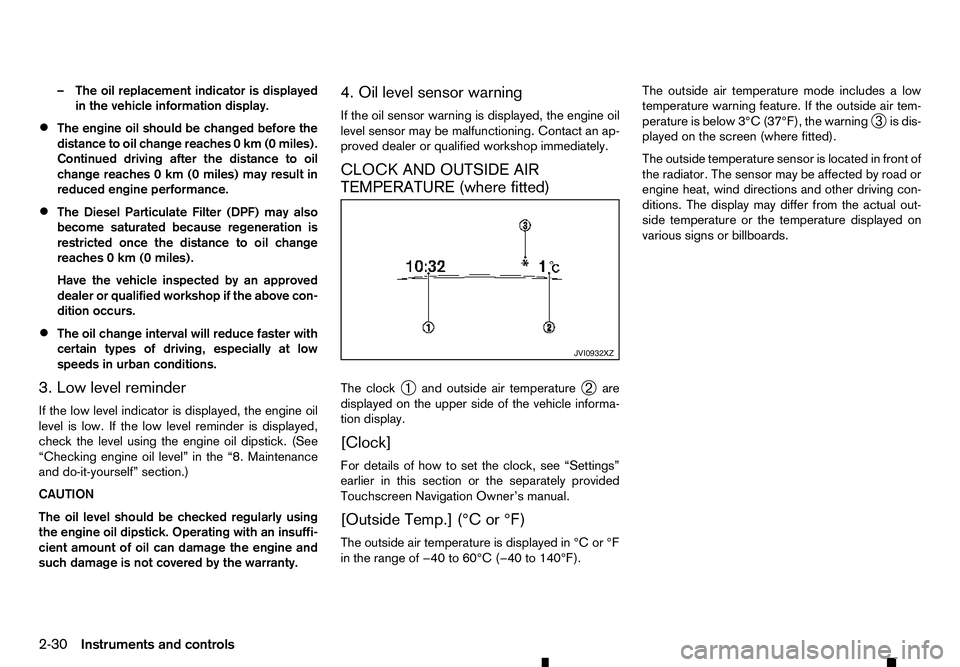
The clock
➀and outside air temperature
➁are
displayed on the upper side of the vehicle informa-
tion display.
[Clock]
For details of how to set the clock, see “Settings”
earlier in this section or the separately provided
Touchscreen Navigation Owner’s manual.
[Outside Temp.] (°C or °F)
The outside air temperature is displayed in °C or °F
in the range of −40 to 60°C (−40 to 140°F). The outside air temperature mode includes
alow
temperature warning feature. If the outside air tem-
perature is below 3°C (37°F), the warning ➂is dis-
played on the screen (where fitted).
The outside temperature sensor is located in front of
the radiator. The sensor may be affected by road or
engine heat, wind directions and other driving con-
ditions. The display may differ from the actual out-
side temperature or the temperature displayed on
various signs or billboards. JVI0932XZ
2-30 Instruments and controls
Page 204 of 340
During the first 1,600 km (1,000 miles), follow these
recommendations to obtain maximum engine per-
formance and ensure the future reliability and
economy of your new vehicle. Failure to follow these
recommendations may result in shortened engine
life and reduced engine performance.
• Do not drive at
aconstant speed, either fast or
slow, for long periods of time.
• Do not run the engine over 4,000 rpm.
• Do not accelerate at full throttle in any gear.
• Do not start quickly.
• Do not brake hard as much as possible.
• Do not tow
atrailer for at least the first 800 km
(500 miles). WARNING
The driving characteristics of your vehicle will
change remarkably by any additional load and its
distribution, as well as by adding optional equip-
ment (trailer coupling, roof rail, etc.). Your driv-
ing style and speed must be adjusted according
to the circumstances. Especially when carrying
heavy loads, your speed must be reduced ad-
equately.
• Make sure the area around the vehicle is clear.
• Check fluid levels such as engine oil, coolant,
brake (and clutch) fluid, window washer fluid as
frequently as possible, at least whenever you
refuel.
• Visually inspect tyres for their appearance and
condition. Measure and check the tyre pressure
for proper inflation.
• Check that all windows and lights are clean.
• Adjust the seat and head restraint positions.
• Adjust the inside and outside rearview mirror po-
sitions.
• Fasten your seat belt and ask all passengers to
do the same.
• Check that all doors are closed.
• Check the operation of the warning lights when
the ignition switch is placed in the “ON” position. •
Maintenance items in the “8. Maintenance and
do-it-yourself” section should be checked peri-
odically.
RUNNING-IN SCHEDULE
BEFORE STARTING ENGINE
5-2 Starting and driving
Page 210 of 340
•
Be sure to check the brakes immediately af-
ter driving in mud or water. See “Brake
system” later in this section for wet brakes.
• Avoid parking your vehicle on steep hills. If
you get out of the vehicle and it rolls forward,
backward or sideways, you could be injured.
• Whenever you drive off-road through sand,
mud or water as deep as the wheel hub, more
frequent maintenance may be required. See
the maintenance information in
aseparate
maintenance booklet.
• Rinse the underside of the vehicle with fresh
water after driving through mud or sand. Re-
move any brush or sticks that are trapped. The turbocharger system uses engine oil for lubrica-
tion and cooling of its rotating components. The tur-
bocharger turbine turns at extremely high speeds
and it can reach an extremely high temperature. It is
essential to maintain
aflow of clean oil through the
turbocharger system. Asudden interruption to the
oil supply may cause amalfunction in the turbo-
charger.
To ensure prolonged life and performance of the
turbocharger, it is essential to comply with the fol-
lowing maintenance procedure:
CAUTION
• Change the engine oil of the turbo-charged
diesel engine as prescribed. See the sepa-
rately provided maintenance booklet for addi-
tional information.
• Use only the recommended engine oil. For
details, refer to the maintenance service
booklet for your vehicle.
• If the engine has been operating at high rpm
for an extended period of time, let it idle for a
few minutes prior to shutdown.
• Do not accelerate the engine to high rpm im-
mediately after starting it.
• When starting the engine at ambient tempera-
tures below −5°C (23°F), an engine protection
mode may be activated. During this time, the
engine output is reduced. The engine protec-
tion mode is switched off automatically after
am
aximum of 3minutes (provided the accel-
erator pedal is released completely). Driving your vehicle to fit the circumstances is es-
sential for your safety and comfort. As
adriver, you
should be the one who knows best how to drive in
the given circumstances.
ENGINE COLD START PERIOD
Due to the higher engine speeds, when the engine
is cold, extra caution must be exercised when se-
lecting agear during the engine warm-up period
after starting the engine.
LOADING LUGGAGE
Loads and their distribution and the attachment of
equipment (roof baggage carriers, etc.) will consid-
erably change the driving characteristics of the ve-
hicle. Your driving style and speed must be adjusted
according to the circumstances.
DRIVING IN WET CONDITIONS
• Avoid accelerating or stopping suddenly.
• Avoid sharp turning or lane changing suddenly.
• Avoid following too close to the vehicle in front.
When water covers the road surface with water
puddles, small water streams, etc., reduce speed to
prevent hydroplaning which can cause skidding and
loss of control. Worn tyres will increase this risk.
DRIVING IN WINTER CONDITIONS • Drive cautiously.
• Avoid accelerating or stopping suddenly.
• Avoid sharp turning or lane changing suddenly.
TURBOCHARGER SYSTEM CARE WHEN DRIVING
5-8 Starting and driving
Page 231 of 340
WARNING
AT model: If the 4WD mode indicator is “OFF” or
the ATP warning light is “ON”, this indicates that
the automatic transmission P(Park) position will
not function and could result in the vehicle mov-
ing unexpectedly, causing serious personal in-
jury or property damage. Always set the parking
brake.
CAUTION
To avoid vehicle damage:
• Do not operate the 4WD mode switch when
cornering, reversing or if the rear wheels are
spinning freely. The vehicle must be moving
straight ahead.
• Do not move the shift lever (AT model) or
release the clutch pedal (MT model) when the
4LO indicator is blinking. Failure to do this
may cause the gears to grind and damaging
the powertrain.
• MT model: Do not accelerate rapidly from a
stopped position when the 4LO indicator is
blinking. Drive straight ahead at
alow speed
until the 4LO indicator is lit. The 4LO indicator
blinks when shifting between <4LO> and
<4H>.
• If the 4WD warning light comes on, perform
the following procedure:
1) Turn off the engine.
2) Start the engine. 3) Check if the 4WD warning light comes on.
If the 4WD warning light is still on after following
the above procedure, have the system checked
and serviced immediately by an approved dealer
or qualified workshop.
The transfer case 4WD mode switch is used to
select either Two-Wheel Drive (2WD) or
Four-Wheel Drive (4WD) depending on the driving
conditions. Turn the 4WD mode switch to select a drive mode (<2WD>, <4H> or <4LO>).
To change into or out of 4LO mode:
1. The vehicle MUST BE standing still.
2. Depress the clutch pedal (MT model) and the brake pedal and move the shift lever to N(Neu-
tral).
3. Depress and turn the 4WD mode switch to change into or out of <4LO>. WARNING
• When parking, apply the parking brake before
stopping the engine and make sure that the
4WD mode indicator is on and that the ATP
warning light or ATP warning message is off,
otherwise, the vehicle could unexpectedly
move even if the automatic transmission is in
the P(Park) position.
• The 4LO indicator must stop blinking and re-
main on or turn off before shifting the trans-
mission into gear. The vehicle may move un- expectedly if the shift lever is shifted from the
N(
Neutral) position to any other gear while
the 4LO indicator is blinking.
CAUTION
• Never turn the 4WD mode switch between
<4LO> and <4H> while driving.
• The <4H> drive mode provides greater power
and traction. Avoid excessive speed as it will
cause increased fuel consumption and higher
oil temperatures, and could damage power
train components. Speeds over 100 km/h (60
MPH) in <4H> are not recommended.
• The <4LO> drive mode provides maximum
power and traction. Avoid raising vehicle
speed excessively. The maximum speed is
approximately 50 km/h (30 MPH).
• The 4WD mode switch can be turned between
<2WD> and <4H> while driving straight ahead.
Do not turn the 4WD mode switch while mak-
ing
aturn or reversing.
• Do not turn the 4WD mode switch between
<2WD> and <4H> while driving on steep
downhill grades. Use the engine brake and
low transmission gears for engine braking.
• Do not turn the 4WD mode switch between
<2WD> and <4H> with the rear wheels spin-
ning.
Starting and driving 5-29
Page 273 of 340
GLASS
Use glass cleaner to remove smoke and dust film
from the glass surfaces. It is normal for glass to
become coated with afilm after the vehicle is parked
in the hot sun. Glass cleaner and asoft cloth will
easily remove this film.
UNDERBODY
In areas where road salt is used in the winter, it is
necessary to clean the vehicle’s underbody regu-
larly in order to prevent dirt and salt from building up
and causing the acceleration of corrosion on the
underbody and suspension.
Before the winter and again in the spring, the under- seal must be checked and, if necessary, re-treated.
WHEELS
• Wash the wheels when washing the vehicle to
maintain their appearance.
• Clean the inner side of the wheels when the
wheel is changed or the underside of the vehicle
is washed.
• Do not use abrasive cleaners when washing the
wheels.
• Inspect wheel rims regularly for dents or corro-
sion. This may cause loss of pressure or damage
the tyre bead.
• RENAULT recommends that the road wheels be
waxed to protect against road salt in areas where
it is used during winter. ALUMINIUM ALLOY WHEELS
Wash the wheels regularly with
asponge damp-
ened in amild soap solution, especially during win-
ter in areas where road salt is used. The salt residue
from road salt could discolour the wheels if it is not
washed off regularly.
CAUTION
Follow the directions below to avoid staining or
discolouring the wheels:
• Do not use
acleaner that uses strong acid or
alkali contents to clean the wheels.
• Do not apply wheel cleaners to the wheels
when they are hot. The wheel temperature
should be the same as ambient temperature.
• Rinse the wheel to completely remove the
cleaner within 15 minutes after the cleaner is
applied.
CHROME PARTS
Clean all chrome parts regularly with anon abrasive
chrome polish to maintain the finish. Occasionally remove loose dust from the interior
trim, plastic parts and seats using
avacuum cleaner
or soft bristled brush. Wipe the vinyl and leather sur-
faces with aclean, soft cloth dampened in mild soap
solution, then wipe clean with adry, soft cloth.
Regular care and cleaning is required in order to
maintain the appearance of the leather.
Before using any fabric protector, read the manu-
facturer’s recommendations. Some fabric protec-
tors contain chemicals that may stain or bleach the
seat material.
Use asoft cloth dampened only with water to clean
the meter and gauge lens covers.
CAUTION
• Never use benzene, thinner or any similar ma-
terial.
• Small dirt particles can be abrasive and dam-
aging to leather surfaces and should be re-
moved promptly. Do not use saddle soap, car
waxes, polishes, oils, cleaning fluids,
solvents, detergents or ammonia-based
cleaners as they damage the natural leather
finish.
• Never use fabric protectors unless recom-
mended by the manufacturer.
• Do not use glass or plastic cleaner on meter
or gauge lens covers. It may damage the lens
covers.
CLEANING INTERIOR
Appearance and care 7-3
Page 282 of 340
The radiator is fitted with
apressure cap. To prevent
engine damage, use only aGenuine RENAULT ra-
diator cap or its equivalent when replacement is
required.
CHECKING ENGINE COOLANT
LEVEL
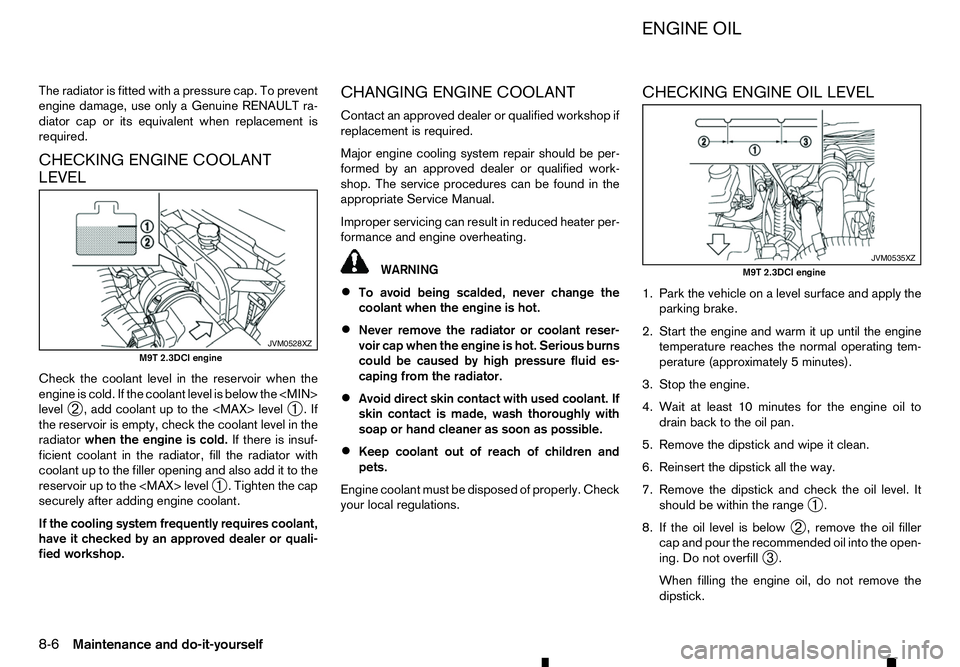
Check the coolant level in the reservoir when the
engine is cold. If the coolant level is below the
level ➁,a
dd coolant up to the
➀.If
the reservoir is empty, check the coolant level in the
radiator when the engine is cold. If there is insuf-
ficient coolant in the radiator, fill the radiator with
coolant up to the filler opening and also add it to the
reservoir up to the
ighten the cap
securely after adding engine coolant.
If the cooling system frequently requires coolant,
have it checked by an approved dealer or quali-
fied workshop. CHANGING ENGINE COOLANT
Contact an approved dealer or qualified workshop if
replacement is required.
Major engine cooling system repair should be per-
formed by an approved dealer or qualified work-
shop. The service procedures can be found in the
appropriate Service Manual.
Improper servicing can result in reduced heater per-
formance and engine overheating.
WARNING
• To avoid being scalded, never change the
coolant when the engine is hot.
• Never remove the radiator or coolant reser-
voir cap when the engine is hot. Serious burns
could be caused by high pressure fluid es-
caping from the radiator.
• Avoid direct skin contact with used coolant. If
skin contact is made, wash thoroughly with
soap or hand cleaner as soon as possible.
• Keep coolant out of reach of children and
pets.
Engine coolant must be disposed of properly. Check
your local regulations. CHECKING ENGINE OIL LEVEL
1. Park the vehicle on
alevel surface and apply the
parking brake.
2. Start the engine and warm it up until the engine temperature reaches the normal operating tem-
perature (approximately 5minutes).
3. Stop the engine.
4. Wait at least 10 minutes for the engine oil to drain back to the oil pan.
5. Remove the dipstick and wipe it clean. 6. Reinsert the dipstick all the way.
7. Remove the dipstick and check the oil level. It should be within the range ➀.
8. If the oil level is below ➁,r
emove the oil filler
cap and pour the recommended oil into the open-
ing. Do not overfill ➂.
When filling the engine oil, do not remove the
dipstick. JVM0528XZ
M9T 2.3DCI engine JVM0535XZ
M9T 2.3DCI engine
ENGINE OIL
8-6 Maintenance and do-it-yourself