door lock RENAULT FLUENCE 2012 1.G User Guide
[x] Cancel search | Manufacturer: RENAULT, Model Year: 2012, Model line: FLUENCE, Model: RENAULT FLUENCE 2012 1.GPages: 241, PDF Size: 6.5 MB
Page 15 of 241
warning buzzer ...................................................... (current page)
doors ..................................................... (up to the end of the DU)
locking the doors .................................. (up to the end of the DU)
opening the doors ................................. (up to the end of the DU)
closing the doors .................................. (up to the end of the DU)
children ................................................. (up to the end of the DU)
doors/tailgate ........................................ (up to the end of the DU)
1.11
ENG_UD21348_3
Ouverture et fermeture des portes (L38 - X38 - Renault)
ENG_NU_891_892-7_L38-B32_Renault_1
Doors
OpENINg AND CLOsINg ThE DOORs (1/2)
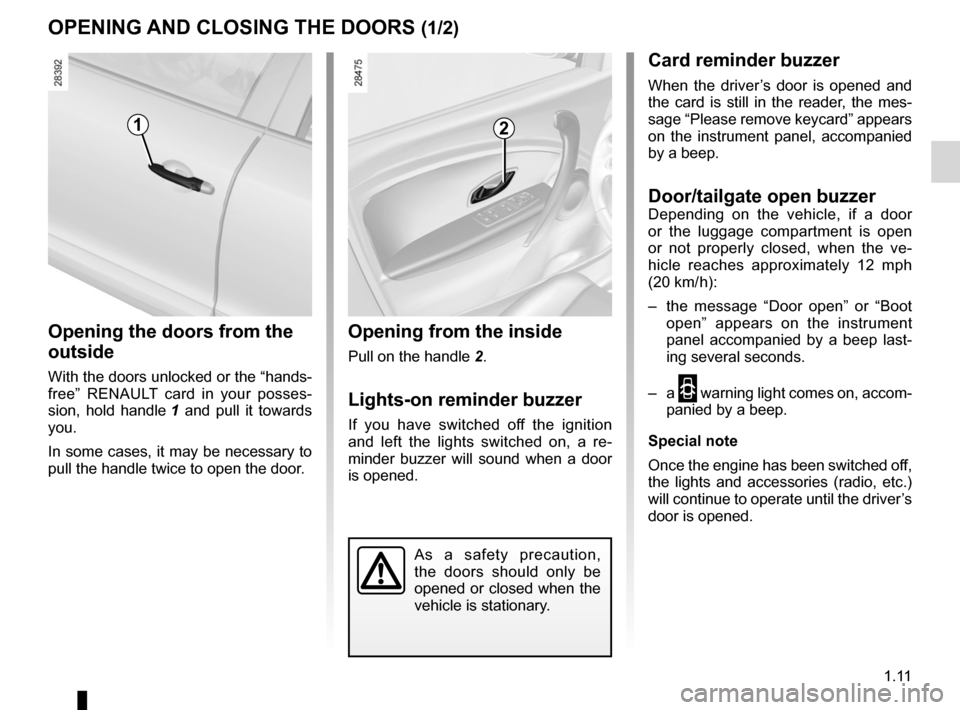
Opening the doors from the
outside
With the doors unlocked or the “hands -
free” RENAULT card in your posses -
sion, hold handle 1 and pull it towards
you.
In some cases, it may be necessary to
pull the handle twice to open the door.
Opening from the inside
Pull on the handle 2.
Lights-on reminder buzzer
If you have switched off the ignition
and left the lights switched on, a re -
minder buzzer will sound when a door
is opened.
Card reminder buzzer
When the driver’s door is opened and
the card is still in the reader, the mes-
sage “Please remove keycard” appears
on the instrument panel, accompanied
by a beep.
Door/tailgate open buzzerDepending on the vehicle, if a door
or the luggage compartment is open
or not properly closed, when the ve -
hicle reaches approximately 12 mph
(20 km/ h):
– the message “ Door open” or “Boot
open ” appears on the instrument
panel accompanied by a beep last -
ing several seconds.
– a
2 warning light comes on, accom-
panied by a beep.
special note
Once the engine has been switched off,
the lights and accessories (radio, etc.)
will continue to operate until the driver’s
door is opened.
12
As a safety precaution,
the doors should only be
opened or closed when the
vehicle is stationary.
Page 16 of 241
1.12
ENG_UD21348_3
Ouverture et fermeture des portes (L38 - X38 - Renault)
ENG_NU_891_892-7_L38-B32_Renault_1
OpENINg AND CLOsINg ThE DOORs (2/2)
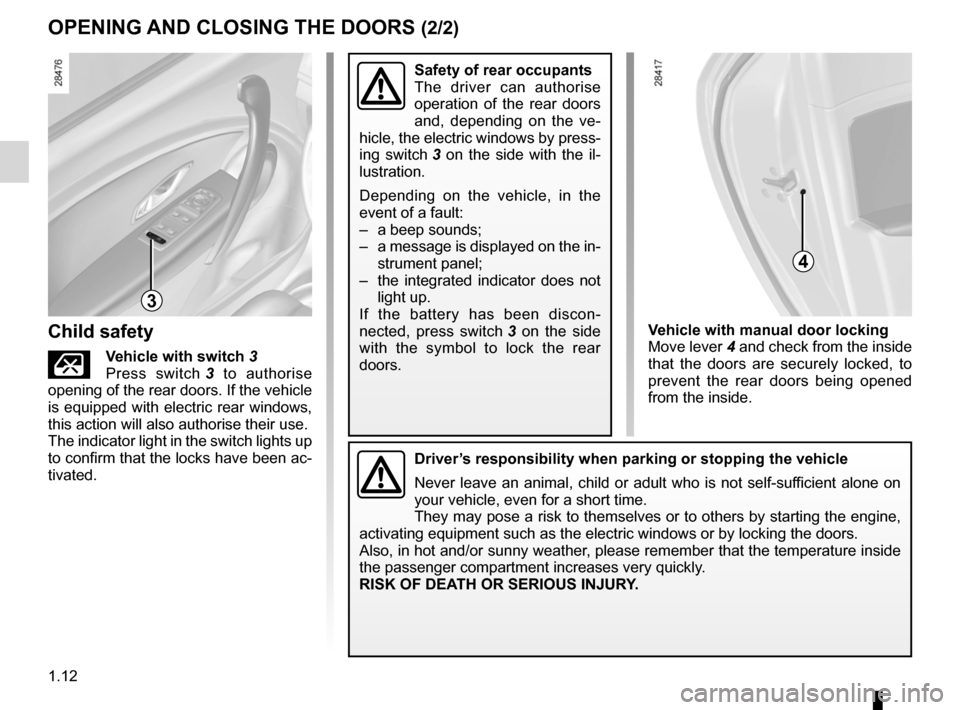
Vehicle with manual door locking
Move lever 4 and check from the inside
that the doors are securely locked, to
prevent the rear doors being opened
from the inside.
Driver’s responsibility when parking or stopping the vehicle
Never leave an animal, child or adult who is not self-sufficient alone on
your vehicle, even for a short time.
They may pose a risk to themselves or to others by starting the engine,
activating equipment such as the electric windows or by locking the door\
s.
Also, in hot and/or sunny weather, please remember that the temperature inside
the passenger compartment increases very quickly.
RIsK OF DEATh OR sERIOUs INJURY.
Child safety
ÇVehicle with switch 3
Press switch 3 to authorise
opening of the rear doors. If the vehicle
is equipped with electric rear windows,
this action will also authorise their use.
The indicator light in the switch lights up
to confirm that the locks have been ac-
tivated.
safety of rear occupants
The driver can authorise
operation of the rear doors
and, depending on the ve -
hicle, the electric windows by press-
ing switch 3 on the side with the il -
lustration.
Depending on the vehicle, in the
event of a fault:
– a beep sounds;
– a message is displayed on the in-
strument panel;
– the integrated indicator does not
light up.
If the battery has been discon -
nected, press switch 3 on the side
with the symbol to lock the rear
doors.
3
4
Page 17 of 241
opening the doors ................................. (up to the end of the DU)
closing the doors .................................. (up to the end of the DU)
unlocking the doors .............................. (up to the end of the DU)
central door locking .............................. (up to the end of the DU)
1.13
ENG_UD21349_2
Verrouillage / Déverrouillage des portes (L38 - X38 - Renault)
ENG_NU_891_892-7_L38-B32_Renault_1
LOCKINg/UNLOCKINg ThE DOORs (1/2)
Locking/Unlocking the doors
from the outside
Refer to “RENAULT cards” or “Radio
frequency remote control” in Section 1.
In some cases , the RENAULT card/
radio frequency remote control will not
operate, or its access area will be modi-
fied:
– if the remote control battery is old or
the vehicle battery discharged;
– if equipment operating on the same
frequency as the card (mobile
phones, etc.) is used;
– vehicle located in a high electromag-
netic radiation zone.
It is then possible:
– to use the key integrated in the
RENAULT card/radio frequency
remote control to unlock the front
left-hand door;
– to lock each of the doors manually;
– to use the interior door locking/un -
locking control (refer to the following
pages).
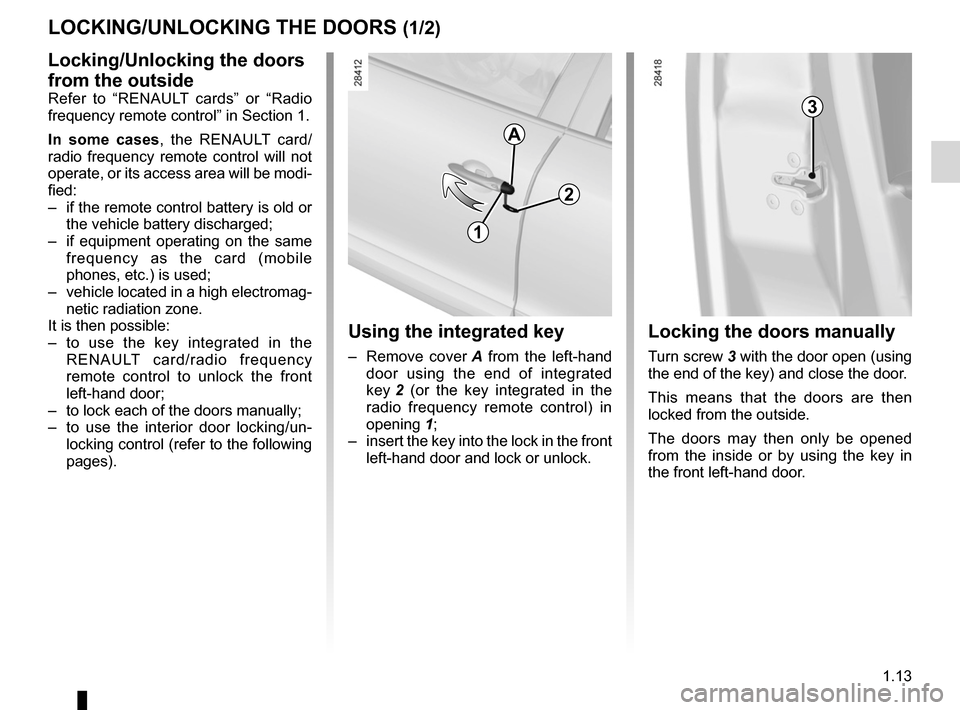
Using the integrated key
– Remove cover A from the left-hand
door using the end of integrated
key 2 (or the key integrated in the
radio frequency remote control) in
opening 1;
– insert the key into the lock in the front
left-hand door and lock or unlock.
Locking the doors manually
Turn screw 3 with the door open (using
the end of the key) and close the door.
This means that the doors are then
locked from the outside.
The doors may then only be opened
from the inside or by using the key in
the front left-hand door.
A
2
3
1
Page 18 of 241
1.14
ENG_UD21349_2
Verrouillage / Déverrouillage des portes (L38 - X38 - Renault)
ENG_NU_891_892-7_L38-B32_Renault_1
LOCKINg/UNLOCKINg ThE DOORs (2/2)
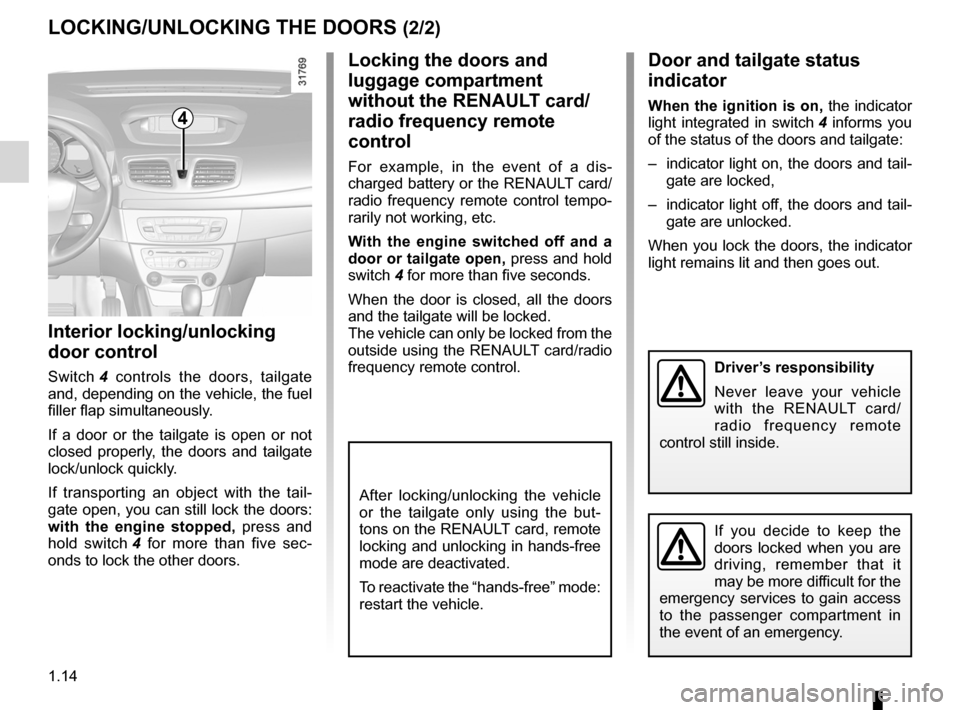
Interior locking/unlocking
door control
Switch 4 controls the doors, tailgate
and, depending on the vehicle, the fuel
filler flap simultaneously.
If a door or the tailgate is open or not
closed properly, the doors and tailgate
lock/unlock quickly.
If transporting an object with the tail -
gate open, you can still lock the doors:
with the engine stopped, press and
hold switch 4 for more than five sec -
onds to lock the other doors.
Locking the doors and
luggage compartment
without the RENAULT card/
radio frequency remote
control
For example, in the event of a dis -
charged battery or the RENAULT card/
radio frequency remote control tempo-
rarily not working, etc.
With the engine switched off and a
door or tailgate open, press and hold
switch 4 for more than five seconds.
When the door is closed, all the doors
and the tailgate will be locked.
The vehicle can only be locked from the
outside using the RENAULT card/radio
frequency remote control.
Door and tailgate status
indicator
When the ignition is on, the indicator
light integrated in switch 4 informs you
of the status of the doors and tailgate:
– indicator light on, the doors and tail-
gate are locked,
– indicator light off, the doors and tail-
gate are unlocked.
When you lock the doors, the indicator
light remains lit and then goes out.
Driver’s responsibility
Never leave your vehicle
with the RENAULT card/
radio frequency remote
control still inside.
If you decide to keep the
doors locked when you are
driving, remember that it
may be more difficult for the
emergency services to gain access
to the passenger compartment in
the event of an emergency.
4
After locking/unlocking the vehicle
or the tailgate only using the but -
tons on the RENAULT card, remote
locking and unlocking in hands-free
mode are deactivated.
To reactivate the “hands-free” mode:
restart the vehicle.
Page 19 of 241
RENAULT ANTI-INTRUDER DEVICE (RAID) (up to the end of the DU)
central door locking .............................. (up to the end of the DU)
doors ..................................................... (up to the end of the DU)
locking the doors .................................. (up to the end of the DU)
doors/tailgate ........................................ (up to the end of the DU)
1.15
ENG_UD21750_3
Condamnation automatique des ouvrants en roulage (L38 - X38 - Renault)\
ENG_NU_891_892-7_L38-B32_Renault_1
Automatic locking when driving
AUTOMATIC LOCKINg WhEN DRIVINg
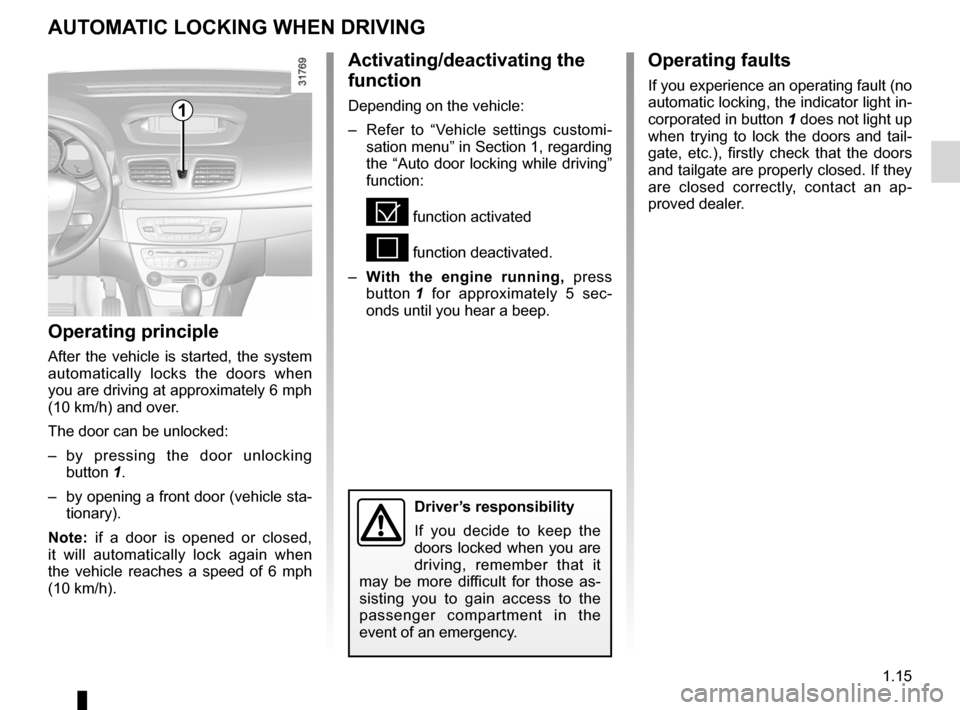
Activating/deactivating the
function
Depending on the vehicle:
– Refer to “Vehicle settings customi -
sation menu” in Section 1, regarding
the “Auto door locking while driving”
function:
= function activated
< function deactivated.
– With the engine running, press
button 1 for approximately 5 sec -
onds until you hear a beep.
Operating principle
After the vehicle is started, the system
automatically locks the doors when
you are driving at approximately 6 mph
(10 km/h) and over.
The door can be unlocked:
– by pressing the door unlocking
button 1.
– by opening a front door (vehicle sta-
tionary).
Note: if a door is opened or closed,
it will automatically lock again when
the vehicle reaches a speed of 6 mph
(10 km/h).
Operating faults
If you experience an operating fault (no
automatic locking, the indicator light in-
corporated in button 1 does not light up
when trying to lock the doors and tail -
gate, etc.), firstly check that the doors
and tailgate are properly closed. If they
are closed correctly, contact an ap -
proved dealer.
1
Driver’s responsibility
If you decide to keep the
doors locked when you are
driving, remember that it
may be more difficult for those as -
sisting you to gain access to the
passenger compartment in the
event of an emergency.
Page 32 of 241
child safety............................................ (up to the end of the DU)
child restraint/seat ................................ (up to the end of the DU)
child restraint/seat ................................ (up to the end of the DU)
child restraint/seat ................................ (up to the end of the DU)
child seats ............................................. (up to the end of the DU)
transporting children ............................. (up to the end of the DU)
children ................................................. (up to the end of the DU)
1.28
ENG_UD20771_2
S curit enfants : g n ralit s (X35 - L35 - X45 - H45 - X65 - X81 \
- X85 - X83 - B95 - D95 - K95 - J95 - R95 - L38 - X38 - X32 - Renault)
ENG_NU_891_892-7_L38-B32_Renault_1
Jaune NoirNoir texte
Child safety: general information
ChILD sAFETY : general information (1/2)
Carrying children
Children, and adults, must be correctly
seated and strapped in for all journeys.
The children being carried in your vehi-
cle are your responsibility.
A child is not a miniature adult. Children
are at risk of specific injuries as their
muscles and bones have not yet fin -
ished growing. The seat belt alone
would not provide suitable protection.
Use an approved child seat and ensure
you use it correctly.
A collision at 30 mph
(50 km/h) is the same as fall-
ing a distance of 10 metres.
Transporting a child without
a restraint is the equivalent of allow-
ing him or her to play on a fourth -
floor balcony without railings.
Never travel with a child held in your
arms. In the event of an accident,
you will not be able to keep hold of
the child, even if you yourself are
wearing a seat belt.
If your vehicle has been involved in
a road accident, replace the child
seat and have the seat belts and
ISOFIX anchorage points checked.
To prevent the doors being
opened, use the “Child
safety” device (refer to the
information on “Opening
and closing the doors” in Section 1).
D r i v e r ’s r e s p o n s i b i l i t y
when parking or stopping
the vehicle
Never leave an animal,
child or adult who is not self-suffi -
cient alone on your vehicle, even for
a short time.
They may pose a risk to themselves
or to others by starting the engine,
activating equipment such as the
electric windows or by locking the
doors.
Also, in hot and/or sunny weather,
please remember that the tempera-
ture inside the passenger compart-
ment increases very quickly.
RI sK OF DEAT h OR sERIOU s
INJURY.
Page 37 of 241
child restraint/seat ................................ (up to the end of the DU)
child restraint/seat ................................ (up to the end of the DU)
child restraint/seat ................................ (up to the end of the DU)
child safety ............................................ (up to the end of the DU)
child seats ............................................. (up to the end of the DU)
transporting children ............................. (up to the end of the DU)
1.33
ENG_UD23757_3
Sécurité enfants : installation du siège enfant (L38 - X38 - R\
enault)
ENG_NU_891_892-7_L38-B32_Renault_1
Some seats are not suitable for fitting
child seats. The diagram on the follow -
ing page shows you how to attach a
child seat.
The types of child seats indicated may
not be available. Before using a differ-
ent child seat, check with the manufac-
turer that it can be fitted.
fitting a child seat
ChILD sAFETY : Fitting a child seat (1/9)
In the rear side seat
A carrycot can be installed across the
vehicle and will take up at least two
seats. Position the child with his or her
feet nearest the door.
Move the front seat as far forward as
possible to install a rear-facing child
seat, then move back the seat in front
as far as it will go, although without al-
lowing it to come into contact with the
child seat.
For the safety of the child in the for -
ward-facing seat, do not move the seat
in front back past the middle of the
runner, do not tilt the seatback too far
(maximum of 25°) and raise the seat as
much as possible.
Check that the forward-facing child seat
is resting against the back of the vehi-
cle seat and that the headrest of the ve-
hicle is not obstructing its use.
In the front seat
The laws concerning children travel
-
ling in the front passenger seat differ in
every country. Consult the legislation in
force and follow the indications on the
diagram on the following page.
Before fitting a child seat in this seat (if
authorised):
– lower the seat belt as far as possible;
– move the seat as far back as possi-
ble;
– gently tilt the seatback away from
vertical (approximately 25°);
– on equipped vehicles, raise the seat
base as far as possible.
Do not change these settings after the
child seat is installed.
R I sK O F D E AT h O R
s ERIOU s INJURY: before
fitting a rear-facing child
seat to this seat, check
that the air bag has been deacti -
vated (refer to the information on
“Child safety: deactivating/activat -
ing the front passenger air bag” in
Section 1).
Fit the child seat in a rear
seat wherever possible.
Check that when installing
the child seat in the vehicle
it is not at risk of coming loose from
its base.
If you have to remove the headrest,
check that it is correctly stored so
that it does not come loose under
harsh braking or impact.
Always attach the child seat to the
vehicle even if it is not in use so that
it does not come loose under harsh
braking or impact.
Ensure that the child seat
or the child’s feet do not
prevent the front seat from
locking correctly. Refer to
the information on the “Front seat”
in Section 1.
Page 51 of 241
JauneNoirNoir texte
1.47
ENG_UD13633_1
Poste de conduite direction à gauche (L38 - X38 - Renault)
ENG_NU_891_892-7_L38-B32_Renault_1
DRIVINg pOsITION: LEFT -hAND DRIVE (2/2)
The equipment fitted, described below, DEpENDs ON ThE VERsION AND COUNTRY.
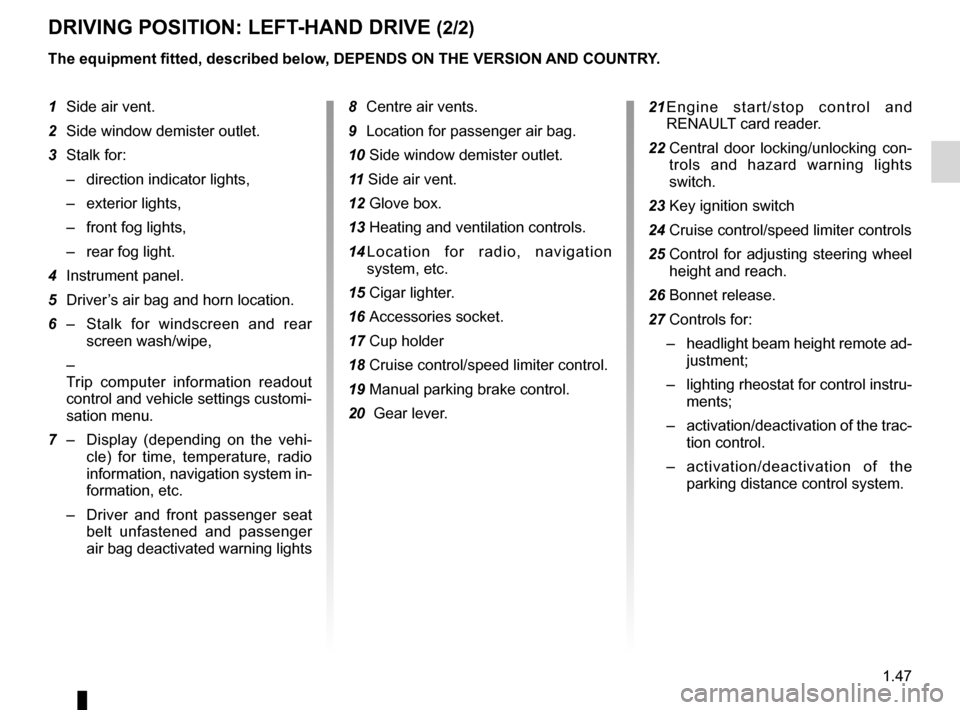
1 Side air vent.
2 Side window demister outlet.
3 Stalk for:
– direction indicator lights,
– exterior lights,
– front fog lights,
– rear fog light.
4 Instrument panel.
5 Driver’s air bag and horn location.
6 – Stalk for windscreen and rear
screen wash/wipe,
–
Trip computer information readout
control and vehicle settings customi-
sation menu.
7 – Display (depending on the vehi -
cle) for time, temperature, radio
information, navigation system in-
formation, etc.
– Driver and front passenger seat
belt unfastened and passenger
air bag deactivated warning lights 8
Centre air vents.
9 Location for passenger air bag.
10 Side window demister outlet.
11 Side air vent.
12 Glove box.
13 Heating and ventilation controls.
14 L o c a t i o n f o r r a d i o , n a v i g a t i o n
system, etc.
15 Cigar lighter.
16 Accessories socket.
17 Cup holder
18 Cruise control/speed limiter control.
19 Manual parking brake control.
20 Gear lever. 21
E n g i n e s t a r t / s t o p c o n t r o l a n d
RENAULT card reader.
22 Central door locking/unlocking con -
trols and hazard warning lights
switch.
23 Key ignition switch
24 Cruise control/speed limiter controls
25 Control for adjusting steering wheel
height and reach.
26 Bonnet release.
27 Controls for:
– headlight beam height remote ad-
justment;
– lighting rheostat for control instru-
ments;
– activation/deactivation of the trac-
tion control.
– activation/deactivation of the
parking distance control system.
Page 53 of 241
JauneNoirNoir texte
1.49
ENG_UD13634_1
Poste de conduite direction à droite (L38 - X38 - Renault)
ENG_NU_891_892-7_L38-B32_Renault_1
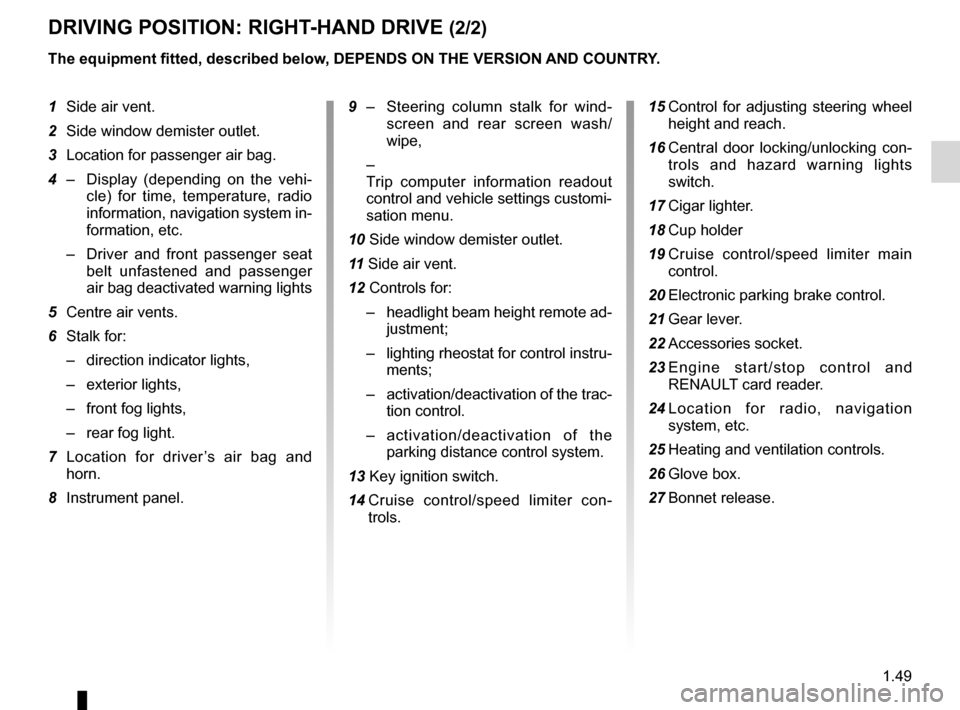
DRIVINg pOsITION: RIghT -hAND DRIVE (2/2)
The equipment fitted, described below, DEpENDs ON ThE VERsION AND COUNTRY.
1 Side air vent.
2 Side window demister outlet.
3 Location for passenger air bag.
4 – Display (depending on the vehi -
cle) for time, temperature, radio
information, navigation system in-
formation, etc.
– Driver and front passenger seat
belt unfastened and passenger
air bag deactivated warning lights
5 Centre air vents.
6 Stalk for:
– direction indicator lights,
– exterior lights,
– front fog lights,
– rear fog light.
7 Location for driver ’s air bag and
horn.
8 Instrument panel.
9 – Steering column stalk for wind -
screen and rear screen wash/
wipe,
–
Trip computer information readout
control and vehicle settings customi-
sation menu.
10 Side window demister outlet.
11 Side air vent.
12 Controls for:
– headlight beam height remote ad-
justment;
– lighting rheostat for control instru-
ments;
– activation/deactivation of the trac-
tion control.
– activation/deactivation of the
parking distance control system.
13 Key ignition switch.
14 Cruise control/speed limiter con -
trols. 15
Control for adjusting steering wheel
height and reach.
16 Central door locking/unlocking con -
trols and hazard warning lights
switch.
17 Cigar lighter.
18 Cup holder
19 Cruise control/speed limiter main
control.
20 Electronic parking brake control.
21 Gear lever.
22 Accessories socket.
23 E n g i n e s t a r t / s t o p c o n t r o l a n d
RENAULT card reader.
24 L o c a t i o n f o r r a d i o , n a v i g a t i o n
system, etc.
25 Heating and ventilation controls.
26 Glove box.
27 Bonnet release.
Page 73 of 241

menu for customising the vehicle settings
(up to the end of the DU)
customising the vehicle settings ........... (up to the end of the DU)
customised vehicle settings .................. (up to the end of the DU)
1.69
ENG_UD24231_2
Menu de personnalisation des réglages du véhicule (L38 - X38 - Re\
nault)
ENG_NU_891_892-7_L38-B32_Renault_1
vehicle settings customisation menu
VEhICLE sETTINgs CUsTOMIsATION MENU
Adjusting the settingsPress one of buttons 2 or 3 to select a
function to change:
a) Auto door locking while driving ;
b) Auto rear wipe with reverse gear ;
c) Auto dipped-beam headlights ;
d) Rear parking sensor ;
e) Parking sensor volume ;
f) LANGUAGE.
= function activated
< function deactivated
On equipped vehicles, this function,
which is integrated in the trip compu
-
ter and warning system 1 , allows you
to activate/deactivate some of the vehi-
cle’s functions.
Accessing the settings
customisation menu
With the vehicle stationary, press
either button 2 or 3 until the mes -
sage “ Settings menu: press and hold ”
appears on display 1 . Press either
button 2 or 3 for longer than 2 seconds
to enter the menu.
Once a line has been selected, keep
pressing either button 2 or 3 to change
the function: If you select either “Parking
sensor volume ” or “LANGUAGE ”, you
will be given a new choice of options
(parking distance control volume or in-
strument panel language). In this case,
make your selection and confirm it by
holding either button 2 or 3 , the value
selected is shown by a
~ in front
of the line.
To exit the menu, select “ EXIT” or
“ BACK ” then confirm by holding either
button 2 or 3 . It may be necessary to
carry out this operation several times.
2
3
1
The vehicle settings customisation
menu cannot be used when driv -
ing. At speeds of above 12 mph (20
km/h) for vehicles with a manual
gearbox (0 mph for vehicles with an
automatic gearbox), the on-board
display returns automatically to the
trip computer and warning system
mode.