warning light RENAULT KOLEOS 2012 1.G User Guide
[x] Cancel search | Manufacturer: RENAULT, Model Year: 2012, Model line: KOLEOS, Model: RENAULT KOLEOS 2012 1.GPages: 233, PDF Size: 7.81 MB
Page 44 of 233
air bagactivating the front passenger air bags ............ (current page)
1.38
ENG_UD23643_7
Sécurité enfants : désactivation, activation airbag passager avant (X45 - H45 - Renault)
ENG_NU_977-2_H45_Ph2_Renault_1
chILd sAfETY : deactivating, activating the front passenger air bag (3/3)
Activating the front
passenger air bags
You should reactivate the air bag as
soon as you remove the child seat from
the front passenger seat to ensure the
protection of the front passenger in the
event of an impact.
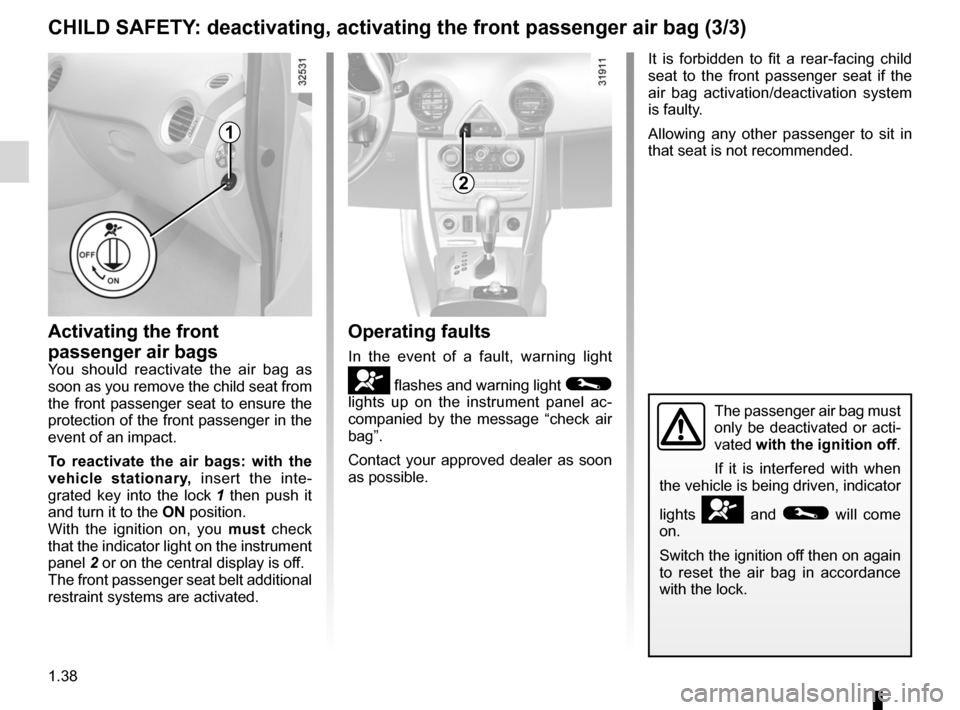
To reactivate the air bags: with the
vehicle stationary, insert the inte-
grated key into the lock 1 then push it
and turn it to the ON position.
With the ignition on, you must check
that the indicator light on the instrument
panel 2 or on the central display is off.
The front passenger seat belt additional
restraint systems are activated.
2
1
Operating faults
In the event of a fault, warning light
å flashes and warning light ©
lights up on the instrument panel ac -
companied by the message “check air
bag”.
Contact your approved dealer as soon
as possible.
The passenger air bag must
only be deactivated or acti-
vated with the ignition off.
If it is interfered with when
the vehicle is being driven, indicator
lights
å and © will come
on.
Switch the ignition off then on again
to reset the air bag in accordance
with the lock.
It is forbidden to fit a rear-facing child
seat to the front passenger seat if the
air bag activation/deactivation system
is faulty.
Allowing any other passenger to sit in
that seat is not recommended.
Page 47 of 233
JauneNoirNoir texte
1.41
ENG_UD27144_6
Poste de conduite direction gauche (X45 - H45 - Renault)
ENG_NU_977-2_H45_Ph2_Renault_1
dRIvINg pOsITION: LEfT -hANd dRIvE (2/2)
The equipment fitted, described below, dEpENds ON ThE vERsION ANd cOUNTRY.
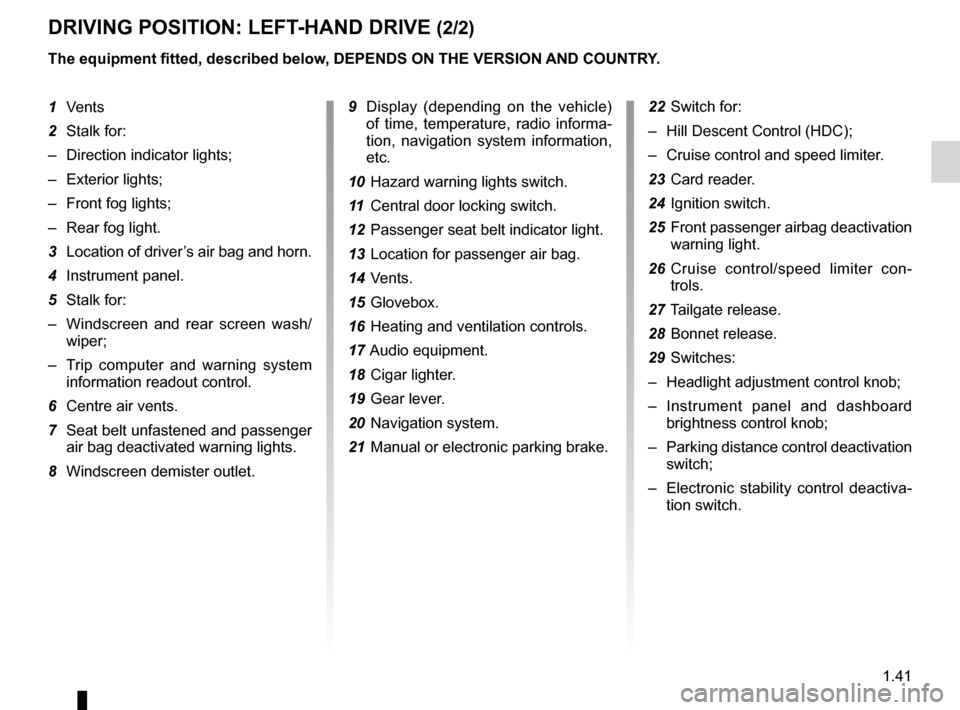
9 Display (depending on the vehicle)
of time, temperature, radio informa -
tion, navigation system information,
etc.
10 Hazard warning lights switch.
11 Central door locking switch.
12 Passenger seat belt indicator light.
13 Location for passenger air bag.
14 Vents.
15 Glovebox.
16 Heating and ventilation controls.
17 Audio equipment.
18 Cigar lighter.
19 Gear lever.
20 Navigation system.
21 Manual or electronic parking brake. 22
Switch for:
– Hill Descent Control (HDC);
– Cruise control and speed limiter.
23 Card reader.
24 Ignition switch.
25 Front passenger airbag deactivation
warning light.
26 Cruise control/speed limiter con -
trols.
27 Tailgate release.
28 Bonnet release.
29 Switches:
– Headlight adjustment control knob;
– Instrument panel and dashboard
brightness control knob;
– Parking distance control deactivation
switch;
– Electronic stability control deactiva -
tion switch.
1
Vents
2 Stalk for:
– Direction indicator lights;
– Exterior lights;
– Front fog lights;
– Rear fog light.
3 Location of driver’s air bag and horn.
4 Instrument panel.
5 Stalk for:
– Windscreen and rear screen wash/
wiper;
– Trip computer and warning system
information readout control.
6 Centre air vents.
7 Seat belt unfastened and passenger
air bag deactivated warning lights.
8 Windscreen demister outlet.
Page 49 of 233
JauneNoirNoir texte
1.43
ENG_UD27145_6
Poste de conduite direction droite (X45 - H45 - Renault)
ENG_NU_977-2_H45_Ph2_Renault_1
dRIvINg pOsITION: RIghT -hANd dRIvE (2/2)
The fittings described below dEpENd ON ThE vEhIcLE EQUIpMENT ANd cOUNTRY.
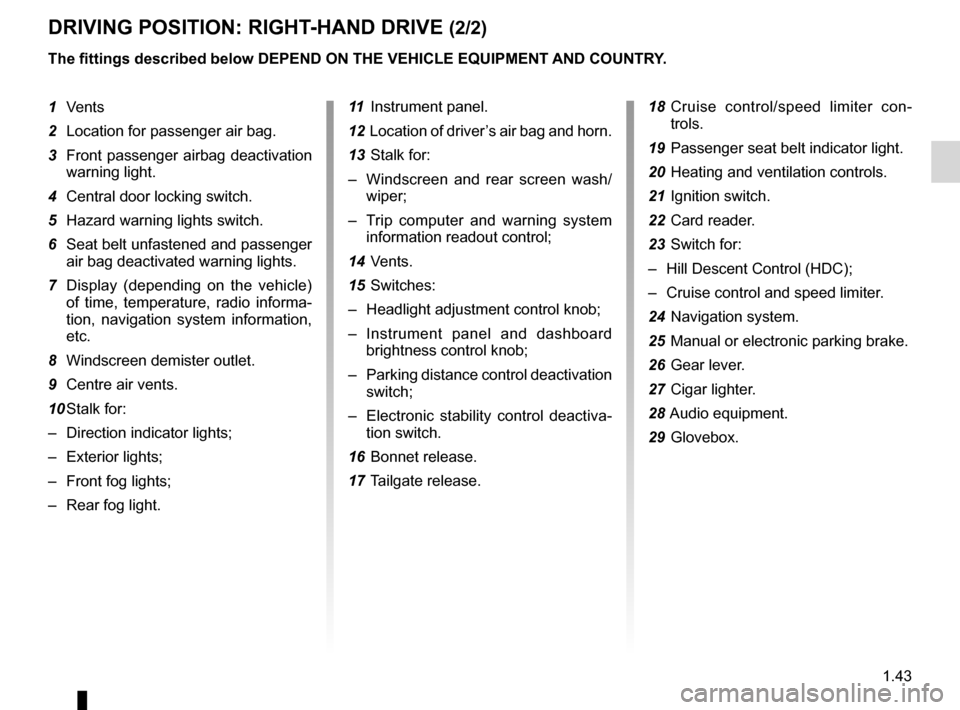
11 Instrument panel.
12 Location of driver’s air bag and horn.
13 Stalk for:
– Windscreen and rear screen wash/
wiper;
– Trip computer and warning system
information readout control;
14 Vents.
15 Switches:
– Headlight adjustment control knob;
– Instrument panel and dashboard
brightness control knob;
– Parking distance control deactivation
switch;
– Electronic stability control deactiva -
tion switch.
16 Bonnet release.
17 Tailgate release. 18
Cruise control/speed limiter con -
trols.
19 Passenger seat belt indicator light.
20 Heating and ventilation controls.
21 Ignition switch.
22 Card reader.
23 Switch for:
– Hill Descent Control (HDC);
– Cruise control and speed limiter.
24 Navigation system.
25 Manual or electronic parking brake.
26 Gear lever.
27 Cigar lighter.
28 Audio equipment.
29 Glovebox.
1
Vents
2 Location for passenger air bag.
3 Front passenger airbag deactivation
warning light.
4 Central door locking switch.
5 Hazard warning lights switch.
6 Seat belt unfastened and passenger
air bag deactivated warning lights.
7 Display (depending on the vehicle)
of time, temperature, radio informa -
tion, navigation system information,
etc.
8 Windscreen demister outlet.
9 Centre air vents.
10 Stalk for:
– Direction indicator lights;
– Exterior lights;
– Front fog lights;
– Rear fog light.
Page 50 of 233
instrument panel ................................... (up to the end of the DU)
warning lights ........................................ (up to the end of the DU)
driver’s position .................................... (up to the end of the DU)
trip computer and warning system ........(up to the end of the DU)
indicators: instrument panel ............................. (up to the end of the DU)
display .................................................. (up to the end of the DU)
1.44
ENG_UD23307_5
Témoins lumineux (X45 - H45 - Renault)
ENG_NU_977-2_H45_Ph2_Renault_1
Jaune NoirNoir texte
Warning lights
WARNINg LIghTs (1/4)
åAir bag warning light
This comes on when the igni -
tion is switched on and goes out after a
few seconds. If it does not light up when
the ignition is switched on, or if it lights
up when the engine is running, it indi -
cates a fault in the system. Contact an
authorised dealer as soon as possible.
Îc ruise control/speed limiter
indicator lights
Refer to the information on the “Cruise
control/Speed limiter” in Section 2.
ðh eating passenger seat op -
erating indicator light
This indicates that the front passen -
ger’s heated seat is on.
ÄToxic fume filter system
Warning Light
This lights up when the ignition is
switched on and goes out when the
engine is started.
– If it comes on continuously, consult
your authorised dealer as soon as
possible.
– If it flashes, reduce the engine speed
until the light stops flashing. Contact
your approved Dealer as soon as
possible.
R e f e r t o t h e i n f o r m a t i o n o n
“Antipollution, fuel economy and driv -
ing” in Section 2.
If no lights or sounds are ap-
parent, this indicates a fault
in the instrument panel. This
indicates that it is essential
to stop immediately (as soon as traf-
fic conditions allow). Ensure that the
vehicle is correctly immobilised and
contact an approved Dealer.
The warning light © means
you should drive very carefully to
an authorised dealer as soon as
possible. If you fail to follow this rec-
ommendation, you risk damaging
your vehicle.
Warning light ® re -
quires you to stop immedi -
ately, for your own safety,
as soon as traffic conditions allow.
Switch off the engine and do not re-
start it. Contact an approved Dealer.
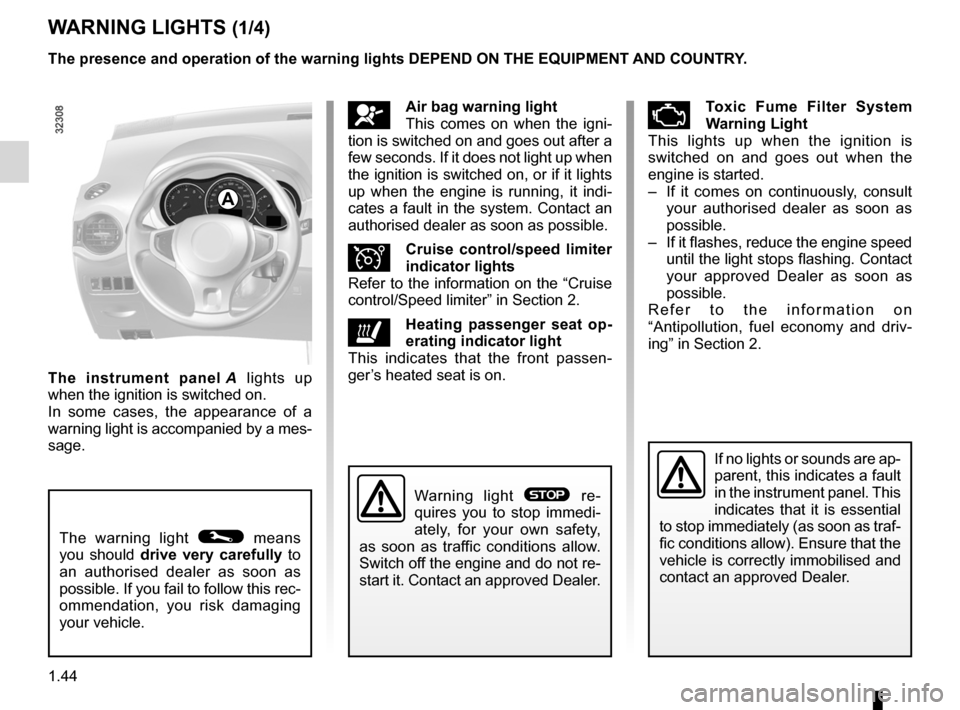
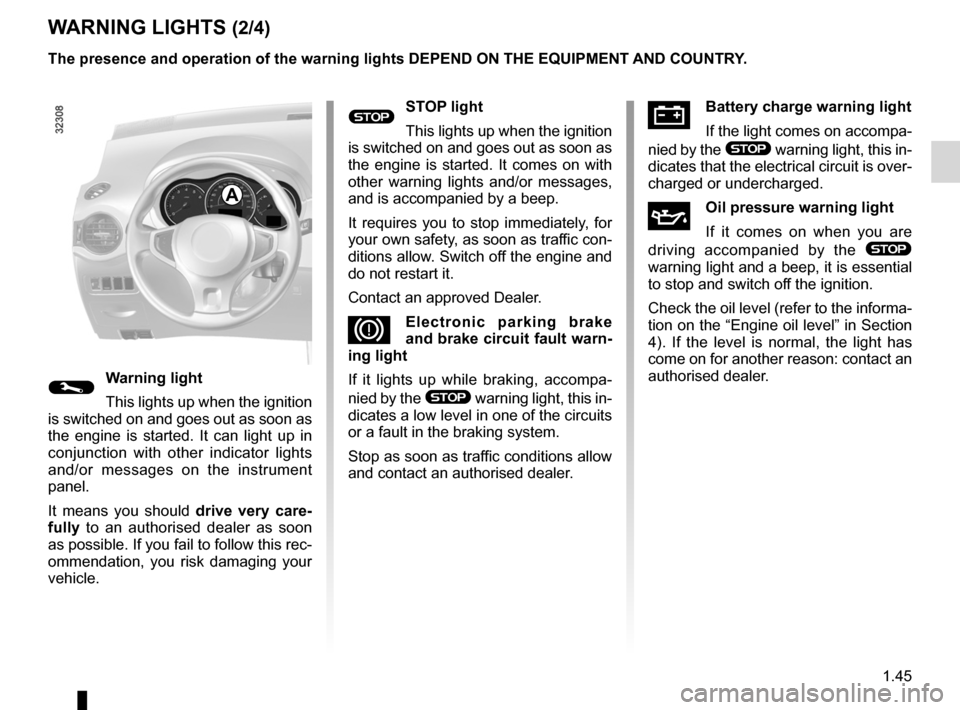
The instrument panel A lights up
when the ignition is switched on.
In some cases, the appearance of a
warning light is accompanied by a mes-
sage. The presence and operation of the warning lights dEpENd ON ThE EQUIpMENT ANd cOUNTRY.
A
Page 51 of 233
JauneNoirNoir texte
1.45
ENG_UD23307_5
Témoins lumineux (X45 - H45 - Renault)
ENG_NU_977-2_H45_Ph2_Renault_1
W ARNINg LIghTs (2/4)
ÚBattery charge warning light
If the light comes on accompa -
nied by the
® warning light, this in-
dicates that the electrical circuit is over-
charged or undercharged.
ÀOil pressure warning light
If it comes on when you are
driving accompanied by the
®
warning light and a beep, it is essential
to stop and switch off the ignition.
Check the oil level (refer to the informa-
tion on the “Engine oil level” in Section
4). If the level is normal, the light has
come on for another reason: contact an
authorised dealer.
A
®sTOp light
This lights up when the ignition
is switched on and goes out as soon as
the engine is started. It comes on with
other warning lights and/or messages,
and is accompanied by a beep.
It requires you to stop immediately, for
your own safety, as soon as traffic con-
ditions allow. Switch off the engine and
do not restart it.
Contact an approved Dealer.
DElectronic parking brake
and brake circuit fault warn-
ing light
If it lights up while braking, accompa -
nied by the
® warning light, this in-
dicates a low level in one of the circuits
or a fault in the braking system.
Stop as soon as traffic conditions allow
and contact an authorised dealer.©Warning light
This lights up when the ignition
is switched on and goes out as soon as
the engine is started. It can light up in
conjunction with other indicator lights
and/or messages on the instrument
panel.
It means you should drive very care-
fully to an authorised dealer as soon
as possible. If you fail to follow this rec-
ommendation, you risk damaging your
vehicle. The presence and operation of the warning lights dEpENd ON ThE EQUIpMENT ANd cOUNTRY.
Page 52 of 233
fuelfilling ................................................................. (current page)
filter particle filter ..................................................... (current page)
1.46
ENG_UD23307_5
Témoins lumineux (X45 - H45 - Renault)
ENG_NU_977-2_H45_Ph2_Renault_1
Jaune NoirNoir texte
WARNINg LIghTs (3/4)
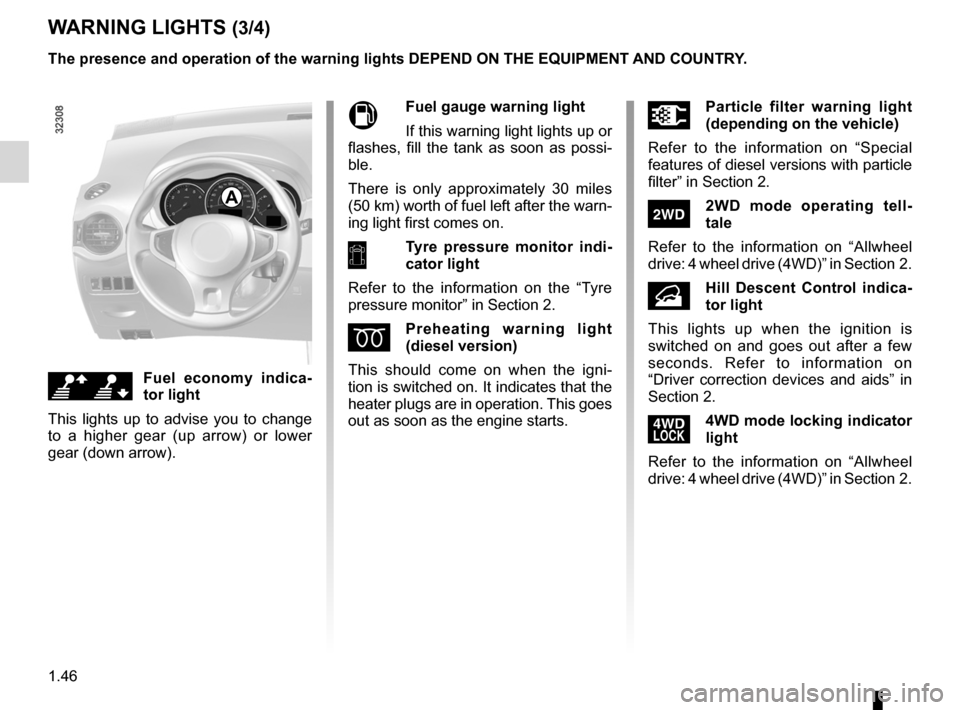
A
\[fuel economy indica -
tor light
This lights up to advise you to change
to a higher gear (up arrow) or lower
gear (down arrow).
Mfuel gauge warning light
If this warning light lights up or
flashes, fill the tank as soon as possi -
ble.
There is only approximately 30 miles
(50 km) worth of fuel left after the warn-
ing light first comes on.
7Tyre pressure monitor indi -
cator light
Refer to the information on the “Tyre
pressure monitor” in Section 2.
Ép reheating warning light
(diesel version)
This should come on when the igni -
tion is switched on. It indicates that the
heater plugs are in operation. This goes
out as soon as the engine starts.
\fp article filter warning light
(depending on the vehicle)
Refer to the information on “Special
features of diesel versions with particle
filter” in Section 2.
‘2W d mode operating tell -
tale
Refer to the information on “Allwheel
drive: 4 wheel drive (4WD)” in Section 2.
•h ill descent control indica -
tor light
This lights up when the ignition is
switched on and goes out after a few
seconds. Refer to information on
“Driver correction devices and aids” in
Section 2.
’4Wd mode locking indicator
light
Refer to the information on “Allwheel
drive: 4 wheel drive (4WD)” in Section 2.
The presence and operation of the warning lights dEpENd ON ThE EQUIpMENT ANd cOUNTRY.
Page 53 of 233
JauneNoirNoir texte
1.47
ENG_UD23307_5
Témoins lumineux (X45 - H45 - Renault)
ENG_NU_977-2_H45_Ph2_Renault_1
W ARNINg LIghTs (4/4)
™front seat belt reminder
warning light
This comes on when the engine is
started then, if the driver’s or front pas-
senger’s seat belt (if this seat is occu-
pied) is not fastened and the vehicle
has reached approximately 12 mph
(20 km/ h), it flashes and a bleep sounds
for around 120 seconds.
Note: an object placed on the passen-
ger seat base may activate the warning
light in some cases.
\bdriver correction devices in-
dicator light
Refer to information on “Driver correc -
tion devices” in Section 2.
xAnti-lock braking warning
light
This comes on when the ignition is
switched on and goes out after a few
seconds. If it does not go out after the
ignition is switched on, or lights up
when driving, there is a fault with the
ABS. The braking system then oper -
ates as it would on a vehicle without
the ABS system: Contact an authorised
dealer as soon as possible.
}h andbrake “on” or elec -
tronic parking brake warn -
ing light
Refer to the information on the
“Handbrake” or “Electronic parking
brake” in Section 2.
uside light tell-tale light
áh eadlight main beam tell -
tale light
kd ipped beam headlight tell -
tale light
gfront fog light tell-tale light
fRear fog light tell-tale light
˜Right-hand direction indica -
tor tell-tale light
–Left-hand direction indicator
tell-tale light
The presence and operation of the warning lights dEpENd ON ThE EQUIpMENT ANd cOUNTRY.
Page 54 of 233
control instruments ............................... (up to the end of the DU)
indicators: instrument panel ............................. (up to the end of the DU)
display .................................................. (up to the end of the DU)
instrument panel ................................... (up to the end of the DU)
coolant ................................................................... (current page)
fuel level ................................................................ (current page)
1.48
ENG_UD23488_3
Tableau de bord : afficheurs et indicateurs (X45 - H45 - Renault)
ENG_NU_977-2_H45_Ph2_Renault_1
Jaune NoirNoir texte
Instrument panel
INsTRUMENT p ANEL: displays and indicators (1/2)
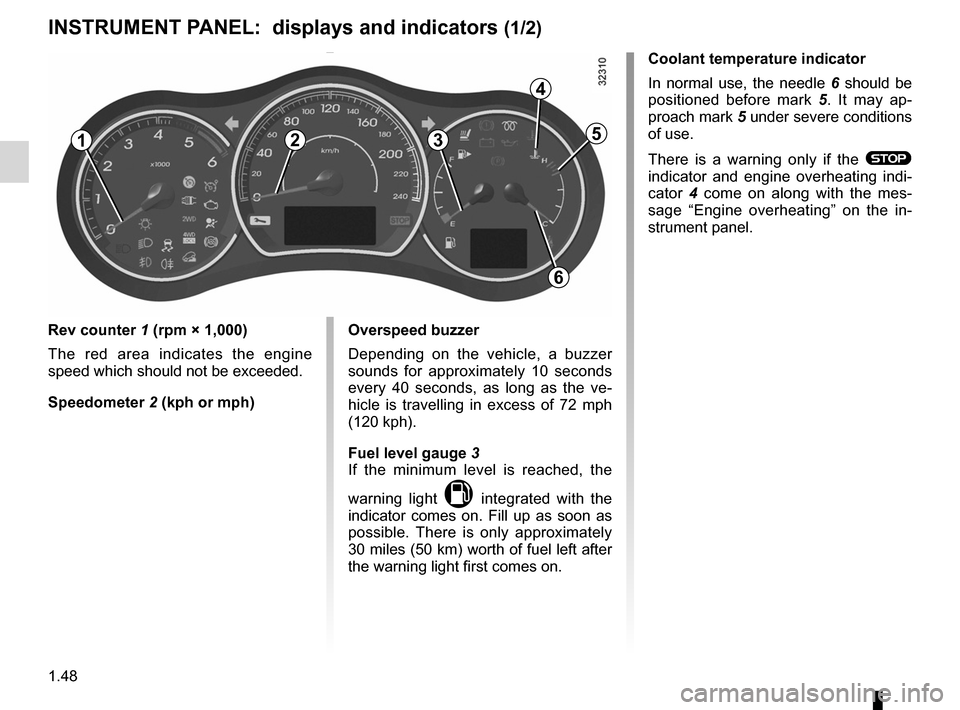
Rev counter 1 (rpm × 1,000)
The red area indicates the engine
speed which should not be exceeded.
speedometer 2 (kph or mph) Overspeed buzzer
Depending on the vehicle, a buzzer
sounds for approximately 10 seconds
every 40 seconds, as long as the ve
-
hicle is travelling in excess of 72 mph
(120 kph).
fuel level gauge 3
If the minimum level is reached, the
warning light
M integrated with the
indicator comes on. Fill up as soon as
possible. There is only approximately
30 miles (50 km) worth of fuel left after
the warning light first comes on. coolant temperature indicator
In normal use, the needle
6 should be
positioned before mark 5 . It may ap -
proach mark 5 under severe conditions
of use.
There is a warning only if the
® indicator and engine overheating indi -
cator 4 come on along with the mes -
sage “ Engine overheating ” on the in-
strument panel.
123
4
5
6
Page 56 of 233
control instruments ............................... (up to the end of the DU)
trip computer and warning system ........(up to the end of the DU)
indicators: instrument panel ............................. (up to the end of the DU)
instrument panel ................................... (up to the end of the DU)
warning lights ........................................ (up to the end of the DU)
1.50
ENG_UD27277_8
Ordinateur de bord (X45 - H45 - Renault)
ENG_NU_977-2_H45_Ph2_Renault_1
Jaune NoirNoir texte
trip computer and warning system
TRIp cOMpUTER ANd WARNINg sYsTEM (1/10)
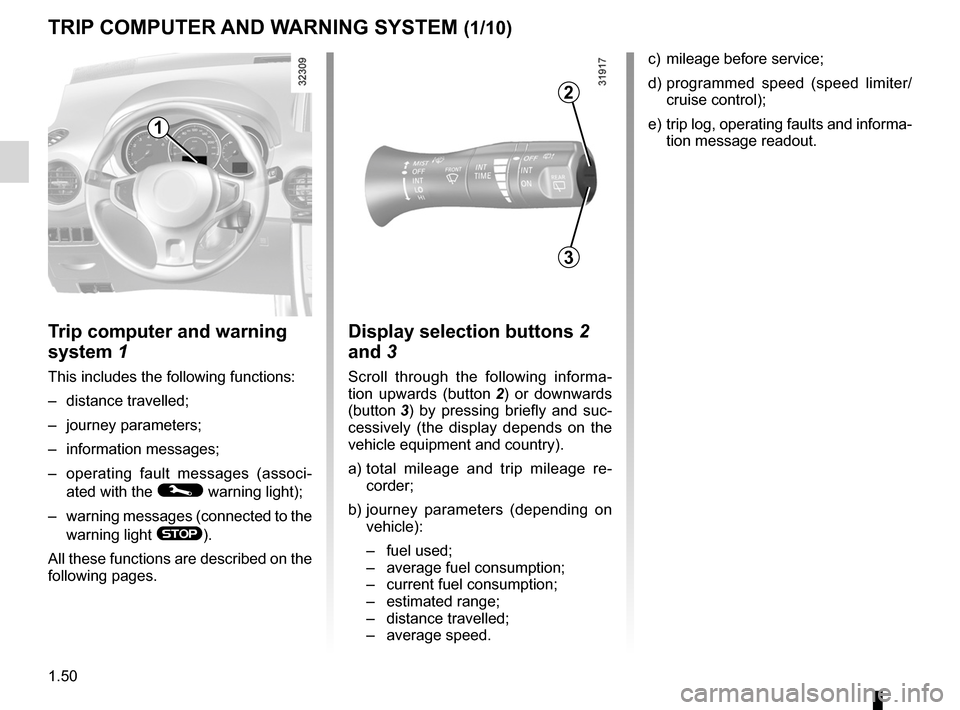
c) mileage before service;
d) programmed speed (speed limiter/
cruise control);
e) trip log, operating faults and informa-
tion message readout.
Trip computer and warning
system 1
This includes the following functions:
– distance travelled;
– journey parameters;
– information messages;
– operating fault messages (associ -
ated with the
© warning light);
– warning messages (connected to the
warning light
®).
All these functions are described on the
following pages.
display selection buttons 2
and 3
Scroll through the following informa -
tion upwards (button 2 ) or downwards
(button 3 ) by pressing briefly and suc -
cessively (the display depends on the
vehicle equipment and country).
a) total mileage and trip mileage re -
corder;
b) journey parameters (depending on
vehicle):
– fuel used;
– average fuel consumption;
– current fuel consumption;
– estimated range;
– distance travelled;
– average speed.
3
2
1
Page 60 of 233
1.54
ENG_UD27277_8
Ordinateur de bord (X45 - H45 - Renault)
ENG_NU_977-2_H45_Ph2_Renault_1
Jaune NoirNoir texte
TRIp cOMpUTER ANd WARNINg sYsTEM (5/10)
The display of information shown below dEpENds ON ThE vEhIcLE EQUIpMENT ANd cOUNTRY.
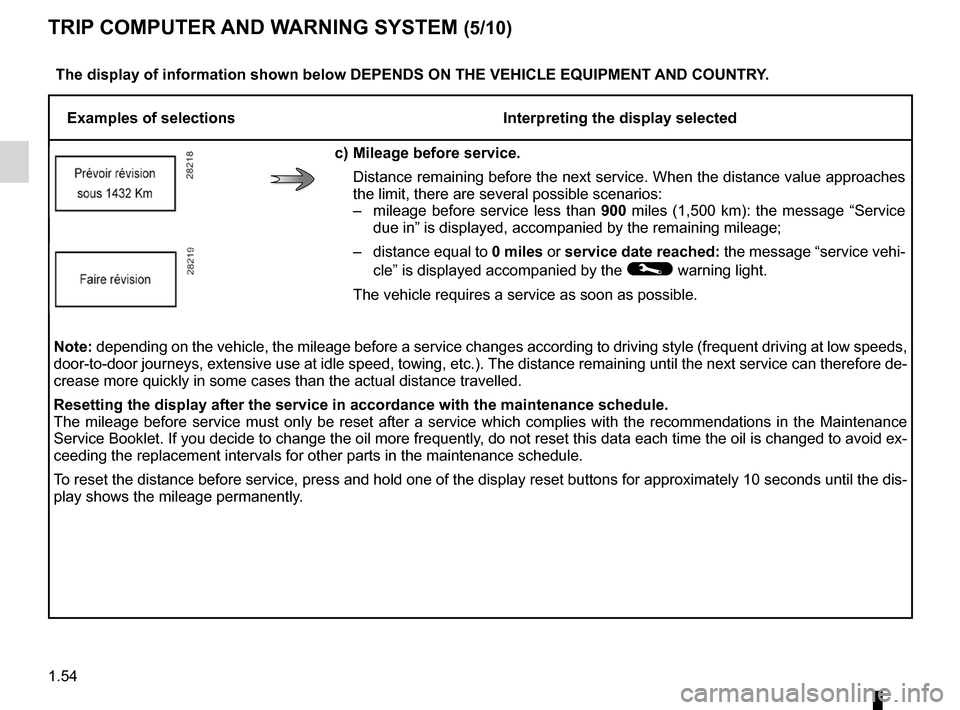
Examples of selections Interpreting the display selected
c) Mileage before service.
Distance remaining before the next service. When the distance value approaches
the limit, there are several possible scenarios:
– mileage before service less than 900 miles (1,500 km): the message “Service
due in ” is displayed, accompanied by the remaining mileage;
– distance equal to 0 miles or service date reached: the message “service vehi-
cle” is displayed accompanied by the
© warning light.
The vehicle requires a service as soon as possible.
Note: depending on the vehicle, the mileage before a service changes according to driving style (frequent driving at low speeds,
door-to-door journeys, extensive use at idle speed, towing, etc.). The distance remaining until the next service can therefore de-
crease more quickly in some cases than the actual distance travelled.
Resetting the display after the service in accordance with the maintenance schedule.
The mileage before service must only be reset after a service which complies with the recommendations in the Maintenance
Service Booklet. If you decide to change the oil more frequently, do not reset this data each time the oil is changed to avoid ex-
ceeding the replacement intervals for other parts in the maintenance schedule.
To reset the distance before service, press and hold one of the display reset buttons for approximately 10 seconds until the dis-
play shows the mileage permanently.