brake RENAULT KOLEOS 2012 1.G Owner's Manual
[x] Cancel search | Manufacturer: RENAULT, Model Year: 2012, Model line: KOLEOS, Model: RENAULT KOLEOS 2012 1.GPages: 233, PDF Size: 7.81 MB
Page 105 of 233
downhill speed control ........................................... (current page)
JauneNoirNoir texte
2.27
ENG_UD27148_7
Dispositifs de correction et d’assistance la conduite (X45 - H45 - Renault)
ENG_NU_977-2_H45_Ph2_Renault_2
DRIvER CORRECTION DEvICES (4/5)
Hill descent control
This function enables the vehicle speed
to be limited to approximately 4 mph
(7 km/h), without depressing the brake
pedal (when driving down a steep hill).
Activating/deactivating the system
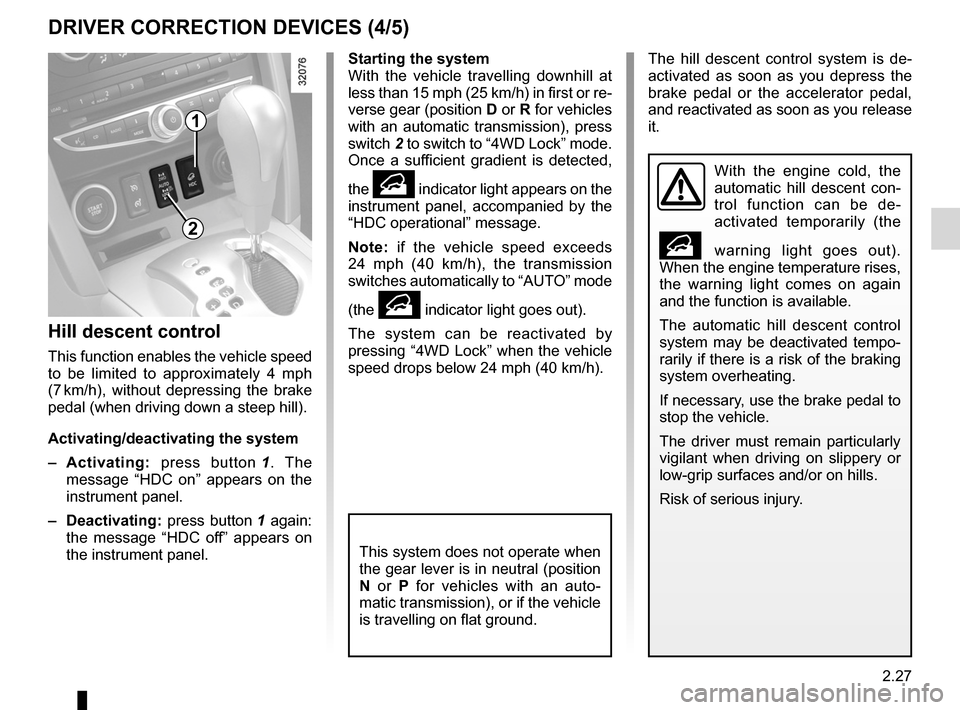
– Activating: press button 1 . The
message “ HDC on” appears on the
instrument panel.
– Deactivating: press button 1 again:
the message “ HDC off” appears on
the instrument panel.
Starting the system
With the vehicle travelling downhill at
less than 15 mph (25 km/h) in first or re-
verse gear (position D or R for vehicles
with an automatic transmission), press
switch 2 to switch to “4WD Lock” mode.
Once a sufficient gradient is detected,
the
• indicator light appears on the
instrument panel, accompanied by the
“HDC operational ” message.
Note: if the vehicle speed exceeds
24 mph (40 km/h), the transmission
switches automatically to “AUTO” mode
(the
• indicator light goes out).
The system can be reactivated by
pressing “4WD Lock” when the vehicle
speed drops below 24 mph (40 km/h).
1
With the engine cold, the
automatic hill descent con -
trol function can be de -
activated temporarily (the
• warning light goes out).
When the engine temperature rises,
the warning light comes on again
and the function is available.
The automatic hill descent control
system may be deactivated tempo-
rarily if there is a risk of the braking
system overheating.
If necessary, use the brake pedal to
stop the vehicle.
The driver must remain particularly
vigilant when driving on slippery or
low-grip surfaces and/or on hills.
Risk of serious injury.
This system does not operate when
the gear lever is in neutral (position
N or P for vehicles with an auto -
matic transmission), or if the vehicle
is travelling on flat ground.
2
The hill descent control system is de -
activated as soon as you depress the
brake pedal or the accelerator pedal,
and reactivated as soon as you release
it.
Page 106 of 233
Hill Start Assistance (HSA) ....................................(current page)
hill start ................................................. (up to the end of the DU)
2.28
ENG_UD27148_7
Dispositifs de correction et d’assistance la conduite (X45 - H45 - Renault)
ENG_NU_977-2_H45_Ph2_Renault_2
DRIvER CORRECTION DEvICES (5/5)
Hill start assistance
This function assists the driver when
starting on hills. It prevents the vehicle
from rolling backwards, depending on
the slope, by automatically applying the
brakes when the driver lifts his/her foot
off the brake pedal to depress the ac -
celerator pedal.
System operation
It only operates when the gear lever is
in a position other than neutral (other
than N or P for automatic transmis -
sions) and the vehicle is completely
stationary (brake pedal depressed)
The system holds the vehicle for ap -
proximately 2 seconds. The brakes are
then gradually released (the vehicle will
move according to the slope).
The hill start assistance
system cannot completely
prevent the vehicle from
rolling backwards in all sit -
uations (extremely steep gradients,
etc.).
In all cases, the driver may depress
the brake pedal to prevent the vehi-
cle from rolling backwards.
The hill start assistance function
should not be used for prolonged
stops: use the brake pedal.
This function is not designed to im-
mobilise the vehicle permanently.
If necessary, use the brake pedal to
stop the vehicle.
The driver must remain particularly
vigilant when driving on slippery or
low-grip surfaces and/or on hills.
Risk of serious injury.
Page 110 of 233
cruise control ........................................ (up to the end of the DU)
cruise control-speed limiter................... (up to the end of the DU)
driving ................................................... (up to the end of the DU)
2.32
ENG_UD23498_5
Régulateur-limiteur de vitesse : fonction régulateur (X45 - H45 - Renault)
ENG_NU_977-2_H45_Ph2_Renault_2
Jaune NoirNoir texte
Cruise control
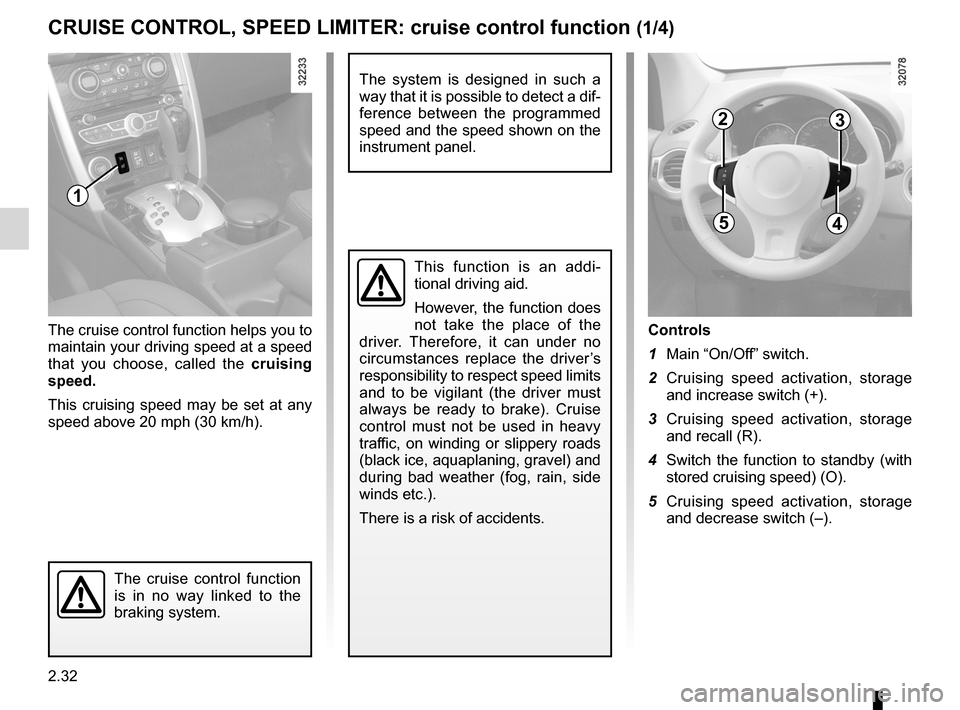
Controls
1 Main “On/Off” switch.
2 Cruising speed activation, storage
and increase switch (+).
3 Cruising speed activation, storage
and recall (R).
4 Switch the function to standby (with
stored cruising speed) (O).
5 Cruising speed activation, storage
and decrease switch (–).
The cruise control function helps you to
maintain your driving speed at a speed
that you choose, called the
cruising
speed.
This cruising speed may be set at any
speed above 20 mph (30 km/h).
The cruise control function
is in no way linked to the
braking system.
This function is an addi -
tional driving aid.
However, the function does
not take the place of the
driver. Therefore, it can under no
circumstances replace the driver’s
responsibility to respect speed limits
and to be vigilant (the driver must
always be ready to brake). Cruise
control must not be used in heavy
traffic, on winding or slippery roads
(black ice, aquaplaning, gravel) and
during bad weather (fog, rain, side
winds etc.).
There is a risk of accidents.
CRUISE CONTROL, SPEED LIMITER: cruise control function (1/4)
1
23
45
The system is designed in such a
way that it is possible to detect a dif-
ference between the programmed
speed and the speed shown on the
instrument panel.
Page 113 of 233
JauneNoirNoir texte
2.35
ENG_UD23498_5
Régulateur-limiteur de vitesse : fonction régulateur (X45 - H45 - Renault)
ENG_NU_977-2_H45_Ph2_Renault_2
CRUISE CONTROL, SPEED LIMITER: cruise control function (4/4)
Putting the function on
standby
The function is suspended when you:
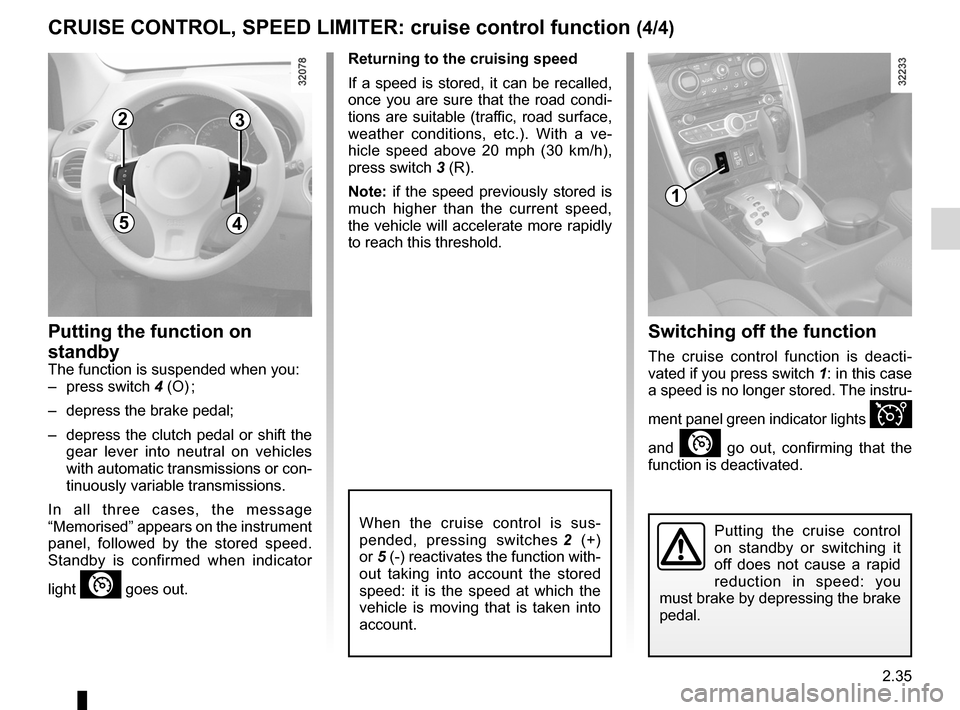
– press switch 4 (O) ;
– depress the brake pedal;
– depress the clutch pedal or shift the
gear lever into neutral on vehicles
with automatic transmissions or con-
tinuously variable transmissions.
In all three cases, the message
“Memorised ” appears on the instrument
panel, followed by the stored speed.
Standby is confirmed when indicator
light
” goes out.
Returning to the cruising speed
If a speed is stored, it can be recalled,
once you are sure that the road condi -
tions are suitable (traffic, road surface,
weather conditions, etc.). With a ve -
hicle speed above 20 mph (30 km/h),
press switch 3 (R).
Note: if the speed previously stored is
much higher than the current speed,
the vehicle will accelerate more rapidly
to reach this threshold.
When the cruise control is sus -
pended, pressing switches 2 (+)
or 5 (-) reactivates the function with-
out taking into account the stored
speed: it is the speed at which the
vehicle is moving that is taken into
account.
Switching off the function
The cruise control function is deacti -
vated if you press switch 1: in this case
a speed is no longer stored. The instru-
ment panel green indicator lights
Î
and
” go out, confirming that the
function is deactivated.
Putting the cruise control
on standby or switching it
off does not cause a rapid
reduction in speed: you
must brake by depressing the brake
pedal.
1
23
45
Page 115 of 233
JauneNoirNoir texte
2.37
ENG_UD27281_8
Aide au parking (X45 - H45 - Renault)
ENG_NU_977-2_H45_Ph2_Renault_2
PARKING DISTANCE CONTROL (2/3)
Automatic activation/deactivation of
rear parking distance control
The system deactivates:
– when the electronic parking brake is
applied;
– when the vehicle speed is above ap-
proximately 7 mph (12 km/h);
– when the vehicle is in neutral or
when the gear lever has been shifted
to N or P for automatic gearboxes.
An impact to the under -
side of the vehicle while
manoeuvring (e.g.: strik -
ing a post, raised kerb or
other street furniture) may result in
damage to the vehicle (e.g.: defor -
mation of an axle).
To avoid any risk of accident, have
your vehicle checked by an ap -
proved Dealer.
If there are obstacles located close to
both the front and rear of the vehicle,
only the closest of the two will be ac -
knowledged and the corresponding
front or rear beep sound will be emit -
ted. If obstacles are detected both to
the front and to the rear of the vehicle
at the same time, and they are both
within 30 centimetres from the vehicle,
the corresponding front and rear beeps
will be emitted alternately.
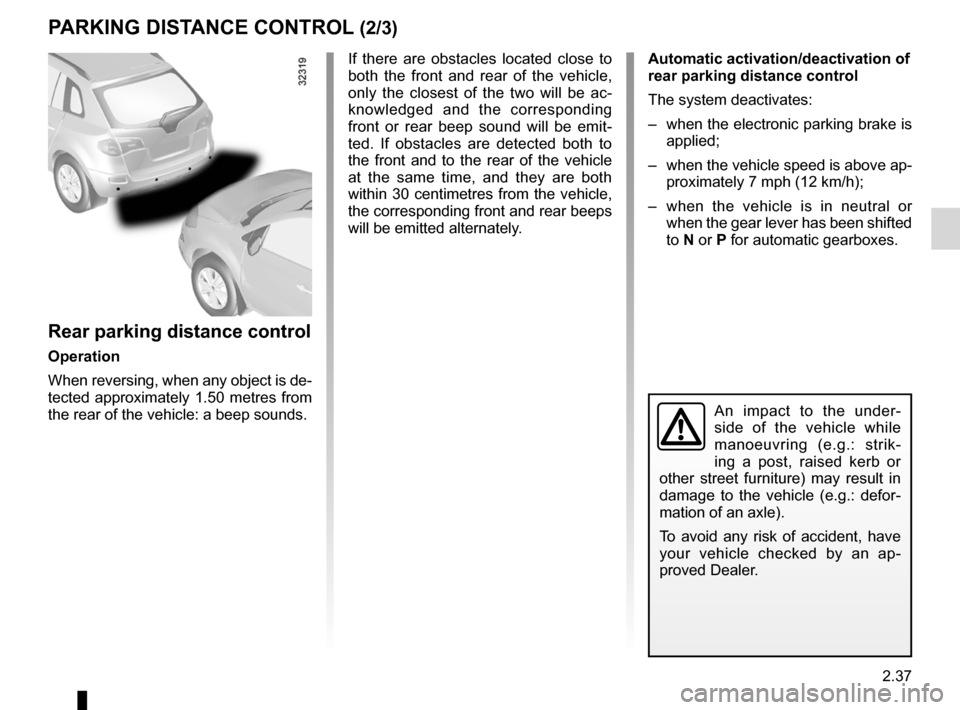
Rear parking distance control
Operation
When reversing, when any object is de-
tected approximately 1.50 metres from
the rear of the vehicle: a beep sounds.
Page 117 of 233

automatic gearbox (use) ....................... (up to the end of the DU)
automatic gearbox selector lever ..........(up to the end of the DU)
driving ................................................... (up to the end of the DU)
reverse gear selecting .......................................... (up to the end of the DU)
changing gear ....................................... (up to the end of the DU)
continuous variation ..............................(up to the end of the DU)
continuously variable transmission ....... (up to the end of the DU)
2.39
ENG_UD27292_7
Bo tes de vitesses automatiques ou variation continue (X45 - H45 - Renault)
ENG_NU_977-2_H45_Ph2_Renault_2
Automatic or continuously variable transmission
AUTOMATIC OR CONTINUOUSLY vARIABLE TRANSMISSION (1/3)
Depending on the vehicle, the vehicle is
either fitted with an automatic transmis-
sion, or a continuously variable trans -
mission.
Selector lever 2
Display A on the instrument panel
shows the mode and gear selected.
3: P: park
4: R: reverse gear
5: N: neutral
6: D: automatic mode
7: manual mode
8: zone displaying gearbox mode or
gear engaged in manual mode
1
2
8
3
6
5
4
7
Operation
N With the gear lever 2 in position P,
switch on the ignition.
To move out of position P, you must de-
press the brake pedal before pressing
the unlocking button 1.
With the foot on the brake pedal (warn-
ing light
c on display A goes out),
move the lever out of position P.
Only engage D or R when the vehi -
cle is stopped, with your foot on the
brake and the accelerator pedal re -
leased.
A
Driving in automatic mode
Select position D. In most traffic con -
ditions, you will not have to touch the
gear selector lever again: the gears will
change automatically at the right time
and at the most suitable engine speed
because the automatic system takes
into account the vehicle load and road
contour and adjusts itself to the particu-
lar driving style you have chosen.
Economical driving
When driving, always leave the lever
in position D, keeping the accelerator
pedal lightly depressed to ensure auto-
matic gear changes at a lower engine
speed.
Accelerating and overtaking
Depress the accelerator pedal firmly
and fully (so that it goes beyond the
kickdown point).
This will enable you to change down
to the optimum gear within the
engine range.
Page 118 of 233
2.40
ENG_UD27292_7
Bo tes de vitesses automatiques ou variation continue (X45 - H45 - Renault)
ENG_NU_977-2_H45_Ph2_Renault_2
Jaune NoirNoir texte
AUTOMATIC OR CONTINUOUSLY vARIABLE TRANSMISSION (2/3)
Driving in manual mode
With the selector lever in position D,
move the lever to the left. Shifting the
lever repeatedly allows you to change
gears manually:
– backwards to shift down the gears;
– forwards to shift up the gears.
The gear selected is displayed on the
instrument panel.
Special cases
Under certain driving conditions (e.g.
engine protection, or electronic stability
control (ESC) operational etc.) the au -
tomatic system may change gear auto-
matically.
Likewise, to prevent incorrect manoeu -
vres, a gear change may be refused by
the automatic system: in this case the
gear display flashes for a few seconds
as a warning.
Special circumstances
– If the bends and road surface do
not allow you to stay in automatic
mode (e.g. in the mountains), we
recommend that you change to
manual mode.
This will prevent repeated gear
changes when climbing and will
enable engine braking on long de -
scents.
– In very cold weather, to avoid stall-
ing the engine, start the engine and
wait a few seconds before moving
the lever from position P or N to po-
sition D or R.
– v ehicles not fitted with traction
control: to avoid wheelspin when
starting on a slippery or low grip sur-
face, change to manual mode and
select second gear before moving
off.
Parking the vehicle
When the vehicle is stopped, move the
lever to position P while keeping your
foot on the brake pedal: the gearbox is
in neutral and the drive wheels are me-
chanically locked by the driveshaft.
Depending on the vehicle, apply the
handbrake or check that the elec -
tronic parking brake is on (refer to
the information on the Parking brake in
Section 2).
In very cold weather, the system may prevent the gears from being shifted in
manual mode until the gearbox reaches the right temperature.
An impact to the under -
side of the vehicle while
manoeuvring (e.g.: strik -
ing a post, raised kerb or
other street furniture) may result in
damage to the vehicle (e.g.: defor -
mation of an axle).
To avoid any risk of accident, have
your vehicle checked by an ap -
proved Dealer.
Page 119 of 233
JauneNoirNoir texte
2.41
ENG_UD27292_7
Bo tes de vitesses automatiques ou variation continue (X45 - H45 - Renault)
ENG_NU_977-2_H45_Ph2_Renault_2
AUTOMATIC OR CONTINUOUSLY vARIABLE TRANSMISSION (3/3)
Operating faults
– when driving, if the “Check auto
gearbox ” message appears on the
instrument panel, it indicates a fault.
Contact your approved Dealer as
soon as possible.
– when driving , if the message “Auto
gearbox overheating ” appears on
the instrument panel, shift the gear
lever into position N, as soon as pos-
sible.
Contact your approved dealer as
soon as possible.
– If a vehicle with an automatic
gearbox breaks down , refer to the
information on “Towing” in Section 5.
Special note for vehicles equipped
with continuously variable
transmissions:
Under certain driving conditions at high
speeds, the gearbox may temporarily
limit the maximum engine speed. This
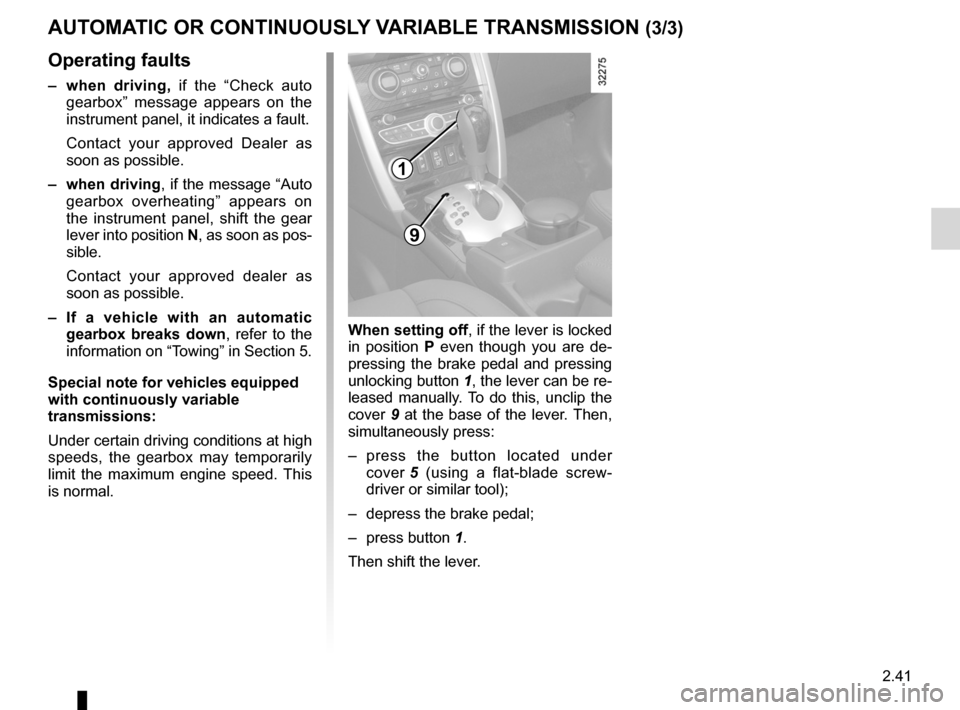
is normal. when setting off, if the lever is locked
in position
P even though you are de -
pressing the brake pedal and pressing
unlocking button 1, the lever can be re-
leased manually. To do this, unclip the
cover 9 at the base of the lever. Then,
simultaneously press:
– press the button located under
cover 5 (using a flat-blade screw -
driver or similar tool);
– depress the brake pedal;
– press button 1.
Then shift the lever.
9
1
Page 154 of 233
luggage compartment cover ................. (up to the end of the DU)
rear parcel shelf .................................... (up to the end of the DU)
rear parcel shelf .................................... (up to the end of the DU)
3.34
ENG_UD27218_3
Cache-bagages (X45 - H45 - Renault)
ENG_NU_977-2_H45_Ph2_Renault_3
Luggage cover
luggAgE coMPARTMENT coVER (DEPENDINg oN ThE VEhIclE)
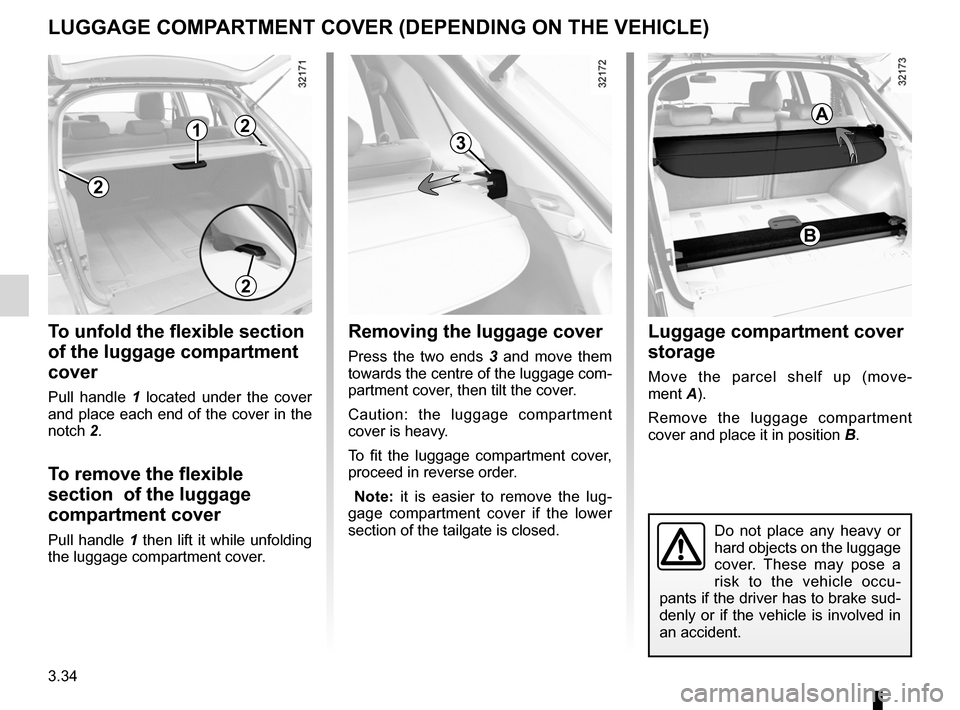
To unfold the flexible section
of the luggage compartment
cover
Pull handle 1 located under the cover
and place each end of the cover in the
notch 2.
To remove the flexible
section of the luggage
compartment cover
Pull handle 1 then lift it while unfolding
the luggage compartment cover.
Removing the luggage cover
Press the two ends 3 and move them
towards the centre of the luggage com-
partment cover, then tilt the cover.
Caution: the luggage compartment
cover is heavy.
To fit the luggage compartment cover,
proceed in reverse order.
Note: it is easier to remove the lug -
gage compartment cover if the lower
section of the tailgate is closed.
luggage compartment cover
storage
Move the parcel shelf up (move -
ment A).
Remove the luggage compartment
cover and place it in position B.
Do not place any heavy or
hard objects on the luggage
cover. These may pose a
risk to the vehicle occu-
pants if the driver has to brake sud-
denly or if the vehicle is involved in
an accident.
2
1
2
3
B
A2
Page 155 of 233
transporting objectsin the luggage compartment ........... (up to the end of the DU)
towing rings .......................................... (up to the end of the DU)
towing towing equipment ............................ (up to the end of the DU)
towing equipment fitting ............................................... (up to the end of the DU)
towing a caravan .................................. (up to the end of the DU)
tailgate .................................................. (up to the end of the DU)
3.35
ENG_UD23502_5
Transport d’objets dans le coffre, remorquage (attelage) (X45 - H45 - Renault)
ENG_NU_977-2_H45_Ph2_Renault_3
32323
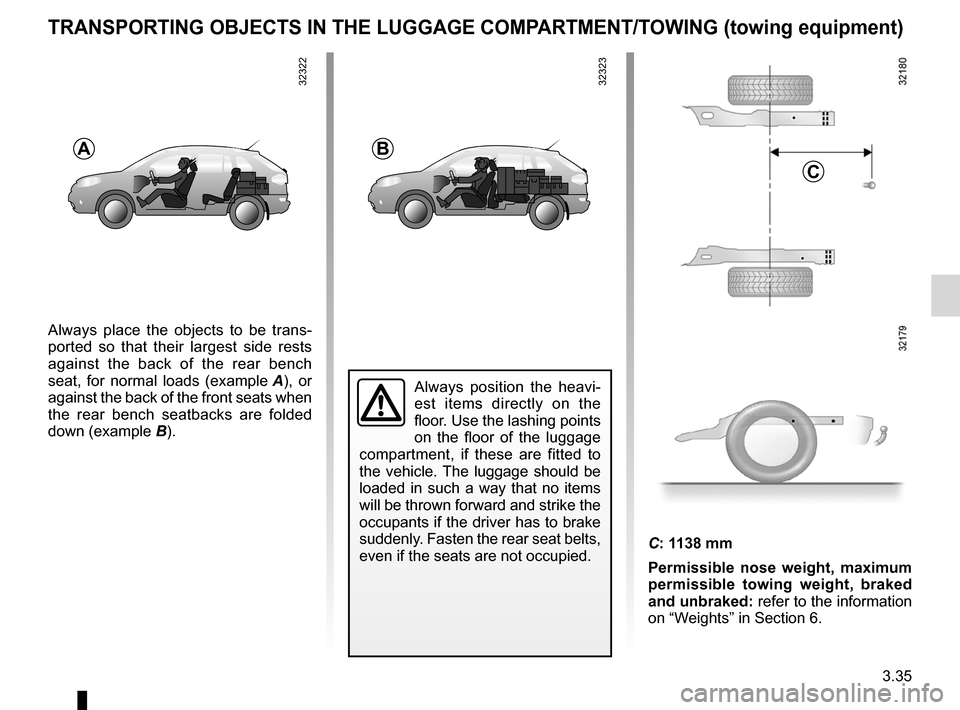
Transporting objects in the boot/towing
TRANSPoRTINg oBjEcTS IN ThE luggAgE coMPARTMENT/TowINg (towing equipment)
B
c
Always place the objects to be trans -
ported so that their largest side rests
against the back of the rear bench
seat, for normal loads (example A ), or
against the back of the front seats when
the rear bench seatbacks are folded
down (example B).
A
Always position the heavi -
est items directly on the
floor. Use the lashing points
on the floor of the luggage
compartment, if these are fitted to
the vehicle. The luggage should be
loaded in such a way that no items
will be thrown forward and strike the
occupants if the driver has to brake
suddenly. Fasten the rear seat belts,
even if the seats are not occupied.
C: 1138 mm
Permissible nose weight, maximum
permissible towing weight, braked
and unbraked: refer to the information
on “Weights” in Section 6.
32322