instrument panel RENAULT KOLEOS 2012 1.G Owner's Manual
[x] Cancel search | Manufacturer: RENAULT, Model Year: 2012, Model line: KOLEOS, Model: RENAULT KOLEOS 2012 1.GPages: 233, PDF Size: 7.81 MB
Page 83 of 233
stopping the engine .............................. (up to the end of the DU)
driving ................................................... (up to the end of the DU)
2.5
ENG_UD27287_4
Arr t du moteur (X45 - H45 - Renault)
ENG_NU_977-2_H45_Ph2_Renault_2
Stopping the engine
STOPPING THE ENGINE
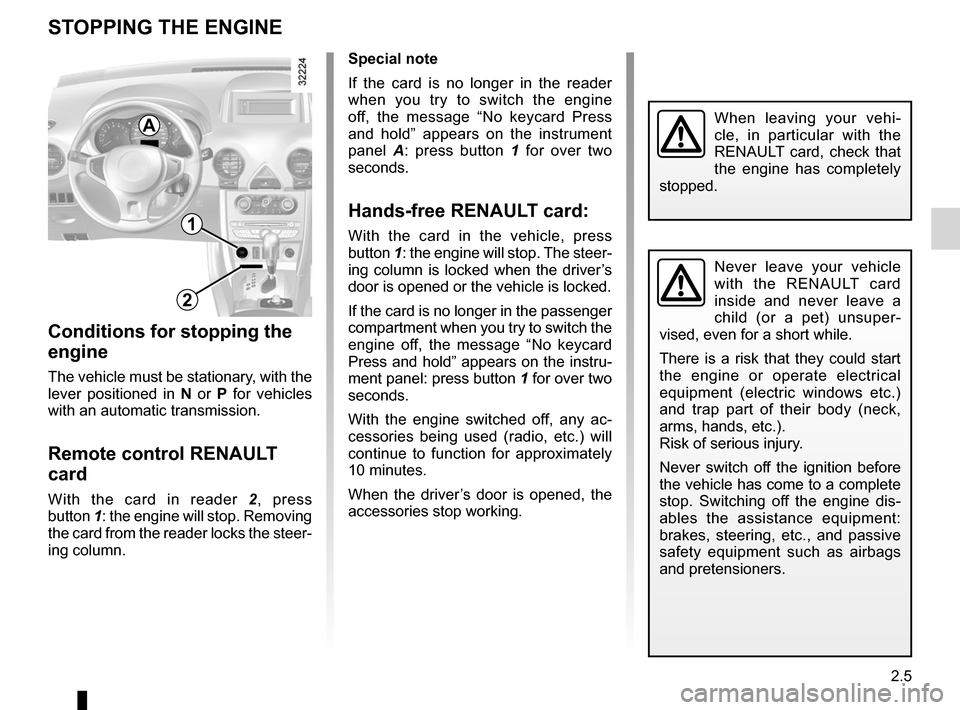
Special note
If the card is no longer in the reader
when you try to switch the engine
off, the message “ No keycard Press
and hold ” appears on the instrument
panel A : press button 1 for over two
seconds.
Hands-free RENAULT card:
With the card in the vehicle, press
button 1: the engine will stop. The steer-
ing column is locked when the driver’s
door is opened or the vehicle is locked.
If the card is no longer in the passenger
compartment when you try to switch the
engine off, the message “ No keycard
Press and hold ” appears on the instru-
ment panel: press button 1 for over two
seconds.
With the engine switched off, any ac -
cessories being used (radio, etc.) will
continue to function for approximately
10 minutes.
When the driver’s door is opened, the
accessories stop working.
Conditions for stopping the
engine
The vehicle must be stationary, with the
lever positioned in N or P for vehicles
with an automatic transmission.
Remote control RENAULT
card
With the card in reader 2, press
button 1: the engine will stop. Removing
the card from the reader locks the steer-
ing column.
Never leave your vehicle
with the RENAULT card
inside and never leave a
child (or a pet) unsuper -
vised, even for a short while.
There is a risk that they could start
the engine or operate electrical
equipment (electric windows etc.)
and trap part of their body (neck,
arms, hands, etc.).
Risk of serious injury.
Never switch off the ignition before
the vehicle has come to a complete
stop. Switching off the engine dis -
ables the assistance equipment:
brakes, steering, etc., and passive
safety equipment such as airbags
and pretensioners.
When leaving your vehi -
cle, in particular with the
RENAULT card, check that
the engine has completely
stopped.
1
2
A
Page 86 of 233
catalytic converter................................. (up to the end of the DU)
fuel priming bulb ................................... (up to the end of the DU)
special features of diesel versions ........(up to the end of the DU)
driving ................................................... (up to the end of the DU)
filter particle filter .................................... (up to the end of the DU)
2.8
ENG_UD27293_7
Particularit s des versions diesel avec filtre particules (X45 - H45 - Renault)
ENG_NU_977-2_H45_Ph2_Renault_2
Special features of diesel versions fitted with a particle filter
SPECIAL FEATURES OF DIESEL vERSIONS FITTED wITH A PARTICLE FILTER
Do not park the vehicle or
run the engine in locations
where combustible sub -
stances or materials such
as grass or leaves can come into
contact with the hot exhaust system.
Diesel engine speed
Diesel engines are fitted with injection
equipment which prevents the engine
speed being exceeded irrespective of
the gear selected.
If the message “ Check exhaust emis -
sion ” is displayed on the instrument
panel accompanied by the
Ä and
© warning lights. Consult an au -
thorised dealer straight away.
When driving, depending on the fuel
grade used, it is possible that white
smoke may be emitted.
This is due to the exhaust particle filter
being cleaned automatically, and does
not affect the way the vehicle runs.
Precautions to be taken in
winter
To avoid faults in icy weather:
– ensure that the battery is always fully
charged,
– always keep the diesel tank rela -
tively full to prevent water vapour
condensing in it and accumulating at
the bottom of the tank.
Depending on the vehicle, the
Ü
warning light lights up on the instrument
panel to show that there is a risk of the
particle filter becoming clogged.
To clean the particle filter, for 60 miles
(100 km) after the warning light comes
on drive at an average speed of at least
42 mph (70 kph), where traffic condi -
tions and the speed limit will allow, until
the warning light goes out.
You may need to restart the operation if
the vehicle has to stop before the warn-
ing light goes out.
As an example, in this case, the clean -
ing operation lasts for up to 20 minutes.
Page 88 of 233
electronic parking brake ....................... (up to the end of the DU)
driving ................................................... (up to the end of the DU)
2.10
ENG_UD27280_8
Frein de parking assist (X45 - H45 - Renault)
ENG_NU_977-2_H45_Ph2_Renault_2
Jaune NoirNoir texte
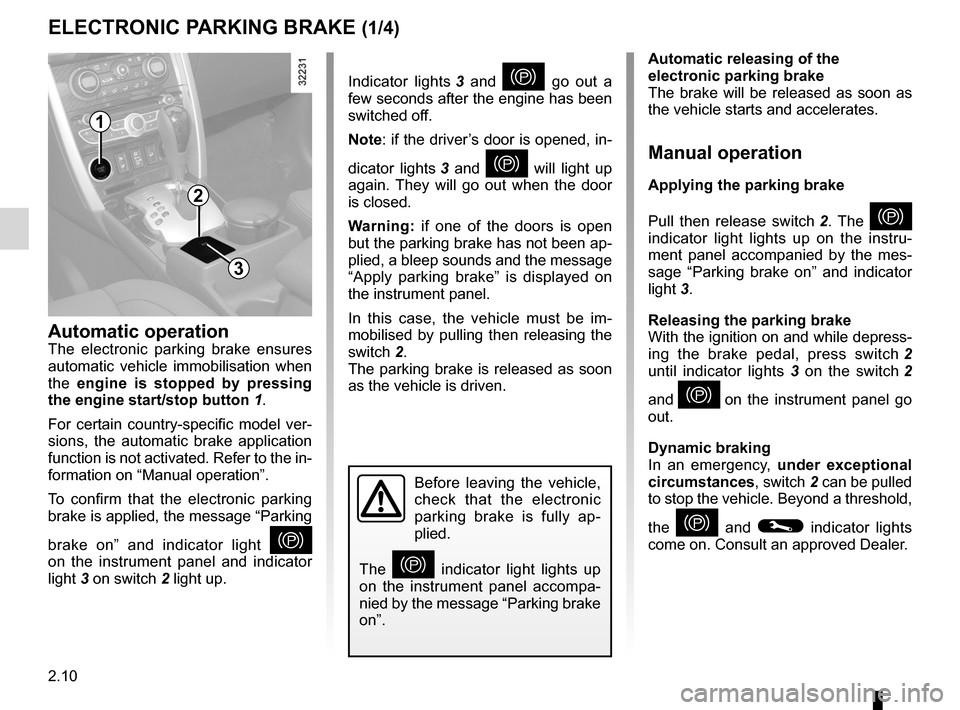
Indicator lights 3 and } go out a
few seconds after the engine has been
switched off.
Note: if the driver’s door is opened, in-
dicator lights 3 and
} will light up
again. They will go out when the door
is closed.
w arning: if one of the doors is open
but the parking brake has not been ap-
plied, a bleep sounds and the message
“ Apply parking brake ” is displayed on
the instrument panel.
In this case, the vehicle must be im -
mobilised by pulling then releasing the
switch 2.
The parking brake is released as soon
as the vehicle is driven.
Electronic parking brake
ELECTRONIC PARKING BRAKE (1/4)
Automatic releasing of the
electronic parking brake
The brake will be released as soon as
the vehicle starts and accelerates.
Manual operation
Applying the parking brake
Pull then release switch 2 . The
}
indicator light lights up on the instru -
ment panel accompanied by the mes -
sage “ Parking brake on ” and indicator
light 3.
Releasing the parking brake
With the ignition on and while depress-
ing the brake pedal, press switch 2
until indicator lights 3 on the switch 2
and
} on the instrument panel go
out.
Dynamic braking
In an emergency, under exceptional
circumstances , switch 2 can be pulled
to stop the vehicle. Beyond a threshold,
the
} and © indicator lights
come on. Consult an approved Dealer.
Before leaving the vehicle,
check that the electronic
parking brake is fully ap -
plied.
The
} indicator light lights up
on the instrument panel accompa -
nied by the message “Parking brake
on”.
Automatic operationThe electronic parking brake ensures
automatic vehicle immobilisation when
the engine is stopped by pressing
the engine start/stop button 1.
For certain country-specific model ver-
sions, the automatic brake application
function is not activated. Refer to the in-
formation on “Manual operation”.
To confirm that the electronic parking
brake is applied, the message “Parking
brake on ” and indicator light
}
on the instrument panel and indicator
light 3 on switch 2 light up.
2
1
3
Page 89 of 233
JauneNoirNoir texte
2.11
ENG_UD27280_8
Frein de parking assist (X45 - H45 - Renault)
ENG_NU_977-2_H45_Ph2_Renault_2
ELECTRONIC PARKING BRAKE (2/4)
Special cases
When the vehicle is on an incline or
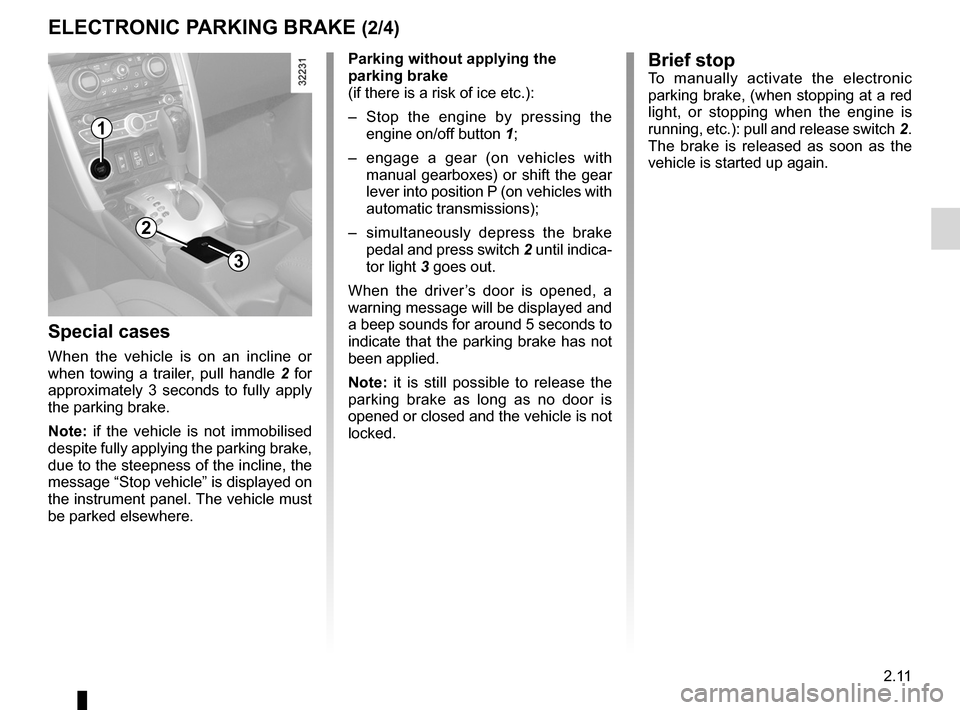
when towing a trailer, pull handle 2 for
approximately 3 seconds to fully apply
the parking brake.
Note: if the vehicle is not immobilised
despite fully applying the parking brake,
due to the steepness of the incline, the
message “Stop vehicle ” is displayed on
the instrument panel. The vehicle must
be parked elsewhere. Parking without applying the
parking brake
(if there is a risk of ice etc.):
–
Stop the engine by pressing the
engine on/off button 1;
– engage a gear (on vehicles with
manual gearboxes) or shift the gear
lever into position P (on vehicles with
automatic transmissions);
– simultaneously depress the brake
pedal and press switch 2 until indica-
tor light 3 goes out.
When the driver ’s door is opened, a
warning message will be displayed and
a beep sounds for around 5 seconds to
indicate that the parking brake has not
been applied.
Note: it is still possible to release the
parking brake as long as no door is
opened or closed and the vehicle is not
locked.
1
2
3
Brief stopTo manually activate the electronic
parking brake, (when stopping at a red
light, or stopping when the engine is
running, etc.): pull and release switch 2.
The brake is released as soon as the
vehicle is started up again.
Page 90 of 233
2.12
ENG_UD27280_8
Frein de parking assist (X45 - H45 - Renault)
ENG_NU_977-2_H45_Ph2_Renault_2
Jaune NoirNoir texte
ELECTRONIC PARKING BRAKE (3/4)
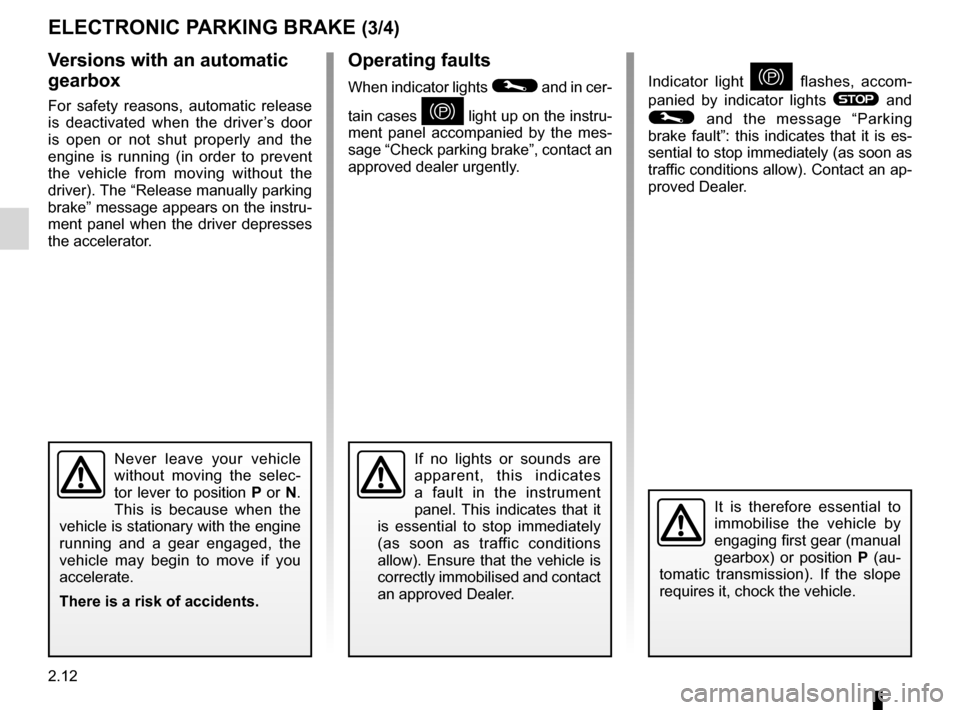
Operating faults
When indicator lights © and in cer-
tain cases
} light up on the instru-
ment panel accompanied by the mes -
sage “Check parking brake”, contact an
approved dealer urgently.
v ersions with an automatic
gearbox
For safety reasons, automatic release
is deactivated when the driver’s door
is open or not shut properly and the
engine is running (in order to prevent
the vehicle from moving without the
driver). The “Release manually parking
brake” message appears on the instru-
ment panel when the driver depresses
the accelerator.
Never leave your vehicle
without moving the selec -
tor lever to position P or N.
This is because when the
vehicle is stationary with the engine
running and a gear engaged, the
vehicle may begin to move if you
accelerate.
There is a risk of accidents.
It is therefore essential to
immobilise the vehicle by
engaging first gear (manual
gearbox) or position P (au -
tomatic transmission). If the slope
requires it, chock the vehicle.
If no lights or sounds are
apparent, this indicates
a fault in the instrument
panel. This indicates that it
is essential to stop immediately
(as soon as traffic conditions
allow). Ensure that the vehicle is
correctly immobilised and contact
an approved Dealer.
Indicator light } flashes, accom -
panied by indicator lights
® and
© and the message “ Parking
brake fault”: this indicates that it is es-
sential to stop immediately (as soon as
traffic conditions allow). Contact an ap-
proved Dealer.
Page 92 of 233
driving ................................................... (up to the end of the DU)
fuel economy ........................................ (up to the end of the DU)
advice on antipollution .......................... (up to the end of the DU)
antipollution advice .............................................................. (current page)
fuel advice on fuel economy ................................... (current page)
2.14
ENG_UD27288_2
Conseils : antipollution, conomies de carburant, conduite (X45 - H45 - Renault)
ENG_NU_977-2_H45_Ph2_Renault_2
Jaune NoirNoir texte
Advice: antipollution and fuel economy
ADvICE: antipollution, fuel economy and driving (1/3)
Your vehicle complies with criteria for
recycling and recovering vehicles at the
end of their service life which will come
into force in 2015.
Some parts of your vehicle have there-
fore been designed to facilitate future
recycling.
These parts are easy to remove so
that they can be recovered and reproc-
essed by recycling companies.
By virtue of its design, moderate fuel
consumption and initial settings, your
vehicle also conforms to current anti-
pollution regulations. The manufac -
turer is actively striving to reduce pol -
lutant exhaust gas emissions and to
save energy. But the fuel consumption
of your vehicle and the level of pollutant
exhaust gas emissions are also your
responsibility. Ensure that it is main -
tained and used correctly.Aiding fuel economyDepending on the vehicle, in order to
optimise consumption, an indicator light
on the instrument panel will inform you
of the best moment to upshift or down -
shift gears:
\ shift up a gear;
[ shift down a gear.
MaintenanceIt is important to remember that failure to
respect antipollution regulations could
lead to legal action being taken against
the vehicle owner. In addition, replacing
engine, fuel supply system and exhaust
components with parts other than those
originally recommended by the manu -
facturer may alter your vehicle so that
it no longer complies with antipollution
regulations. Have your vehicle adjusted and
checked by an approved Dealer, in ac-
cordance with the instructions given in
your maintenance schedule: they will
have all the equipment necessary for
ensuring that your vehicle is maintained
to its original standard.
Engine adjustments
–
ignition: this does not require ad -
justment.
– spark plugs: for optimum fuel econ-
omy, efficiency and performance
the specifications laid down by our
Design Department must be strictly
applied.
If the spark plugs have to be
changed, use the make, type and
gap specified for your vehicle’s
engine. Contact an approved dealer
for this.
– idle: this does not require adjust -
ment.
– air filter, diesel filter: a clogged ele-
ment reduces performance. It must
be replaced.
Page 97 of 233
JauneNoirNoir texte
2.19
ENG_UD27289_6
Syst me de surveillance de pression des pneumatiques (X45 - H45 - Renault)
ENG_NU_977-2_H45_Ph2_Renault_2
TYRE PRESSURE MONITOR (2/3)
Changing a wheel
The tyre pressure monitor takes ap -
proximately 8 minutes to identify the
tyres which have been replaced. The
system will not operate during this time.
Fitting tyres(replacing tyres or fitting winter
tyres)
Since replacing tyres requires special
precautions, we advise you to contact
your approved dealer.
While the tyre pressure
monitor is identifying the
tyres which have been re -
placed, the information sent
by the system may be inaccurate
and this could have serious conse-
quences.
Emergency spare wheel
The emergency spare wheel has no
sensor, and cannot be recognised by
the system.
When it is fitted in the place of another
wheel, the system then detects an op-
erating fault.
Replacing wheels/tyres
This system requires specific equip -
ment (wheels, hubcaps, etc.).
Contact an approved dealer to fit new
tyres and to find out about available ac-
cessories compatible with the system
and available from your approved
dealer: the use of any other accessory
could affect the correct operation of the
system or damage a sensor.
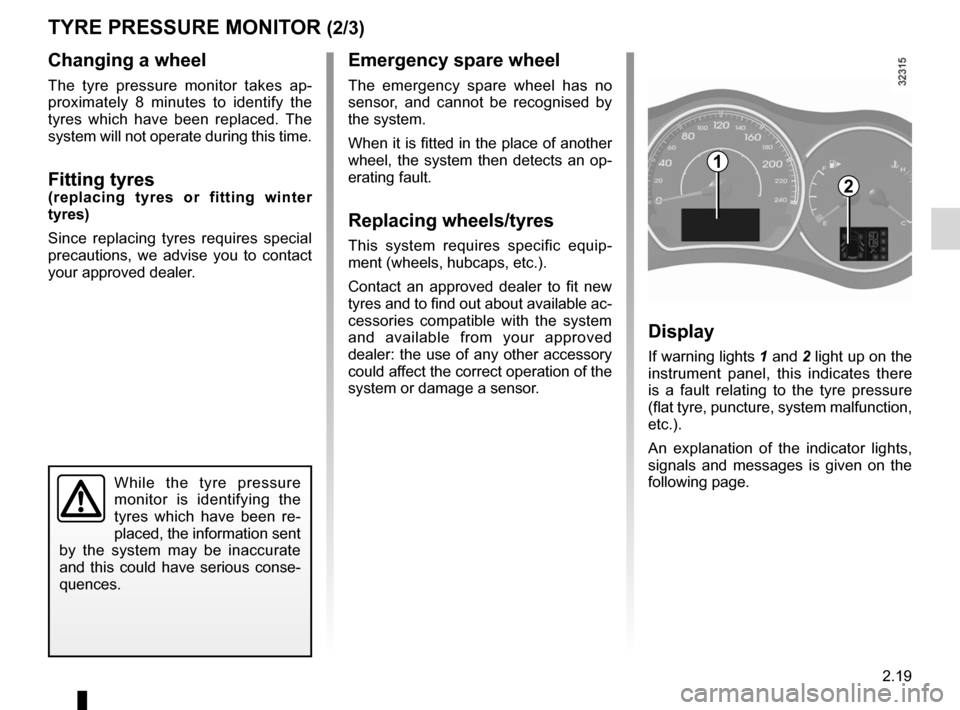
Display
If warning lights 1 and 2 light up on the
instrument panel, this indicates there
is a fault relating to the tyre pressure
(flat tyre, puncture, system malfunction,
etc.).
An explanation of the indicator lights,
signals and messages is given on the
following page.
1
2
Page 98 of 233
2.20
ENG_UD27289_6
Syst me de surveillance de pression des pneumatiques (X45 - H45 - Renault)
ENG_NU_977-2_H45_Ph2_Renault_2
TYRE PRESSURE MONITOR (3/3)
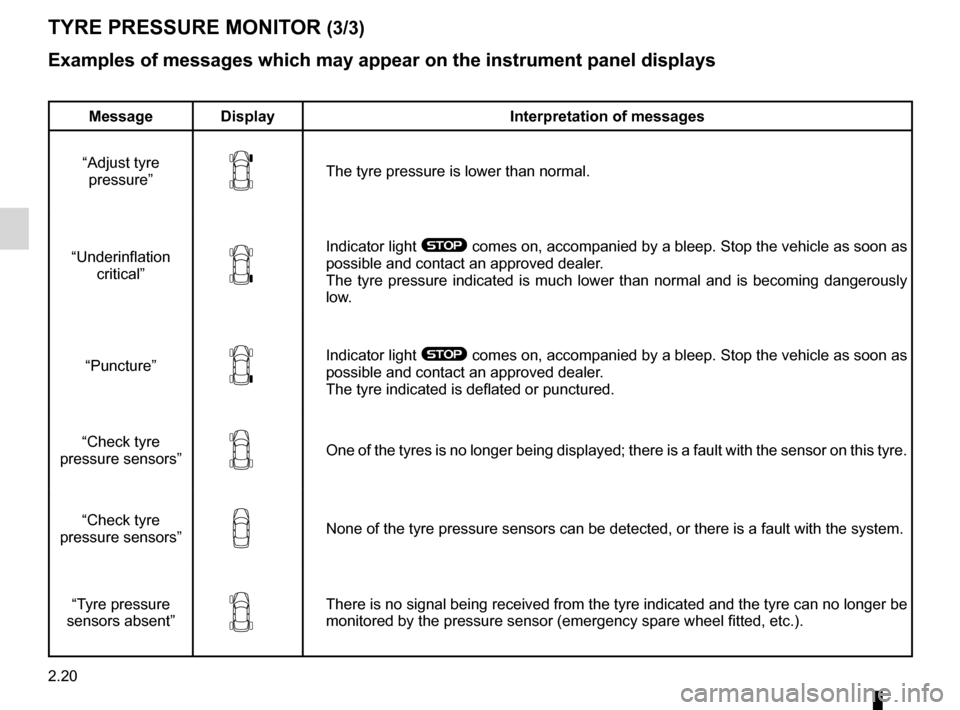
Examples of messages which may appear on the instrument panel displays
Message Display Interpretation of messages
“Adjust tyre pressure ”
The tyre pressure is lower than normal.
“Underinflation critical”
Indicator light ® comes on, accompanied by a bleep. Stop the vehicle as soon as
possible and contact an approved dealer.
The tyre pressure indicated is much lower than normal and is becoming dangerously
low.
“Puncture”
Indicator light ® comes on, accompanied by a bleep. Stop the vehicle as soon as
possible and contact an approved dealer.
The tyre indicated is deflated or punctured.
“Check tyre
pressure sensors ”
One of the tyres is no longer being displayed; there is a fault with the sensor on this tyre.
“Check tyre
pressure sensors ”
None of the tyre pressure sensors can be detected, or there is a fault with the system.
“Tyre pressure
sensors absent ”
There is no signal being received from the tyre indicated and the tyre can no longer be
monitored by the pressure sensor (emergency spare wheel fitted, etc.).
Page 99 of 233
driving ................................................... (up to the end of the DU)
4 wheel drive (4WD) ............................. (up to the end of the DU)
all-wheel drive system .......................... (up to the end of the DU)
2.21
ENG_UD27290_7
Transmission int grale : 4 roues motrices : 4WD (X45 - H45 - Renault)
ENG_NU_977-2_H45_Ph2_Renault_2
All-wheel drive transmission: 4-wheel drive (4WD)
ALL-wHEEL DRIvE SYSTEM: 4 wheel drive (4wD) (1/3)
“AUTO” mode
This is the mode defined each time
the engine is started.
Operating principle
The “AUTO” mode automatically dis -
tributes the torque between the front
and rear axles according to the road
conditions and the vehicle speed. This
position optimises roadholding. Use
this mode where the roads are slippery
or in good condition.
“2wD” mode
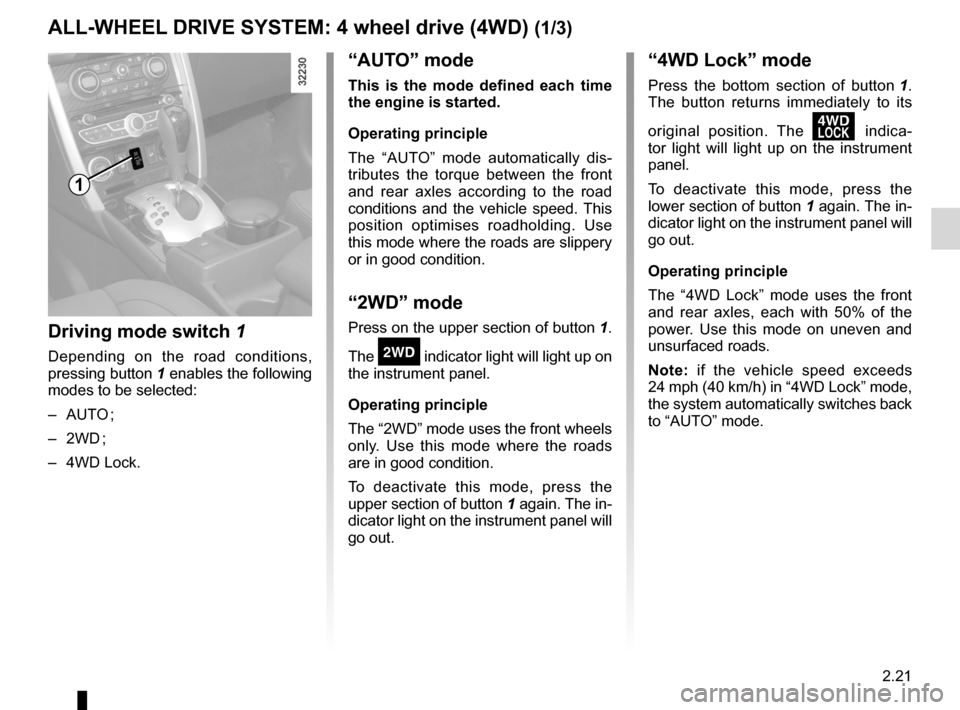
Press on the upper section of button 1.
The
‘ indicator light will light up on
the instrument panel.
Operating principle
The “2WD” mode uses the front wheels
only. Use this mode where the roads
are in good condition.
To deactivate this mode, press the
upper section of button 1 again. The in-
dicator light on the instrument panel will
go out.
“4wD Lock” mode
Press the bottom section of button 1 .
The button returns immediately to its
original position. The
’ indica -
tor light will light up on the instrument
panel.
To deactivate this mode, press the
lower section of button 1 again. The in-
dicator light on the instrument panel will
go out.
Operating principle
The “4WD Lock” mode uses the front
and rear axles, each with 50% of the
power. Use this mode on uneven and
unsurfaced roads.
Note: if the vehicle speed exceeds
24 mph (40 km/h) in “4WD Lock” mode,
the system automatically switches back
to “AUTO” mode.
Driving mode switch 1
Depending on the road conditions,
pressing button 1 enables the following
modes to be selected:
– AUTO ;
– 2WD ;
– 4WD Lock.
1
Page 100 of 233
2.22
ENG_UD27290_7
Transmission int grale : 4 roues motrices : 4WD (X45 - H45 - Renault)
ENG_NU_977-2_H45_Ph2_Renault_2
Jaune NoirNoir texte
ALL-wHEEL DRIvE SYSTEM: 4 wheel drive (4wD) (2/3)
Special note on all-wheel
drive system
– The vehicle may make more
noise when the “AUTO” or “4WD
Lock” modes are activated. This
is normal;
– if the system detects a difference
in the size of the front and rear
wheels (as is the case, for exam-
ple, when the wrong size tyres
are fitted, or if the tyres are un -
der-inflated or significantly worn
on one axle etc.) the message
“4WD not available ” is displayed
on the instrument panel and the
indicator light
‘ flashes.
Select “2WD” mode and drive at
a moderate speed;
– always use four tyres with the
same level of wear;
– as soon as the vehicle speed ex-
ceeds 24 mph (40 km/h) in “4WD
Lock” mode, the system automat-
ically switches back to “AUTO”
mode. The indicator light goes
out;
– when the front and rear wheels
are turning at different speeds
(for example, when driving on
uneven road surfaces, sand or
mud, or when being towed, tyres
with different levels of wear), the
oil temperature may rise, given
the mechanical stresses. In this
case, the system automatically
switches back to “2WD” mode to
prevent overheating. The mes-
sage “ 4w D not available ” is
displayed on the instrument
panel and the
‘ or ’
indicator light comes on. Park
the vehicle in a safe place and
wait until the message “4WD not
available ” disappears.
If the warning appears again,
contact an approved Dealer.
Operating faults
When the system detects an operating
fault the message “ Check 4WD” and
warning light
© appear on the in-
strument panel.
Contact your approved Dealer as soon
as possible.