ignition RENAULT LAGUNA 2012 X91 / 3.G User Guide
[x] Cancel search | Manufacturer: RENAULT, Model Year: 2012, Model line: LAGUNA, Model: RENAULT LAGUNA 2012 X91 / 3.GPages: 241, PDF Size: 7.82 MB
Page 55 of 241
filterparticle filter ..................................................... (current page)
heated seats .......................................................... (current page)
ABS ....................................................................... (current page)
JauneNoirNoir texte
1.49
ENG_UD27624_4
Témoins lumineux (X91 - B91 - K91 - Renault)
ENG_NU_936-5_BK91_Renault_1
The presence and operation of the warning lights dEpENd ON THE EQUIpmENT ANd cOUNTRY.
W ARNINg LIgHTs (4/4)
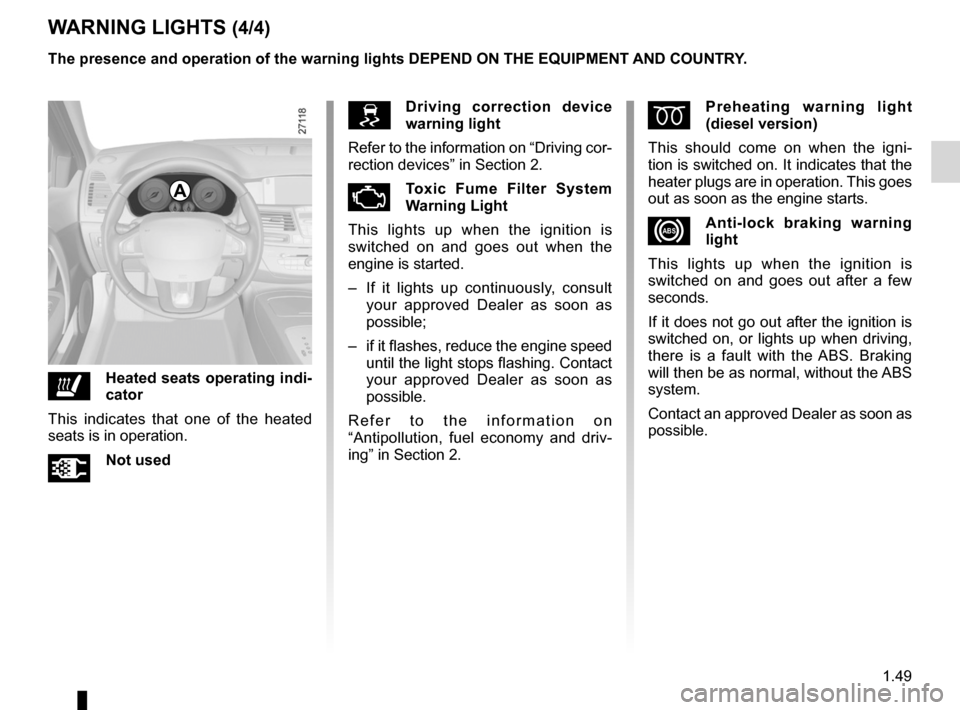
driving correction device
warning light
Refer to the information on “Driving cor-
rection devices” in Section 2.
ÄToxic fume filter system
Warning Light
This lights up when the ignition is
switched on and goes out when the
engine is started.
– If it lights up continuously, consult
your approved Dealer as soon as
possible;
– if it flashes, reduce the engine speed
until the light stops flashing. Contact
your approved Dealer as soon as
possible.
R e f e r t o t h e i n f o r m a t i o n o n
“Antipollution, fuel economy and driv -
ing” in Section 2.
ðHeated seats operating indi -
cator
This indicates that one of the heated
seats is in operation.
ÜNot used
A
Ép reheating warning light
(diesel version)
This should come on when the igni -
tion is switched on. It indicates that the
heater plugs are in operation. This goes
out as soon as the engine starts.
xAnti-lock braking warning
light
This lights up when the ignition is
switched on and goes out after a few
seconds.
If it does not go out after the ignition is
switched on, or lights up when driving,
there is a fault with the ABS. Braking
will then be as normal, without the ABS
system.
Contact an approved Dealer as soon as
possible.
Page 56 of 241
indicators:instrument panel ............................. (up to the end of the DU)
display .................................................. (up to the end of the DU)
instrument panel ................................... (up to the end of the DU)
fuel level ................................................................ (current page)
coolant ................................................................... (current page)
1.50
ENG_UD25107_2
Afficheurs et indicateurs (X91 - B91 - K91 - D91 - Renault)
ENG_NU_936-5_BK91_Renault_1
dIspLAYs ANd INdIcATORs
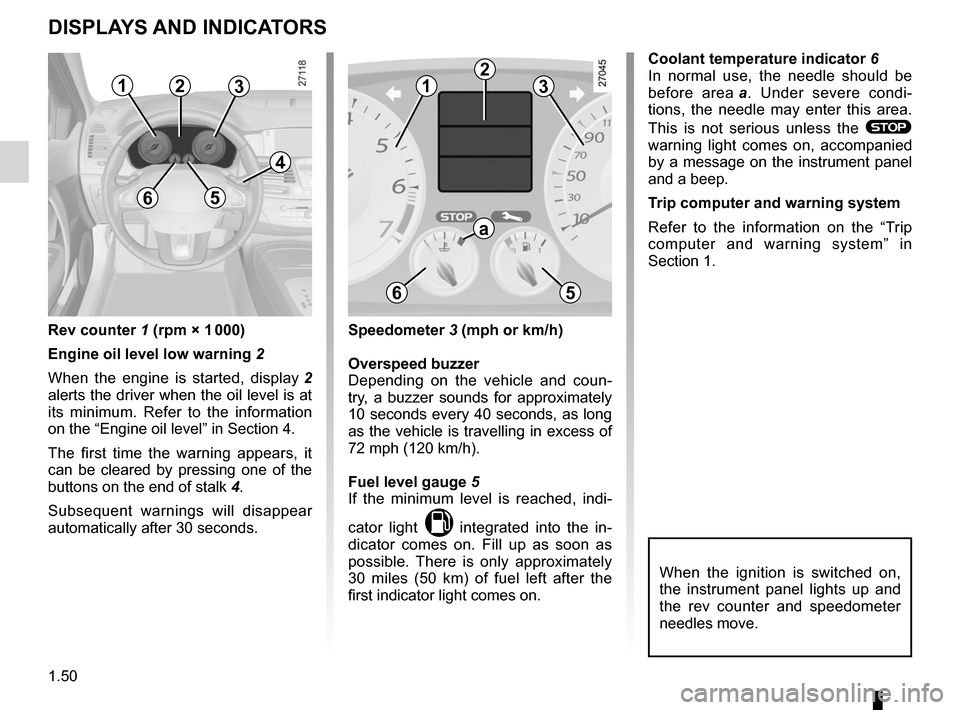
Rev counter 1 (rpm × 1 000)
Engine oil level low warning 2
When the engine is started, display 2
alerts the driver when the oil level is at
its minimum. Refer to the information
on the “Engine oil level” in Section 4.
The first time the warning appears, it
can be cleared by pressing one of the
buttons on the end of stalk 4.
Subsequent warnings will disappear
automatically after 30 seconds. coolant temperature indicator 6
In normal use, the needle should be
before area
a . Under severe condi -
tions, the needle may enter this area.
This is not serious unless the
®
warning light comes on, accompanied
by a message on the instrument panel
and a beep.
Trip computer and warning system
Refer to the information on the “Trip
computer and warning system” in
Section 1.
speedometer 3 (mph or km/h)
Overspeed buzzer
Depending on the vehicle and coun -
try, a buzzer sounds for approximately
10 seconds every 40 seconds, as long
as the vehicle is travelling in excess of
72 mph (120 km/h).
fuel level gauge 5
If the minimum level is reached, indi -
cator light
M integrated into the in -
dicator comes on. Fill up as soon as
possible. There is only approximately
30 miles (50 km) of fuel left after the
first indicator light comes on.
123
65
4
12
3
a
65
When the ignition is switched on,
the instrument panel lights up and
the rev counter and speedometer
needles move.
Page 64 of 241
trip computer and warning system.........................(current page)
warning lights ......................................................... (current page)
instrument panel messages ...................................(current page)
instrument panel .................................................... (current page)
1.58
ENG_UD28946_2
Ordinateur de bord : messages d’information (X91 - B91 - K91 - D91 - Renault)
ENG_NU_936-5_BK91_Renault_1
TRIp cOmpUTER ANd WARNINg sYsTEm: information messages
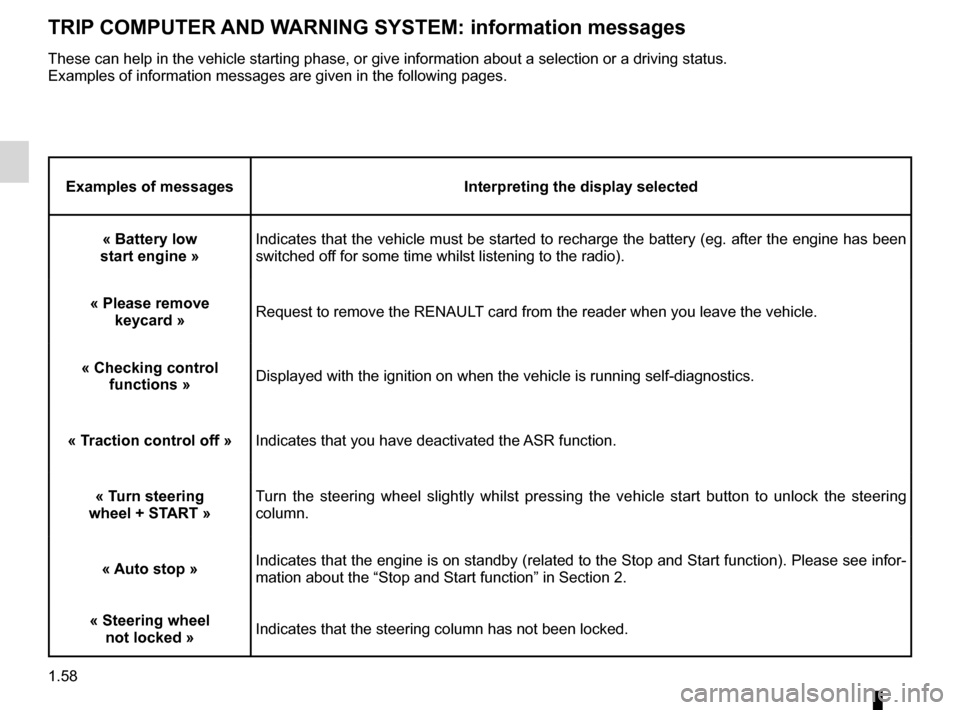
Examples of messages Interpreting the display selected
« Battery low
start engine » Indicates that the vehicle must be started to recharge the battery (eg. after the engine has been
switched off for some time whilst listening to the radio).
« please remove keycard » Request to remove the RENAULT card from the reader when you leave the vehicle.
« checking control functions » Displayed with the ignition on when the vehicle is running self-diagnostics.
« Traction control off »Indicates that you have deactivated the ASR function.
« Turn steering
wheel + sTART » Turn the steering wheel slightly whilst pressing the vehicle start button to unlock the steering
column.
« Auto stop »Indicates that the engine is on standby (related to the Stop and Start function). Please see infor-
mation about the “Stop and Start function” in Section 2.
« steering wheel not locked »Indicates that the steering column has not been locked.
These can help in the vehicle starting phase, or give information about a selection or a driving status.
Examples of information messages are given in the following pages.
Page 69 of 241
rear view mirrors ................................... (up to the end of the DU)
1.63
ENG_UD23635_4
Rétroviseurs (X91 - B91 - K91 - Renault)
ENG_NU_936-5_BK91_Renault_1
Rear-view mirrors
storing the setting
For vehicles fitted with a driver’s seat
with position memorisation, refer to the
information on the “driver ’s seat with
position memory” in Section 1.
folding door mirrors
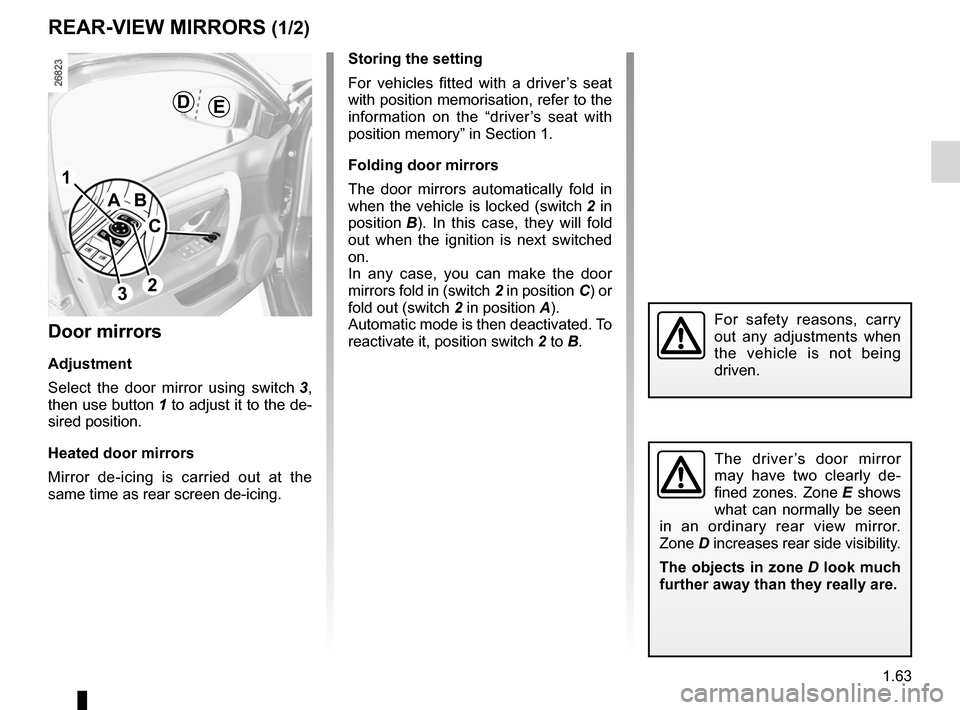
The door mirrors automatically fold in
when the vehicle is locked (switch 2 in
position B ). In this case, they will fold
out when the ignition is next switched
on.
In any case, you can make the door
mirrors fold in (switch 2 in position C) or
fold out (switch 2 in position A).
Automatic mode is then deactivated. To
reactivate it, position switch 2 to B.
REAR-vIEW mIRRORs (1/2)
door mirrors
Adjustment
Select the door mirror using switch 3 ,
then use button 1 to adjust it to the de-
sired position.
Heated door mirrors
Mirror de-icing is carried out at the
same time as rear screen de-icing.
The driver ’s door mirror
may have two clearly de -
fined zones. Zone E shows
what can normally be seen
in an ordinary rear view mirror.
Zone D increases rear side visibility.
The objects in zone D look much
further away than they really are.
1
2
A
c
B
dE
3
For safety reasons, carry
out any adjustments when
the vehicle is not being
driven.
Page 76 of 241
1.70
ENG_UD23636_5
Essuie-vitre / lave-vitre avant (X91 - B91 - K91 - Renault)
ENG_NU_936-5_BK91_Renault_1
Jaune NoirNoir texte
Wash/Wipe
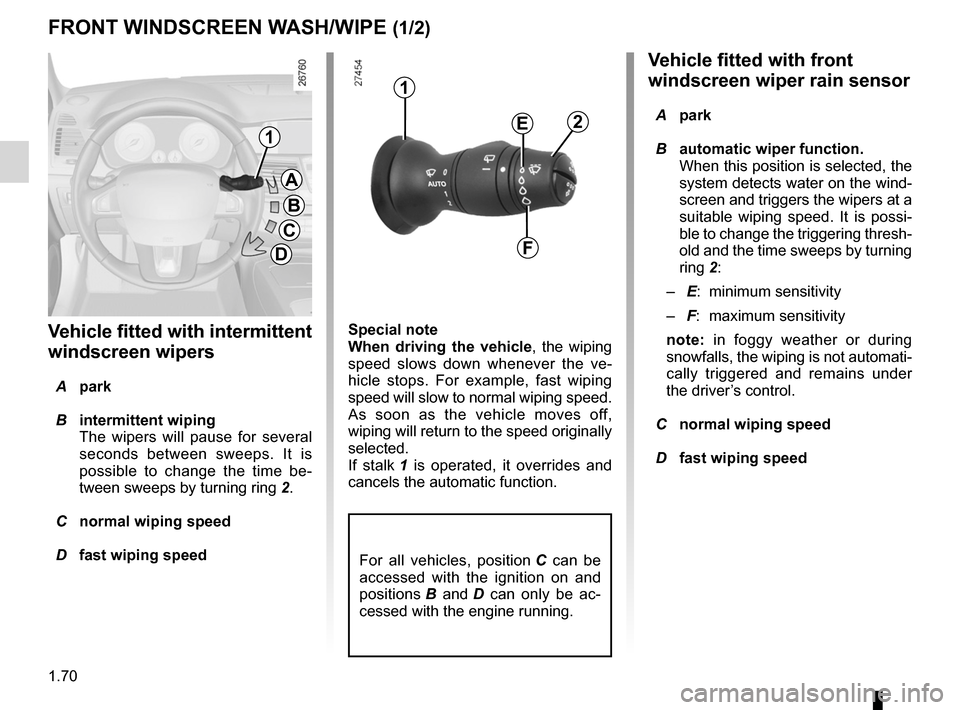
vehicle fitted with front
windscreen wiper rain sensor
A park
B automatic wiper function.
When this position is selected, the
system detects water on the wind -
screen and triggers the wipers at a
suitable wiping speed. It is possi -
ble to change the triggering thresh-
old and the time sweeps by turning
ring 2:
– E: minimum sensitivity
– F: maximum sensitivity
note: in foggy weather or during
snowfalls, the wiping is not automati-
cally triggered and remains under
the driver’s control.
C normal wiping speed
D fast wiping speed
special note
When driving the vehicle
, the wiping
speed slows down whenever the ve -
hicle stops. For example, fast wiping
speed will slow to normal wiping speed.
As soon as the vehicle moves off,
wiping will return to the speed originally
selected.
If stalk 1 is operated, it overrides and
cancels the automatic function.
v ehicle fitted with intermittent
windscreen wipers
A park
B intermittent wiping
The wipers will pause for several
seconds between sweeps. It is
possible to change the time be -
tween sweeps by turning ring 2.
C normal wiping speed
D fast wiping speed
fRONT WINdscREEN WAsH/WIpE (1/2)
1
1
A
B
c
d
E
f
2
For all vehicles, position C can be
accessed with the ignition on and
positions B and D can only be ac -
cessed with the engine running.
Page 77 of 241
headlight washer ................................................... (current page)
JauneNoirNoir texte
1.71
ENG_UD23636_5
Essuie-vitre / lave-vitre avant (X91 - B91 - K91 - Renault)
ENG_NU_936-5_BK91_Renault_1
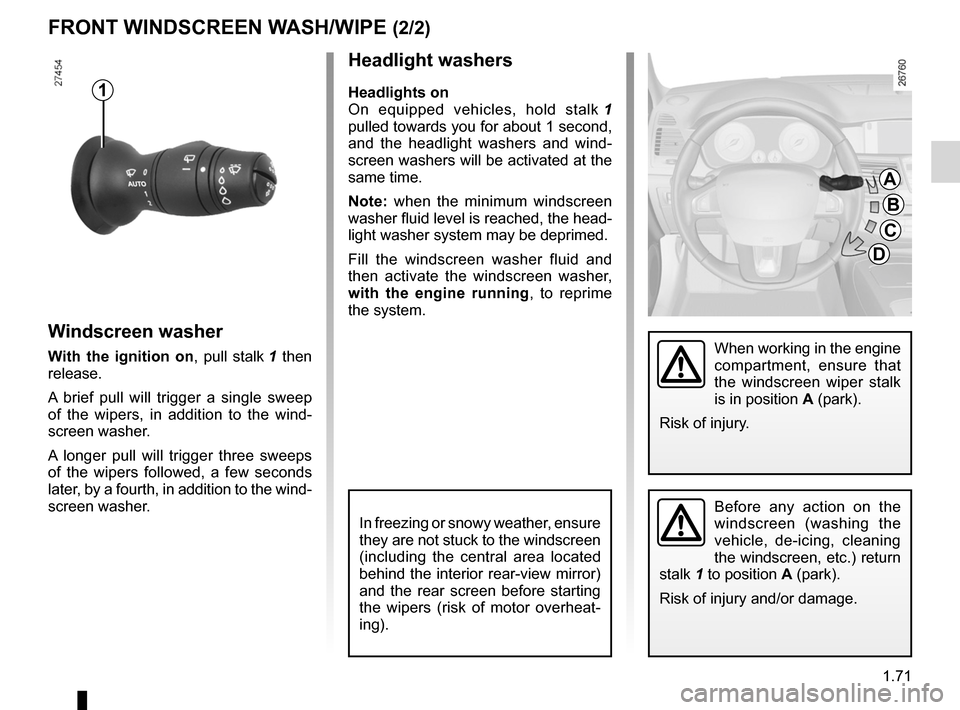
Headlight washers
Headlights on
On equipped vehicles, hold stalk 1
pulled towards you for about 1 second,
and the headlight washers and wind -
screen washers will be activated at the
same time.
Note: when the minimum windscreen
washer fluid level is reached, the head -
light washer system may be deprimed.
Fill the windscreen washer fluid and
then activate the windscreen washer,
with the engine running , to reprime
the system.
Windscreen washer
With the ignition on, pull stalk 1 then
release.
A brief pull will trigger a single sweep
of the wipers, in addition to the wind -
screen washer.
A longer pull will trigger three sweeps
of the wipers followed, a few seconds
later, by a fourth, in addition to the wind -
screen washer.
fRONT WINdscREEN WAsH/WIpE (2/2)
1
In freezing or snowy weather, ensure
they are not stuck to the windscreen
(including the central area located
behind the interior rear-view mirror)
and the rear screen before starting
the wipers (risk of motor overheat -
ing).
A
B
c
d
When working in the engine
compartment, ensure that
the windscreen wiper stalk
is in position A (park).
Risk of injury.
Before any action on the
windscreen (washing the
vehicle, de-icing, cleaning
the windscreen, etc.) return
stalk 1 to position A (park).
Risk of injury and/or damage.
Page 78 of 241
screen wash/wipe ................................. (up to the end of the DU)
windscreen washer ............................... (up to the end of the DU)
1.72
ENG_UD13336_3
Essuie-vitre / lave-vitre arrière (X91 - B91 - K91 - Renault)
ENG_NU_936-5_BK91_Renault_1
REAR scREEN WAsH/WIpE
1
2
Check the condition of the wiper
blades. You are responsible for their
service life:
– they must remain clean: clean
the blades, windscreen and
rear screen regularly with soapy
water;
– do not use them when the wind -
screen or rear screen are dry;
– free them from the windscreen or
rear screen when they have not
been used for a long time.
In all cases, replace them as soon
as they begin to lose efficiency: ap-
proximately once a year.
Before using the rear wiper, check
that no object obstructs the travel of
the blade.
Do not use the wiper arm to open or
close the tailgate.
Activation/deactivation of the rear
screen wiper
Your vehicle is designed to activate the
rear wiping function in reverse gear (if
the windscreen wipers are operating).
You can choose to activate or deacti -
vate the function. To do this, refer to
the information on the “Vehicle set -
tings customisation menu” in Section 1;
“Rear wiping in reverse gear”.
= function activated;
< function deactivated.
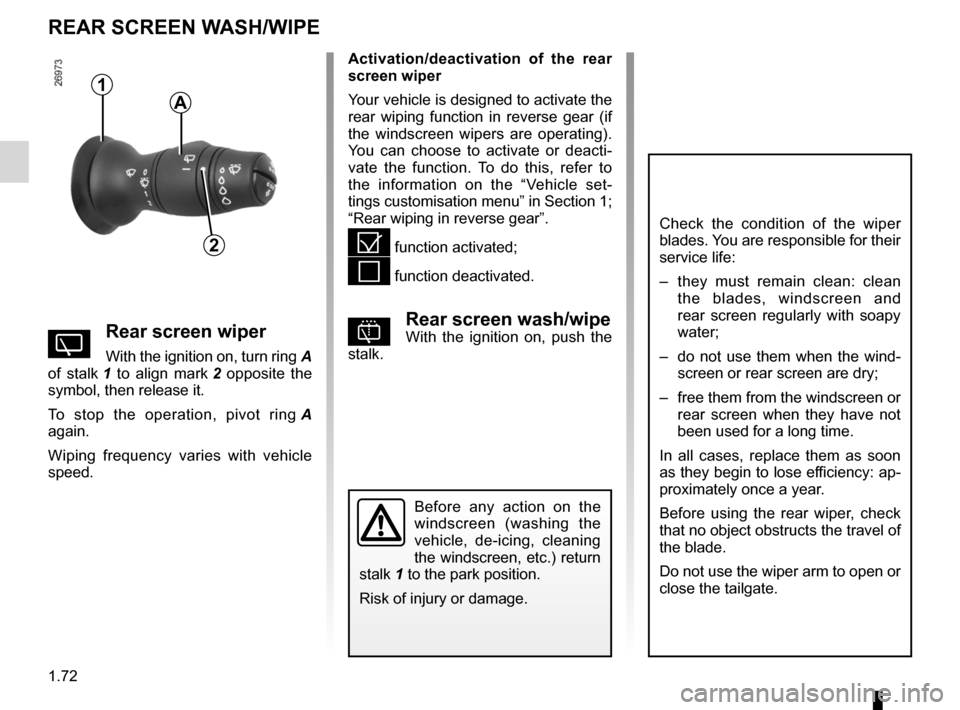
pRear screen wash/wipeWith the ignition on, push the
stalk.YRear screen wiper
With the ignition on, turn ring A
of stalk 1 to align mark 2 opposite the
symbol, then release it.
To stop the operation, pivot ring A
again.
Wiping frequency varies with vehicle
speed.
Before any action on the
windscreen (washing the
vehicle, de-icing, cleaning
the windscreen, etc.) return
stalk 1 to the park position.
Risk of injury or damage.
A
Page 80 of 241
1.74
ENG_UD28947_3
Réservoir carburant (X91 - B91 - K91 - Renault)
ENG_NU_936-5_BK91_Renault_1
Jaune NoirNoir texte
fUEL TANK (2/3)
filling with fuel
With the ignition off, insert the nozzle to
open valve B and insert it fully before
turning it on to fill the fuel tank (risk of
splashing).
Keep the nozzle in this position
throughout the entire filling operation.
When the pump cuts out automatically
at the end of the filling procedure, a
maximum of two further filling attempts
may be made, as there must be suffi -
cient space in the fuel tank to allow for
expansion.
Make sure that no water enters the fuel
tank during filling. Valve B and its sur -
round must remain clean.
petrol versions
Using leaded petrol will damage the
antipollution system and may lead to a
loss of warranty.
To ensure that the fuel tank is not filled
with leaded petrol, the fuel tank filler
neck contains a restrictor fitted with a
foolproof system which only allows
the nozzle for unleaded petrol to be
used (at the pump).
v
ehicles running on ethanol -based
fuel
It is essential to use unleaded petrol or
fuel containing a maximum of 85% eth-
anol (E85).
In very cold conditions, it may be very
difficult or even impossible to start the
engine. To avoid this problem, use un-
leaded petrol or, for equipped vehi -
cles, use the heater integrated into the
engine: connect the specified end of
the extension piece supplied into the
socket integrated into the radiator grille
and the other end into a 220v socket
for at least 6 hours before starting.
Note: you may notice an increase in
fuel consumption with this type of fuel.
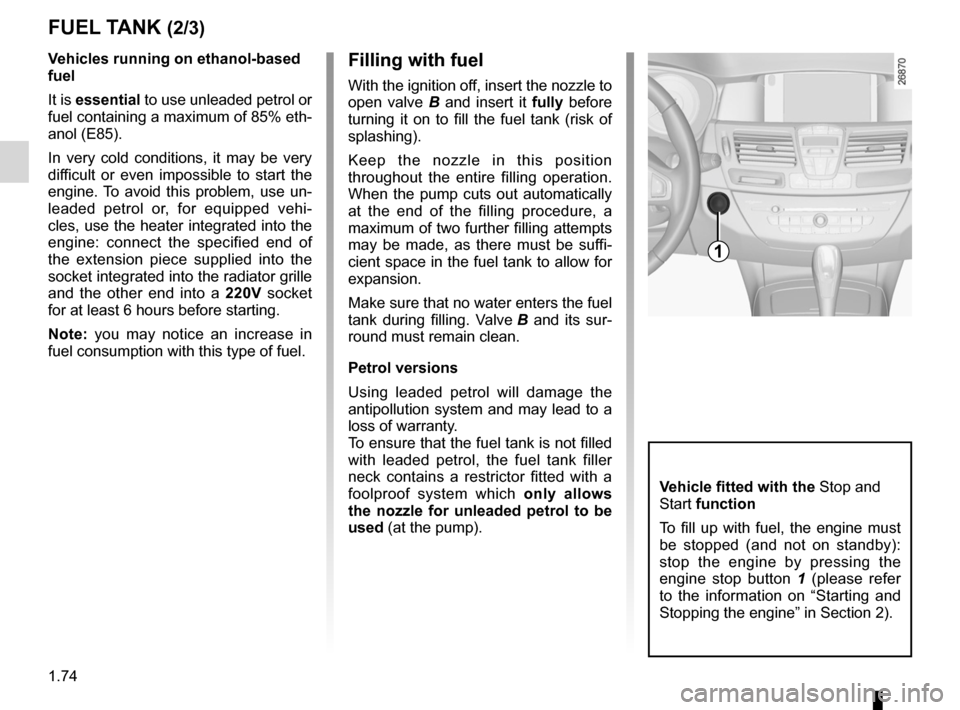
v ehicle fitted with the Stop and
Start function
To fill up with fuel, the engine must
be stopped (and not on standby):
stop the engine by pressing the
engine stop button 1 (please refer
to the information on “Starting and
Stopping the engine” in Section 2).
1
Page 81 of 241
fuel priming bulb .................................................... (current page)
fuel repriming ......................................................... (current page)
JauneNoirNoir texte
1.75
ENG_UD28947_3
Réservoir carburant (X91 - B91 - K91 - Renault)
ENG_NU_936-5_BK91_Renault_1
No modifications what -
soever are permitted on
any part of the fuel supply
system (computers, wiring,
fuel circuit, injector, protection
covers, etc.) as this may be danger-
ous (such work must be undertaken
by qualified Network personnel).
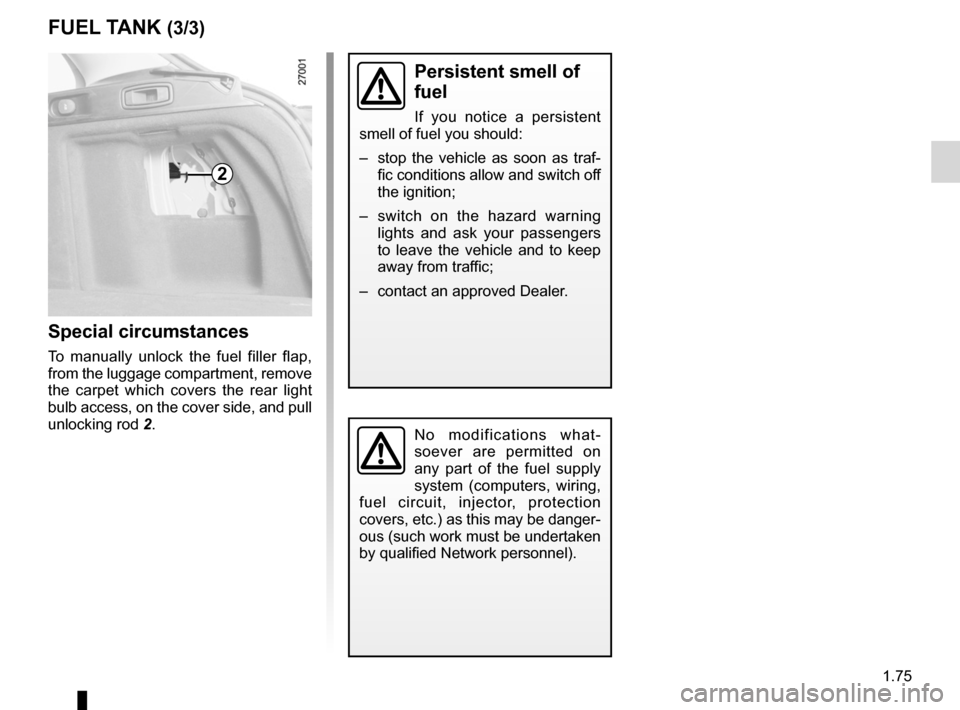
special circumstances
To manually unlock the fuel filler flap,
from the luggage compartment, remove
the carpet which covers the rear light
bulb access, on the cover side, and pull
unlocking rod 2.
persistent smell of
fuel
If you notice a persistent
smell of fuel you should:
– stop the vehicle as soon as traf-
fic conditions allow and switch off
the ignition;
– switch on the hazard warning
lights and ask your passengers
to leave the vehicle and to keep
away from traffic;
– contact an approved Dealer.
fUEL TANK (3/3)
2
Page 86 of 241
switching on the vehicle ignition ............................ (current page)
2.4
ENG_UD28948_5
Démarrage, arrêt du moteur (X91 - B91 - K91 - Renault)
ENG_NU_936-5_BK91_Renault_2
Jaune NoirNoir texte
StaRtING/StoPPING the eNGINe (2/3)
accessories function(Switching on the ignition)
Once you have gained access to your
vehicle, you may use some of its func-
tions (radio, navigation, wipers, etc.).
operating faults
In certain cases, the hands-free
RENAULT card may not work:
– when the RENAULT card battery is
drained, flat battery, etc.
– near to appliances operating on the
same frequency as the card (moni -
tor, mobile phone, video game, etc.);
– vehicle located in a high electromag-
netic radiation zone.
The message “ Please insert keycard ”
appears on the instrument panel.
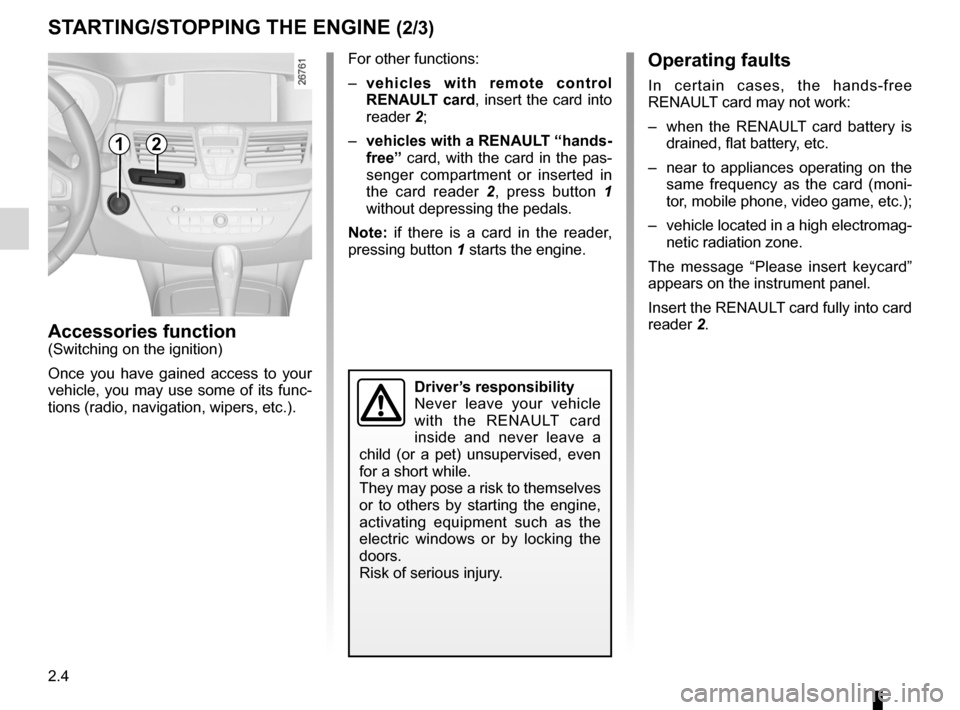
Insert the RENAULT card fully into card
reader 2.
12
Driver’s responsibility
Never leave your vehicle
with the RENAULT card
inside and never leave a
child (or a pet) unsupervised, even
for a short while.
They may pose a risk to themselves
or to others by starting the engine,
activating equipment such as the
electric windows or by locking the
doors.
Risk of serious injury.
For other functions:
– vehicles with remote control
ReNaUL t card, insert the card into
reader 2;
– vehicles with a ReNaULt “hands-
free” card, with the card in the pas-
senger compartment or inserted in
the card reader 2 , press button 1
without depressing the pedals.
Note: if there is a card in the reader,
pressing button 1 starts the engine.