steering RENAULT LAGUNA 2012 X91 / 3.G User Guide
[x] Cancel search | Manufacturer: RENAULT, Model Year: 2012, Model line: LAGUNA, Model: RENAULT LAGUNA 2012 X91 / 3.GPages: 241, PDF Size: 7.82 MB
Page 71 of 241
warning buzzer ..................................... (up to the end of the DU)
headlight flashers ................................. (up to the end of the DU)
indicators .............................................. (up to the end of the DU)
lights: hazard warning ............................... (up to the end of the DU)
lights: direction indicators .......................... (up to the end of the DU)
indicators: direction indicators .......................... (up to the end of the DU)
hazard warning lights signal ................. (up to the end of the DU)
hazard warning lights signal ................. (up to the end of the DU)
horn ...................................................... (up to the end of the DU)
horn: flash ................................................................. (current page)
horn: sounding the horn ............................................ (current page)
horn ....................................................................... (current page)
1.65
ENG_UD27625_2
Avertisseurs sonores et lumineux (X91 - B91 - K91 - D91 - Renault)
ENG_NU_936-5_BK91_Renault_1
Audible and visual signals
AUdIBLE ANd vIsUAL sIgNALs
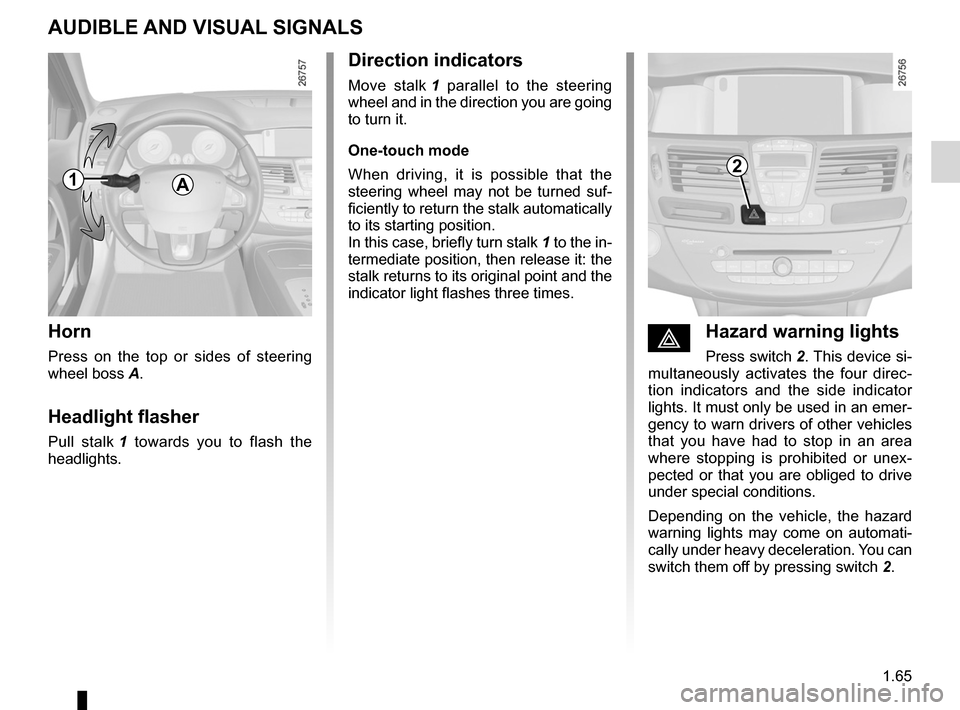
Horn
Press on the top or sides of steering
wheel boss A.
Headlight flasher
Pull stalk 1 towards you to flash the
headlights.
éHazard warning lights
Press switch 2. This device si-
multaneously activates the four direc -
tion indicators and the side indicator
lights. It must only be used in an emer-
gency to warn drivers of other vehicles
that you have had to stop in an area
where stopping is prohibited or unex -
pected or that you are obliged to drive
under special conditions.
Depending on the vehicle, the hazard
warning lights may come on automati -
cally under heavy deceleration. You can
switch them off by pressing switch 2.
direction indicators
Move stalk 1 parallel to the steering
wheel and in the direction you are going
to turn it.
One-touch mode
When driving, it is possible that the
steering wheel may not be turned suf -
ficiently to return the stalk automatically
to its starting position.
In this case, briefly turn stalk 1 to the in-
termediate position, then release it: the
stalk returns to its original point and the
indicator light flashes three times.
A12
Page 73 of 241
lights:main beam headlights ...................................... (current page)
warning buzzer ...................................................... (current page)
see-me-home lighting ............................................ (current page)
lights mobile directional ............................................. (current page)
lights: main beam headlights ...................................... (current page)
JauneNoirNoir texte
1.67
ENG_UD20268_1
Eclairage et signalisation extérieurs (X91 - B91 - K91 - Renault)
ENG_NU_936-5_BK91_Renault_1
EXTERIOR LIgHTINg ANd sIgNALs (2/3)
special note:
– If the dipped beam headlights are
manually switched on and if the light
is sufficient, the directional head -
lights will remain fixed;
– If the lights come on automatically
when cornering, the directional
headlights will start working from the
next time the vehicle corners;
– When the dipped beam headlights
are switched on with the engine
running and the vehicle stationary,
the lights move to reinitialise them -
selves. If not, there is a system fault.
switching off the lights
There are two possibilities:
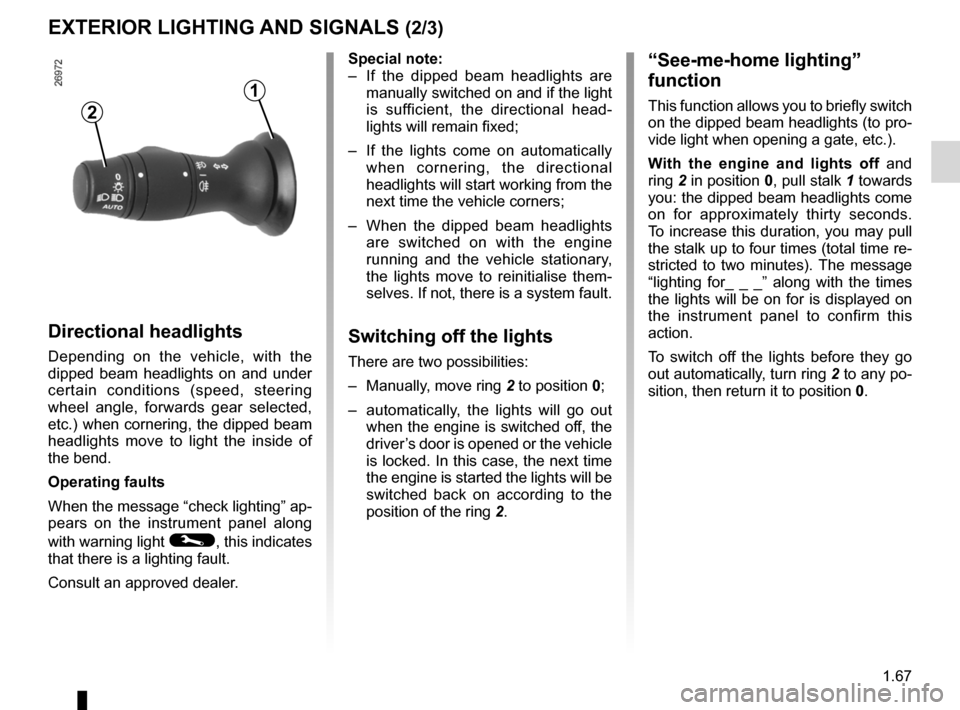
– Manually, move ring 2 to position 0;
– automatically, the lights will go out
when the engine is switched off, the
driver’s door is opened or the vehicle
is locked. In this case, the next time
the engine is started the lights will be
switched back on according to the
position of the ring 2.
“see-me-home lighting”
function
This function allows you to briefly switch
on the dipped beam headlights (to pro-
vide light when opening a gate, etc.).
With the engine and lights off and
ring 2 in position 0, pull stalk 1 towards
you: the dipped beam headlights come
on for approximately thirty seconds.
To increase this duration, you may pull
the stalk up to four times (total time re-
stricted to two minutes). The message
“lighting for_ _ _” along with the times
the lights will be on for is displayed on
the instrument panel to confirm this
action.
To switch off the lights before they go
out automatically, turn ring 2 to any po-
sition, then return it to position 0.
directional headlights
Depending on the vehicle, with the
dipped beam headlights on and under
certain conditions (speed, steering
wheel angle, forwards gear selected,
etc.) when cornering, the dipped beam
headlights move to light the inside of
the bend.
Operating faults
When the message “check lighting” ap-
pears on the instrument panel along
with warning light
©, this indicates
that there is a lighting fault.
Consult an approved dealer.
2
1
Page 85 of 241
starting the engine ................................ (up to the end of the DU)
engine start/stop button ........................ (up to the end of the DU)
starting the engine ................................ (up to the end of the DU)
driving ................................................... (up to the end of the DU)
stopping the engine .............................. (up to the end of the DU)
2.3
ENG_UD28948_5
Démarrage, arrêt du moteur (X91 - B91 - K91 - Renault)
ENG_NU_936-5_BK91_Renault_2
Starting, stopping the engine
StaRtING/StoPPING the eNGINe (1/3)
Starting the engine
Remote control ReNaUL t card
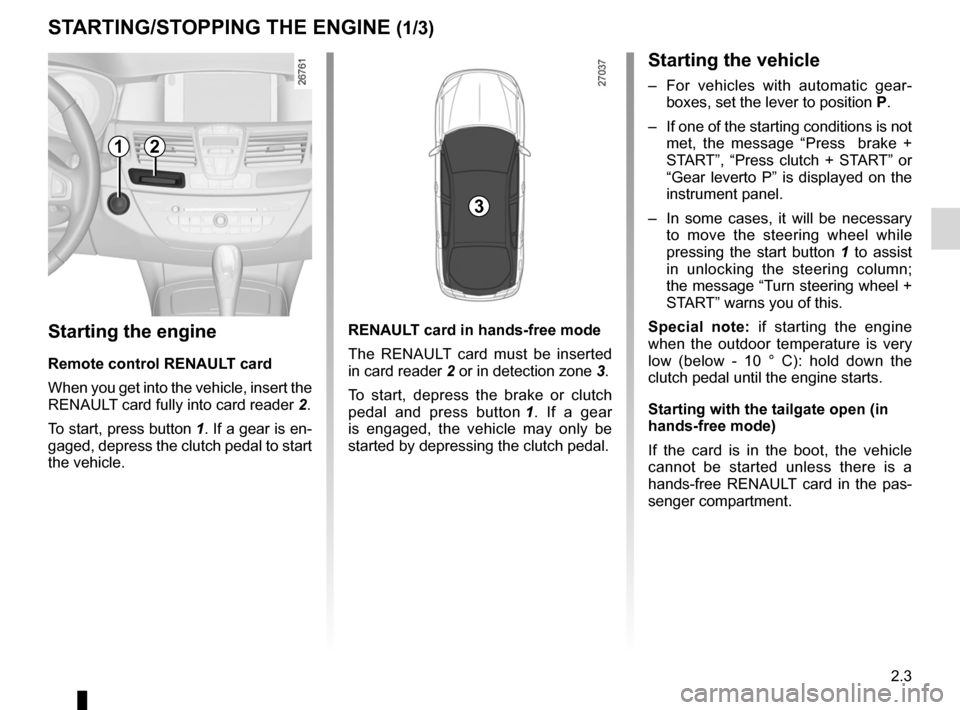
When you get into the vehicle, insert the
RENAULT card fully into card reader 2.
To start, press button 1. If a gear is en-
gaged, depress the clutch pedal to start
the vehicle. ReNaUL
t card in hands-free mode
The RENAULT card must be inserted
in card reader 2 or in detection zone 3.
To start, depress the brake or clutch
pedal and press button 1 . If a gear
is engaged, the vehicle may only be
started by depressing the clutch pedal.
Starting the vehicle
– For vehicles with automatic gear -
boxes, set the lever to position P.
– If one of the starting conditions is not
met, the message “ Press brake +
START”, “Press clutch + START” or
“Gear leverto P” is displayed on the
instrument panel.
– In some cases, it will be necessary
to move the steering wheel while
pressing the start button 1 to assist
in unlocking the steering column;
the message “Turn steering wheel +
START” warns you of this.
Special note: if starting the engine
when the outdoor temperature is very
low (below - 10 ° C): hold down the
clutch pedal until the engine starts.
Starting with the tailgate open (in
hands-free mode)
If the card is in the boot, the vehicle
cannot be started unless there is a
hands-free RENAULT card in the pas -
senger compartment.
12
3
Page 104 of 241
ABS ...................................................... (up to the end of the DU)
anti-lock braking system: ABS ..............(up to the end of the DU)
emergency brake assist ........................(up to the end of the DU)
emergency braking ............................... (up to the end of the DU)
driving ................................................... (up to the end of the DU)
ASR (traction control) ........................... (up to the end of the DU)
traction control: ASR .............................(up to the end of the DU)
traction control system: ASR ................(up to the end of the DU)
electronic stability control: ESC ............ (up to the end of the DU)
ESC: electronic stability control ............ (up to the end of the DU)
Hill Start Assist...................................... (up to the end of the DU)
2.22
ENG_UD27695_10
Dispositifs de correction et d’assistance à la de conduite (X91 - B91 - K91 - D91 - Renault)
ENG_NU_936-5_BK91_Renault_2
Jaune NoirNoir texte
abS (anti-lock braking
system)
Under heavy braking, the ABS prevents
the wheels from locking, allowing the
stopping distance to be managed and
keeping control of the vehicle.
Under these circumstances, the vehi -
cle can be steered to avoid an obstacle
whilst braking. In addition, this system
can increase stopping distances, par -
ticularly on roads with low surface grip
(wet ground etc.).
You will feel a pulsation through the
brake pedal each time the system is
activated. The ABS does not in any way
improve the vehicle's physical perform-
ance relating to the road surface and
roadholding. It is still essential to follow
the rules of good driving practice (such
as driving at a safe distance from the
vehicle in front etc.).
Driver correction devices and aids
DRIveR CoRReCtIoN DevICeS aND aIDS (1/5)
Depending on the vehicle, they may
comprise:
– t h e a bS ( a n t i - l o c k b r a k i n g
system);
– eSC (electronic stability program)
with understeer control and a SR
traction control;
– emergency brake assist with, de -
pending on the vehicle, braking
anticipation;
– rear wheel steering.
In an emergency, apply firm and
continuous pressure to the brake
pedal. There is no need to pump
it repeatedly. The ABS will modu -
late the force applied in the braking
system.
These functions are an ad-
ditional aid in the event of
critical driving conditions,
enabling the vehicle behav -
iour to be adapted to suit the driving
conditions.
However, the functions do not take
the place of the driver. they do
not increase the vehicle’s limits
and should not encourage you
to drive more quickly. Therefore,
they can under no circumstances
replace the vigilance or responsibil -
ity of the driver when manoeuvring
the vehicle (the driver must always
be ready for sudden incidents which
may occur when driving).
Yo u r b r a k i n g s y s t e m s
are partially operational.
However, it is dangerous
to brake suddenly and
it is essential to stop immediately,
as soon as traffic conditions allow.
Contact an approved dealer.
operating faults:
–
© and x lit up on the in -
strument panel alongside mes -
sages “Check ABS”, “Check braking
system” and “Check ESC”: indicates
the ABS, ESC and emergency brake
assist are deactivated. braking is
always enabled;
–
x, D, © and ® lit
up on the instrument panel alongside
the message “Braking system fault”:
this indicates a fault in the braking
system.
In both cases, consult an approved
dealer.
Page 106 of 241
2.24
ENG_UD27695_10
Dispositifs de correction et d’assistance à la de conduite (X91 - B91 - K91 - D91 - Renault)
ENG_NU_936-5_BK91_Renault_2
Jaune NoirNoir texte
DRIveR CoRReCtIoN DevICeS aND aIDS (3/5)
electronic stability control
eSC with understeer control
and traction control aSR
electronic stability control eSC
This system helps you to keep control
of the vehicle in critical driving condi -
tions (avoiding an obstacle, loss of grip
on a bend, etc.).
operating principle
A sensor in the steering wheel detects
the direction selected by the driver.
Other sensors throughout the vehicle
measure the actual direction.
The system compares driver input to
the actual trajectory of the vehicle and
corrects the trajectory, if necessary, by
controlling the braking of certain wheels
and/or engine power. In the event that
the system is engaged, warning light
flashes on the instrument panel. Understeer control
This system optimises the action of the
ESC in the case of pronounced under
-
steer (loss of front axle road holding).
t raction control (aSR)
This system helps to limit wheelspin of
the drive wheels and to control the ve-
hicle when pulling away accelerating or
decelerating.
operating principle
Using the wheel sensors, the system
measures and compares the speed of
the drive wheels at all times and slows
down their over-rotation. If a wheel is
starting to slip, the system brakes au -
tomatically until the drive supplied be -
comes compatible with the level of grip
under the wheel again.
The system also adjusts the engine
speed to the grip available under the
wheels, independently of the pressure
exerted on the accelerator pedal. operating faults
When the system detects an operat
-
ing fault the message “Check ESC” and
warning light
© appear on the in-
strument panel. In this case, the ESC
and ASR are deactivated.
Consult an approved dealer.
Page 108 of 241
rear drive wheels ................................................... (current page)
2.26
ENG_UD27695_10
Dispositifs de correction et d’assistance à la de conduite (X91 - B91 - K91 - D91 - Renault)
ENG_NU_936-5_BK91_Renault_2
Rear wheel steering
On equipped vehicles, this system,
when the vehicle is being driven, steers
the rear wheels according to driving
conditions: at low speed this system
offers manoeuvrability, at higher speeds
it optimises stability.
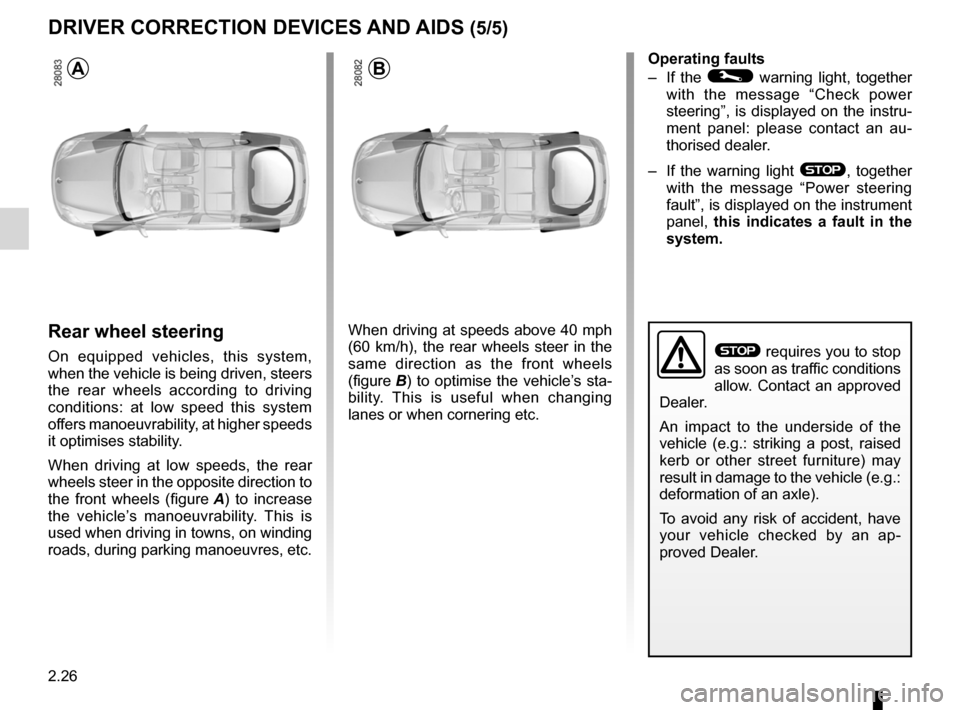
When driving at low speeds, the rear
wheels steer in the opposite direction to
the front wheels (figure A ) to increase
the vehicle’s manoeuvrability. This is
used when driving in towns, on winding
roads, during parking manoeuvres, etc.
When driving at speeds above 40 mph
(60 km/h), the rear wheels steer in the
same direction as the front wheels
(figure B) to optimise the vehicle’s sta-
bility. This is useful when changing
lanes or when cornering etc. operating faults
–
If the
© warning light, together
with the message “ Check power
steering ”, is displayed on the instru-
ment panel: please contact an au -
thorised dealer.
– If the warning light
®, together
with the message “ Power steering
fault”, is displayed on the instrument
panel, this indicates a fault in the
system.
DRIveR CoRReCtIoN DevICeS aND aIDS (5/5)
ab
® requires you to stop
as soon as traffic conditions
allow. Contact an approved
Dealer.
An impact to the underside of the
vehicle (e.g.: striking a post, raised
kerb or other street furniture) may
result in damage to the vehicle (e.g.:
deformation of an axle).
To avoid any risk of accident, have
your vehicle checked by an ap -
proved Dealer.
Page 157 of 241
multimedia equipment .......................... (up to the end of the DU)
telephone .............................................. (up to the end of the DU)
navigation system ................................. (up to the end of the DU)
hands-free telephone integrated control
(up to the end of the DU)
navigation ............................................. (up to the end of the DU)
radio...................................................... (up to the end of the DU)
3.35
ENG_UD20471_1
Equipement multimédia (X91 - B91 - K91 - Renault)
ENG_NU_936-5_BK91_Renault_3
Multimedia equipment
Mul TIMEDIA EquIPMENT
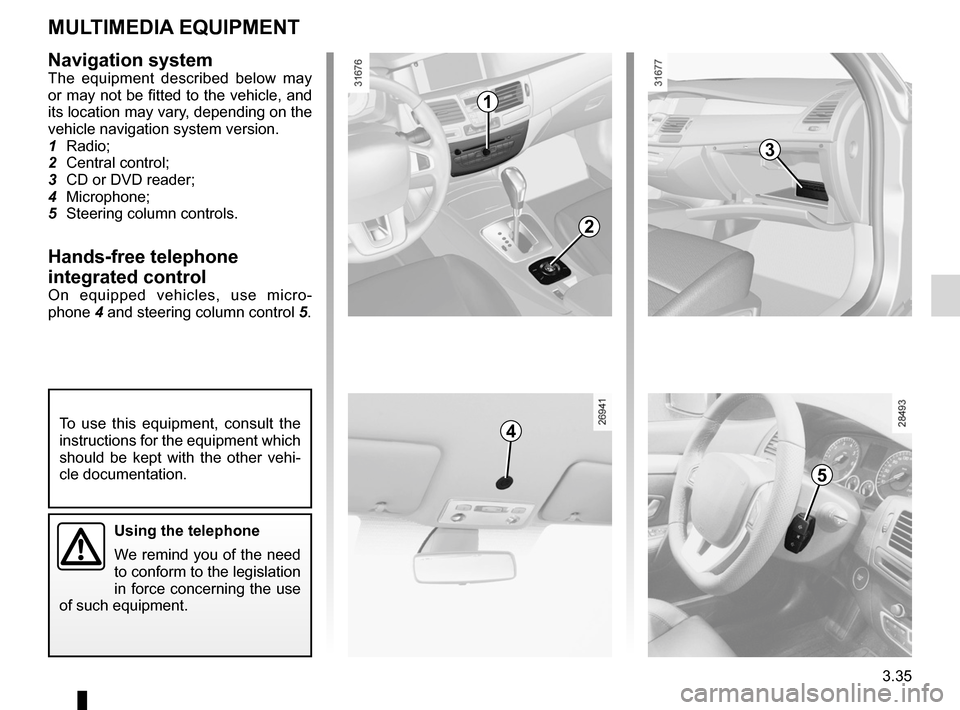
Navigation systemThe equipment described below may
or may not be fitted to the vehicle, and
its location may vary, depending on the
vehicle navigation system version.
1 Radio;
2 Central control;
3 CD or DVD reader;
4 Microphone;
5 Steering column controls.
hands-free telephone
integrated control
On equipped vehicles, use micro -
phone 4 and steering column control 5.
To use this equipment, consult the
instructions for the equipment which
should be kept with the other vehi -
cle documentation.
using the telephone
We remind you of the need
to conform to the legislation
in force concerning the use
of such equipment.
1
2
3
4
5
Page 188 of 241
tyre pressure.......................................................... (current page)
5.12
ENG_UD22249_4
Pneumatiques (X91 - B91 - K91 - Renault)
ENG_NU_936-5_BK91_Renault_5
Jaune NoirNoir texte
Pressures should be checked when the
tyres are cold; ignore higher pressures
which may be reached in hot weather
or following a fast journey.
If tyre pressures cannot be checked
when the tyres are cold, the normal
pressures must be increased by 0.2 to
0.3 bar (or 3 PSI).
never deflate a hot tyre.
Special note
Depending on the vehicle, there may
be an adapter which needs to be posi-
tioned on the valve before air is added.Fitting new tyres
emergency spare wheel
Refer to the information on the
“Emergency spare wheel” and in -
structions on “Changing a wheel” in
Section 5.
tYreS (continued)
t yre pressuresAdhere to the tyre pressures (including
the emergency spare wheel). The tyre
pressures should be checked at least
once a month and additionally before
any long journey (refer to the label af -
fixed to the edge of the driver’s door).
Incorrect tyre pressures
lead to abnormal tyre wear
and unusually hot running.
These are factors which
may seriously affect safety and lead
to:
– poor road holding,
– risk of bursting or tread separa -
tion.
The pressure depends on the load
and the speed of use. Adjust the
pressures according to the condi -
tions of use (refer to the information
on “Tyre pressures”).
Please be aware that a
poorly tightened or miss -
ing valve cap can make the
tyres less airtight and lead
to pressure loss.
Always use valve caps identical to
those fitted originally and tighten
them fully.
For safety reasons, this op-
eration must be carried out
by a specialist.
Fitting different tyres may
change your vehicle as follows:
– It may mean that your vehicle no
longer conforms to current regu-
lations;
– It may change the way it handles
when cornering;
– It may cause the steering to be
heavy;
– It may affect the use of snow
chains.
Page 207 of 241
towingbreakdown ...................................... (up to the end of the DU)
towing hitch ........................................... (up to the end of the DU)
5.31
ENG_UD20531_1
Remorquage : dépannage (X91 - B91 - K91 - Renault)
ENG_NU_936-5_BK91_Renault_5
Towing
tOWInG : breakdown
Before towing, unlock the steering
column: with the clutch depressed,
engage first gear (lever in position n
or r for vehicles with automatic trans -
missions), insert the RENAULT card in
the card reader then press the engine
start button for two seconds.
The column is unlocked, the acces -
sory functions are supplied: the vehi -
cle lights can be used (indicators, brake
lights etc.). At night the vehicle must
have its lights on.
Once you have finished towing, press
the engine start button twice (risk of
running down the battery).
The speed specified by current legis -
lation for towing must always be ob -
served. If your vehicle is the towing
vehicle, do not exceed the maximum
towing weight for your vehicle (refer to
the information on “Weights” in Section
6).t owing a vehicle with an
automatic gearbox
With the engine switched off, the trans-
mission is no longer lubricated. It is
preferable to tow this type of vehicle on
a trailer or tow it with the front wheels
off the ground.
u nder exceptional circumstances ,
you may tow the vehicle with all four
wheels on the ground, only going for -
ward, with the gear lever in the n posi-
tion, and for a distance not exceeding
30 miles (50 km).
D o n o t r e m o v e t h e
RENAULT card from the
reader when the vehicle is
being towed.
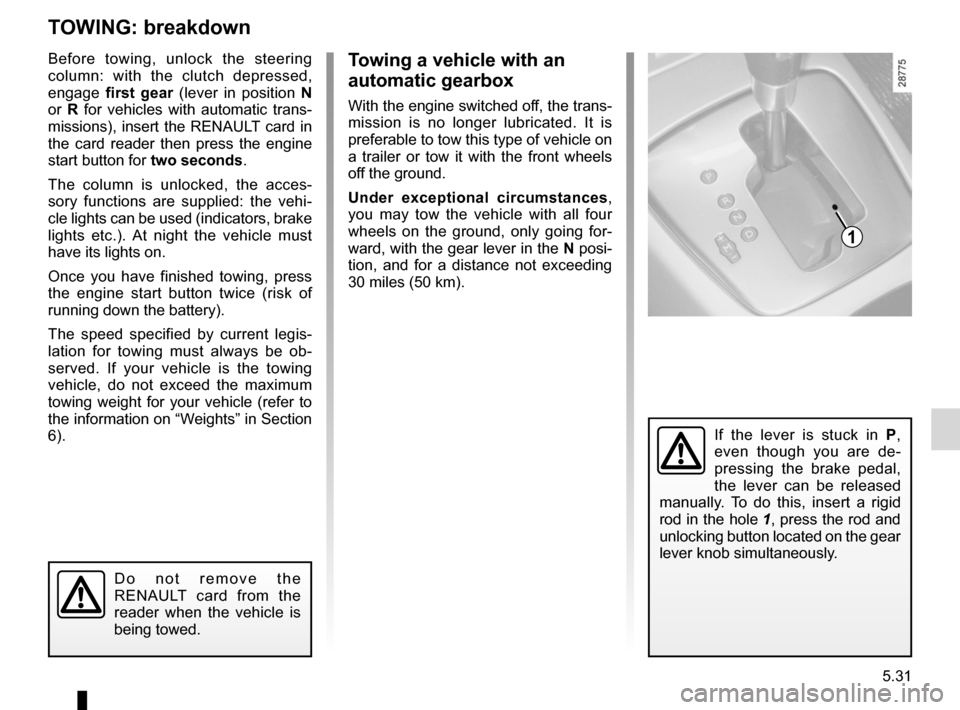
If the lever is stuck in P,
even though you are de -
pressing the brake pedal,
the lever can be released
manually. To do this, insert a rigid
rod in the hole 1, press the rod and
unlocking button located on the gear
lever knob simultaneously.
1
Page 208 of 241
5.32
ENG_UD20531_1
Remorquage : dépannage (X91 - B91 - K91 - Renault)
ENG_NU_936-5_BK91_Renault_5
tOWInG : breakdown (continued)
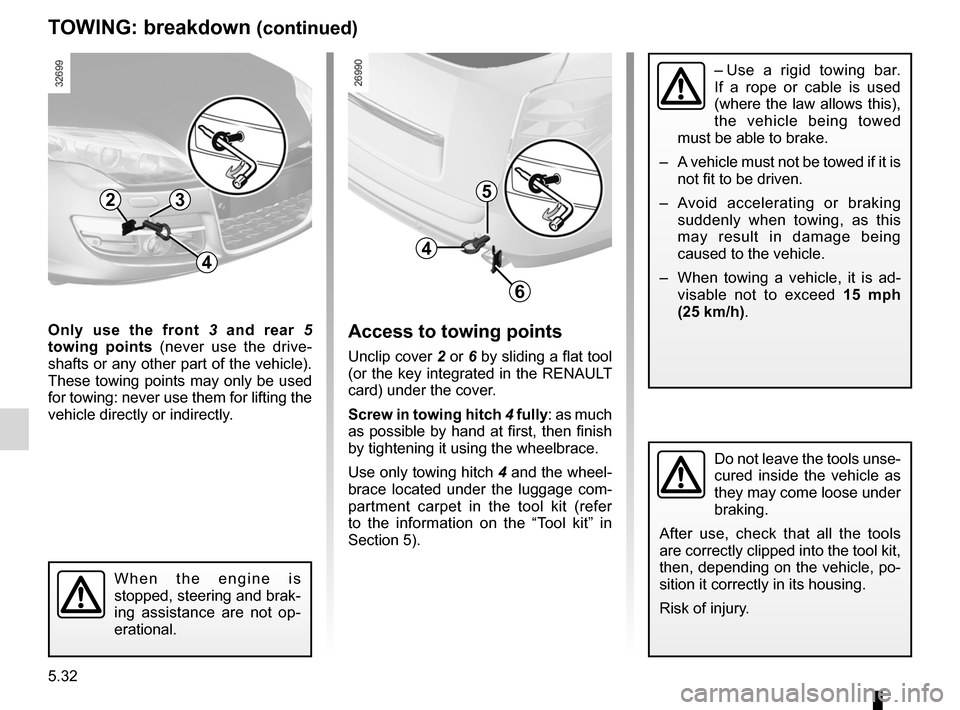
Only use the front 3 and rear 5
towing points (never use the drive -
shafts or any other part of the vehicle).
These towing points may only be used
for towing: never use them for lifting the
vehicle directly or indirectly.
W h e n t h e e n g i n e i s
stopped, steering and brak-
ing assistance are not op -
erational.
5
6
4
32
4
Access to towing points
Unclip cover 2 or 6 by sliding a flat tool
(or the key integrated in the RENAULT
card) under the cover.
Screw in towing hitch 4 fully: as much
as possible by hand at first, then finish
by tightening it using the wheelbrace.
Use only towing hitch 4 and the wheel-
brace located under the luggage com -
partment carpet in the tool kit (refer
to the information on the “Tool kit” in
Section 5).
– Use a rigid towing bar.
If a rope or cable is used
(where the law allows this),
the vehicle being towed
must be able to brake.
– A vehicle must not be towed if it is
not fit to be driven.
– Avoid accelerating or braking
suddenly when towing, as this
may result in damage being
caused to the vehicle.
– When towing a vehicle, it is ad -
visable not to exceed 15 mph
(25 km/h).
Do not leave the tools unse-
cured inside the vehicle as
they may come loose under
braking.
After use, check that all the tools
are correctly clipped into the tool kit,
then, depending on the vehicle, po-
sition it correctly in its housing.
Risk of injury.