brake light RENAULT MASTER 2018 User Guide
[x] Cancel search | Manufacturer: RENAULT, Model Year: 2018, Model line: MASTER, Model: RENAULT MASTER 2018Pages: 290, PDF Size: 7.1 MB
Page 134 of 290
2.18
DRIVING CORRECTION DEVICES AND AIDS (3/8)
Emergency brake assist
This system supplements the ABS
and helps reduce vehicle stopping dis-
tances.
Operating principle
The system is for detecting an emer-
gency braking situation. In this case,
the braking assistance immediately de-
velops maximum power and may trig-
ger ABS regulation.
ABS braking is maintained as long as
the brake pedal is applied.
Hazard warning lights switching on
Depending on the vehicle, these may
light up in the event of sudden decel-
eration.
Operating faults
When the system detects an operat-
ing fault the message “CHECK ABS”
appears on the instrument panel along
with the
© warning light.
Consult an approved dealer.
Driver assistance with a
trailer
This system helps to maintain control
over the vehicle while using a trailer.
It detects shaking caused by towing a
trailer under certain driving conditions.
Operating conditions
– The towbar must be approved by an authorised dealer;
– the harness must be approved by an authorised dealer;
– the towbar must be connected to the vehicle.
Operating principle
The function stabilises the vehicle by:
– asymmetric braking of the front wheels to reduce shaking caused by
the trailer;
– braking of all four wheels and limita- tion on engine torque to reduce the
vehicle speed until the shaking has
stopped.
Warning light
flashes on the in-
strument panel to inform the driver.
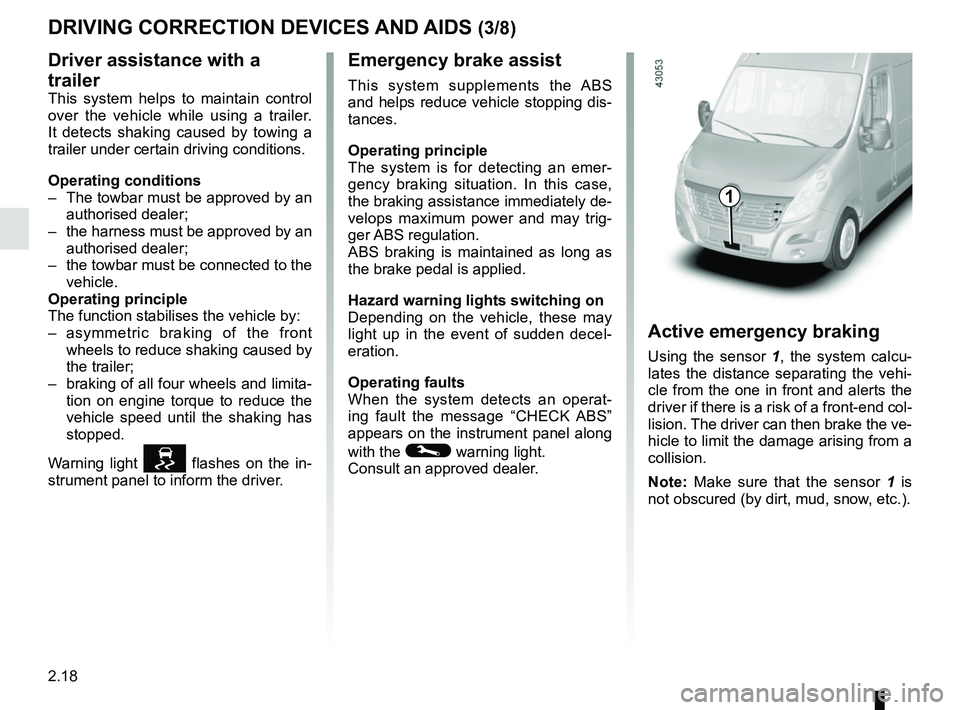
Active emergency braking
Using the sensor 1, the system calcu-
lates the distance separating the vehi-
cle from the one in front and alerts the
driver if there is a risk of a front-end col-
lision. The driver can then brake the ve-
hicle to limit the damage arising from a
collision.
Note: Make sure that the sensor 1 is
not obscured (by dirt, mud, snow, etc.).
1
Page 135 of 290
2.19
DRIVER CORRECTION DEVICES AND AIDS (4/8)
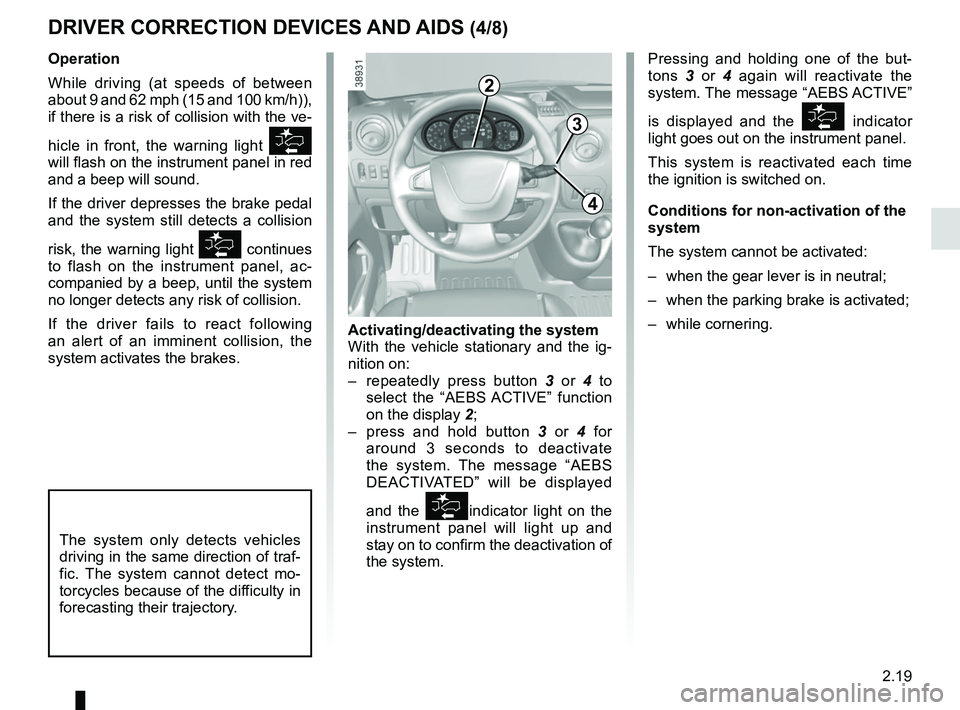
Pressing and holding one of the but-
tons 3 or 4 again will reactivate the
system. The message “AEBS ACTIVE”
is displayed and the
indicator
light goes out on the instrument panel.
This system is reactivated each time
the ignition is switched on.
Conditions for non-activation of the
system
The system cannot be activated:
– when the gear lever is in neutral;
– when the parking brake is activated;
– while cornering.
Operation
While driving (at speeds of between
about 9 and 62 mph (15 and 100 km/h)),
if there is a risk of collision with the ve-
hicle in front, the warning light
will flash on the instrument panel in red
and a beep will sound.
If the driver depresses the brake pedal
and the system still detects a collision
risk, the warning light
continues
to flash on the instrument panel, ac-
companied by a beep, until the system
no longer detects any risk of collision.
If the driver fails to react following
an alert of an imminent collision, the
system activates the brakes.
The system only detects vehicles
driving in the same direction of traf-
fic. The system cannot detect mo-
torcycles because of the difficulty in
forecasting their trajectory.
Activating/deactivating the system
With the vehicle stationary and the ig-
nition on:
– repeatedly press button 3 or 4 to
select the “AEBS ACTIVE” function
on the display 2;
– press and hold button 3 or 4 for
around 3 seconds to deactivate
the system. The message “AEBS
DEACTIVATED” will be displayed
and the
indicator light on the
instrument panel will light up and
stay on to confirm the deactivation of
the system.
3
4
2
Page 137 of 290

Active emergency braking
Limitation of the system operation
– A vehicle travelling in the opposite direction will not trigger any alert\
or any action")
2.21
DRIVER CORRECTION DEVICES AND AIDS (6/8)
Active emergency braking
Limitation of the system operation
– A vehicle travelling in the opposite direction will not trigger any alert\
or any action on the system operation.
– The sensor area should be kept clean and free of any modifications in or\
der to ensure the proper operation of the system.
– The system cannot respond to small vehicles such as motorbikes or bicycl\
es as effectively as to other vehicles.
Deactivating the function
You must disable the function if:
– the brake lights are not functioning;
– the front of the vehicle has undergone an impact or been damaged;
– the vehicle is being towed (breakdowns).
Halting the function
You can halt the active braking function at any time by tapping the accel\
erator pedal or by turning the steering wheel in an
avoidance manoeuvre.
In the event of the system behaving abnormally, deactivate it and consult an authorised dealer.
Page 152 of 290
2.36
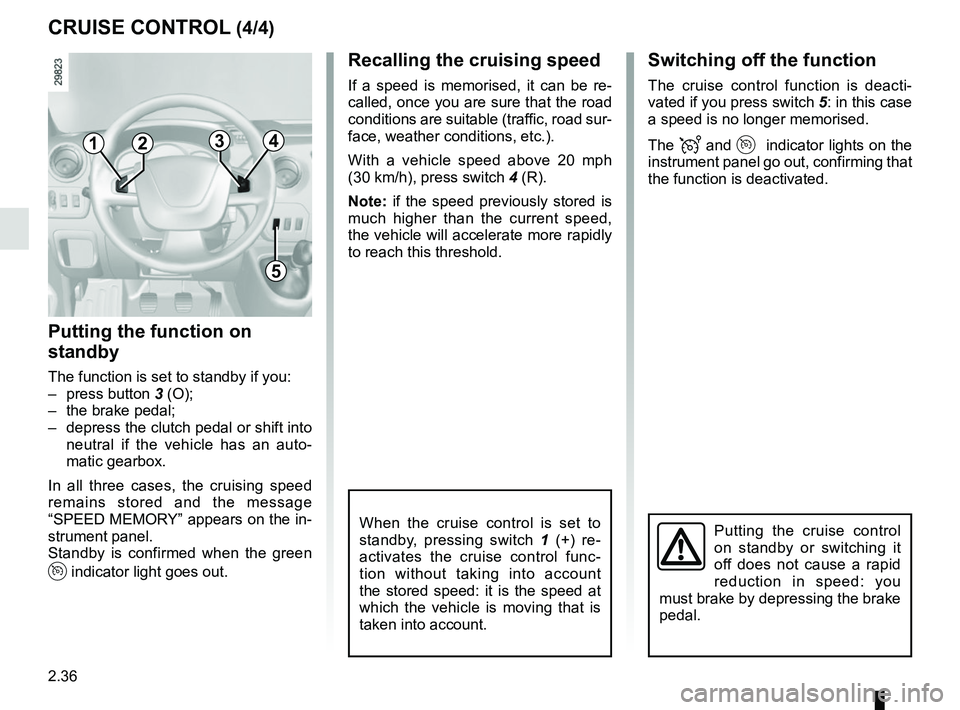
Switching off the function
The cruise control function is deacti-
vated if you press switch 5: in this case
a speed is no longer memorised.
The
and indicator lights on the
instrument panel go out, confirming that
the function is deactivated.
Recalling the cruising speed
If a speed is memorised, it can be re-
called, once you are sure that the road
conditions are suitable (traffic, road sur-
face, weather conditions, etc.).
With a vehicle speed above 20 mph
(30 km/h), press switch 4 (R).
Note: if the speed previously stored is
much higher than the current speed,
the vehicle will accelerate more rapidly
to reach this threshold.
When the cruise control is set to
standby, pressing switch 1 (+) re-
activates the cruise control func-
tion without taking into account
the stored speed: it is the speed at
which the vehicle is moving that is
taken into account.Putting the cruise control
on standby or switching it
off does not cause a rapid
reduction in speed: you
must brake by depressing the brake
pedal.
CRUISE CONTROL (4/4)
1
5
2
Putting the function on
standby
The function is set to standby if you:
– press button 3 (O);
– the brake pedal;
– depress the clutch pedal or shift into neutral if the vehicle has an auto-
matic gearbox.
In all three cases, the cruising speed
remains stored and the message
“SPEED MEMORY” appears on the in-
strument panel.
Standby is confirmed when the green
indicator light goes out.
43
Page 161 of 290
2.45
SEQUENTIAL GEARBOX (1/5)
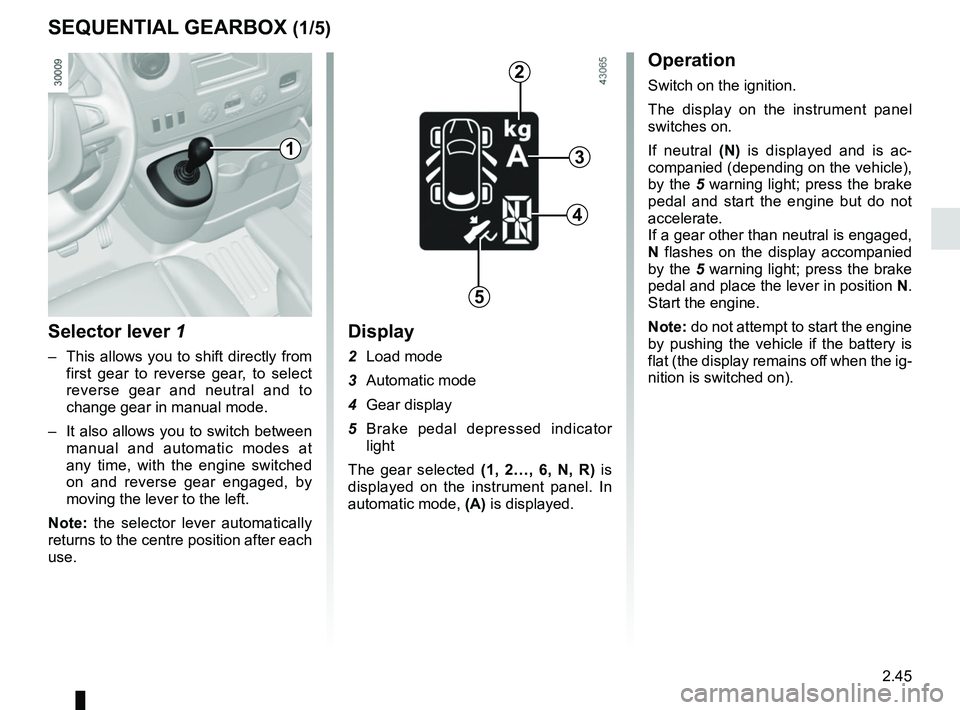
Selector lever 1
– This allows you to shift directly from first gear to reverse gear, to select
reverse gear and neutral and to
change gear in manual mode.
– It also allows you to switch between manual and automatic modes at
any time, with the engine switched
on and reverse gear engaged, by
moving the lever to the left.
Note: the selector lever automatically
returns to the centre position after each
use.
Display
2 Load mode
3 Automatic mode
4 Gear display
5 Brake pedal depressed indicator light
The gear selected (1, 2…, 6, N, R) is
displayed on the instrument panel. In
automatic mode, (A) is displayed.
Operation
Switch on the ignition.
The display on the instrument panel
switches on.
If neutral (N) is displayed and is ac-
companied (depending on the vehicle),
by the 5 warning light; press the brake
pedal and start the engine but do not
accelerate.
If a gear other than neutral is engaged,
N flashes on the display accompanied
by the 5 warning light; press the brake
pedal and place the lever in position N.
Start the engine.
Note: do not attempt to start the engine
by pushing the vehicle if the battery is
flat (the display remains off when the ig-
nition is switched on).
1
2
3
4
5
Page 162 of 290
2.46
Reverse gear (vehicle stationary)
– Brake pedal depressed. Push the
selector lever towards the right and
to the rear as shown on the base
of the lever, and then release it.
Reverse gear is engaged and the
letter R appears on the display.
– Release the brake pedal: – the engine’s idle speed is suffi-
cient for parking manoeuvres;
– accelerate gently to reverse.
You may shift from reverse gear to a
forwards gear by pushing the lever for-
wards once the vehicle is stationary.
Note: When the vehicle is stationary,
you must depress the brake pedal to
engage or disengage a gear. Otherwise,
warning light 5 will come on.
SEQUENTIAL GEARBOX (2/5)
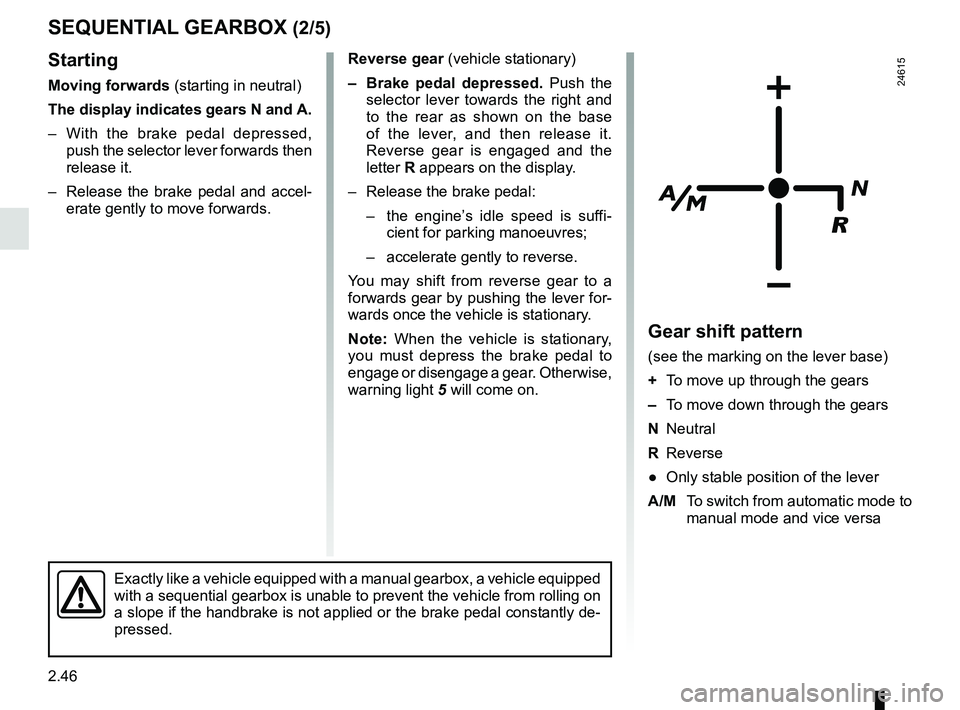
Gear shift pattern
(see the marking on the lever base)
+ To move up through the gears
– To move down through the gears
N Neutral
R Reverse
● Only stable position of the lever
A/M To switch from automatic mode to
manual mode and vice versa
24615
Exactly like a vehicle equipped with a manual gearbox, a vehicle equippe\
d
with a sequential gearbox is unable to prevent the vehicle from rolling \
on
a slope if the handbrake is not applied or the brake pedal constantly de\
-
pressed.
Starting
Moving forwards (starting in neutral)
The display indicates gears N and A.
– With the brake pedal depressed, push the selector lever forwards then
release it.
– Release the brake pedal and accel- erate gently to move forwards.
Page 163 of 290
2.47
SEQUENTIAL GEARBOX (3/5)
Operation in semiautomatic
mode (manual)
This mode can be activated at any time
when driving by pushing the lever to the
left. The mode is switched without shift-
ing up a gear.
You can initiate gear changes using the
selector lever.
To shift up a gear, push the selector
lever forwards; the accelerator pedal
does not have to be lifted.
To shift down a gear, push the selector
lever backwards; the accelerator pedal
does not have to be lifted. The system will not tolerate a series
of up or down changes that cause the
engine to underrev or overrev.
By pushing the lever forwards twice
you can move up two gears at a time
(except if underrevving). By pushing
the lever backwards twice you can
move down two gears at a time (unless
this causes overrevving).
When decelerating with the foot off
the pedal, the gears will automatically
drop to the low engine speed limit to
avoid stalling. First gear automatically
shifts below a certain speed limit. You
can stop the vehicle at red lights or
junctions etc. by depressing the brake
pedal; there is no need to change to
neutral (N).
The vehicle will move off again:
– either slowly, if you release the brake
without accelerating (e.g. when in a
traffic jam);
– or quickly, if you release the brake and accelerate.
Note: neutral may only be selected
when the vehicle is being driven or is
stationary when the brake pedal is
depressed (if you forget, warning
light 5 will come on) .
Push the gear selector lever to the right
to engage neutral.
If the engine speed is too high or too
low, the system will choose the opti-
mum gear.
Semiautomatic mode can be deacti-
vated and reactivated at any time when
the engine is running by pushing the
lever to the left.
Page 164 of 290
2.48
SEQUENTIAL GEARBOX (4/5)
Operation in automatic mode
Automatic mode is selected by default
every time the ignition is switched on.
The letter A appears on the display.
The vehicle is controlled using the ac-
celerator and the brake. Gears will
change automatically at the correct
moment and at a suitable engine speed
because the automatic mode takes the
road surface and the chosen driving
style into consideration.
Gears may be shifted manually in this
mode. Pushing the lever forwards
or backwards shifts a gear upwards
(except if there is a risk of underrev-
ving) or downwards (except if there is a
risk of overrevving).
Note: automatic mode takes account
of:
– the position and speed of depression of the accelerator pedal to assess
driving style and select the optimum
gear;
– action on the brake pedal, to com- mence engine braking in preparation
for a downshift.
You can stop the vehicle at red lights,
with the gear engaged, by depressing
the brake pedal; there is no need to
change to neutral (N).
The vehicle will move off again:
– either slowly, if you release the brake without accelerating (e.g. when in a
traffic jam);
– or quickly, if you release the brake and accelerate.
Accelerating and overtaking
– Slowly depress the accelerator pedal to accelerate gradually;
The oil level in the automatic gear-
box system reservoir varies depend-
ing on use. Adding oil is strictly
forbidden (except by qualified ap-
proved network personnel).
– to obtain maximum vehicle per-
formance regardless of the mode
selected (automatic or manual),
quickly depress the accelerator
pedal beyond the kickdown point.
The speed with which you depress the
pedal will allow you to downshift ac-
cording to the vehicle’s capabilities.
Parking the vehicle
It is possible to park in gear (for exam-
ple, on a slope):
– with the ignition on, select a gear with your foot on the brake ;
– check that a gear other than N is dis- played on the instrument panel, then
remove the ignition key;
– apply the handbrake.
To disengage the gear, switch on the
ignition without starting the engine and
shift the selector lever to neutral with
the brake pedal depressed . Check
that N is displayed on the instrument
panel.
Page 165 of 290
2.49
SEQUENTIAL GEARBOX (5/5)
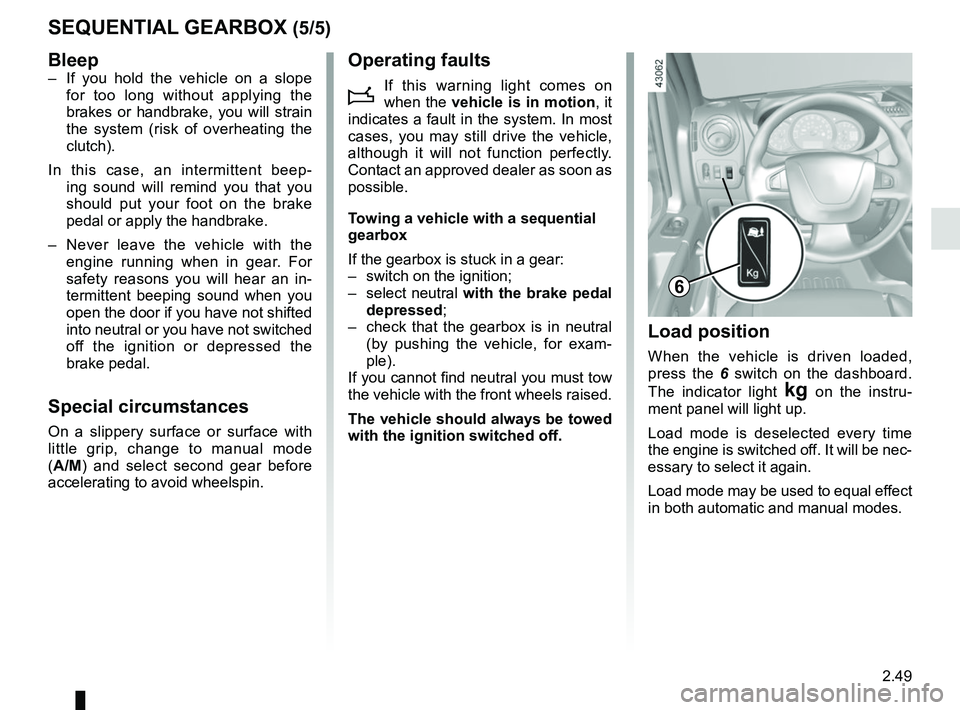
Load position
When the vehicle is driven loaded,
press the 6 switch on the dashboard.
The indicator light
§ on the instru-
ment panel will light up.
Load mode is deselected every time
the engine is switched off. It will be nec-
essary to select it again.
Load mode may be used to equal effect
in both automatic and manual modes.
6
Bleep– If you hold the vehicle on a slope for too long without applying the
brakes or handbrake, you will strain
the system (risk of overheating the
clutch).
In this case, an intermittent beep- ing sound will remind you that you
should put your foot on the brake
pedal or apply the handbrake.
– Never leave the vehicle with the engine running when in gear. For
safety reasons you will hear an in-
termittent beeping sound when you
open the door if you have not shifted
into neutral or you have not switched
off the ignition or depressed the
brake pedal.
Special circumstances
On a slippery surface or surface with
little grip, change to manual mode
(A/M) and select second gear before
accelerating to avoid wheelspin.
Operating faults
i
If this warning light comes on
when the vehicle is in motion , it
indicates a fault in the system. In most
cases, you may still drive the vehicle,
although it will not function perfectly.
Contact an approved dealer as soon as
possible.
Towing a vehicle with a sequential
gearbox
If the gearbox is stuck in a gear:
– switch on the ignition;
– select neutral with the brake pedal
depressed;
– check that the gearbox is in neutral (by pushing the vehicle, for exam-
ple).
If you cannot find neutral you must tow
the vehicle with the front wheels raised.
The vehicle should always be towed
with the ignition switched off.
Page 196 of 290
3.30
TRANSPORTING OBJECTS (2/2)
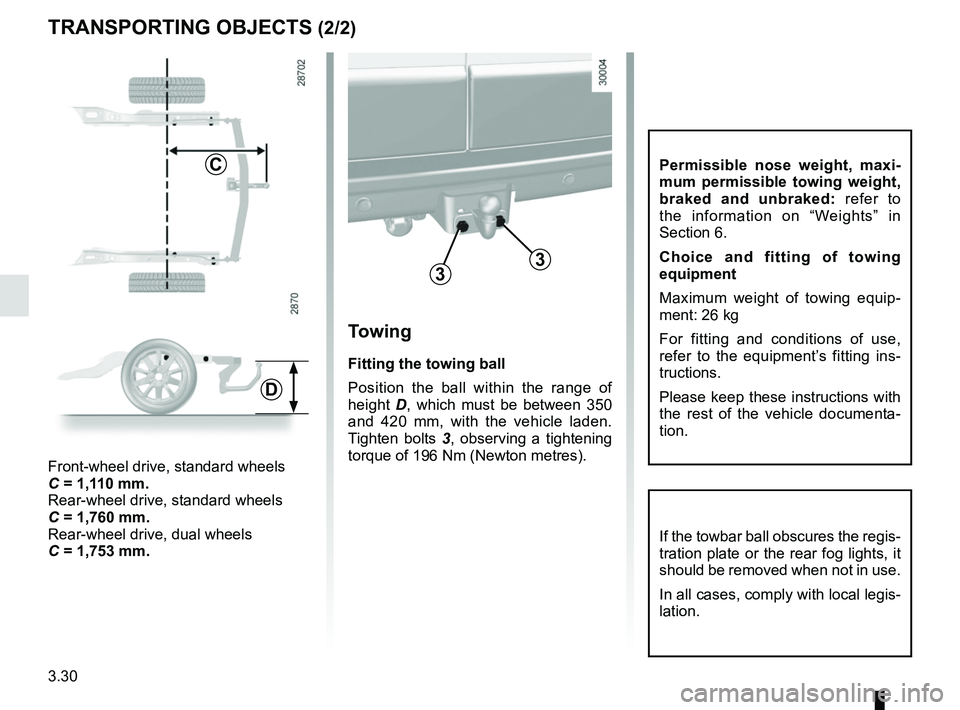
Towing
Fitting the towing ball
Position the ball within the range of
height D, which must be between 350
and 420 mm, with the vehicle laden.
Tighten bolts 3, observing a tightening
torque of 196 Nm (Newton metres).
33
C
Front-wheel drive, standard wheels
C = 1,110 mm.
Rear-wheel drive, standard wheels
C = 1,760 mm.
Rear-wheel drive, dual wheels
C = 1,753 mm.
D
If the towbar ball obscures the regis-
tration plate or the rear fog lights, it
should be removed when not in use.
In all cases, comply with local legis-
lation.
Permissible nose weight, maxi-
mum permissible towing weight,
braked and unbraked: refer to
the information on “Weights” in
Section 6.
Choice and fitting of towing
equipment
Maximum weight of towing equip-
ment: 26 kg
For fitting and conditions of use,
refer to the equipment’s fitting ins-
tructions.
Please keep these instructions with
the rest of the vehicle documenta-
tion.