rear light RENAULT MEGANE 2017 4.G User Guide
[x] Cancel search | Manufacturer: RENAULT, Model Year: 2017, Model line: MEGANE, Model: RENAULT MEGANE 2017 4.GPages: 346, PDF Size: 7.04 MB
Page 86 of 346
1.80
VEHICLE SETTINGS CUSTOMISATION MENU (1/2)
Adjusting the settings
Select the function to modify:
a) Free wheel in ECO mode;
(please refer to the information on “Driving advice, ECO-driving” in
Section 2)
b) Auto door lock while driving ;
c) Use handsfree card: open/close ;
d) Indicator sound volume ;
e) Internal welcome sound ;
f) External welcom ;
g) Automatic Cabin Light ;
h) Rear wiper when rear gear engaged ;
i) Driving style indicator ;
Depending on the function, select “ON"
or "OFF" to activate or disable it, and
"+" or "-" to adjust the volume of the in-
dicators.
Depending on the vehicle equipment,
this function allows you to activate/de-
activate and adjust some of the vehi-
cle’s functions.
Vehicles fitted with a
multimedia system
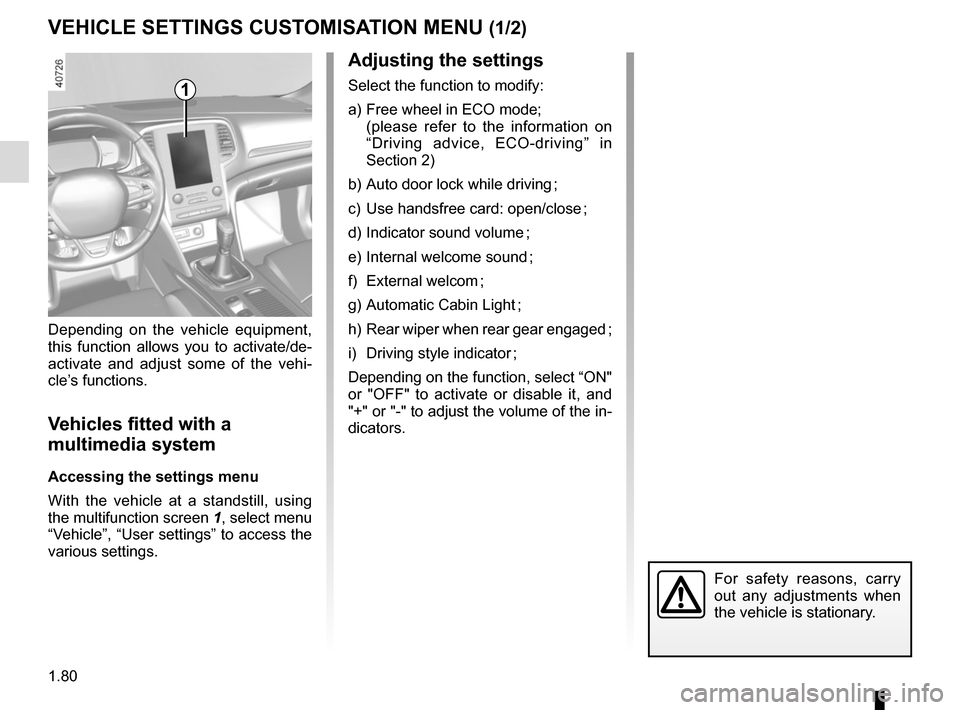
Accessing the settings menu
With the vehicle at a standstill, using
the multifunction screen
1, select menu
“Vehicle”, “User settings” to access the
various settings.
1
For safety reasons, carry
out any adjustments when
the vehicle is stationary.
Page 87 of 346
1.81
VEHICLE SETTINGS CUSTOMISATION MENU (2/2)
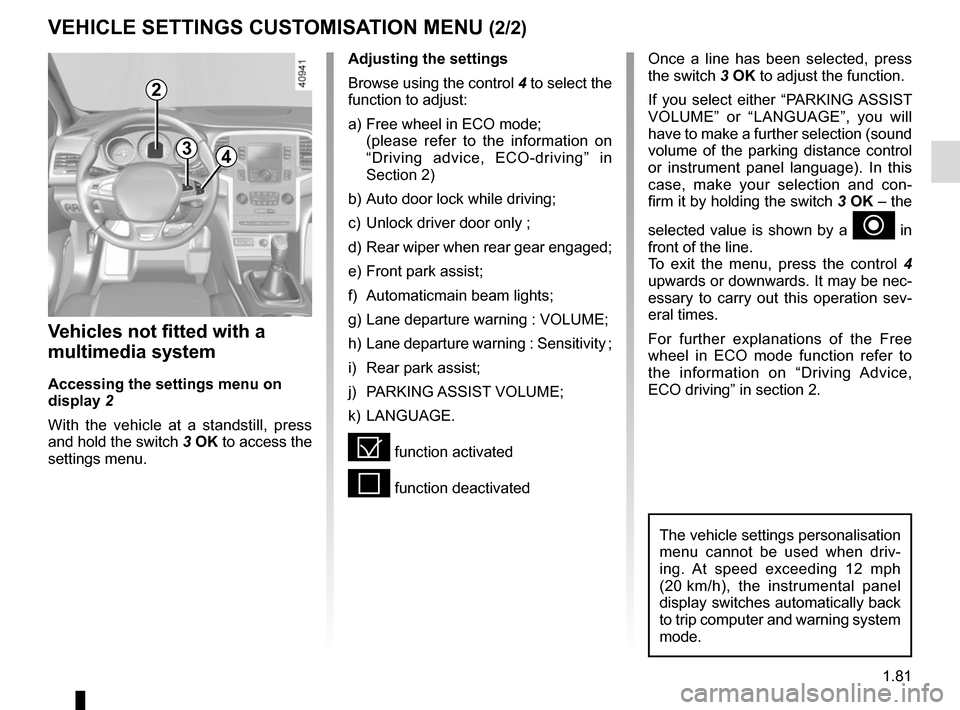
34
Once a line has been selected, press
the switch 3 OK to adjust the function.
If you select either “PARKING ASSIST
VOLUME” or “LANGUAGE”, you will
have to make a further selection (sound
volume of the parking distance control
or instrument panel language). In this
case, make your selection and con-
firm it by holding the switch 3 OK – the
selected value is shown by a
~ in
front of the line.
To exit the menu, press the control 4
upwards or downwards. It may be nec-
essary to carry out this operation sev-
eral times.
For further explanations of the Free
wheel in ECO mode function refer to
the information on “Driving Advice,
ECO driving” in section 2.
Vehicles not fitted with a
multimedia system
Accessing the settings menu on
display 2
With the vehicle at a standstill, press
and hold the switch 3 OK to access the
settings menu.
Adjusting the settings
Browse using the control 4 to select the
function to adjust:
a) Free wheel in ECO mode;
(please refer to the information on “Driving advice, ECO-driving” in
Section 2)
b) Auto door lock while driving;
c) Unlock driver door only ;
d) Rear wiper when rear gear engaged;
e) Front park assist;
f) Automaticmain beam lights;
g) Lane departure warning : VOLUME;
h) Lane departure warning : Sensitivity ;
i) Rear park assist;
j) PARKING ASSIST VOLUME;
k) LANGUAGE.
= function activated
< function deactivated
The vehicle settings personalisation
menu cannot be used when driv-
ing. At speed exceeding 12 mph
(20 km/h), the instrumental panel
display switches automatically back
to trip computer and warning system
mode.
2
Page 92 of 346
1.86
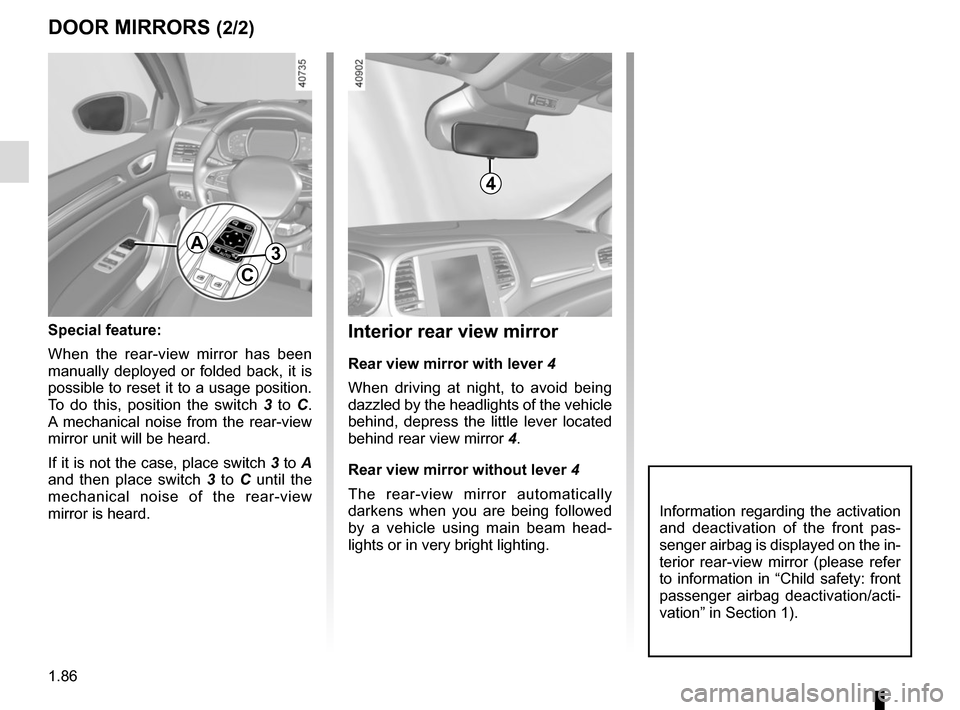
Interior rear view mirror
Rear view mirror with lever 4
When driving at night, to avoid being
dazzled by the headlights of the vehicle
behind, depress the little lever located
behind rear view mirror 4.
Rear view mirror without lever 4
The rear-view mirror automatically
darkens when you are being followed
by a vehicle using main beam head-
lights or in very bright lighting.
DOOR MIRRORS (2/2)
Special feature:
When the rear-view mirror has been
manually deployed or folded back, it is
possible to reset it to a usage position.
To do this, position the switch 3 to C.
A mechanical noise from the rear-view
mirror unit will be heard.
If it is not the case, place switch 3 to A
and then place switch 3 to C until the
mechanical noise of the rear-view
mirror is heard.
A
C
3
Information regarding the activation
and deactivation of the front pas-
senger airbag is displayed on the in-
terior rear-view mirror (please refer
to information in “Child safety: front
passenger airbag deactivation/acti-
vation” in Section 1).
4
Page 96 of 346
1.90
Automatic main beam
headlights
Depending on the vehicle, this system
switches the main beam headlights on
and off automatically. The function uses
a camera located behind the interior
rear-view mirror to detect vehicles that
are following and coming in the oppo-
site direction.
The main beam headlights come on au-
tomatically if:
– exterior light is weak;
– no other vehicles or lighting are de-tected;
– the vehicle speed is above approxi- mately 25 mph (40 km/h).
If any of the above conditions are not
fulfilled, the system switches to dipped
beam headlights.
The “automatic main beam
headlights” system should
under no circumstances be
used to replace driver atten-
tion and responsibility with regard
to vehicle lighting and adapting to
light, visibility and traffic conditions.
The system may encounter difficul-
ties under certain conditions, inclu-
ding :
– extreme weather conditions (rain, snow, fog, etc.);
– obstruction in front of the wind- screen or camera;
– when a following or oncoming ve- hicle has weak or hidden lighting;
– incorrect settings for the front headlights;
– reflective systems;
– ...
EXTERIOR LIGHTING AND SIGNALS (2/6)
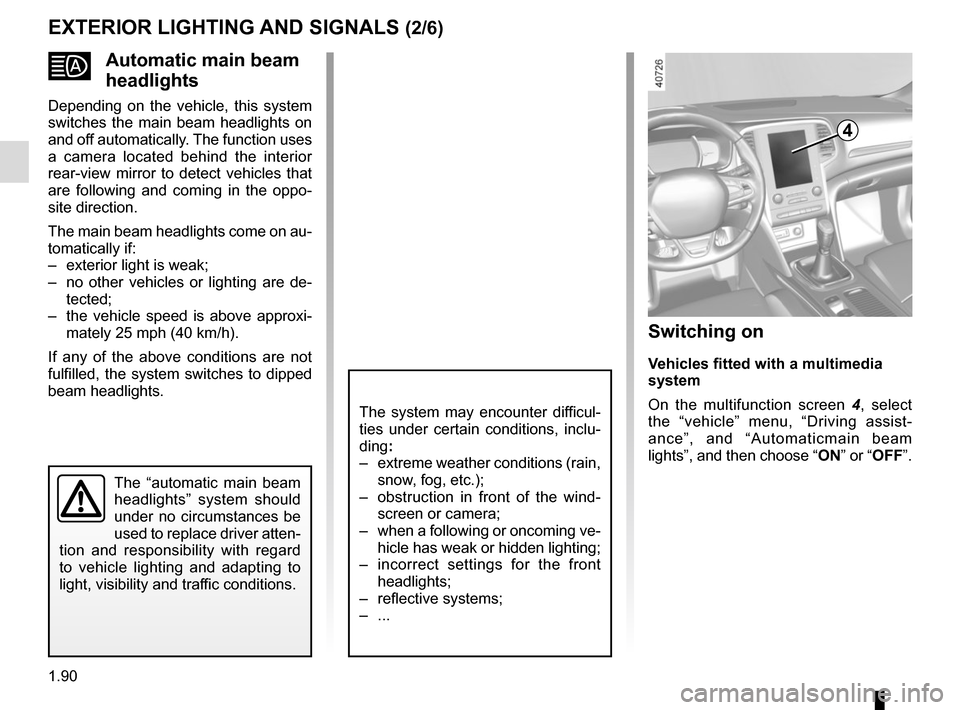
Switching on
Vehicles fitted with a multimedia
system
On the multifunction screen 4, select
the “vehicle” menu, “Driving assist-
ance”, and “Automaticmain beam
lights”, and then choose “ ON” or “OFF”.
4
Page 99 of 346
1.93
“See-me-home lighting”
function
This function allows you to briefly switch
on the dipped beam headlights (to pro-
vide light when opening a gate, etc.).
With the engine and lights off and
ring 3 in position 0 or AUTO, pull
stalk 1 towards you: the dipped beam
headlights come on for approximately
thirty seconds. To increase this dura-
tion, you may pull the stalk up to four
times (total time restricted to two mi-
nutes). The message “Follow-me home
for _ _ _” along with the time the lights
will be on for is displayed on the instru-
ment panel to confirm this action. You
can then lock your vehicle.
To switch off the lights before they go
out automatically, turn ring 3 to any po-
sition, then return it to the AUTO posi-
tion .
EXTERIOR LIGHTING AND SIGNALS (5/6)
Welcome and goodbye
function
(depending on the vehicle)
Once the function is activated, the day-
time running lights and the rear side
light light up automatically upon detect-
ing the RENAULT card or when the ve-
hicle is unlocked.
They switch off automatically:
– approximately one minute after li- ghting up;
– when starting the engine based on the position of the lighting stalk;
or
– upon locking the vehicle. Welcome lighting under the door
mirrors
With the function activated, the lights
located under the door mirrors come
on automatically upon detection of the
RENAULT card, upon unlocking the
vehicle or when opening a door.
They switch off automatically:
– approximately one minute after li-
ghting up;
– upon starting the engine;
or
– upon locking the vehicle.
Activating/deactivating the function
From the multifunction screen, select
menu “Vehicle”, “User settings” then
“External welcom”. Choose “ ON" or
“ OFF" to activate or deactivate the
function.
Page 100 of 346
1.94
EXTERIOR LIGHTING AND SIGNALS (6/6)
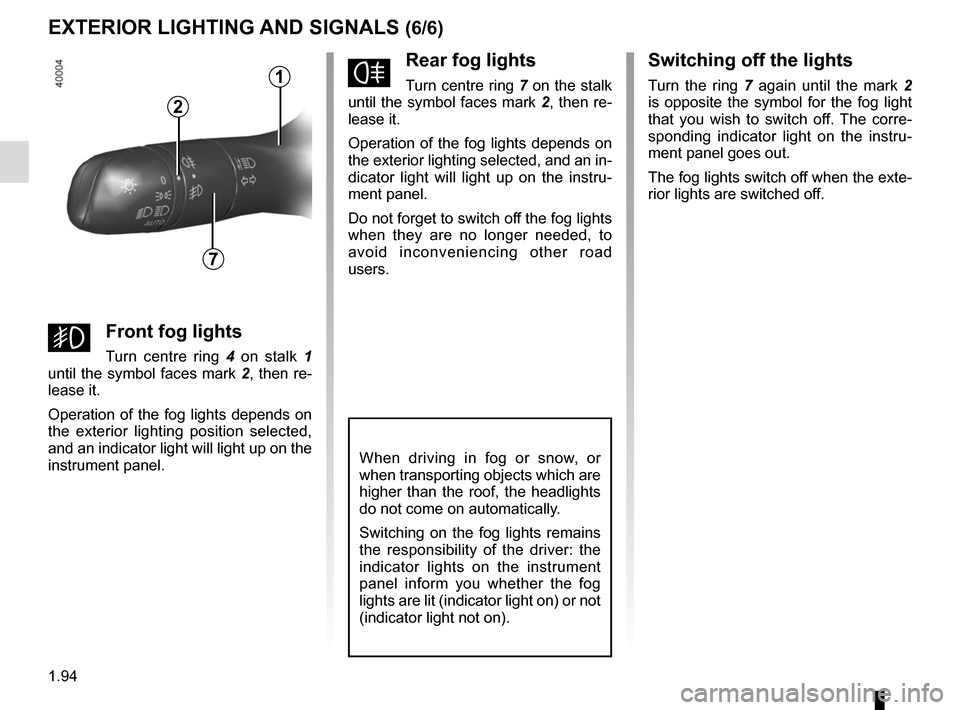
fRear fog lights
Turn centre ring 7 on the stalk
until the symbol faces mark 2, then re-
lease it.
Operation of the fog lights depends on
the exterior lighting selected, and an in-
dicator light will light up on the instru-
ment panel.
Do not forget to switch off the fog lights
when they are no longer needed, to
avoid inconveniencing other road
users.
Switching off the lights
Turn the ring 7 again until the mark 2
is opposite the symbol for the fog light
that you wish to switch off. The corre-
sponding indicator light on the instru-
ment panel goes out.
The fog lights switch off when the exte-
rior lights are switched off.
When driving in fog or snow, or
when transporting objects which are
higher than the roof, the headlights
do not come on automatically.
Switching on the fog lights remains
the responsibility of the driver: the
indicator lights on the instrument
panel inform you whether the fog
lights are lit (indicator light on) or not
(indicator light not on).
7
2
gFront fog lights
Turn centre ring 4 on stalk 1
until the symbol faces mark 2, then re-
lease it.
Operation of the fog lights depends on
the exterior lighting position selected,
and an indicator light will light up on the
instrument panel.
1
Page 151 of 346
2.39
DRIVER CORRECTION DEVICES AND AIDS (10/10)
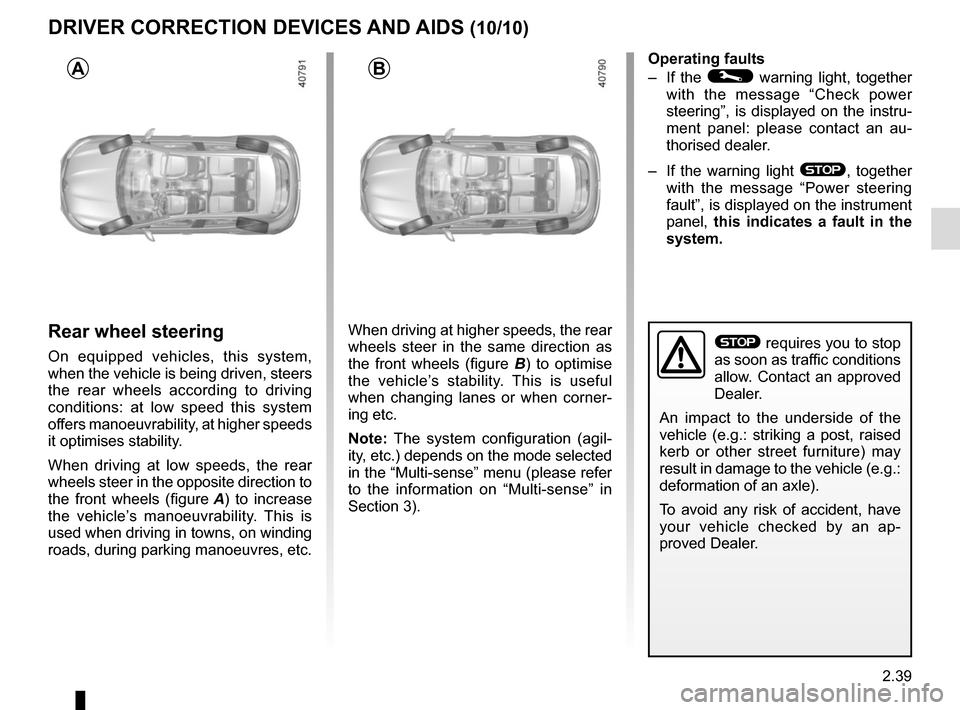
Rear wheel steering
On equipped vehicles, this system,
when the vehicle is being driven, steers
the rear wheels according to driving
conditions: at low speed this system
offers manoeuvrability, at higher speeds
it optimises stability.
When driving at low speeds, the rear
wheels steer in the opposite direction to
the front wheels (figure A) to increase
the vehicle’s manoeuvrability. This is
used when driving in towns, on winding
roads, during parking manoeuvres, etc. When driving at higher speeds, the rear
wheels steer in the same direction as
the front wheels (figure B
) to optimise
the vehicle’s stability. This is useful
when changing lanes or when corner-
ing etc.
Note: The system configuration (agil-
ity, etc.) depends on the mode selected
in the “Multi-sense” menu (please refer
to the information on “Multi-sense” in
Section 3). Operating faults
– If the
© warning light, together
with the message “Check power
steering”, is displayed on the instru-
ment panel: please contact an au-
thorised dealer.
– If the warning light
®, together
with the message “Power steering
fault”, is displayed on the instrument
panel, this indicates a fault in the
system.
AB
® requires you to stop
as soon as traffic conditions
allow. Contact an approved
Dealer.
An impact to the underside of the
vehicle (e.g.: striking a post, raised
kerb or other street furniture) may
result in damage to the vehicle (e.g.:
deformation of an axle).
To avoid any risk of accident, have
your vehicle checked by an ap-
proved Dealer.
Page 158 of 346
2.46
Operating faults
If the system detects a fault, the mes-
sage “Check blind spot alert” is dis-
played on the instrument panel. Consult
an authorised dealer.
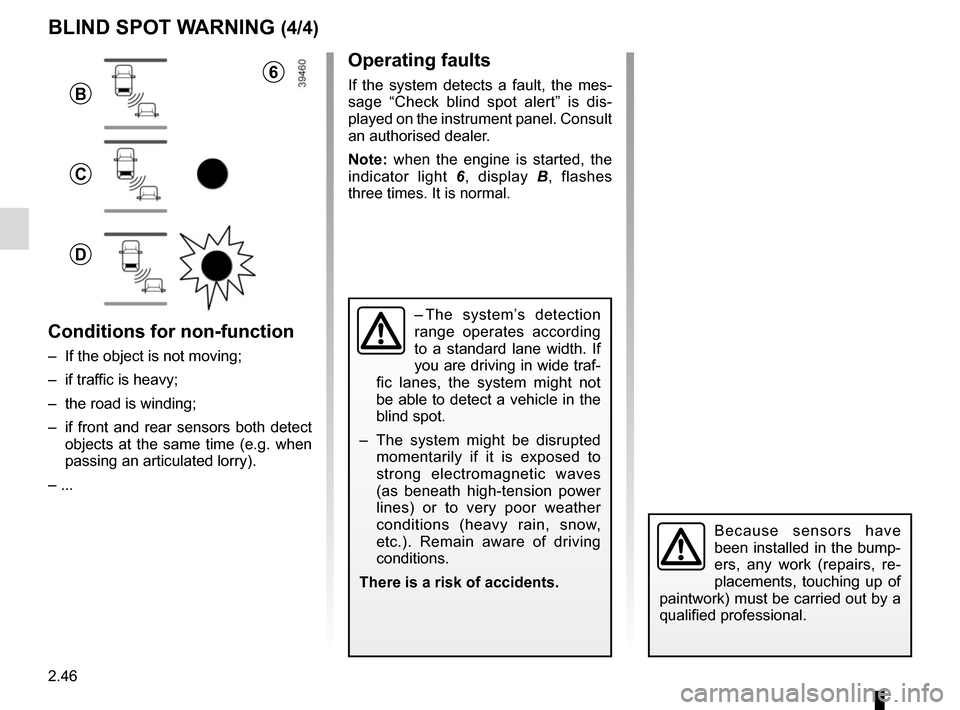
Note: when the engine is started, the
indicator light 6, display B , flashes
three times. It is normal.
– The system’s detection
range operates according
to a standard lane width. If
you are driving in wide traf-
fic lanes, the system might not
be able to detect a vehicle in the
blind spot.
– The system might be disrupted momentarily if it is exposed to
strong electromagnetic waves
(as beneath high-tension power
lines) or to very poor weather
conditions (heavy rain, snow,
etc.). Remain aware of driving
conditions.
There is a risk of accidents.
BLIND SPOT WARNING (4/4)
Because sensors have
been installed in the bump-
ers, any work (repairs, re-
placements, touching up of
paintwork) must be carried out by a
qualified professional.
6
B
C
D
Conditions for non-function
– If the object is not moving;
– if traffic is heavy;
– the road is winding;
– if front and rear sensors both detect objects at the same time (e.g. when
passing an articulated lorry).
– ...
Page 186 of 346
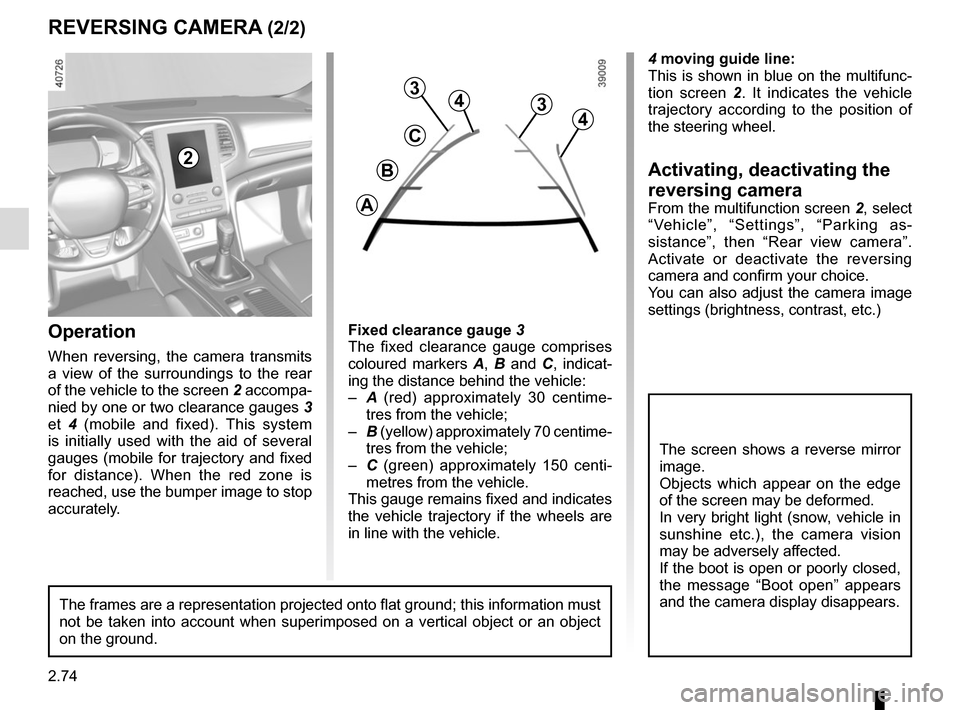
2.74
4 moving guide line:
This is shown in blue on the multifunc-
tion screen 2. It indicates the vehicle
trajectory according to the position of
the steering wheel.
Activating, deactivating the
reversing camera
From the multifunction screen 2, select
“Vehicle”, “Settings”, “Parking as-
sistance”, then “Rear view camera”.
Activate or deactivate the reversing
camera and confirm your choice.
You can also adjust the camera image
settings (brightness, contrast, etc.)
REVERSING CAMERA (2/2)
C
B
A
43
2
The screen shows a reverse mirror
image.
Objects which appear on the edge
of the screen may be deformed.
In very bright light (snow, vehicle in
sunshine etc.), the camera vision
may be adversely affected.
If the boot is open or poorly closed,
the message “Boot open” appears
and the camera display disappears.
3
4
Fixed clearance gauge 3
The fixed clearance gauge comprises
coloured markers A, B and C , indicat-
ing the distance behind the vehicle:
– A (red) approximately 30 centime-
tres from the vehicle;
– B (yellow) approximately 70 centime-
tres from the vehicle;
– C (green) approximately 150 centi-
metres from the vehicle.
This gauge remains fixed and indicates
the vehicle trajectory if the wheels are
in line with the vehicle.Operation
When reversing, the camera transmits
a view of the surroundings to the rear
of the vehicle to the screen 2 accompa-
nied by one or two clearance gauges 3
et 4 (mobile and fixed). This system
is initially used with the aid of several
gauges (mobile for trajectory and fixed
for distance). When the red zone is
reached, use the bumper image to stop
accurately.
The frames are a representation projected onto flat ground; this informa\
tion must
not be taken into account when superimposed on a vertical object or an o\
bject
on the ground.
Page 195 of 346

3.1
Section 3: Your comfort
multi-Sense . . . . . . . . . . . . . . . . . . . . . . . . . . . . . . . . . . . .\
. . . . . . . . . . . . . . . . . . . . . . . . . . . . . . . . 3.2
Air Vents . . . . . . . . . . . . . . . . . . . . . . . . . . . . . . . . . . . .\
. . . . . . . . . . . . . . . . . . . . . . . . . . . . . . . . . . 3.4
Manual air conditioning/heating system . . . . . . . . . . . . . . . . . . . . . . . . . . . . . . . . . . . .\
. . . . . . . . . . 3.6
Automatic climate control . . . . . . . . . . . . . . . . . . . . . . . . . . . . . . . . . . . .\
. . . . . . . . . . . . . . . . . . . . . 3.9
Air conditioning: information and advice on use . . . . . . . . . . . . . . . . . . . . . . . . . . . . . . . . . . . .\
. . . . 3.19
Outside air quality and deodorisation functions . . . . . . . . . . . . . . . . . . . . . . . . . . . . . . . . . . . . \
. . . . . 3.20
Electric windows . . . . . . . . . . . . . . . . . . . . . . . . . . . . . . . . . . . .\
. . . . . . . . . . . . . . . . . . . . . . . . . . . . 3.21
Electric sunroof . . . . . . . . . . . . . . . . . . . . . . . . . . . . . . . . . . . .\
. . . . . . . . . . . . . . . . . . . . . . . . . . . . . 3.23
Interior lighting . . . . . . . . . . . . . . . . . . . . . . . . . . . . . . . . . . . . \
. . . . . . . . . . . . . . . . . . . . . . . . . . . . . . 3.26
Sun visor/blinds . . . . . . . . . . . . . . . . . . . . . . . . . . . . . . . . . . . . \
. . . . . . . . . . . . . . . . . . . . . . . . . . . . . 3.28
Passenger compartment storage/fittings . . . . . . . . . . . . . . . . . . . . . . . . . . . . . . . . . . . . \
. . . . . . . . . . 3.29
Accessories socket . . . . . . . . . . . . . . . . . . . . . . . . . . . . . . . . . . . .\
. . . . . . . . . . . . . . . . . . . . . . . . . . 3.33
Ashtray . . . . . . . . . . . . . . . . . . . . . . . . . . . . . . . . . . . .\
. . . . . . . . . . . . . . . . . . . . . . . . . . . . . . . . . . . 3.33
Cigarette lighter . . . . . . . . . . . . . . . . . . . . . . . . . . . . . . . . . . . . \
. . . . . . . . . . . . . . . . . . . . . . . . . . . . . 3.33
Rear headrests . . . . . . . . . . . . . . . . . . . . . . . . . . . . . . . . . . . .\
. . . . . . . . . . . . . . . . . . . . . . . . . . . . . 3.35
Rear bench seat . . . . . . . . . . . . . . . . . . . . . . . . . . . . . . . . . . . .\
. . . . . . . . . . . . . . . . . . . . . . . . . . . . 3.37
Luggage compartment. . . . . . . . . . . . . . . . . . . . . . . . . . . . . . . . . . . . \
. . . . . . . . . . . . . . . . . . . . . . . . 3.39
Rear parcel shelf . . . . . . . . . . . . . . . . . . . . . . . . . . . . . . . . . . . . \
. . . . . . . . . . . . . . . . . . . . . . . . . . . . 3.43
Luggage cover . . . . . . . . . . . . . . . . . . . . . . . . . . . . . . . . . . . . \
. . . . . . . . . . . . . . . . . . . . . . . . . . . . . . 3.44
Luggage net. . . . . . . . . . . . . . . . . . . . . . . . . . . . . . . . . . . . \
. . . . . . . . . . . . . . . . . . . . . . . . . . . . . . . . 3.45
Luggage compartment storage space/fittings . . . . . . . . . . . . . . . . . . . . . . . . . . . . . . . . . . . .\
. . . . . . 3.47
Transporting objects in the luggage compartment . . . . . . . . . . . . . . . . . . . . . . . . . . . . . . . . . . . .\
. . 3.52
Transporting objects: towbar . . . . . . . . . . . . . . . . . . . . . . . . . . . . . . . . . . . . \
. . . . . . . . . . . . . . . . . . . 3.53
Roof bars . . . . . . . . . . . . . . . . . . . . . . . . . . . . . . . . . . . . \
. . . . . . . . . . . . . . . . . . . . . . . . . . . . . . . . . . 3.54
Multimedia equipment . . . . . . . . . . . . . . . . . . . . . . . . . . . . . . . . . . . . \
. . . . . . . . . . . . . . . . . . . . . . . . 3.56