rear RENAULT MEGANE 2017 4.G Owner's Guide
[x] Cancel search | Manufacturer: RENAULT, Model Year: 2017, Model line: MEGANE, Model: RENAULT MEGANE 2017 4.GPages: 346, PDF Size: 7.04 MB
Page 91 of 346
1.85
Welcome and goodbye function
(depending on vehicle)
From the multifunction screen, select
menu “Vehicle”, “User settings”,
“External welcome” and activate or de-
activate the function (ON or OFF).
Depending on the selected choice, the
door mirrors will fold out:
– when the ignition is next switched on (function deactivated);
– upon detecting the RENAULT card or upon unlocking the vehicle (func-
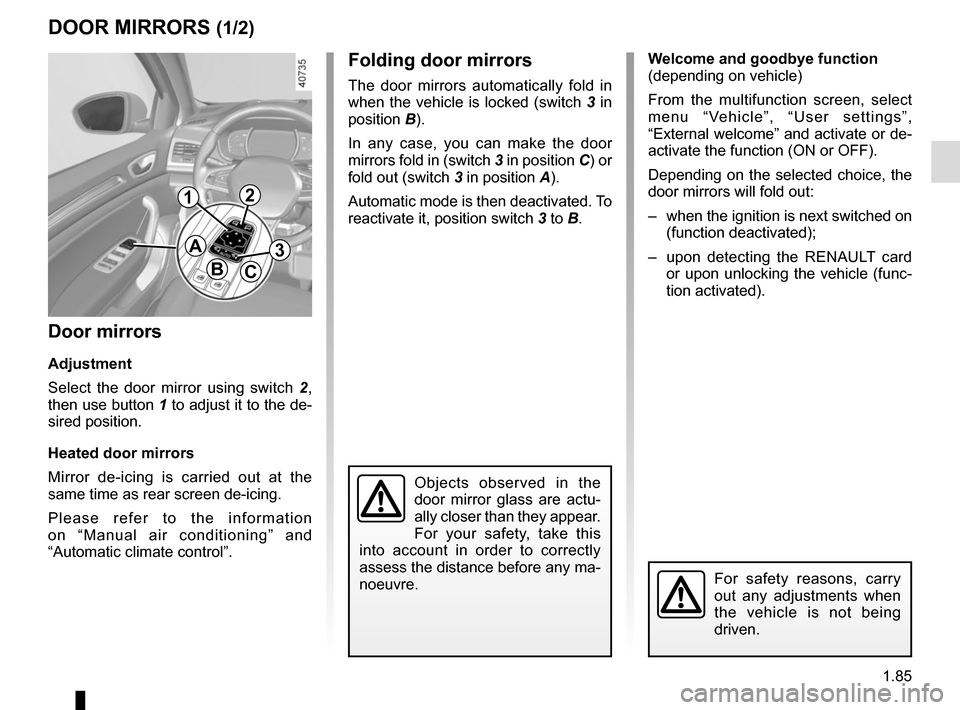
tion activated).Folding door mirrors
The door mirrors automatically fold in
when the vehicle is locked (switch 3 in
position B).
In any case, you can make the door
mirrors fold in (switch 3 in position C) or
fold out (switch 3 in position A).
Automatic mode is then deactivated. To
reactivate it, position switch 3 to B.
DOOR MIRRORS (1/2)
Door mirrors
Adjustment
Select the door mirror using switch 2 ,
then use button 1 to adjust it to the de-
sired position.
Heated door mirrors
Mirror de-icing is carried out at the
same time as rear screen de-icing.
Please refer to the information
on “Manual air conditioning” and
“Automatic climate control”.
Objects observed in the
door mirror glass are actu-
ally closer than they appear.
For your safety, take this
into account in order to correctly
assess the distance before any ma-
noeuvre.
For safety reasons, carry
out any adjustments when
the vehicle is not being
driven.
A
BC
12
3
Page 92 of 346
1.86
Interior rear view mirror
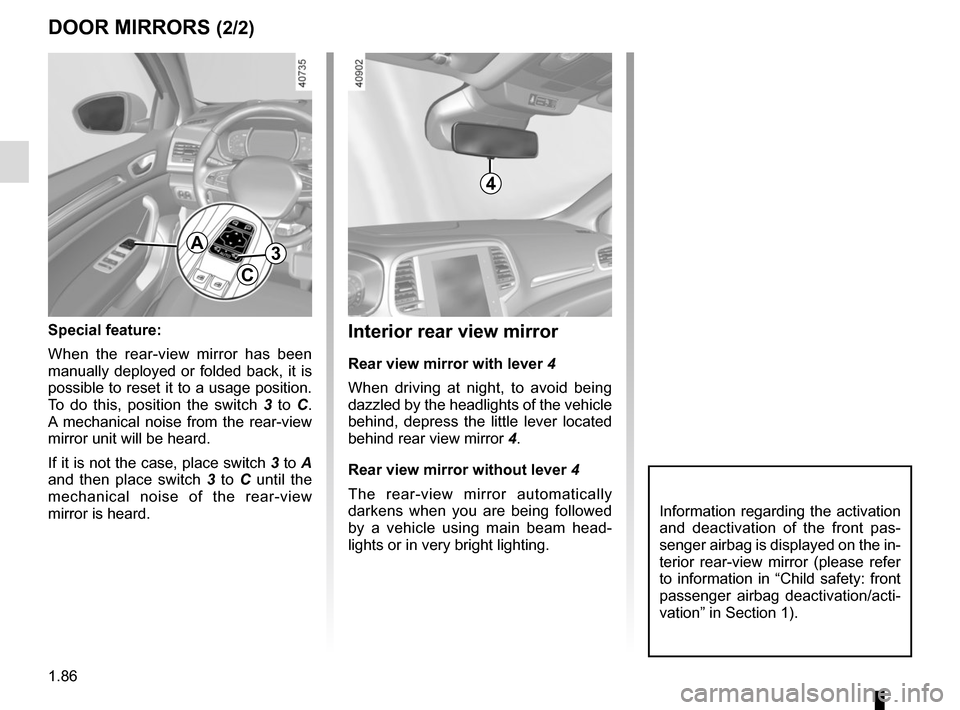
Rear view mirror with lever 4
When driving at night, to avoid being
dazzled by the headlights of the vehicle
behind, depress the little lever located
behind rear view mirror 4.
Rear view mirror without lever 4
The rear-view mirror automatically
darkens when you are being followed
by a vehicle using main beam head-
lights or in very bright lighting.
DOOR MIRRORS (2/2)
Special feature:
When the rear-view mirror has been
manually deployed or folded back, it is
possible to reset it to a usage position.
To do this, position the switch 3 to C.
A mechanical noise from the rear-view
mirror unit will be heard.
If it is not the case, place switch 3 to A
and then place switch 3 to C until the
mechanical noise of the rear-view
mirror is heard.
A
C
3
Information regarding the activation
and deactivation of the front pas-
senger airbag is displayed on the in-
terior rear-view mirror (please refer
to information in “Child safety: front
passenger airbag deactivation/acti-
vation” in Section 1).
4
Page 96 of 346
1.90
Automatic main beam
headlights
Depending on the vehicle, this system
switches the main beam headlights on
and off automatically. The function uses
a camera located behind the interior
rear-view mirror to detect vehicles that
are following and coming in the oppo-
site direction.
The main beam headlights come on au-
tomatically if:
– exterior light is weak;
– no other vehicles or lighting are de-tected;
– the vehicle speed is above approxi- mately 25 mph (40 km/h).
If any of the above conditions are not
fulfilled, the system switches to dipped
beam headlights.
The “automatic main beam
headlights” system should
under no circumstances be
used to replace driver atten-
tion and responsibility with regard
to vehicle lighting and adapting to
light, visibility and traffic conditions.
The system may encounter difficul-
ties under certain conditions, inclu-
ding :
– extreme weather conditions (rain, snow, fog, etc.);
– obstruction in front of the wind- screen or camera;
– when a following or oncoming ve- hicle has weak or hidden lighting;
– incorrect settings for the front headlights;
– reflective systems;
– ...
EXTERIOR LIGHTING AND SIGNALS (2/6)
Switching on
Vehicles fitted with a multimedia
system
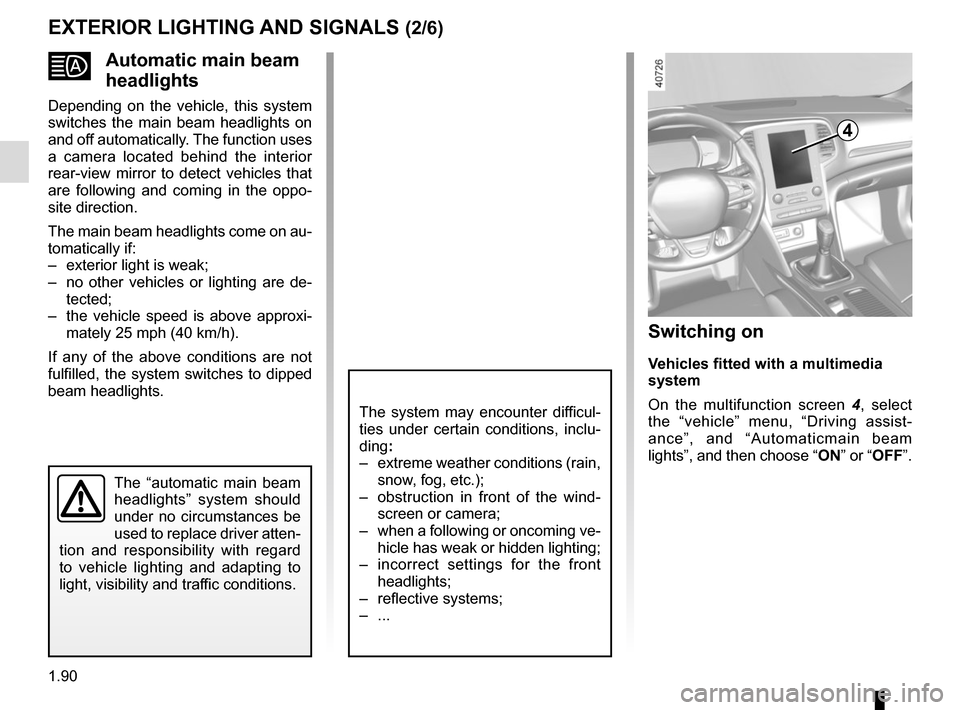
On the multifunction screen 4, select
the “vehicle” menu, “Driving assist-
ance”, and “Automaticmain beam
lights”, and then choose “ ON” or “OFF”.
4
Page 99 of 346
1.93
“See-me-home lighting”
function
This function allows you to briefly switch
on the dipped beam headlights (to pro-
vide light when opening a gate, etc.).
With the engine and lights off and
ring 3 in position 0 or AUTO, pull
stalk 1 towards you: the dipped beam
headlights come on for approximately
thirty seconds. To increase this dura-
tion, you may pull the stalk up to four
times (total time restricted to two mi-
nutes). The message “Follow-me home
for _ _ _” along with the time the lights
will be on for is displayed on the instru-
ment panel to confirm this action. You
can then lock your vehicle.
To switch off the lights before they go
out automatically, turn ring 3 to any po-
sition, then return it to the AUTO posi-
tion .
EXTERIOR LIGHTING AND SIGNALS (5/6)
Welcome and goodbye
function
(depending on the vehicle)
Once the function is activated, the day-
time running lights and the rear side
light light up automatically upon detect-
ing the RENAULT card or when the ve-
hicle is unlocked.
They switch off automatically:
– approximately one minute after li- ghting up;
– when starting the engine based on the position of the lighting stalk;
or
– upon locking the vehicle. Welcome lighting under the door
mirrors
With the function activated, the lights
located under the door mirrors come
on automatically upon detection of the
RENAULT card, upon unlocking the
vehicle or when opening a door.
They switch off automatically:
– approximately one minute after li-
ghting up;
– upon starting the engine;
or
– upon locking the vehicle.
Activating/deactivating the function
From the multifunction screen, select
menu “Vehicle”, “User settings” then
“External welcom”. Choose “ ON" or
“ OFF" to activate or deactivate the
function.
Page 100 of 346
1.94
EXTERIOR LIGHTING AND SIGNALS (6/6)
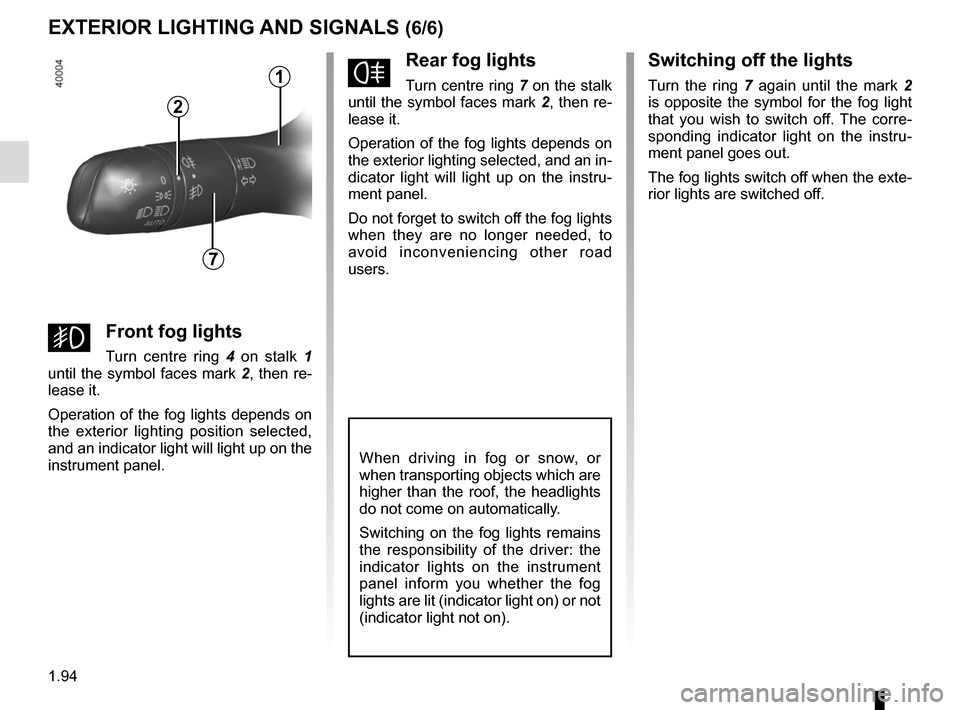
fRear fog lights
Turn centre ring 7 on the stalk
until the symbol faces mark 2, then re-
lease it.
Operation of the fog lights depends on
the exterior lighting selected, and an in-
dicator light will light up on the instru-
ment panel.
Do not forget to switch off the fog lights
when they are no longer needed, to
avoid inconveniencing other road
users.
Switching off the lights
Turn the ring 7 again until the mark 2
is opposite the symbol for the fog light
that you wish to switch off. The corre-
sponding indicator light on the instru-
ment panel goes out.
The fog lights switch off when the exte-
rior lights are switched off.
When driving in fog or snow, or
when transporting objects which are
higher than the roof, the headlights
do not come on automatically.
Switching on the fog lights remains
the responsibility of the driver: the
indicator lights on the instrument
panel inform you whether the fog
lights are lit (indicator light on) or not
(indicator light not on).
7
2
gFront fog lights
Turn centre ring 4 on stalk 1
until the symbol faces mark 2, then re-
lease it.
Operation of the fog lights depends on
the exterior lighting position selected,
and an indicator light will light up on the
instrument panel.
1
Page 101 of 346
1.95
Special note
When driving the vehicle, the wiping
speed slows down whenever the ve-
hicle stops. For example, fast wiping
speed will slow to normal wiping speed.
As soon as the vehicle moves off,
wiping will return to the speed originally
selected.
If stalk 1 is operated, it overrides and
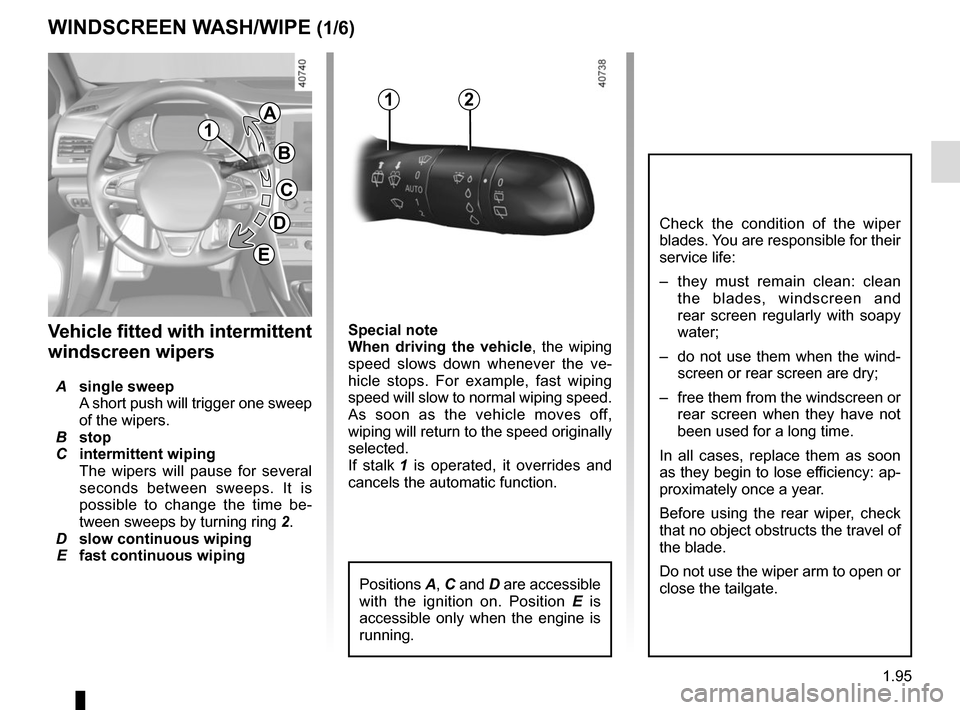
cancels the automatic function.Vehicle fitted with intermittent
windscreen wipers
A single sweep
A short push will trigger one sweep
of the wipers.
B stop
C intermittent wiping
The wipers will pause for several
seconds between sweeps. It is
possible to change the time be-
tween sweeps by turning ring 2.
D slow continuous wiping
E fast continuous wiping
WINDSCREEN WASH/WIPE (1/6)
1
1A
B
C
D
2
Positions A, C and D are accessible
with the ignition on. Position E is
accessible only when the engine is
running.
Check the condition of the wiper
blades. You are responsible for their
service life:
– they must remain clean: clean the blades, windscreen and
rear screen regularly with soapy
water;
– do not use them when the wind- screen or rear screen are dry;
– free them from the windscreen or rear screen when they have not
been used for a long time.
In all cases, replace them as soon
as they begin to lose efficiency: ap-
proximately once a year.
Before using the rear wiper, check
that no object obstructs the travel of
the blade.
Do not use the wiper arm to open or
close the tailgate.
E
Page 102 of 346
1.96
WINDSCREEN WASH/WIPE (2/6)
1
F
2
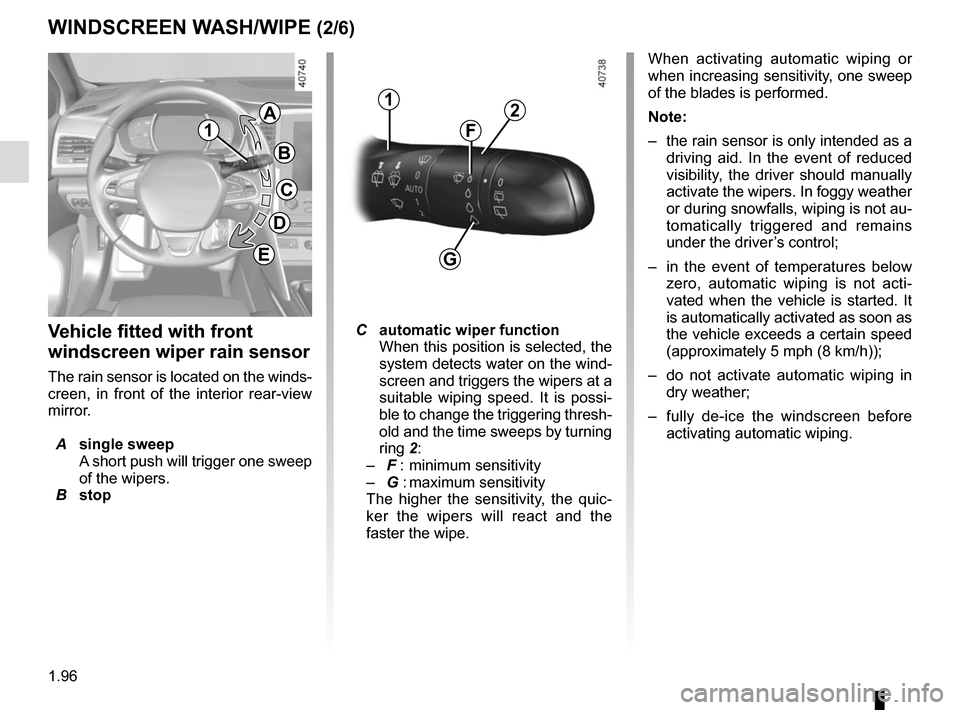
Vehicle fitted with front
windscreen wiper rain sensor
The rain sensor is located on the winds-
creen, in front of the interior rear-view
mirror.
A single sweep
A short push will trigger one sweep
of the wipers.
B stop
C automatic wiper function
When this position is selected, the
system detects water on the wind-
screen and triggers the wipers at a
suitable wiping speed. It is possi-
ble to change the triggering thresh-
old and the time sweeps by turning
ring 2:
– F : minimum sensitivity
– G : maximum sensitivity
The higher the sensitivity, the quic-
ker the wipers will react and the
faster the wipe. When activating automatic wiping or
when increasing sensitivity, one sweep
of the blades is performed.
Note:
–
the rain sensor is only intended as a
driving aid. In the event of reduced
visibility, the driver should manually
activate the wipers. In foggy weather
or during snowfalls, wiping is not au-
tomatically triggered and remains
under the driver’s control;
– in the event of temperatures below
zero, automatic wiping is not acti-
vated when the vehicle is started. It
is automatically activated as soon as
the vehicle exceeds a certain speed
(approximately 5 mph (8 km/h));
– do not activate automatic wiping in
dry weather;
– fully de-ice the windscreen before
activating automatic wiping.
G
1
A
B
C
D
E
Page 104 of 346
1.98
WINDSCREEN WASH/WIPE (4/6)
Note:
After your intervention, to reposition the
blades correctly, make sure the blades
are resting on the windscreen, switch
on the ignition and activate the wiper
control.
Specific front wiper position
(service position)
This position enables the blades to be
lifted to remove them from the winds-
creen.
It may be useful to:
– to clean the blades;
– to release the blades from the winds-creen in winter;
– to replace the blades (please refer to the information on the “Wiper
blades” in Section 5).
With the ignition on and the engine off,
lower the windscreen wiper stalk fully
(fast continuous wipe position). The
wiper arms stop in a position away from
the bonnet.
To return the blades to position, make
sure they have been placed on the
windscreen, then move the stalk to po-
sition B (stop) with the ignition on.
Before switching on the ignition,
place the wipers on the windscreen.
Otherwise, there may a risk of damage
to the bonnet or the wipers when they
are switched on.
In the event of obstacles present
on the windscreen (dirt, snow, ice,
etc.), clean the windscreen (inclu-
ding the central area located behind
the interior rear-view mirror) and
the rear screen before starting the
wipers (risk of motor overheating).
If an object is preventing a blade
from moving, it may stop functio-
ning. Remove the obstacle and
reactivate the wiper using the wiper
stalk.
Before any action involving
the windscreen (washing
the vehicle, de-icing,
cleaning the windscreen,
etc.) return stalk 1 to position B
(stop).
Risk of injury and/or damage.
Page 107 of 346
1.101
REAR SCREEN WASH/WIPE (1/2)
13
Check the condition of the wiper
blades. You are responsible for their
service life:
– they must remain clean: clean the blades, windscreen and
rear screen regularly with soapy
water;
– do not use them when the winds- creen or rear screen are dry;
– free them from the windscreen or rear screen when they have not
been used for a long time.
In all cases, replace them as soon
as they begin to lose efficiency: ap-
proximately once a year.
Before using the rear wiper, check
that no object obstructs the travel of
the blade.
Do not use the wiper arm to open or
close the tailgate.
To stop the operation, pivot ring 3 again.
Note:
When washing using a roller type car
wash, return the ring 3 on the stalk 1
to the stop position to deactivate auto-
matic wiping.
Follow usage recommendations.
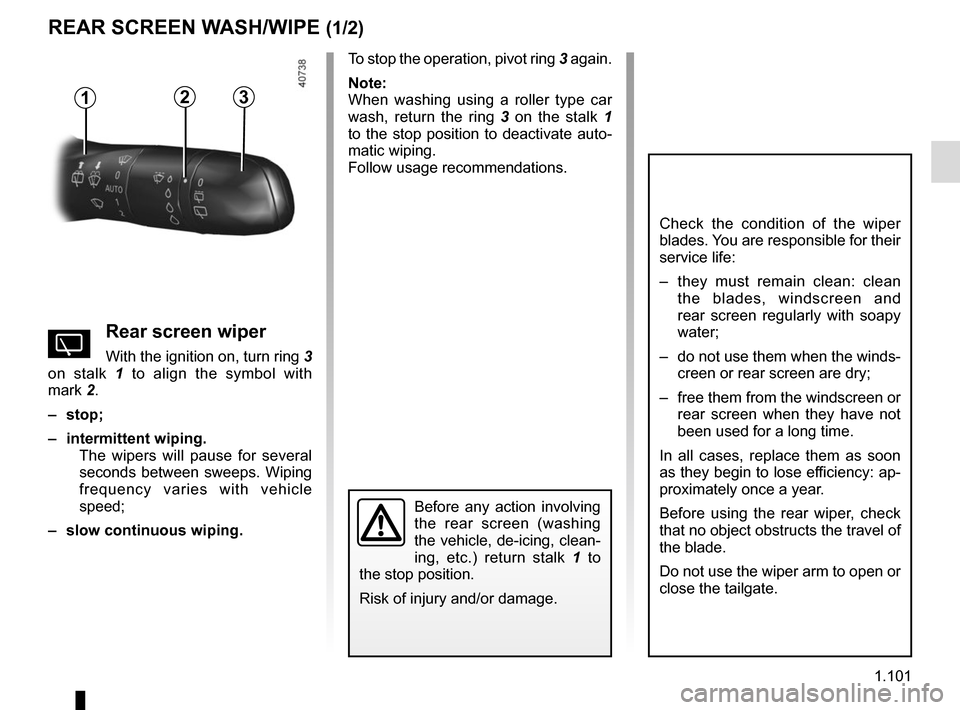
YRear screen wiper
With the ignition on, turn ring 3
on stalk 1 to align the symbol with
mark 2.
– stop;
– intermittent wiping. The wipers will pause for several
seconds between sweeps. Wiping
frequency varies with vehicle
speed;
– slow continuous wiping.
2
Before any action involving
the rear screen (washing
the vehicle, de-icing, clean-
ing, etc.) return stalk 1 to
the stop position.
Risk of injury and/or damage.
Page 108 of 346
1.102
REAR SCREEN WASH/WIPE (2/2)
In the event of obstacles present on the
rear window (dirt, snow, etc.), the wiper
will try to sweep away all the obstacles.
If an obstacle prevents the blade from
moving, it can be stopped. Remove the
obstacle, wait for around 30 seconds
and reactivate the wiper using the wiper
stalk.
Precautions
– In the event of ice, check whether
the blades are stuck to the wind-
screen before operating the wiping
mechanism. If you activate the wiper
while the blade is blocked by ice, you
risk damaging both the blade and the
wiping motor.
– Do not activate the wipers on a dry
screen. This will lead to premature
wear or damage to the blades.
Activation/deactivation of the rear
screen wiper
Engaging reverse gear triggers inter-
mittent wiping (if the front wipers are in
operation). If your vehicle is fitted with
a vehicle settings customisation menu,
you can opt to activate or deactivate
this function. To do this, refer to the in-
formation on the “Vehicle settings cus-
tomisation menu” in Section 1; “Rear
wiping in reverse gear”.
For vehicles not fitted with a settings
customisation menu, you can have this
function deactivated by an authorised
dealer.
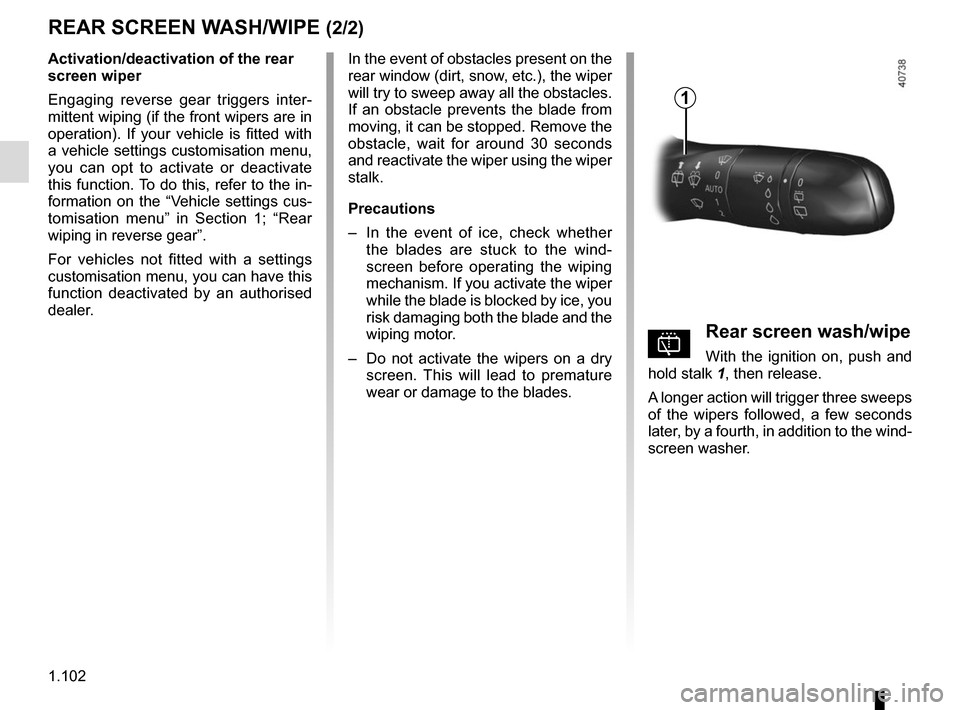
pRear screen wash/wipe
With the ignition on, push and
hold stalk 1, then release.
A longer action will trigger three sweeps
of the wipers followed, a few seconds
later, by a fourth, in addition to the wind-
screen washer.
1