rear RENAULT MEGANE 2017 4.G Repair Manual
[x] Cancel search | Manufacturer: RENAULT, Model Year: 2017, Model line: MEGANE, Model: RENAULT MEGANE 2017 4.GPages: 346, PDF Size: 7.04 MB
Page 210 of 346
3.16
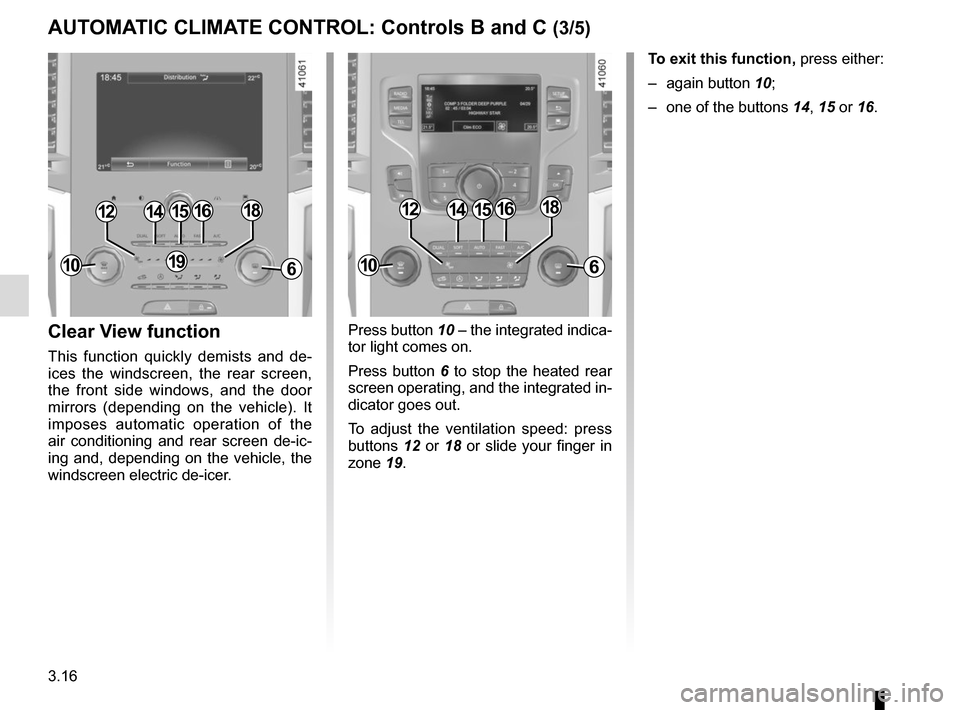
Press button 10 – the integrated indica-
tor light comes on.
Press button 6 to stop the heated rear
screen operating, and the integrated in-
dicator goes out.
To adjust the ventilation speed: press
buttons 12 or 18 or slide your finger in
zone 19.Clear View function
This function quickly demists and de-
ices the windscreen, the rear screen,
the front side windows, and the door
mirrors (depending on the vehicle). It
imposes automatic operation of the
air conditioning and rear screen de-ic-
ing and, depending on the vehicle, the
windscreen electric de-icer. To exit this function,
press either:
– again button 10;
– one of the buttons 14, 15 or 16.
141512
6
1816
191010
141512
6
1816
AUTOMATIC CLIMATE CONTROL: Controls B and C (3/5)
Page 211 of 346
3.17
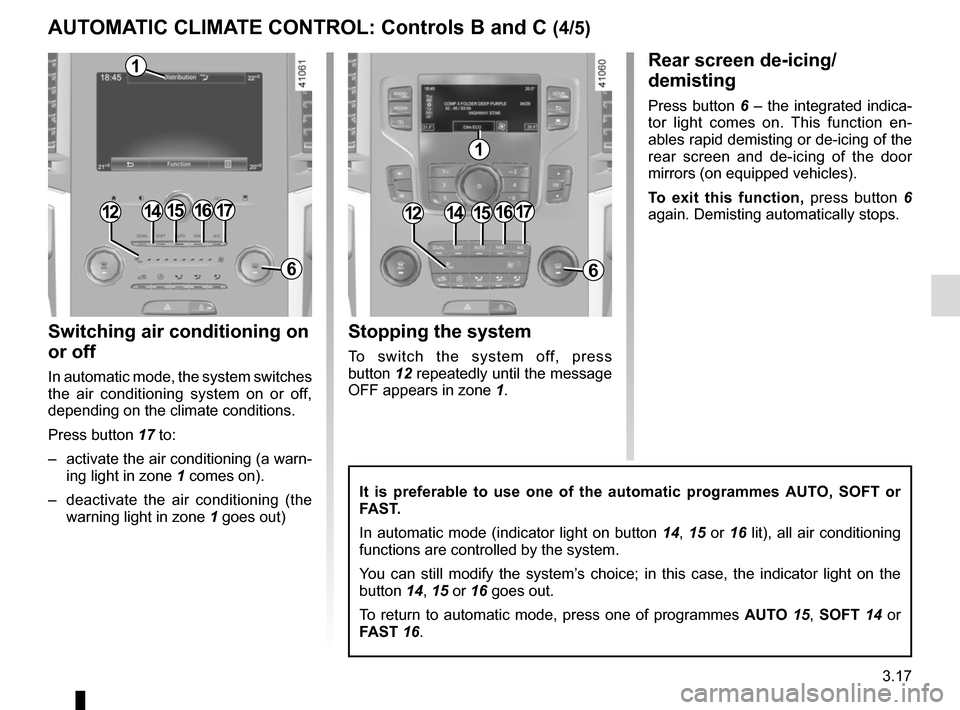
Switching air conditioning on
or off
In automatic mode, the system switches
the air conditioning system on or off,
depending on the climate conditions.
Press button 17 to:
– activate the air conditioning (a warn-ing light in zone 1 comes on).
– deactivate the air conditioning (the warning light in zone 1 goes out)
Rear screen de-icing/
demisting
Press button 6 – the integrated indica-
tor light comes on. This function en-
ables rapid demisting or de-icing of the
rear screen and de-icing of the door
mirrors (on equipped vehicles).
To exit this function, press button 6
again. Demisting automatically stops.
It is preferable to use one of the automatic programmes AUTO, SOFT or
FAST.
In automatic mode (indicator light on button 14, 15 or 16 lit), all air conditioning
functions are controlled by the system.
You can still modify the system’s choice; in this case, the indicator light on the
button 14, 15 or 16 goes out.
To return to automatic mode, press one of programmes AUTO 15, SOFT 14 or
FAST 16.
15
6
1715
6
1714161416
1
1
Stopping the system
To switch the system off, press
button 12 repeatedly until the message
OFF appears in zone 1.
1212
AUTOMATIC CLIMATE CONTROL: Controls B and C (4/5)
Page 215 of 346
3.21
ELECTRIC WINDOWS (1/2)
1
2
34
5
6
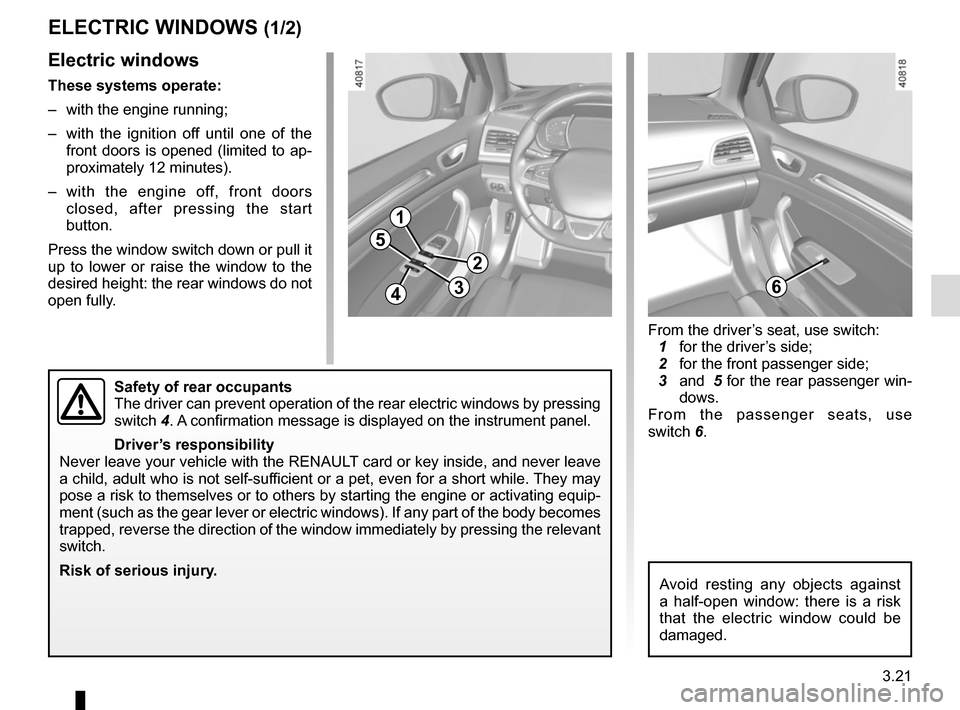
Electric windows
These systems operate:
– with the engine running;
– with the ignition off until one of the front doors is opened (limited to ap-
proximately 12 minutes).
– with the engine off, front doors closed, after pressing the start
button.
Press the window switch down or pull it
up to lower or raise the window to the
desired height: the rear windows do not
open fully.
Safety of rear occupants
The driver can prevent operation of the rear electric windows by pressin\
g
switch 4. A confirmation message is displayed on the instrument panel.
Driver’s responsibility
Never leave your vehicle with the RENAULT card or key inside, and never leave
a child, adult who is not self-sufficient or a pet, even for a short while. They may
pose a risk to themselves or to others by starting the engine or activat\
ing equip-
ment (such as the gear lever or electric windows). If any part of the \
body becomes
trapped, reverse the direction of the window immediately by pressing the\
relevant
switch.
Risk of serious injury.
Avoid resting any objects against
a half-open window: there is a risk
that the electric window could be
damaged.
From the driver’s seat, use switch:
1 for the driver’s side;
2 for the front passenger side;
3 and 5 for the rear passenger win-
dows.
From the passenger seats, use
switch 6.
Page 217 of 346
3.23
ELECTRIC SUNROOF (1/3)
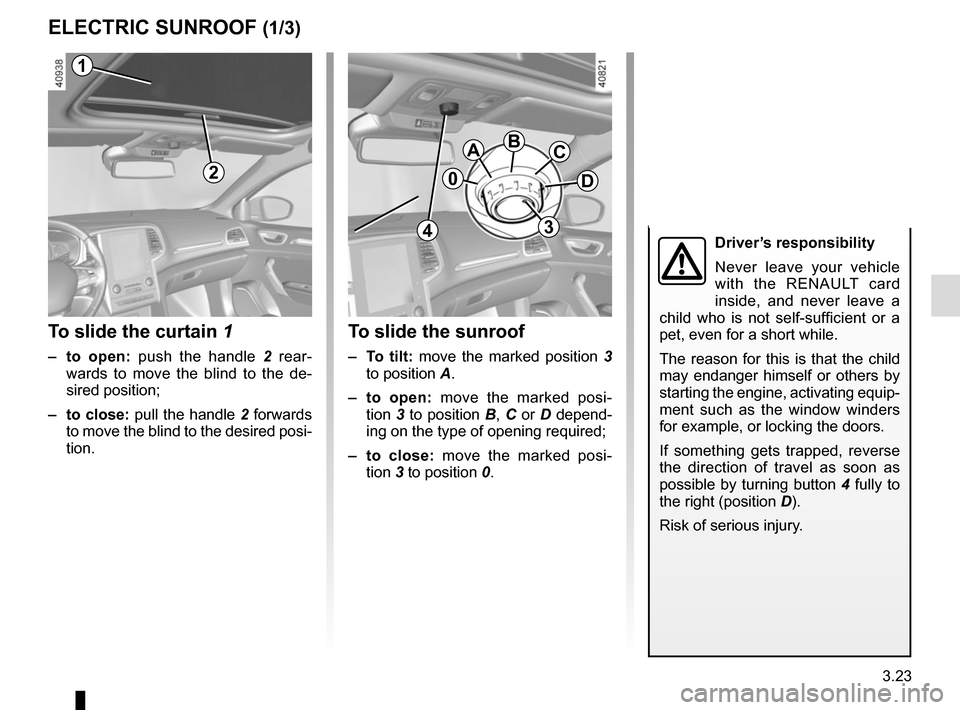
To slide the curtain 1
– to open: push the handle 2 rear-
wards to move the blind to the de-
sired position;
– to close: pull the handle 2 forwards
to move the blind to the desired posi-
tion.
To slide the sunroof
– To tilt: move the marked position 3
to position A.
– to open: move the marked posi-
tion 3 to position B, C or D depend-
ing on the type of opening required;
– to close: move the marked posi- tion 3 to position 0.
2
1
0
ABC
D
3
1
4Driver’s responsibility
Never leave your vehicle
with the RENAULT card
inside, and never leave a
child who is not self-sufficient or a
pet, even for a short while.
The reason for this is that the child
may endanger himself or others by
starting the engine, activating equip-
ment such as the window winders
for example, or locking the doors.
If something gets trapped, reverse
the direction of travel as soon as
possible by turning button 4 fully to
the right (position D).
Risk of serious injury.
Page 225 of 346

3.31
PASSENGER COMPARTMENT STORAGE SPACE AND FITTINGS (3/4)
Central storage
compartment 8
With the sliding armrest 7 in its rear-
most position, raise it.
78
Grab handle 9
This offers support and can be held
when the vehicle is being driven.
Do not use it for getting into or out of
the vehicle.
Clothes hooks 10
9
10
Nothing should be placed
on the floor area in front of
the driver as such objects
may slide under the pedal
during braking manoeuvres, thus
obstructing its use.
Page 226 of 346
3.32
PASSENGER COMPARTMENT STORAGE SPACE AND FITTINGS (4/4)
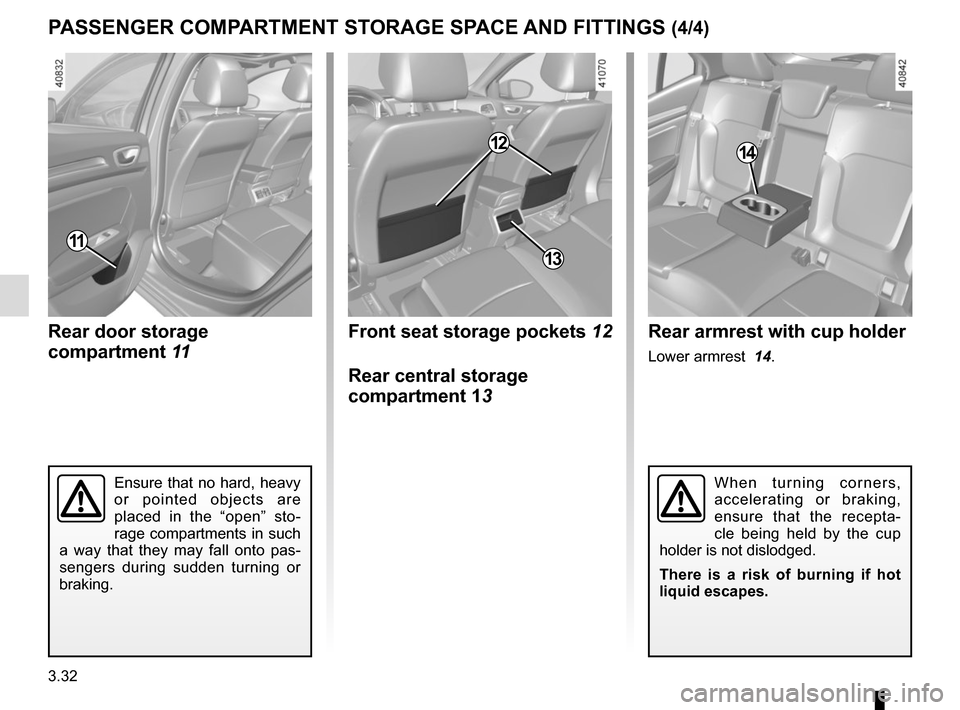
Rear door storage
compartment 11
11
Front seat storage pockets 12
Rear central storage
compartment 13
12
Rear armrest with cup holder
Lower armrest 14.
14
Ensure that no hard, heavy
or pointed objects are
placed in the “open” sto-
rage compartments in such
a way that they may fall onto pas-
sengers during sudden turning or
braking.When turning corners,
accelerating or braking,
ensure that the recepta-
cle being held by the cup
holder is not dislodged.
There is a risk of burning if hot
liquid escapes.
13
Page 229 of 346
3.35
REAR HEADRESTS (1/2)
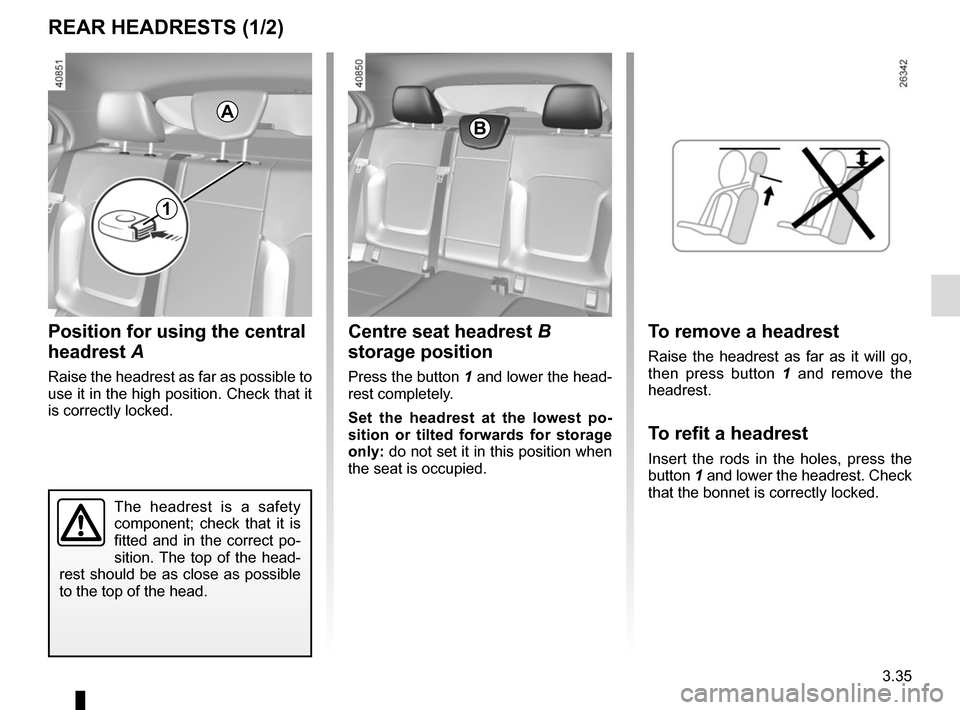
Position for using the central
headrest A
Raise the headrest as far as possible to
use it in the high position. Check that it
is correctly locked.
The headrest is a safety
component; check that it is
fitted and in the correct po-
sition. The top of the head-
rest should be as close as possible
to the top of the head.
A
1
Centre seat headrest B
storage position
Press the button 1 and lower the head-
rest completely.
Set the headrest at the lowest po-
sition or tilted forwards for storage
only: do not set it in this position when
the seat is occupied.
B
To remove a headrest
Raise the headrest as far as it will go,
then press button 1 and remove the
headrest.
To refit a headrest
Insert the rods in the holes, press the
button 1 and lower the headrest. Check
that the bonnet is correctly locked.
Page 230 of 346
3.36
REAR HEADRESTS (2/2)
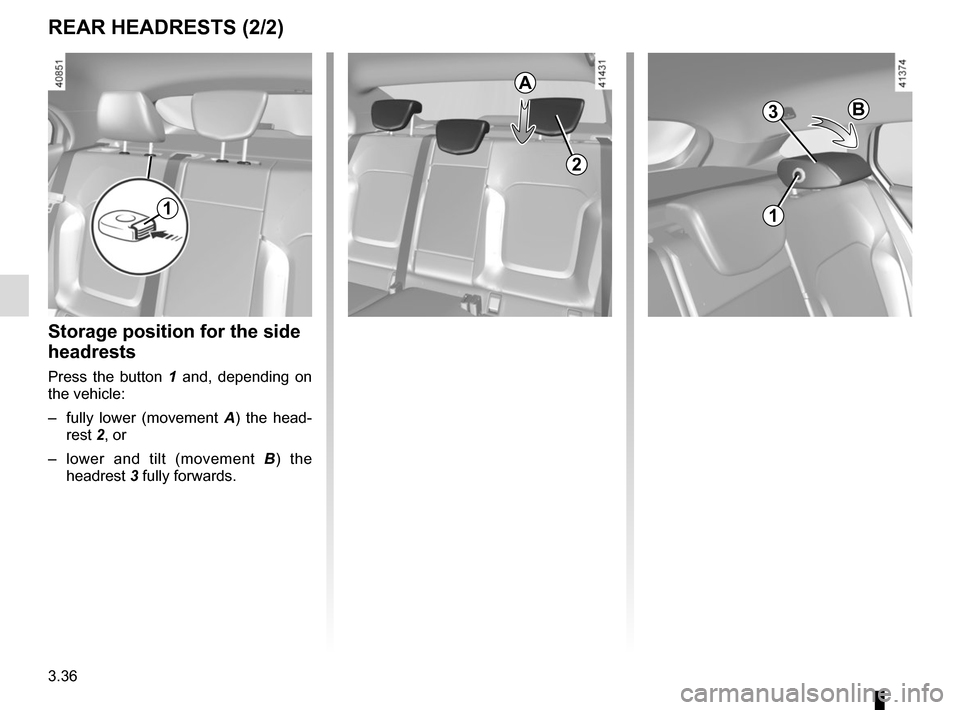
Storage position for the side
headrests
Press the button 1 and, depending on
the vehicle:
– fully lower (movement A) the head-
rest 2, or
– lower and tilt (movement B ) the
headrest 3 fully forwards.
1
B
A
2
3
1
Page 231 of 346
3.37
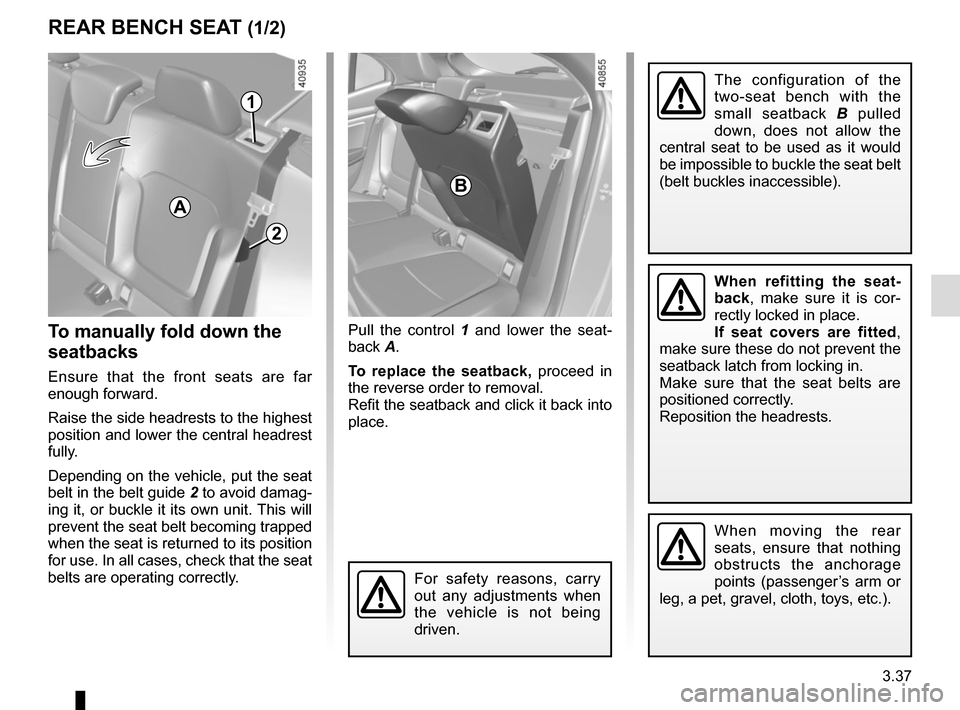
To manually fold down the
seatbacks
Ensure that the front seats are far
enough forward.
Raise the side headrests to the highest
position and lower the central headrest
fully.
Depending on the vehicle, put the seat
belt in the belt guide 2 to avoid damag-
ing it, or buckle it its own unit. This will
prevent the seat belt becoming trapped
when the seat is returned to its position
for use. In all cases, check that the seat
belts are operating correctly.
Pull the control 1 and lower the seat-
back A.
To replace the seatback, proceed in
the reverse order to removal.
Refit the seatback and click it back into
place.
REAR BENCH SEAT (1/2)
For safety reasons, carry
out any adjustments when
the vehicle is not being
driven.
When moving the rear
seats, ensure that nothing
obstructs the anchorage
points (passenger’s arm or
leg, a pet, gravel, cloth, toys, etc.).
A
1
The configuration of the
two-seat bench with the
small seatback B pulled
down, does not allow the
central seat to be used as it would
be impossible to buckle the seat belt
(belt buckles inaccessible).
When refitting the seat-
back, make sure it is cor-
rectly locked in place.
If seat covers are fitted ,
make sure these do not prevent the
seatback latch from locking in.
Make sure that the seat belts are
positioned correctly.
Reposition the headrests.
B
2
Page 232 of 346
3.38
REAR BENCH SEAT (2/2)
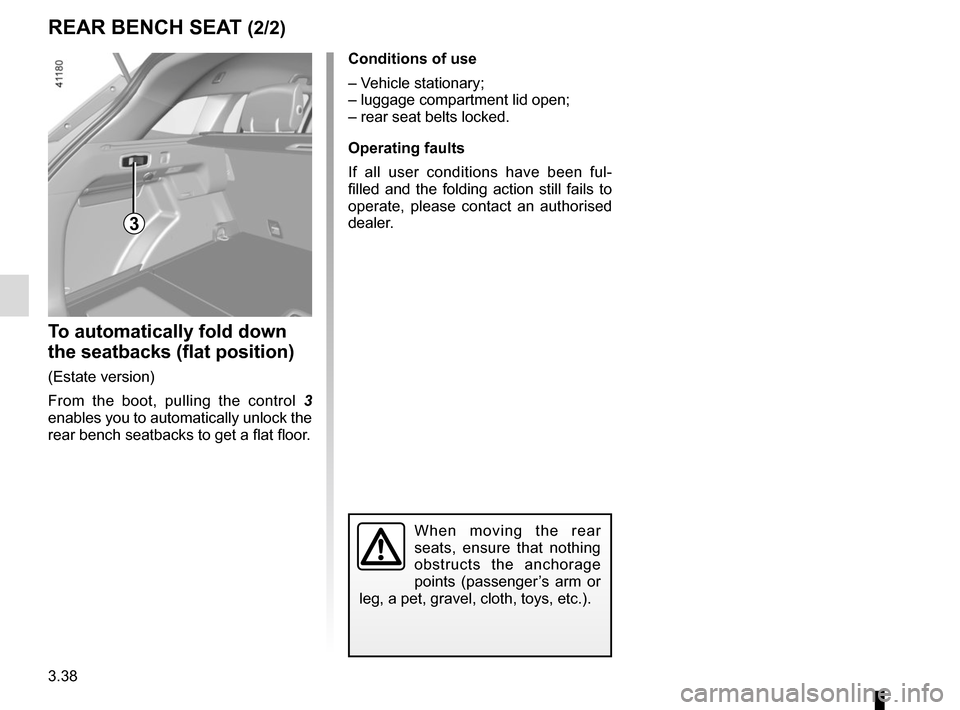
To automatically fold down
the seatbacks (flat position)
(Estate version)
From the boot, pulling the control 3
enables you to automatically unlock the
rear bench seatbacks to get a flat floor.
3
When moving the rear
seats, ensure that nothing
obstructs the anchorage
points (passenger’s arm or
leg, a pet, gravel, cloth, toys, etc.).
Conditions of use
– Vehicle stationary;
– luggage compartment lid open;
– rear seat belts locked.
Operating faults
If all user conditions have been ful-
filled and the folding action still fails to
operate, please contact an authorised
dealer.