rear RENAULT MEGANE 2017 4.G Service Manual
[x] Cancel search | Manufacturer: RENAULT, Model Year: 2017, Model line: MEGANE, Model: RENAULT MEGANE 2017 4.GPages: 346, PDF Size: 7.04 MB
Page 142 of 346
2.30
DRIVER CORRECTION DEVICES AND AIDS (1/10)ABS (anti-lock braking
system)
Under heavy braking, the ABS prevents
the wheels from locking, allowing the
stopping distance to be managed and
keeping control of the vehicle.
Under these circumstances, the vehi-
cle can be steered to avoid an obstacle
whilst braking. In addition, this system
can increase stopping distances, par-
ticularly on roads with low surface grip
(wet ground etc.).
You will feel a pulsation through the
brake pedal each time the system is
activated. The ABS does not in any way
improve the vehicle's physical perform-
ance relating to the road surface and
roadholding. It is still essential to follow
the rules of good driving practice (such
as driving at a safe distance from the
vehicle in front etc.).
– ABS (anti-lock braking system);
– ESC
(electronic stability control)
with understeer control and trac-
tion control;
– emergency brake assist;
– active emergency braking;
– hill start assistance;
– rear wheel steering.
Other driving assistance systems are
detailed on the following pages.
In an emergency, apply firm and
continuous pressure to the brake
pedal. There is no need to pump
it repeatedly. The ABS will modu-
late the force applied in the braking
system.
These functions are an ad-
ditional aid in the event of
critical driving conditions,
enabling the vehicle behav-
iour to be adapted to suit the driving
conditions.
However, the functions do not take
the place of the driver. They do
not increase the vehicle’s limits
and should not encourage you
to drive more quickly. Therefore,
they can under no circumstances
replace the vigilance or responsibil-
ity of the driver when manoeuvring
the vehicle (the driver must always
be ready for sudden incidents which
may occur when driving).
Page 151 of 346
2.39
DRIVER CORRECTION DEVICES AND AIDS (10/10)
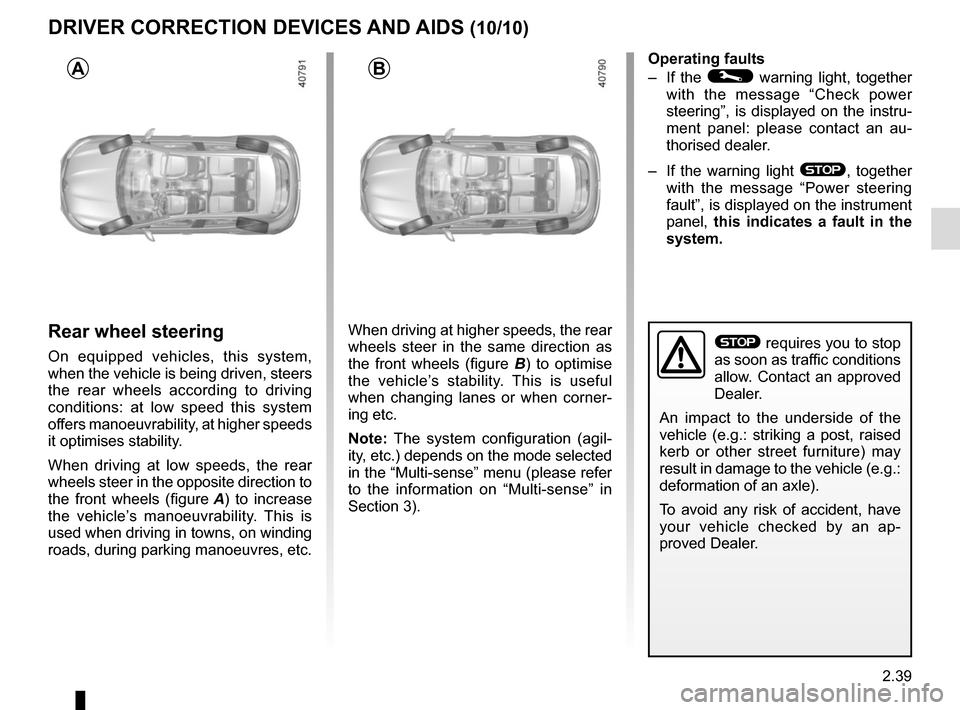
Rear wheel steering
On equipped vehicles, this system,
when the vehicle is being driven, steers
the rear wheels according to driving
conditions: at low speed this system
offers manoeuvrability, at higher speeds
it optimises stability.
When driving at low speeds, the rear
wheels steer in the opposite direction to
the front wheels (figure A) to increase
the vehicle’s manoeuvrability. This is
used when driving in towns, on winding
roads, during parking manoeuvres, etc. When driving at higher speeds, the rear
wheels steer in the same direction as
the front wheels (figure B
) to optimise
the vehicle’s stability. This is useful
when changing lanes or when corner-
ing etc.
Note: The system configuration (agil-
ity, etc.) depends on the mode selected
in the “Multi-sense” menu (please refer
to the information on “Multi-sense” in
Section 3). Operating faults
– If the
© warning light, together
with the message “Check power
steering”, is displayed on the instru-
ment panel: please contact an au-
thorised dealer.
– If the warning light
®, together
with the message “Power steering
fault”, is displayed on the instrument
panel, this indicates a fault in the
system.
AB
® requires you to stop
as soon as traffic conditions
allow. Contact an approved
Dealer.
An impact to the underside of the
vehicle (e.g.: striking a post, raised
kerb or other street furniture) may
result in damage to the vehicle (e.g.:
deformation of an axle).
To avoid any risk of accident, have
your vehicle checked by an ap-
proved Dealer.
Page 152 of 346

This function is a driving aid in the event of the accidental crossing o\
f
a continuous or broken line in the road. However, the function is not in-
tended to repla")
2.40
LANE DEPARTURE WARNING (1/3)
This function is a driving aid in the event of the accidental crossing o\
f
a continuous or broken line in the road. However, the function is not in-
tended to replace the driver. The function can be disrupted under certain
conditions, including:
– poor visibility (rain, snow, fog, dirty windscreen, glare of the sun, partially ob- scured road lines, etc.);
– roads with tight bends;
– closely following a vehicle in the same lane;
– worn road markings, difficult to distinguish or spaced very widely apart;
– narrow roads;
– ...
In this case, the line visibility indicators remain uncoloured on the in\
strument
panel to indicate that the function will not operate (lines not detecte\
d).
Under no circumstances should this function replace the driver’s care or respon-
sibility whilst performing manoeuvres.
This system notifies the driver when
they accidentally cross a continuous or
broken line.
This function uses a camera attached
to the windscreen, behind the rear-view
mirror.
Page 155 of 346
2.43
BLIND SPOT WARNING (1/4)
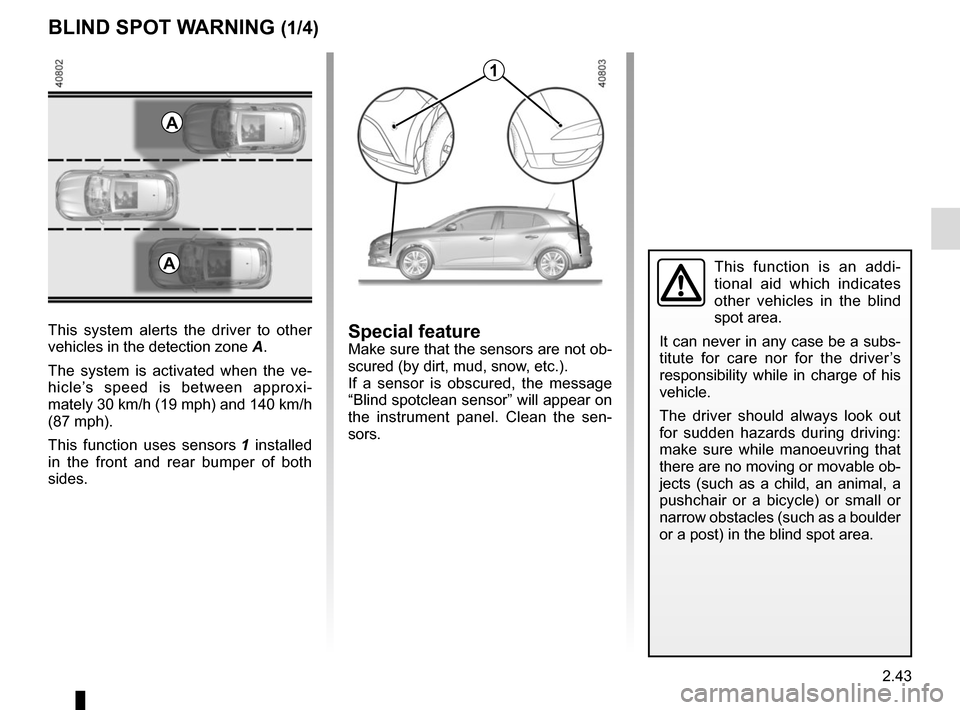
This system alerts the driver to other
vehicles in the detection zone A.
The system is activated when the ve-
hicle’s speed is between approxi-
mately 30 km/h (19 mph) and 140 km/h
(87 mph).
This function uses sensors 1 installed
in the front and rear bumper of both
sides.
1
A
Special featureMake sure that the sensors are not ob-
scured (by dirt, mud, snow, etc.).
If a sensor is obscured, the message
“Blind spotclean sensor” will appear on
the instrument panel. Clean the sen-
sors.
AThis function is an addi-
tional aid which indicates
other vehicles in the blind
spot area.
It can never in any case be a subs-
titute for care nor for the driver’s
responsibility while in charge of his
vehicle.
The driver should always look out
for sudden hazards during driving:
make sure while manoeuvring that
there are no moving or movable ob-
jects (such as a child, an animal, a
pushchair or a bicycle) or small or
narrow obstacles (such as a boulder
or a post) in the blind spot area.
Page 158 of 346
2.46
Operating faults
If the system detects a fault, the mes-
sage “Check blind spot alert” is dis-
played on the instrument panel. Consult
an authorised dealer.
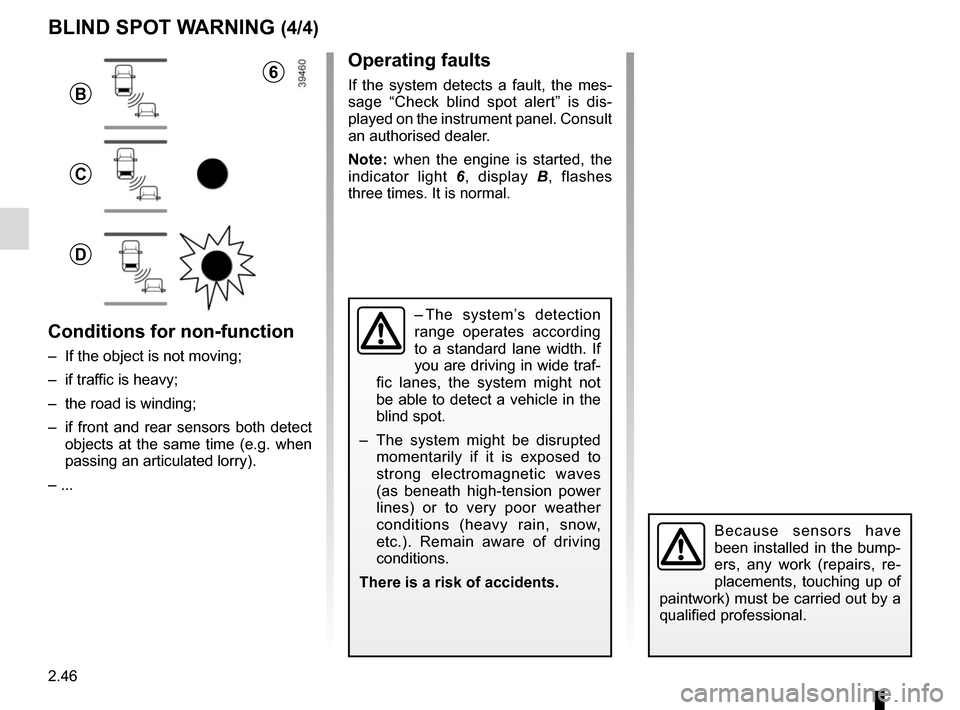
Note: when the engine is started, the
indicator light 6, display B , flashes
three times. It is normal.
– The system’s detection
range operates according
to a standard lane width. If
you are driving in wide traf-
fic lanes, the system might not
be able to detect a vehicle in the
blind spot.
– The system might be disrupted momentarily if it is exposed to
strong electromagnetic waves
(as beneath high-tension power
lines) or to very poor weather
conditions (heavy rain, snow,
etc.). Remain aware of driving
conditions.
There is a risk of accidents.
BLIND SPOT WARNING (4/4)
Because sensors have
been installed in the bump-
ers, any work (repairs, re-
placements, touching up of
paintwork) must be carried out by a
qualified professional.
6
B
C
D
Conditions for non-function
– If the object is not moving;
– if traffic is heavy;
– the road is winding;
– if front and rear sensors both detect objects at the same time (e.g. when
passing an articulated lorry).
– ...
Page 166 of 346
2.54
OVERSPEED ALERT (1/3)
The overspeed alert with signage panel
recognition notifies the driver that they
are exceeding the speed limit for the
section of road on which they are cur-
rently travelling.For vehicles equipped with a navigation
system and if the vehicle is travelling in
a country where the speed units differ
from those of the vehicle, the system
displays the speed limit sign in the unit
of the country, alongside the speed limit
converted to the unit used by the vehi-
cle’s instrument panel.
For countries where the speed limit is
reduced during rainy weather on some
types of roads, on vehicles equipped
with a navigation system, the system
can modify the limited speed after a few
seconds of wiping the windscreen.
Special situations
The system does not take into account
exceptional speed limit measures, such
as peak pollution days.
On equipped vehicles, some infor-
mation is given on the head-up dis-
play.
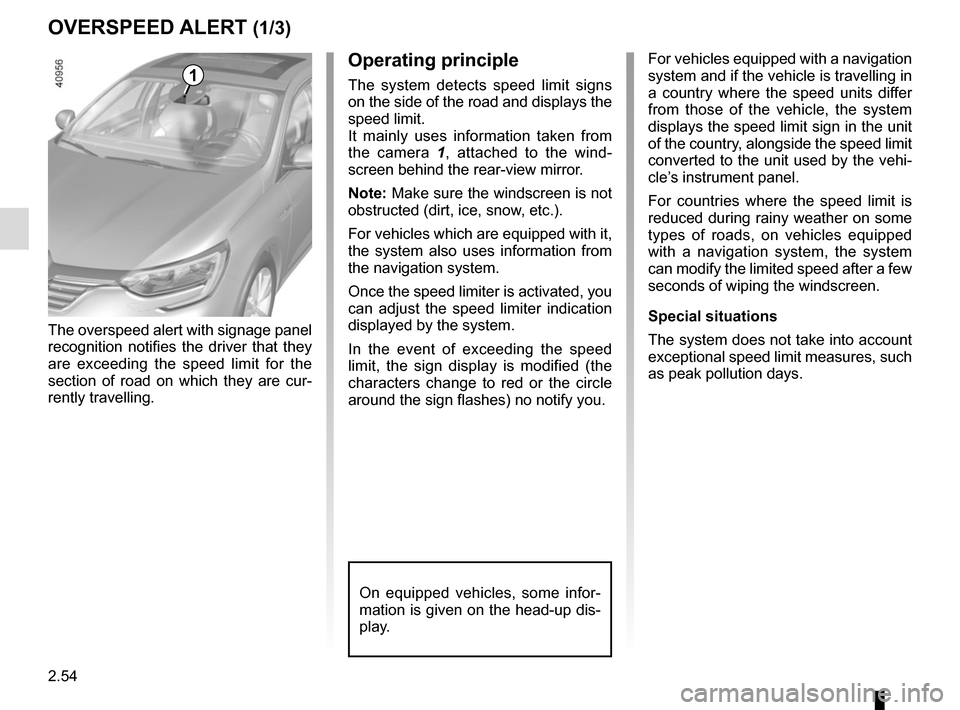
1Operating principle
The system detects speed limit signs
on the side of the road and displays the
speed limit.
It mainly uses information taken from
the camera 1
, attached to the wind-
screen behind the rear-view mirror.
Note: Make sure the windscreen is not
obstructed (dirt, ice, snow, etc.).
For vehicles which are equipped with it,
the system also uses information from
the navigation system.
Once the speed limiter is activated, you
can adjust the speed limiter indication
displayed by the system.
In the event of exceeding the speed
limit, the sign display is modified (the
characters change to red or the circle
around the sign flashes) no notify you.
Page 180 of 346
2.68
PARKING DISTANCE CONTROL (1/5)
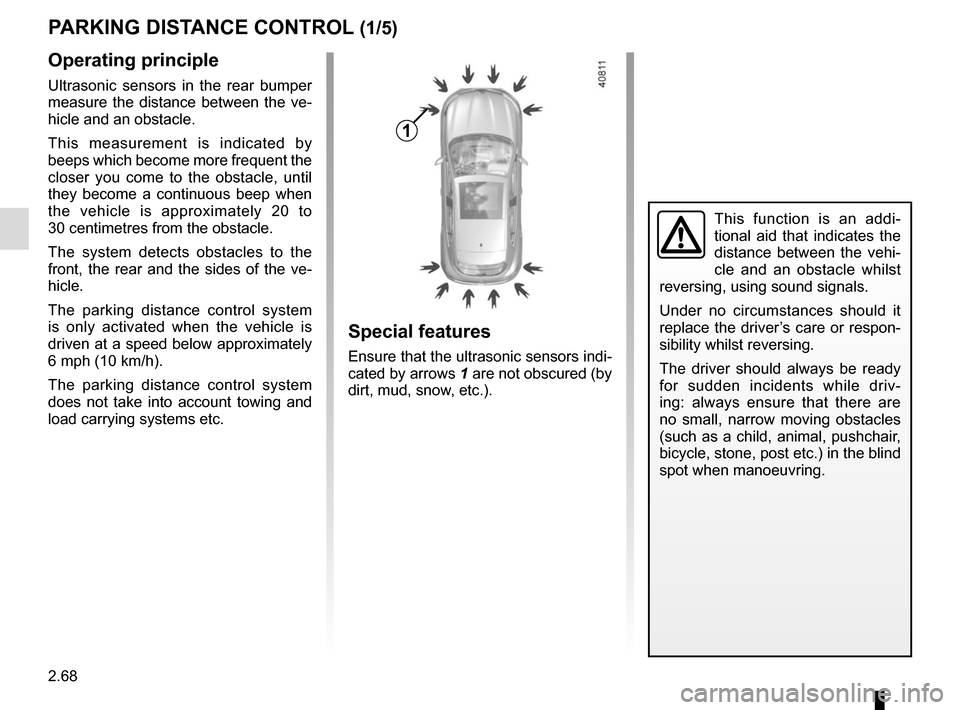
Operating principle
Ultrasonic sensors in the rear bumper
measure the distance between the ve-
hicle and an obstacle.
This measurement is indicated by
beeps which become more frequent the
closer you come to the obstacle, until
they become a continuous beep when
the vehicle is approximately 20 to
30 centimetres from the obstacle.
The system detects obstacles to the
front, the rear and the sides of the ve-
hicle.
The parking distance control system
is only activated when the vehicle is
driven at a speed below approximately
6 mph (10 km/h).
The parking distance control system
does not take into account towing and
load carrying systems etc.
This function is an addi-
tional aid that indicates the
distance between the vehi-
cle and an obstacle whilst
reversing, using sound signals.
Under no circumstances should it
replace the driver’s care or respon-
sibility whilst reversing.
The driver should always be ready
for sudden incidents while driv-
ing: always ensure that there are
no small, narrow moving obstacles
(such as a child, animal, pushchair,
bicycle, stone, post etc.) in the blind
spot when manoeuvring.
Special features
Ensure that the ultrasonic sensors indi-
cated by arrows 1 are not obscured (by
dirt, mud, snow, etc.).
1
Page 181 of 346
2.69
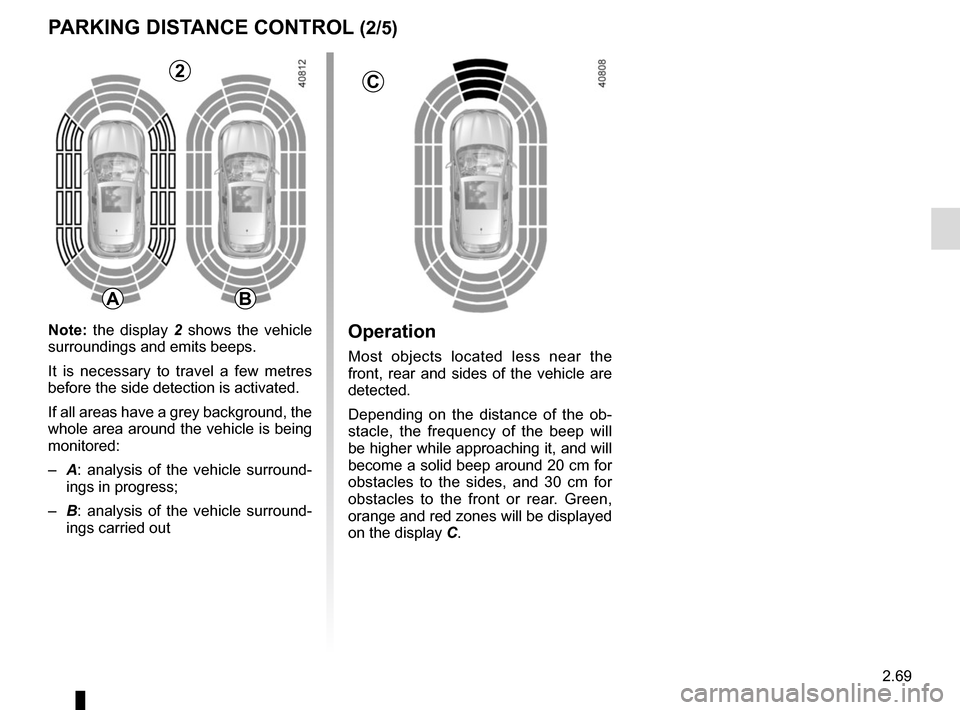
Operation
Most objects located less near the
front, rear and sides of the vehicle are
detected.
Depending on the distance of the ob-
stacle, the frequency of the beep will
be higher while approaching it, and will
become a solid beep around 20 cm for
obstacles to the sides, and 30 cm for
obstacles to the front or rear. Green,
orange and red zones will be displayed
on the display C.
PARKING DISTANCE CONTROL (2/5)
C
AB
2
Note: the display 2 shows the vehicle
surroundings and emits beeps.
It is necessary to travel a few metres
before the side detection is activated.
If all areas have a grey background, the
whole area around the vehicle is being
monitored:
– A: analysis of the vehicle surround-
ings in progress;
– B: analysis of the vehicle surround-
ings carried out
Page 185 of 346
2.73
REVERSING CAMERA (1/2)
111
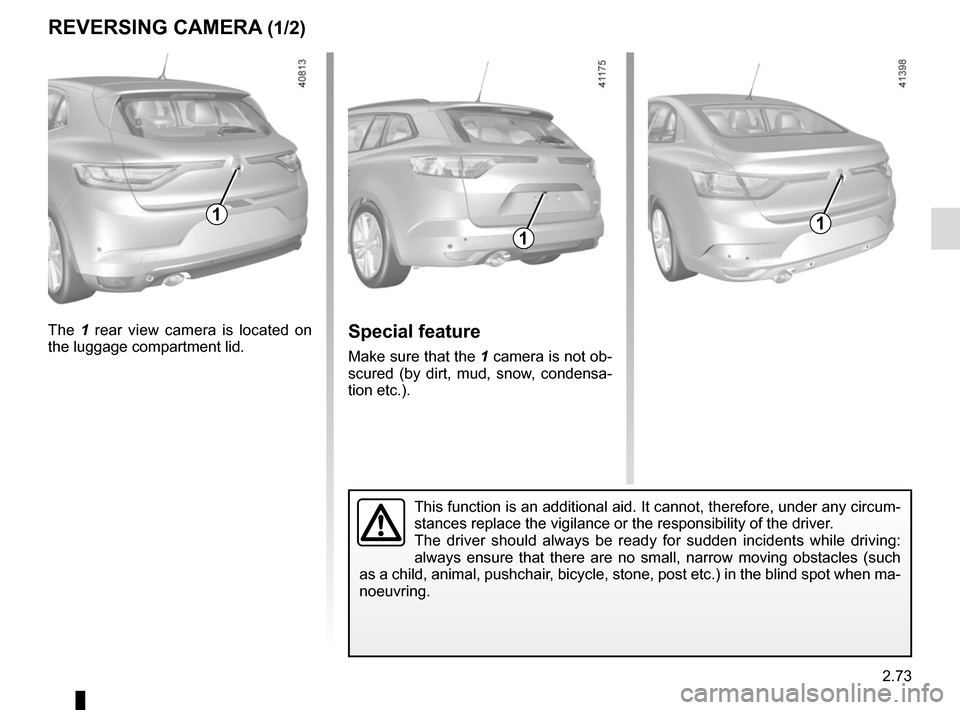
The 1 rear view camera is located on
the luggage compartment lid.Special feature
Make sure that the 1 camera is not ob-
scured (by dirt, mud, snow, condensa-
tion etc.).
This function is an additional aid. It cannot, therefore, under any circ\
um-
stances replace the vigilance or the responsibility of the driver.
The driver should always be ready for sudden incidents while driving:
always ensure that there are no small, narrow moving obstacles (such
as a child, animal, pushchair, bicycle, stone, post etc.) in the blind spot when ma-
noeuvring.
Page 186 of 346
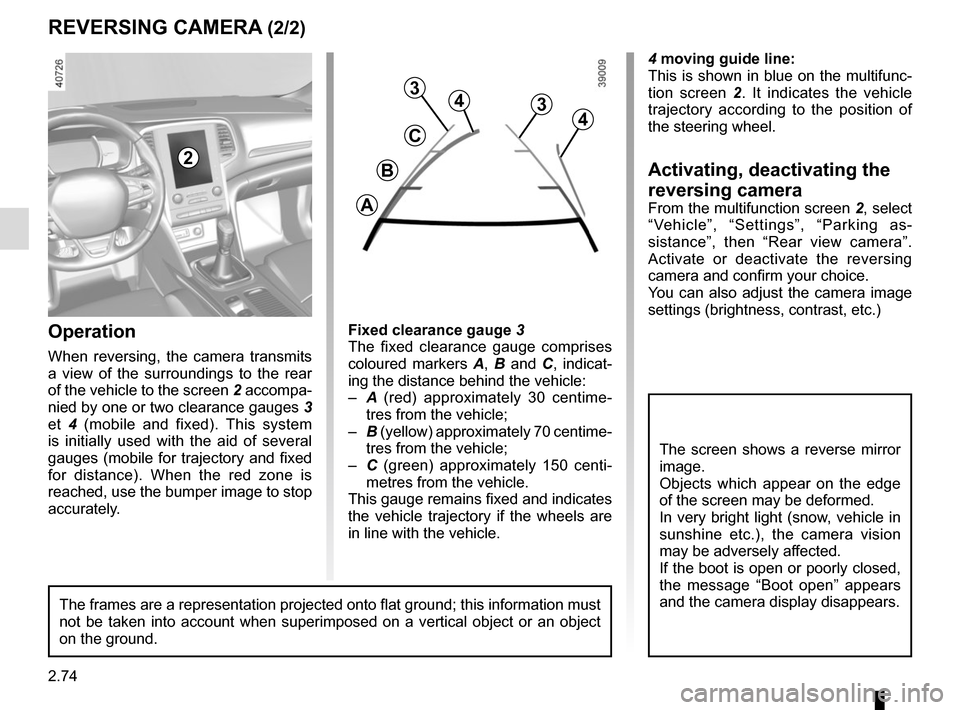
2.74
4 moving guide line:
This is shown in blue on the multifunc-
tion screen 2. It indicates the vehicle
trajectory according to the position of
the steering wheel.
Activating, deactivating the
reversing camera
From the multifunction screen 2, select
“Vehicle”, “Settings”, “Parking as-
sistance”, then “Rear view camera”.
Activate or deactivate the reversing
camera and confirm your choice.
You can also adjust the camera image
settings (brightness, contrast, etc.)
REVERSING CAMERA (2/2)
C
B
A
43
2
The screen shows a reverse mirror
image.
Objects which appear on the edge
of the screen may be deformed.
In very bright light (snow, vehicle in
sunshine etc.), the camera vision
may be adversely affected.
If the boot is open or poorly closed,
the message “Boot open” appears
and the camera display disappears.
3
4
Fixed clearance gauge 3
The fixed clearance gauge comprises
coloured markers A, B and C , indicat-
ing the distance behind the vehicle:
– A (red) approximately 30 centime-
tres from the vehicle;
– B (yellow) approximately 70 centime-
tres from the vehicle;
– C (green) approximately 150 centi-
metres from the vehicle.
This gauge remains fixed and indicates
the vehicle trajectory if the wheels are
in line with the vehicle.Operation
When reversing, the camera transmits
a view of the surroundings to the rear
of the vehicle to the screen 2 accompa-
nied by one or two clearance gauges 3
et 4 (mobile and fixed). This system
is initially used with the aid of several
gauges (mobile for trajectory and fixed
for distance). When the red zone is
reached, use the bumper image to stop
accurately.
The frames are a representation projected onto flat ground; this informa\
tion must
not be taken into account when superimposed on a vertical object or an o\
bject
on the ground.