button RENAULT MEGANE RS 2012 X95 / 3.G User Guide
[x] Cancel search | Manufacturer: RENAULT, Model Year: 2012, Model line: MEGANE RS, Model: RENAULT MEGANE RS 2012 X95 / 3.GPages: 239, PDF Size: 9.2 MB
Page 25 of 239

1.19
ENG_UD18878_3
Sièges avant à à commandes électriques (X95 - B95 - D95 - R\
enault)
ENG_NU_837-6_BDK9")
front seatswith electric controls ........................................ (current page)
1.19
ENG_UD18878_3
Sièges avant à à commandes électriques (X95 - B95 - D95 - R\
enault)
ENG_NU_837-6_BDK95_Renault_1
Switch 3 is used for adjusting the seat-
back and switch 4 is used for adjusting
the seat squab.
On equipped vehicles, buttons 1 are
used to store the chosen driving posi -
tion (refer to the following page).
Adjusting the seat squab:– To move the seat forwards or back
Move switch 4 forwards or back -
wards.
– To raise or lower the seat base
Move the switch 4 upwards or down -
wards.
Adjusting the lumbar support
on the driver’s seat:
Lower handle 5 to increase the support
and lift to decrease it.
For safety reasons, carry
out any adjustments when
the vehicle is not being
driven.
We would advise you not
to recline the seatbacks too
far to ensure that the effec-
tiveness of the seat belts is
not reduced.
Nothing should be placed on the
floor (area in front of driver) as such
objects may slide under the pedal
during braking manoeuvres, thus
obstructing its use.
Adjusting the seatback:To tilt the seatback , move the top of
switch 3 forwards or backwards.
Heated seats(depending on vehicle)
With the engine running, turn control 2
to either position 1, 2 or 3 (depending
on the temperature required). An in -
dicator light on the instrument panel
lights up once the front seat heating
system is operating.
The system, which has a thermostat,
decides whether or not the heating is
needed, according to the position se -
lected.
fRONT sEATs WITH ELEcTRIc cONTROL
2
4
3
15
Page 26 of 239
storing the driver’s seat position ...........(up to the end of the DU)
front seat driver’s position memory ................. (up to the end of the DU)
1.20
ENG_UD18876_1
Siège avant à commande électrique avec mémorisation (B95 - \
D95 - K95 - Renault)
ENG_NU_837-6_BDK95_Renault_1
fRONT sEATs WITH ELEcTRIc cONTROL WITH sTORAgE Of sETTINgs
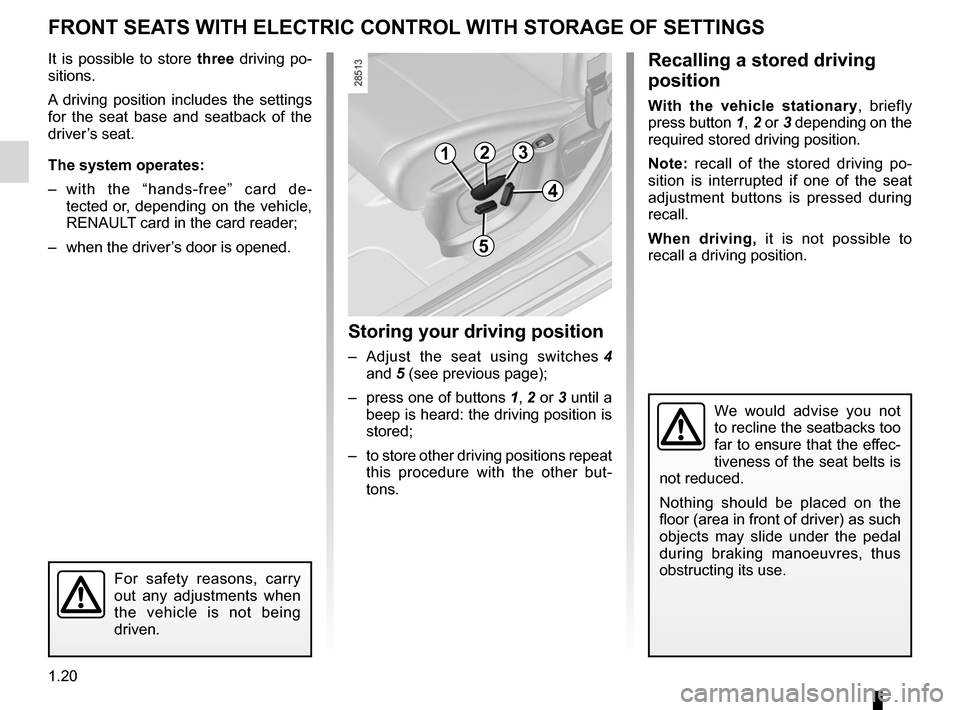
It is possible to store three driving po-
sitions.
A driving position includes the settings
for the seat base and seatback of the
driver’s seat.
The system operates:
– with the “hands-free” card de -
tected or, depending on the vehicle,
RENAULT card in the card reader;
– when the driver’s door is opened.
storing your driving position
– Adjust the seat using switches 4
and 5 (see previous page);
– press one of buttons 1, 2 or 3 until a
beep is heard: the driving position is
stored;
– to store other driving positions repeat
this procedure with the other but -
tons.
Recalling a stored driving
position
With the vehicle stationary , briefly
press button 1, 2 or 3 depending on the
required stored driving position.
Note: recall of the stored driving po -
sition is interrupted if one of the seat
adjustment buttons is pressed during
recall.
When driving, it is not possible to
recall a driving position.
123
4
5
We would advise you not
to recline the seatbacks too
far to ensure that the effec-
tiveness of the seat belts is
not reduced.
Nothing should be placed on the
floor (area in front of driver) as such
objects may slide under the pedal
during braking manoeuvres, thus
obstructing its use.
For safety reasons, carry
out any adjustments when
the vehicle is not being
driven.
Page 29 of 239
JauneNoirNoir texte
1.23
ENG_UD17353_5
Ceintures de sécurité (X95 - B95 - D95 - Renault)
ENG_NU_837-6_BDK95_Renault_1
sEAT BELTs (2/3)
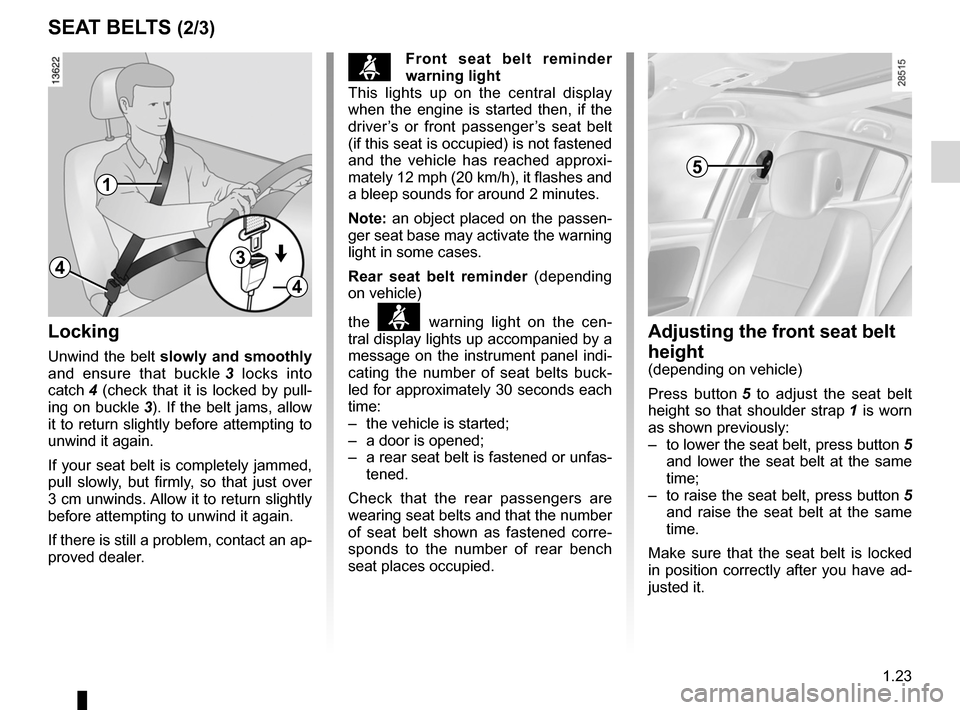
Adjusting the front seat belt
height
(depending on vehicle)
Press button 5 to adjust the seat belt
height so that shoulder strap 1 is worn
as shown previously:
– to lower the seat belt, press button 5
and lower the seat belt at the same
time;
– to raise the seat belt, press button 5
and raise the seat belt at the same
time.
Make sure that the seat belt is locked
in position correctly after you have ad-
justed it.
5
Locking
Unwind the belt slowly and smoothly
and ensure that buckle 3 locks into
catch 4 (check that it is locked by pull -
ing on buckle 3). If the belt jams, allow
it to return slightly before attempting to
unwind it again.
If your seat belt is completely jammed,
pull slowly, but firmly, so that just over
3 cm unwinds. Allow it to return slightly
before attempting to unwind it again.
If there is still a problem, contact an ap-
proved dealer.
1
43
4
ßf ront seat belt reminder
warning light
This lights up on the central display
when the engine is started then, if the
driver’s or front passenger’s seat belt
(if this seat is occupied) is not fastened
and the vehicle has reached approxi -
mately 12 mph (20 km/h), it flashes and
a bleep sounds for around 2 minutes.
Note: an object placed on the passen -
ger seat base may activate the warning
light in some cases.
Rear seat belt reminder (depending
on vehicle)
the
ß warning light on the cen -
tral display lights up accompanied by a
message on the instrument panel indi -
cating the number of seat belts buck -
led for approximately 30 seconds each
time:
– the vehicle is started;
– a door is opened;
– a rear seat belt is fastened or unfas-
tened.
Check that the rear passengers are
wearing seat belts and that the number
of seat belt shown as fastened corre -
sponds to the number of rear bench
seat places occupied.
Page 30 of 239
1.24
ENG_UD17353_5
Ceintures de sécurité (X95 - B95 - D95 - Renault)
ENG_NU_837-6_BDK95_Renault_1
sEAT BELTs (3/3)
The following information applies to the vehicle’s front and rear seat belts.
– No modification may be made to the component parts of the restraint
system (belts and seats and their mountings) fitted originally. For spe-
cial operations (e.g. fitting child seats) contact an approved Dealer.
– Do not use devices which allow any slack in the belts (e.g. clothes
pegs, clips, etc.): a seat belt which is worn too loosely may cause injury in the
event of an accident.
– Never wear the shoulder strap under your arm or behind your back.
– Never use the same belt for more than one person and never hold a baby or
child on your lap with your seat belt around them.
– The belt should never be twisted.
– Following an accident, have the seat belts checked and replaced if necessary.
Always replace your seat belts as soon as they show any signs of wear.
– Make sure that the buckle is inserted into the appropriate catch.
– Ensure that no objects are placed in the area around the seat belt catch as
they could prevent it from being properly secured.
– When putting back the rear bench seat, take care that the seat belts are cor-
rectly positioned so that they can be used properly.
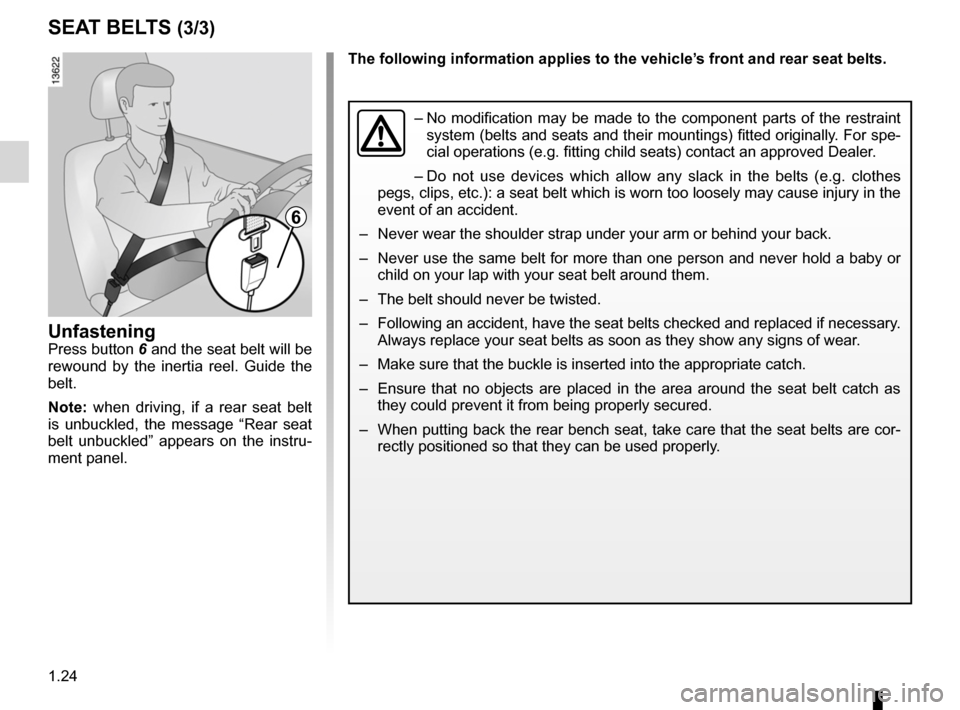
UnfasteningPress button 6 and the seat belt will be
rewound by the inertia reel. Guide the
belt.
Note: when driving, if a rear seat belt
is unbuckled, the message “Rear seat
belt unbuckled” appears on the instru -
ment panel.
6
Page 61 of 239
JauneNoirNoir texte
1.55
ENG_UD18928_3
Tableau de bord : afficheurs et indicateurs (X95 - B95 - D95 - Renault)
ENG_NU_837-6_BDK95_Renault_1
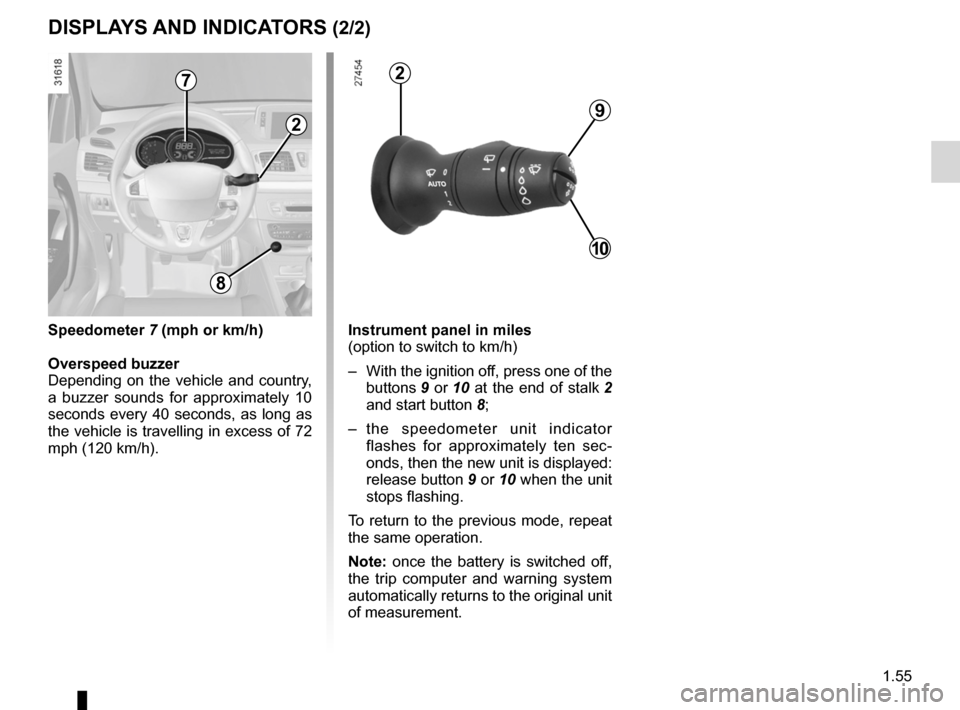
Instrument panel in miles
(option to switch to km/h)
– With the ignition off, press one of the
buttons 9 or 10 at the end of stalk 2
and start button 8;
– the speedometer unit indicator
flashes for approximately ten sec -
onds, then the new unit is displayed:
release button 9 or 10 when the unit
stops flashing.
To return to the previous mode, repeat
the same operation.
Note: once the battery is switched off,
the trip computer and warning system
automatically returns to the original unit
of measurement.
dIspLAYs ANd INdIcATORs (2/2)
9
10
2
2
8
speedometer 7 (mph or km/h)
Overspeed buzzer
Depending on the vehicle and country,
a buzzer sounds for approximately 10
seconds every 40 seconds, as long as
the vehicle is travelling in excess of 72
mph (120 km/h).
7
Page 62 of 239
control instruments ............................... (up to the end of the DU)
indicators: instrument panel ............................. (up to the end of the DU)
trip computer and warning system ........(up to the end of the DU)
instrument panel ................................... (up to the end of the DU)
warning lights ........................................ (up to the end of the DU)
instrument panel messages ..................(up to the end of the DU)
1.56
ENG_UD18879_3
Ordinateur de bord (X95 - B95 - D95 - Renault)
ENG_NU_837-6_BDK95_Renault_1
Jaune NoirNoir texte
trip computer and warning system
TRIp cOmpUTER ANd WARNINg sYsTEm (1/10)
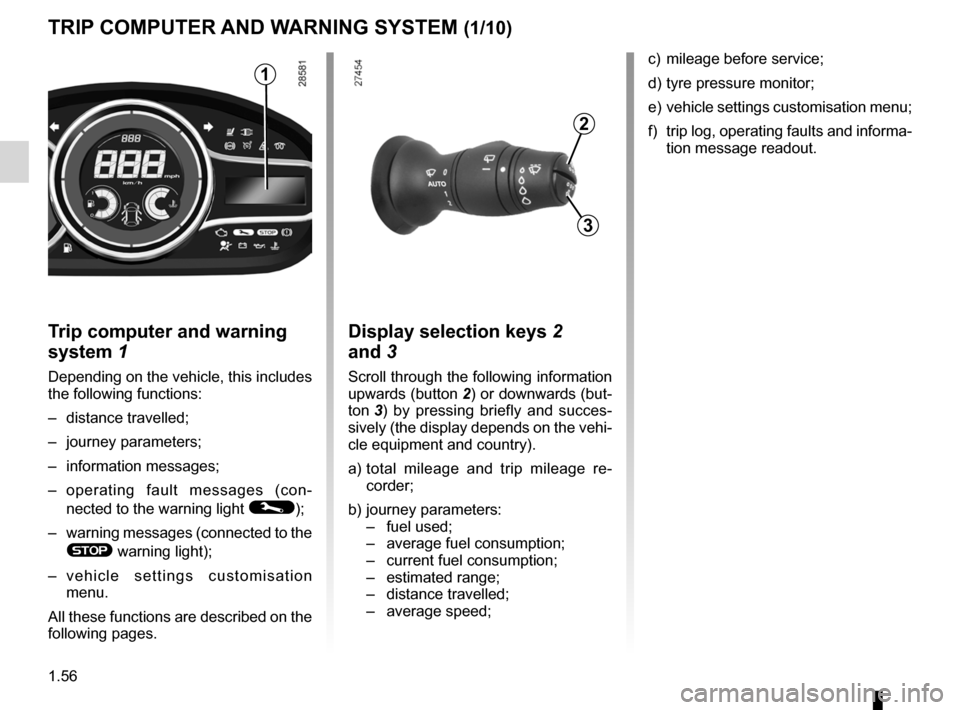
Trip computer and warning
system 1
Depending on the vehicle, this includes
the following functions:
– distance travelled;
– journey parameters;
– information messages;
– operating fault messages (con -
nected to the warning light
©);
– warning messages (connected to the
® warning light);
– v e h i c l e s e t t i n g s c u s t o m i s a t i o n
menu.
All these functions are described on the
following pages.
display selection keys 2
and 3
Scroll through the following information
upwards (button 2) or downwards (but-
ton 3 ) by pressing briefly and succes -
sively (the display depends on the vehi-
cle equipment and country).
a) total mileage and trip mileage re -
corder;
b) journey parameters:
– fuel used;
– average fuel consumption;
– current fuel consumption;
– estimated range;
– distance travelled;
– average speed;
1
2
3
c) mileage before service;
d) tyre pressure monitor;
e) vehicle settings customisation menu;
f) trip log, operating faults and informa-
tion message readout.
Page 63 of 239
JauneNoirNoir texte
1.57
ENG_UD18879_3
Ordinateur de bord (X95 - B95 - D95 - Renault)
ENG_NU_837-6_BDK95_Renault_1
TRIp cOmpUTER ANd WARNINg sYsTEm (2/10)
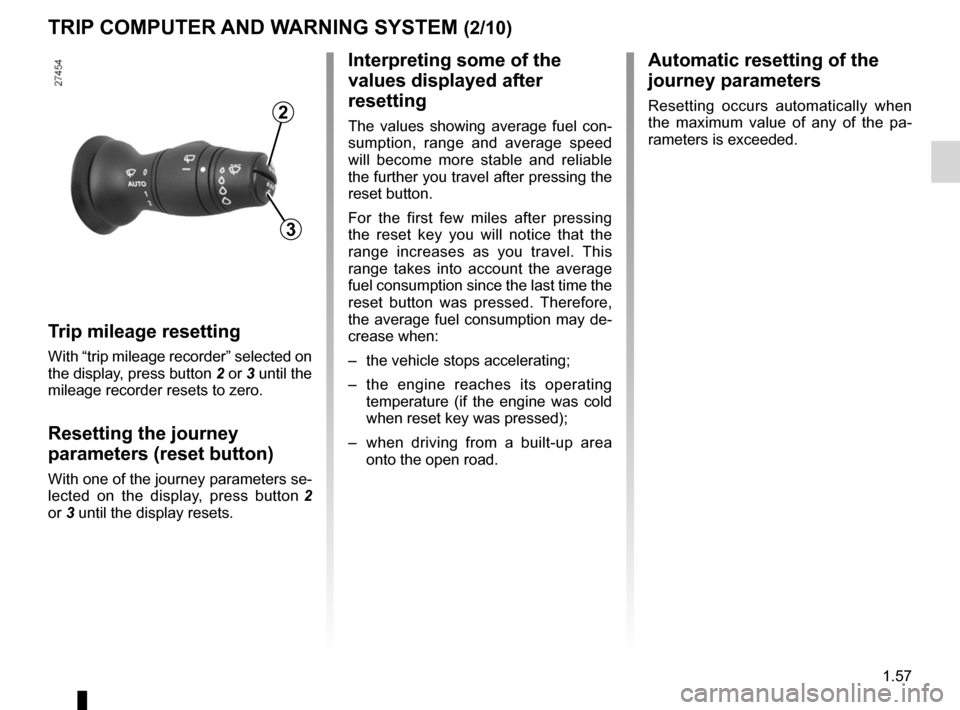
Trip mileage resetting
With “trip mileage recorder” selected on
the display, press button 2 or 3 until the
mileage recorder resets to zero.
Resetting the journey
parameters (reset button)
With one of the journey parameters se-
lected on the display, press button 2
or 3 until the display resets.
Interpreting some of the
values displayed after
resetting
The values showing average fuel con -
sumption, range and average speed
will become more stable and reliable
the further you travel after pressing the
reset button.
For the first few miles after pressing
the reset key you will notice that the
range increases as you travel. This
range takes into account the average
fuel consumption since the last time the
reset button was pressed. Therefore,
the average fuel consumption may de-
crease when:
– the vehicle stops accelerating;
– the engine reaches its operating
temperature (if the engine was cold
when reset key was pressed);
– when driving from a built-up area
onto the open road.
3
2
Automatic resetting of the
journey parameters
Resetting occurs automatically when
the maximum value of any of the pa -
rameters is exceeded.
Page 65 of 239
JauneNoirNoir texte
1.59
ENG_UD18879_3
Ordinateur de bord (X95 - B95 - D95 - Renault)
ENG_NU_837-6_BDK95_Renault_1
TRIp cOmpUTER ANd WARNINg sYsTEm (4/10)
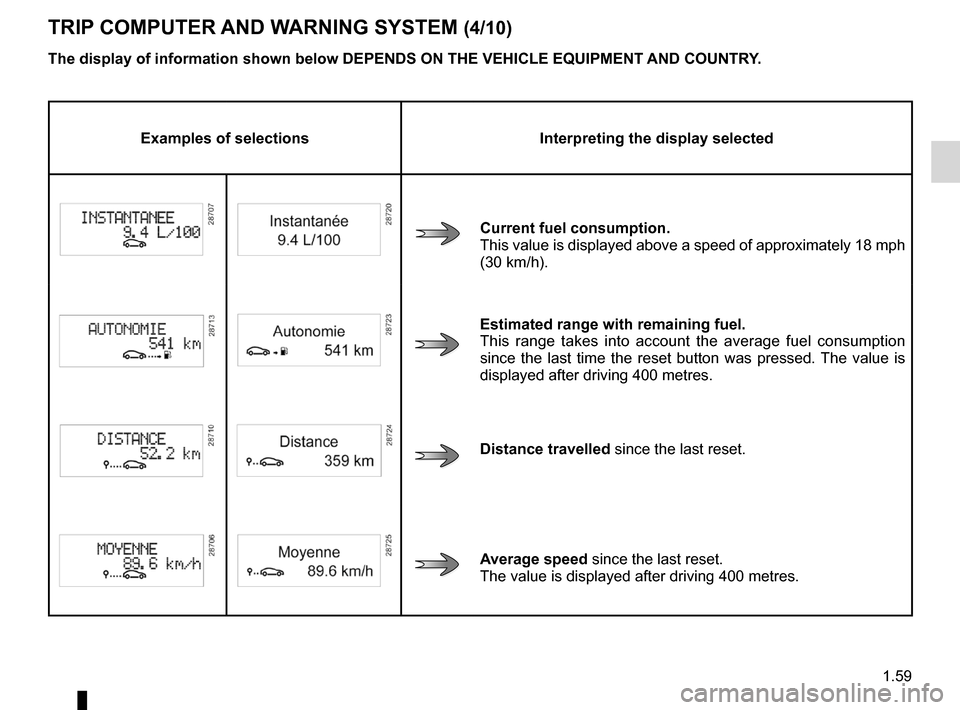
Examples of selections Interpreting the display selected
current fuel consumption.
This value is displayed above a speed of approximately 18 mph
(30 km/h).
Estimated range with remaining fuel.
This range takes into account the average fuel consumption
since the last time the reset button was pressed. The value is
displayed after driving 400 metres.
distance travelled since the last reset.
Average speed since the last reset.
The value is displayed after driving 400 metres.
The display of information shown below dEpENds ON THE vEHIcLE EQUIpmENT ANd cOUNTRY.
Page 66 of 239
1.60
ENG_UD18879_3
Ordinateur de bord (X95 - B95 - D95 - Renault)
ENG_NU_837-6_BDK95_Renault_1
Jaune NoirNoir texte
TRIp cOmpUTER ANd WARNINg sYsTEm (5/10)
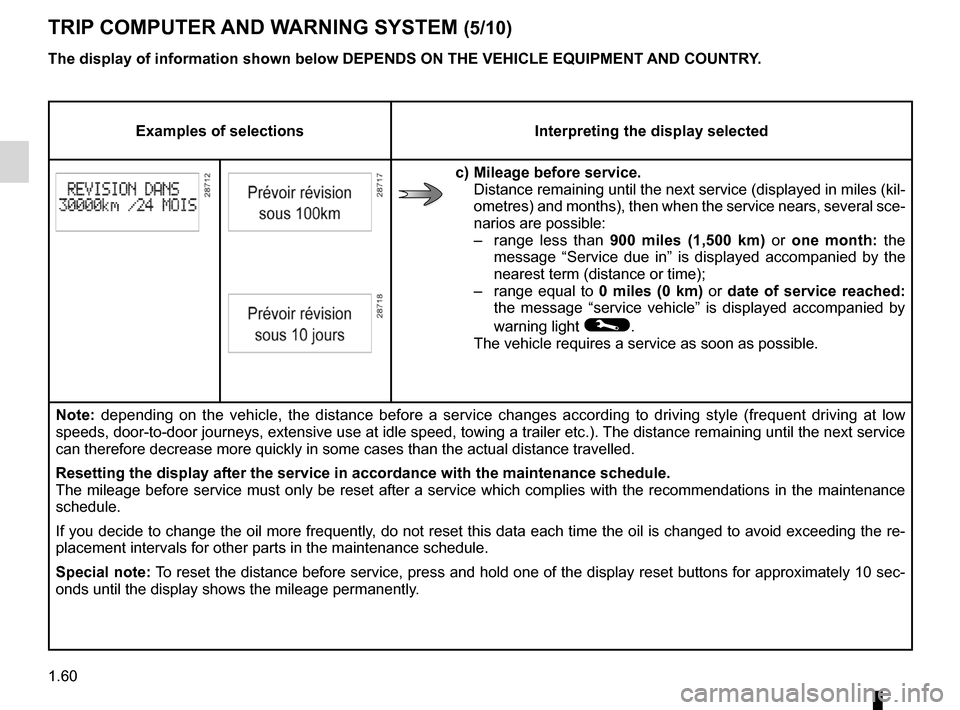
Examples of selections Interpreting the display selected
c) mileage before service.
Distance remaining until the next service (displayed in miles (kil-
ometres) and months), then when the service nears, several sce-
narios are possible:
– range less than 900 miles (1,500 km) or one month: the
message “Service due in” is displayed accompanied by the
nearest term (distance or time);
– range equal to 0 miles (0 km) or date of service reached:
the message “service vehicle” is displayed accompanied by
warning light
©.
The vehicle requires a service as soon as possible.
Note: depending on the vehicle, the distance before a service changes according to driving style (frequent driving at low
speeds, door-to-door journeys, extensive use at idle speed, towing a trailer etc.). The distance remaining until the next service
can therefore decrease more quickly in some cases than the actual distan\
ce travelled.
Resetting the display after the service in accordance with the maintenan\
ce schedule.
The mileage before service must only be reset after a service which complies with the recommendations in the maintenance
schedule.
If you decide to change the oil more frequently, do not reset this data each time the oil is changed to avoid exceeding the re-
placement intervals for other parts in the maintenance schedule.
special note: To reset the distance before service, press and hold one of the display reset buttons for approximately 10 sec-
onds until the display shows the mileage permanently.
The display of information shown below dEpENds ON THE vEHIcLE EQUIpmENT ANd cOUNTRY.
Page 69 of 239
JauneNoirNoir texte
1.63
ENG_UD18879_3
Ordinateur de bord (X95 - B95 - D95 - Renault)
ENG_NU_837-6_BDK95_Renault_1
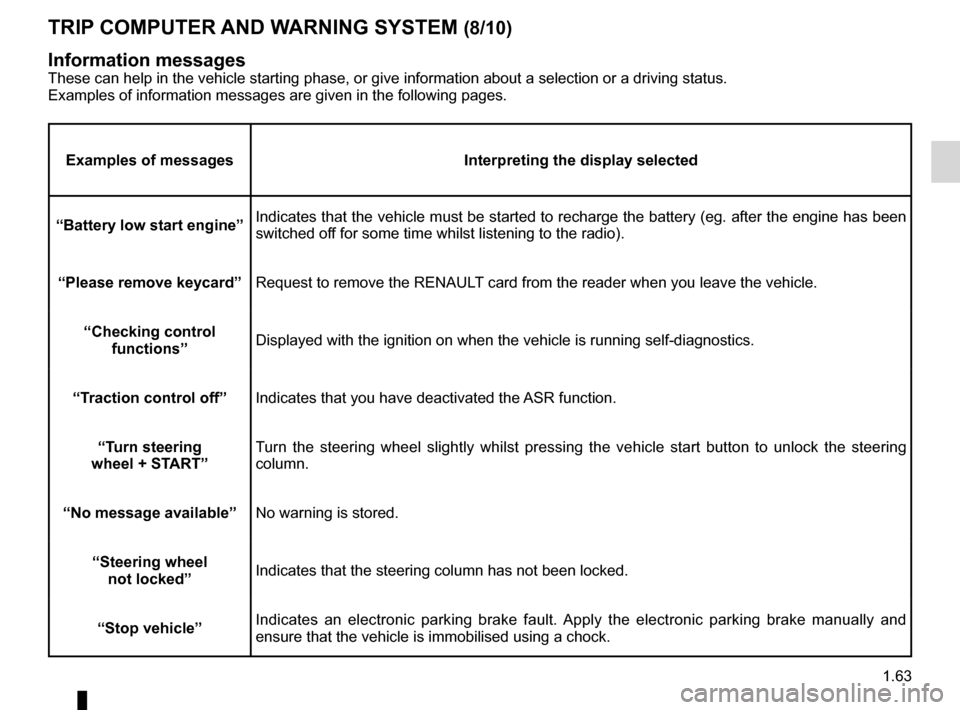
TRIp cOmpUTER ANd WARNINg sYsTEm (8/10)
Examples of messages Interpreting the display selected
“Battery low start engine” Indicates that the vehicle must be started to recharge the battery (eg. after the engine has been
switched off for some time whilst listening to the radio).
“please remove keycard ”Request to remove the RENAULT card from the reader when you leave the vehicle.
“checking control functions ” Displayed with the ignition on when the vehicle is running self-diagnost\
ics.
“Traction control off ”Indicates that you have deactivated the ASR function.
“Turn steering
wheel + sTART” Turn the steering wheel slightly whilst pressing the vehicle start button to unlock the steering
column.
“No message available” No warning is stored.
“steering wheel not locked ”Indicates that the steering column has not been locked.
“stop vehicle” Indicates an electronic parking brake fault. Apply the electronic parking brake manually and
ensure that the vehicle is immobilised using a chock.
Information messagesThese can help in the vehicle starting phase, or give information about \
a selection or a driving status.
Examples of information messages are given in the following pages.