rs mode RENAULT MEGANE RS 2012 X95 / 3.G Owners Manual
[x] Cancel search | Manufacturer: RENAULT, Model Year: 2012, Model line: MEGANE RS, Model: RENAULT MEGANE RS 2012 X95 / 3.GPages: 239, PDF Size: 9.2 MB
Page 3 of 239

0.1
ENG_UD17239_2
Bienvenue (X35 - X44 - X45 - X73 - X81 - J81 - X84 - X85 - B85 - C85 - \
S85 - X91 - X70 - X76 - X83 - X61 - X77 ph2 - K85 - X95 - X33 - X43 - X3\
8 - X65 PH5 - X62 - X32
ENG_NU_837-6_BDK95_Renault_0
Translated from French. Copying or translation, in part or in full, is forbidden unless prior written permission has been obtained from RENAULT,
92 100 Billancourt 2010.
This Driver’s Handbook contains the information necessary:
– for you to familiarise yourself with your vehicle, to use it to its best advantage and to benefit fully from the all the functions and
the technical developments it incorporates.
– to ensure that it always gives the best performance by following the simple, but comprehensive advice concerning regular main-
tenance.
– to enable you to deal quickly with minor faults not requiring specialist attention.
It is well worth taking a few minutes to read this handbook to familiarise yourself with the information and guidelines it contains
about the vehicle and its functions and new features. If certain points are still unclear, our Network technicians will be only too
pleased to provide you with any additional information.
The following symbol will help you when reading this handbook:
Welcome to your new vehicle
The descriptions of the models given in this handbook are based on the technical specifications at the time of writing. This hand-
book covers all items of equipment (both standard and optional) available for these models but whether or not these are
fitted to the vehicle depends on the version, options selected and the c\
ountry where the vehicle is sold.
This handbook may also contain information about items of equipment to b\
e introduced later in the model year.
Throughout the manual, the “approved Dealer” is your RENAULT Dealer. To indicate a hazard, danger or safety recommendation.
Enjoy driving your new vehicle.
Page 11 of 239
locking the doors .................................. (up to the end of the DU)
RENAULT card use .................................................. (up to the end of the DU)
1.5
ENG_UD14783_3
Carte RENAULT en mode mains libres (X95 - B95 - Renault)
ENG_NU_837-6_BDK95_Renault_1
HANds-fREE RENAULT cARd: use (1/3)
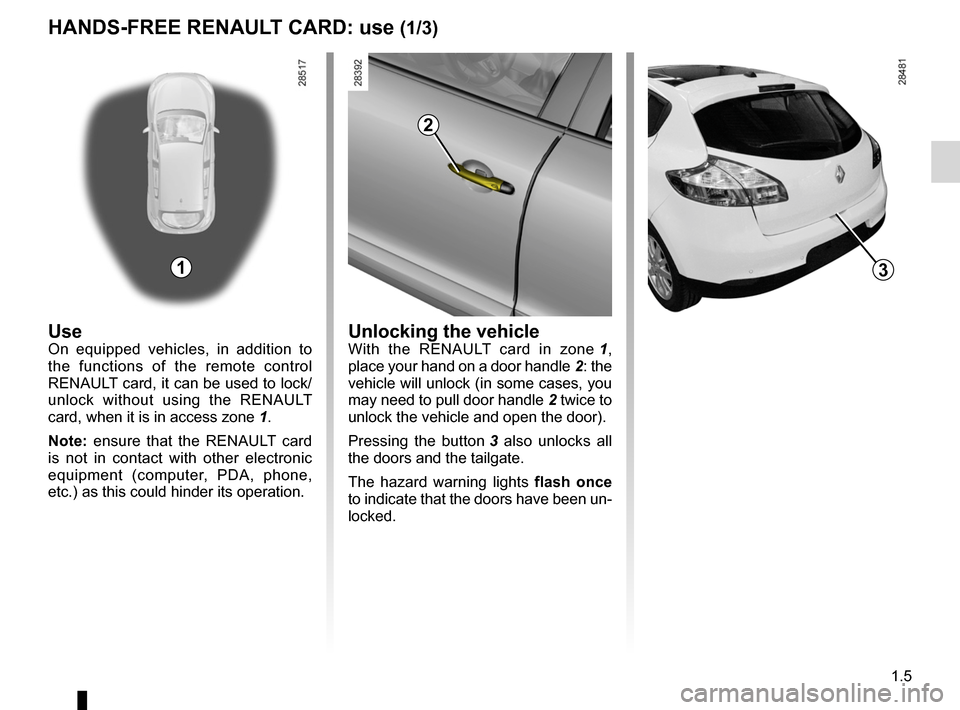
UseOn equipped vehicles, in addition to
the functions of the remote control
RENAULT card, it can be used to lock/
unlock without using the RENAULT
card, when it is in access zone 1.
Note: ensure that the RENAULT card
is not in contact with other electronic
equipment (computer, PDA, phone,
etc.) as this could hinder its operation.Unlocking the vehicleWith the RENAULT card in zone 1 ,
place your hand on a door handle 2: the
vehicle will unlock (in some cases, you
may need to pull door handle 2 twice to
unlock the vehicle and open the door).
Pressing the button 3 also unlocks all
the doors and the tailgate.
The hazard warning lights flash once
to indicate that the doors have been un-
locked.
1
2
3
Page 12 of 239
child safety............................................................. (current page)
children (safety) ..................................................... (current page)
1.6
ENG_UD14783_3
Carte RENAULT en mode mains libres (X95 - B95 - Renault)
ENG_NU_837-6_BDK95_Renault_1
Jaune NoirNoir texte
HANds-fREE RENAULT cARd: use (2/3)
Locking the vehicle
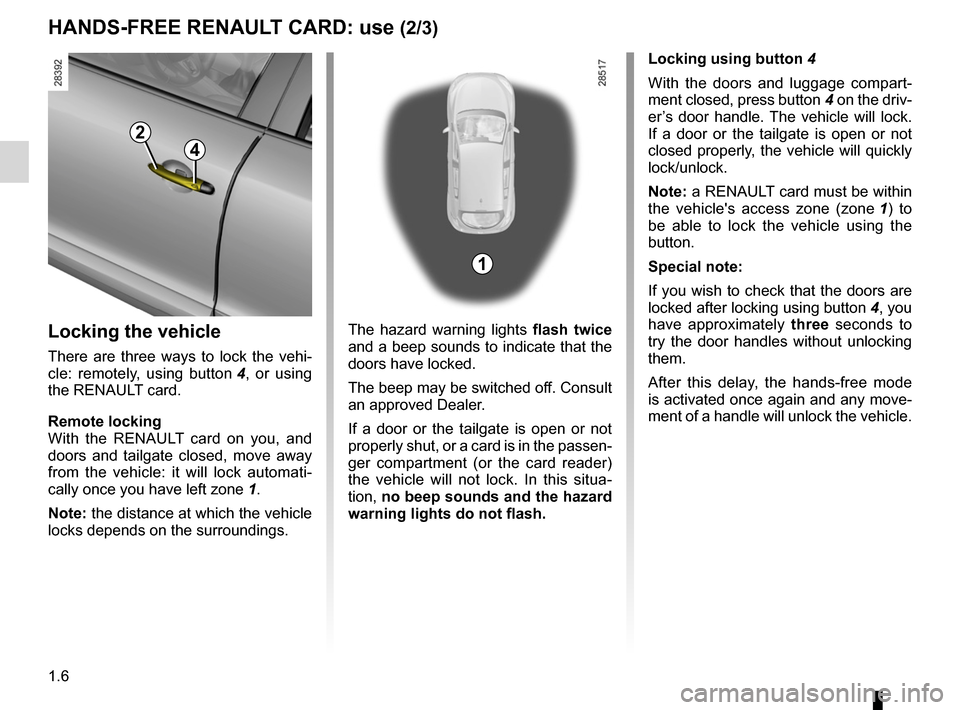
There are three ways to lock the vehi-
cle: remotely, using button 4 , or using
the RENAULT card.
Remote locking
With the RENAULT card on you, and
doors and tailgate closed, move away
from the vehicle: it will lock automati -
cally once you have left zone 1.
Note: the distance at which the vehicle
locks depends on the surroundings. The hazard warning lights
flash twice
and a beep sounds to indicate that the
doors have locked.
The beep may be switched off. Consult
an approved Dealer.
If a door or the tailgate is open or not
properly shut, or a card is in the passen -
ger compartment (or the card reader)
the vehicle will not lock. In this situa -
tion, no beep sounds and the hazard
warning lights do not flash.
2
4
Locking using button 4
With the doors and luggage compart -
ment closed, press button 4 on the driv-
er’s door handle. The vehicle will lock.
If a door or the tailgate is open or not
closed properly, the vehicle will quickly
lock/unlock.
Note: a RENAULT card must be within
the vehicle's access zone (zone 1 ) to
be able to lock the vehicle using the
button.
special note:
If you wish to check that the doors are
locked after locking using button 4, you
have approximately three seconds to
try the door handles without unlocking
them.
After this delay, the hands-free mode
is activated once again and any move-
ment of a handle will unlock the vehicle.
1
Page 13 of 239
JauneNoirNoir texte
1.7
ENG_UD14783_3
Carte RENAULT en mode mains libres (X95 - B95 - Renault)
ENG_NU_837-6_BDK95_Renault_1
With the engine running , if after
having opened and closed a door the
card is no longer in the passenger com-
partment, the message Keycard not de-
tected (accompanied by a beep when
the speed exceeds a certain level)
warns you that the card is no longer
in the vehicle. This avoids you driving
away after having dropped off a pas -
senger who has the card, for example.
The warning disappears when the card
is detected again.
HANds-fREE RENAULT cARd: use (3/3)
Locking the vehicle
(continued)
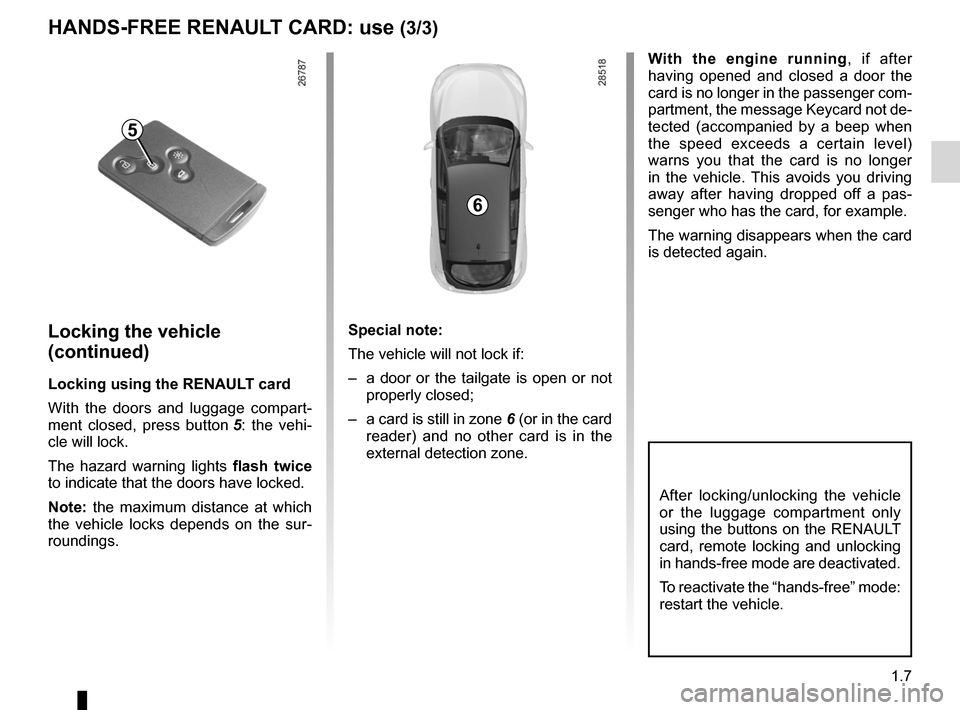
Locking using the RENAULT card
With the doors and luggage compart -
ment closed, press button 5 : the vehi -
cle will lock.
The hazard warning lights flash twice
to indicate that the doors have locked.
Note: the maximum distance at which
the vehicle locks depends on the sur -
roundings. special note:
The vehicle will not lock if:
–
a door or the tailgate is open or not
properly closed;
– a card is still in zone 6 (or in the card
reader) and no other card is in the
external detection zone.
5
6
After locking/unlocking the vehicle
or the luggage compartment only
using the buttons on the RENAULT
card, remote locking and unlocking
in hands-free mode are deactivated.
To reactivate the “hands-free” mode:
restart the vehicle.
Page 14 of 239
central door locking .............................. (up to the end of the DU)
doors/tailgate ........................................ (up to the end of the DU)
locking the doors .................................. (up to the end of the DU)
RENAULT card use .................................................. (up to the end of the DU)
deadlocking the doors ........................................... (current page)
1.8
ENG_UD10814_2
Cartes RENAULT : super-condamnation (X95 - B95 - D95 - Renault)
ENG_NU_837-6_BDK95_Renault_1
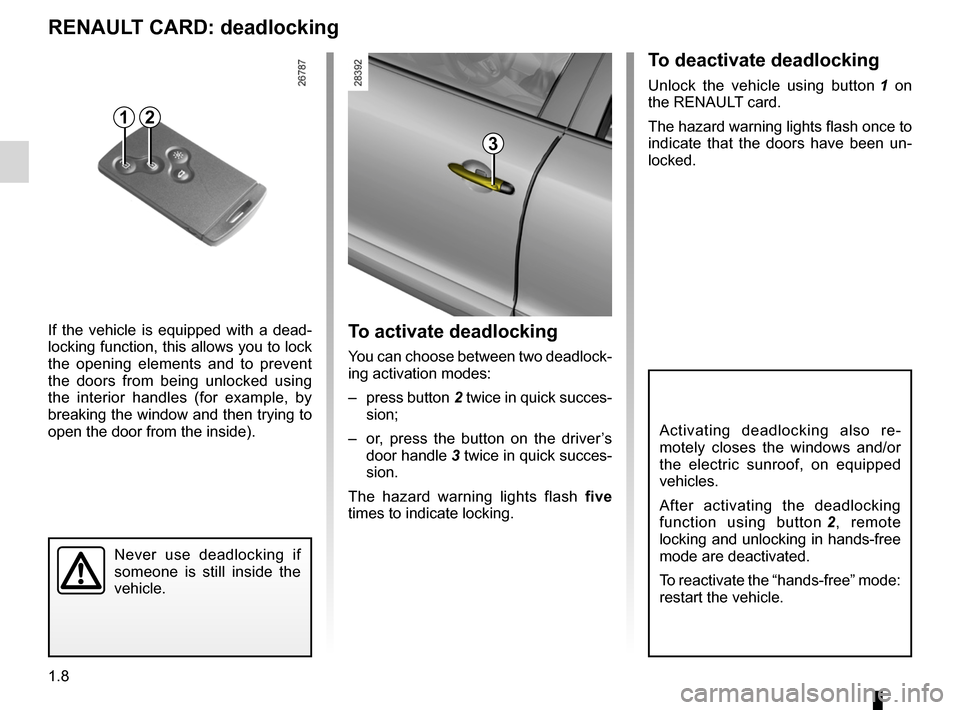
To deactivate deadlocking
Unlock the vehicle using button 1 on
the RENAULT card.
The hazard warning lights flash once to
indicate that the doors have been un -
locked.
Never use deadlocking if
someone is still inside the
vehicle.
To activate deadlocking
You can choose between two deadlock -
ing activation modes:
– press button 2 twice in quick succes-
sion;
– or, press the button on the driver’s
door handle 3 twice in quick succes-
sion.
The hazard warning lights flash five
times to indicate locking.
If the vehicle is equipped with a dead
-
locking function, this allows you to lock
the opening elements and to prevent
the doors from being unlocked using
the interior handles (for example, by
breaking the window and then trying to
open the door from the inside).
RENAULT cARd: deadlocking
2
Activating deadlocking also re -
motely closes the windows and/or
the electric sunroof, on equipped
vehicles.
After activating the deadlocking
function using button 2 , remote
locking and unlocking in hands-free
mode are deactivated.
To reactivate the “hands-free” mode:
restart the vehicle.
3
1
Page 15 of 239
locking the doors .................................. (up to the end of the DU)
RENAULT card use .................................................. (up to the end of the DU)
1.9
ENG_UD18962_2
Carte RENAULT en mode restreint (X95 - B95 - D95 - Renault)
ENG_NU_837-6_BDK95_Renault_1
RENAULT cARd “sER vIcE”
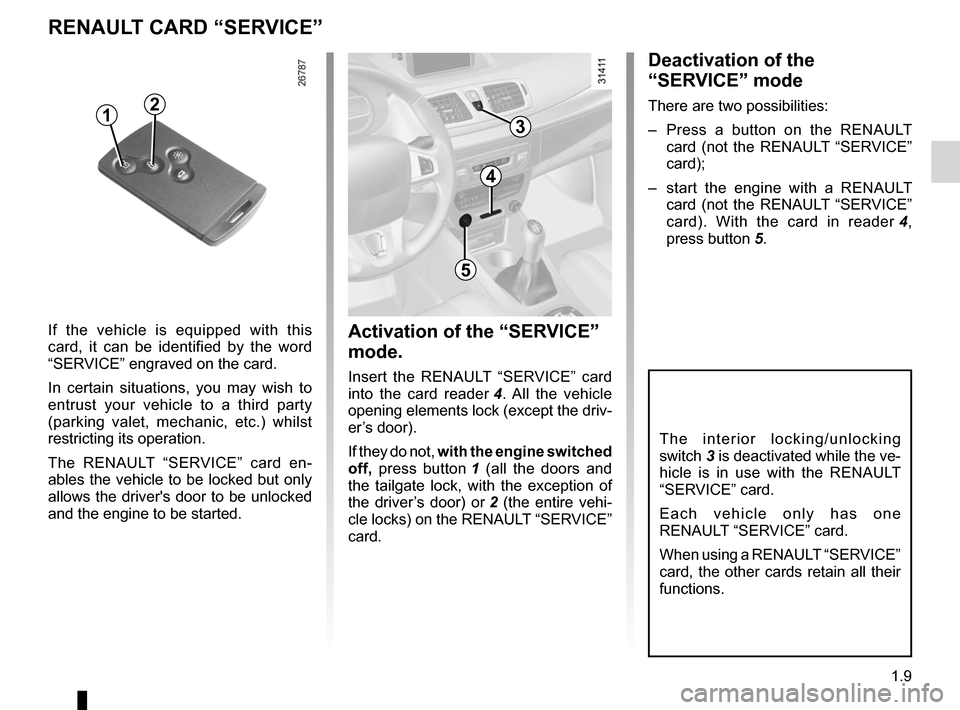
If the vehicle is equipped with this
card, it can be identified by the word
“SERVICE” engraved on the card.
In certain situations, you may wish to
entrust your vehicle to a third party
(parking valet, mechanic, etc.) whilst
restricting its operation.
The RENAULT “SERVICE” card en -
ables the vehicle to be locked but only
allows the driver's door to be unlocked
and the engine to be started.Activation of the “sER vIcE”
mode.
Insert the RENAULT “SERVICE” card
into the card reader 4 . All the vehicle
opening elements lock (except the driv-
er’s door).
If they do not, with the engine switched
off, press button 1 (all the doors and
the tailgate lock, with the exception of
the driver’s door) or 2 (the entire vehi -
cle locks) on the RENAULT “SERVICE”
card.
T h e i n t e r i o r l o c k i n g / u n l o c k i n g
switch 3 is deactivated while the ve-
hicle is in use with the RENAULT
“SERVICE” card.
E a c h v e h i c l e o n l y h a s o n e
RENAULT “SERVICE” card.
When using a RENAULT “SERVICE”
card, the other cards retain all their
functions.
12
4
5
deactivation of the
“sER vIcE” mode
There are two possibilities:
– Press a button on the RENAULT
card (not the RENAULT “SERVICE”
card);
– start the engine with a RENAULT
card (not the RENAULT “SERVICE”
card). With the card in reader 4 ,
press button 5.
3
Page 19 of 239
\
ENG_NU_837-6_BDK95_Renault_1
LOcKINg/UNLOcKINg THE dOORs (2/2)
Interior locking/unlocking")
JauneNoirNoir texte
1.13
ENG_UD11876_3
Verrouillage / Déverrouillage des portes (X95 - B95 - D95 - Renault)\
ENG_NU_837-6_BDK95_Renault_1
LOcKINg/UNLOcKINg THE dOORs (2/2)
Interior locking/unlocking
door control
Switch 4 controls the doors, tailgate
and, depending on the vehicle, the fuel
filler flap simultaneously.
If a door or the tailgate is open or not
closed properly, the doors and tailgate
lock/unlock quickly.
If transporting an object with the tail -
gate open, you can still lock the doors:
with the engine stopped, press and
hold switch 4 for more than five sec -
onds to lock the other doors.
Locking the doors without
the RENAULT card
For example, in the event of a dis -
charged battery or the RENAULT card
temporarily not working, etc.
With the engine switched off and a
door or tailgate open, press and hold
switch 4 for more than five seconds.
When the door is closed, all the doors
and the tailgate will be locked.
Unlocking the vehicle from the outside
is only possible with the RENAULT card
in the vehicle's access zone or using
the key integrated in the RENAULT
card.
door and tailgate status
indicator
When the ignition is on, the indicator
light integrated in switch 4 informs you
of the status of the doors and tailgate:
– indicator light on, the doors and tail-
gate are locked,
– indicator light off, the doors and tail-
gate are unlocked.
When you lock the doors, the indicator
light remains lit and then goes out.
Never leave your vehicle
with the RENAULT card
inside.
If you decide to keep the
doors locked when you are
driving, remember that it
may be more difficult for the
emergency services to gain access
to the passenger compartment in
the event of an emergency.
4
After locking/unlocking the vehicle
or the tailgate only using the but -
tons on the RENAULT card, remote
locking and unlocking in hands-free
mode are deactivated.
To reactivate the “hands-free” mode:
restart the vehicle.
Page 61 of 239
JauneNoirNoir texte
1.55
ENG_UD18928_3
Tableau de bord : afficheurs et indicateurs (X95 - B95 - D95 - Renault)
ENG_NU_837-6_BDK95_Renault_1
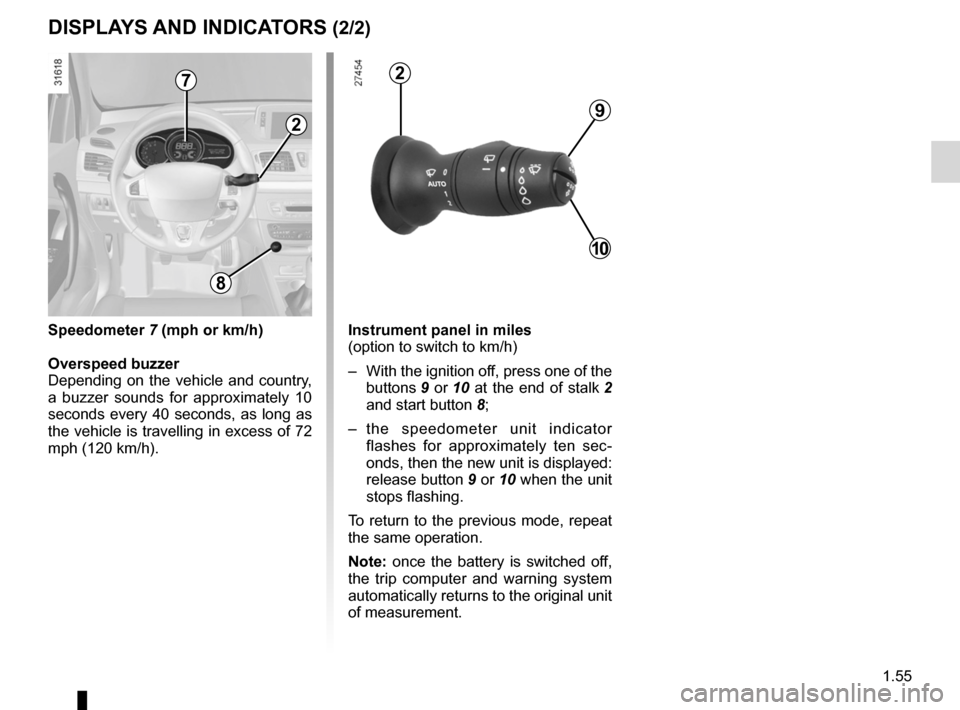
Instrument panel in miles
(option to switch to km/h)
– With the ignition off, press one of the
buttons 9 or 10 at the end of stalk 2
and start button 8;
– the speedometer unit indicator
flashes for approximately ten sec -
onds, then the new unit is displayed:
release button 9 or 10 when the unit
stops flashing.
To return to the previous mode, repeat
the same operation.
Note: once the battery is switched off,
the trip computer and warning system
automatically returns to the original unit
of measurement.
dIspLAYs ANd INdIcATORs (2/2)
9
10
2
2
8
speedometer 7 (mph or km/h)
Overspeed buzzer
Depending on the vehicle and country,
a buzzer sounds for approximately 10
seconds every 40 seconds, as long as
the vehicle is travelling in excess of 72
mph (120 km/h).
7
Page 72 of 239
menu for customising the vehicle settings
(up to the end of the DU)
customising the vehicle settings ........... (up to the end of the DU)
customised vehicle settings .................. (up to the end of the DU)
1.66
ENG_UD11347_2
Menu de personnalisation des réglages du véhicule (X95 - B95 - D9\
5 - Renault)
ENG_NU_837-6_BDK95_Renault_1
vehicle settings customisation menu
vEHIcLE sETTINgs cUsTOmIsATION mENU
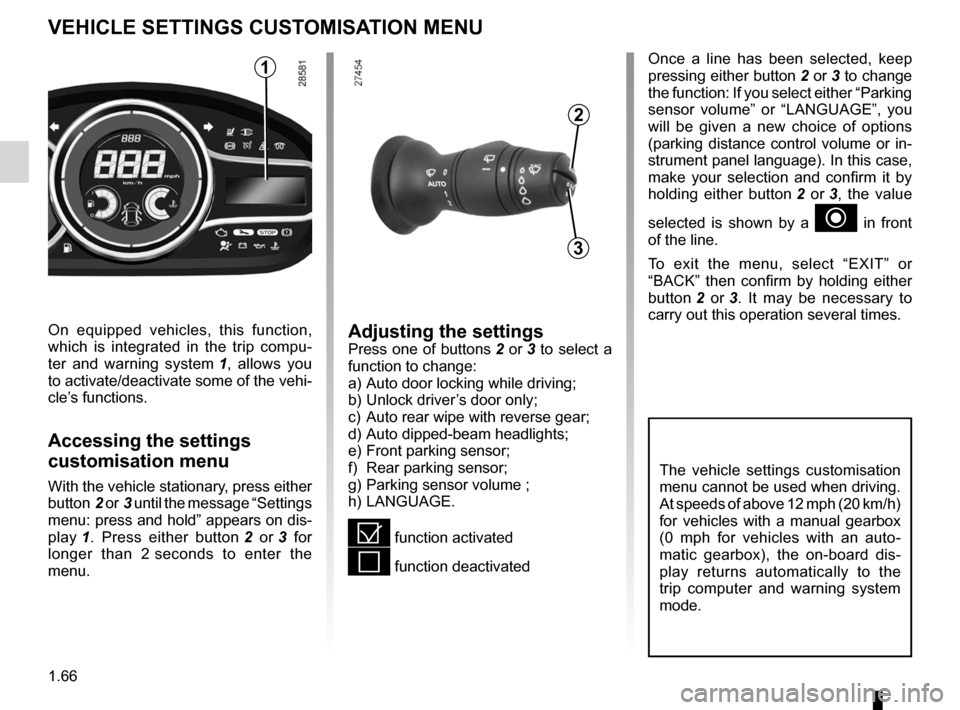
Adjusting the settingsPress one of buttons 2 or 3 to select a
function to change:
a) Auto door locking while driving ;
b) Unlock driver’s door only ;
c) Auto rear wipe with reverse gear ;
d) Auto dipped-beam headlights ;
e) Front parking sensor ;
f) Rear parking sensor ;
g) Parking sensor volume ;
h) LANGUAGE.
= function activated
< function deactivated
On equipped vehicles, this function,
which is integrated in the trip compu
-
ter and warning system 1 , allows you
to activate/deactivate some of the vehi-
cle’s functions.
Accessing the settings
customisation menu
With the vehicle stationary, press either
button 2 or 3 until the message “Settings
menu: press and hold ” appears on dis-
play 1 . Press either button 2 or 3 for
longer than 2 seconds to enter the
menu.
Once a line has been selected, keep
pressing either button 2 or 3 to change
the function: If you select either “Parking
sensor volume ” or “LANGUAGE ”, you
will be given a new choice of options
(parking distance control volume or in-
strument panel language). In this case,
make your selection and confirm it by
holding either button 2 or 3 , the value
selected is shown by a
~ in front
of the line.
To exit the menu, select “ EXIT” or
“ BACK ” then confirm by holding either
button 2 or 3 . It may be necessary to
carry out this operation several times.
2
3
1
The vehicle settings customisation
menu cannot be used when driving.
At speeds of above 12 mph (20 km/h)
for vehicles with a manual gearbox
(0 mph for vehicles with an auto -
matic gearbox), the on-board dis -
play returns automatically to the
trip computer and warning system
mode.
Page 75 of 239
rear view mirrors ................................... (up to the end of the DU)
1.69
ENG_UD6288_1
Rétroviseurs (X95 - B95 - D95 - Renault)
ENG_NU_837-6_BDK95_Renault_1
Rear view mirrors
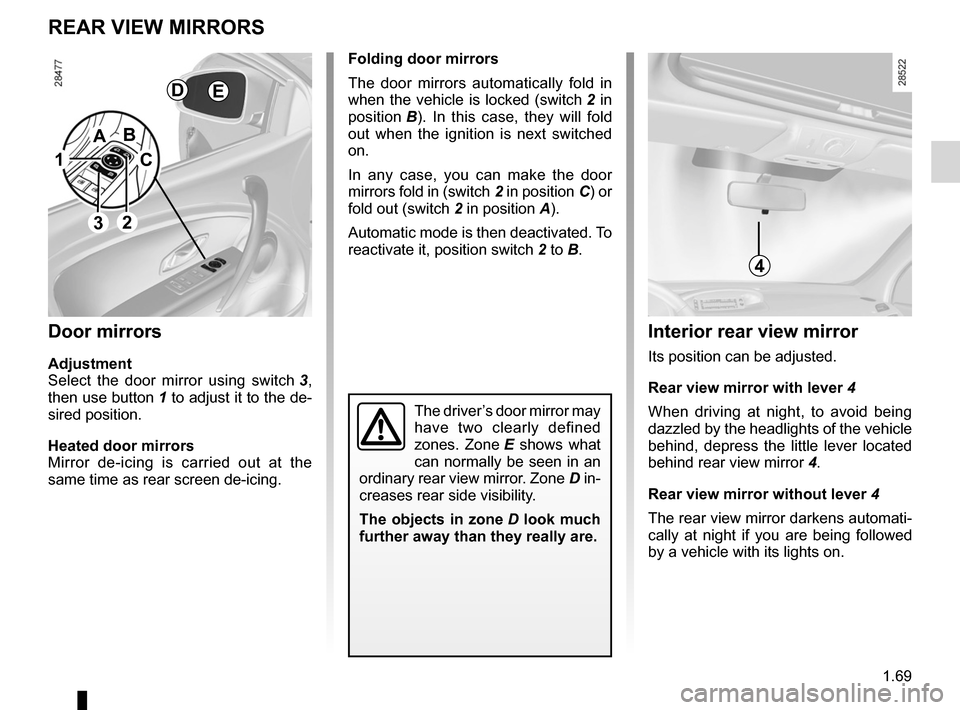
folding door mirrors
The door mirrors automatically fold in
when the vehicle is locked (switch 2 in
position B ). In this case, they will fold
out when the ignition is next switched
on.
In any case, you can make the door
mirrors fold in (switch 2 in position C) or
fold out (switch 2 in position A).
Automatic mode is then deactivated. To
reactivate it, position switch 2 to B.
REAR vIEW mIRRORs
door mirrors
Adjustment
Select the door mirror using switch 3 ,
then use button 1 to adjust it to the de-
sired position.
Heated door mirrors
Mirror de-icing is carried out at the
same time as rear screen de-icing.
The driver’s door mirror may
have two clearly defined
zones. Zone E shows what
can normally be seen in an
ordinary rear view mirror. Zone D in-
creases rear side visibility.
The objects in zone D look much
further away than they really are.
Interior rear view mirror
Its position can be adjusted.
Rear view mirror with lever 4
When driving at night, to avoid being
dazzled by the headlights of the vehicle
behind, depress the little lever located
behind rear view mirror 4.
Rear view mirror without lever 4
The rear view mirror darkens automati-
cally at night if you are being followed
by a vehicle with its lights on.
1
2
A
c
B
4
dE
3