13B-190
AFTER REPAIRCarry out a road test, then check with the diagnostic tool.
V4 MR-372-J84-13B000$140.mif
DIESEL INJECTION
Fault finding – Fault finding charts13B
InjectionDDCR
Vdiag No.: 44, 48
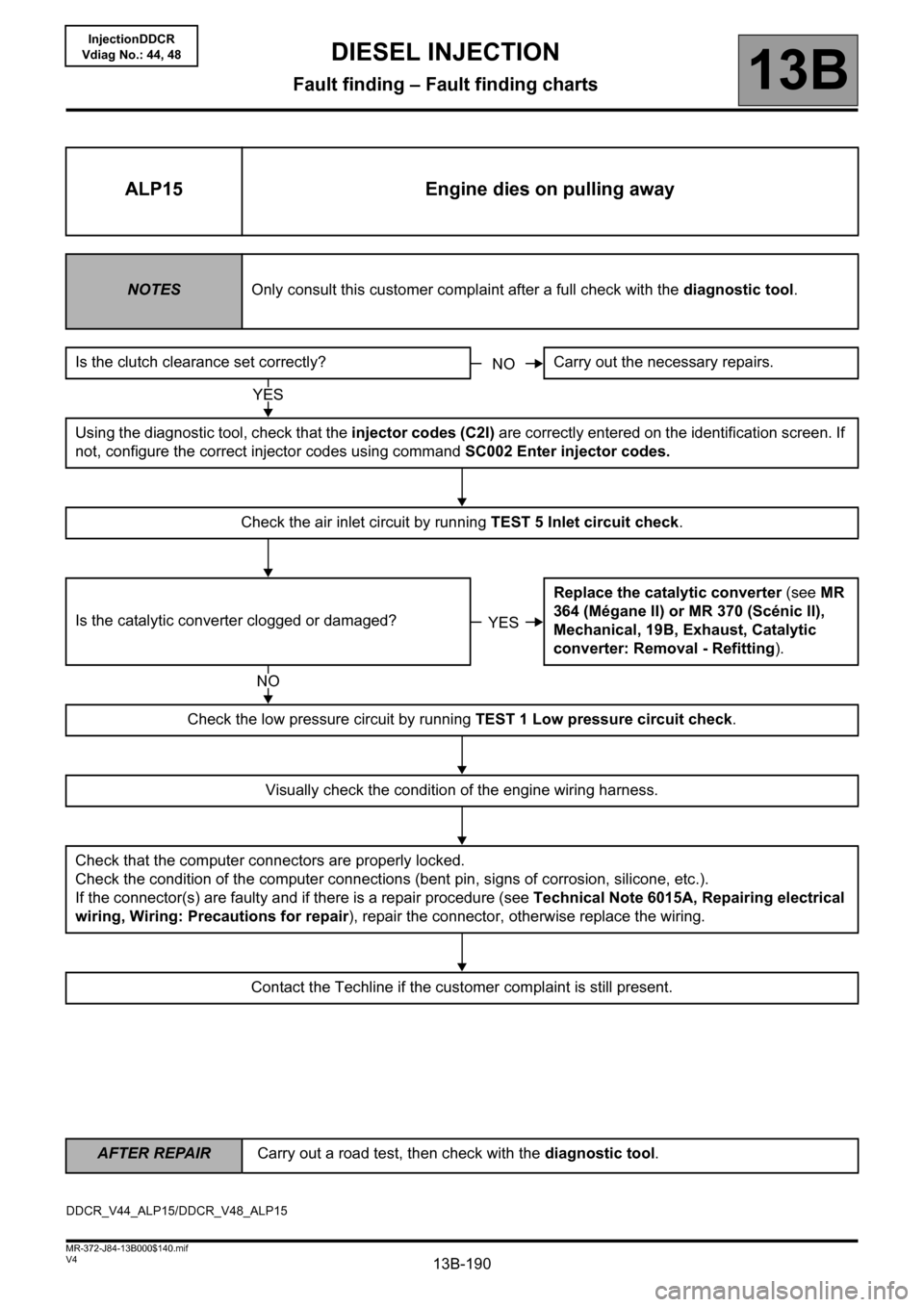
ALP15 Engine dies on pulling away
NOTESOnly consult this customer complaint after a full check with the diagnostic tool.
Is the clutch clearance set correctly? Carry out the necessary repairs.
Using the diagnostic tool, check that the injector codes (C2I) are correctly entered on the identification screen. If
not, configure the correct injector codes using command SC002 Enter injector codes.
Check the air inlet circuit by running TEST 5 Inlet circuit check.
Is the catalytic converter clogged or damaged?Replace the catalytic converter (see MR
364 (Mégane II) or MR 370 (Scénic II),
Mechanical, 19B, Exhaust, Catalytic
converter: Removal - Refitting).
Check the low pressure circuit by running TEST 1 Low pressure circuit check.
Visually check the condition of the engine wiring harness.
Check that the computer connectors are properly locked.
Check the condition of the computer connections (bent pin, signs of corrosion, silicone, etc.).
If the connector(s) are faulty and if there is a repair procedure (see Technical Note 6015A, Repairing electrical
wiring, Wiring: Precautions for repair), repair the connector, otherwise replace the wiring.
Contact the Techline if the customer complaint is still present.
NO
YES
YES
NO
DDCR_V44_ALP15/DDCR_V48_ALP15
13B-194
AFTER REPAIRCarry out a road test, then check with the diagnostic tool.
V4 MR-372-J84-13B000$140.mif
DIESEL INJECTION
Fault finding – Fault finding charts13B
InjectionDDCR
Vdiag No.: 44, 48
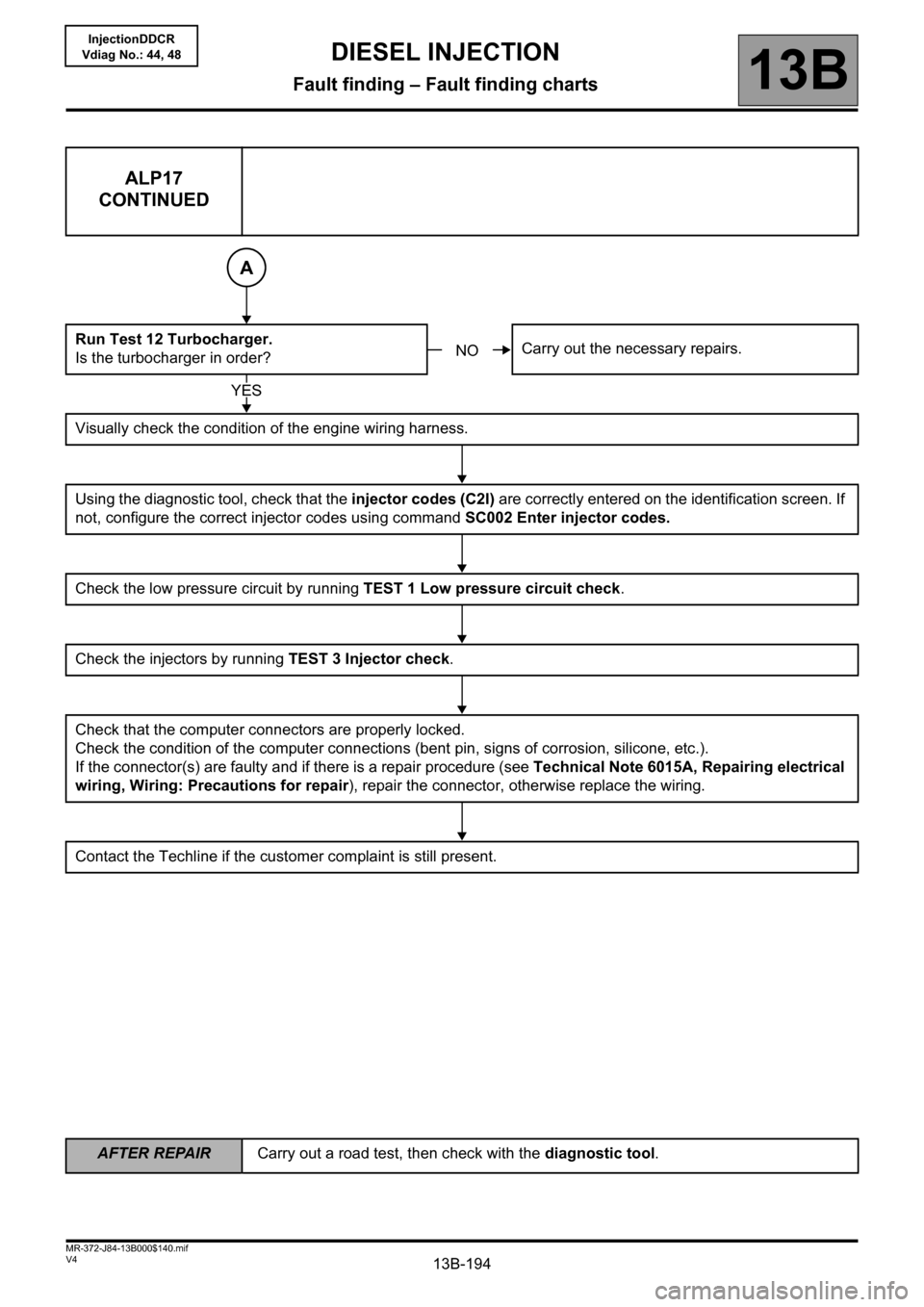
ALP17
CONTINUED
Run Test 12 Turbocharger.
Is the turbocharger in order?Carry out the necessary repairs.
Visually check the condition of the engine wiring harness.
Using the diagnostic tool, check that the injector codes (C2I) are correctly entered on the identification screen. If
not, configure the correct injector codes using command SC002 Enter injector codes.
Check the low pressure circuit by running TEST 1 Low pressure circuit check.
Check the injectors by running TEST 3 Injector check.
Check that the computer connectors are properly locked.
Check the condition of the computer connections (bent pin, signs of corrosion, silicone, etc.).
If the connector(s) are faulty and if there is a repair procedure (see Technical Note 6015A, Repairing electrical
wiring, Wiring: Precautions for repair), repair the connector, otherwise replace the wiring.
Contact the Techline if the customer complaint is still present.
A
NO
YES