display RENAULT SCENIC 2018 User Guide
[x] Cancel search | Manufacturer: RENAULT, Model Year: 2018, Model line: SCENIC, Model: RENAULT SCENIC 2018Pages: 364, PDF Size: 10.43 MB
Page 77 of 364

The display of information shown below DEPENDS ON THE VEHICLE EQUIPMENT \
AND COUNTRY.
On display C or, depending on the
vehicle, on the rear-view mirror D
Passenger Air")
1.71
WARNING LIGHTS (6/6)
The display of information shown below DEPENDS ON THE VEHICLE EQUIPMENT \
AND COUNTRY.
On display C or, depending on the
vehicle, on the rear-view mirror D
Passenger Airbag ON
Refer to the information on
“Child safety: deactivating/activating
the front passenger airbag” in Section 1.
¹Passenger Airbag OFF
Refer to the information on
“Child safety: deactivating/activating
the front passenger airbag” in
Section 1).
ßDriver’s seat belt reminder
and, depending on the vehi-
cle, front passenger seat belt re-
minder.
This lights up when the ignition is
switched on if the driver's or front pas-
senger's seat belt (if the passenger
seat is occupied) is not fastened and
the vehicle has reached approximately
12.4 mph (20 km/h), it flashes and a
beep sounds for around 2 minutes.
Note: an object placed on the passen-
ger seat base can activate the warning
light.
C
D
Page 78 of 364
1.72
DISPLAYS AND INDICATORS (1/6)
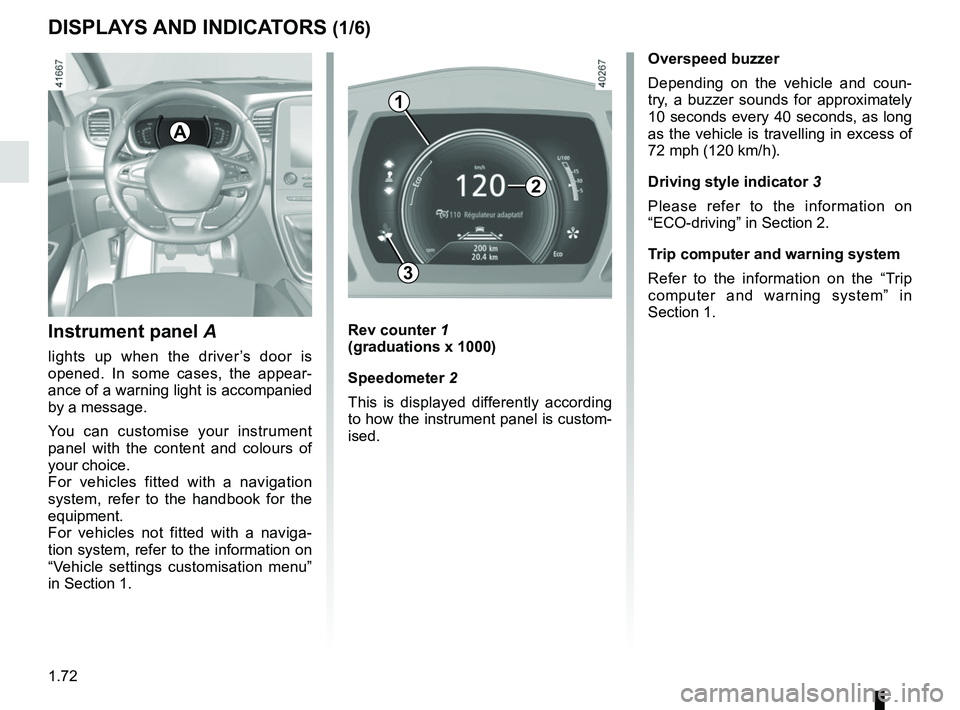
Instrument panel A
lights up when the driver’s door is
opened. In some cases, the appear-
ance of a warning light is accompanied
by a message.
You can customise your instrument
panel with the content and colours of
your choice.
For vehicles fitted with a navigation
system, refer to the handbook for the
equipment.
For vehicles not fitted with a naviga-
tion system, refer to the information on
“Vehicle settings customisation menu”
in Section 1.
Rev counter 1
(graduations x 1000)
Speedometer 2
This is displayed differently according
to how the instrument panel is custom-
ised.
3
A
Overspeed buzzer
Depending on the vehicle and coun-
try, a buzzer sounds for approximately
10 seconds every 40 seconds, as long
as the vehicle is travelling in excess of
72 mph (120 km/h).
Driving style indicator 3
Please refer to the information on
“ECO-driving” in Section 2.
Trip computer and warning system
Refer to the information on the “Trip
computer and warning system” in
Section 1.
1
2
Page 79 of 364
1.73
DISPLAYS AND INDICATORS (2/6)
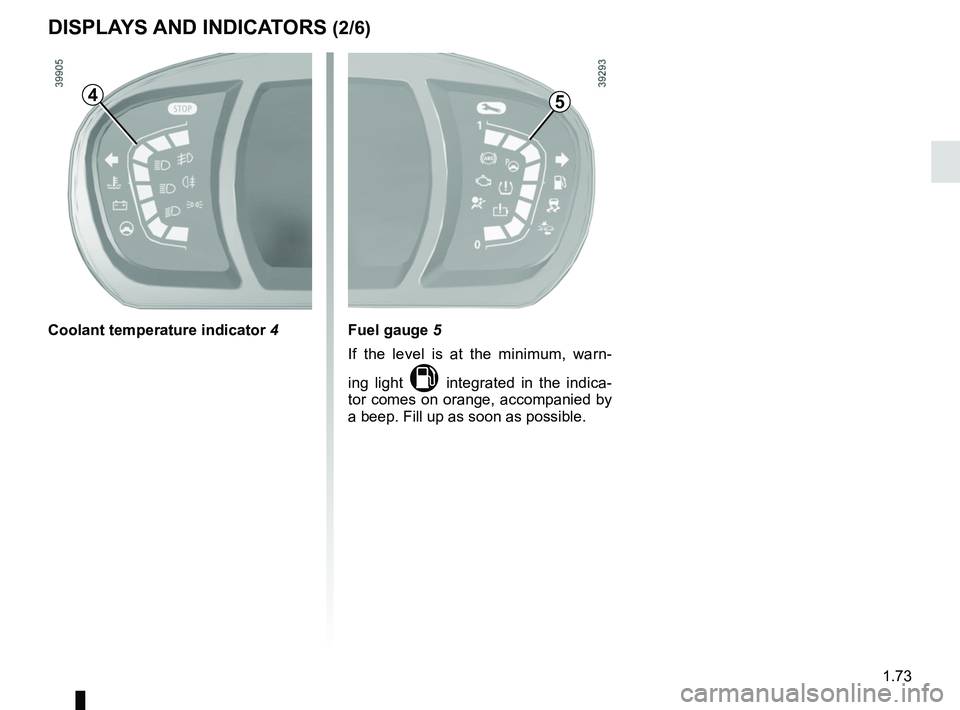
Fuel gauge 5
If the level is at the minimum, warn-
ing light
M integrated in the indica-
tor comes on orange, accompanied by
a beep. Fill up as soon as possible.
Coolant temperature indicator 4
54
Page 80 of 364
1.74
DISPLAYS AND INDICATORS (3/6)
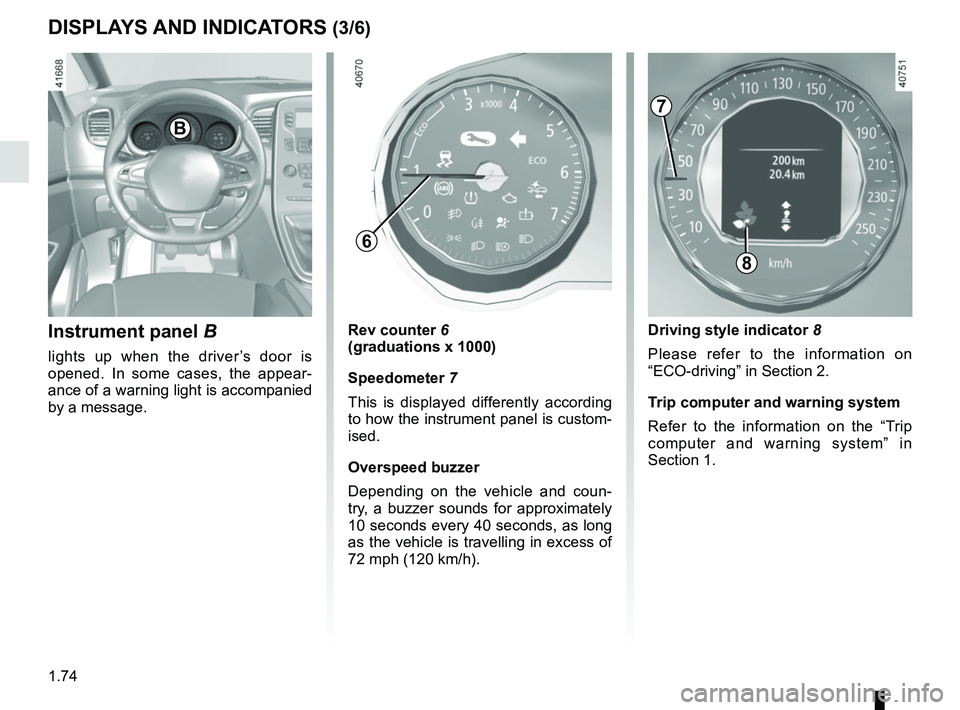
Instrument panel B
lights up when the driver’s door is
opened. In some cases, the appear-
ance of a warning light is accompanied
by a message.
Rev counter 6
(graduations x 1000)
Speedometer 7
This is displayed differently according
to how the instrument panel is custom-
ised.
Overspeed buzzer
Depending on the vehicle and coun-
try, a buzzer sounds for approximately
10 seconds every 40 seconds, as long
as the vehicle is travelling in excess of
72 mph (120 km/h).
8
B
Driving style indicator 8
Please refer to the information on
“ECO-driving” in Section 2.
Trip computer and warning system
Refer to the information on the “Trip
computer and warning system” in
Section 1.
7
6
Page 81 of 364
1.75
DISPLAYS AND INDICATORS (4/6)
1110
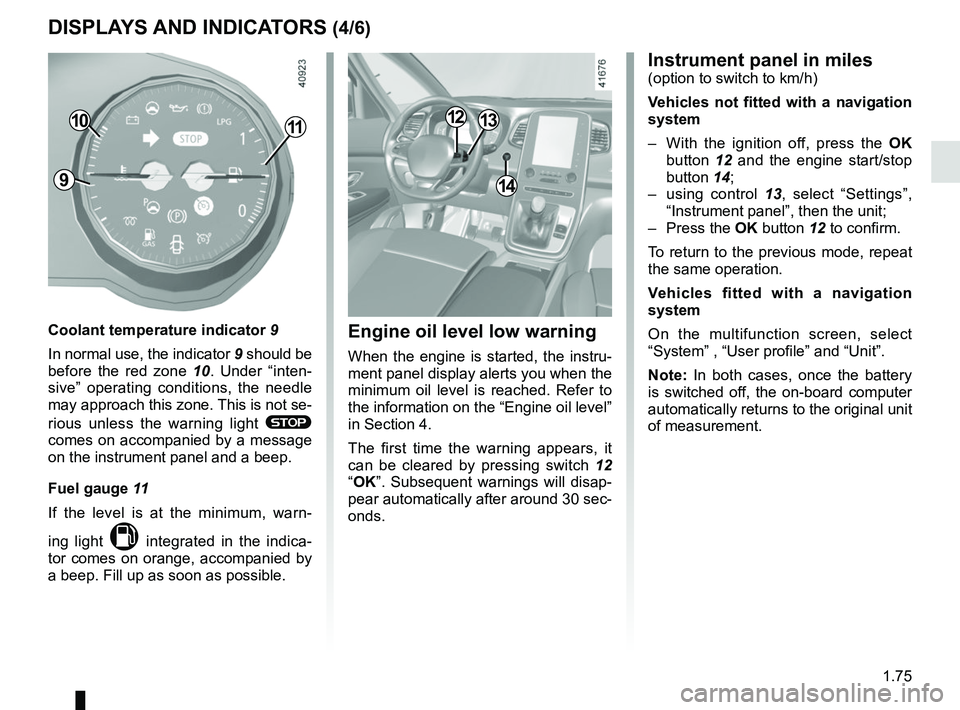
Coolant temperature indicator 9
In normal use, the indicator 9 should be
before the red zone 10. Under “inten-
sive” operating conditions, the needle
may approach this zone. This is not se-
rious unless the warning light
®
comes on accompanied by a message
on the instrument panel and a beep.
Fuel gauge 11
If the level is at the minimum, warn-
ing light
M integrated in the indica-
tor comes on orange, accompanied by
a beep. Fill up as soon as possible.
914
1213
Instrument panel in miles(option to switch to km/h)
Vehicles not fitted with a navigation
system
– With the ignition off, press the OK
button 12 and the engine start/stop
button 14;
– using control 13, select “Settings”,
“Instrument panel”, then the unit;
– Press the OK button 12 to confirm.
To return to the previous mode, repeat
the same operation.
Vehicles fitted with a navigation
system
On the multifunction screen, select
“System” , “User profile” and “Unit”.
Note: In both cases, once the battery
is switched off, the on-board computer
automatically returns to the original unit
of measurement.
Engine oil level low warning
When the engine is started, the instru-
ment panel display alerts you when the
minimum oil level is reached. Refer to
the information on the “Engine oil level”
in Section 4.
The first time the warning appears, it
can be cleared by pressing switch 12
“OK”. Subsequent warnings will disap-
pear automatically after around 30 sec-
onds.
Page 82 of 364
1.76
DISPLAYS AND INDICATORS (5/6)
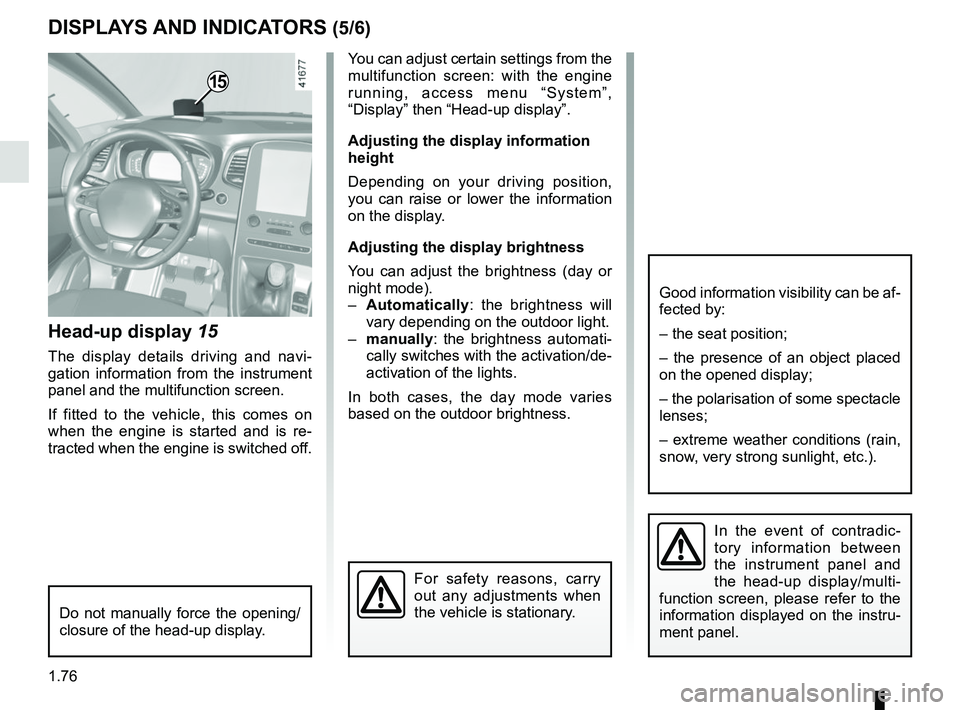
Head-up display 15
The display details driving and navi-
gation information from the instrument
panel and the multifunction screen.
If fitted to the vehicle, this comes on
when the engine is started and is re-
tracted when the engine is switched off.
15
You can adjust certain settings from the
multifunction screen: with the engine
running, access menu “System”,
“Display” then “Head-up display”.
Adjusting the display information
height
Depending on your driving position,
you can raise or lower the information
on the display.
Adjusting the display brightness
You can adjust the brightness (day or
night mode).
– Automatically : the brightness will
vary depending on the outdoor light.
– manually: the brightness automati-
cally switches with the activation/de-
activation of the lights.
In both cases, the day mode varies
based on the outdoor brightness.
Good information visibility can be af-
fected by:
– the seat position;
– the presence of an object placed
on the opened display;
– the polarisation of some spectacle
lenses;
– extreme weather conditions (rain,
snow, very strong sunlight, etc.).
In the event of contradic-
tory information between
the instrument panel and
the head-up display/multi-
function screen, please refer to the
information displayed on the instru-
ment panel.
Do not manually force the opening/
closure of the head-up display.
For safety reasons, carry
out any adjustments when
the vehicle is stationary.
Page 83 of 364
1.77
DISPLAYS AND INDICATORS (6/6)
Operating faults
In the event of a malfunction (the dis-
play fails to open when the engine is
started, or the display retracts, with the
engine running, following an object im-
pacting the display):
– stop and restart the engine;
or
– from the multifunction screen, change the display opening settings.
If there is still a problem, contact an au-
thorised dealer.
With the display opened or closed,
no object should be placed on it or
in its housing.
Do not use solvents, detergents or
an abrasive cloth to clean the dis-
play.
Only use a microfibre wipe.
Page 84 of 364
1.78
TRIP COMPUTER: general information (1/2)
1
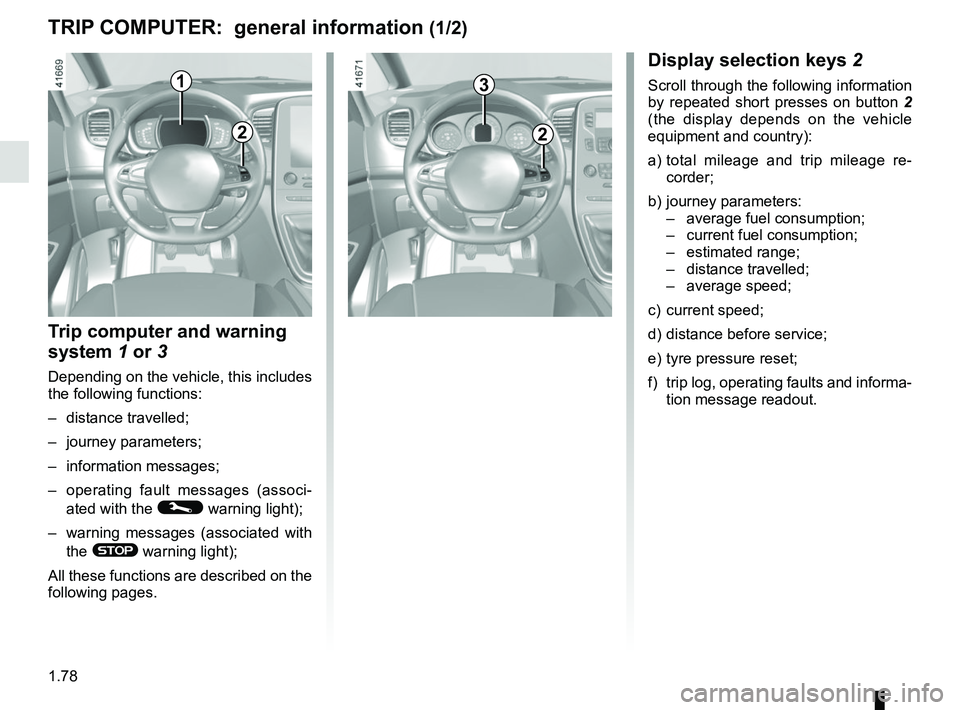
Display selection keys 2
Scroll through the following information
by repeated short presses on button 2
(the display depends on the vehicle
equipment and country):
a) total mileage and trip mileage re-
corder;
b) journey parameters: – average fuel consumption;
– current fuel consumption;
– estimated range;
– distance travelled;
– average speed;
c) current speed;
d) distance before service;
e) tyre pressure reset;
f) trip log, operating faults and informa- tion message readout.
Trip computer and warning
system 1 or 3
Depending on the vehicle, this includes
the following functions:
– distance travelled;
– journey parameters;
– information messages;
– operating fault messages (associ-
ated with the
© warning light);
– warning messages (associated with the
® warning light);
All these functions are described on the
following pages.
2
3
2
Page 85 of 364
1.79
ON-BOARD COMPUTER: general information (2/2)
4
Interpreting some of the
values displayed after
resetting
The values showing average fuel con-
sumption and average speed will
become more stable and reliable the
further you have travelled since the last
time the Reset button was pressed.
The average fuel consumption may de-
crease when:
– the vehicle stops accelerating;
– the engine reaches its operating
temperature (if the engine was cold
when the reset key was pressed);
– when driving from an urban area
onto the open road.
Automatic resetting of the
journey parameters
Resetting occurs automatically when
the maximum value of any of the pa-
rameters is exceeded.
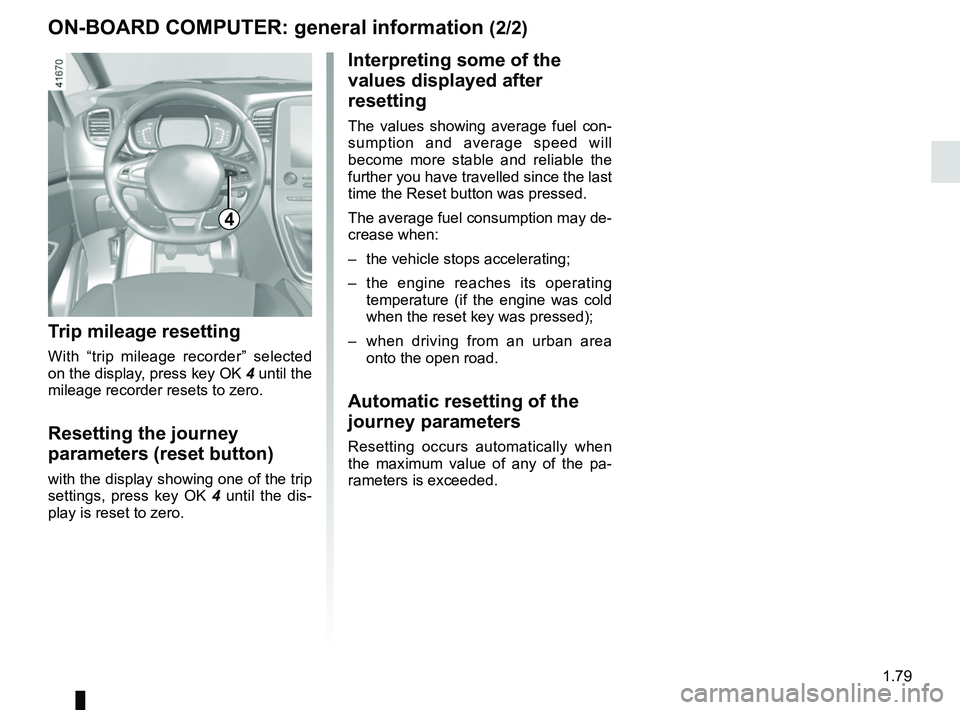
Trip mileage resetting
With “trip mileage recorder” selected
on the display, press key OK 4 until the
mileage recorder resets to zero.
Resetting the journey
parameters (reset button)
with the display showing one of the trip
settings, press key OK 4 until the dis-
play is reset to zero.
Page 86 of 364

The display of information shown below DEPENDS ON THE VEHICLE EQUIPMENT \
AND COUNTRY.
Examples of selectionsInterpreting the display selected
101778 km
a)")
1.80
ON-BOARD COMPUTER: trip settings (1/5)
The display of information shown below DEPENDS ON THE VEHICLE EQUIPMENT \
AND COUNTRY.
Examples of selectionsInterpreting the display selected
101778 km
a) Total mileage and trip mileage recorder.
112.4 km
Average
b) Journey parameters: Average fuel consumption.
The value is displayed after having travelled at least 400 metres since \
the last
reset.
5.8 L/100
Current
Current fuel consumption. Value displayed after reaching a speed, depending on the vehicle, from 6.\
2 mph
(10 km/h) to 18.6 mph (30 km/h).
7.4 L/100