display RENAULT SCENIC 2018 Repair Manual
[x] Cancel search | Manufacturer: RENAULT, Model Year: 2018, Model line: SCENIC, Model: RENAULT SCENIC 2018Pages: 364, PDF Size: 10.43 MB
Page 208 of 364
2.88
This function is an additional
aid. It cannot, therefore,
under any circumstances
replace the vigilance or the
responsibility of the driver.
The driver should always be ready
for sudden incidents while driv-
ing: always ensure that there are
no small, narrow moving obstacles
(such as a child, animal, pushchair,
bicycle, stone, post etc.) in the blind
spot when manoeuvring.
The screen shows a reverse mirror
image.
The frames are a representation
projected on a flat surface. This in-
formation is to not be taken into ac-
count when superimposed on a
vertical object or an object on the
ground.
Objects which appear on the edge
of the screen may be deformed.
In very bright light (snow, vehicle in
sunshine etc.), the camera vision
may be adversely affected.
If the boot is open or poorly closed,
the message “Boot open” appears
and the camera display disappears.
You can also adjust the camera image
settings (brightness, contrast, etc.)
Activating, deactivating the
reversing camera
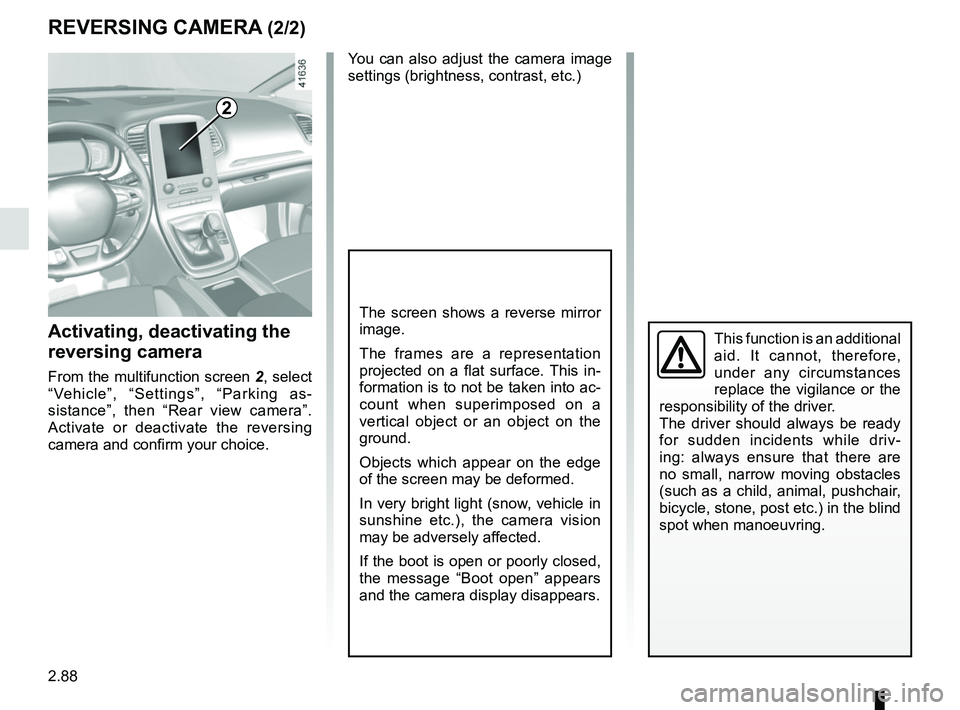
From the multifunction screen 2, select
“Vehicle”, “Settings”, “Parking as-
sistance”, then “Rear view camera”.
Activate or deactivate the reversing
camera and confirm your choice.
REVERSING CAMERA (2/2)
2
Page 210 of 364
2.90
ASSISTED PARKING (2/4)
Choice of manoeuvre
The system can perform four types of
manoeuvres:
– parallel parking;
– perpendicular parking;
– angle parking;
– moving out of a parallel parking space.
From the multifunction screen, select
the manoeuvre to be performed.
Note: when starting the vehicle, or after
having successfully completed parallel
parking using the system, the default
manoeuvre proposed by the system is
assistance in exiting a parallel parking
space. In other cases, the default ma-
noeuvre can be set from the multifunc-
tion screen.
Operation
Parking
As long as the vehicle speed is less
than 20 mph (30 km/h), the system
looks for available parking spaces on
both sides of the vehicle.
Once a space has been found, it is dis-
played on the multifunction screen, in-
dicated by a small letter “P”. So that
the vehicle can detect a space, drive
slowly, with the indicators activated on
the same side as the space, until the
message “Stop” is displayed, along
with a beep.
The space is then indicated on the mul-
tifunction screen by a capital “P”.
– Stop the vehicle;
– select reverse gear.
The
indicator light lights up
on the instrument panel and a beep
sounds;
– release the steering wheel;
– follow the system instructions pro- vided on the multifunction screen. Your speed should not exceed around 4
mph (7 km/h).
Once the warning light
on the
instrument panel goes off and a beep
sounds, the manoeuvre has been com-
pleted.
Page 211 of 364
2.91
ASSISTED PARKING (3/4)
Your speed should not exceed around
4 mph (7 km/h).
Once in position to exit the space, the
system will notify you of the end of the
manoeuvre.
Once the warning light
on the
instrument panel goes off and a beep
sounds, the manoeuvre has been com-
pleted.
Suspending the manoeuvreThe manoeuvre is suspended in the fol-
lowing circumstances:
– you take control of the wheel;
– a door or the boot is opened;
– the vehicle is at a standstill for too long;
– an obstacle in the direction of move- ment prevents the manoeuvre from
being completed;
– the engine will stop.
Once the warning light
on the
instrument panel goes off and a beep
sounds, the manoeuvre has been sus-
pended. To resume the manoeuvre,
press and hold the system activation
switch. In this case, the reason for suspending
the manoeuvre will be displayed on the
multifunction screen.
Make sure:
– you have released the steering
wheel;
and
– that all doors and the boot are closed;
and
– that no obstacles are in the way of the direction of movement;
and
– that the engine is started.
Cancelling the manoeuvre
The manoeuvre can be stopped in the
following cases:
– by pressing the system activation switch;
– the vehicle speed has exceeded 4 mph (7 km/h);
– you have performed more than ten forwards/backwards movements in
one manoeuvre;
– the parking distance control sensors are dirty or blocked;
– the vehicle wheels have skidded.
Once the warning light
on the
instrument panel goes off and a beep
sounds, the manoeuvre has been com-
pleted.
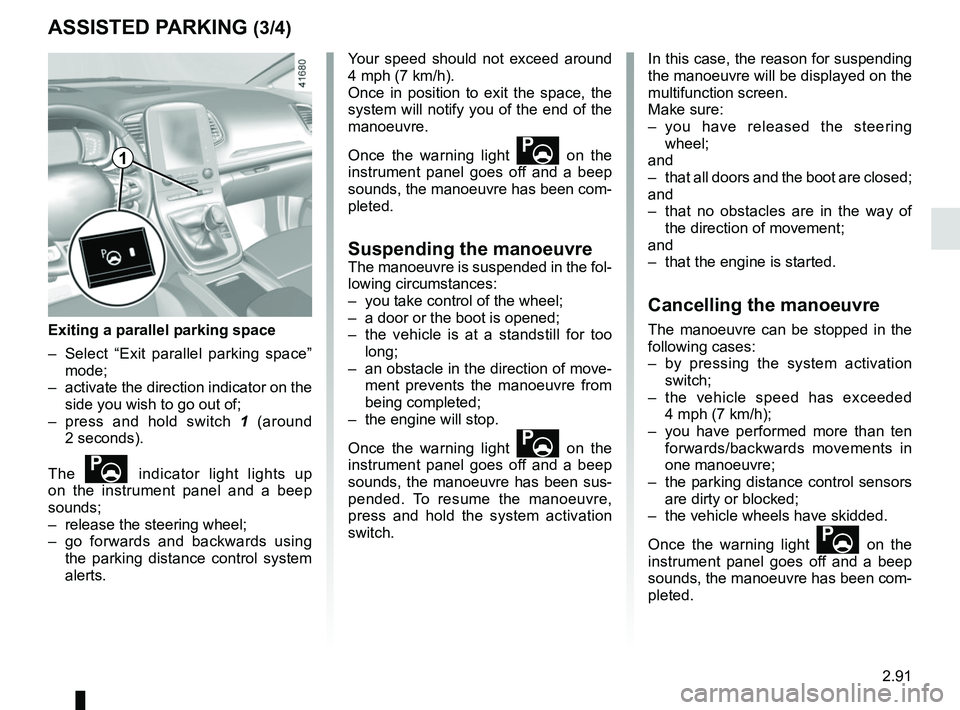
Exiting a parallel parking space
– Select “Exit parallel parking space” mode;
– activate the direction indicator on the side you wish to go out of;
– press and hold switch 1 (around
2 seconds).
The
indicator light lights up
on the instrument panel and a beep
sounds;
– release the steering wheel;
– go forwards and backwards using the parking distance control system
alerts.
1
Page 213 of 364
2.93
AUTOMATIC GEARBOX (1/3)
2
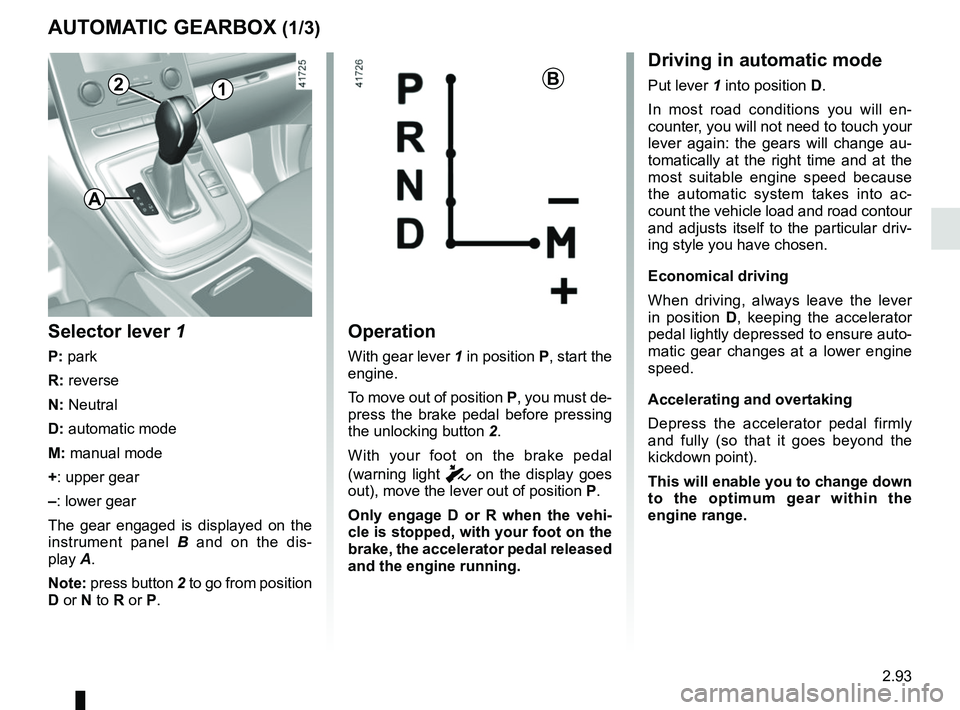
Operation
With gear lever 1 in position P, start the
engine.
To move out of position P, you must de-
press the brake pedal before pressing
the unlocking button 2.
With your foot on the brake pedal
(warning light
c on the display goes
out), move the lever out of position P.
Only engage D or R when the vehi-
cle is stopped, with your foot on the
brake, the accelerator pedal released
and the engine running.
1B
Selector lever 1
P: park
R: reverse
N: Neutral
D: automatic mode
M: manual mode
+: upper gear
–: lower gear
The gear engaged is displayed on the
instrument panel B and on the dis-
play A.
Note: press button 2 to go from position
D or N to R or P.
Driving in automatic mode
Put lever 1 into position D.
In most road conditions you will en-
counter, you will not need to touch your
lever again: the gears will change au-
tomatically at the right time and at the
most suitable engine speed because
the automatic system takes into ac-
count the vehicle load and road contour
and adjusts itself to the particular driv-
ing style you have chosen.
Economical driving
When driving, always leave the lever
in position D, keeping the accelerator
pedal lightly depressed to ensure auto-
matic gear changes at a lower engine
speed.
Accelerating and overtaking
Depress the accelerator pedal firmly
and fully (so that it goes beyond the
kickdown point).
This will enable you to change down
to the optimum gear within the
engine range.
A
Page 214 of 364
2.94
Special circumstances
– If the bends and road surface do
not allow you to stay in automatic
mode (e.g. in the mountains), we
recommend that you change to
manual mode. This will prevent the
automatic gearbox from changing
gear repeatedly when climbing, and
permit engine braking on long de-
scents.
– In cold weather , start the engine
and wait a few seconds before
moving the selector lever from posi-
tion P or N and engaging it in D or R
to prevent the engine stalling.
The gear selected is displayed on the
instrument panel.
Special casesIn certain driving conditions (result-
ing in, for example, engine protection,
operation of the Electronic Stability
Control programme: ESC etc.) the au-
tomated system may change the gear
automatically.
Likewise, to prevent incorrect manoeu-
vres, a gear change may be refused by
the automatic system: in this case the
gear display flashes for a few seconds
as a warning.
AUTOMATIC GEARBOX (2/3)
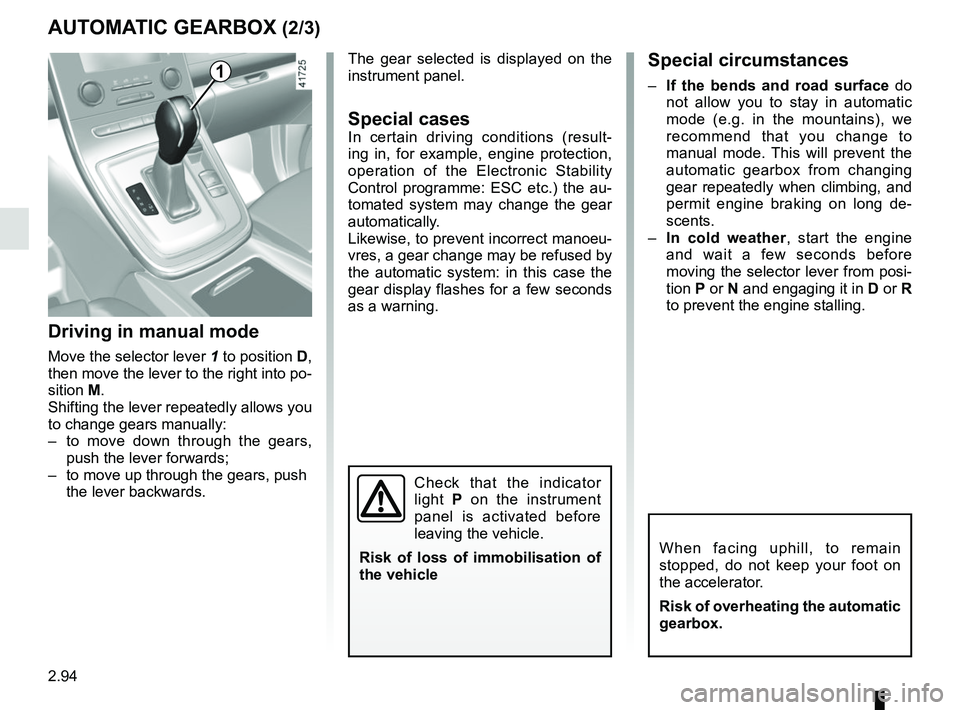
Driving in manual mode
Move the selector lever 1 to position D,
then move the lever to the right into po-
sition M.
Shifting the lever repeatedly allows you
to change gears manually:
– to move down through the gears, push the lever forwards;
– to move up through the gears, push the lever backwards.
1
When facing uphill, to remain
stopped, do not keep your foot on
the accelerator.
Risk of overheating the automatic
gearbox.
Check that the indicator
light P on the instrument
panel is activated before
leaving the vehicle.
Risk of loss of immobilisation of
the vehicle
Page 218 of 364
3.2
MULTI-SENSE (1/2)
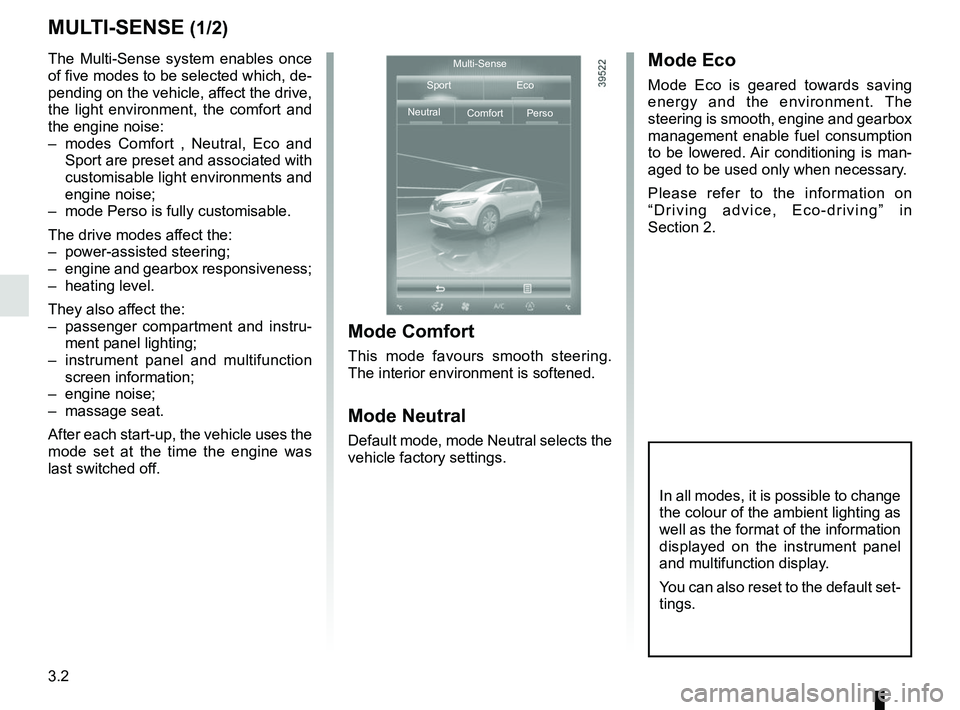
The Multi-Sense system enables once
of five modes to be selected which, de-
pending on the vehicle, affect the drive,
the light environment, the comfort and
the engine noise:
– modes Comfort , Neutral, Eco and Sport are preset and associated with
customisable light environments and
engine noise;
– mode Perso is fully customisable.
The drive modes affect the:
– power-assisted steering;
– engine and gearbox responsiveness;
– heating level.
They also affect the:
– passenger compartment and instru- ment panel lighting;
– instrument panel and multifunction screen information;
– engine noise;
– massage seat.
After each start-up, the vehicle uses the
mode set at the time the engine was
last switched off.
Mode Comfort
This mode favours smooth steering.
The interior environment is softened.
Mode Neutral
Default mode, mode Neutral selects the
vehicle factory settings.
Mode Eco
Mode Eco is geared towards saving
energy and the environment. The
steering is smooth, engine and gearbox
management enable fuel consumption
to be lowered. Air conditioning is man-
aged to be used only when necessary.
Please refer to the information on
“Driving advice, Eco-driving” in
Section 2.
Multi-Sense
Sport Eco
Neutral Comfort Perso
In all modes, it is possible to change
the colour of the ambient lighting as
well as the format of the information
displayed on the instrument panel
and multifunction display.
You can also reset to the default set-
tings.
Page 222 of 364
3.6
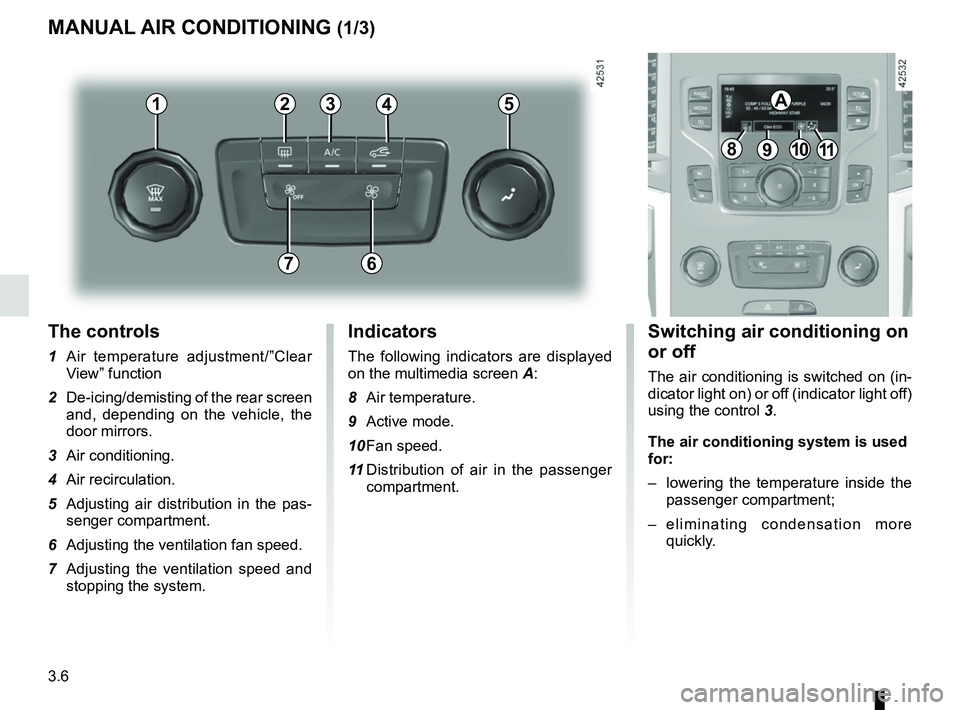
The controls
1 Air temperature adjustment/”Clear View” function
2 De-icing/demisting of the rear screen and, depending on the vehicle, the
door mirrors.
3 Air conditioning.
4 Air recirculation.
5 Adjusting air distribution in the pas- senger compartment.
6 Adjusting the ventilation fan speed.
7 Adjusting the ventilation speed and stopping the system.
MANUAL AIR CONDITIONING (1/3)
Switching air conditioning on
or off
The air conditioning is switched on (in-
dicator light on) or off (indicator light off)
using the control 3.
The air conditioning system is used
for:
– lowering the temperature inside the
passenger compartment;
– eliminating condensation more quickly.
Indicators
The following indicators are displayed
on the multimedia screen A:
8 Air temperature.
9 Active mode.
10 Fan speed.
11 Distribution of air in the passenger
compartment.
21
7
34
891011
A5
6
Page 223 of 364
3.7
MANUAL AIR CONDITIONING (2/3)
Distribution of air in the
passenger compartment
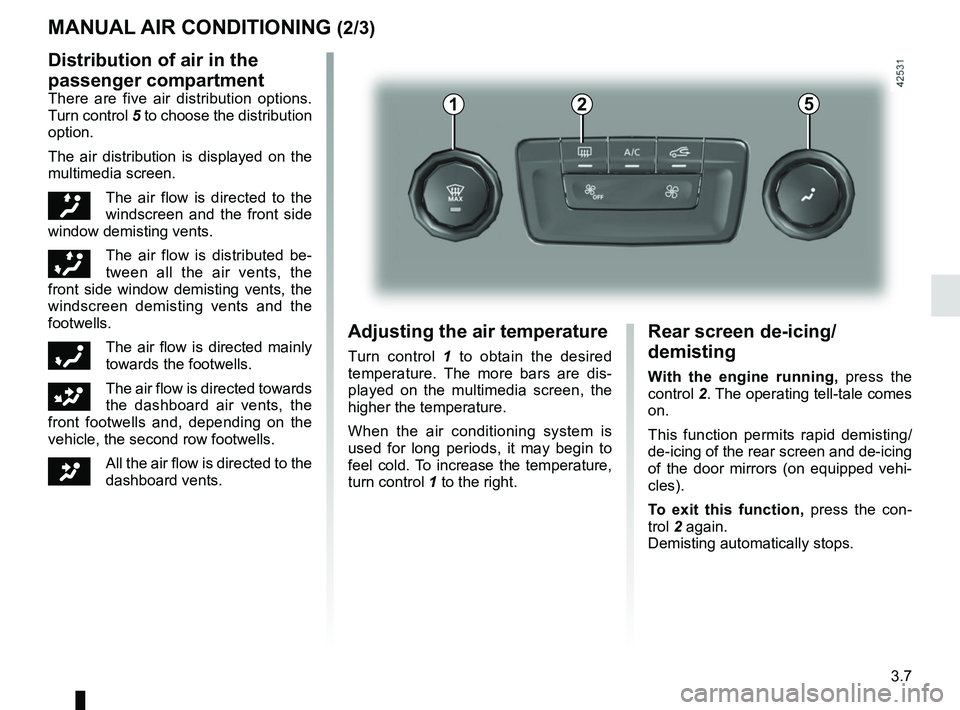
There are five air distribution options.
Turn control 5 to choose the distribution
option.
The air distribution is displayed on the
multimedia screen.
õThe air flow is directed to the
windscreen and the front side
window demisting vents.
÷The air flow is distributed be-
tween all the air vents, the
front side window demisting vents, the
windscreen demisting vents and the
footwells.
óThe air flow is directed mainly
towards the footwells.
GThe air flow is directed towards
the dashboard air vents, the
front footwells and, depending on the
vehicle, the second row footwells.
JAll the air flow is directed to the
dashboard vents.
5
Adjusting the air temperature
Turn control 1 to obtain the desired
temperature. The more bars are dis-
played on the multimedia screen, the
higher the temperature.
When the air conditioning system is
used for long periods, it may begin to
feel cold. To increase the temperature,
turn control 1 to the right.
Rear screen de-icing/
demisting
With the engine running, press the
control 2. The operating tell-tale comes
on.
This function permits rapid demisting/
de-icing of the rear screen and de-icing
of the door mirrors (on equipped vehi-
cles).
To exit this function, press the con-
trol 2 again.
Demisting automatically stops.
21
Page 225 of 364
3.9
10
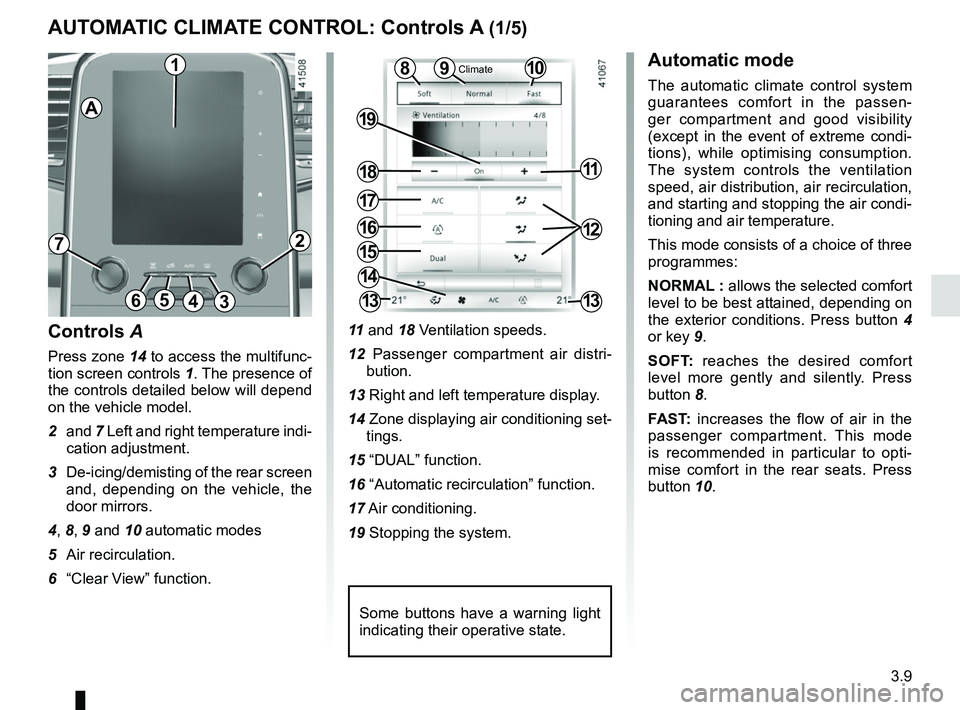
AUTOMATIC CLIMATE CONTROL: Controls A (1/5)
15
6543
9
1216
17
18
19
11
Controls A
Press zone 14 to access the multifunc-
tion screen controls 1. The presence of
the controls detailed below will depend
on the vehicle model.
2 and 7 Left and right temperature indi-
cation adjustment.
3 De-icing/demisting of the rear screen and, depending on the vehicle, the
door mirrors.
4, 8, 9 and 10 automatic modes
5 Air recirculation.
6 “Clear View” function. 11
and 18 Ventilation speeds.
12 Passenger compartment air distri- bution.
13 Right and left temperature display.
14 Zone displaying air conditioning set- tings.
15 “DUAL” function.
16 “Automatic recirculation” function.
17 Air conditioning.
19 Stopping the system.
Automatic mode
The automatic climate control system
guarantees comfort in the passen-
ger compartment and good visibility
(except in the event of extreme condi-
tions), while optimising consumption.
The system controls the ventilation
speed, air distribution, air recirculation,
and starting and stopping the air condi-
tioning and air temperature.
This mode consists of a choice of three
programmes:
NORMAL : allows the selected comfort
level to be best attained, depending on
the exterior conditions. Press button 4
or key 9.
SOFT: reaches the desired comfort
level more gently and silently. Press
button 8.
FAST: increases the flow of air in the
passenger compartment. This mode
is recommended in particular to opti-
mise comfort in the rear seats. Press
button 10.8
14
13
72
13
1
Some buttons have a warning light
indicating their operative state.
A
Climate
Page 226 of 364
3.10
Varying the ventilation speed
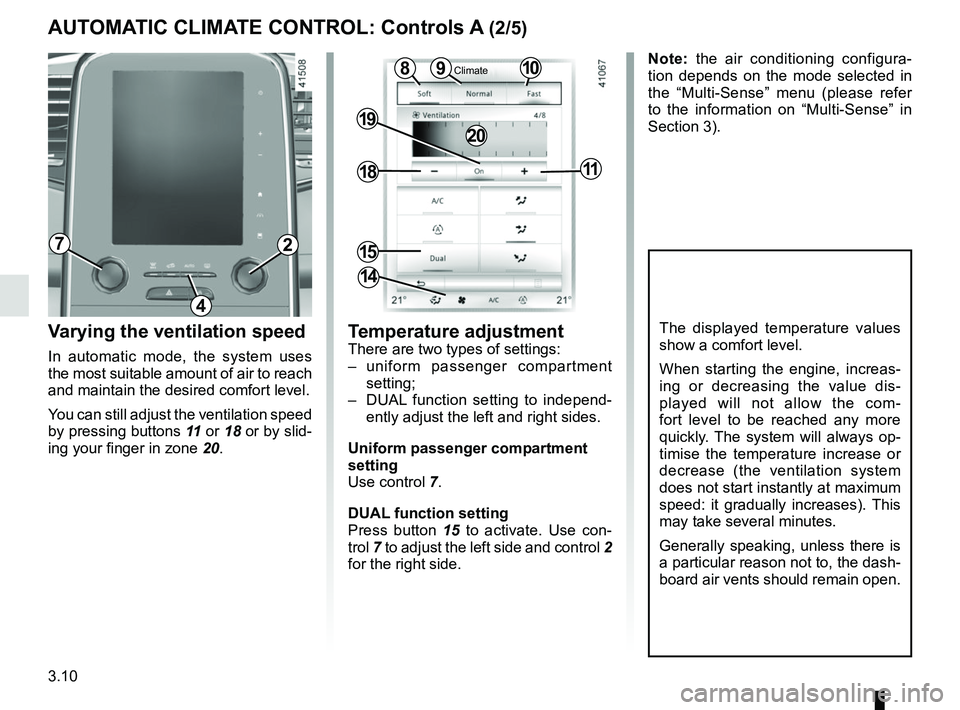
In automatic mode, the system uses
the most suitable amount of air to reach
and maintain the desired comfort level.
You can still adjust the ventilation speed
by pressing buttons 11 or 18 or by slid-
ing your finger in zone 20.
Temperature adjustmentThere are two types of settings:
– uniform passenger compartment
setting;
– DUAL function setting to independ- ently adjust the left and right sides.
Uniform passenger compartment
setting
Use control 7.
DUAL function setting
Press button 15 to activate. Use con-
trol 7 to adjust the left side and control 2
for the right side.
The displayed temperature values
show a comfort level.
When starting the engine, increas-
ing or decreasing the value dis-
played will not allow the com-
fort level to be reached any more
quickly. The system will always op-
timise the temperature increase or
decrease (the ventilation system
does not start instantly at maximum
speed: it gradually increases). This
may take several minutes.
Generally speaking, unless there is
a particular reason not to, the dash-
board air vents should remain open.
4
72
10
15
9
18
19
11
8
14
Note: the air conditioning configura-
tion depends on the mode selected in
the “Multi-Sense” menu (please refer
to the information on “Multi-Sense” in
Section 3).
20
AUTOMATIC CLIMATE CONTROL: Controls A (2/5)
Climate